
Tag: CMS

  • Test and Enable Gzip compression in Joomla?

    Test and Enable Gzip compression in Joomla?

    Is your Joomla website taking too long to load? Did you know that enabling Gzip compression can significantly reduce your page size and improve loading speed?

    In this step-by-step guide, we’ll explore:

    1. What Gzip compression is and why it matters.
    2. How to test if Gzip is enabled on your Joomla website.
    3. How to enable Gzip compression to boost performance and SEO.

    Let’s get started!

    What is Gzip Compression and Why Is It Important?

    Gzip compression is a method of reducing the size of files sent from your server to your visitors’ browsers. Smaller files mean faster loading times, which improves:

    • User Experience: Visitors love fast websites.
    • SEO Performance: Search engines prioritize faster-loading websites.
    • Bandwidth Usage: Save resources by reducing the amount of data transferred.

    The Impact of Gzip Compression

    Here’s what enabling Gzip can do for your website:

    • Reduce file sizes by up to 70%.
    • Boost your Google PageSpeed Insights score.
    • Decrease bounce rates caused by slow loading speeds.

    Step 1: Test If Gzip Compression is Already Enabled

    Before enabling Gzip compression, check if it’s already active on your Joomla website. Follow these steps:

    1. Use Online Tools

    Use free online tools like:

    • Check Gzip Compression: Enter your website URL and check if Gzip is enabled.
    • GTmetrix: Analyze your site performance and look for “Enable Compression” recommendations.

    2. Browser Developer Tools

    1. Open your website in Chrome.
    2. Right-click anywhere on the page and select Inspect.
    3. Go to the Network tab, refresh the page, and look at the Content-Encoding header. If it shows gzip, compression is enabled.

    Step 2: How to Enable Gzip Compression in Joomla
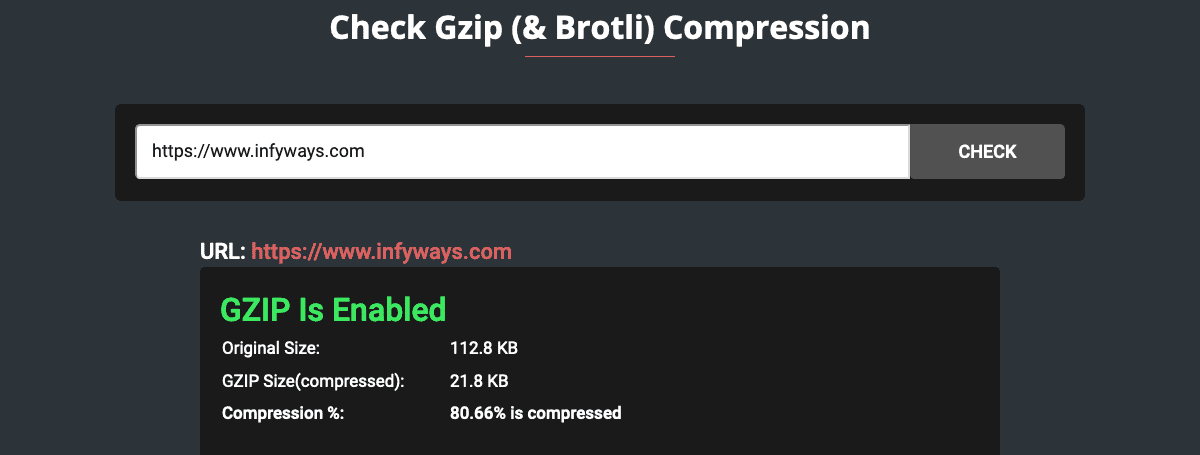
    Gzip Compression Test Joomla

    If Gzip is not already enabled, here’s how you can do it in Joomla:

    1. Enable Gzip in Joomla’s Global Configuration
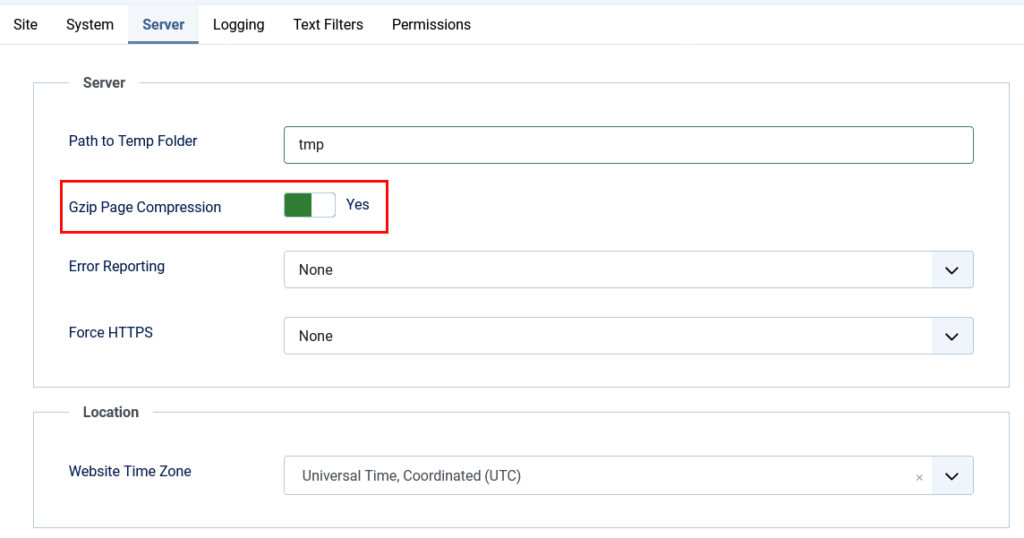
    enable gzip joomla
    1. Log in to your Joomla Admin Panel.
    2. Navigate to System > Global Configuration > Server.
    3. Set the Gzip Page Compression option to Yes.
    4. Click Save & Close.

    Pro Tip: After enabling, test your website again using the tools mentioned above to ensure Gzip is working.

    2. Enable Gzip via .htaccess File

    If the above method doesn’t work or you want more control:

    1. Access your server using an FTP client or file manager in your hosting panel.
    2. Open the .htaccess file located in your Joomla root directory.
    3. Add the following code to enable Gzip compression:
    <IfModule mod_deflate.c>
      AddOutputFilterByType DEFLATE text/html text/plain text/xml text/css
      AddOutputFilterByType DEFLATE application/javascript application/x-javascript
    </IfModule>

    4.Save the file and refresh your website.

      3. Contact Your Hosting Provider
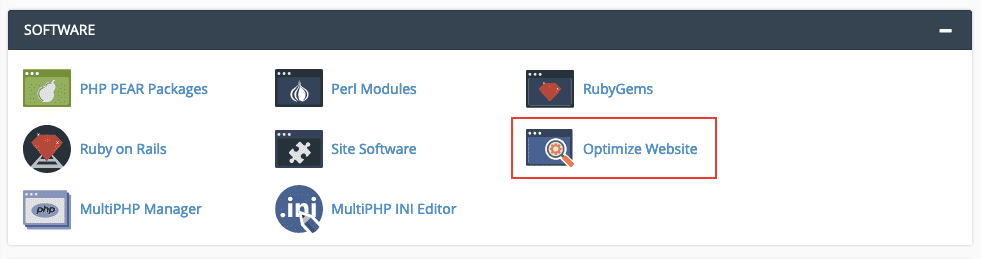
      Enable Gzip in cPanel

      Some servers may require Gzip to be enabled at the hosting level. If the above steps don’t work, reach out to your hosting provider and request Gzip compression activation.

      Step 3: Verify Gzip Compression

      After enabling Gzip, re-run the tests mentioned in Step 1 to confirm it’s active. A properly enabled Gzip setup will show significantly smaller file sizes in the test results.

      Benefits of Enabling Gzip Compression

      Still wondering if enabling Gzip is worth it? Here’s how it can transform your Joomla website:

      1. Faster Loading Speeds: Reduce page load times by compressing large files.
      2. Better SEO Performance: Meet Google’s page speed requirements to improve rankings.
      3. Enhanced User Experience: Delight users with a faster, smoother browsing experience.
      4. Lower Server Costs: Minimize bandwidth usage, reducing server expenses.

      Common Issues When Enabling Gzip (And How to Fix Them)

      1. Gzip Not Working After Enabling
        • Check if your server supports Gzip. You can verify this with your hosting provider.
      2. Site Breaks After Enabling Gzip
        • Ensure your .htaccess file syntax is correct. A misplaced character can cause server errors.
      3. Minimal Performance Improvement
        • Combine Gzip compression with other optimizations like caching, minification, and image optimization for maximum impact.

      Final Thoughts: Why Gzip is Essential for Joomla Websites

      Enabling Gzip compression is one of the simplest yet most effective ways to boost your website’s performance. Whether you’re running a small blog or a large e-commerce site, the benefits are clear:

      • Faster load times.
      • Better SEO rankings.
      • Happier users.

      Take the time to test and enable Gzip compression on your Joomla site today—it’s a small step that delivers massive results.

      Need Help?
      If you’re unsure about implementing Gzip compression or need expert assistance, contact us today. Our team of Joomla experts is here to help optimize your website’s performance.

    1. Magento Alternatives for eCommerce Websites

      Magento Alternatives for eCommerce Websites

      Magento is a popular eCommerce platform that is widely used by businesses of all sizes to sell their products and services online. However, with the rise of new eCommerce platforms and the changing needs of businesses, there are now several Magento alternatives available. In this blog post, we’ll take a look at some of the top alternatives to Magento for eCommerce websites.

      Shopify

      One of the main benefits of Shopify is that it is a fully hosted platform, meaning that you don’t need to worry about setting up and managing your own hosting environment. Shopify also offers a range of plans to suit businesses of all sizes, making it a great option for startups as well as established businesses.

      Shopify is one of the most popular eCommerce platforms and is a great alternative to Magento for businesses of all sizes. With Shopify, you can quickly set up an online store, customize your website design, and start selling products online. Shopify also offers a wide range of integrations with third-party apps and tools, making it easy to add new features to your store.

      WooCommerce

      WooCommerce is a popular eCommerce plugin for WordPress that allows you to turn your WordPress website into a fully functional online store. With WooCommerce, you can easily add products, set up payment gateways, and customize your store’s design.

      One of the main benefits of WooCommerce is that it is open source and highly customizable. This means that you have complete control over your online store and can modify it as needed to meet the specific needs of your business. WooCommerce also offers a range of extensions and plugins to add new features to your store.

      BigCommerce

      BigCommerce is a powerful eCommerce platform that is a great alternative to Magento. With BigCommerce, you can quickly set up an online store, customize your website design, and start selling products online. BigCommerce also offers a range of built-in marketing tools, making it easy to promote your store and drive traffic to your website.

      One of the main benefits of BigCommerce is that it is a fully hosted platform, meaning that you don’t need to worry about setting up and managing your own hosting environment. BigCommerce also offers a range of plans to suit businesses of all sizes, making it a great option for startups as well as established businesses.

      PrestaShop

      PrestaShop is a popular open-source eCommerce platform that is a great alternative to Magento. With PrestaShop, you can quickly set up an online store, customize your website design, and start selling products online. PrestaShop also offers a range of built-in marketing tools, making it easy to promote your store and drive traffic to your website.

      One of the main benefits of PrestaShop is that it is open source and highly customizable. This means that you have complete control over your online store and can modify it as needed to meet the specific needs of your business. PrestaShop also offers a range of modules and plugins to add new features to your store.

      OpenCart

      OpenCart is a lightweight and easy-to-use eCommerce platform that is a great alternative to Magento. With OpenCart, you can quickly set up an online store, customize your website design, and start selling products online. OpenCart also offers a range of built-in marketing tools, making it easy to promote your store and drive traffic to your website.

      One of the main benefits of OpenCart is that it is lightweight and fast, meaning that it can handle large amounts of traffic without slowing down your website. OpenCart also offers a range of extensions and plugins to add new features to your store.

      Conclusion

      Choosing the right eCommerce platform is crucial for the success of your online store. While Magento is a powerful platform, there are now several alternatives available that offer similar or better features and functionalities. Shopify, WooCommerce, BigCommerce, PrestaShop, and Open