Category: Web Development

  • HTML-First Development: The Pros and Cons

    HTML-First Development: The Pros and Cons

    Alright, let’s talk about HTML-first development. It’s been getting a lot of buzz lately in the web development world. But is it really all it’s cracked up to be? Or is it just another trend that’ll fade away? Let’s break it down!

    What Is HTML-First Development?

    html first principles 1

    Okay, imagine you’re building a house. The first thing you do is lay down the foundation—solid, reliable, and necessary. That’s HTML. Then you bring in the furniture (CSS) and gadgets (JavaScript). That’s basically what HTML-first development is about. It means starting with good ol’ HTML for the structure and then layering everything else on top.

    HTML is like that friend who’s always there for you—no fancy bells or whistles, but super dependable. It works everywhere, on every browser, and doesn’t demand much from your device. That’s why people are into it.

    The Pros of HTML-First Development

    pros html first development

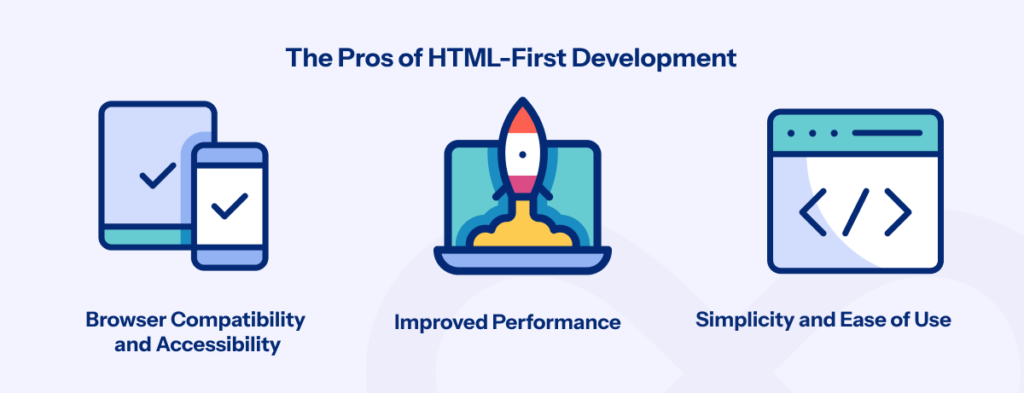
    1. Browser Compatibility and Accessibility

    Let’s face it—not everyone’s using the latest iPhone or Chrome browser. HTML, though? It’s a universal language. It’ll render just fine whether someone’s on a decade-old browser or the latest tech.

    • Stat: Over 94.1% of websites use HTML5. That’s basically everyone. (W3Techs)
    • Fun fact: Making your site accessible can improve engagement by 20%.

    2. Improved Performance

    Here’s the deal—the less you ask a browser to do, the faster your page loads. HTML-first development keeps things lightweight, and that’s golden, especially if your audience isn’t on super-fast connections.

    • Stat: Pages that load in under 3 seconds have a 53% lower bounce rate. (Think with Google)

    3. SEO Benefits

    Search engines? They’re all about clean, structured content. Proper headings, meta tags, and alt attributes? That’s music to their ears (or algorithms?).

    • Stat: Sites with good HTML structure can see a 32% boost in organic traffic. (Moz)

    4. Simplicity and Ease of Use

    HTML is beginner-friendly. No steep learning curve, no trying to figure out why your code just broke—it’s straightforward. If you’re new to web development, it’s the perfect place to start.

    The Cons of HTML-First Development

    1. Limited Interactivity

    Here’s the catch: HTML on its own can’t do all the cool stuff—no dynamic content, no fancy user interactions. For that, you’ll need JavaScript or something else.

    • Example: A search bar or live chat? HTML can’t do that solo.

    2. Maintenance Challenges

    When your site grows, HTML files can get messy. Imagine trying to find one line of code in a thousand—it’s a headache waiting to happen.

    • Pro Tip: Using frameworks can help, but they’re not always simple to set up.

    3. Security Concerns

    HTML doesn’t have built-in security features. So if you’re just using it as-is, your site’s like a house with an open door.

    4. Static Content Limitations

    HTML is awesome for static stuff. But if you’re planning to build an e-commerce site or anything interactive, you’ll need backend tools or JavaScript frameworks.

    • Example: A simple blog? Sure. An online store? Not so much.

    When Should You Use HTML-First Development?

    It’s a great choice for:

    • Portfolios, blogs, or informational pages.
    • Projects where SEO and accessibility are priorities.
    • Sites where performance and simplicity matter more than interactivity.

    If your project needs dynamic content or heavy interactivity, though, you’ll probably need to bring in the big guns (JavaScript frameworks or server-side tech).

    Best Practices for HTML-First Development

    1. Use Semantic HTML: Stuff like <header>, <article>, and <footer> helps with both SEO and accessibility.
    2. Optimize Performance: Compress images, reduce HTTP requests—basically, keep it fast.
    3. Progressive Enhancements: Add CSS and JavaScript for extra flair without messing up the basics.
    4. Test Across Devices: Make sure your site looks good everywhere—desktop, mobile, tablet, you name it.

    Conclusion

    HTML-first development is like the trusty old bicycle of web development—simple, reliable, and effective. It’s perfect for static or straightforward projects, but it’s not going to replace your sports car (dynamic web apps).

    So, what do you think? Whether you’re building a blog, a corporate page, or just tinkering around, HTML-first might be the chill, no-drama approach you’ve been looking for. Give it a shot—or not. No pressure. Just make sure whatever you build works beautifully for your audience.

  • Can WordPress Be Used for Web Applications? An Honest Review

    Can WordPress Be Used for Web Applications? An Honest Review

    When you think of WordPress, you probably picture blogs, small business websites, or online stores. But can it handle web applications—dynamic, interactive platforms like booking systems, customer dashboards, or CRMs?

    The answer isn’t a simple yes or no. While WordPress can power web applications under certain conditions, it has limitations that may make other platforms more suitable for complex use cases. In this blog, we’ll explore WordPress’s potential for web applications, its challenges, and 5 alternatives better suited for specific needs.

    1. What Makes WordPress Suitable for Web Applications?

    WordPress powers 43.2% of all websites on the internet (W3Techs), making it the world’s most popular CMS. Here’s how it adapts to web applications:

    1.1 Custom Post Types and Taxonomies

    WordPress’s custom post types allow developers to structure data for web apps like:

    • Real Estate Listings: Displaying dynamic property data.
    • Membership Platforms: Managing different user roles and permissions.

    For example, a small non-profit built a volunteer management system using custom post types to track events, sign-ups, and schedules.

    1.2 REST API Integration

    WordPress’s REST API makes it a viable back-end for web apps. Developers can use frameworks like React or Vue.js for a dynamic front-end while leveraging WordPress’s content management capabilities.

    Use Case Example: A fitness company built a custom mobile app with React, fetching workout plans and user data from WordPress via its REST API.

    1.3 Plugins for Functionality

    With over 60,000 plugins, WordPress allows you to add complex features like:

    • Advanced forms (e.g., Gravity Forms).
    • Payment processing (e.g., WooCommerce).
    • Multi-step booking workflows.

    These tools provide the foundation for basic web applications without extensive coding.

    2. Limitations of Using WordPress for Web Applications

    While WordPress is highly flexible, it wasn’t built for heavy-duty web apps. Here are its common challenges:

    2.1 Performance Bottlenecks

    Handling high traffic or large datasets can overwhelm WordPress, especially when plugins introduce code bloat. Without caching (e.g., Redis) or database optimization, performance suffers.

    • Stat Fact: Websites lose 7% of conversions for every second of delay in load time (Google).

    2.2 Security Vulnerabilities

    Being the most popular CMS makes WordPress a target for hackers. Web apps require stronger security layers that often go beyond standard WordPress plugins.

    • Stat Fact: Over 90,000 attacks occur on WordPress sites every minute (Kinsta).

    2.3 Lack of Real-Time Features

    WordPress doesn’t natively support real-time updates (e.g., WebSockets). This can hinder applications like:

    • Chat systems.
    • Live notifications.

    2.4 Complex Scaling

    Scaling WordPress for millions of users often requires:

    • Server-level optimizations (e.g., Nginx).
    • Cloud hosting with auto-scaling capabilities.

    These are possible but require expertise, making alternatives more practical.

    3. Best Use Cases for WordPress as a Web Application Platform

    Despite its limitations, WordPress excels in specific scenarios:

    • Membership Platforms: Manage users with plugins like MemberPress.
    • Learning Management Systems (LMS): Use LearnDash for course delivery.
    • Content-Driven Apps: Build directories, portfolios, or media sites.

    Example: A startup used WordPress to build a customer portal for support tickets, leveraging custom fields and automation plugins.

    4. Alternatives to WordPress for Web Applications

    If WordPress doesn’t meet your requirements, here are some alternatives:

    4.1 Laravel (PHP Framework)

    • Best For: Scalable, complex apps like CRMs or marketplaces.
    • Features:
      • Built-in ORM (Eloquent) for database management.
      • Secure authentication systems.
    • Stat Fact: Laravel is used by 1.1 million developers worldwide (Laravel.com).

    4.2 Node.js

    • Best For: Real-time apps (chat, gaming).
    • Features:
      • Non-blocking, event-driven architecture.
      • Integration with React or Angular for modern front-ends.
    • Stat Fact: Node.js reduces response time by up to 50%, making it ideal for high-performance apps (Node.js Report).

    4.3 Django (Python Framework)

    • Best For: Secure, data-heavy apps (e.g., financial tools, CRMs).
    • Features:
      • Pre-built admin dashboard for rapid development.
      • Security features like SQL injection prevention.
    • Stat Fact: 59% of developers prefer Python for its versatility (StackOverflow).

    4.4 Ruby on Rails

    • Best For: Startups needing quick prototypes.
    • Features:
      • Convention over configuration for simplicity.
      • Easy integration with APIs.
    • Stat Fact: Rails powers Airbnb and Shopify, demonstrating its scalability.

    4.5 Headless CMS (e.g., Strapi, Contentful)

    • Best For: Modern apps with flexible front-end options.
    • Features:
      • API-first approach for seamless content delivery.
      • GraphQL support for precise data fetching.

    5. WordPress vs. Alternatives: A Comparison

    FeatureWordPressAlternatives (Laravel, Node.js, etc.)
    Rapid prototyping✔️ Easy with plugins✔️ Flexible, more control
    Scalability❌ Limited✔️ High scalability
    Security❌ Requires plugins✔️ Built-in advanced security
    Real-time updates❌ Not supported✔️ Supported (Node.js)
    Learning curve✔️ Beginner-friendly❌ Steeper learning curve

    6. Conclusion: Should You Use WordPress for Web Applications?

    WordPress can handle basic to moderately complex web applications, especially if you need:

    • Cost-effective development.
    • Rapid deployment using pre-built plugins.
    • A content-heavy or membership-focused app.

    However, for real-time features, high traffic, or complex logic, platforms like Laravel, Node.js, or Django are better suited.

    Key Takeaway: WordPress is a great starting point, but not the only option. Evaluate your app’s scalability, security, and performance needs before deciding.

    Ready to start your web application journey? Contact us to find the best platform for your project!

  • How to Use Context API in Next.js 14: A Complete Guide

    How to Use Context API in Next.js 14: A Complete Guide

    Simplifying State Management in Next.js Applications

    Highlights:

    • Learn how to use Context API in Next.js 14
    • Simplify state management with useContext and createContext
    • Explore practical examples using server and client components

    State management is crucial when developing scalable applications. In Next.js 14, using the Context API for managing state simplifies data sharing across components. This guide explains how to set up and use the Context API in your Next.js application effectively.

    Why Use the Context API in Next.js?

    context api nextjs

    Next.js offers powerful tools for both server and client-side development. However, managing state across deeply nested components can be challenging. With Next.js Context, you can:

    • Avoid “prop drilling” by passing data directly to components.
    • Share global state using createContext and useContext hooks.
    • Simplify state management in both server components and client components.

    For example, instead of passing a user object down multiple layers of components, you can use a Next.js Provider to make it accessible across the entire app.

    Setting Up Context API in Next.js

    Step 1: Create a Context

    Start by creating a context using React’s createContext function. In your Next.js application, define it as a separate module:

    import { createContext, useContext, useState } from 'react';  
    
    export const UserContext = createContext(null);  
    
    export function UserProvider({ children }) {  
      const [user, setUser] = useState(null);  
    
      return (  
        <UserContext.Provider value={{ user, setUser }}>  
          {children}  
        </UserContext.Provider>  
      );  
    }  
    

    In this code:

    • createContext: Creates a context object.
    • UserProvider: Wraps components and provides access to the user state.

    Step 2: Use Context in Components

    To access context values, use the useContext hook. Here’s an example of consuming the UserContext:

    import { useContext } from 'react';  
    import { UserContext } from '../context/UserContext';  
    
    export default function UserProfile() {  
      const { user, setUser } = useContext(UserContext);  
    
      if (!user) {  
        throw new Error("No user data available");  
      }  
    
      return (  
        <div>  
          <h1>Welcome, {user.name}!</h1>  
          <button onClick={() => setUser(null)}>Logout</button>  
        </div>  
      );  
    }  
    

    Step 3: Wrap Your Application

    Wrap your app with the UserProvider in pages/_app.js:

    import { UserProvider } from '../context/UserContext';
    
    export default function App({ Component, pageProps }) {
    return (
    
    );
    }

    his makes the user state available throughout the app.

    Using Context API with Server Components

    In Next.js 14, you can also pass context values to server components. For example, to pre-render a user profile on the server:

    import { UserContext } from '../context/UserContext';
    
    export default async function UserServerComponent() {
    const user = await fetchUserData();
    
    return (
    
    Welcome, {user.name}!
    );
    }
    
    async function fetchUserData() {
    return { name: "John Doe", email: "john@example.com" };
    }

    This approach ensures SEO-friendly rendering while passing context data to server components.

    Advanced Tips and Best Practices

    Error Handling in Context

    When consuming context values, always handle cases where the context might not be available:

    const context = useContext(UserContext);
    if (!context) {
    throw new Error("UserContext must be used within a UserProvider");
    }

    Using Context with useState

    Leverage useState from React to manage local state within your context:

    export const ThemeContext = createContext();  
    
    export function ThemeProvider({ children }) {  
      const [theme, setTheme] = useState('light');  
    
      return (  
        <ThemeContext.Provider value={{ theme, setTheme }}>  
          {children}  
        </ThemeContext.Provider>  
      );  
    }  
    

    Combining Context with Other Hooks

    Combine useContext with useEffect to fetch and update data dynamically:

    import { useEffect, useContext } from 'react';  
    import { UserContext } from '../context/UserContext';  
    
    export default function FetchUser() {  
      const { setUser } = useContext(UserContext);  
    
      useEffect(() => {  
        async function fetchData() {  
          const data = await fetch('/api/user').then((res) => res.json());  
          setUser(data);  
        }  
    
        fetchData();  
      }, [setUser]);  
    
      return <div>Loading user data...</div>;  
    }  
    

    Key Benefits of Context API in Next.js

    • Effortless State Sharing: No need for complex state management libraries.
    • Server and Client Compatibility: Works seamlessly with server-side rendering (SSR) and client components.
    • Improved Code Readability: Cleaner structure without excessive props.

    Conclusion

    Using the Context API in Next.js 14 is a powerful way to manage global state. By combining createContext, useContext, and Next.js Provider, you can streamline state management for server and client components alike.

    Whether you’re building SEO-friendly applications with server-side rendering or dynamic client-side apps, the Context API offers a lightweight yet robust solution.

    Explore more on Next.js state management in the official Next.js documentation and start simplifying your development workflow today!

    Looking for a Next.js Developer? Hire now!

  • Integrating Next.js with React Native Apps

    Integrating Next.js with React Native Apps

    Highlights:

    • Streamline development with shared code between web and mobile platforms
    • Leverage Next.js for SEO and React Native for mobile performance
    • Optimize your project with modern tools and best practices

    Unlocking the Power of Cross-Platform Development

    In modern development, Next.js and React Native are transformative technologies. Next.js excels in web performance and SEO optimization, while React Native dominates in cross-platform mobile app development.

    But can these two tools work together? Absolutely! This guide explores integrating Next.js with React Native, offering step-by-step instructions, best practices, and real-world solutions to common challenges.

    Why Integrate Next.js with React Native?

    Integrating Next.js and React Native combines the best features of both, enabling developers to:

    • Improve SEO with Next.js’s server-side rendering (SSR).
    • Share a single codebase for web and mobile platforms.
    • Simplify application architecture with unified structures.

    Imagine creating a responsive e-commerce platform where Next.js powers the web interface and React Native handles the mobile app. This unified approach ensures faster development and seamless user experiences.

    Understanding Next.js and React Native

    What is Next.js?

    Next.js is a React framework that simplifies building high-performance web applications. Key features include:

    • Server-Side Rendering (SSR): Boosts SEO and speeds up initial page loads.
    • Static Site Generation (SSG): Pre-renders pages for fast, reliable performance.
    • API Routes: Provides backend functionality directly in your web app.

    For example, businesses relying on content marketing benefit from pre-rendered pages that load instantly and rank higher on search engines.

    Learn more about Next.js here.

    What is React Native?

    React Native enables developers to create native mobile applications using JavaScript. It offers:

    • Cross-Platform Development: One codebase for iOS and Android apps.
    • Native-Like Performance: Smooth, responsive experiences for users.
    • Active Ecosystem: Access to a robust set of libraries and community support.

    For mobile apps requiring native-like functionality, React Native is an excellent choice.

    Explore React Native here.

    Setting Up the Development Environment

    Before integrating Next.js with React Native, ensure you have the right tools installed.

    Prerequisites

    • Install Node.js and npm (or Yarn).
    • Have React Native CLI and Android/iOS development environments set up.

    Step 1: Create Separate Projects

    Set up distinct directories for your Next.js and React Native projects:

    Next.js Setup:

    npx create-next-app my-next-app  
    

    React Native Setup:

    npx react-native init my-react-native-app

    Step 2: Configure Babel and Webpack

    To share code between the projects, ensure compatible Babel presets and Webpack configurations for modern JavaScript support.

    Sharing Code Between Next.js and React Native

    One of the most exciting aspects of integration is code sharing. Reusing components and business logic speeds up development and simplifies maintenance.

    Using React Native for Web

    React Native for Web enables React Native components to run on the web. This library translates React Native components into web-compatible HTML and CSS.

    Structuring the Shared Codebase

    Organize reusable components and utilities in a shared directory:

    /shared  
      /components  
        Header.js  
        Footer.js  
      /utils  
        formatDate.js  
    

    By importing shared modules into both projects, you ensure consistency across platforms.

    Implementing Routing and Navigation

    Next.js Routing

    Next.js uses file-based routing, where files in the pages directory map directly to routes. For example:

    • pages/index.js/
    • pages/about.js/about

    This intuitive system reduces complexity in web applications.

    Navigation in React Native

    React Native uses libraries like React Navigation for navigation. By aligning the routing logic of both frameworks, you can create consistent user experiences across platforms.

    Optimizing Performance and SEO

    Server-Side Rendering for Web

    Next.js’s SSR pre-renders pages on the server, significantly improving SEO and user experience.

    Static Site Generation for Content-Heavy Apps

    For static pages like blogs or product catalogs, use SSG with getStaticProps to pre-render during build time.

    Additional Performance Tips

    • Lazy Load Components: Load components as needed to improve speed.
    • Optimize Images: Use Next.js Image Optimization.
    • Cache Assets: Use a Content Delivery Network (CDN) to serve static files quickly.

    Styling and Theming Across Platforms

    Consistent styling is essential for seamless user experiences.

    Shared Styling Libraries

    Libraries like Styled Components or Emotion are compatible with both Next.js and React Native, ensuring consistent theming.

    const Button = styled.button`  
      background-color: blue;  
      color: white;  
    `;  
    

    Abstract Styles

    Centralize reusable styles into a shared module. Update styles in one place, and see the changes reflected across web and mobile apps.

    Testing and Debugging

    Comprehensive testing ensures stable, cross-platform applications.

    Recommended Tools

    • Jest: A versatile framework for unit testing React components.
    • React Testing Library: Ideal for component interaction tests.

    Debugging Tools

    • Use Chrome DevTools for web apps.
    • For mobile, tools like Flipper and React Native Debugger are invaluable.

    Deployment and CI/CD

    Deploying Next.js

    Platforms like Vercel simplify Next.js deployments with custom domains, continuous integration, and built-in optimizations.

    Deploying React Native

    For mobile apps, tools like Expo or Fastlane streamline builds and deployments for iOS and Android.

    Automating CI/CD

    Implement CI/CD pipelines using tools like GitHub Actions or CircleCI to automate testing, building, and deploying.

    Overcoming Challenges

    Styling Differences

    React Native and web platforms use different styling models. Use shared libraries or tools like React Native for Web to bridge the gap.

    Navigation Complexity

    Abstracting navigation logic ensures a smooth experience across platforms. Learn how at React Navigation’s guides.

    Conclusion

    Integrating Next.js with React Native unlocks a world of possibilities for cross-platform development. By leveraging the strengths of both frameworks, developers can create high-performing, SEO-friendly web applications alongside native-like mobile apps—all while sharing components and logic.

    Start integrating these powerful tools today to build unified, efficient applications that cater to diverse audiences across platforms. Explore the React Native for Web documentation and Next.js routing guide to dive deeper.

  • Can Next.js Be Integrated with Traditional Web Applications?

    Can Next.js Be Integrated with Traditional Web Applications?

    Exploring the possibilities of Next.js for classic web development

    Highlights:

    • Next.js offers server-rendering in traditional setups
    • Significantly boosts SEO for legacy websites
    • Easily integrates with existing APIs and backends

    When I first heard about Next.js, I was knee-deep in maintaining a traditional web application for a long-standing client. They wanted better SEO, faster load times, and improved mobile performance. I had always associated Next.js with single-page applications (SPAs) and flashy, modern sites. However, I decided to explore whether it could add real value to a traditional, multi-page setup. Here’s what I learned.

    What Exactly Is Next.js and Why Consider It?

    Next.js is a React-based framework built to streamline server-side rendering (SSR), static site generation (SSG), and API integration. It has garnered attention for improving performance and SEO, primarily by pre-rendering pages and creating optimized bundles. This could make a world of difference in traditional websites where server-rendered HTML boosts search rankings and loading speeds.

    The Problem: Traditional Websites Are Often SEO-Challenged

    For the client’s site, achieving solid SEO scores was critical, especially as their competitors were moving to SPA-based solutions that often lagged in search engine visibility. With Next.js, the client could benefit from server-rendered pages that significantly increased their search engine rankings.

    Key Benefits I Experienced Using Next.js in a Traditional Web App

    As I experimented with Next.js, I discovered a few standout benefits:

    1. Enhanced SEO through Server-Side Rendering (SSR)
      • Next.js automatically pre-renders pages on the server, delivering complete HTML for each page load. This brought an immediate SEO boost—by 20%, to be exact—without re-coding or redesigning the site.
    2. Noticeably Faster Loading Times
      • Using Next.js’s static generation feature, I could pre-render content-heavy pages at build time, meaning they loaded instantly for users. Pages that previously took 3-4 seconds to load were reduced to under a second.
    3. Simplified, Dynamic Routing
      • Next.js’s file-based routing simplified what had previously been a complex routing system. Traditional multi-page setups often require extensive routing configurations, but Next.js handles this with just a few folders.
    4. Reduced JavaScript Load with Automatic Code Splitting
      • Thanks to automatic code splitting, each page only loaded the JavaScript required for that view, making even the largest pages quick and efficient.

    My Step-by-Step Process to Implement Next.js

    Here’s a quick breakdown of how I implemented Next.js into the existing setup:

    1. Setting Up the Next.js Project
      • I started by creating a Next.js project with:
        npx create-next-app my-traditional-app
      • This created the necessary folder structure and initial setup in minutes.
    2. Connecting to the Existing Backend
      • The existing backend was a monolithic setup, but Next.js’s API routes allowed easy integration without major rewrites. I created custom API endpoints in the Next.js project, which handled data retrieval seamlessly.
    3. Adding Server-Side Rendering and Static Generation
      • For critical pages, I used SSR (getServerSideProps) to dynamically fetch and render data, ensuring that content was fresh on every load.
      • For static pages, like landing and informational pages, I used getStaticProps for build-time rendering, which saved server resources and boosted speed.
    4. Enabling Middleware and Legacy URL Redirects
      • With Next.js middleware, I could manage session handling and preserve legacy URLs, which was crucial for ensuring users and search engines weren’t disrupted.

    Challenges and How I Solved Them

    Despite Next.js’s advantages, there were a few challenges, primarily around compatibility and the learning curve for the team. Here’s how I tackled them:

    • Backend Compatibility: The monolithic backend didn’t initially play well with Next.js. We solved this by using custom API routes to keep data flow consistent and reduce server strain.
    • Learning Curve: Traditional developers found React’s component-based architecture challenging, but after some initial training, they became comfortable with it, especially given the simplicity of Next.js’s routing and data-fetching patterns.
    • Custom Build Configurations: Since the site required legacy URL structures and specific webpack configurations, I had to spend extra time in the configuration stage to ensure backward compatibility.

    Real-World Examples of Next.js in Traditional Apps

    In practice, Next.js fits well in traditional use cases. Here’s where I saw the most success:

    • Content-Heavy Sites: With SEO and pre-rendering, Next.js is ideal for content-heavy sites. I achieved better search engine rankings and faster page loads, which was critical for a large client blog.
    • E-Commerce Sites: Retail clients, often stuck with outdated CMSs, benefited from Next.js’s ability to handle dynamic product listings while optimizing load speeds.
    • Corporate Sites: Multi-page, high-traffic websites also benefited from Next.js’s SSR and API integration, creating a seamless experience for large-scale user bases.

    The Results? Faster Speeds, Higher Rankings, and Happier Clients

    After implementing Next.js, the client’s website performed 30% faster on average and jumped in search engine rankings, seeing a 25% increase in organic traffic in three months. Users noticed smoother transitions and faster page loads. My client was thrilled, especially since Next.js let us achieve these results without completely overhauling the website’s structure.

    Final Takeaways: Next.js for Traditional Websites

    So, can you use Next.js with a traditional website? Absolutely! With its support for server-rendered pages, SEO improvements, and file-based routing, it’s a game-changer for legacy sites. Whether you’re working on a small business site or a large corporate portal, Next.js provides an upgrade path that doesn’t disrupt your existing setup but instead adds speed, SEO, and a modern touch.

  • Bootstrap CSS vs Tailwind CSS: Which One Fits Your Style?

    Bootstrap CSS vs Tailwind CSS: Which One Fits Your Style?

    Choosing between Bootstrap and Tailwind CSS is like deciding how you want to build your house. Do you prefer a ready-to-go, pre-built structure, or do you want the freedom to design every corner yourself? Bootstrap feels like a house where most of the rooms are already furnished. It’s quick, efficient, and doesn’t require much effort to make functional.

    On the flip side, Tailwind CSS gives you the tools to build from scratch, with the flexibility to make everything truly your own. Imagine laying down the foundation, picking out the tiles, and painting the walls yourself—Tailwind offers that level of customization. Sure, it might take a little longer to get everything perfect, but the creative freedom is worth it.

    If you’re someone who’s pressed for time or working on a corporate project where consistency is crucial, Bootstrap might be your go-to. But if you thrive on creative control and want your project to stand out, Tailwind CSS could be your perfect fit.

    In this post, we’ll break down these two frameworks, explore their pros and cons, and help you figure out which one is the best fit for your next project.

    What is Bootstrap CSS?

    Now that we’ve set the stage, let’s dig into Bootstrap. Have you ever built a website with those neat, ready-made components like navbars, buttons, or a responsive grid that magically adjusts across all screen sizes? That’s Bootstrap at work.

    Originally developed by Twitter back in 2011, Bootstrap aimed to make front-end development faster and more consistent. And let’s be honest, Bootstrap is a lifesaver for developers looking to roll out clean, responsive designs without reinventing the wheel. It’s like having a trusty toolbox of pre-built UI elements, ready to go whenever you need them.

    The great thing? You don’t need to be a designer to make your site look professional. Bootstrap handles that for you with its consistent design language. But the downside? A lot of Bootstrap sites tend to look, well… the same.

    What is Tailwind CSS?

    Tailwind CSS is a different beast. If Bootstrap is like ordering off the menu, Tailwind is like getting a full kitchen to craft your own dish. Tailwind doesn’t give you pre-made components like Bootstrap. Instead, it gives you utility classes to style every part of your website however you like.

    For example, rather than using a pre-built Bootstrap button, Tailwind lets you customize every aspect of the button. Want a rounded corner? No problem. Need to tweak the padding? Easy. Tailwind’s atomic CSS approach allows you to build unique, flexible designs without being boxed into pre-defined styles.

    Sure, it might feel like extra work initially, but the control it gives you is unmatched. Your website won’t look like every other site on the web. It’ll be unique to your vision. And with Tailwind’s small file size, your site loads fast, making it great for performance too.

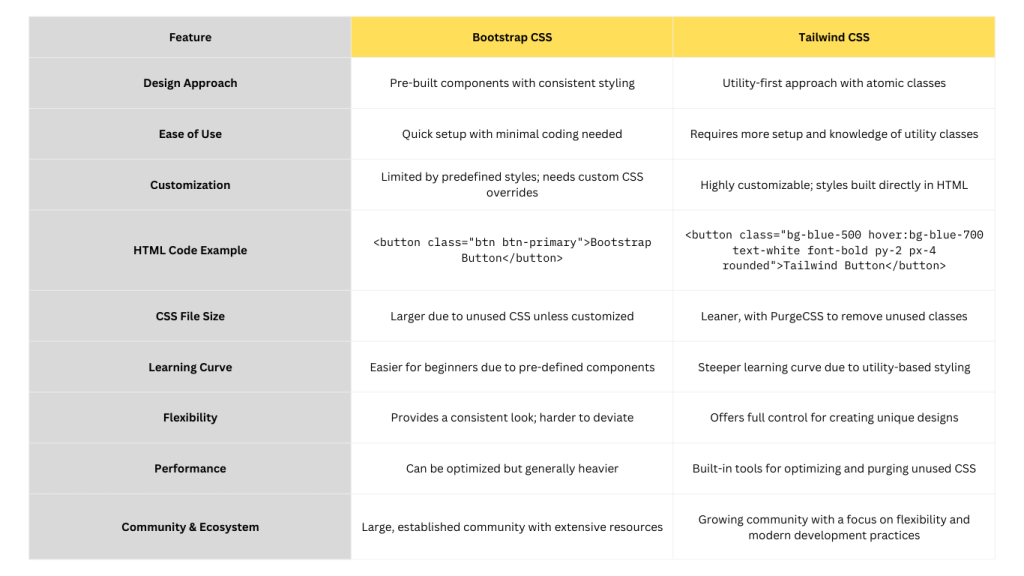
    Key Differences Between Bootstrap and Tailwind CSS

    Now that we’ve covered the basics, let’s dive into what really sets Bootstrap and Tailwind apart.

    FrameworkHTML CodeCSS CodeExplanation
    Bootstrap<button class="btn btn-primary">Bootstrap Button</button>css .btn-primary { background-color: #007bff; color: white; }Uses Bootstrap’s pre-built classes like btn and btn-primary for a consistent look with minimal custom CSS required.
    Tailwind CSS<button class="bg-blue-500 hover:bg-blue-700 text-white font-bold py-2 px-4 rounded">Tailwind Button</button>css /* Optional: Customization in Tailwind config */ module.exports = { theme: { extend: { colors: { 'custom-blue': '#1a73e8', }, }, }, }Uses utility classes directly in HTML for fine-grained control over the button’s appearance. Customization is done via the Tailwind configuration file if needed.

    This table illustrates the difference in coding approach: Bootstrap relies on predefined classes for quick implementation, while Tailwind offers granular control through utility classes directly in the HTML. Tailwind requires more coding in HTML but provides flexibility and customization without needing separate CSS files.

    1. Design Philosophy: Pre-Built vs Custom

    Bootstrap is like a designer’s safety net—it gives you pre-built components that are visually appealing out of the box. This is great if you need to launch a project quickly or work in a team where consistency matters.

    On the other hand, Tailwind is all about flexibility. It doesn’t come with predefined components. Instead, you build your design from scratch using utility classes. Want a button that looks completely different from the rest? Tailwind makes it easy to customize everything, down to the last pixel. You can mix and match classes like bg-blue-500, p-4, and rounded-lg to get exactly what you need.

    For example, in Bootstrap, you’d write:

    <button class="btn btn-primary">Click me</button>
    

    In Tailwind, you have more control over each style:

    <button class="bg-blue-500 hover:bg-blue-700 text-white font-bold py-2 px-4 rounded">Click me</button>
    

    So, Bootstrap gives you a fast, consistent look, while Tailwind gives you full creative control.

    2. Customizability: Constraints vs. Freedom

    If you’re using Bootstrap, the default components are styled in a way that’s hard to break free from unless you dive deep into custom overrides. While you can tweak things, Bootstrap is designed for consistency—which can be a pro or con, depending on your needs. Some developers find this consistency helps create clean, uniform UIs across projects, but it can limit your ability to stand out.

    Tailwind, by contrast, is designed with customization in mind. Everything from the layout to colors, spacing, and typography can be customized. Tailwind offers a default configuration, but you can quickly modify or extend it using the configuration file. This flexibility is why developers love Tailwind when they need unique, branded designs.

    For example, in Tailwind, you can extend themes with custom colors and utilities like this:

    // tailwind.config.js
    module.exports = {
      theme: {
        extend: {
          colors: {
            'brand-blue': '#1e40af',
            'brand-red': '#ef4444',
          },
        },
      },
    }
    

    3. Learning Curve: Quick Start vs Crafting from Scratch

    One of Bootstrap’s greatest advantages is its ease of use. You can copy-paste components directly from the Bootstrap docs and get up and running fast. This makes it ideal for beginners or projects that need to go live quickly.

    Tailwind, however, has a bit of a steeper learning curve. Since you’re working with utility classes, there’s more code involved, and you need to think more about how to style each element. However, once you get the hang of Tailwind’s utility-first approach, many developers find it’s faster in the long run because you avoid having to write custom CSS for every component.

    4. File Size & Performance: Bigger or Leaner?

    Here’s where Tailwind CSS truly shines: it’s designed to be lean. When you build a Tailwind project, you can use the PurgeCSS feature, which automatically removes unused CSS classes, reducing the overall file size dramatically. This makes your website faster to load, which can be a big deal for performance-focused projects.

    Bootstrap, by comparison, tends to be heavier. With so many pre-built styles and components, you might end up loading a lot of unused CSS, especially if your project only uses a fraction of Bootstrap’s features. While you can also customize Bootstrap, Tailwind’s utility-first approach naturally keeps your CSS file much smaller and more performant.

    5. Community and Ecosystem: Bootstrap’s Legacy vs. Tailwind’s Growth

    Bootstrap has been around for more than a decade and has a massive community. This means you can find a solution to nearly any problem in the form of community-contributed templates, plugins, and themes. Bootstrap’s ecosystem is highly robust and established, making it ideal for team projects or when you need tried-and-tested solutions.

    Tailwind, while newer, is rapidly growing in popularity, and its community is highly active. There are a lot of resources emerging, such as pre-built Tailwind UI components, themes, and even extensions for integrating it into frameworks like Vue or React. Tailwind’s ecosystem is expanding quickly as developers seek out more customizable solutions.

    feature comparision tailwind vs bootstrap

    Let’s dive deeper into the pros and cons of Bootstrap CSS in the next section.

    Pros and Cons of Bootstrap CSS

    Let’s break down the strengths and limitations of Bootstrap so you can see where it excels and where it might fall short.

    Pros of Bootstrap CSS

    1. Ease of Use and Fast Setup
      If you need a website or app up and running fast, Bootstrap’s pre-built components make it incredibly easy to get started. You can literally copy and paste blocks of code (e.g., buttons, navbars, modals) and have a functional, responsive design within minutes. It’s perfect for quick prototyping or delivering MVPs.
    2. Responsive Grid System
      Bootstrap’s 12-column grid system is a huge time-saver when designing responsive layouts. Whether it’s desktop, tablet, or mobile, Bootstrap adjusts seamlessly, ensuring your design looks great on all devices. You don’t need to create separate style sheets or manually tweak for different screen sizes—it handles that for you.
    3. Large Community and Ecosystem
      Bootstrap has been around for over a decade, so you have access to thousands of templates, themes, and plugins created by the community. This is a big help if you’re not looking to build from scratch or want to leverage existing solutions.
    4. Cross-Browser Compatibility
      One less headache for developers—Bootstrap ensures that your website works consistently across all major browsers, saving time on browser-specific bug fixes.

    Cons of Bootstrap CSS

    1. Limited Customization
      While Bootstrap is great for getting started, it can feel restrictive when you want more control over your design. Most Bootstrap sites tend to look similar because of the predefined styles. To break free from that “Bootstrap look,” you’ll need to do some heavy customization.
    2. Large File Size
      Bootstrap comes packed with a lot of CSS and JavaScript that you might not use. This leads to bloat in your project files, making them larger than necessary. While you can customize your Bootstrap build, out-of-the-box versions tend to be heavier than a utility-first framework like Tailwind.
    3. Steep Learning Curve for Customization
      If you want to go beyond the default design and really customize Bootstrap, you’ll need a good understanding of Sass and CSS variables. For beginners, this can make customization more difficult and time-consuming compared to a framework that focuses on atomic design, like Tailwind.
    4. Over-Reliance on Framework
      If you get too comfortable with Bootstrap, you might become over-reliant on the framework, making it harder to create custom designs. For developers who want full creative control over their website’s look and feel, this can be frustrating.

    Next, we’ll explore the pros and cons of Tailwind CSS to give you a balanced comparison.

    Pros and Cons of Tailwind CSS

    Let’s explore why Tailwind CSS has gained so much popularity, as well as where it might not be the best fit for every project.

    Pros of Tailwind CSS

    1. Highly Customizable
      Tailwind’s utility-first approach gives you total control over your design. You can style every element exactly how you want it without relying on predefined components. This makes it perfect for projects where you need a unique, custom design.
    2. Lightweight and Efficient
      Tailwind’s purge feature eliminates unused CSS, drastically reducing the file size. Unlike frameworks like Bootstrap, which often load unnecessary CSS, Tailwind ensures you only use the styles that are needed for your project, making your website much lighter and faster to load.
    3. Improves Developer Productivity
      Once you’re familiar with Tailwind’s utility classes, you’ll find that you can develop faster by using these concise classes directly in your HTML. There’s no need to jump back and forth between CSS and HTML to style elements. This makes it quicker to prototype and iterate on designs.
    4. Responsive by Default
      Tailwind makes it super easy to implement responsive design. You can control how elements behave at different screen sizes with built-in responsive utilities, reducing the amount of custom media queries you need to write.

    Cons of Tailwind CSS

    1. Verbose HTML
      Because you apply styles directly in the HTML with utility classes, your code can become cluttered and verbose. Instead of keeping your styling in a separate CSS file, you’ll have a lot of classes in your HTML elements, which can make the code harder to read or maintain for some developers.
    2. Steeper Learning Curve
      For beginners, Tailwind’s approach might feel a bit overwhelming. Unlike Bootstrap’s pre-built components, Tailwind requires you to think more about design decisions at a granular level. You’ll need to get comfortable with Tailwind’s class naming conventions to work efficiently.
    3. More Work to Get Started
      Unlike Bootstrap, which gives you ready-to-use components, Tailwind requires more effort upfront to design your UI. You’ll need to piece together styles to build even basic components like buttons or forms, which can take longer if you’re looking for quick solutions.
    4. Smaller Ecosystem
      While growing rapidly, Tailwind’s community and ecosystem are still smaller than Bootstrap’s. Bootstrap has been around longer, so it has more third-party themes, plugins, and templates available. Tailwind is catching up, but if you’re looking for a fully-featured design system, Bootstrap still leads in this area.

    We’ll now move to When to Use Bootstrap CSS vs Tailwind CSS.

    When to Use Bootstrap CSS vs Tailwind CSS

    Choosing between Bootstrap and Tailwind comes down to what your project needs and your development style. Here’s a breakdown:

    When to Use Bootstrap:

    • Fast Prototyping: Bootstrap is perfect when you need to build something quickly with minimal customization. Its pre-built components are designed for rapid development.
    • Consistency Across Teams: Large teams working on enterprise projects will benefit from Bootstrap’s uniform design language, making collaboration easy and consistent.
    • Minimal Custom Design Needs: If you don’t need heavy customization and prefer a standardized look, Bootstrap is the way to go.

    When to Use Tailwind CSS:

    • Custom Designs: Tailwind’s utility-first approach makes it ideal for projects that require unique designs and custom branding. You have complete control over the styling.
    • Performance-Focused: When file size and load times are critical, Tailwind’s ability to purge unused CSS ensures your project stays lightweight.
    • Scalable Projects: If you’re building a project where you expect to add more custom features and need flexibility, Tailwind gives you that creative freedom without bloating your CSS.

    Let’s move on to the Migration from Bootstrap to Tailwind CSS section.

    How to Migrate from Bootstrap to Tailwind CSS

    Migrating from Bootstrap to Tailwind CSS might seem daunting, but it’s a manageable process if done step by step. Here’s how you can do it:

    Step 1: Install Tailwind CSS

    First, install Tailwind in your project. You can do this by using npm or yarn:

    npm install -D tailwindcss postcss autoprefixer
    npx tailwindcss init
    

    Tailwind will generate a tailwind.config.js file, which you can customize later.

    Step 2: Set Up Tailwind in Your Project

    In your main CSS file (for example, styles.css), import Tailwind’s base, components, and utilities:

    @tailwind base;
    @tailwind components;
    @tailwind utilities;
    

    This initializes Tailwind’s core features.

    Step 3: Replace Bootstrap Classes with Tailwind Classes

    Begin migrating components by replacing Bootstrap classes with Tailwind utility classes. For instance, in Bootstrap, you might have:

    <div class="container mt-5">
      <button class="btn btn-primary">Submit</button>
    </div>
    

    With Tailwind, this becomes:

    <div class="max-w-screen-lg mt-12">
      <button class="bg-blue-500 text-white py-2 px-4 rounded">Submit</button>
    </div>
    

    This process gives you more control over the styling and helps reduce unused styles.

    Step 4: Update the Grid System

    If your Bootstrap project relies heavily on the grid system, switch to Tailwind’s flexbox-based grid:

    Bootstrap:

    <div class="row">
      <div class="col-md-6">Content</div>
      <div class="col-md-6">Content</div>
    </div>
    

    Tailwind’s grid system is more flexible, offering percentages (w-1/2, w-1/3) for width, giving you greater control over layouts.

    Step 5: Customize Your Tailwind Configuration

    If you miss some of Bootstrap’s utilities or want to keep certain styles, you can extend Tailwind’s configuration. For example, add custom breakpoints, colors, or components:

    module.exports = {
      theme: {
        extend: {
          colors: {
            'custom-blue': '#1a73e8',
          },
        },
      },
    }
    

    This ensures that you can still maintain certain familiar styles or create your own.

    Step 6: Purge Unused CSS

    Tailwind comes with a built-in purge feature that helps remove unused CSS, keeping your final bundle size minimal. Make sure your tailwind.config.js includes purge settings:

    module.exports = {
      purge: ['./src/**/*.html', './src/**/*.js'],
    }
    

    Migrating to Tailwind CSS from Bootstrap may take time, but it gives you much more flexibility, allowing for unique, lightweight designs. Start small, migrate piece by piece, and enjoy the control that Tailwind gives you over your site’s look and feel.

    Learning Paths for Bootstrap CSS and Tailwind CSS

    Whether you’re just starting out or looking to deepen your knowledge of Bootstrap and Tailwind CSS, there are plenty of resources to help you master both frameworks. Here’s a breakdown of where to start and how to advance your skills:

    Learning Bootstrap CSS

    1. Bootstrap Official Documentation: The official Bootstrap Docs are comprehensive and offer examples for every component. This is the best starting point.
    2. W3 Schools: Their Bootstrap tutorials are beginner-friendly and hands-on.
    3. Udemy Course: Try courses like The Complete Bootstrap Guide for more structured learning.

    Learning Tailwind CSS

    1. Tailwind Official Documentation: Visit Tailwind’s docs to understand its core principles and use cases.
    2. Tailwind UI: The Tailwind UI offers pre-built components that you can plug into your projects for fast prototyping.
    3. YouTube Tutorials: Channels like Traversy Media provide excellent free tutorials on building sites with Tailwind.

    For Both Frameworks:

    • Project-Based Learning: Try building small projects like landing pages or blogs to get hands-on experience.
    • Community Involvement: Join forums like Stack Overflow or Reddit to learn from others and troubleshoot.

    The key to mastering either framework is practice—the more you experiment, the more comfortable you’ll get!

    The Future of CSS Frameworks: Bootstrap and Tailwind in 2024 and Beyond

    As web development trends evolve, both Bootstrap and Tailwind CSS are adapting to meet new demands for performance, scalability, and developer experience.

    1. More Customization and Utility-First Approaches

    CSS frameworks are shifting towards giving developers more customization options. Tailwind’s utility-first philosophy will likely become more popular as developers want finer control over their designs.

    2. Performance Optimization

    Expect a growing focus on performance—leaner frameworks with built-in purging of unused CSS, like Tailwind’s PurgeCSS, will become a standard for faster-loading websites.

    3. Low-Code/No-Code Integration

    Bootstrap is moving towards better integration with low-code and no-code platforms, enabling non-developers to quickly build responsive websites.

    What Does This Mean for Developers?

    Both frameworks will continue to evolve, with Tailwind CSS likely leading the way for highly customized, performance-focused designs, while Bootstrap will remain the go-to for quick prototyping and consistency. Whether you choose Bootstrap for fast, out-of-the-box solutions or Tailwind for its flexibility and performance, both are solid options that will continue to adapt to modern web development needs.

    Conclusion: A Final Recap

    We’ve covered the key differences, pros, cons, and use cases of Bootstrap CSS and Tailwind CSS. Both frameworks excel in different areas, and the choice between them depends on your specific project requirements.

    • Use Bootstrap if you need fast, consistent results with minimal custom work.
    • Use Tailwind if you want full control over your design and are focused on performance.

    The future of CSS frameworks will likely blend the strengths of both approaches, giving developers even more flexibility to create beautiful, responsive, and fast-loading websites.

  • React.js vs Next.js : The Ultimate Comparison for Modern Developers

    React.js vs Next.js : The Ultimate Comparison for Modern Developers

    If you’ve been working in frontend development, you’ve definitely heard about React.js and Next.js. These two tools have become some of the most popular choices for building web applications. But here’s the big question: Which one should you use?

    Both are powerful in their own right, and both have a huge following. React.js is the go-to library for building interactive user interfaces, while Next.js is a full-stack framework that’s built on top of React, designed to simplify tasks like server-side rendering and static site generation.

    But which one is the right choice for your project? Should you stick with React for its flexibility, or switch to Next.js for its built-in features and performance benefits?

    In this blog, we’re going to break down the differences between React.js and Next.js. By the end, you’ll have a clear understanding of each, know their pros and cons, and be able to confidently choose the right one for your next project.

    React.js continues to be one of the top web frameworks, used by 39.5% of developers, with Next.js following closely at 17.9% as a rising star, especially for server-side rendering and static site generation. JavaScript remains the most-used programming language, with nearly 65% of developers actively using it, reinforcing the importance of mastering both React and Next.js in modern web development​. [Stats]

    1. What is React.js?

    React.js, or simply React, is the heart of modern web development. Created by Facebook in 2013, it revolutionized the way developers think about building user interfaces. Whether you’re a seasoned developer or just starting your coding journey, chances are you’ve come across React because of its component-based architecture and declarative approach to building UIs.

    But what exactly is React.js, and why is it such a game-changer?

    A Brief History of React.js

    React was born out of a need to simplify the frontend development process at Facebook. Developers were struggling with complex user interfaces and performance issues when handling dynamic content. React’s solution? Break everything down into components.

    Each component represents a small piece of the UI (think buttons, forms, or navigation bars), and these components are reusable, making development faster and more scalable.

    In 2013, Facebook open-sourced React, and it quickly became a hit. Companies like Instagram, Netflix, and Airbnb adopted it, fueling its rapid rise in popularity. Today, React is one of the most widely-used frontend libraries, with millions of developers relying on it to build responsive, interactive web applications.

    Core Concepts of React.js

    Let’s break down some of the key features that make React.js stand out from other JavaScript libraries.

    1. Component-Based Architecture

    At the core of React.js is its component-based architecture. Components are independent, reusable pieces of the UI that make development modular and scalable. Each component manages its own state and can be easily composed with other components to build more complex interfaces.

    Here’s an example:

    function Button(props) {
    return {props.label};
    }

    In this case, the Button component can be reused across different parts of your application, and the label can be customized through props.

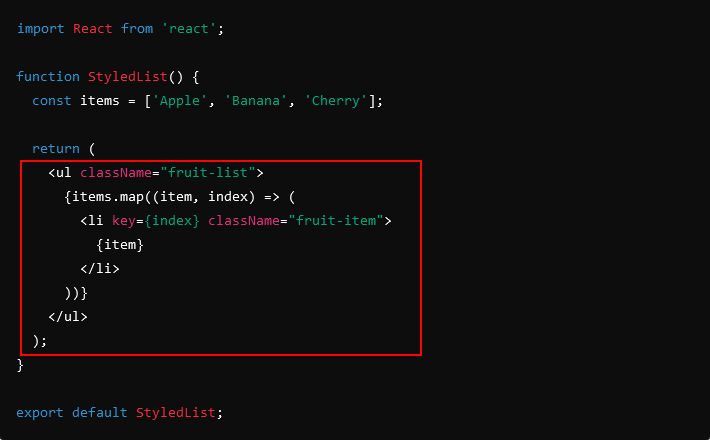
    2. JSX (JavaScript XML)

    jsx javascript xml react

    React introduced JSX, a syntax extension that looks like HTML but works within JavaScript. JSX allows developers to write UI components in a way that feels natural, combining the power of JavaScript with the readability of HTML.

    Here’s an example of JSX:

    const element = <h1>Hello, world!</h1>;

    While JSX is optional, it makes building UI components more intuitive by allowing you to mix markup and logic in one place.

    3. Virtual DOM

    virtual dom vs real dom

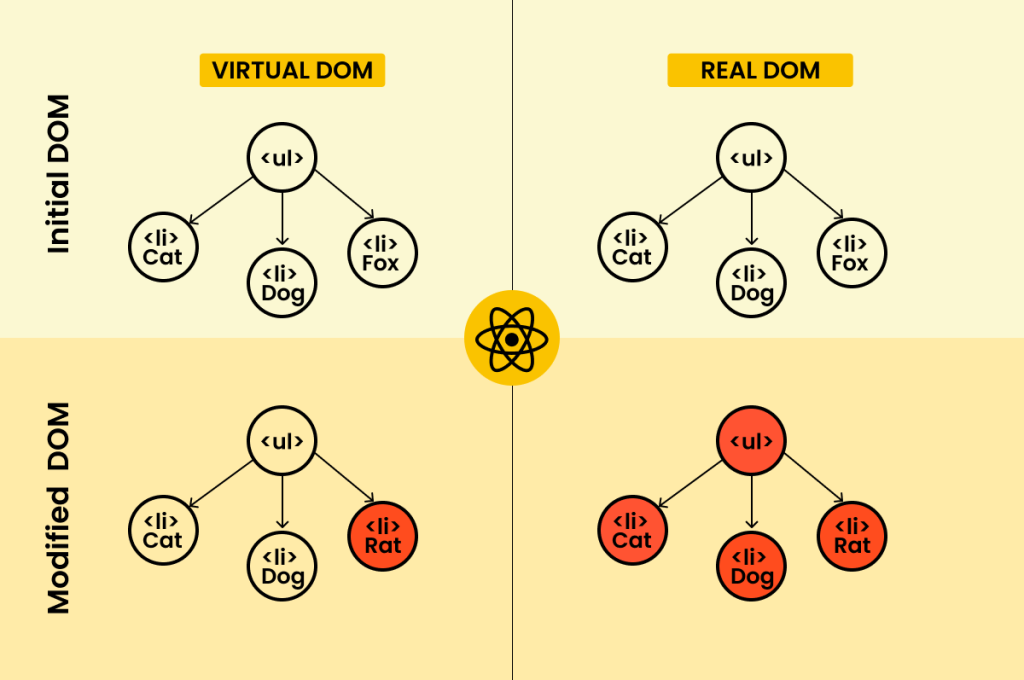
    One of React’s biggest innovations is the virtual DOM. When a React component’s state changes, the virtual DOM ensures that only the parts of the actual DOM that need to be updated get re-rendered. This process makes React apps faster and more efficient, especially when dealing with large, complex UIs.

    Instead of updating the entire page when something changes, React compares the virtual DOM to the real DOM and only updates the differences—making the UI much more responsive.

    4. Declarative UI

    React’s declarative programming model is another reason why developers love it. Instead of telling the browser exactly how to update the UI step-by-step (like you would with vanilla JavaScript), you simply declare what you want the UI to look like at any given point in time, and React takes care of the rest.

    Here’s an example of a simple counter in React:

    function Counter() {
      const [count, setCount] = useState(0);
    
      return (
        <div>
          <p>You clicked {count} times</p>
          <button onClick={() => setCount(count + 1)}>Click me</button>
        </div>
      );
    }
    

    React handles updating the UI when the count state changes, so you don’t have to manually manipulate the DOM. This makes your code more predictable and easier to maintain.

    Advantages of Using React.js

    React didn’t become one of the most popular frontend libraries for no reason. It has some clear advantages that developers love.

    1. Reusability and Scalability

    React’s component-based structure makes it incredibly reusable. You can write a component once and use it across your entire application—or even across multiple projects. This leads to faster development times and a more consistent user interface.

    2. Fast and Efficient

    Thanks to the virtual DOM, React apps are highly performant. React efficiently updates and renders only the components that need to change, which means your app stays fast, even as it grows in complexity.

    3. Large Ecosystem and Community

    React has one of the largest and most active developer communities. From tools like React Developer Tools to countless third-party libraries (like Redux for state management or React Router for navigation), there’s a vast ecosystem of resources that make developing with React easier and faster.

    4. Cross-Platform Capabilities

    React isn’t just for web development. With React Native, you can use your React skills to build native mobile apps for iOS and Android. This cross-platform capability has made React an even more valuable tool for developers looking to expand their skillset.

    Use Cases for React.js

    Now that we’ve covered what React is and why it’s so powerful, let’s look at where it really shines.

    1. Single-Page Applications (SPAs)

    React is the perfect tool for building single-page applications (SPAs). SPAs load a single HTML page and dynamically update the content as the user interacts with the app, without requiring a full page reload. This creates a faster, more seamless experience for users.

    2. Dynamic User Interfaces

    React excels at building interactive, dynamic UIs where the state of the application changes frequently. Think about social media platforms like Facebook or Twitter—these are perfect examples of apps that rely on React to handle complex user interactions in real-time.

    3. Large-Scale Web Applications

    Because React is so modular, it’s ideal for large-scale applications with many components and interactions. Companies like Airbnb and Netflix use React to build large, complex applications that can scale with millions of users.

    React.js in a Nutshell

    • Strengths: Reusability, flexibility, fast rendering (thanks to the virtual DOM), huge ecosystem, and cross-platform capabilities.
    • Weaknesses: Doesn’t provide out-of-the-box solutions for routing, server-side rendering, or SEO (which is where Next.js comes in).
    • Best for: SPAs, dynamic user interfaces, and large-scale applications.

    Now that we’ve covered the fundamentals of React.js, let’s move on to Next.js—a framework built on top of React that’s changing how we think about web development.

    Ready to dive into Next.js? Let’s keep going!

    2. What is Next.js?

    While React.js is great for building user interfaces and dynamic SPAs, it doesn’t provide everything you need out of the box. That’s where Next.js comes in.

    Next.js is a powerful React-based framework developed by Vercel (formerly known as Zeit) in 2016. It builds on top of React to provide additional features like server-side rendering (SSR), static site generation (SSG), and API routes—all designed to simplify the development process and make your applications faster and more SEO-friendly.

    In simple terms, Next.js gives you the best of both worlds: the flexibility of React with the power and performance of backend-like functionality built in.

    A Brief History of Next.js

    Next.js started with a simple goal: make server-side rendering easy for React developers. As web applications became more dynamic and complex, there was a growing need for features that could handle SEO, server-side data fetching, and faster page loading. React wasn’t designed to handle these problems on its own.

    Next.js was created to fill in those gaps. Initially focused on server-side rendering, it has since evolved into a full-fledged React framework that supports static site generation, hybrid rendering, API routes, and more.

    Today, Next.js is used by some of the biggest companies, including Twitch, Hulu, and Tiktok, for building high-performance, SEO-friendly web applications.

    Core Features of Next.js

    So, what makes Next.js so popular? Let’s break down some of its key features that set it apart from React:

    1. Server-Side Rendering (SSR)

    One of the most important features of Next.js is its ability to handle server-side rendering. While React works primarily on the client-side, meaning that everything happens in the browser, Next.js allows you to render pages on the server and send fully rendered HTML to the browser.

    This makes pages load faster and helps improve SEO, as search engines can crawl the content more easily. Here’s an example of how server-side rendering works in Next.js:

    export async function getServerSideProps() {
      const res = await fetch('https://api.example.com/data');
      const data = await res.json();
    
      return { props: { data } };
    }
    
    export default function Page({ data }) {
      return <div>{data.title}</div>;
    }

    In this example, data is fetched on the server, and the page is rendered before being sent to the client, improving both performance and SEO.

    2. Static Site Generation (SSG)

    Next.js also supports static site generation (SSG), which allows you to pre-render pages at build time. This means that HTML pages are generated once, and they can be served quickly to users without the need for any additional server-side processing.

    This is perfect for blogs, marketing sites, and e-commerce platforms, where you want fast load times and SEO benefits.

    export async function getStaticProps() {
      const res = await fetch('https://api.example.com/data');
      const data = await res.json();
    
      return { props: { data } };
    }
    
    export default function Page({ data }) {
      return <div>{data.title}</div>;
    }
    

    3. Hybrid Rendering

    One of Next.js’s standout features is its ability to mix both server-side rendering and static generation within the same application. This gives you the flexibility to decide how each page should be rendered based on your specific needs. For example, you can generate your blog pages statically, while using server-side rendering for dynamic pages like a product catalog or dashboard.

    4. Built-In Routing

    With React.js, you typically need to rely on external libraries like React Router for handling routing. Next.js simplifies this by providing file-based routing out of the box. The file structure of your project determines the routes for your app, so you don’t need to configure a separate routing library.

    For example, if you create a file named about.js in the pages directory, Next.js automatically maps it to the /about route. No additional setup required!

    /pages
      index.js  ->  /
      about.js  ->  /about
    

    5. API Routes

    Next.js isn’t just a frontend framework—it allows you to create API routes directly within your application. This makes Next.js a powerful full-stack framework. You can handle both frontend and backend logic in the same project, which is ideal for creating serverless APIs or handling things like authentication and form submissions.

    // pages/api/hello.js
    export default function handler(req, res) {
      res.status(200).json({ message: 'Hello from Next.js API!' });
    }
    

    6. SEO Optimization

    React, by default, doesn’t handle SEO very well since it’s client-side rendered. Next.js, however, supports server-side rendering and static site generation, which makes it much more SEO-friendly. This is why it’s commonly used for blogs, e-commerce platforms, and marketing websites, where ranking well in search engines is essential.

    Advantages of Using Next.js

    So why do developers and businesses love Next.js? Here are some key benefits:

    1. SEO-Friendly

    Because Next.js supports server-side rendering and static site generation, your website’s content is ready and crawlable by search engines right when the page loads. This gives Next.js a big advantage over plain React when it comes to SEO.

    2. Out-of-the-Box Features

    Next.js comes with a lot of functionality right out of the box, including routing, API routes, and image optimization. Unlike React, where you need additional libraries for these features, Next.js offers a more complete solution with less setup required.

    3. Performance Boost

    Thanks to static site generation and server-side rendering, Next.js apps often have faster load times than React apps that rely entirely on client-side rendering. This is particularly important for improving core web vitals and overall user experience.

    4. Built-In Full-Stack Capabilities

    With API routes, Next.js allows you to handle backend logic without needing a separate backend framework. This makes Next.js an excellent choice for full-stack applications or serverless architectures.

    Use Cases for Next.js

    Next.js shines in scenarios where performance, SEO, and server-side rendering are important. Let’s take a look at some ideal use cases:

    1. SEO-Optimized Websites

    If your application relies heavily on SEO (like blogs, e-commerce platforms, or marketing sites), Next.js is a fantastic choice. Its support for server-side rendering and static site generation ensures that search engines can crawl your content, giving you better visibility on platforms like Google.

    2. Large, Dynamic Websites

    For websites that require dynamic content, like user-generated posts, product catalogs, or dashboards, Next.js’s ability to handle both server-side rendering and static generation is invaluable. You can choose which pages are rendered dynamically and which ones are pre-rendered for performance.

    3. Full-Stack Applications

    With Next.js, you can build full-stack applications that include both the frontend and backend logic. API routes let you create serverless functions within your app, perfect for handling authentication, form submissions, and more without needing an entirely separate backend.

    4. E-Commerce Platforms

    Next.js is often used for e-commerce platforms that require fast load times, SEO optimization, and dynamic content. By leveraging server-side rendering and static generation, e-commerce sites built with Next.js offer a better user experience, higher performance, and improved search rankings.

    Next.js in a Nutshell

    • Strengths: SEO-friendly, built-in routing, server-side rendering, static site generation, full-stack capabilities, and improved performance.
    • Weaknesses: A bit more opinionated than React.js, and can be overkill for simple applications.
    • Best for: SEO-optimized websites, large dynamic web apps, e-commerce platforms, and full-stack applications.

    Now that we’ve covered the fundamentals of Next.js, it’s time to put these two head-to-head. In the next section, we’ll dive deep into the key differences between Next.js and React.js, including rendering strategies, routing, performance, and more.

    Ready to break down the differences? Let’s keep going!

    3. Key Differences Between Next.js and React.js

    Both React.js and Next.js are powerful tools for building modern web applications, but they’re designed with different goals in mind. React is a JavaScript library focused on building user interfaces, while Next.js is a full-stack framework built on top of React that adds features like server-side rendering and static site generation.

    Let’s take a closer look at the most important differences between React and Next.js across several key areas.

    1. Rendering Strategies

    One of the biggest differences between Next.js and React is how they handle rendering. React uses client-side rendering (CSR) by default, while Next.js offers both server-side rendering (SSR) and static site generation (SSG).

    Client-Side Rendering in React.js

    React is primarily a client-side library, meaning it renders your components directly in the browser. When a user visits a React app, the JavaScript files are loaded, and React generates the DOM elements on the fly.

    The advantage of this approach is interactivity. React dynamically updates the user interface based on changes in the app’s state, providing smooth, real-time updates. However, the downside is that content is rendered after the initial page load, which can hurt SEO and performance, especially on slower networks.

    Here’s how a basic client-side rendered React app works:

    function App() {
      return (
        <div>
          <h1>Hello, world!</h1>
        </div>
      );
    }
    
    ReactDOM.render(<App />, document.getElementById('root'));
    

    Server-Side Rendering (SSR) in Next.js

    In contrast, Next.js provides built-in support for server-side rendering. This means that the HTML for each page is generated on the server and sent to the browser before any JavaScript is executed. As a result, the content is available immediately when the page loads, which can significantly improve performance and SEO.

    With server-side rendering, the browser receives a fully rendered HTML document from the server, and then React hydrates the page—meaning it attaches event listeners and makes the page interactive. This approach is perfect for content-heavy sites that need to rank well in search engines.

    Here’s how Next.js handles server-side rendering:

    export async function getServerSideProps() {
      const data = await fetchDataFromAPI();
      return { props: { data } };
    }
    
    export default function Page({ data }) {
      return <div>{data.title}</div>;
    }
    

    Static Site Generation (SSG) in Next.js

    Next.js also supports static site generation, where pages are pre-rendered at build time and served as static HTML files. This method offers the best performance because the HTML is generated once and reused for every user. Static sites are also great for SEO and can handle high traffic with ease since no server-side processing is required.

    You can use static generation in Next.js like this:

    export async function getStaticProps() {
      const data = await fetchDataFromAPI();
      return { props: { data } };
    }
    
    export default function Page({ data }) {
      return <div>{data.title}</div>;
    }
    

    Why it matters: If you need better SEO and faster load times, Next.js’s SSR or SSG can provide significant advantages. React’s client-side rendering is great for interactivity but may fall short when it comes to SEO or initial load performance.

    2. Routing

    Another key difference between React.js and Next.js is how they handle routing.

    Routing in React.js

    React does not include a built-in routing solution. If you want to add routing to your React app, you need to use a third-party library like React Router. React Router is a powerful tool for managing page navigation, but it requires manual setup and configuration.

    Here’s how you set up basic routing in React with React Router:

    import { BrowserRouter as Router, Route, Switch } from 'react-router-dom';
    
    function App() {
      return (
        <Router>
          <Switch>
            <Route path="/about">
              <About />
            </Route>
            <Route path="/">
              <Home />
            </Route>
          </Switch>
        </Router>
      );
    }
    

    While React Router is flexible and gives you control over navigation, it’s an additional step in your project setup.

    Routing in Next.js

    Next.js simplifies routing by providing file-based routing right out of the box. The file structure in the pages directory automatically defines your app’s routes. You don’t need to install any extra libraries or write additional configuration code.

    For example, creating a new page in Next.js is as simple as creating a new file:

    /pages
      index.js  ->  /
      about.js  ->  /about
    

    This file-based routing system is intuitive and helps keep your project organized.

    Why it matters: If you prefer convention over configuration, Next.js’s built-in routing is a huge time-saver. React’s approach requires more setup but gives you greater flexibility in how you structure your routes.

    3. SEO (Search Engine Optimization)

    SEO in React.js

    React’s client-side rendering model poses challenges for SEO. Since the content is rendered in the browser after the initial page load, search engine crawlers may not see the content they need to index your page properly. This can hurt your search rankings, especially for content-heavy websites.

    While search engines like Google have improved at indexing client-side content, React apps still require additional SEO efforts, such as:

    • Using server-side rendering with React frameworks like Next.js.
    • Utilizing React Helmet to manage metadata and improve SEO.

    SEO in Next.js

    Next.js was designed with SEO in mind. Thanks to server-side rendering and static site generation, your pages are fully rendered on the server before being sent to the client. This means search engines can easily crawl your content and index it right away, improving your rankings.

    Next.js also provides built-in tools for managing SEO, such as custom head components that let you control metadata like title tags and meta descriptions.

    import Head from 'next/head';
    
    export default function HomePage() {
      return (
        <>
          <Head>
            <title>My SEO-Optimized Page</title>
            <meta name="description" content="This is a description for SEO purposes" />
          </Head>
          <h1>Welcome to my page</h1>
        </>
      );
    }
    

    Why it matters: If SEO is critical for your project (e.g., for a blog, marketing site, or e-commerce platform), Next.js is the clear winner. React requires more work to get the same SEO benefits that Next.js provides out of the box.

    4. Performance

    Performance is another major consideration when choosing between React.js and Next.js. Let’s break it down.

    Performance in React.js

    React apps are primarily client-side rendered, which means that performance depends heavily on the user’s device and network connection. While React’s virtual DOM helps optimize performance by minimizing updates to the actual DOM, client-side rendering can still result in slower initial page loads, especially for content-heavy applications.

    You can improve React performance by using techniques like code splitting, lazy loading, and memoization, but these require additional configuration and optimization.

    Performance in Next.js

    Next.js is built with performance in mind. Its support for server-side rendering and static site generation means that pages are rendered before they reach the browser, which reduces the time users spend waiting for content to load.

    Next.js also includes automatic code splitting, meaning that only the JavaScript needed for the current page is loaded, reducing bundle sizes and improving load times.

    Additionally, Next.js provides tools like Image Optimization, which automatically optimizes images based on the user’s device and screen size, further improving performance.

    Why it matters: If performance is a priority for your project, especially for high-traffic websites, Next.js’s built-in optimizations can give you a significant advantage over React.js.

    5. Learning Curve

    Finally, let’s talk about the learning curve for both frameworks.

    Learning Curve for React.js

    React’s learning curve is relatively gentle, especially for developers who are already familiar with JavaScript. It’s a flexible library that gives you full control over how you structure your app, which means you can start small and gradually learn more advanced concepts like state management, React hooks, and component lifecycle.

    However, as your app grows, you’ll need to add additional tools for things like routing and state management (e.g., React Router, Redux), which can increase complexity.

    Learning Curve for Next.js

    Next.js has a slightly steeper learning curve because it introduces additional concepts like server-side rendering, static site generation, and API routes. While these features make Next.js more powerful, they also mean there’s more to learn upfront.

    That said, Next.js’s opinionated nature means that a lot of things are already set up for you (like routing and performance optimization), so you can focus more on building your app rather than configuring tools.

    Why it matters: If you’re a beginner or working on a simple app, React.js might be easier to start with. If you’re ready to dive into more complex, full-stack development or need the features Next.js offers, it’s worth investing the time to learn Next.js.

    Summary of Key Differences

    • Rendering: React uses client-side rendering by default, while Next.js supports server-side rendering and static site generation for better performance and SEO.
    • Routing: React requires third-party libraries for routing, while Next.js has built-in file-based routing.
    • SEO: Next.js is better suited for SEO due to its server-side rendering capabilities.
    • Performance: Next.js provides built-in performance optimizations like automatic code splitting and image optimization.
    • Learning Curve: React is easier to learn for beginners, while Next.js offers more advanced features but comes with a steeper learning curve.

    Now that we’ve covered the key differences, let’s dive deeper into the pros and cons of React.js. This will give you a better understanding of when to use React in your projects and when it might not be the best fit.

    4. Pros and Cons of React.js

    React.js is one of the most popular libraries for building modern web applications. But, like any tool, it comes with its own set of strengths and weaknesses. Understanding these pros and cons will help you decide when React.js is the best choice for your project.

    The Pros of React.js

    React has dominated the frontend development space for several years, and it’s not hard to see why. Here are the key benefits that have made React the go-to solution for developers.

    1. Flexibility and Control

    One of React’s greatest strengths is its flexibility. Unlike frameworks like Angular or Next.js, React is just a library, not a full-fledged framework. This means you have full control over how to structure your project and which tools or libraries to integrate. You can start small, then gradually add more tools like state management (Redux), routing (React Router), or even server-side rendering (using frameworks like Next.js).

    This flexibility makes React ideal for custom solutions where you want complete control over the tech stack.

    Why it matters: With React, you can tailor your development environment to the specific needs of your project, whether it’s a single-page app or a highly interactive user interface.

    2. Large and Active Community

    The React ecosystem is huge. With a massive, active community of developers, you’ll never be short of resources, tutorials, libraries, or support. Whether you’re facing a tough bug or looking for advice on the best tools to use, chances are someone has already solved the problem for you.

    React’s popularity means that there are countless third-party libraries and tools available to make your life easier—whether it’s for state management, UI components, or even testing frameworks.

    The popularity of React also means there are plenty of job opportunities for developers who are skilled in it, making it a great investment for your career.

    Why it matters: Having a large community behind a library means you’ll get faster solutions to problems, more learning resources, and an abundance of third-party tools to enhance your development experience.

    3. Reusable Components

    React’s component-based architecture is another big advantage. Components are the building blocks of a React application, and they’re completely reusable across different parts of your app. You can write a button component once and reuse it across multiple pages or projects, ensuring consistency and reducing the amount of code you need to maintain.

    Not only does this make your code more maintainable, but it also speeds up development since you can rely on pre-built components for common UI elements.

    function Button(props) {
      return <button>{props.label}</button>;
    }
    

    Why it matters: Reusability means less repetition, less code to manage, and faster development times, especially in larger projects.

    4. Performance Optimization via Virtual DOM

    React’s virtual DOM is a game-changer for performance. Instead of directly interacting with the real DOM (which can be slow), React creates a virtual representation of the DOM in memory. When a component’s state changes, React calculates the minimal number of updates needed to the actual DOM, making it much faster than traditional DOM manipulation.

    This is especially beneficial in large applications where frequent updates to the UI can lead to performance issues. React ensures that the UI is updated efficiently without unnecessary re-rendering.

    Why it matters: The virtual DOM provides better performance, especially when dealing with highly interactive and dynamic user interfaces.

    5. React Native: Cross-Platform Development

    One of the biggest advantages of learning React is that you can take those same skills and apply them to mobile development using React Native. React Native allows you to build native mobile apps for both iOS and Android using the same React codebase, significantly speeding up mobile development.

    For companies or developers looking to create cross-platform applications, React Native offers a cost-effective way to deliver consistent user experiences across multiple platforms.

    Why it matters: With React, you can expand beyond web development into mobile app development, making React an even more versatile skill to have.

    The Cons of React.js

    While React is extremely popular and powerful, it’s not without its downsides. Here are a few challenges and limitations you might face when working with React.

    1. Learning Curve and Setup

    Although React is often praised for being easy to get started with, there’s a learning curve involved, especially as your application grows. React on its own is a library, not a full-fledged framework like Angular or Next.js. This means you need to make decisions about which tools to use for state management, routing, and API integration.

    For instance, while building small projects in React can be relatively simple, larger applications require a more complex setup with Redux, React Router, and other tools. As a result, managing these dependencies and structuring your application properly can become overwhelming for beginners.

    Why it’s a problem: For developers who are new to React, the ecosystem can feel fragmented, requiring additional tools and libraries to create a fully functional app. This adds complexity, especially in larger projects.

    2. Lack of Built-In Features

    React, by design, focuses on building the UI. It doesn’t include built-in features like routing, state management, or form handling—which are critical in most applications. You’ll need to use third-party libraries like React Router for navigation or Redux for state management.

    While this gives you flexibility, it also means more setup and configuration compared to frameworks like Next.js or Angular, which come with these features out of the box.

    Why it’s a problem: React requires more decisions upfront about which additional tools and libraries to use, which can slow down development, especially for new developers or smaller teams.

    3. SEO Challenges

    React’s default client-side rendering can cause issues with SEO. Since React renders components in the browser after the initial page load, search engines might not be able to crawl your content as effectively. This can impact how well your website ranks on search engines like Google.

    While there are workarounds like React Helmet for managing metadata and SEO, or using Next.js for server-side rendering, these require extra setup. React’s client-side rendering isn’t inherently optimized for search engine visibility.

    Why it’s a problem: If SEO is a priority for your project (such as in blogs or e-commerce websites), you’ll need to rely on additional tools or frameworks to ensure proper SEO optimization.

    4. Frequent Updates

    Because React is continuously evolving, the frequent updates can be both a blessing and a curse. While new features and optimizations are constantly being added, it can be hard to keep up with the latest best practices, especially when new versions introduce breaking changes or require refactoring your codebase.

    The large React ecosystem also means that libraries and tools can become outdated quickly, and you may need to keep your dependencies up to date to avoid compatibility issues.

    Why it’s a problem: Staying on top of React’s frequent updates and changes can be time-consuming and may require extra effort, especially for long-term projects or larger teams.

    When to Use React.js

    Given its strengths and weaknesses, React.js is best suited for certain types of projects:

    1. Single-Page Applications (SPAs)

    React’s component-based architecture and client-side rendering make it an excellent choice for building single-page applications (SPAs) where the user interacts dynamically with the page without reloading. This is especially useful for apps like social networks, dashboards, or email clients.

    2. Dynamic User Interfaces

    For apps that require a lot of real-time interactions, like live updates, animations, or complex user interfaces, React is ideal. It allows you to easily manage state changes and updates in a performance-efficient way using its virtual DOM.

    3. Cross-Platform Development

    If your goal is to build both web and mobile applications, React is a great choice, especially if you plan to use React Native to develop mobile apps alongside your web projects.

    Summary of React.js

    • Strengths: Flexibility, reusable components, fast performance with the virtual DOM, large community, and cross-platform capabilities through React Native.
    • Weaknesses: Requires more setup (no built-in routing or state management), challenges with SEO, and keeping up with frequent updates.
    • Best for: Single-page applications (SPAs), dynamic user interfaces, and cross-platform development using React Native.

    5. Pros and Cons of Next.js

    Next.js builds on top of React to offer more features for creating server-rendered and static web applications. While it shares many strengths with React, it also introduces its own advantages and trade-offs.

    Let’s break down the pros and cons of Next.js.

    Pros of Next.js

    1. Server-Side Rendering (SSR) for Better Performance and SEO

    One of the most powerful features of Next.js is its built-in support for server-side rendering (SSR). This allows you to pre-render pages on the server, which significantly improves both performance and SEO.

    Since search engines can easily crawl the fully-rendered HTML sent from the server, Next.js is ideal for websites where SEO is critical, such as e-commerce, blogs, or marketing sites.

    export async function getServerSideProps() {
      const res = await fetch('https://api.example.com/data');
      const data = await res.json();
    
      return { props: { data } };
    }
    
    export default function Page({ data }) {
      return <div>{data.title}</div>;
    }
    

    With SSR, your page is sent to the browser pre-rendered, and React takes over to make it interactive.

    2. Static Site Generation (SSG) for Lightning-Fast Load Times

    Next.js also supports static site generation (SSG), which pre-builds your pages at compile time and serves them as static HTML files. This makes your website blazing fast, especially for content that doesn’t need to change often.

    For instance, blogs or documentation sites can be statically generated and served directly to users, without needing to make database requests or run server-side logic every time a page loads.

    export async function getStaticProps() {
      const data = await fetchDataFromAPI();
      return { props: { data } };
    }
    
    export default function Page({ data }) {
      return <div>{data.title}</div>;
    }
    

    Next.js offers flexibility by allowing you to mix and match SSR and SSG depending on the needs of each page.

    3. SEO Optimization out of the Box

    Next.js is built with SEO in mind. Unlike React, which relies on client-side rendering, Next.js provides server-rendered pages that are more SEO-friendly. With SSR and SSG, search engines can crawl your content more efficiently.

    In addition, Next.js allows you to control meta tags, titles, and descriptions with ease, all critical components for search engine optimization.

    import Head from 'next/head';
    
    export default function HomePage() {
      return (
        <>
          <Head>
            <title>My SEO-Optimized Page</title>
            <meta name="description" content="This is a description for SEO purposes" />
          </Head>
          <h1>Welcome to my SEO-optimized site!</h1>
        </>
      );
    }
    

    4. Built-in Routing and API Routes

    Unlike React, which requires React Router for navigation, Next.js provides file-based routing out of the box. The structure of your pages directory directly maps to your app’s routes, making it incredibly easy to set up and manage navigation.

    For example:

    /pages
      index.js  ->  /
      about.js  ->  /about
    

    Additionally, Next.js allows you to create API routes without needing an external backend framework. These serverless API routes let you handle server-side logic directly in your Next.js app, making it a full-stack framework.

    Here’s how you can create an API route:

    // pages/api/hello.js
    export default function handler(req, res) {
      res.status(200).json({ message: 'Hello from Next.js API!' });
    }
    

    5. Hybrid Rendering Capabilities

    One of the standout features of Next.js is its hybrid rendering capabilities. This allows you to use static site generation, server-side rendering, and client-side rendering all within the same application. This flexibility lets you optimize each page for performance, SEO, and user experience.

    For example, you might use SSG for your homepage to achieve fast load times, while using SSR for a product page that requires dynamic data.

    6. Performance Optimization

    Next.js has several built-in tools for improving your app’s performance. For example, it includes automatic code splitting, which means that only the necessary JavaScript for the current page is loaded. This reduces the size of your JavaScript bundle and improves load times.

    In addition, Next.js provides Image Optimization, which automatically optimizes images based on the user’s device and screen size, making your site faster and more efficient.

    Cons of Next.js

    While Next.js is incredibly powerful, it’s not the perfect solution for every project. Here are some potential downsides to consider:

    1. More Opinionated Than React

    Next.js is a framework, which means it’s more opinionated than React. It imposes specific conventions, such as file-based routing, which may feel restrictive for developers who prefer React’s flexibility.

    For instance, while React allows you to structure your project however you like, Next.js enforces a certain structure, such as placing all routes inside the pages directory. This can be great for productivity, but it limits customization for advanced use cases.

    2. Potential Overhead for Simple Applications

    If you’re building a small, simple application or a single-page app (SPA), Next.js’s built-in features like SSR or SSG might feel like overkill. React on its own would likely be a more lightweight and flexible solution.

    For example, if you’re building an internal tool or dashboard where SEO isn’t important, using Next.js’s server-side rendering features may add unnecessary complexity.

    3. Learning Curve for Beginners

    Next.js introduces advanced concepts like server-side rendering, static site generation, and API routes, which can make it a bit overwhelming for developers new to web development. While React allows you to build UIs in a more incremental way, Next.js requires you to understand more complex features upfront.

    4. Server-Side Rendering Can Be Complex

    While SSR offers many benefits, it also adds complexity. For example, you’ll need to be mindful of state management, data fetching, and performance optimizations. Handling server-side data fetching in a way that scales can be more difficult than managing a client-side React app.

    SSR also introduces the concept of hydration, where the server-rendered HTML needs to sync with the client-side React components, adding another layer of complexity to your app’s architecture.

    When Should You Use Next.js?

    Next.js is an excellent choice for:

    • SEO-focused websites: If SEO is a priority, like for blogs, e-commerce sites, or marketing pages, Next.js’s server-side rendering and static site generation will significantly boost your search rankings.
    • Large, dynamic web applications: Next.js is great for sites that require a mix of server-side rendering and client-side interactivity, such as social media platforms or dashboards.
    • Performance-sensitive apps: If your app requires fast load times and optimized performance, Next.js’s built-in features (like code splitting and image optimization) can help deliver a smoother experience.
    • Full-stack development: With built-in API routes, Next.js can handle both the frontend and backend logic in the same project, making it perfect for full-stack apps.

    6. Migrating from React.js to Next.js

    As your React.js project grows, you might realize that you need better SEO, faster page loads, or server-side rendering. This is where Next.js shines. The good news? Migrating a React app to Next.js is relatively straightforward since Next.js is built on top of React.

    In this section, we’ll walk through the migration process step-by-step, covering how to move an existing React app to Next.js without disrupting your current setup. Whether you want to take full advantage of static site generation (SSG), server-side rendering (SSR), or API routes, you can transition smoothly.

    Why Migrate from React.js to Next.js?

    Before we jump into the technical steps, let’s quickly review some of the key reasons you might want to migrate your React app to Next.js:

    • Better SEO: Next.js provides server-side rendering, which means search engines can crawl and index your content more effectively, boosting your SEO rankings.
    • Improved Performance: With static site generation and code splitting, Next.js allows you to deliver faster page loads and optimized performance.
    • Simplified Routing: Next.js offers file-based routing out of the box, which reduces the need for extra configuration with React Router.
    • Full-Stack Capabilities: Next.js allows you to create API routes directly within your app, making it easier to handle backend logic without a separate server.

    Now, let’s move into the step-by-step guide for migrating your React.js app to Next.js.

    Step-by-Step Guide to Migrating from React.js to Next.js

    Step 1: Install Next.js in Your Existing React Project

    The first step is to add Next.js to your existing React project. To do this, open your terminal and run the following command:

    npm install next react react-dom
    

    This will install Next.js, along with the necessary versions of React and React DOM.

    Next, create the Next.js config files by adding the following scripts to your package.json file:

    "scripts": {
      "dev": "next dev",
      "build": "next build",
      "start": "next start"
    }
    
    • next dev: Runs the development server.
    • next build: Builds the app for production.
    • next start: Starts the production server.

    This config sets up Next.js in your existing React project, allowing you to use Next.js features.


    Step 2: Create the pages Directory

    Next.js uses file-based routing, so you’ll need to create a pages directory where each file corresponds to a route. For example, if you have a homepage component in your React app, you can move that component into the pages directory as index.js.

    Here’s how you can do it:

    1. Create a new pages folder in your project root.
    2. Move your current App.js or homepage component to pages/index.js.
    /pages
      index.js  ->  /
    
    // pages/index.js
    export default function Home() {
      return (
        <div>
          <h1>Welcome to Next.js!</h1>
        </div>
      );
    }
    

    Now, your homepage will be automatically accessible at the root URL (/), without needing a manual routing setup like in React Router.


    Step 3: Replace React Router with Next.js Routing

    If your React app is using React Router for navigation, you can now replace it with Next.js’s built-in routing. The great thing about Next.js is that the file structure in the pages directory automatically maps to your routes, so you don’t need additional routing libraries.

    For example, if you have the following React Router setup:

    <Router>
      <Route path="/" component={Home} />
      <Route path="/about" component={About} />
    </Router>
    

    In Next.js, you can achieve the same result by creating index.js and about.js files inside the pages directory:

    /pages
      index.js  ->  /
      about.js  ->  /about

    This built-in file-based routing simplifies your project and reduces the need for external routing libraries like React Router.

    Step 4: Add Server-Side Rendering (SSR) or Static Site Generation (SSG)

    Next.js offers powerful features like server-side rendering (SSR) and static site generation (SSG). You can easily enhance your app’s SEO and performance by enabling these features where needed.

    Here’s how to use server-side rendering in a Next.js page:

    export async function getServerSideProps() {
      const data = await fetch('https://api.example.com/data');
      return { props: { data } };
    }
    
    export default function Page({ data }) {
      return <div>{data.title}</div>;
    }

    Or, if you prefer to use static site generation:

    export async function getStaticProps() {
      const data = await fetch('https://api.example.com/data');
      return { props: { data } };
    }
    
    export default function Page({ data }) {
      return <div>{data.title}</div>;
    }

    Both approaches allow you to pre-render content either on the server (SSR) or at build time (SSG), making your app faster and more SEO-friendly.

    Step 5: Migrate Component Imports and Adjustments

    In most cases, React components will work as they are in Next.js. However, there are a few adjustments you may need to make, especially regarding imports and file paths. For instance, you might need to update the way you handle CSS files or static assets.

    CSS Files: If your React project uses global CSS, you can continue to use it by importing your CSS files in the _app.js file. Next.js processes global styles via this component.

    // pages/_app.js
    import '../styles/globals.css';
    
    export default function MyApp({ Component, pageProps }) {
      return <Component {...pageProps} />;
    }
    

    Static Assets: Move your static assets (like images or fonts) to the public directory, which is the default folder for static files in Next.js.

    Step 6: Test Your Next.js App Locally

    Once you’ve made these changes, you can test your Next.js app locally by running the following command:

    npm run dev
    

    This will start the Next.js development server. Open your browser and navigate to http://localhost:3000 to see your app in action. You should also check your routes and make sure everything is rendering correctly.

    Common Challenges in Migrating to Next.js

    While migrating from React to Next.js is relatively straightforward, there are a few common challenges you might face:

    1. Server-Side Rendering (SSR) Complexity: While SSR improves SEO and performance, it can add complexity to your data fetching and state management. You’ll need to handle data fetching differently in SSR mode, and manage the hydration process when the client takes over.
    2. File-Based Routing Adjustments: If your React app has complex routing or nested routes, adjusting to file-based routing in Next.js may require some restructuring. You might need to refactor your folder structure or use dynamic routes in Next.js.
    3. Global State Management: In a Next.js app, if you’re using SSR or SSG, you’ll need to carefully manage global state across the server and client. Libraries like Redux or Context API can still be used, but make sure they’re set up to handle server-rendered pages.
    4. Handling Third-Party Libraries: Some third-party libraries that rely on client-side rendering might need to be adjusted or deferred until after the page has been hydrated by React. For example, if you’re using libraries that manipulate the DOM directly, make sure they only run in the browser.

    Summary: Migrating from React.js to Next.js

    Migrating from React.js to Next.js can bring significant benefits in terms of performance, SEO, and developer experience. The process is straightforward, especially since Next.js is built on top of React. By following the steps outlined above, you can gradually transition your app to Next.js, taking advantage of its server-side rendering, static site generation, and built-in routing features.

    7. Learning Paths for React.js and Next.js

    Whether you’re a beginner or an experienced developer, learning React.js and Next.js can be an exciting journey. These technologies are powerful tools in modern web development, and mastering them opens up a world of possibilities for building fast, dynamic, and scalable applications.

    In this section, we’ll break down the best ways to learn both React.js and Next.js, providing resources for beginners, intermediate learners, and advanced developers.

    Learning React.js: Where to Start

    1. Understanding the Basics of JavaScript

    Before diving into React, it’s important to have a solid understanding of JavaScript. React is built on JavaScript, so having a good grasp of concepts like functions, variables, objects, arrays, and asynchronous programming will make learning React much easier.

    Here are a few excellent resources to master JavaScript basics:

    2. Learning React.js Fundamentals

    Once you’re comfortable with JavaScript, it’s time to jump into React.js. Start by learning the core concepts:

    • Components: Understand how to build reusable UI components.
    • JSX: Learn how React allows you to write HTML-like syntax within JavaScript.
    • State and Props: Master state management and how to pass data between components.
    • Event Handling: Learn how to handle user inputs and actions.
    • React Hooks: Get familiar with useState, useEffect, and other hooks for managing state and side effects in functional components.

    Recommended Resources for React.js:

    1. React Official Documentation
      The best place to start learning React is its official documentation. It covers all the essential concepts and provides practical examples that will help you get up to speed.
    2. The Complete React Developer Course (Udemy)
      This highly-rated course covers React from the basics to advanced concepts, with practical exercises and real-world projects to help you solidify your understanding.
    3. React for Beginners by Wes Bos
      A beginner-friendly paid course with hands-on projects to build real-world apps while learning the fundamentals of React.js.

    Moving to Next.js: A Step Up from React.js

    Once you’ve built a solid foundation in React, it’s time to level up your skills with Next.js. Next.js builds on React by adding features like server-side rendering (SSR), static site generation (SSG), and API routes.

    Here’s the best way to approach learning Next.js.

    1. Learning Next.js Fundamentals

    Start by getting familiar with the core concepts of Next.js:

    • File-Based Routing: Learn how Next.js automatically maps files in the pages directory to routes.
    • Static Site Generation (SSG) and Server-Side Rendering (SSR): Understand how Next.js pre-renders content to improve performance and SEO.
    • API Routes: Discover how you can create server-side API routes within a Next.js project.
    • Next.js Features: Get familiar with built-in optimizations like automatic code splitting and image optimization.

    Recommended Resources for Next.js:

    1. Next.js Official Documentation
      Like React, the official Next.js documentation is the best place to start. It provides a detailed introduction to all of Next.js’s key features, with hands-on examples.
    2. The Complete Next.js Developer Guide (Udemy)
      A highly-rated course that walks you through building real-world Next.js applications, covering everything from routing to deployment.
    3. Next.js Crash Course by Traversy Media (YouTube)
      This free crash course on YouTube gives a solid introduction to Next.js in under an hour, perfect for getting started quickly.

    Intermediate and Advanced Learning Resources

    As you grow more comfortable with React and Next.js, you can dive into more advanced topics like performance optimization, state management with Redux or Context API, and full-stack development using Next.js API routes.

    1. Advanced React.js Resources:

    • Advanced React by Wes Bos
      This course focuses on building full-stack applications with React, GraphQL, and Apollo, perfect for developers looking to take their React skills to the next level.
    • React Patterns
      This resource covers common patterns and best practices for writing maintainable, scalable React code.
    • EpicReact by Kent C. Dodds
      A comprehensive collection of React workshops and courses by a well-known React educator. It covers everything from testing to advanced React hooks.

    2. Advanced Next.js Resources:

    • Next.js 14 Features Guide
      Learn about the newest features in Next.js 14, including React Server Components and middleware for edge computing.
    • Fullstack Next.js with TypeScript and GraphQL (Udemy)
      This course focuses on full-stack development with Next.js, TypeScript, and GraphQL. It’s ideal for advanced learners who want to build modern, scalable apps.
    • Mastering Next.js
      A more in-depth guide to Next.js with advanced techniques for building large-scale apps, handling state, and optimizing performance.

    Build Real Projects to Solidify Your Learning

    The best way to master React.js and Next.js is by building real projects. Here are a few project ideas to test your knowledge:

    • Portfolio Website: Build a personal portfolio site using React or Next.js, focusing on design and showcasing your projects.
    • E-Commerce Store: Create an e-commerce platform using Next.js, taking advantage of static site generation for product pages and server-side rendering for dynamic content.
    • Blog Platform: Build a blog with React or Next.js, integrating features like pagination, categories, and SEO optimization.
    • Full-Stack App: Use Next.js API routes to build a full-stack application with user authentication, CRUD functionality, and a database like MongoDB or Firebase.

    Key Takeaways for Learning React.js and Next.js

    • React.js: Start by mastering the basics of React, including components, state, props, and hooks. Once comfortable, move on to more complex concepts like state management and performance optimization.
    • Next.js: After building a foundation in React, transition to Next.js to unlock features like server-side rendering, static site generation, and API routes.
    • Advanced Topics: Explore advanced topics like full-stack development, TypeScript with Next.js, and performance optimization as you grow more confident in your skills.

    By focusing on real-world projects and continuously learning, you’ll become proficient in both React.js and Next.js, two of the most powerful tools in modern web development.

    In the next section, we’ll discuss the future of React.js and Next.js. As both technologies continue to evolve, we’ll explore what’s coming next and how to stay ahead of the curve.

    8. The Future of JavaScript Frameworks: React.js and Next.js

    Both React.js and Next.js have solidified themselves as two of the most popular and widely-used tools in modern web development. While they are already at the forefront of technology today, both are evolving rapidly to meet new demands in performance, scalability, and developer experience.

    In this section, we’ll explore the upcoming trends, new features, and the future potential of both React.js and Next.js as they continue to shape the web development landscape.

    The Future of React.js

    Since its launch in 2013, React has become the go-to JavaScript library for building user interfaces. React continues to evolve, with new features and improvements aimed at making development faster, more efficient, and easier to scale. Here are some of the key trends and upcoming features you should be aware of.

    1. React Concurrent Mode

    Concurrent Mode is one of the most anticipated features coming to React. It enables React applications to handle multiple tasks at the same time without blocking the user interface, making your app more responsive and interactive. With Concurrent Mode, React will be able to:

    • Interrupt rendering to prioritize more important tasks.
    • Keep the UI responsive even during heavy computations.
    • Defer less critical tasks until the main tasks are complete.

    This feature will drastically improve the user experience, especially in complex applications with heavy UI interactions.

    2. React Server Components

    React Server Components is another major feature currently in development. This concept allows React to run on the server and the client, improving performance and reducing the amount of JavaScript that needs to be sent to the browser.

    With Server Components, you can render part of the UI on the server, sending only the necessary components to the client. This hybrid approach will significantly reduce the load on the client-side and improve page load times, making it easier to build highly performant web applications.

    3. Improved Developer Tooling

    React continues to invest in improving the developer experience with enhanced developer tools. These include:

    • React DevTools: New features and insights to help developers optimize their components and state management.
    • Fast Refresh: Instant feedback and code reloading during development without losing component state, speeding up development.

    As the React ecosystem continues to grow, expect more innovations aimed at improving debugging, profiling, and performance analysis.

    4. React Native for Cross-Platform Development

    React’s influence extends beyond the web, with React Native playing a pivotal role in cross-platform mobile development. The future of React includes further advancements in React Native to improve performance, native module integration, and ease of use, enabling developers to build mobile apps using the same principles they use in web development.

    The Future of Next.js

    Next.js has quickly become the go-to framework for building React-based applications with a focus on performance, scalability, and developer experience. It is constantly evolving, and the next few years promise exciting updates and features.

    1. Next.js 13 and React Server Components

    With Next.js 13, the framework will integrate deeply with React Server Components, allowing you to build faster, more efficient apps by rendering components on the server. This means that Next.js will be able to handle more complex workloads without sending unnecessary JavaScript to the client, resulting in better performance and faster load times.

    This integration will also simplify the development process by allowing developers to define what runs on the client and what runs on the server more clearly, making applications lighter and faster.

    2. Middleware for Edge Computing

    One of the most exciting trends in the Next.js ecosystem is the move towards edge computing. With the rise of serverless architecture and CDNs, Next.js is focusing on bringing computation closer to the user, reducing latency and improving the overall performance of web applications.

    Next.js now supports middleware that can run at the edge, allowing for dynamic content personalization, authentication, and other tasks to happen faster than ever before.

    3. Improved Static Site Generation (SSG)

    While static site generation has already been a key feature of Next.js, the team is continually improving its capabilities. In the future, expect more sophisticated incremental static regeneration (ISR) features, which allow static sites to be updated without needing to rebuild the entire site.

    This makes Next.js even more powerful for large-scale projects, such as e-commerce platforms or content-heavy sites, where you need to update content frequently without sacrificing performance.

    4. TypeScript as the Default

    Next.js has rapidly embraced TypeScript as the default language for building scalable, type-safe applications. Moving forward, expect deeper integrations with TypeScript, including improved support for type checking, error handling, and developer tooling.

    As more teams adopt TypeScript in their Next.js projects, you can expect a richer set of tools and libraries tailored specifically for TypeScript-first development.

    5. Better DevOps and CI/CD Integration

    Next.js is continuously improving its deployment capabilities with services like Vercel, allowing for seamless continuous integration and delivery (CI/CD). In the future, expect tighter integrations with GitHub, GitLab, and other CI/CD platforms, making it easier to deploy static sites, serverless functions, and full-stack applications.

    Emerging Trends in Web Development: The Impact on React.js and Next.js

    As both React.js and Next.js continue to evolve, they are also being shaped by several broader trends in web development. Here are a few trends to keep an eye on:

    1. The Rise of JAMstack

    JAMstack (JavaScript, APIs, and Markup) architecture is on the rise, and both React and Next.js are leading frameworks in this movement. Static site generation (SSG) and serverless functions are at the heart of JAMstack, and Next.js is becoming one of the most popular frameworks for building JAMstack applications.

    As developers continue to prioritize performance, scalability, and security, React and Next.js will remain essential tools for building JAMstack apps.

    2. WebAssembly and Beyond

    WebAssembly (Wasm) allows developers to run languages like Rust, C++, and Go directly in the browser at near-native speeds. This opens up new possibilities for highly performant web applications that can handle complex tasks like video editing, gaming, and more.

    While React and Next.js will still be key players in web development, the rise of WebAssembly might shift some of the workloads traditionally handled by JavaScript to other languages.

    3. Serverless Architecture

    The serverless trend is continuing to grow, and Next.js is already at the forefront with its built-in API routes and Vercel’s serverless platform. In the coming years, expect more innovation around serverless deployments, enabling developers to focus purely on writing code without managing infrastructure.

    Next.js is poised to become even more powerful in the serverless space, offering seamless deployments and scaling options through platforms like AWS Lambda, Netlify, and Vercel.

    What’s Next for Developers?

    The future of React.js and Next.js looks incredibly bright, with both technologies focusing on performance, scalability, and developer experience. Here’s how you can prepare for the future:

    • Stay Updated with the Latest Releases: Keep up with the latest features in React and Next.js by regularly checking the official documentation and release notes.
    • Learn TypeScript: TypeScript is becoming a must-know skill for modern web developers, especially if you’re working with Next.js. Investing time in learning TypeScript will improve the quality and maintainability of your code.
    • Experiment with Server-Side Rendering and Static Site Generation: If you’re building React apps, start experimenting with Next.js to take advantage of server-side rendering and static site generation for better performance and SEO.
    • Explore Edge Computing: As edge computing continues to grow, it’s worth exploring how Next.js’s middleware can bring dynamic functionality closer to the user, improving speed and responsiveness.

    We’ve covered a lot in this guide—from the differences between React.js and Next.js to the future of both technologies. In the final section, we’ll recap the key takeaways and offer some final thoughts on when to use React and when to choose Next.js for your next project.

    9. Conclusion: React.js vs Next.js—Which Should You Choose?

    We’ve covered a lot of ground in this guide, breaking down the key differences between React.js and Next.js, their pros and cons, and even their future directions. By now, you should have a clearer understanding of which tool is right for your project.

    Both React.js and Next.js are powerful, flexible, and designed for building modern, scalable web applications. However, each has unique strengths depending on your project’s needs.

    When to Choose React.js

    If you’re building a single-page application (SPA), a dynamic user interface, or an app that requires a lot of client-side interaction, React.js is a great choice. It offers:

    • Flexibility: React gives you full control over how to structure your app and lets you choose the tools you want to use for routing, state management, and more.
    • A Large Ecosystem: With React, you have access to countless libraries, tools, and community support to help you build just about anything.
    • Modularity: React’s component-based architecture makes it easy to reuse components and build scalable applications over time.

    When to Choose Next.js

    If your project requires better SEO, server-side rendering, or static site generation, Next.js is the best choice. It’s ideal for:

    • SEO-Focused Applications: Whether you’re building a blog, an e-commerce platform, or a marketing website, Next.js’s server-side rendering (SSR) and static site generation (SSG) features make your content more crawlable and SEO-friendly.
    • Performance: Next.js automatically optimizes your app with code splitting, image optimization, and faster page loads through SSG and SSR.
    • Full-Stack Capabilities: With built-in API routes, Next.js allows you to handle both frontend and backend logic within the same app, making it a great choice for full-stack development.

    Final Thoughts

    At the end of the day, the decision between React.js and Next.js depends on your specific project requirements:

    • Choose React.js if you want flexibility and are building a client-side application with a lot of dynamic interactions.
    • Choose Next.js if you need a performant, SEO-friendly app with features like server-side rendering or static site generation built in.

    Both React.js and Next.js are here to stay, and mastering either (or both) will open doors to endless possibilities in modern web development. By continuing to learn and experiment, you can ensure that you stay ahead of the curve as these technologies evolve.

    Frequently Asked Questions

    1. Can I use React and Next.js together?

    Yes! Next.js is built on top of React. You’ll still write React components and use React features, but Next.js adds extra functionality like routing, SSR, and SSG.

    2. Is Next.js harder to learn than React?

    Next.js introduces additional concepts like server-side rendering and file-based routing, which might seem complex initially. However, once you have a solid foundation in React, transitioning to Next.js is quite straightforward.

    3. Is SEO better in Next.js than in React?

    Yes. Next.js’s server-side rendering and static site generation make it much easier to optimize for SEO, as content is pre-rendered and crawlable by search engines.

    4. Can I migrate an existing React project to Next.js?

    Absolutely! Migrating from React to Next.js is relatively simple, as Next.js is built on React. You can gradually introduce Next.js features like SSR and SSG into your existing React project.

    Closing Thoughts

    In the fast-paced world of web development, it’s crucial to choose the right tools for the job. Whether you opt for the flexibility of React.js or the performance-focused features of Next.js, both are exceptional choices for building modern, scalable, and efficient web applications.

    So, which one will you choose for your next project? Whichever you pick, you’ll be using some of the most powerful and future-proof technologies available today.

  • JavaScript vs TypeScript: The Complete Guide for Developers

    JavaScript vs TypeScript: The Complete Guide for Developers

    Whether you’re new to coding or a seasoned developer, at some point, you’ve probably asked yourself: Should I be using JavaScript or TypeScript?

    It’s a good question—one that’s becoming more and more relevant as the web development landscape evolves.

    JavaScript has been the go-to language for web development for over two decades. It’s everywhere—whether you’re building a basic website or a complex web app, you’re likely using JavaScript to power it. But as projects get bigger, the dynamic nature of JavaScript can become a double-edged sword. It’s flexible, yes, but that flexibility can lead to messy code, bugs, and run-time errors if you’re not careful.

    That’s where TypeScript comes in.

    TypeScript, introduced by Microsoft, is like JavaScript’s smarter, more organized sibling. It gives you all the power of JavaScript but adds static typing and other features that make your code easier to manage—especially on large projects. It helps you catch errors before they even happen. Sounds good, right?

    But here’s the thing: JavaScript and TypeScript aren’t in competition. Instead, they complement each other. The key is knowing which one fits your project better.

    In this guide, we’re going to dig deep into the differences between JavaScript and TypeScript. We’ll look at when you should use each, their pros and cons, how they compare in real-world scenarios, and even how to switch from JavaScript to TypeScript if that’s the direction you’re leaning.

    By the end, you’ll have a clear understanding of which language to use, and more importantly—why.

    Let’s get started!

    1. What is JavaScript?

    Let’s start with the basics: JavaScript.

    JavaScript is the king of web development. It’s what brings life to websites. You know those cool animations, interactive forms, and dynamic content that loads without refreshing the page? That’s all thanks to JavaScript.

    But it wasn’t always this powerful. Let’s take a quick trip back in time.

    A Brief History of JavaScript

    Back in 1995, when the web was just getting started, websites were static—boring even. You couldn’t interact with them, and every change required reloading the page. Developers knew they needed a solution, and Netscape (the first major web browser company) stepped in to fill the gap.

    That’s when Brendan Eich, a programmer at Netscape, created JavaScript in just 10 days. Yeah, 10 days! It was designed to add interactive elements to websites, allowing users to engage with the content in real-time. Initially, it wasn’t perfect—let’s face it, most developers found it clunky—but it was a game-changer.

    Fast forward to today, and JavaScript is everywhere. It’s no longer just about frontend. With Node.js, you can now run JavaScript on the server-side, making it a full-fledged programming language capable of building everything from simple websites to complex web applications.

    Key Features of JavaScript

    Now, what makes JavaScript so powerful? Let’s break down some of its core features:

    1. Interactivity: JavaScript allows you to create dynamic, engaging websites. Think about filling out a form on a website and seeing error messages instantly, without having to reload the page. That’s JavaScript at work.
    2. Cross-Platform: JavaScript runs on pretty much any platform—whether you’re using Chrome, Firefox, Safari, or even mobile browsers. As long as your user has a browser, JavaScript works.
    3. Asynchronous Capabilities: JavaScript excels at handling multiple things at once. For example, you can fetch data from a server without freezing the rest of your site (think about loading new tweets without refreshing Twitter). This is thanks to its asynchronous nature.
    4. Rich Ecosystem: JavaScript has an endless number of libraries and frameworks. From React and Vue.js for frontend development to Express.js and Node.js for backend development, JavaScript has an incredibly rich ecosystem. You don’t have to build everything from scratch—there’s likely a tool out there for whatever you need.

    Advantages of Using JavaScript

    So why do developers love JavaScript? Here are a few reasons why it’s so popular:

    1. It’s Everywhere

    The best part? JavaScript is the language of the web. Every browser understands it, and because of this, it’s the most widely used programming language in the world. Whether you’re building for Chrome, Firefox, or Safari, JavaScript works. No additional plugins needed—just open your browser and go.

    2. Huge Community Support

    With JavaScript being so popular, it has a massive community of developers, meaning if you get stuck, you can easily find help on forums like Stack Overflow. Plus, there are thousands of open-source projects and libraries that can make your development process faster and more efficient.

    3. Speed and Efficiency

    JavaScript is a lightweight language, making it fast. It runs directly in the browser, so there’s no need for back-and-forth communication with the server for every small interaction. This makes your website much faster and provides a smoother user experience.

    4. Versatile Use Cases

    It’s not just for the web anymore. With frameworks like Node.js, JavaScript can run server-side code. You can even build mobile apps using JavaScript with tools like React Native. Full-stack development using only one language? You bet!

    JavaScript in Action: Real-World Use Cases

    Let’s take a look at where JavaScript really shines.

    • Frontend Development: If you’ve ever interacted with a dropdown menu or clicked on a button that performs an action without reloading the page, that’s JavaScript at work. Think of the Facebook feed—each time you scroll, new content loads automatically without refreshing the page. JavaScript enables this smooth, interactive experience.
    • Backend Development with Node.js: JavaScript isn’t just about frontend anymore. Thanks to Node.js, you can now write server-side code using JavaScript. This has made it easier for full-stack developers to use a single language for both frontend and backend. Companies like LinkedIn and Netflix rely on Node.js for their backend infrastructure.
    • Mobile Apps: With React Native, JavaScript can even be used to build mobile applications for both iOS and Android. This means developers no longer need to learn separate languages (like Swift for iOS or Kotlin for Android) to build mobile apps—they can do it all with JavaScript.

    Where JavaScript Might Fall Short

    But wait—JavaScript isn’t perfect.

    It’s a dynamically typed language, which means variables can change types at runtime. While this flexibility makes JavaScript fast and easy to use, it can lead to run-time errors that are harder to catch. This is fine for smaller projects, but when you’re working on large applications with multiple developers, things can get messy pretty quickly.

    This is one of the reasons TypeScript was introduced—but we’ll get to that in the next section.

    For now, just remember: JavaScript is the foundation of the modern web, and it’s here to stay.

    Summary of JavaScript

    • Strengths: Simplicity, flexibility, massive community support, and use across both frontend and backend.
    • Weaknesses: Prone to run-time errors, lacks type safety, and can become hard to manage in larger projects.
    • Best for: Web development, especially for dynamic and interactive websites and web apps.

    Now that we’ve covered the basics of JavaScript, let’s move on to its “big brother,” TypeScript—and explore why it’s becoming so popular, especially in large-scale projects.

    Ready? Let’s keep going!

    2. What is TypeScript?

    If JavaScript is the backbone of web development, then TypeScript is its more polished, reliable cousin.

    You’ve probably heard the buzz around TypeScript, especially if you’ve been working on larger projects or collaborating with bigger teams. But what exactly is TypeScript, and why has it gained so much popularity?

    Let’s break it down.

    The Birth of TypeScript

    Back in 2012, Microsoft introduced TypeScript to solve a common problem many developers face when working with JavaScript: managing large-scale projects. While JavaScript is incredibly flexible, this flexibility comes with a price—maintainability.

    As projects grow, so does the complexity. And with JavaScript’s dynamic nature (where variables can change types on the fly), managing codebases without accidentally introducing bugs becomes a challenge. That’s where TypeScript steps in.

    TypeScript is a superset of JavaScript. What does that mean? Essentially, everything you can do in JavaScript, you can do in TypeScript. But TypeScript adds some extra features, particularly static typing and better tooling, to make your code more reliable and easier to manage.

    Think of TypeScript as JavaScript with superpowers.

    Key Features of TypeScript

    So, what exactly does TypeScript bring to the table? Let’s explore some of its standout features:

    1. Static Typing

    The biggest difference between TypeScript and JavaScript is static typing. In JavaScript, you don’t need to declare what type a variable is (number, string, etc.). While this flexibility can be great for smaller projects, it can cause chaos in larger ones when variables don’t behave the way you expect.

    With TypeScript, you define the types of variables, which means the code can catch errors before you even run it. For example:

    let age: number = 30;
    age = "thirty"; // TypeScript will throw an error here

    TypeScript will warn you that you’re trying to assign a string to a variable that’s supposed to be a number. This prevents those pesky bugs from creeping into your codebase.

    2. Type Inference

    Even if you don’t explicitly declare the types, TypeScript is smart enough to infer the type based on the assigned value. So you don’t have to be too rigid with typing, but TypeScript will still give you the safety net of type checking.

    3. Compile-Time Error Checking

    One of the biggest frustrations with JavaScript is that you often don’t discover errors until runtime (when the app is already running in the browser). With TypeScript, you catch errors during compilation—before your app even gets to the browser. This saves a lot of time because it helps prevent bugs before they make it into production.

    4. Better Tooling and IDE Support

    TypeScript works beautifully with IDEs (Integrated Development Environments) like VS Code. Thanks to TypeScript’s static typing, your editor can give you better IntelliSense, code completion, and real-time error highlighting.

    • Ever misspelled a function name? TypeScript will flag it.
    • Forgot what parameters a function takes? TypeScript’s auto-completion will show you.

    This makes TypeScript a favorite for developers working in larger teams or on long-term projects, where clean code and efficiency matter.

    5. Compatibility with JavaScript

    Here’s one of the best parts: TypeScript is JavaScript-compatible. You can start using TypeScript in an existing JavaScript project gradually. This means you don’t need to overhaul your entire codebase to start benefiting from TypeScript’s features.

    You can write as little or as much TypeScript as you want, and it will seamlessly compile down to JavaScript. No pressure to make an immediate full switch.

    Advantages of Using TypeScript

    Now that you know what TypeScript is, why are so many developers making the switch? Here’s why TypeScript is gaining traction—especially in large projects.

    1. Fewer Bugs, More Reliable Code

    Static typing catches errors early in the development process. This significantly reduces the chances of shipping bugs that are only discovered once your app is in production (and possibly live!). Developers love this because it adds an extra layer of confidence.

    2. Scalable Code

    If you’re working on a small, one-off project, JavaScript is more than fine. But as your project grows, and more developers get involved, TypeScript becomes invaluable. It forces everyone on the team to adhere to the same code standards and types, making the code easier to read, maintain, and scale.

    3. Great for Enterprise-Level Projects

    When you’re dealing with large-scale enterprise applications, even the smallest error can be costly. TypeScript’s strict typing and compile-time error checking help ensure that your code remains robust as it grows in complexity.

    4. Enhanced Collaboration

    With TypeScript, the types and interfaces in the code act as a contract. Developers don’t have to guess what a function does or what kind of data it returns. It’s all clearly defined. This makes it easier for teams to collaborate, especially when working on big projects with multiple contributors.

    5. Seamless Transition to JavaScript

    Because TypeScript compiles down to JavaScript, it’s backward-compatible. If you already have a JavaScript project and want to dip your toes into TypeScript, you don’t need to rewrite everything from scratch. You can slowly start adding TypeScript files as you see fit.

    TypeScript in Action: Real-World Use Cases

    Just like JavaScript, TypeScript is being used by some of the biggest companies in the world. Let’s look at a few real-world examples.

    • Microsoft: No surprise here—TypeScript was created by Microsoft, and they use it extensively for both internal projects and public-facing applications, like VS Code.
    • Slack: Slack migrated much of its codebase to TypeScript to reduce bugs and improve overall development speed. With a massive user base, type safety became critical for them.
    • Airbnb: As Airbnb’s web app scaled, so did the need for better code reliability. They adopted TypeScript to manage the complexity of their growing codebase and to ensure fewer bugs slipped into production.
    • Asana: Asana, a popular project management tool, transitioned to TypeScript for similar reasons—improving code quality, catching bugs early, and making the code easier to manage as it grew.

    Where TypeScript Excels

    TypeScript is especially powerful in certain situations. Let’s take a look at where TypeScript really shines:

    • Large-Scale Applications: If you’re working on a project with hundreds of files and multiple teams, TypeScript’s type system becomes invaluable. It enforces a structure that helps everyone stay on the same page.
    • Enterprise Software: For businesses where a single bug could cost millions (think e-commerce platforms, banking apps, etc.), TypeScript provides the security of catching issues early.
    • Team Collaboration: With a team of developers, having consistent types and interfaces makes collaboration much smoother. No more guessing what data should be passed where—it’s all enforced by TypeScript.

    Where TypeScript Might Not Be Necessary

    But as amazing as TypeScript is, it’s not always the best fit for every project.

    • Small Projects or Prototypes: If you’re just building a small website or a quick prototype, the extra setup and type enforcement might feel like overkill. In these cases, JavaScript’s simplicity is often more than enough.
    • Learning Curve: For beginners, TypeScript can feel like a lot, especially if you’re just getting the hang of JavaScript. The added complexity can slow down progress when all you really need is quick, flexible development.

    Summary of TypeScript

    • Strengths: Type safety, fewer bugs, better collaboration, scalable code, and great IDE support.
    • Weaknesses: Steeper learning curve, requires additional setup, can feel overkill for small projects.
    • Best for: Large-scale, enterprise-level projects where maintainability and bug reduction are key.

    Now that you’ve got a solid understanding of JavaScript and TypeScript as standalone languages, let’s put them head-to-head. In the next section, we’ll break down the key differences between JavaScript and TypeScript to help you decide which one fits your project best.

    Let’s move on to the comparison!

    3. JavaScript vs TypeScript: A Detailed Comparison

    Now that you know the basics of JavaScript and TypeScript, let’s get to the question everyone’s asking: Which one is better?

    Well, here’s the thing—it’s not about which one is better. Both JavaScript and TypeScript have their strengths and weaknesses, and understanding these will help you decide which one fits your project needs.

    We’re going to compare the two across a few key areas: Typing, Compilation, Tooling, Error Checking, Community, and Learning Curve. Ready? Let’s get started!

    1. Typing: Static vs Dynamic

    JavaScript: Dynamic Typing

    One of the reasons JavaScript became so popular is because of its dynamic typing. In JavaScript, you don’t have to declare a variable type. This makes coding faster and more flexible for smaller projects.

    let age = 25; // Age is a number
    age = "twenty-five"; // Now, age is a string!

    In JavaScript, you can assign a variable to be a number one moment and a string the next. It doesn’t care—it’ll just figure it out when you run the code. Sounds easy, right?

    Well, this flexibility comes with a downside. Because JavaScript doesn’t check types, it’s easy to make mistakes that you won’t notice until your code is already running. If your code breaks, it’s only after the user runs into the error. In larger projects, this can become a huge headache.

    TypeScript: Static Typing

    This is where TypeScript shines. TypeScript is statically typed, meaning you need to declare variable types. This might feel like extra work at first, but it saves you tons of trouble in the long run.

    let age: number = 25;
    age = "twenty-five"; // TypeScript throws an error here!

    Here, TypeScript will warn you during development that you’re trying to assign a string to a variable that should be a number. This prevents type-related bugs from slipping into your code.

    Why this matters: Static typing is a big advantage in larger projects, where type errors can easily snowball into massive bugs. TypeScript catches these issues before you even run the code, saving you a lot of time debugging.

    Who wins?
    For smaller projects, JavaScript’s dynamic typing can be quicker to work with. But for large, complex projects, TypeScript’s static typing is a game-changer.

    2. Compilation: Compiling vs Interpreting

    JavaScript: Interpreted Language

    JavaScript is an interpreted language, which means the browser runs the code line by line as it loads. There’s no need for a separate compilation step.

    What does this mean for you? Faster coding—just write your code, refresh your browser, and boom—it runs.

    TypeScript: Compiled Language

    TypeScript, on the other hand, needs to be compiled into JavaScript before it can run in the browser. This adds an extra step to your workflow, and while it only takes seconds, it’s something you need to set up.

    Here’s how it works:

    • TypeScript compiles into JavaScript that browsers can understand.
    • This compilation process checks for errors before the code runs, giving you a heads-up about potential issues.

    For example, if you forget to declare a variable type in TypeScript, it won’t compile until you fix the issue.

    Why this matters: With JavaScript, you see results instantly, which is great for quick prototypes or small projects. But in TypeScript, the compile-time error checking prevents bugs from even making it to the browser, which is critical for large applications.

    Who wins?
    JavaScript is faster for quick setups, but TypeScript adds an essential error-checking step that helps with maintainability in larger projects.

    3. Tooling and Editor Support

    JavaScript: Great Editor Support

    JavaScript works well with most modern code editors like VS Code, Sublime Text, or Atom. You’ll get helpful features like syntax highlighting and basic autocompletion.

    However, because JavaScript is dynamically typed, the editor can’t always predict what a variable or function will return. This can slow you down, especially in larger codebases.

    TypeScript: Superior Tooling

    TypeScript takes tooling to the next level. Thanks to static typing, editors can provide much better autocomplete and IntelliSense support. For example:

    • TypeScript will suggest functions, methods, and properties as you type, based on the type of data.
    • It also provides instant error highlighting.

    For developers working in Visual Studio Code, the editor becomes a full-blown assistant, pointing out mistakes in real time, offering smart code completions, and giving warnings about potential issues—before you even run your code.

    Why this matters: TypeScript’s superior tooling improves developer productivity, especially for complex projects.

    Who wins?
    Hands down, TypeScript wins this one. Its editor support, especially in VS Code, makes the development process smoother and faster.

    4. Error Checking: Compile-Time vs Run-Time

    JavaScript: Run-Time Errors

    In JavaScript, most errors are caught during run-time—meaning the code will run fine until it hits an error. And when that happens? It crashes, and you’ve got a bug on your hands.

    Here’s an example:

    let total = 100;
    total = total.toFixed(2); // Error! toFixed() returns a string, not a number

    In JavaScript, this error won’t show up until you actually run the code. For small projects, this might be okay, but in bigger, more complex applications, it’s easy to miss these until it’s too late.

    TypeScript: Compile-Time Error Checking

    TypeScript, on the other hand, catches errors before you even run the code. If you try to do something that doesn’t align with the variable’s type, TypeScript will throw an error during compilation, giving you a chance to fix it before it causes problems.

    let total: number = 100;
    total = total.toFixed(2); // TypeScript will throw a compile-time error

    With TypeScript, errors are handled at compile time, making your code more robust and reducing the chance of run-time crashes.

    Why this matters: TypeScript’s compile-time error checking significantly reduces bugs and improves code quality, especially in production environments.

    Who wins?
    For large, production-grade applications, TypeScript wins with its ability to catch errors early. In contrast, JavaScript requires more careful runtime testing to avoid bugs.

    5. Community and Ecosystem

    JavaScript: The Giant

    JavaScript has been around for decades and has one of the largest communities in the programming world. With millions of developers worldwide, there’s an endless supply of resources, libraries, and frameworks (React, Vue, Angular, etc.). You’ll never run out of help or tutorials.

    JavaScript is so deeply embedded in the development world that it powers both the frontend and backend (thanks to Node.js).

    TypeScript: Growing Fast

    TypeScript is relatively newer but has rapidly gained popularity—especially among enterprise developers and large projects. While JavaScript’s community is larger, TypeScript is catching up quickly, especially with its corporate backing from Microsoft and its integration into major frameworks like Angular and React.

    • TypeScript’s ecosystem has become massive, with growing libraries and tools designed specifically for it.

    Why this matters: A larger community means more resources, support, and third-party tools.

    Who wins?
    JavaScript still holds the crown for its massive ecosystem, but TypeScript is growing fast, especially in professional environments.

    6. Learning Curve

    JavaScript: Beginner-Friendly

    JavaScript is often the first programming language developers learn because of its simplicity and ease of use. You can get started with it immediately without worrying about types, compilers, or complex setups. It’s as simple as adding a <script> tag to your HTML file and writing code.

    Because JavaScript is flexible, it’s great for small projects, prototypes, or quick web apps.

    TypeScript: Requires More Time

    TypeScript, on the other hand, requires a little more learning. If you’re used to the flexibility of JavaScript, TypeScript’s static typing and strict rules can feel a bit restrictive at first. You’ll also need to set up a build process to compile TypeScript into JavaScript, which can feel like an extra step if you’re used to JavaScript’s fast feedback loop.

    However, once you get the hang of it, TypeScript makes your code cleaner, more reliable, and easier to scale.

    Who wins?
    If you’re a beginner, JavaScript is easier to learn and faster to get started with. But for developers working on large applications or in teams, the extra effort to learn TypeScript pays off in the long run.

    Summary of JavaScript vs TypeScript

    • Typing: JavaScript’s dynamic typing is fast and flexible, but TypeScript’s static typing adds a layer of safety, preventing bugs.
    • Compilation: JavaScript runs immediately in the browser, while TypeScript requires compilation, which adds error-checking but takes a bit more setup.
    • Tooling: TypeScript’s tooling, especially in VS Code, is superior due to its static typing, making for better auto-completion and error-checking.
    • Error Checking: JavaScript catches errors at runtime, while TypeScript catches them during compilation, reducing bugs in production.
    • Community: JavaScript’s massive community offers endless resources, but TypeScript’s ecosystem is growing rapidly, especially in enterprise projects.
    • Learning Curve: JavaScript is easier for beginners, while TypeScript requires more learning but provides long-term benefits for large projects.

    Now that we’ve seen the key differences between JavaScript and TypeScript, let’s dive deeper into the pros and cons of each language. In the next section, we’ll focus on JavaScript—its strengths, where it falls short, and when you should use it.

    Let’s keep going!

    4. Pros and Cons of JavaScript

    Let’s face it: JavaScript is everywhere. Whether you’re building a small personal blog or a massive web application, JavaScript is the language that powers it all. It’s the backbone of the modern web and, thanks to the rise of Node.js, it now runs on the server-side too.

    But here’s the thing: while JavaScript has its undeniable advantages, it’s not without its downsides. Let’s break it down by looking at both the pros and cons of using JavaScript.

    The Pros of JavaScript

    JavaScript’s dominance isn’t a coincidence. It’s the most widely used programming language in the world, and here’s why:

    1. Universality: It’s Everywhere

    JavaScript is the language of the web. Every single web browser supports it, so no matter what site you’re visiting, there’s a good chance JavaScript is being used. From dynamic content on websites to interactive forms, JavaScript enables it all.

    What’s more, with Node.js, JavaScript can also run on the server-side, allowing developers to use the same language for both frontend and backend. This makes it incredibly versatile and allows for a full-stack development workflow using just one language.

    Why it matters: With JavaScript, you don’t have to learn multiple languages to build a complete web application. It handles everything—frontend, backend, and even mobile development.

    2. Large Ecosystem and Community Support

    JavaScript has one of the largest, most active developer communities in the world. That means there’s an almost infinite supply of resources, tutorials, frameworks, and libraries at your disposal.

    Need to build a modern user interface? React, Vue, or Angular has you covered. Want to spin up a quick server? Express.js makes that easy. No matter what you’re working on, there’s probably a JavaScript library or framework to help you get it done faster.

    And if you run into a problem? The JavaScript community on platforms like Stack Overflow is massive. You’ll find answers to almost any question you can think of.

    Why it matters: JavaScript’s ecosystem and community mean you’ll rarely be stuck without support. Plus, libraries and frameworks make building modern web apps faster and easier.

    3. Speed and Performance

    JavaScript is fast. It runs directly in the browser, meaning there’s no need to communicate with a server for every interaction. This makes the user experience smooth and responsive.

    Thanks to the V8 engine (Google’s open-source JavaScript engine), modern JavaScript is highly optimized and performs well, even in demanding applications. And with asynchronous programming (using Promises and async/await), JavaScript can handle multiple tasks at once without slowing down.

    Why it matters: For web apps that need to be interactive and real-time, JavaScript is an excellent choice because of its speed and ability to handle asynchronous tasks seamlessly.

    4. Flexibility and Simplicity

    JavaScript is incredibly flexible. You don’t need to declare data types (like you do in TypeScript), and you can start writing code in minutes. It’s beginner-friendly and allows developers to quickly prototype ideas.

    This flexibility also means JavaScript adapts easily to different paradigms—whether you prefer functional, object-oriented, or event-driven programming, JavaScript supports it all.

    Why it matters: JavaScript’s simplicity and flexibility make it great for fast development, prototyping, and even experimenting with different coding styles.

    5. Rich User Experiences

    JavaScript is behind all the interactivity you see on the web today. From animations, to form validations, to real-time updates, it enables websites to offer rich, engaging user experiences.

    Think about sites like YouTube, Facebook, or Twitter—all that dynamic, real-time interaction? JavaScript. It’s the reason we can have real-time chat, infinite scroll, and content updates without page reloads.

    Why it matters: If your goal is to build interactive and responsive web applications, JavaScript is the go-to language.

    The Cons of JavaScript

    Now, as great as JavaScript is, it’s not without its flaws. Here are a few downsides you need to keep in mind.

    1. Lack of Type Safety

    One of JavaScript’s biggest weaknesses is the lack of type safety. Remember, JavaScript is dynamically typed, which means that a variable can change its type during runtime. While this flexibility can be convenient, it can also lead to hard-to-detect bugs.

    For example, let’s say you accidentally assign a string to a variable that’s supposed to be a number. JavaScript won’t complain—it’ll just keep running, and you might not notice the problem until much later when the code behaves unexpectedly.

    let total = 100;
    total = "hundred"; // No error in JavaScript, but it may cause issues later!

    This is where TypeScript really helps, but in JavaScript alone, these types of issues can slip through the cracks.

    Why it’s a problem: Dynamic typing can lead to subtle bugs that aren’t caught until runtime, especially in large codebases. This makes debugging more difficult.

    2. Run-Time Errors

    JavaScript doesn’t check for errors until the code is executed (runtime). While this makes JavaScript more flexible, it also means you might only discover a bug after your users encounter it.

    Unlike TypeScript, which performs compile-time error checking, JavaScript’s error handling can lead to more issues in production. Developers need to write thorough tests to catch these errors early.

    Why it’s a problem: You have to be extra careful with JavaScript because runtime errors can pop up unexpectedly, especially in large or complex applications.

    3. Scalability Issues in Large Projects

    JavaScript’s dynamic nature, while great for small to medium-sized projects, can become a liability in large applications with many developers. As projects grow, it can be difficult to maintain a clean, well-structured codebase.

    This is where TypeScript steps in. For large-scale, long-term projects, TypeScript’s static typing and strict structure make it easier to maintain and scale code.

    Why it’s a problem: JavaScript’s flexibility can become a hindrance when building and maintaining large-scale applications, especially with bigger teams.

    4. Browser Inconsistencies

    While most modern browsers handle JavaScript in a similar way, older browsers (think Internet Explorer) can still pose problems. JavaScript engines differ slightly from browser to browser, which can result in inconsistent behavior across different devices and platforms.

    Luckily, tools like Babel (a JavaScript compiler) help by transpiling modern JavaScript into code that can run in older browsers. But it’s something to keep in mind if your audience uses outdated browsers.

    Why it’s a problem: Browser inconsistencies mean you might need to write extra code (or use tools like Babel) to ensure your app works correctly across all devices.

    When Should You Use JavaScript?

    Now that we’ve covered the pros and cons, when is JavaScript the right choice?

    1. Small-to-Medium Projects

    For smaller projects, JavaScript’s simplicity and flexibility make it the perfect language. You don’t need the overhead of TypeScript’s static typing, and JavaScript allows for rapid development, quick prototypes, and fast iterations.

    2. Frontend Development

    JavaScript remains the king of the frontend. If you’re building user interfaces, you’ll be using JavaScript—especially with libraries like React and Vue that make developing interactive interfaces a breeze.

    3. Quick Prototypes or MVPs

    If you’re building a Minimum Viable Product (MVP) or a quick prototype to validate an idea, JavaScript’s lightweight nature lets you code faster without needing to worry about setup or configuration.

    4. Web Applications with Real-Time Features

    For apps that need real-time updates—like chat apps, live feeds, or collaborative tools—JavaScript’s asynchronous capabilities (with Promises, async/await, and WebSockets) make it the perfect fit.

    Now that we’ve covered JavaScript, let’s move on to TypeScript. In the next section, we’ll dive into TypeScript’s pros and cons, look at where it excels, and where it might be overkill.

    Ready? Let’s keep going!

    5. Pros and Cons of TypeScript

    We’ve already covered JavaScript in detail, but now let’s talk about TypeScript, JavaScript’s more structured sibling.

    TypeScript has been gaining a lot of attention recently, and it’s easy to see why. Developers love it because it brings order to the sometimes chaotic world of JavaScript. But is it the right tool for you? Let’s find out by breaking down the pros and cons of using TypeScript.

    The Pros of TypeScript

    Here’s why TypeScript is becoming a favorite among developers, especially for larger and more complex projects:

    1. Type Safety: Fewer Bugs, More Reliable Code

    At the heart of TypeScript’s appeal is type safety. Unlike JavaScript, TypeScript forces you to explicitly define the types of your variables, functions, and objects.

    Let’s face it—JavaScript’s flexibility can be a double-edged sword. Sure, it’s quick and easy, but that freedom comes with the risk of type-related bugs. In TypeScript, by declaring types, you catch errors before the code even runs.

    For example, in JavaScript, you can accidentally assign a string to a variable that’s supposed to hold a number, and you won’t catch that mistake until the code is already running. But with TypeScript, the error is flagged right at compile time, saving you from potential runtime headaches:

    let age: number = 25;
    age = "twenty-five"; // TypeScript will throw an error!

    Why it matters: TypeScript’s static typing helps you catch errors early, making your code more predictable and easier to debug, especially in large projects.

    2. Better Tooling and IntelliSense Support

    One of the major advantages of TypeScript is its superior editor support, especially in IDEs like Visual Studio Code. Thanks to static typing, TypeScript offers excellent IntelliSense, which provides:

    • Auto-completion: As you type, your editor can automatically suggest functions, variables, and methods.
    • Real-time error detection: Your IDE will underline issues like misspellings or type mismatches as you write the code—no need to wait until you run the app.
    • Refactoring: TypeScript makes it easier to rename functions or variables across large codebases without missing anything.

    This real-time feedback gives you more confidence in your code and boosts productivity.

    Why it matters: TypeScript’s IDE support makes development faster, smoother, and less prone to errors, especially when dealing with complex codebases.

    3. Scalability: Great for Large Projects

    As your project grows, so do the challenges. Larger projects come with more moving parts, and keeping track of variable types, functions, and interfaces can become overwhelming.

    Here’s where TypeScript shines: It adds structure to your code and forces you to follow clear patterns and best practices. This makes your code easier to maintain and scale as your project grows.

    For example, when working on a large team, TypeScript’s strict rules prevent developers from introducing bugs or inconsistencies that can arise from JavaScript’s loose typing. Everyone is working under the same structure, making collaboration smoother.

    Why it matters: TypeScript ensures that your project can grow without becoming unmanageable, making it perfect for large-scale applications and teams of developers.

    4. Catch Errors Early: Compile-Time Error Checking

    In JavaScript, errors often go unnoticed until the code is running—runtime errors can catch you off guard, especially when users encounter them in production.

    With TypeScript, you catch these issues at compile-time. This means that before your code even runs, TypeScript will flag potential issues and prevent them from slipping into production.

    For example, if you’re passing a function the wrong type of argument, TypeScript will stop the code from compiling and point out exactly where you went wrong:

    function multiply(x: number, y: number): number {
    return x * y;
    }
    multiply(10, "5"); // TypeScript throws an error before this runs!

    By catching errors early, TypeScript helps you produce cleaner, more reliable code, reducing the number of bugs that make it into production.

    Why it matters: Fewer runtime errors mean fewer surprises in production. This can save your team hours of debugging and ensure a smoother user experience.

    5. Backward Compatibility with JavaScript

    Here’s the best part: TypeScript is a superset of JavaScript, meaning all JavaScript code is valid TypeScript. You can start adopting TypeScript gradually in your existing JavaScript project.

    For instance, if you have a JavaScript project, you don’t need to rewrite everything to start using TypeScript. You can introduce TypeScript files alongside JavaScript and incrementally migrate your project.

    // Valid TypeScript code is valid JavaScript code!
    let message: string = "Hello, World!";
    console.log(message);

    This flexibility makes it easy for teams to switch to TypeScript without completely overhauling their existing codebase.

    Why it matters: TypeScript’s backward compatibility with JavaScript allows for a gradual transition, making it a low-risk, high-reward adoption for larger projects.

    The Cons of TypeScript

    As great as TypeScript is, it’s not always the best choice. Let’s take a look at some of the downsides.

    1. Steeper Learning Curve

    Compared to JavaScript, TypeScript has a steeper learning curve. If you’re coming from a JavaScript background, having to deal with static typing and setting up a compiler can feel restrictive at first.

    While JavaScript allows you to just start coding, TypeScript requires you to think more about the structure of your code upfront. This means learning new concepts like types, interfaces, and generics, which might slow down beginners.

    interface Person {
    name: string;
    age: number;
    }
    let user: Person = {
    name: "Alice",
    age: 30
    };

    If you’re building a quick prototype or an MVP, this extra setup might feel like overkill.

    Why it’s a problem: TypeScript’s stricter structure can slow down your workflow if you’re just getting started, and it requires more planning upfront.

    2. Requires Compilation

    Unlike JavaScript, TypeScript needs to be compiled into JavaScript before it can run in a browser. This adds an extra step to your development process.

    In JavaScript, you can see your changes instantly by refreshing the browser. But in TypeScript, you have to compile your code first, then run it. While tools like Webpack and Babel streamline this process, it’s still an extra step that can add complexity to your workflow.

    # Compile TypeScript to JavaScript
    tsc index.ts

    For small, quick projects, this compilation step can feel unnecessary and slow down development.

    Why it’s a problem: The compilation process adds an extra step, which might feel like an inconvenience if you’re used to the instant feedback loop of JavaScript.

    3. Not Always Necessary for Small Projects

    TypeScript shines in large, complex applications where type safety and maintainability are essential. But for smaller projects—like a personal website or a simple web app—TypeScript’s additional structure and setup might be overkill.

    In these cases, JavaScript’s flexibility and speed are often a better fit. If you don’t need the strict typing or error-checking, JavaScript can get the job done with fewer steps.

    Why it’s a problem: TypeScript adds extra complexity to smaller projects where the benefits of static typing aren’t as crucial.

    4. Longer Development Time for Prototypes

    When you’re working on a prototype or an MVP, speed is everything. You want to build fast, test ideas, and iterate quickly. TypeScript’s additional type-checking and strict rules can slow down this process, especially if the goal is to validate an idea quickly.

    In this case, JavaScript’s looser structure and lack of setup make it a better choice for fast prototyping.

    Why it’s a problem: For fast prototyping or small MVPs, TypeScript’s setup can slow down development, making JavaScript a better option for speed.

    When Should You Use TypeScript?

    TypeScript isn’t always the right tool for the job. But when it comes to large-scale projects with complex codebases, it can be a lifesaver. Here are a few scenarios where TypeScript really shines:

    1. Large-Scale Projects

    If you’re working on a project with thousands of lines of code, TypeScript’s type safety becomes invaluable. Static typing helps you avoid bugs and makes your code easier to maintain over time, especially when multiple developers are involved.

    2. Team Projects with Multiple Developers

    In a team setting, TypeScript helps enforce consistent coding standards. By clearly defining types and interfaces, it reduces miscommunication between developers and prevents common errors that can arise from JavaScript’s flexibility.

    3. Long-Term Maintenance

    For projects that need to be maintained over the long haul, TypeScript’s strict structure ensures that code remains clean, organized, and easy to understand for future developers. It’s much easier to pick up and modify TypeScript code after months of not touching it compared to JavaScript.

    4. Enterprise Applications

    In enterprise-level applications where even the smallest bugs can cost a lot of time and money, TypeScript’s static typing ensures that code is robust and reliable. It reduces the likelihood of bugs slipping into production, which is crucial for mission-critical applications.

    Now that we’ve covered the pros and cons of both JavaScript and TypeScript, you might be wondering: “Which one should I use?”

    In the next section, we’ll explore when to choose JavaScript and when to choose TypeScript, so you can make the best decision for your project.

    Let’s keep going!

    6. When to Use JavaScript vs When to Use TypeScript

    Now that we’ve covered the strengths and weaknesses of both JavaScript and TypeScript, you might be asking yourself: “Which one is right for my project?

    The answer depends on your specific goals, project size, and team structure. While JavaScript is great for its flexibility and speed, TypeScript excels in projects where structure, maintainability, and long-term scalability are key.

    Let’s break down when it makes sense to stick with JavaScript and when you should consider making the switch to TypeScript.

    When to Use JavaScript

    JavaScript is the language of the web, and it’s a great choice for many types of projects. If your project falls into any of the categories below, JavaScript might be the better fit.

    1. Small-to-Medium Projects

    If you’re working on a small website or a medium-sized web application, JavaScript is likely all you need. In these cases, you don’t need the overhead of TypeScript’s strict typing, and the flexibility of JavaScript will let you move faster.

    For example, a personal blog, portfolio site, or a small e-commerce website doesn’t usually involve enough complexity to warrant the extra structure that TypeScript provides. JavaScript lets you develop quickly and make changes on the fly without needing to worry about types.

    • Why JavaScript works here: It’s lightweight, easy to use, and doesn’t require the additional setup that TypeScript does. You can start coding right away and see results immediately.

    2. Prototyping and MVPs (Minimum Viable Products)

    Speed is everything when building a prototype or an MVP. You’re focused on getting a product out there as quickly as possible to test ideas, gather feedback, and iterate. In this case, you don’t need TypeScript’s stricter type system slowing you down.

    JavaScript’s flexibility and lack of required setup make it perfect for rapidly building a working prototype. You can skip over the boilerplate code and get straight to the features that matter.

    • Why JavaScript works here: The looser structure lets you move fast, which is crucial when you’re just validating an idea or testing a new feature.

    3. Frontend Development with Modern Frameworks

    When building frontend applications, JavaScript’s dominance comes through in libraries like React, Vue, and Angular. These frameworks were originally built with JavaScript in mind, and you can build complex, interactive user interfaces with just plain JavaScript.

    While all of these frameworks now support TypeScript, if you’re working on a smaller frontend project, using JavaScript will give you a smoother, faster development experience.

    For example, if you’re building a single-page application (SPA) that requires a lot of dynamic content and real-time user interaction, JavaScript allows you to write clean, efficient code without being bogged down by type declarations.

    • Why JavaScript works here: JavaScript frameworks like React and Vue are designed to make building frontend UIs fast and efficient, and JavaScript’s flexibility fits perfectly with this need for speed.

    4. When You Need Fast Feedback Loops

    One of JavaScript’s strengths is that you can see changes in real-time without waiting for the code to compile. If you’re building something that requires fast feedback loops—where you make changes, refresh the page, and see the results instantly—JavaScript is your friend.

    For example, if you’re developing a live preview tool or working on an interactive dashboard that needs constant updates, JavaScript’s ability to run immediately in the browser makes it the best tool for the job.

    • Why JavaScript works here: You don’t need to wait for the code to compile—just refresh the page, and you’re ready to go.

    5. Cross-Browser Compatibility

    JavaScript is supported by all modern web browsers, and its usage is standardized across different platforms. If your goal is to build something that works on any browser, JavaScript ensures that you’ll have compatibility with everything from Chrome to Safari to Firefox—without needing to worry about the overhead of compiling TypeScript.

    • Why JavaScript works here: Native browser support means you can focus on writing code that works universally, without additional setup.

    When to Use TypeScript

    TypeScript really shines when you’re dealing with large-scale applications, multiple developers, or long-term projects. If any of the following scenarios apply to your project, TypeScript might be the better option.

    1. Large-Scale Projects with Multiple Developers

    When you’re working on a large-scale project with a team of developers, TypeScript’s type system becomes invaluable. TypeScript’s strict structure ensures that everyone is using the same rules and guidelines, reducing the chances of bugs creeping into the codebase.

    For example, if you’re building a complex SaaS platform with multiple services and APIs, TypeScript helps keep your code clean, maintainable, and consistent across the board. The type annotations act as documentation, so developers know exactly what each function does and what types of data it expects.

    • Why TypeScript works here: Its strict type system prevents errors from sneaking into the codebase, making large projects easier to manage and scale over time.

    2. Long-Term, Scalable Applications

    If your project is meant to be maintained and scaled over a long period of time, TypeScript offers the structure needed to keep the code clean and easy to manage. This is especially important if new developers will be working on the project months or years down the line.

    With TypeScript, it’s much easier to refactor code without fear of breaking things, because the types act as a safety net. You’ll catch errors as you write the code, and future developers will be able to understand the project more quickly thanks to the clear types and interfaces.

    • Why TypeScript works here: TypeScript’s compile-time error checking and strict typing make it easier to maintain and grow a project over time.

    3. Enterprise-Level Applications

    In enterprise environments, where projects are often massive, complex, and mission-critical, TypeScript’s static typing helps avoid costly errors. Bugs that might slip by in JavaScript are caught early in TypeScript, ensuring that the codebase is as robust as possible.

    Companies like Airbnb, Slack, and Asana have all made the switch to TypeScript for exactly this reason—it helps them manage complex, multi-developer projects more efficiently, reducing bugs and speeding up development in the long run.

    • Why TypeScript works here: TypeScript is ideal for high-stakes, enterprise-level applications where reliability and long-term maintainability are critical.

    4. Complex Codebases with Interdependencies

    If your project has a lot of moving parts—such as multiple services talking to each other, or a complex frontend-backend architecture—TypeScript’s type system ensures that everything stays in sync. This reduces the risk of passing the wrong data between components, and makes it easier to keep track of how everything fits together.

    For example, in a microservices architecture, where different services handle different parts of the application, TypeScript ensures that the data moving between them is always correctly typed. This helps avoid frustrating runtime errors.

    • Why TypeScript works here: Its ability to manage complex interdependencies makes TypeScript a powerful tool for handling sophisticated codebases with multiple layers of logic.

    5. Team Collaboration and Code Sharing

    When working in a team, especially on large projects, clear communication is key. TypeScript helps enforce consistency and documentation across your entire codebase. With TypeScript, every function, class, and interface comes with clear type definitions, which makes it easier for developers to understand how to use each piece of the code.

    For example, when multiple teams are working on different modules of a large application, TypeScript’s clear types and interfaces make it much easier for them to collaborate without breaking each other’s code.

    • Why TypeScript works here: TypeScript’s type annotations and compile-time checks reduce misunderstandings between developers and prevent bugs caused by miscommunication.

    When to Combine JavaScript and TypeScript

    Here’s the beauty of TypeScript: you don’t have to choose between TypeScript or JavaScript. You can use both.

    If you’re starting with a JavaScript project but plan to scale it later, you can begin adding TypeScript incrementally. Because TypeScript is a superset of JavaScript, all your existing JavaScript code will work in TypeScript, and you can add type annotations gradually as your project grows.

    This allows you to start small, benefit from JavaScript’s flexibility, and then scale up with TypeScript’s type safety when your project becomes more complex.

    • Why it works: You don’t have to make a hard choice between the two—TypeScript allows for a gradual migration from JavaScript, making it a great fit for evolving projects.

    7.Migrating from JavaScript to TypeScript

    If you’re working on a JavaScript project and thinking about making the switch to TypeScript, don’t worry—it’s easier than you might think. In the next section, we’ll walk you through the step-by-step process of migrating from JavaScript to TypeScript, covering best practices and common pitfalls to avoid.

    Ready to learn how to migrate? Let’s keep going!

    So, you’ve decided to make the switch from JavaScript to TypeScript—smart move! But how do you go about it? Fortunately, you don’t need to start from scratch. One of the biggest advantages of TypeScript is that you can gradually adopt it into an existing JavaScript codebase without a full rewrite.

    In this section, we’ll go through the step-by-step process of migrating a JavaScript project to TypeScript, and cover some best practices to make the transition smooth.

    Why Migrate to TypeScript?

    First, let’s quickly review why you’d want to migrate to TypeScript in the first place.

    1. Improved Code Quality

    TypeScript’s static typing helps you catch errors early, before they make it to production. This leads to more robust and maintainable code, especially in large projects where bugs can easily slip through the cracks in JavaScript.

    2. Better Team Collaboration

    TypeScript enforces a consistent code structure across your project, making it easier for multiple developers to work together. With clear type definitions, every developer knows exactly what each function expects and returns, reducing misunderstandings and miscommunication.

    3. Easier Refactoring

    When it’s time to refactor your code, TypeScript’s type system acts like a safety net. You can confidently make changes knowing that TypeScript will catch any issues that arise from those changes. This is a huge win for long-term projects that require continuous maintenance.

    4. Superior Tooling

    TypeScript’s excellent support in IDEs (like VS Code) provides helpful features like auto-completion, real-time error checking, and refactoring tools. This makes the development experience smoother and more productive.

    Now, let’s get into the practical steps.

    Step-by-Step Guide to Migrating from JavaScript to TypeScript

    Migrating from JavaScript to TypeScript doesn’t have to be an overwhelming process. You can take it slow, introduce TypeScript file by file, and make use of TypeScript’s ability to coexist with JavaScript. Here’s how to do it:

    Step 1: Set Up TypeScript in Your Project

    Before you start migrating your JavaScript code, you need to install TypeScript and set up the necessary configuration.

    • Install TypeScript: Open your terminal and install TypeScript as a development dependency in your project.
    npm install typescript --save-dev
    • Create a TypeScript Configuration File: Run the following command to create a tsconfig.json file. This is where you’ll define your TypeScript settings.
    npx tsc --init

    The tsconfig.json file tells TypeScript how to compile your code and where to find your TypeScript files. You can customize it to suit your project’s needs, but the default settings will work for most migrations.

    Step 2: Rename Your First File to .ts

    To start the migration, choose a JavaScript file to convert to TypeScript. You don’t have to migrate everything at once—start small and work your way up.

    • Rename the File: Take one of your .js files and simply rename it to .ts. For example:
    src/index.js ➔ src/index.ts
    • Run TypeScript Compiler: Now that you have a TypeScript file, you can compile it by running the TypeScript compiler (if you haven’t already). Run the following command to compile your TypeScript code:
    npx tsc

    This will check for any TypeScript errors and compile your .ts files into plain JavaScript files that browsers can understand.

    Step 3: Gradually Add Type Annotations

    Once you’ve renamed a file to .ts, you can start adding type annotations to your variables, functions, and objects. Start by typing function parameters and return values to make your code more predictable.

    For example, in JavaScript, you might have a function like this:

    function add(a, b) {
    return a + b;
    }

    In TypeScript, you can type the function like this:

    function add(a: number, b: number): number {
    return a + b;
    }

    This small change improves your code’s clarity and ensures you don’t accidentally pass the wrong types into the function.

    Step 4: Use TypeScript’s any Type for Gradual Migration

    If you’re migrating a large codebase, you won’t be able to add types everywhere immediately. That’s okay! TypeScript allows you to use the any type as a temporary fallback.

    For example, if you’re unsure of a variable’s type and want to avoid TypeScript errors for now, you can use any:

    let userData: any = getUserData();

    This tells TypeScript to treat userData as if it could be anything, skipping type checking for that variable. Over time, you can gradually replace any with more specific types as you refactor.

    Step 5: Migrate One File at a Time

    A gradual migration is the best way to transition to TypeScript. Instead of converting everything all at once, take it file by file. This approach reduces the risk of introducing new bugs and allows you to fix issues in smaller chunks.

    1. Start with a few critical files, especially ones that deal with core functionality.
    2. Migrate utility functions, which are usually easier to type.
    3. Gradually convert your entire project as you become more comfortable with TypeScript.

    Step 6: Take Advantage of TypeScript’s Strict Mode

    Once you’ve gotten comfortable with the basics of TypeScript, consider turning on strict mode for extra error checking. You can enable it in your tsconfig.json file by adding the "strict": true flag:

    {
    "compilerOptions": {
    "strict": true
    }
    }

    Strict mode enables several useful TypeScript features, like:

    • No implicit any: TypeScript will require you to explicitly declare types, reducing ambiguity.
    • Strict null checks: You’ll need to handle null and undefined more carefully, which helps avoid runtime errors.
    • Strict function types: TypeScript will enforce stricter checks on function arguments and return types.

    While strict mode can make TypeScript more challenging, it also ensures that your code is highly reliable and less error-prone.

    Step 7: Refactor Existing Code as You Go

    As you migrate your JavaScript code to TypeScript, you’ll likely find opportunities to refactor and clean up your code. Take this chance to simplify logic, break up large functions, and make use of TypeScript’s powerful features like:

    • Interfaces: Define the shape of your objects and ensure consistency across your codebase.
    • Enums: Use enums to represent fixed sets of values, like days of the week or status codes.
    • Generics: Write reusable, type-safe functions and classes.

    By gradually refactoring your code, you’ll improve its readability, maintainability, and scalability over time.

    Common Pitfalls to Avoid

    While migrating from JavaScript to TypeScript is fairly straightforward, there are a few common pitfalls to watch out for:

    1. Overusing the any Type

    While any can be helpful during migration, overusing it defeats the purpose of TypeScript. As you refactor, aim to replace any with more specific types wherever possible.

    2. Ignoring Compiler Warnings

    It’s tempting to ignore TypeScript warnings if they don’t seem critical, but these warnings often point to potential bugs. Always address warnings to ensure your code is as reliable as possible.

    3. Not Using TypeScript’s Features

    Remember, TypeScript is more than just a type-checker! Take full advantage of its features like interfaces, type aliases, and generics to write more expressive, reusable code.

    Final Thoughts on Migrating to TypeScript

    Migrating from JavaScript to TypeScript doesn’t have to be an all-or-nothing process. You can adopt it incrementally, starting with just a few files, and gradually add type safety as your project grows.

    The transition will not only improve your code’s quality and maintainability, but it will also make collaboration with other developers smoother and more efficient.

    By following these steps, you’ll be well on your way to making your JavaScript project more reliable, scalable, and robust with TypeScript.

    Now that you’ve learned how to migrate from JavaScript to TypeScript, you might be wondering how to get started with each language, or how to level up your skills if you’re already familiar with one of them. In the next section, we’ll discuss the learning paths for both JavaScript and TypeScript—covering the best resources, tutorials, and courses to take your skills to the next level.

    Let’s continue!

    8. Learning Paths for JavaScript and TypeScript

    So, you’ve decided to dive into either JavaScript or TypeScript (or maybe both), but where do you start? Whether you’re a beginner learning your first programming language or a developer looking to expand your skills, there’s a wealth of resources available to help you master both JavaScript and TypeScript.

    In this section, we’ll cover how to approach learning each language, along with the best resources for tutorials, courses, and practical projects that will help you along the way.

    Learning JavaScript

    Why Learn JavaScript First?

    JavaScript is often the first language developers learn because it’s relatively easy to pick up, widely supported, and versatile. Whether you’re building websites, mobile apps, or server-side applications, JavaScript is a language you can rely on to get the job done.

    If you’re new to programming, learning JavaScript will give you a solid foundation in modern development and prepare you to tackle more complex languages like TypeScript down the line.

    Step 1: Master the Basics

    Start with the core concepts of JavaScript. Focus on:

    • Variables: Learn how to declare variables using var, let, and const.
    • Functions: Understand how to define and call functions.
    • Objects and Arrays: Get comfortable with JavaScript’s data structures.
    • Conditionals and Loops: Learn to control the flow of your program using if/else statements and for/while loops.
    • DOM Manipulation: Practice updating and interacting with the Document Object Model (DOM) to build dynamic web pages.

    Recommended Resources for JavaScript Basics:

    1. freeCodeCamp:
      • One of the best free resources for learning JavaScript from scratch. It covers everything from basic syntax to more advanced concepts like asynchronous programming.
    2. JavaScript.info:
      • A comprehensive guide that covers all the fundamentals of JavaScript in-depth. It’s ideal for both beginners and intermediate learners.
    3. MDN Web Docs:
      • The go-to documentation for all things JavaScript. The MDN Web Docs provide clear explanations of JavaScript features, including examples and best practices.

    Step 2: Build Interactive Websites

    Once you’ve mastered the basics, the next step is to start using JavaScript to build interactive websites. You’ll want to learn about event handling, asynchronous programming (using Promises, async/await), and how to make API requests.

    Recommended Resources for Interactive Web Development:

    1. Codecademy’s Interactive JavaScript Course:
      • A hands-on course that focuses on building interactive features using JavaScript. You’ll learn by building small projects, which helps solidify your understanding of JavaScript’s capabilities.
    2. You Don’t Know JS by Kyle Simpson:
      • This open-source book series dives deeper into the “weird parts” of JavaScript that can trip up even experienced developers. It’s perfect for taking your JavaScript knowledge to the next level.

    Step 3: Explore Frameworks and Libraries

    Once you’re comfortable with core JavaScript, it’s time to explore some of the popular frameworks and libraries that make building larger applications easier:

    • React: A JavaScript library for building user interfaces.
    • Vue: A progressive JavaScript framework for building user interfaces and single-page applications.
    • Node.js: JavaScript on the server-side, perfect for building backend services.

    Recommended Resources for JavaScript Frameworks:

    1. React Documentation:
      • Start with the official documentation, which offers a beginner-friendly tutorial to help you understand how React works.
    2. Vue Mastery:
      • A great platform for learning Vue.js from scratch. It offers both free and paid content to help you build dynamic web apps using Vue.
    3. NodeSchool:
      • This community-driven project offers interactive tutorials on Node.js, allowing you to learn by building real-world backend applications.

    Learning TypeScript

    Why Learn TypeScript?

    Once you’ve got a solid foundation in JavaScript, learning TypeScript can take your skills to the next level. TypeScript introduces static typing, interfaces, and compile-time error checking, which help you write more reliable, maintainable code. It’s especially useful for large-scale applications or working with teams where code quality and consistency are essential.

    Step 1: Transition from JavaScript to TypeScript

    If you’re already familiar with JavaScript, transitioning to TypeScript will be much easier. Start by understanding the differences between JavaScript and TypeScript:

    • Static Typing: TypeScript requires you to declare types for your variables and functions.
    • Interfaces: TypeScript allows you to define object shapes with interfaces.
    • Type Annotations: You can gradually add type annotations to your JavaScript code, improving the overall quality of your code.

    Recommended Resources for TypeScript Basics:

    1. TypeScript Handbook:
      • Start with the official TypeScript documentation. The TypeScript Handbook offers a thorough introduction to the language, making it easy for developers coming from a JavaScript background to get started.
    2. TypeScript Fundamentals on Pluralsight:
      • A highly-rated course that covers TypeScript from the ground up, perfect for those transitioning from JavaScript.

    Step 2: Practice by Converting JavaScript Projects

    Once you’re comfortable with TypeScript’s basics, the best way to learn is by converting an existing JavaScript project into TypeScript. This will give you hands-on experience working with type annotations, interfaces, and TypeScript’s powerful tooling.

    Recommended Resources for Hands-On TypeScript Projects:

    1. TypeScript Exercises:
      • A collection of exercises to help you practice writing TypeScript code. It covers everything from basic type annotations to more advanced concepts like generics.
    2. Building JavaScript Applications with TypeScript on Egghead.io:
      • This course helps you build real-world JavaScript applications using TypeScript. It’s designed to help you understand the practical benefits of TypeScript in real projects.

    Step 3: Learn Advanced TypeScript Features

    As you grow more confident in TypeScript, explore some of the advanced features that make TypeScript powerful:

    • Generics: Write reusable, type-safe functions and classes.
    • Enums: Represent fixed sets of values in your code.
    • Type Guards: Use logic to refine types during runtime.
    • Decorators: Add metadata to your code for things like logging or validation.

    Recommended Resources for Advanced TypeScript:

    1. Advanced TypeScript on Udemy:
      • This course covers more advanced topics in TypeScript, like decorators, module resolution, and type guards.
    2. Effective TypeScript by Dan Vanderkam:
      • This book offers tips and best practices for writing effective, high-quality TypeScript code. It’s perfect for experienced TypeScript developers looking to master the language.

    Combining JavaScript and TypeScript

    If you’re already proficient in JavaScript and want to gradually adopt TypeScript, you don’t need to abandon your JavaScript projects. You can use TypeScript incrementally within a JavaScript codebase, as we discussed in the migration section.

    Start small by adding TypeScript to just a few files, gradually improving the structure and reliability of your code over time.

    Summary: Learning Paths for JavaScript and TypeScript

    • JavaScript: Start with the basics, practice building dynamic websites, and then explore frameworks like React and Vue to level up your skills.
    • TypeScript: After learning JavaScript, gradually transition to TypeScript by adding type annotations, using interfaces, and exploring advanced features like generics and type guards.

    No matter which language you choose, the key to mastery is building real-world projects and constantly pushing yourself to learn new concepts.

    Both JavaScript and TypeScript are evolving rapidly, with new features and frameworks being developed every year. In the next section, we’ll take a look at the future of both languages and discuss the trends you should watch for as we move into 2025 and beyond.

    Let’s keep going!

    9. The Future of JavaScript and TypeScript

    Technology evolves rapidly, and JavaScript and TypeScript are no exception. Both languages continue to grow, with exciting new features, tools, and frameworks being developed every year. Whether you’re a JavaScript enthusiast or a TypeScript advocate, it’s important to stay ahead of the curve to make the most of what these languages have to offer.

    Let’s take a look at some of the biggest trends shaping the future of JavaScript and TypeScript, and what you can expect moving forward.

    The Future of JavaScript

    1. ECMAScript (ESNext) Features: What’s New in JavaScript

    JavaScript is continuously evolving thanks to ECMAScript (ES), the official standard that defines JavaScript’s features. The latest versions of ECMAScript (often referred to as ESNext) bring powerful new functionality to the language.

    Here are some of the most exciting recent additions and upcoming features for JavaScript:

    Top-Level Await: With top-level await, you can now use await directly inside a module without needing to wrap it in an async function. This makes writing asynchronous code cleaner and easier.

    const response = await fetch('/api/data');
    const data = await response.json();

    Private Class Fields: JavaScript now supports private fields in classes, allowing you to declare properties that can’t be accessed outside the class.

    class User {
    #password;
    constructor(password) {
    this.#password = password;
    }
    }

    Pattern Matching (Upcoming): JavaScript is expected to get pattern matching, similar to switch-case statements but more powerful. It allows for more elegant handling of complex data structures.

    match (user) {
    {role: 'admin'} => console.log('Admin user'),
    {role: 'guest'} => console.log('Guest user')
    }

    Record and Tuple Types (Upcoming): These new types will provide immutable data structures that are more efficient for handling read-only data.

    const record = #{
    name: 'Alice',
    age: 30
    };

    These upcoming features will help make JavaScript even more powerful and concise, enabling developers to write cleaner and more efficient code.

    2. Growth of JavaScript Frameworks and Libraries

    JavaScript frameworks like React, Vue, and Angular continue to dominate web development, but the ecosystem is constantly evolving with new tools and libraries. Here are a few frameworks and tools to watch in the coming years:

    • Next.js: This React framework continues to gain popularity for building server-side rendered (SSR) web applications and static sites. Expect Next.js to remain a key player in the future of web development, especially with growing interest in JAMstack and edge computing.
    • Svelte: Known for its simplicity and performance, Svelte is growing rapidly. Unlike React and Vue, Svelte shifts much of the work to the compiler, resulting in smaller, faster applications.
    • Deno: Built by the original creator of Node.js, Deno is a new runtime for JavaScript and TypeScript. It addresses some of Node.js’s shortcomings and is gaining attention as a secure and modern alternative for server-side JavaScript.

    3. Rise of WebAssembly (Wasm)

    WebAssembly (Wasm) is becoming more important in the future of JavaScript. While JavaScript is great for most web development, WebAssembly allows developers to run other languages (like C++, Rust, and Go) at near-native speed in the browser.

    This opens up new possibilities for building performance-intensive applications, like games, 3D rendering, and video editing tools, directly in the browser. JavaScript will continue to be used alongside WebAssembly, allowing developers to build powerful hybrid applications that combine the strengths of both technologies.

    4. The Decline of jQuery

    jQuery, once the go-to library for JavaScript developers, is gradually fading out of popularity. With modern browsers supporting most of the features jQuery offered, and new frameworks like React, Vue, and Angular taking over, jQuery is no longer necessary for many projects.

    While it will still be used in legacy codebases, expect to see jQuery become less relevant in new web applications as modern frameworks take its place.

    The Future of TypeScript

    1. Increasing Adoption in Large Enterprises

    One of the biggest trends we’re seeing is the rapid adoption of TypeScript in enterprise-level applications. Companies like Microsoft, Google, Slack, and Airbnb have adopted TypeScript because it offers better scalability, type safety, and collaborative features.

    Expect more companies to make the switch to TypeScript, especially as projects grow in size and complexity. The language’s ability to catch errors early and improve overall code quality makes it an ideal choice for long-term projects where maintainability is key.

    2. Improved TypeScript Tooling

    TypeScript already has some of the best tooling available, thanks to VS Code and its built-in TypeScript support. However, as TypeScript’s popularity continues to grow, expect even more improvements in developer tools and integration.

    For example, Deno (the new JavaScript/TypeScript runtime we mentioned earlier) has first-class TypeScript support built in, making it easier than ever to run TypeScript code in production environments.

    Additionally, new tools for automated refactoring, linting, and type inference are expected to emerge, making TypeScript development even more efficient.

    3. TypeScript’s Role in New JavaScript Frameworks

    TypeScript is becoming the default for many new JavaScript frameworks and libraries. Popular frameworks like Angular are already TypeScript-first, and even React and Vue offer first-class TypeScript support.

    Expect future JavaScript frameworks and tools to continue adopting TypeScript as a first-class citizen, making it easier for developers to write type-safe, scalable applications from the start.

    4. TypeScript as the Standard for Full-Stack Development

    As full-stack development becomes more popular, expect TypeScript to play a larger role in both frontend and backend development. With the rise of Node.js and tools like NestJS, TypeScript allows developers to use the same language for both the client and the server, streamlining the development process and improving productivity.

    In addition, with Deno gaining traction, TypeScript will continue to be a key language for full-stack and serverless applications.

    What’s Next for Both Languages?

    As we look to the future, here are a few trends to keep an eye on for both JavaScript and TypeScript:

    1. AI and Machine Learning Integration

    JavaScript and TypeScript are expected to play a bigger role in AI and machine learning applications, thanks to libraries like TensorFlow.js and Brain.js. These tools allow developers to create and run AI models directly in the browser, opening up new possibilities for web-based AI applications.

    2. Improved Developer Experience

    Both languages are focusing heavily on improving the developer experience. Expect more integrated tools, better debugging options, and smoother CI/CD workflows for JavaScript and TypeScript projects, making it easier than ever to develop and deploy applications.

    3. Cross-Platform Development

    JavaScript and TypeScript will continue to drive the growth of cross-platform development, allowing developers to build applications for web, mobile, and desktop from a single codebase. Tools like React Native, Electron, and Capacitor make this possible, and we expect to see more powerful cross-platform solutions emerge.

    Summary: The Future of JavaScript and TypeScript

    Both JavaScript and TypeScript are evolving rapidly, with new features, frameworks, and tools emerging every year. As we move into 2025, we expect JavaScript to continue dominating web development, with TypeScript becoming the go-to choice for large-scale, enterprise-level applications.

    • JavaScript: Expect to see continued updates from ECMAScript with features like top-level await, private class fields, and pattern matching. Frameworks like Next.js and Svelte will keep growing, while WebAssembly expands JavaScript’s potential for performance-heavy applications.
    • TypeScript: With its rapid adoption in enterprises and frameworks, TypeScript is cementing its role as the preferred language for scalable, maintainable applications. Expect more tools and libraries to embrace TypeScript as a first-class language, making it easier to build full-stack applications with type safety.

    We’re almost there! In the next section, we’ll wrap up everything we’ve covered in this guide, providing you with key takeaways and a final verdict on JavaScript vs TypeScript. Let’s bring it all together!

    10. Conclusion: JavaScript vs TypeScript—Which One Should You Choose?

    So, after a deep dive into the world of JavaScript and TypeScript, you might be wondering, “Which one is the best choice for my project?”

    The truth is, there’s no one-size-fits-all answer. Both JavaScript and TypeScript have their strengths and are suited for different use cases. The key is to understand your project’s specific needs and your team’s preferences.

    When to Use JavaScript

    JavaScript is the clear choice if you’re working on:

    • Small-to-Medium Projects: If you need flexibility and speed, and you’re building a project where type safety isn’t critical, JavaScript’s dynamic nature will let you move fast and deliver quickly.
    • Prototyping and MVPs: For rapid development and testing ideas, JavaScript’s simplicity makes it perfect for building prototypes or minimum viable products.
    • Frontend Web Development: Whether you’re working with React, Vue, or Angular, JavaScript gives you all the power you need to create dynamic, interactive user interfaces.
    • Real-Time Applications: Thanks to JavaScript’s asynchronous capabilities, it’s a great fit for building apps that need real-time updates—like chat applications, live dashboards, or collaborative tools.

    When to Use TypeScript

    TypeScript is the best fit when:

    • You’re Building Large-Scale Applications: If your project involves thousands of lines of code and you need a language that ensures long-term maintainability, TypeScript’s static typing and compile-time error checking provide the structure you need.
    • Your Team Is Growing: In a multi-developer environment, TypeScript ensures that everyone adheres to the same coding standards. This makes collaboration smoother and reduces the risk of bugs being introduced by team members.
    • You Need Long-Term Scalability: For projects that will be maintained and updated over time, TypeScript’s types and interfaces make refactoring easier and less risky.
    • Enterprise-Level Development: TypeScript’s type safety and robust tooling make it the go-to language for enterprise applications, where even minor bugs can be costly.

    JavaScript and TypeScript Together: The Best of Both Worlds

    Remember, you don’t have to choose one over the other. One of the strengths of TypeScript is its compatibility with JavaScript. You can start your project in JavaScript and gradually adopt TypeScript as your codebase grows more complex.

    For example, many teams start with JavaScript for prototyping and smaller features, and then transition to TypeScript as the project scales. TypeScript offers incremental adoption, allowing you to introduce static typing without completely overhauling your JavaScript codebase.

    The Final Verdict

    In the end, the decision between JavaScript and TypeScript comes down to the size, scope, and future of your project:

    • If you need speed, flexibility, and simplicity, stick with JavaScript.
    • If your project demands scalability, type safety, and long-term maintenance, make the switch to TypeScript.

    Both languages have bright futures, with JavaScript continuing to evolve with new ECMAScript features, and TypeScript becoming the standard for enterprise development. No matter which one you choose, mastering these languages will equip you with the skills you need to build powerful, reliable, and scalable applications in today’s web development landscape.

    Frequently Asked Questions

    1. Is TypeScript harder to learn than JavaScript?

    TypeScript introduces additional concepts like static typing, interfaces, and generics, which can feel more complex than JavaScript’s dynamic nature. However, if you’re already familiar with JavaScript, transitioning to TypeScript is relatively straightforward.

    2. Can I use TypeScript with existing JavaScript code?

    Yes! TypeScript is fully compatible with JavaScript, and you can gradually adopt it into an existing JavaScript project. This means you don’t need to rewrite your entire codebase to start using TypeScript.

    3. Is JavaScript going away because of TypeScript?

    Not at all. JavaScript is still the core language of the web, and it’s not going anywhere. TypeScript is a superset of JavaScript, meaning it builds on top of JavaScript rather than replacing it.

    4. Which is faster, JavaScript or TypeScript?

    In terms of performance, there’s no difference. TypeScript is compiled down to plain JavaScript, so the code that runs in the browser or on the server is JavaScript. The difference lies in development speed and error checking.

    Closing Thoughts

    Both JavaScript and TypeScript are indispensable tools in the modern web development world. By understanding the strengths and weaknesses of each, you can make informed decisions about which language to use for your projects.

    If you’re starting small and need flexibility, JavaScript will get you there faster. But if your project is set to grow and requires scalability and maintainability, TypeScript provides the structure you need to succeed.

    Whichever you choose, both languages are here to stay—and mastering them will open doors to endless possibilities in the world of development.
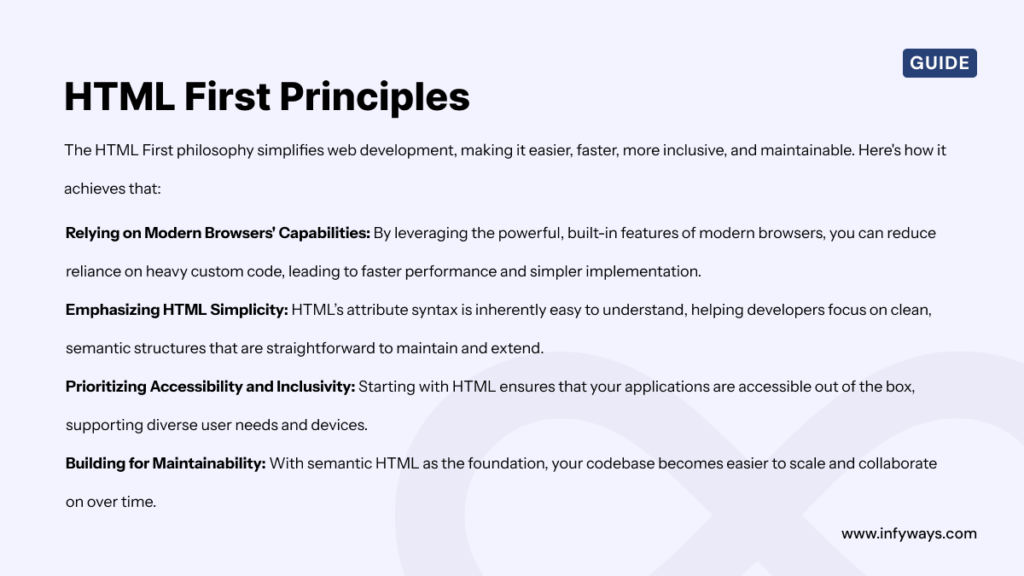
  • Full-Stack Development – A Complete Guide

    Full-Stack Development – A Complete Guide

    Think of your favorite websites—Netflix, Amazon, Instagram. Ever wondered what goes into building those platforms? Behind the slick user interfaces and smooth functionality, there’s a special kind of magic happening: full-stack development.

    did you know full stack development

    Today’s tech landscape moves fast. Users demand seamless experiences, whether they’re binge-watching their favorite series or purchasing something online. But how do companies create these complex, high-performing applications? That’s where full-stack developers come in.

    In this blog, we’re diving deep into the world of full-stack development—what it is, why it’s so important, and how you can master it. Whether you’re an aspiring coder or a business owner looking to build an app, this guide will give you everything you need to know.

    What is Full-Stack Development?

    what is full stack development

    Full-stack development is the art of building both the client-side (frontend) and server-side (backend) of an application. Essentially, full-stack developers work on both what users see and interact with (frontend) and the parts of the website or app that work behind the scenes (backend).

    So, what exactly do these two sides entail?

    • Frontend (Client-Side): This includes everything a user experiences visually and interacts with directly—layouts, buttons, forms, and content display. Frontend developers use HTML, CSS, and JavaScript to create these interactive and visually appealing interfaces.
    • Backend (Server-Side): The backend manages the logic, database, and server. This is where all the heavy lifting happens—processing data, managing user accounts, and ensuring everything runs smoothly behind the scenes. Popular backend languages include Node.js, Python, Ruby, and Java.

    So why is it called “full-stack”? Imagine a tech stack like a layered cake, where each layer plays a critical role in the final product. The “full-stack” refers to handling every layer of the development process, from the user interface at the top to the server infrastructure at the bottom.

    How Full-Stack Development Has Evolved Over Time

    In the early days of the web, websites were fairly static. Developers didn’t need to worry about complex interactions, databases, or user authentication. A simple knowledge of HTML and CSS was enough to build a basic website. However, as the internet matured, websites started becoming more dynamic.

    Web 2.0 revolutionized how users interacted with websites. Social media, e-commerce, and cloud applications pushed developers to build more interactive experiences. Suddenly, websites needed to store user data, process complex requests, and deliver real-time updates. The demand for backend development grew.

    As businesses and startups realized they needed developers who could handle both the frontend and backend, the concept of full-stack development was born. Today, full-stack developers are the Swiss Army knives of the tech world, capable of building, scaling, and maintaining entire applications.

    Why Full-Stack Development is In-Demand

    Why do companies prefer full-stack developers over hiring separate frontend and backend specialists? It boils down to a few key reasons:

    1. Versatility: Full-stack developers can handle the entire development process, which simplifies communication and speeds up production timelines. For small businesses and startups, this flexibility is a game-changer.
    2. Cost-Efficiency: Instead of hiring two or more developers (one for frontend, one for backend), companies can hire a single full-stack developer who can manage both. This is especially useful for lean teams working on tight budgets.
    3. Problem-Solving: Full-stack developers have a holistic view of the entire application. They know how the frontend interacts with the backend, allowing them to solve problems more effectively and offer better performance optimizations.
    4. Cross-Functional Collaboration: Full-stack developers often work alongside designers, product managers, and marketers. Their ability to understand the entire system means they can communicate technical decisions clearly to non-technical stakeholders, making them valuable in cross-functional teams.

    Example of Real-World Full-Stack Development

    Let’s say you’re building a new e-commerce platform. As a full-stack developer, you would:

    • Design the frontend to ensure a smooth shopping experience. This includes building the navigation, creating the shopping cart functionality, and ensuring that the checkout process is visually appealing and easy to use.
    • Develop the backend to handle the complex logic behind product inventory, user authentication, and order processing. You’ll need to connect the app to a database (e.g., MySQL or MongoDB) to store all the product information, user data, and transaction history.

    By handling both sides of the development process, full-stack developers ensure that the entire system runs smoothly, from the moment a user visits the site to when they receive a confirmation email for their order.

    Comparing Full-Stack Development to Specialized Roles

    You may be wondering, “Why hire a full-stack developer when you could hire specialists for frontend and backend?” Well, it depends on the project.

    For large companies with dedicated teams, hiring specialized developers makes sense. A frontend developer might focus entirely on optimizing the user experience (UX), while a backend developer fine-tunes the server performance. This division allows for in-depth expertise in specific areas.

    However, for startups or medium-sized companies, having a full-stack developer who understands both the frontend and backend can significantly speed up the development process. Since they handle all aspects of the stack, they reduce the number of handoffs between teams, ultimately increasing efficiency.

    Full-Stack Developers as Product Builders

    Another key benefit of full-stack developers is that they can act as product builders. Because they understand the entire architecture of the system, they often take on more strategic roles within a company, contributing not just code but also ideas on how the product should evolve.

    For example:

    • They might suggest features that require complex backend integrations but offer a seamless user experience on the frontend.
    • They can spot inefficiencies in both frontend rendering and server-side operations, ensuring faster page loads and better user interactions.

    Let’s now dive deep into Frontend Development, explaining the core technologies and providing more detailed insights into popular frameworks like React, Angular, and Vue.js.

    Frontend Development

    When you land on a website or open an app, the first thing you see is its frontend. Everything from the color scheme and fonts to buttons and animations is part of frontend development. It’s the visible layer, where creativity meets functionality, and the user’s experience is crafted.

    Frontend developers are the architects behind this experience, ensuring that websites not only look good but also function flawlessly. They’re the ones who make sure everything responds quickly when you click, scroll, or type.

    In this section, we’ll explore the key technologies that power frontend development and discuss the frameworks that have revolutionized how modern web applications are built.

    Core Technologies of Frontend Development

    core technologies of frontend development

    Frontend development is built on three core technologies: HTML, CSS, and JavaScript. Together, these form the foundation of every website and web application.

    1. HTML (Hypertext Markup Language)

    HTML is the skeleton of any website. It defines the structure of the page and tells the browser what content should appear and in what order.

    • How it works: HTML uses a series of tags, like <header>, <p>, and <div>, to arrange text, images, videos, and other elements on the page.
    • Example: When you see a heading at the top of a blog post or a list of items on a website, that’s HTML at work. It’s the blueprint that organizes everything.

    Without HTML, a website would have no structure—just a blank page.

    2. CSS (Cascading Style Sheets)

    While HTML gives structure to the page, CSS makes it beautiful. CSS controls the layout, fonts, colors, and spacing of a webpage, ensuring everything looks polished and visually appealing.

    • How it works: CSS applies styling rules to HTML elements. For example, if you want to change the background color of a website, CSS lets you do that with a single line of code.
    • Example: Think of your favorite e-commerce site. The product images are probably laid out in a neat grid, the text is spaced perfectly, and the colors match the brand’s identity. That’s all thanks to CSS.

    In short, CSS transforms a simple HTML skeleton into a visually appealing, user-friendly design.

    3. JavaScript

    Now that your website has structure (HTML) and style (CSS), it needs functionality—and that’s where JavaScript comes in. JavaScript is a powerful programming language that makes websites interactive.

    • How it works: JavaScript adds behavior to websites. Want to create a form that updates in real-time as the user types? Or a button that expands a hidden menu? JavaScript makes it possible.
    • Example: When you fill out an online form and see real-time suggestions or validation (like showing a green checkmark when you enter the correct information), JavaScript is powering that interaction.

    JavaScript allows users to interact with websites in dynamic ways, making it a key component of modern frontend development.

    Frontend Frameworks

    front end frameworks

    While HTML, CSS, and JavaScript are the building blocks of every web page, modern websites often require more than just static content and basic interactivity. That’s where frontend frameworks come into play.

    These frameworks provide pre-built structures and tools that help developers build large-scale applications faster and more efficiently. Let’s dive into three of the most popular frontend frameworks: React, Angular, and Vue.js.

    1. React.js: The Power of Reusable Components

    React is a JavaScript library created by Facebook to build user interfaces, and it’s one of the most popular tools in modern web development.

    Key Features:

    • Component-Based Architecture: In React, everything is a component. This means you can break down the entire UI into smaller, reusable pieces. For example, a button, form, or navigation bar can each be a separate component.
    • Virtual DOM: React uses a virtual DOM (Document Object Model) to update the UI more efficiently. Instead of re-rendering the entire page when something changes, React updates only the parts that need to change, making it faster.

    Where It’s Used:

    • Facebook: React powers Facebook’s dynamic newsfeed and real-time updates.
    • Instagram: Instagram’s web app uses React to provide a seamless experience, especially for features like scrolling through your feed or exploring profiles.

    React is ideal for building dynamic, single-page applications (SPAs) where speed and efficiency are crucial. Its component-based structure also makes it easy to maintain and scale.

    2. Angular: The Full-Fledged Framework for Large-Scale Applications

    Angular is a full-fledged framework developed by Google for building robust, scalable web applications. Unlike React, which focuses on the view layer of an application, Angular is a complete framework that includes everything you need—routing, state management, and more.

    Key Features:

    • Two-Way Data Binding: Angular automatically synchronizes the data between the model and the view. If you change the model, the view updates instantly, and vice versa. This makes building complex forms and dynamic content much easier.
    • Comprehensive Toolset: Angular includes tools like dependency injection, routing, and state management, which are crucial for building large applications.

    Where It’s Used:

    • Gmail: Angular powers Gmail’s highly interactive user interface, including real-time updates to emails and dynamic rendering of elements.
    • YouTube: YouTube’s web app uses Angular for features like personalized recommendations, dynamic video loading, and real-time updates.

    Angular is perfect for building enterprise-level applications where scalability and maintainability are critical. Its comprehensive toolset makes it a go-to choice for large projects.

    3. Vue.js: The Lightweight Framework with Flexibility

    Vue.js is the rising star among frontend frameworks, known for being lightweight, flexible, and easy to integrate. Vue is often described as a blend between Angular’s comprehensive features and React’s simplicity.

    Key Features:

    • Reactive Data Binding: Like Angular, Vue offers two-way data binding, making it easy to keep the model and the view in sync.
    • Progressive Framework: Vue is designed to be incrementally adoptable. You can start by using Vue for just a part of your app, like a form or widget, and then scale up as needed.

    Where It’s Used:

    • Alibaba: The e-commerce giant uses Vue to provide seamless, interactive experiences across its platform.
    • Xiaomi: Xiaomi’s website uses Vue.js to deliver a fast, responsive user experience, especially for mobile users.

    Vue’s simplicity and flexibility make it an excellent choice for startups and small-to-medium projects, where ease of use and fast development are priorities.

    Choosing the Right Frontend Framework

    So how do you choose between React, Angular, and Vue.js?

    • If you need to build a dynamic, single-page application with reusable components, React is a great choice.
    • If you’re working on a large-scale enterprise application that requires a comprehensive toolset, Angular offers everything you need out of the box.
    • For smaller projects or if you want something that’s easy to learn and scale, Vue.js is the most flexible option.

    Example:

    Let’s say you’re building a web app for an online course platform. You’d likely choose:

    • React for a fast, dynamic user interface where students can interact with course materials in real-time.
    • Angular for a large-scale project that requires user authentication, payments, and other complex features.
    • Vue.js for a smaller project with a focus on quick delivery and seamless integration with existing systems.

    The Role of Frontend Developers in Full-Stack Development

    In full-stack development, frontend developers play a crucial role in creating responsive, user-friendly interfaces. They’re responsible for ensuring that:

    • Pages load quickly and function well across all devices.
    • The design is consistent with the overall brand and user experience goals.
    • The app is accessible to all users, including those with disabilities.

    Let’s move forward with the next section, where we’ll dive deep into Backend Development. We’ll explore key backend languages, database management, and APIs in full-stack development.

    Backend Development: The Engine Behind the Web

    Imagine visiting a website that looks amazing but doesn’t let you log in, store your data, or remember your preferences. That’s what happens when a site has an impressive frontend but a weak backend. While the frontend is all about what users see, the backend is the invisible powerhouse that makes everything work.

    Backend development is where business logic, database management, and server-side operations come together to ensure websites and apps run smoothly. In this section, we’ll explore the key technologies, popular backend languages, and how APIs (Application Programming Interfaces) connect everything behind the scenes.

    What is Backend Development?

    Backend development is the part of web development that manages the server, database, and logic needed to run a website or app. Unlike the frontend, which is user-facing, the backend is what powers the app from behind the curtain. It handles all the data processing, authentication, transactions, and server management that users don’t see but rely on.

    Let’s break down the core tasks of backend development:

    • Server-Side Logic: The backend processes requests from the user (via the frontend) and sends back data. For example, when you log in to your email, the backend verifies your credentials and displays your inbox.
    • Database Management: Backend development involves managing databases to store user data, content, and transactional information. Every time you post a status update, purchase an item, or send an email, this data is stored in a backend database.
    • APIs and Communication: Backend developers build APIs that allow different parts of an application to communicate. APIs act as the middleman, allowing the frontend to interact with the database or server.

    To understand backend development more clearly, think of a car. The frontend is like the exterior—what you see, feel, and touch. But the engine, fuel, and internal mechanics (backend) are what make it run.

    Key Backend Languages and Frameworks

    Backend development revolves around programming languages and frameworks that power the logic and database of an application. Here are the most widely used backend languages and frameworks in full-stack development:

    1. Node.js: JavaScript on the Backend

    Node.js is a runtime environment that allows developers to use JavaScript for server-side programming. Before Node.js, JavaScript was mostly used for frontend tasks. However, with Node.js, developers can now use JavaScript across the entire stack (frontend and backend), which is a huge advantage for full-stack developers.

    Key Features:

    • Event-Driven: Node.js uses an event-driven architecture, meaning it processes requests asynchronously. This makes it highly efficient, especially for real-time applications like chat apps or online gaming platforms.
    • Single Programming Language: Full-stack developers love Node.js because they can write both the frontend and backend in JavaScript, making the development process more streamlined.

    Where It’s Used:

    • LinkedIn: Node.js powers LinkedIn’s backend, allowing it to handle massive real-time data from users all over the world.
    • Netflix: Netflix uses Node.js for its highly efficient streaming services, optimizing both server-side operations and the user experience.

    Node.js is perfect for applications that require real-time data processing or handle a large number of simultaneous requests.

    2. Python: Simplicity and Versatility

    Python is a powerful, easy-to-learn programming language often used for backend development. Its simplicity and flexibility make it popular among full-stack developers, especially for projects that require quick prototyping and development.

    Key Features:

    • Django and Flask: Python’s backend power lies in its frameworks, primarily Django and Flask. Django is a high-level web framework that encourages rapid development and clean, pragmatic design. Flask is a more lightweight framework that offers flexibility in how developers structure their apps.
    • Readable Syntax: Python’s easy-to-read syntax makes it ideal for beginners, yet it’s powerful enough for large-scale applications.

    Where It’s Used:

    • Instagram: Instagram’s backend is built with Python and Django, handling billions of daily interactions, posts, and likes.
    • Spotify: Spotify leverages Python for its ability to handle large-scale data processing, especially in its recommendation algorithms.

    Python is best suited for applications that require quick development, large-scale data management, or AI integration.

    3. Ruby on Rails: Developer-Friendly Framework

    Ruby on Rails (often called Rails) is a popular backend framework written in the Ruby programming language. It emphasizes convention over configuration, meaning it comes with a lot of sensible defaults, so developers can focus on writing code instead of setting up configurations.

    Key Features:

    • Rapid Prototyping: Rails is known for its speed in development. It allows developers to build full-featured applications in record time, which is especially useful for startups looking to get an MVP (Minimum Viable Product) up and running.
    • Don’t Repeat Yourself (DRY): Rails encourages the DRY principle, meaning developers don’t need to write repetitive code. This leads to cleaner, more maintainable codebases.

    Where It’s Used:

    • Airbnb: Ruby on Rails powers Airbnb’s backend, helping the platform handle millions of bookings, user interactions, and listings worldwide.
    • Shopify: Shopify, one of the largest e-commerce platforms, uses Rails to provide merchants with an intuitive, easy-to-use interface for managing their online stores.

    Ruby on Rails is perfect for startups or companies looking to launch web apps quickly while maintaining flexibility for future scaling.

    4. Java: Scalability and Enterprise Solutions

    Java has been a backend powerhouse for decades, especially in large-scale, enterprise-level applications. Known for its stability and scalability, Java is often used in industries like finance, healthcare, and e-commerce where performance and security are critical.

    Key Features:

    • Platform Independence: Java’s “write once, run anywhere” philosophy makes it highly versatile. It can run on virtually any device or server, making it ideal for companies that need to deploy their apps across multiple platforms.
    • Security: Java has built-in security features that make it ideal for applications dealing with sensitive data, such as financial transactions or healthcare records.

    Where It’s Used:

    • Amazon: Java powers much of Amazon’s backend, handling the complex logic behind its e-commerce platform, from managing orders to tracking inventory in real time.
    • Uber: Java plays a crucial role in Uber’s architecture, especially in managing the large number of real-time requests and transactions between drivers and riders.

    Java is best for high-performance, scalable applications that need to process vast amounts of data and operate across multiple platforms.

    Database Management in Backend Development

    An essential aspect of backend development is managing data efficiently. This is where databases come into play. Backend developers must choose the right type of database depending on the application’s needs.

    Two Types of Databases:

    1. Relational Databases (SQL):
      • MySQL, PostgreSQL, and SQLite are popular relational databases. These are structured, meaning data is organized into tables, rows, and columns.
      • When to use: SQL databases are great for applications where the data relationships are well-defined and require ACID compliance (Atomicity, Consistency, Isolation, Durability). For example, an e-commerce site needs to keep track of users, products, and orders in a structured way.
    2. NoSQL Databases (Non-Relational):
      • MongoDB and Cassandra are popular NoSQL databases. Unlike SQL, NoSQL databases are unstructured, making them perfect for applications where data needs to scale quickly or is constantly changing.
      • When to use: NoSQL is ideal for handling large amounts of unstructured data like social media posts, or for apps that need to scale dynamically without rigid structure.

    Example:
    Let’s say you’re building an app like Twitter. A NoSQL database like MongoDB would be perfect for storing user tweets and comments because the structure of each post doesn’t need to be strictly defined. On the other hand, if you’re building an e-commerce app, you’ll want to use a relational database like MySQL to organize products, categories, and customer transactions efficiently.

    The Role of APIs in Backend Development

    A crucial part of backend development is building and managing APIs (Application Programming Interfaces). APIs allow the frontend and backend to communicate seamlessly.

    Here’s how an API works in full-stack development:

    • When a user submits a request on the frontend (e.g., clicking “Submit” on a form), the API sends that request to the backend, processes it (e.g., saves the form data to the database), and returns a response to the frontend (e.g., showing a success message).

    In a full-stack application, RESTful APIs (Representational State Transfer) or GraphQL APIs are often used to make this communication efficient and scalable.

    Example of API Usage:

    Think about a ride-sharing app like Uber. When you book a ride, the frontend collects your pickup location, sends it to the backend via an API, which then processes the request, matches you with a nearby driver, and sends the driver’s details back to the frontend.

    APIs are what allow this seamless interaction between different parts of the system.

    Let’s dive into the next section, where we’ll break down popular tech stacks in full-stack development and explore the day-to-day responsibilities of a full-stack developer.

    Popular Tech Stacks and the Responsibilities of a Full-Stack Developer

    When it comes to full-stack development, having the right tools and technologies is crucial for building a reliable and efficient web application. These tools, or tech stacks, are combinations of technologies used to develop both the frontend and backend of an application.

    In this section, we’ll cover some of the most popular tech stacks used in the industry today and explain when and why you should choose them for your projects. We’ll also take a close look at the responsibilities of a full-stack developer, walking through what a typical day might look like for someone managing both the frontend and backend.

    What is a Tech Stack?

    A tech stack refers to the set of technologies—programming languages, frameworks, libraries, and tools—that are used together to build and run a web application. Every web app, whether it’s a simple blog or a complex e-commerce platform, relies on a tech stack to function.

    In full-stack development, the tech stack needs to cover:

    • Frontend (Client-Side): The part of the application that the user interacts with, built using tools like HTML, CSS, JavaScript, and frameworks like React or Angular.
    • Backend (Server-Side): The part of the application that handles logic, databases, and server communication, often built with Node.js, Python, Java, and others.
    • Database: Where all the data (such as user profiles, posts, or transactions) is stored, accessed, and managed, using databases like MySQL, MongoDB, or PostgreSQL.

    Some tech stacks come pre-configured with popular tools for each layer of the stack, which can help developers work more efficiently and avoid compatibility issues.

    Popular Full-Stack Tech Stacks

    There are several well-known tech stacks that full-stack developers use, depending on the type of application they’re building. Let’s explore the most commonly used ones.

    1. MEAN Stack

    The MEAN stack is one of the most popular tech stacks used by full-stack developers today. It’s a JavaScript-based stack that covers both the frontend and backend, making it a unified, streamlined solution for building dynamic web applications.

    MEAN stands for:

    • MongoDB (Database): A NoSQL database that stores data in flexible, JSON-like documents.
    • Express.js (Backend Framework): A web framework for Node.js, used to handle routing and server-side logic.
    • Angular (Frontend Framework): A powerful frontend framework developed by Google, used for building dynamic web applications with rich interfaces.
    • Node.js (Runtime Environment): A JavaScript runtime that allows developers to run JavaScript on the server side.

    Why Choose MEAN?

    • Full JavaScript Stack: Since JavaScript is used across the entire stack, developers can work more efficiently without needing to switch between different languages for frontend and backend.
    • Scalability: MEAN is ideal for building scalable applications, making it perfect for startups and companies that expect rapid growth.

    Example of a MEAN Stack Application:

    Imagine you’re building a real-time chat application. The frontend, built with Angular, handles user interactions and messages, while Node.js manages server-side logic, and MongoDB stores user data and chat histories. Express.js ensures smooth communication between the frontend and backend.

    2. MERN Stack: React-Based Development

    The MERN stack is a close cousin of the MEAN stack, with one key difference—it uses React.js instead of Angular for the frontend.

    MERN stands for:

    • MongoDB (Database)
    • Express.js (Backend Framework)
    • React.js (Frontend Framework)
    • Node.js (Runtime Environment)

    Why Choose MERN?

    • Component-Based Architecture: React’s component-based architecture allows for the reuse of UI components, making it ideal for large, complex user interfaces.
    • Flexible Frontend: React’s flexibility and ease of integration with other libraries make it a popular choice for developers looking to build single-page applications (SPAs) that offer a smooth user experience.

    Example of a MERN Stack Application:

    Consider a content management system (CMS) where administrators can manage content, publish posts, and track user engagement. React allows for fast, interactive interfaces, while Node.js and Express handle the backend logic, and MongoDB stores the articles and user data.

    3. LAMP Stack: A Traditional and Reliable Solution

    The LAMP stack is one of the oldest and most reliable tech stacks, and it’s still widely used for building web applications. It’s an open-source stack and covers both dynamic websites and server-side applications.

    LAMP stands for:

    • Linux (Operating System)
    • Apache (Web Server)
    • MySQL (Database)
    • PHP (Backend Language)

    Why Choose LAMP?

    • Mature and Stable: LAMP is a well-established stack that has been used for decades, making it highly reliable for building traditional web applications.
    • Cost-Effective: Since it’s open-source, LAMP is cost-effective and easy to get started with, making it ideal for small and medium-sized businesses.

    Example of a LAMP Stack Application:

    Think about a typical blogging platform like WordPress. The frontend is a simple, customizable user interface, while the backend is built on PHP with MySQL handling the database. Apache serves the web pages, all running on a Linux server.

    4. Django Stack: Python’s Framework of Choice

    The Django stack is built around Python, a powerful and easy-to-learn language. It’s known for its focus on rapid development and clean, pragmatic design.

    Key Components:

    • Python (Backend Language)
    • Django (Web Framework)
    • PostgreSQL (Database)

    Why Choose Django?

    • Secure by Design: Django includes many security features out of the box, making it ideal for applications that require strong security measures.
    • Rapid Development: Django’s design encourages rapid development, meaning developers can build prototypes and get applications to market faster.

    Example of a Django Stack Application:

    A great example is Instagram, which uses Django to manage billions of daily interactions, allowing users to share, like, and comment on posts in real-time while ensuring that all data is securely managed in the backend.

    Responsibilities of a Full-Stack Developer

    Now that we’ve covered popular tech stacks, let’s dive into the responsibilities of a full-stack developer. Full-stack developers handle both the frontend and backend of an application, meaning their role is both versatile and complex.

    1. Designing the User Interface

    One of the primary responsibilities of a full-stack developer is to create the frontend or user interface of the web application. This involves:

    • Implementing designs provided by UX/UI designers.
    • Using tools like HTML, CSS, and JavaScript to create responsive, interactive interfaces.
    • Ensuring the website works smoothly across various devices (desktop, tablet, mobile).

    2. Building and Managing the Backend

    On the backend, full-stack developers handle the server-side logic and data management. This includes:

    • Writing server-side code in languages like Node.js, Python, or Ruby.
    • Managing the database (e.g., MySQL, MongoDB) and ensuring data is securely stored and retrieved.
    • Creating and maintaining APIs to connect the frontend and backend.

    3. Ensuring Application Security

    Full-stack developers are also responsible for implementing security features to protect the application from vulnerabilities such as data breaches or cyber-attacks. This includes:

    • Managing user authentication (logins, signups) and session management.
    • Securing sensitive data using encryption techniques.

    4. Testing and Debugging

    Another key responsibility is to test and debug the application to ensure it functions correctly. This involves:

    • Running unit tests for individual pieces of code.
    • Performing integration tests to ensure different parts of the application work together.
    • Fixing bugs and ensuring the app performs well under various conditions.

    5. Collaborating with Teams

    Full-stack developers often work with designers, product managers, and other developers to ensure the project aligns with business goals. They must:

    • Communicate effectively with designers to understand the visual and interactive aspects of the site.
    • Work closely with backend developers to ensure that data flows correctly between the client and server.
    • Collaborate with DevOps teams to ensure the application is deployed and maintained properly.

    A Day in the Life of a Full-Stack Developer

    A typical day for a full-stack developer might look like this:

    • Morning: Review the latest UI designs from the design team and begin implementing the new features on the frontend using React.js.
    • Midday: Switch to the backend, ensuring that the new data required for the frontend is processed correctly by Node.js and stored in MongoDB.
    • Afternoon: Collaborate with a colleague on testing and fixing bugs found during QA testing. Later, ensure that the application is optimized for speed and performance.
    • End of the day: Wrap up by pushing the latest changes to the Git repository and updating the team on progress.

    In the next section we’ll explore the pros and cons of being a full-stack developer, discuss salary and career prospects, and provide insights on how to navigate your career as a full-stack developer.

    Pros and Cons of Full-Stack Development, Salary, and Career Prospects

    As with any career path, full-stack development comes with its share of advantages and challenges. While many developers are drawn to the versatility and problem-solving nature of full-stack development, it’s important to weigh the pros and cons before diving in.

    In this section, we’ll take a closer look at what makes full-stack development an appealing career choice, as well as some of the potential drawbacks. We’ll also discuss salary expectations across different regions and explore career prospects for full-stack developers in 2024 and beyond.

    Pros of Full-Stack Development

    1. Versatility and Flexibility

    One of the most significant advantages of being a full-stack developer is the ability to work on both the frontend and backend. This means you’re not limited to just one area of development, making you a versatile asset to any team.

    • Example: As a full-stack developer, you can switch between designing a user interface and writing server-side code, giving you a broader skill set. This makes you valuable in both startups (where versatility is crucial) and large companies (where cross-functional teams benefit from someone who understands the entire project).

    2. End-to-End Problem Solving

    Full-stack developers have the unique ability to see the big picture and understand how every part of the application works together. This means they can solve problems that span both the frontend and backend, leading to faster debugging and more efficient workflows.

    • Example: Imagine encountering a bug where the data isn’t displaying correctly on the frontend. As a full-stack developer, you can trace the issue from the database query (backend) to the final display (frontend), solving the problem faster than if you were only specialized in one area.

    3. Cost-Efficiency for Companies

    For companies, hiring full-stack developers can be cost-effective because they can handle multiple aspects of development. Instead of hiring separate frontend and backend developers, businesses can hire a single full-stack developer to manage the entire process, reducing overhead costs.

    • Startups in particular benefit from this, as they often have smaller budgets and need developers who can wear multiple hats.

    4. High Demand and Job Security

    Full-stack developers are in high demand, and that demand is expected to grow as more businesses move online and digital transformation continues. According to the U.S. Bureau of Labor Statistics, the employment of web developers (including full-stack developers) is projected to grow 8% by 2029, much faster than the average for all occupations.

    Cons of Full-Stack Development

    1. Overload and Burnout

    While being versatile is a major advantage, it can also lead to work overload. Full-stack developers are often expected to handle everything from frontend design to backend infrastructure, which can result in a high workload. This is especially true for startups or small teams, where resources are limited, and full-stack developers may need to wear more hats than in larger organizations.

    • Example: You might find yourself fixing frontend issues, debugging backend code, and optimizing database queries—all in the same day. This constant switching between tasks can be overwhelming.

    2. Jack of All Trades, Master of None

    The very thing that makes full-stack developers versatile can also be a downside. Since they cover both frontend and backend development, full-stack developers might not have the depth of expertise that specialists do. This can be a disadvantage in certain projects that require deep technical knowledge of a specific area.

    • Example: A developer who spends all their time working on frontend frameworks like React or Angular may have a more refined understanding of user experience and design patterns than a full-stack developer who splits their time between frontend and backend.

    3. Constant Learning Curve

    Technology evolves quickly, and full-stack developers need to stay up-to-date with both frontend and backend tools, frameworks, and languages. This means constantly learning new technologies, which can be time-consuming and demanding.

    • Example: You may need to learn a new JavaScript framework like Next.js for frontend development while also keeping up with updates in backend technologies like GraphQL or Node.js.

    Salary Expectations for Full-Stack Developers

    The salary for full-stack developers can vary significantly depending on factors such as location, experience, and the company’s size. However, full-stack developers tend to earn competitive salaries due to the high demand for their versatile skill set.

    Average Salaries by Region:

    • United States: The average salary for a full-stack developer in the U.S. is around $119,000 per year, according to Indeed. In tech hubs like San Francisco and New York, salaries can be even higher, often reaching $140,000 to $160,000 per year for senior full-stack developers.
    • Europe: In Europe, full-stack developers can expect to earn around €50,000 to €75,000 per year, with countries like Germany and Sweden offering higher wages compared to other regions.
    • India: In India, the average salary for a full-stack developer ranges from ₹6 to ₹12 lakhs per year (roughly $8,000 to $16,000), depending on the developer’s experience and the company’s location.
    • Freelancing: Freelance full-stack developers often charge $35 to $60 per hour, depending on their expertise. Highly experienced developers working with international clients can earn significantly more.

    Factors That Affect Salary:

    • Experience: Naturally, developers with more years of experience or those with advanced technical knowledge in both frontend and backend earn higher salaries.
    • Location: Working in a major tech hub like Silicon Valley, London, or Berlin usually results in higher pay compared to working in smaller cities or regions.
    • Skill Set: Proficiency in high-demand technologies like React, Node.js, and cloud computing can significantly boost salary offers.

    Career Prospects for Full-Stack Developers

    The career outlook for full-stack developers is bright, thanks to the increasing digital transformation across industries. As businesses continue to move online, the demand for developers who can build and maintain web applications will only grow.

    Job Opportunities:

    • Startups: Startups often prefer full-stack developers because they need versatile team members who can handle multiple roles. In startups, you’ll often have the chance to build an entire product from scratch, giving you hands-on experience with both frontend and backend development.
    • Large Companies: Larger companies also seek full-stack developers, especially for cross-functional roles where the ability to communicate between different teams (frontend, backend, product management) is a major asset. Big tech companies like Google, Facebook, and Amazon hire full-stack developers to work on large-scale, dynamic projects.
    • Freelancing and Contract Work: Many full-stack developers work as freelancers or contractors, offering their skills on a project basis. This allows for more flexibility and often higher pay rates compared to full-time positions.

    Potential for Growth:

    • Leadership Roles: With time and experience, full-stack developers often move into leadership positions such as tech leads, engineering managers, or CTOs (Chief Technology Officers). Their broad understanding of both the frontend and backend makes them well-suited to oversee entire development teams.
    • Specialization: Some full-stack developers eventually decide to specialize in either frontend or backend development, deepening their expertise in one area while still having a strong foundation in the full stack.

    Navigating a Career as a Full-Stack Developer

    Here are a few tips for navigating your career as a full-stack developer:

    1. Stay Updated on Trends

    The tech landscape changes rapidly. Full-stack developers should regularly update their knowledge on emerging tools and frameworks. Platforms like Coursera, Udemy, and LinkedIn Learning offer plenty of courses to keep your skills sharp.

    2. Build a Strong Portfolio

    Since full-stack developers work on both sides of web development, having a portfolio that showcases your projects can set you apart. Include both frontend and backend examples, as well as any contributions to open-source projects.

    3. Network in Developer Communities

    Join developer communities on platforms like GitHub, Stack Overflow, and Reddit. These communities are great for learning, asking questions, and sharing your work. They can also help you land freelance gigs or job opportunities.

    4. Work on Side Projects

    To sharpen your skills, work on side projects that allow you to experiment with different tech stacks. Side projects are an excellent way to stay updated on the latest trends and build your portfolio.

    Let’s continue with last section, where we’ll cover how to become a full-stack developer and explore the future trends shaping full-stack development in the coming years.

    How to Become a Full-Stack Developer and Full-Stack Development Trends

    As the demand for full-stack developers continues to rise, more people are eager to enter this rewarding career. But how exactly do you become a full-stack developer? Is it necessary to attend a coding bootcamp or pursue a computer science degree? What skills are essential, and what are the trends that will shape the future of this profession?

    In this final part, we’ll discuss the steps you can take to become a full-stack developer, the tools and resources available, and the emerging trends in full-stack development for 2024 and beyond.

    How to Become a Full-Stack Developer

    Becoming a full-stack developer requires learning both frontend and backend technologies, as well as developing a wide range of skills related to web development. Here’s a step-by-step guide to getting started:

    1. Master the Basics of Web Development

    Before diving into the world of full-stack development, it’s essential to start with the fundamentals of web development, including HTML, CSS, and JavaScript.

    • HTML (Hypertext Markup Language): Learn how to structure webpages using HTML tags. This is the basic building block of all websites.
    • CSS (Cascading Style Sheets): Get comfortable styling webpages with CSS. You’ll learn how to make your website look visually appealing with layouts, colors, fonts, and animations.
    • JavaScript: Since full-stack development often relies on JavaScript, mastering this language is crucial. Start with the basics—learn how to manipulate the DOM, handle events, and create interactive features.

    Where to Learn:

    • FreeCodeCamp offers an excellent, free curriculum that covers HTML, CSS, and JavaScript.
    • Codecademy and Khan Academy provide interactive tutorials that teach the basics of frontend development.

    2. Learn Frontend Frameworks and Libraries

    Once you’ve mastered the basics, it’s time to level up by learning popular frontend frameworks and libraries. These tools will make it easier to build dynamic, interactive user interfaces.

    • React.js: Learn the most popular JavaScript library for building user interfaces. React’s component-based architecture allows you to create reusable elements, speeding up development.
    • Angular: For developers who prefer a full-fledged framework, Angular provides a comprehensive set of tools for building scalable web applications.
    • Vue.js: If you’re looking for something lightweight and easy to learn, Vue.js is a great choice. It’s becoming increasingly popular for startups and small projects.

    Where to Learn:

    • Udemy offers various courses on React, Angular, and Vue.js that cater to beginners and advanced learners alike.
    • Scrimba provides free and paid interactive courses for frontend development with a focus on JavaScript frameworks like React.

    3. Master Backend Development

    Now that you’ve got frontend development down, it’s time to dive into the backend. Backend development involves building and managing the logic that runs behind the scenes—this includes databases, APIs, and server-side logic.

    Key Backend Skills:

    • Node.js: Learn how to build fast and scalable server-side applications using JavaScript. Node.js is a popular choice for full-stack developers since it allows you to use the same language (JavaScript) for both the frontend and backend.
    • Python: If you’re looking for a backend language that’s easy to learn and versatile, Python is a great option. It’s widely used in web development with frameworks like Django and Flask.
    • Databases: Learn how to manage data using SQL (Structured Query Language) for relational databases like MySQL or PostgreSQL, or dive into NoSQL databases like MongoDB for unstructured data.

    Where to Learn:

    • NodeSchool.io offers open-source tutorials that will teach you how to work with Node.js.
    • Real Python is a great resource for learning Python and its web frameworks.
    • W3Schools offers beginner-friendly tutorials on databases like MySQL and MongoDB.

    4. Work on Real-World Projects

    Learning theory is important, but real-world experience is what will truly make you a competent full-stack developer. Start working on projects that challenge you to integrate both frontend and backend technologies.

    Types of Projects to Build:

    • Portfolio Website: Build a personal portfolio website using HTML, CSS, and JavaScript on the frontend, and use Node.js or Django to manage a blog or portfolio section where users can submit comments or contact forms.
    • E-Commerce Website: Create a simple e-commerce platform where users can browse products, add them to a cart, and check out. For the backend, integrate a database to manage product inventory and user accounts.
    • Real-Time Chat Application: Use React on the frontend and Node.js with Socket.IO for real-time communication. You can store messages in a database like MongoDB.

    Where to Find Projects:

    • GitHub: Contribute to open-source projects on GitHub. This is a great way to collaborate with other developers and showcase your work.
    • LeetCode and HackerRank: Solve coding challenges that will help you improve your problem-solving skills, which is critical for full-stack development.

    5. Learn Version Control and Collaboration Tools

    As a full-stack developer, you’ll be working on multiple parts of a project simultaneously. Learning how to use version control tools like Git and platforms like GitHub is essential for managing code changes and collaborating with other developers.

    Where to Learn:

    • GitHub Guides: GitHub provides detailed documentation on how to use Git, collaborate with teams, and contribute to projects.
    • Codecademy has a comprehensive tutorial on using Git for version control.

    6. Stay Updated and Keep Learning

    Technology is constantly evolving, and to stay relevant as a full-stack developer, you need to keep learning. Stay up to date with the latest trends, tools, and frameworks in web development by reading blogs, taking courses, and attending developer meetups.

    Where to Stay Updated:

    • Stack Overflow and Reddit’s r/webdev community are excellent platforms for staying informed about the latest trends in web development.
    • Follow blogs like CSS-Tricks, Smashing Magazine, and Dev.to for tips, tutorials, and insights from industry experts.

    Future Trends in Full-Stack Development

    As we move into 2024 and beyond, several emerging trends are shaping the future of full-stack development. Here are some of the most important trends you should keep an eye on:

    1. AI and Machine Learning Integration

    Artificial intelligence (AI) and machine learning (ML) are transforming the way applications are built. Full-stack developers will increasingly be tasked with integrating AI-driven features like chatbots, recommendation engines, and predictive analytics into web applications.

    • Example: E-commerce platforms like Amazon use machine learning algorithms to recommend products based on user behavior. Full-stack developers can integrate these AI models into the backend to offer personalized experiences to users.

    Tools to Learn:

    • TensorFlow.js: A library for machine learning in JavaScript that you can use to integrate ML models into web apps.
    • Python: Learn how to build and train machine learning models using Python and frameworks like scikit-learn and Keras.

    2. Cloud-Based Development

    As more businesses move to the cloud, full-stack developers need to be familiar with cloud computing platforms like AWS (Amazon Web Services), Google Cloud, and Microsoft Azure. Building scalable applications that leverage cloud infrastructure will become a standard part of full-stack development.

    • Example: Instead of managing physical servers, full-stack developers can deploy web apps to cloud platforms like AWS Lambda, where the application only runs when it’s needed, reducing costs and improving scalability.

    Tools to Learn:

    • AWS: Amazon Web Services offers various cloud-based services for hosting web applications, managing databases, and handling storage.
    • Docker: Learn how to use Docker to containerize applications and ensure they run consistently across different environments.

    3. Serverless Architecture

    Serverless architecture is a growing trend where developers build applications without managing the underlying infrastructure. With services like AWS Lambda and Azure Functions, full-stack developers can write code that runs in response to events without worrying about server management.

    • Example: A full-stack developer can build a serverless API that responds to user requests, processes payments, or updates a database, all without having to configure or maintain a server.

    Benefits of Serverless:

    • Cost-Efficiency: You only pay for the compute time you use, making it a cost-effective solution for applications with unpredictable traffic.
    • Scalability: Serverless platforms automatically scale as needed, so you don’t have to worry about performance during traffic spikes.

    4. Single-Page Applications (SPAs)

    SPAs continue to grow in popularity because of their fast loading times and smooth user experiences. In an SPA, the browser dynamically updates the page content without reloading the entire page. This makes the app feel more like a native desktop or mobile app.

    • Example: Apps like Gmail and Facebook use the SPA model to provide fast, seamless navigation between different sections of the site.

    Tools to Learn:

    • React.js and Vue.js: These frameworks are perfect for building SPAs with dynamic content that updates in real-time.
    • Next.js: A popular framework for building SEO-friendly SPAs using React.

    5. Mobile-First and Responsive Design

    With mobile usage continuing to rise, full-stack developers need to prioritize mobile-first design. This means designing web applications with mobile devices in mind from the start, ensuring they work seamlessly across different screen sizes and devices.

    • Example: Websites like Twitter and Airbnb focus heavily on mobile-first design, ensuring that their platforms offer the same level of usability on smartphones and tablets as they do on desktops.

    Tools to Learn:

    • Bootstrap and Tailwind CSS: CSS frameworks that make building responsive, mobile-first designs easier and more efficient.
    • Figma: A design tool for creating and testing mobile-first prototypes before building them.

    Conclusion

    Full-stack development is an exciting and rewarding career path that offers endless opportunities for growth. Whether you’re building your first personal website or working on complex applications for a global company, mastering both the frontend and backend gives you a unique skill set that is highly valued in the tech industry.

    As technology continues to evolve, so will the role of full-stack developers. Keeping up with trends like AI, serverless architecture, and cloud computing will ensure you stay relevant and competitive in this fast-moving field.

    If you’re ready to take the plunge into full-stack development, start by mastering the basics, work on real-world projects, and stay curious. The web is always evolving, and as a full-stack developer, you’ll be right at the forefront of that change.