WebP Converter for Joomla: Why Google Ranking Needs It
A WebP converter for Joomla turns JPG, PNG, and GIF files into smaller WebP (and optionally AVIF) copies so browsers download less data while visitors still see the same picture. That matters for Google ranking because Google uses page experience and Core Web Vitals as ranking signals. On image-heavy Joomla sites, a slow hero JPEG often is the Largest Contentful Paint (LCP) element. Cutting image weight by up to 80% is one of the fastest ways to improve what Google measures and what users feel.
Joomla does not convert formats when you upload a photo. Templates and page builders keep printing whatever you stored. Over years you get a folder of large JPEGs and PNGs. Google PageSpeed Insights and Lighthouse then flag Serve images in next-gen formats. This article starts with why next-gen conversion is a must for websites that want to rank in Google, then covers how to do it on Joomla 4, 5, and 6.
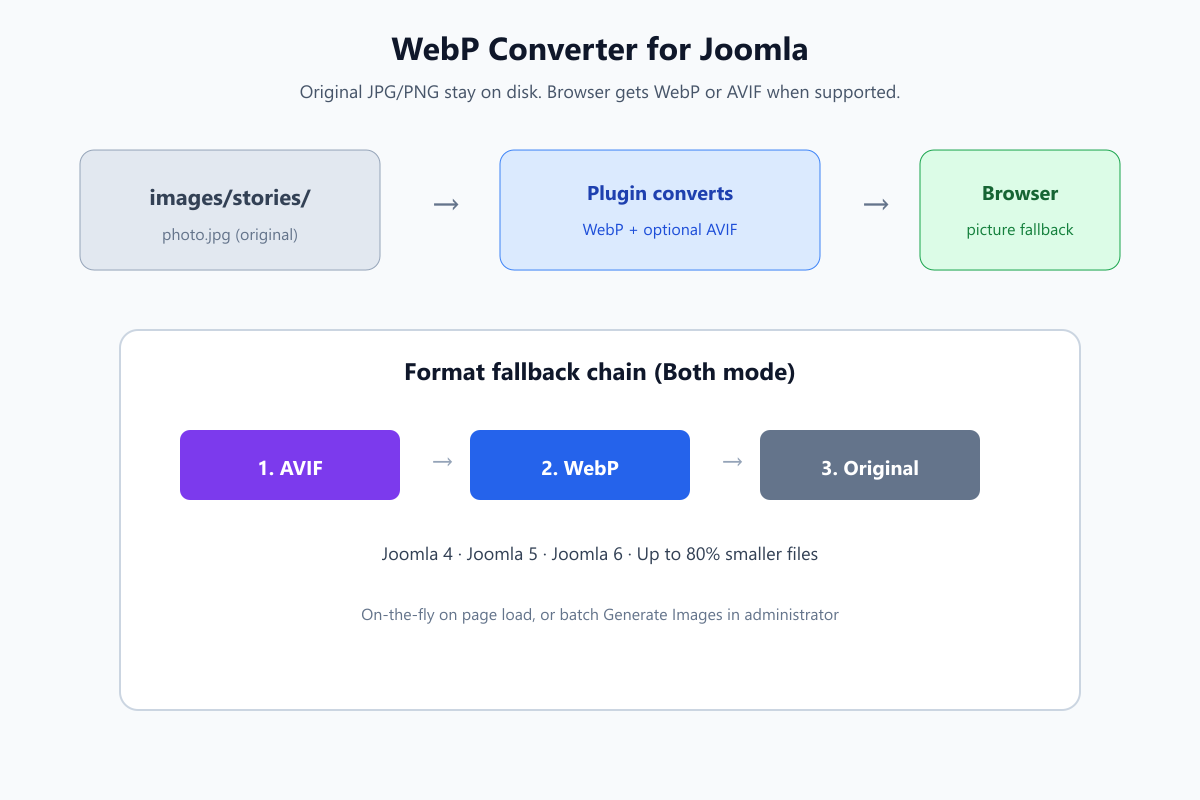
Same visual, smaller file. Google’s crawlers and real users both benefit when LCP images load faster.
What you will learn
- How Google uses speed and Core Web Vitals in ranking
- Why heavy images are a must-fix for almost every website
- Why Joomla sites fall behind on Google PageSpeed image audits
- How WebP and AVIF help you pass Google’s next-gen format checks
- Practical ways to convert (manual, CDN, plugin) and which fits
- Step-by-step conversion on Joomla 4, 5, and 6, then how to verify in Google tools
Related speed work: Joomla website optimization and Joomla on-page optimization.
How Google ranking is affected by slow images
Google Search does not rank on keywords alone. Google also evaluates how usable the page feels. Official Google Search documentation describes page experience and Core Web Vitals as part of that picture. Core Web Vitals currently center on:
| Metric | What Google measures | Why images matter |
|---|---|---|
| LCP (Largest Contentful Paint) | How fast the main content appears | Often a hero image or intro photo on Joomla templates |
| INP (Interaction to Next Paint) | How responsive the page feels | Heavy pages compete for main-thread time while large images load |
| CLS (Cumulative Layout Shift) | Visual stability | Late-loading images without size hints can shove content around |
Google’s guidance for a “good” LCP is roughly 2.5 seconds or under for most users in the field data Google collects. When the largest paint is a 400 KB JPEG on a mid-range phone, that budget burns before PHP or MySQL even enter the story. Content quality still matters most, but when two pages are similar, Google can prefer the faster, better-experiencing URL. That is how image format work impacts ranking: it protects LCP and page experience so you are not the slower option in a competitive SERP.
You see the same problem in tools Google provides:
- PageSpeed Insights (lab + field / CrUX data)
- Search Console → Experience / Core Web Vitals reports
- Lighthouse audits: Serve images in next-gen formats, Efficiently encode images, Properly size images
Ignoring those Google reports does not freeze your rankings overnight. It does leave ranking headroom on the table, especially on mobile Google results where bandwidth and CPU are weaker.
Why next-gen image conversion is a must for websites
Every public website that wants organic traffic from Google has the same constraint: users and Googlebot both wait on bytes. Images are often the largest bytes on the page. Leaving them as unconverted JPG and PNG is optional only if you do not care about:
- Google ranking and visibility. Weak Core Web Vitals and poor page experience make it harder to win when competitors already ship WebP or AVIF.
- Mobile Google users. Most searches happen on phones. A desktop-optimized JPEG that looks fine in the office fails in the field data Google uses.
- Bounce and conversion. Slow LCP means people leave before they read. Fewer engaged visits can reinforce weaker performance in Google Analytics and Search Console over time.
- Crawl and index efficiency. Bloated pages waste crawl budget and delay rendering. Leaner HTML and lighter assets help Google fetch and understand the page faster.
- Cost. Hosts and CDNs charge for bandwidth. Serving 80% less image data is free money after the conversion path exists.
WebP and AVIF are not trends. They are smaller encodings of the same pixels. At similar visual quality, WebP is typically much smaller than JPEG or PNG. AVIF can be smaller still when the host and browser support it. For any website that lives on Google traffic, converting to next-gen formats is a must, not a polish task after “real SEO.”
On Joomla, the must is stronger: the CMS will happily keep uploading camera JPEGs forever unless something converts them automatically.
Why Google PageSpeed hits Joomla sites especially hard
Joomla stores media under images/ and reuses those paths everywhere: articles, modules, custom fields, templates, and third-party components. Unlike a one-page static site, you cannot casually rename every file without breaking references. Google still evaluates the rendered page. If the live HTML points at a 400 KB JPEG, Google PageSpeed counts that JPEG.
Typical Joomla image debt looks like this:
- Hero and intro images uploaded as high-quality JPEG from a phone or camera
- PNG screenshots and UI graphics that were never compressed
- Gallery and news folders with thousands of files from years of publishing
- Template CSS that still points at
.jpgor.pngbackgrounds - Structured data and Open Graph tags that still list the old JPEG URL
Manual fix: download, convert on a desktop, re-upload, update every article and module. On a 500-article site that is a migration project, not a maintenance task. New uploads start the problem again unless conversion is automatic.
So the need is not only "use WebP once." It is continuous: keep originals for the editor and backup, serve modern formats on the front end, and handle new uploads without a weekly batch job on someone’s laptop.
WebP vs AVIF: what each format is for
| Format | Typical size vs JPEG | Browser support | Role on a Joomla site |
|---|---|---|---|
| WebP | Often 25 to 35% smaller at similar quality (sometimes more) | All modern browsers | Safe default for almost every Joomla 4+ site |
| AVIF | Can be ~50% smaller than WebP at similar quality | Strong in Chrome, Firefox, Opera; Safari support has expanded | Use when PHP and hosting can create AVIF |
| Original JPG/PNG | Largest | Universal | Keep as fallback for older clients |
You do not need AVIF on day one. WebP alone clears most of Google PageSpeed’s Serve images in next-gen formats warning for modern traffic. AVIF is the second step when hosting supports it (usually PHP 8.1+ with GD imageavif() or ImageMagick AVIF).
Ideal delivery uses a <picture> chain: AVIF first (if present), then WebP, then the original. The browser picks the first format it understands. Google’s crawlers that support modern formats get the lean file. Older clients still get a working image. You should not hand-write that markup in every Joomla article.
How conversion can be done (pick a method)
| Method | When it works | When it fails |
|---|---|---|
| Desktop tools + re-upload | Few images, one-time redesign | Large archives, ongoing editors, broken paths |
| Free online converters | One-off assets | Privacy, no Joomla integration, no automation |
| CDN / edge image polish | Host already offers format negotiation | Less control per folder; admin and exclusions harder |
| Joomla system plugin | Ongoing sites, many folders, exclusions | Needs PHP GD (and AVIF libs if you want AVIF) |
A solid WebP converter for Joomla should do at least this:
- Keep originals so Media Manager and backups stay intact
- Convert on page load and/or in bulk before traffic spikes
- Support WebP, and AVIF when the server can
- Serve fallbacks so old browsers still see an image
- Let you exclude logos, animated GIFs, checkout pages
- Run on shared hosting without SSH
Those requirements define the "how," not a brand pitch. One product that matches them on Joomla 4, 5, and 6 is WebP Converter by JoomlaX (Infyways). The rest of this guide uses that plugin as the concrete how-to, with official documentation for settings detail.
How it works once a converter is installed
Two workflows cover most sites:
On-the-fly. A visitor opens a page. The plugin finds image tags (and can handle CSS backgrounds and optional global URL rewrite). If a WebP or AVIF copy exists, the HTML points there. If not, it can create the copy during that request (with memory limits), then reuse it later. Good for new uploads and steady traffic.
Batch Generate Images. In the administrator, open the plugin’s Image Management tab, tick folders under images/, choose WebP Only, AVIF Only, or Both, and run Generate. Use this before launch, after a migration, or for a large stories archive.
Default layout: images/stories/photo.jpg gains a copy under images/webp/stories/photo.webp (and AVIF when enabled). Originals are never deleted. Deleting converted files only removes the modern copies.
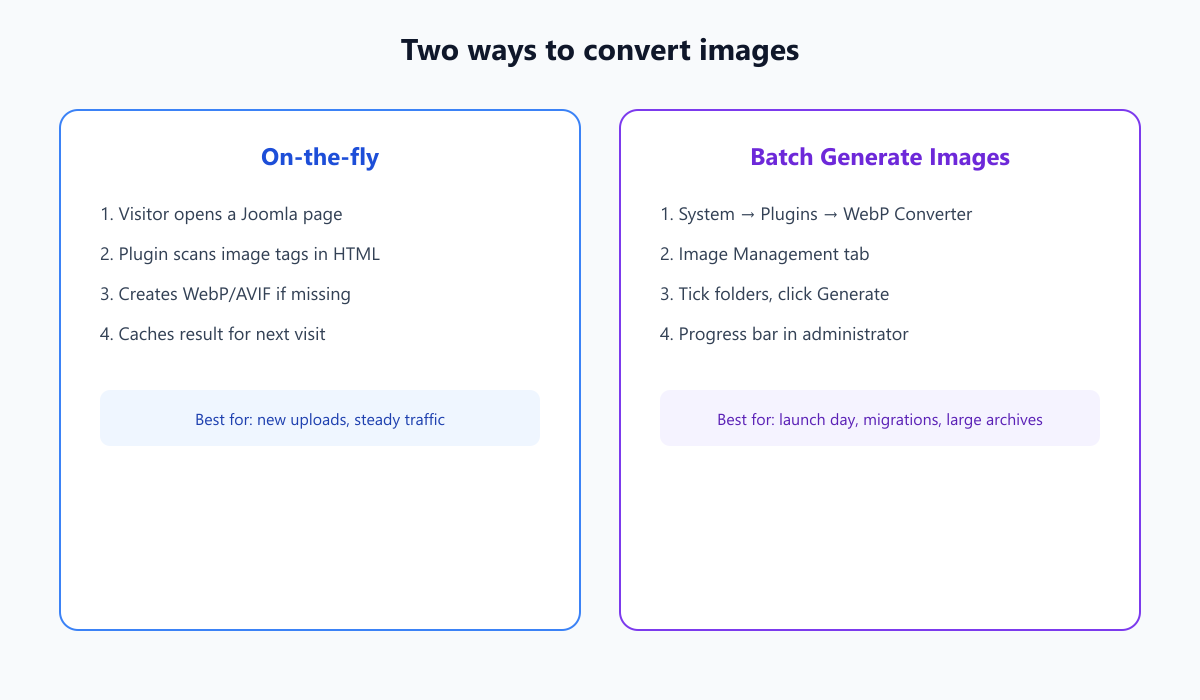
Lazy conversion for ongoing traffic, or pre-warm folders when you control the launch date.
Step 1: Check hosting before you convert
| Goal | What you need |
|---|---|
| WebP | PHP with GD WebP support (common on Joomla hosts) |
| AVIF | PHP 8.1+ with GD imageavif() or ImageMagick AVIF |
| Disk | Space for parallel copies (originals stay) |
| Joomla | 4.x, 5.x, or 6.x |
If AVIF is missing, start with WebP Only. That still solves most of the necessity case above.
Step 2: Install the converter plugin
From the install guide:
- Buy or download from joomlax.com/webp-converter.html.
- Unzip the outer
WebPConverter_UNZIP.zipon your computer. - Install only the inner
plg_system_webpconverter_….zipvia System → Install → Extensions → Upload Package File. Do not upload the wrapper zip. - System → Maintenance → Clear Cache.
- System → Plugins → search WebP Converter → enable System – WebP Converter.
Step 3: First-time settings that matter
Open the plugin → General Settings:
- Image Format: WebP Only (add Both later if AVIF works)
- WebP Quality: about 70 to 80 (100 is rarely worth the size)
- Use Lightweight Processing: Yes on shared hosting
- Debug Mode: No on production
- Save, open the public homepage, hard-refresh
Proof: view source and search for .webp, or open an image in a new tab and check the extension.
Optional next: Exclusion Settings for GIF animations, no-webp class on logos, menu items like checkout, or folders such as headers. Details: Exclusion Settings.
Step 4: Convert a folder in bulk (recommended first test)
- Plugin → Image Management
- Tick one small folder (not Root on the first try)
- Choose WebP Only
- Click Generate Images and wait for completion
- Clear Joomla cache and purge the CDN if you use one
- Re-run PageSpeed Insights on a page that uses those images
If Generate does nothing, tick a folder and use Load more folders when the list is long. Stay logged in as an administrator.
Step 5: Features you turn on only when needed
You do not need every switch on day one. After basics work, these solve real gaps:
| Need | Setting or capability |
|---|---|
| PageSpeed still shows JPG in meta or schema | Replace Image URLs Globally |
| Long pages | Native lazy loading (keep above-the-fold eager if offered) |
| Huge news archives | Flat output directory and/or hashed filenames |
| Checkout or shop quirks | Disable for menu items / components / URL patterns |
| Maximum compression | Image Format → Both (AVIF + WebP + original) |
| Shared hosting RAM pressure | Memory threshold and lightweight mode |
Security extras (CSRF on AJAX, rate limits, logging) matter more on multi-admin sites than on a single-editor brochure site. Full feature list: product page.
After conversion: prove it helped in Google’s tools
- Hard-refresh a key page. Confirm
.webp(or AVIF) in Network or view-source. - Compare file sizes of hero images before and after.
- Re-test mobile in Google PageSpeed Insights. Watch LCP and the next-gen image opportunities.
- Check Google Search Console Core Web Vitals / Experience reports over the following weeks (field data updates slowly).
- Purge CDN so Googlebot and users are not still hitting old JPEG URLs at the edge.
- Spot-check Open Graph previews if you enabled global URL replace.
If images look wrong, lower quality slightly or exclude that asset. Originals are still on disk.
Plans if you use WebP Converter
From the official store, all with a 30-day money-back guarantee:
| Plan | Price | Sites | Access |
|---|---|---|---|
| Tester | $19 | 1 | 30 days (testing) |
| 6 Months | $29 | 2 | Priority support |
| 1 Year (recommended) | $49 | 3 | VIP support channel |
| Lifetime | $99 | Unlimited | Dedicated support |
Pick Tester for a staging proof. Pick 1 Year or Lifetime if you maintain client sites. Docs: WebP Converter documentation. Support: support.joomlax.com.
AVIF-focused companion: Joomla AVIF converter and WebP optimizer.
Key takeaways
- Google uses page experience and Core Web Vitals in ranking. Slow LCP images put you behind faster competitors.
- Next-gen conversion is a must for websites that depend on Google: smaller files, better mobile UX, clearer PageSpeed reports.
- Joomla keeps uploading JPG/PNG forever unless something converts them continuously.
- Start with WebP. Add AVIF when hosting supports it.
- Manual conversion does not scale. A system plugin fits ongoing editorial sites.
- Verify in Google PageSpeed Insights and Search Console after you clear cache and CDN.
Agency help with speed and SEO: Joomla SEO services.
Frequently asked questions
Does WebP conversion help Google ranking?
Yes, indirectly but materially. Google uses Core Web Vitals and page experience as ranking signals. Faster LCP from smaller images helps you compete when content quality is similar. It will not replace good content, but it removes a common technical drag on Google visibility.
Why is a WebP converter a must for websites?
Because Google and users both punish slow pages. Images are often the heaviest assets. Without WebP or AVIF, mobile Google traffic pays the full JPEG cost, PageSpeed stays red on next-gen format audits, and ranking headroom goes to sites that already converted.
Why do I need a WebP converter for Joomla?
Because Joomla serves uploaded JPG and PNG as-is. Converting to WebP or AVIF cuts file size, improves LCP for Google, and clears common PageSpeed image warnings without redesigning the site.
Is WebP enough, or do I need AVIF?
WebP is enough for most sites. Use Both when the server can create AVIF and you want maximum compression with automatic fallbacks.
Will conversion delete my originals?
No, when you use a proper Joomla converter that writes parallel files. Originals stay under images/.
Can I convert without a plugin?
Yes, manually or at the CDN. Plugins win when editors keep uploading and you need folder exclusions and HTML replacement inside Joomla.
How do I know conversion worked?
View source for .webp or .avif, check Network sizes, and re-run PageSpeed after clearing cache and CDN.
Does this work on Joomla 5 and 6?
Yes for current WebP Converter builds aimed at Joomla 4, 5, and 6. Confirm your package version on the product page.
What if PageSpeed still shows old JPG URLs?
Enable global image URL replacement if your plugin offers it, regenerate, and purge CDN. Meta tags and schema often keep old paths until that pass runs.
Can I skip logos and animated GIFs?
Yes. Exclude formats, folders, filenames, or add a class such as no-webp on specific images.
What PHP do I need for AVIF?
PHP 8.1+ with GD imageavif() or ImageMagick with AVIF. Otherwise stay on WebP Only.
Where do I get setup help?
WebP Converter documentation and JoomlaX support. JoomlaX is Infyways’ extension store.
SEO Metadata
| Field | Value |
|---|---|
| Meta Title | WebP Converter for Joomla: Google Ranking & Speed |
| Meta Description | How Google ranking and Core Web Vitals depend on image speed, why WebP/AVIF is a must, and how to convert on Joomla 4, 5, and 6. |
| URL Slug | image-to-webp-joomla |
| Focus Keyword | webp converter for joomla |