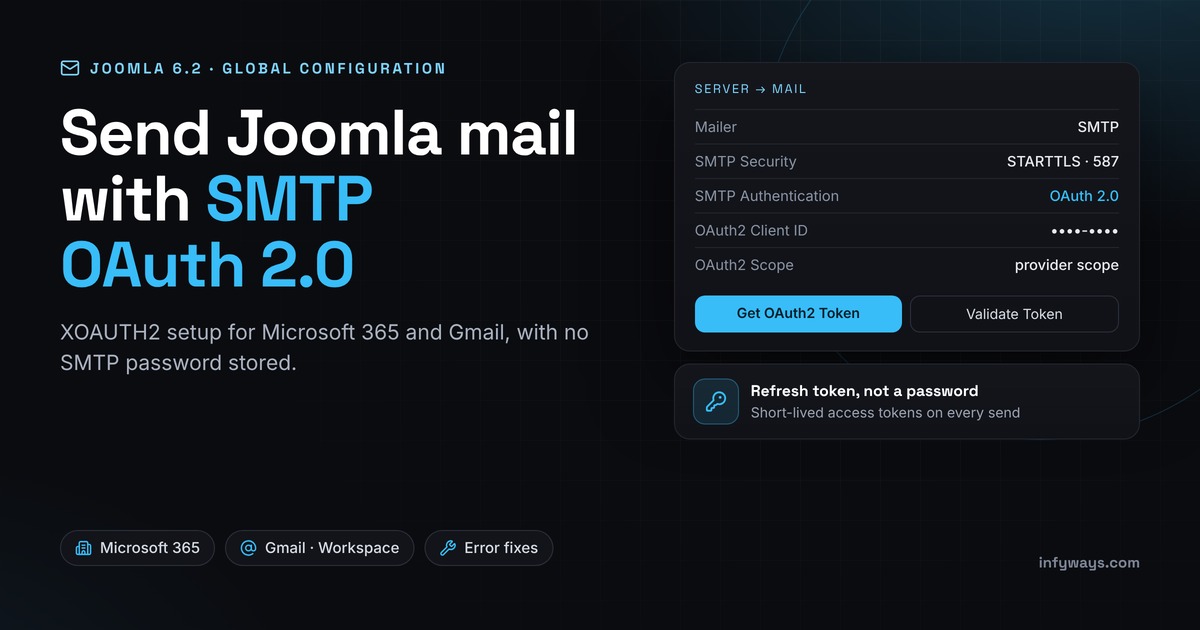
Short answer: Joomla 6.2, released on 13 October 2026, added OAuth 2.0 (XOAUTH2) authentication for SMTP to core. Go to System → Global Configuration → Server → Mail, set Mailer to SMTP and SMTP Authentication to OAuth 2.0. Enter the Client ID, Client Secret, Scope, Authorize URL and Token URL from your mail provider and save. Then click Get OAuth2 Token and sign in to the mailbox. Joomla stores a refresh token instead of your SMTP password and fetches a short-lived access token each time it sends mail. The feature is generic, with no built-in presets, so it works with any XOAUTH2 provider. The Joomla manual documents Microsoft 365 and Gmail / Google Workspace, and this guide covers both.
In this guide: what 6.2 added (checked against the 6.2.0 code), why password SMTP is being retired, step-by-step setup for Microsoft 365 and Google, how to test it, a table of common errors and their fixes, and what to do if you can’t upgrade yet. Planning the upgrade itself? Start with our Joomla 6 guide.
What did Joomla 6.2 add to the mail settings?
The Joomla 6.2 release announcement lists “Generic XOAuth2 support for mail authentication”. It arrived through pull request #48290, which replaced an earlier proposal with provider-specific presets for Microsoft and Google with a generic version. We checked the 6.2.0 code so the field names below match what you’ll see.
| Setting | What changed in 6.2 |
|---|---|
| SMTP Authentication | Now a list instead of Yes/No: Disabled, Username and Password, OAuth 2.0. Existing sites keep their old setting. |
| OAuth2 Information | A note with the callback URL to register at your provider and a link to the Joomla manual. |
| SMTP Username | Still used with OAuth 2.0. It’s the mailbox Joomla signs in as. SMTP Password is hidden. |
| OAuth2 Client ID / Client Secret | Your app’s credentials from Microsoft Entra or Google Cloud. The secret field is masked and locked once saved. |
| OAuth2 Scope | The provider permission, such as https://outlook.office.com/SMTP.Send offline_access or https://mail.google.com/. |
| OAuth2 Authorize URL / Token URL | The provider’s OAuth endpoints. No presets are built in, so you paste them. |
| OAuth2 Token | Buttons for Get OAuth2 Token (or Reissue OAuth2 Token) and Validate Token, plus the time the token was issued. |
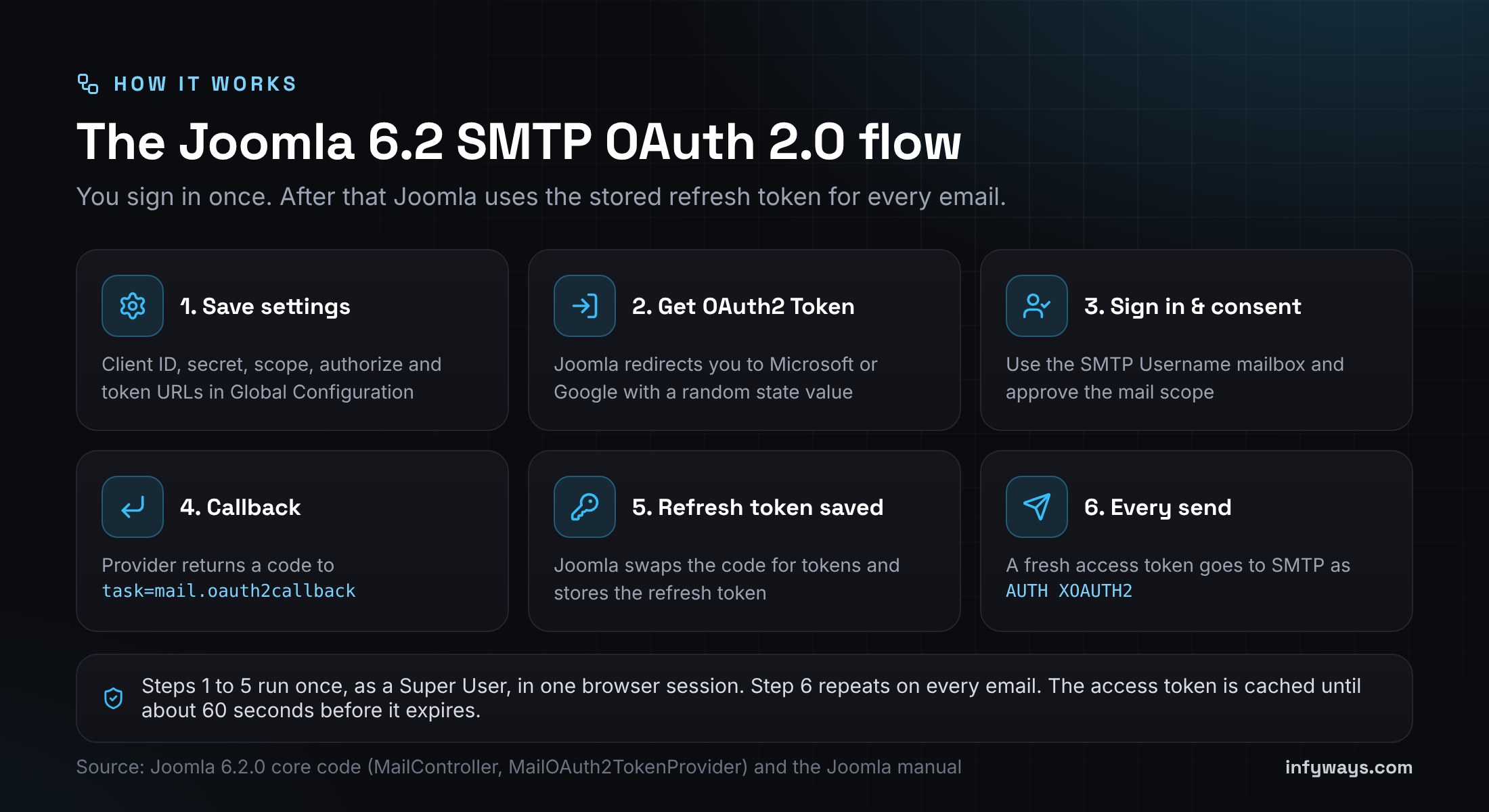
Under the hood, Joomla asks for consent with prompt=consent and access_type=offline, so the provider returns a refresh token. It checks a random state value against your admin session when the provider redirects back, and only a Super User (core.admin) can save the token. When it sends mail, it hands PHPMailer an XOAUTH2 token provider that swaps the refresh token for an access token and caches it until about 60 seconds before it expires.
Which providers does it support?
Any SMTP server that accepts SASL XOAUTH2 with the OAuth 2.0 authorization code flow. The Joomla manual gives tested values for Microsoft 365 (Exchange Online) and Gmail / Google Workspace. For other providers you need their SMTP host, OAuth endpoints and the scope that allows SMTP sending. Joomla 6.2 doesn’t support Microsoft’s app-only client credentials flow (SMTP.SendAsApp). It signs in as a real mailbox.
Why is basic-auth SMTP being retired?
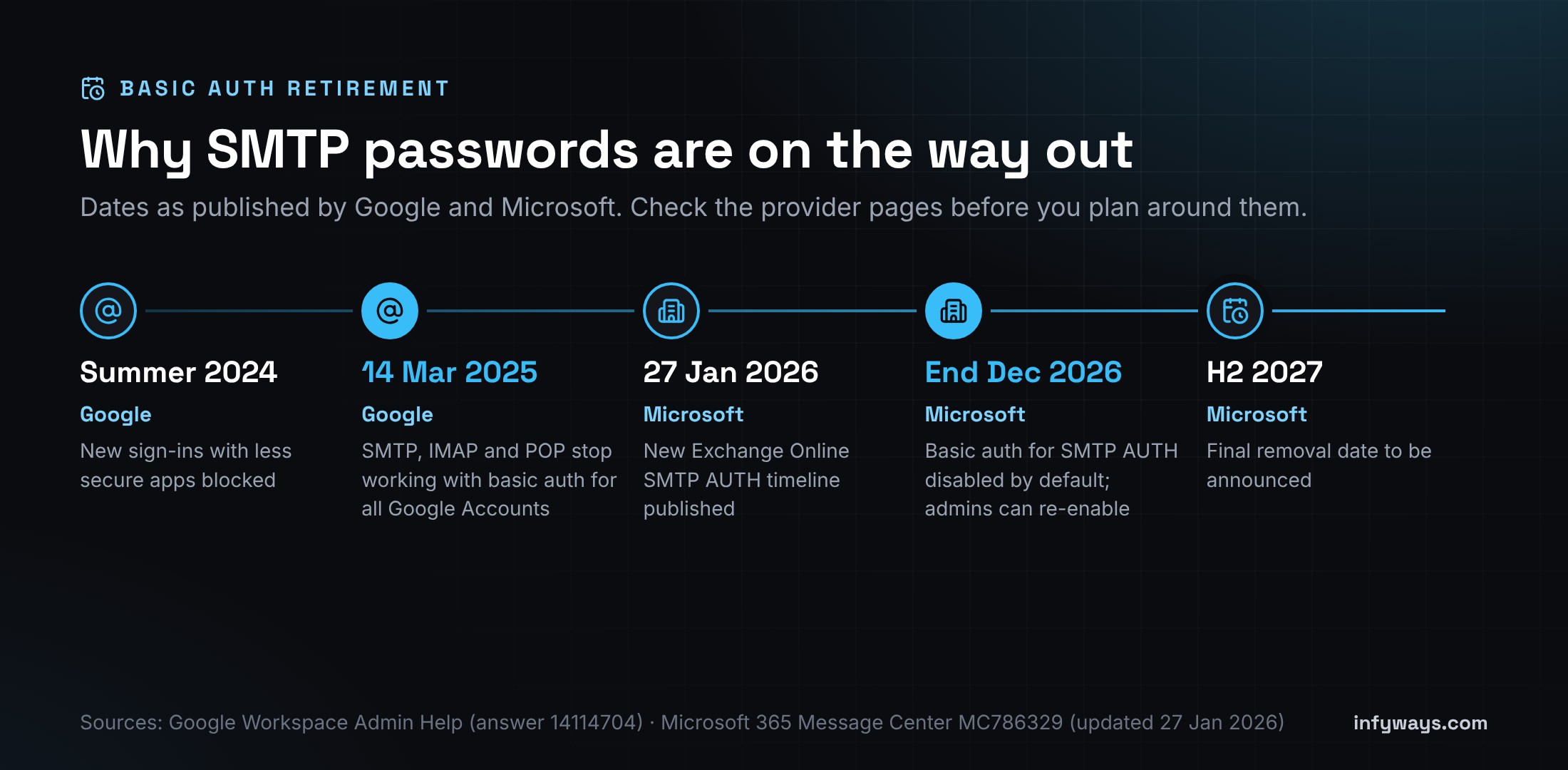
Basic authentication means the app stores and sends the mailbox username and password. Microsoft calls it vulnerable to credential theft, phishing and brute force attacks. OAuth tokens are limited to one app and one permission, they expire, and they keep working with multi-factor authentication turned on. These are the dates the providers have published:
| Provider | What happens | When |
|---|---|---|
| Google (Gmail and Workspace) | Access for “less secure apps” turned off for all Google Accounts. SMTP, IMAP and POP stop working with passwords. Source | 14 March 2025 (first-time connections blocked from summer 2024) |
| Google exception | App passwords still work where the account allows them. Google lists them as an option for devices that can’t use OAuth. | Current |
| Microsoft Exchange Online | No change to SMTP AUTH basic authentication yet. | Now until December 2026 |
| Microsoft Exchange Online | SMTP AUTH basic auth disabled by default for existing tenants. Admins can still re-enable it. Source | End of December 2026 |
| Microsoft Exchange Online | New tenants can’t use SMTP AUTH basic auth by default. OAuth is the supported method. | Tenants created after December 2026 |
| Microsoft Exchange Online | Microsoft will announce the final removal date. | Second half of 2027 |
Microsoft had planned to start rejecting basic-auth SMTP on 1 March 2026. It put that on hold in its 27 January 2026 update. Treat the end of December 2026 as your real deadline for Microsoft 365, and plan your switch before then.
What do you need before you start?
- Joomla 6.2.0 or later. Check System → System Information. On Joomla 5.4, the move to 6.2 is an upgrade, not a migration.
- A Super User account in Joomla.
- Admin access to the provider: a Microsoft Entra role that can register apps (and grant consent if your tenant needs it), or a Google Cloud project.
- The mailbox Joomla will send from, with its password and MFA at hand for the one-time sign-in.
- Your site’s exact admin URL, including
https,wwwor not, and any subfolder. The callback URL must match it character for character.
The callback URL Joomla uses is:
https://www.example.com/administrator/index.php?option=com_config&task=mail.oauth2callback&format=rawJoomla builds it from the address you’re using to reach the administrator, so open the admin on the same host you register (for example, always www).
How do you set up Microsoft 365 / Outlook SMTP OAuth2 in Joomla?
Step 1: Register an app in Microsoft Entra
- Open the Microsoft Entra admin center and go to Identity → Applications → App registrations → New registration (Microsoft guide).
- Name it, for example Joomla SMTP. For one organisation, choose Accounts in this organizational directory only.
- Under Redirect URI, choose platform Web and paste your Joomla callback URL. You can also add it later under Authentication.
- Register, then copy the Application (client) ID and Directory (tenant) ID from the Overview page.
Step 2: Add the SMTP permission and a client secret
- Under API permissions, add the delegated permission
SMTP.Send(Microsoft’s scope string ishttps://outlook.office.com/SMTP.Send, per Microsoft Learn). Grant admin consent if your tenant requires it. - Under Certificates & secrets → Client secrets, create a secret and copy its Value straight away. Don’t copy the Secret ID. Microsoft shows the value only once.
- Note the secret’s expiry date and set a reminder. When it expires, mail stops until you paste a new one and reissue the token.
Step 3: Make sure SMTP AUTH is allowed for the mailbox
OAuth won’t help if SMTP AUTH itself is switched off. In the Microsoft 365 admin center, go to Users → Active users, select the mailbox, then Mail → Manage email apps and tick Authenticated SMTP. Microsoft notes that if security defaults are on, SMTP AUTH is already disabled, and an organisation-wide setting can also turn it off (Microsoft Learn). In PowerShell:
Set-CASMailbox -Identity joomla@example.com -SmtpClientAuthenticationDisabled $false
Get-CASMailbox -Identity joomla@example.com | Format-List SmtpClientAuthenticationDisabled
Changes to the app, permissions or Exchange can take a while to apply. The Joomla manual suggests allowing up to about an hour before you decide something is broken.
Step 4: Enter the values in Joomla
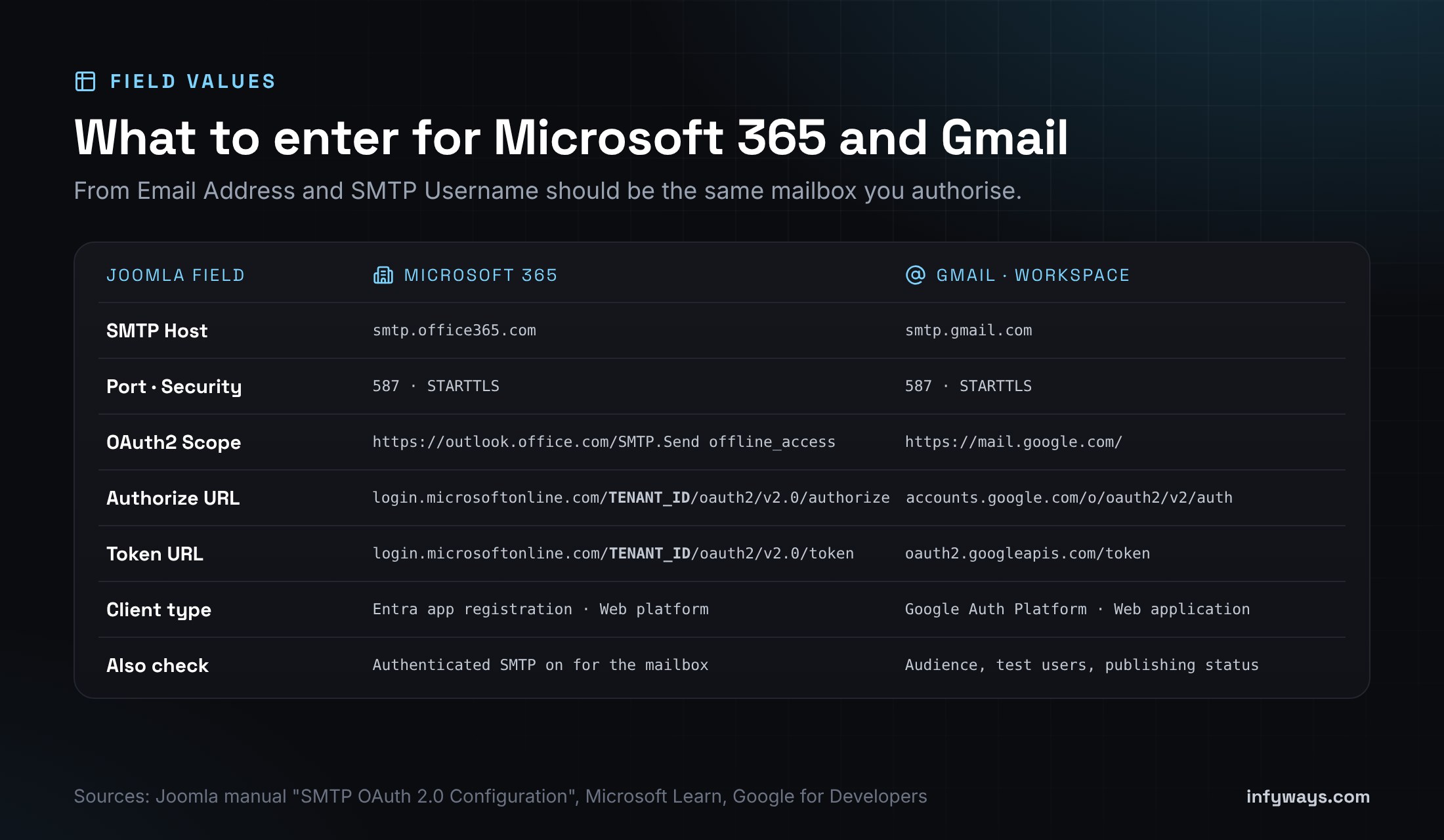
| Joomla field | Microsoft 365 value |
|---|---|
| Mailer | SMTP |
| SMTP Host | smtp.office365.com |
| SMTP Port | 587 |
| SMTP Security | STARTTLS |
| SMTP Authentication | OAuth 2.0 |
| From Email / SMTP Username | The same mailbox, e.g. joomla@example.com |
| OAuth2 Client ID | Application (client) ID |
| OAuth2 Client Secret | The secret Value |
| OAuth2 Scope | https://outlook.office.com/SMTP.Send offline_access |
| OAuth2 Authorize URL | https://login.microsoftonline.com/TENANT_ID/oauth2/v2.0/authorize |
| OAuth2 Token URL | https://login.microsoftonline.com/TENANT_ID/oauth2/v2.0/token |
Replace TENANT_ID with your Directory (tenant) ID. Keep offline_access in the scope. Without it Microsoft doesn’t return a refresh token and Joomla shows “Failed to acquire OAuth2 refresh token.”
Step 5: Save, then get the token
Click Save first, because Joomla reads the saved values when it starts the sign-in. Then click Get OAuth2 Token, sign in as the SMTP Username mailbox and accept the permission. You’re sent back to Global Configuration with “OAuth2 token received and saved.” and an issue time under the button.
Personal Outlook.com accounts: Microsoft says OAuth for SMTP works for Outlook.com too. The Joomla manual only documents the work-account setup above, though, and personal accounts need an app registration that allows personal Microsoft accounts. We haven’t covered that case here.
How do you set up Gmail or Google Workspace SMTP OAuth2 in Joomla?
Step 1: Configure the Google Auth Platform
- In Google Cloud Console, create or pick a project for this site.
- Open Google Auth Platform and fill in Branding (app name, support email, developer contact).
- Under Audience, choose Internal if every sending mailbox is in your Workspace organisation. Choose External for a personal Gmail account.
- Under Data Access, add the scope
https://mail.google.com/. Google treats it as a restricted scope, which can mean extra verification for public apps. That usually doesn’t apply to an internal app used by your own staff.
Step 2: Create a Web application client
- Go to Google Auth Platform → Clients → Create client and choose Web application. Google says to use this type for server-side apps (Google for Developers).
- Under Authorized redirect URIs, add the full Joomla callback URL, query string included. Just the domain isn’t enough.
- Copy the Client ID (it ends in
.apps.googleusercontent.com) and the Client secret.
Step 3: Watch the 7-day trap on External apps
Google’s OAuth documentation says an External app whose publishing status is Testing gets refresh tokens that expire after 7 days. That applies to the Gmail scope. Your Joomla mail would work for a week and then stop with invalid_grant. For a personal Gmail account, add the mailbox as a test user only for the first try, then publish the app (move it to In production) before you rely on it. Workspace sites with an Internal app don’t hit this limit.
Step 4: Enter the values in Joomla
| Joomla field | Gmail / Workspace value |
|---|---|
| Mailer | SMTP |
| SMTP Host | smtp.gmail.com |
| SMTP Port | 587 |
| SMTP Security | STARTTLS |
| SMTP Authentication | OAuth 2.0 |
| From Email / SMTP Username | The same Google mailbox |
| OAuth2 Client ID | Your Web client ID |
| OAuth2 Client Secret | Your client secret |
| OAuth2 Scope | https://mail.google.com/ |
| OAuth2 Authorize URL | https://accounts.google.com/o/oauth2/v2/auth |
| OAuth2 Token URL | https://oauth2.googleapis.com/token |
Save, click Get OAuth2 Token, sign in with the same Google account and allow access. If Google shows an “unverified app” warning for your own External app, that’s expected while it’s unverified. Continue only if it’s your app.
How do you test that Joomla is really using OAuth?
- Click Validate Token. A good result reads “Token is valid. Access token expires in N seconds.” This proves the refresh token works with your client ID and secret.
- Click Send Test Mail. Joomla sends a message to your own Super User email address with the subject “Test mail from {your site name}”.
- Read the success message closely. If it says the email was sent “using PHP Mail as fallback”, Joomla didn’t use SMTP. Fix the SMTP error before you go further.
- Check that the message arrived and look at the headers. It should come from your provider’s servers.
- Test a real flow too: a contact form, a password reset or a registration email.
Add this to your maintenance checklist: Microsoft client secrets expire, and Google revokes refresh tokens in some cases, for example if one goes unused for six months or the user changes their password while the token has Gmail scopes. The fix is the same each time: update the secret if needed, save, then click Reissue OAuth2 Token.
What do the common SMTP OAuth2 errors mean?
| Error you see | Usual cause | Fix |
|---|---|---|
AADSTS50011: redirect URI doesn’t match | The callback in Entra differs from the one Joomla sends (www vs non-www, http vs https, or a different admin path) | Copy the URL from the OAuth2 Information note into Entra exactly, and use the admin on that same host |
AADSTS7000215: invalid client secret | The Secret ID was pasted instead of the Value, or the secret expired | Create a new secret, paste its Value, save and reissue the token |
AADSTS65001 or “Need admin approval” | Your tenant requires admin consent for SMTP.Send | Have an admin grant consent under API permissions |
535 5.7.139 Authentication unsuccessful | SMTP AUTH is off for the tenant or mailbox, or security defaults are on | Enable Authenticated SMTP on the mailbox and check the tenant setting |
535 5.7.3 Authentication unsuccessful | SMTP Username isn’t the account that signed in, or the token lacks SMTP.Send | Match the SMTP Username to the mailbox you authorised and check the scope |
554 5.2.252 SendAsDenied | From Email Address differs from the SMTP Username | Use the same address, or grant Send As in Exchange |
Google Error 400: redirect_uri_mismatch | The callback isn’t in Authorized redirect URIs, or only the domain is | Add the full callback URL, query string included |
Google Error 403: access_denied | External app in Testing and the account isn’t a test user, or an admin blocks the app | Add the test user or publish the app; Workspace admins can trust the app |
Google invalid_grant after a week | External app still in Testing, so the refresh token expired after 7 days | Publish the app, then reissue the token |
admin_policy_enforced | A Workspace admin restricted Gmail access for third-party apps | Ask the admin to allow or trust your OAuth client |
| Joomla: “The most recent request was denied because it had an invalid security token” | The callback reached a different session, for example you started on one host and came back on another, or the session timed out | Start again from Global Configuration on the exact host in the callback URL |
| Joomla: “OAuth2 authorize URL or client ID is missing.” or “OAuth2 token URL, client ID or client secret is missing.” | A field is empty, or the values weren’t saved before you clicked the button | Fill in the fields, save, then click Get OAuth2 Token |
| Joomla: “Failed to acquire OAuth2 refresh token.” | No refresh token came back (on Microsoft, usually a missing offline_access) | Fix the scope, save and reissue |
| Joomla: “OAuth2 SMTP configuration is incomplete.” | Username, client ID, secret, token URL or the stored refresh token is empty | Fill in every field and get a token |
Microsoft lists every AADSTS code in its Entra error code reference. If a test mail fails and no clear error appears, turn on Debug System in Global Configuration for a moment, or check your server’s PHP error log. Turn debugging off afterwards.
Is it safe to store the refresh token in Joomla?
It’s safer than storing the password, but treat it the same way. Joomla 6.2 saves the client secret and refresh token with the rest of Global Configuration in configuration.php. Anyone who can read that file can send mail as the mailbox until you revoke the token. So keep the file outside public reach with strict permissions, don’t commit it to Git, and use a dedicated sending mailbox, not a person’s main account. If you think it leaked, revoke the app’s access (for Microsoft, delete the secret; for Google, remove the app from the account’s third-party access), then create new credentials. Our Joomla security guide covers file permissions and admin hardening.
What if you can’t upgrade to Joomla 6.2 yet?
| Situation | Option | Trade-off |
|---|---|---|
| Joomla 5.x or 6.0/6.1 | Upgrade to 6.2 for core OAuth | Test extensions first; 5.4 to 6.2 is an upgrade, not a migration |
| Google mailbox, can’t upgrade soon | A Google app password, where the account allows one | Still a stored password; Google lists it as an exception, not the goal |
| Microsoft 365, can’t upgrade soon | Basic-auth SMTP still works until end of December 2026 | Plan the switch; after that it’s disabled by default |
| Any version | A transactional email service with API-key SMTP | Another vendor and DNS (SPF, DKIM) setup |
| Any version | A third-party Joomla OAuth mail plugin | Paid, and another extension to maintain |
Upgrades aren’t always smooth. Our Joomla upgrade issues guide tracks known 6.2 problems and their workarounds.
Need help switching your Joomla mail to OAuth?
Infyways has built Joomla sites since 2010 and makes 125 Joomla extensions. We can upgrade you to 6.2, set up the Entra or Google app, move your mail to OAuth, check SPF, DKIM and DMARC so messages land in the inbox, and document how to renew the secret. See our Joomla development services. Send us your site and mail provider. We reply within 12 hours.
Sources we checked (October 2026)
- Joomla 6.2 release announcement (13 October 2026)
- Joomla PR #48290: generic XOAuth2 implementation
- Joomla 6.2.0 source: libraries/src/Mail
- Joomla manual: SMTP OAuth 2.0 Configuration
- Microsoft Learn: Authenticate an IMAP, POP or SMTP connection using OAuth
- Microsoft Learn: Enable or disable SMTP AUTH in Exchange Online
- Microsoft Exchange Team: updated SMTP AUTH basic authentication timeline (January 2026)
- Microsoft Entra error codes
- Google Workspace Admin Help: Transition from less secure apps to OAuth
- Google for Developers: Using OAuth 2.0 to access Google APIs
- Google for Developers: Gmail XOAUTH2 protocol
Frequently Asked Questions
Does Joomla support SMTP OAuth2?
Yes, from Joomla 6.2.0 (released 13 October 2026). In Global Configuration → Server → Mail, set Mailer to SMTP and SMTP Authentication to OAuth 2.0, enter your provider’s client details and endpoints, save, and click Get OAuth2 Token.
Which Joomla version added OAuth 2.0 for email?
Joomla 6.2. Earlier versions, including Joomla 5.x, 6.0 and 6.1, only support username and password SMTP authentication in core.
What scope does Joomla need for Microsoft 365 SMTP?
Use https://outlook.office.com/SMTP.Send offline_access. SMTP.Send allows sending, and offline_access makes Microsoft return the refresh token Joomla stores.
What scope does Joomla need for Gmail SMTP?
Use https://mail.google.com/, with the authorize URL https://accounts.google.com/o/oauth2/v2/auth and the token URL https://oauth2.googleapis.com/token.
What is the redirect URI for Joomla SMTP OAuth2?
Your site URL followed by /administrator/index.php?option=com_config&task=mail.oauth2callback&format=raw. Register it exactly, with the same https and www as the admin URL you use.
Why did my Gmail OAuth stop working after 7 days?
Google issues 7-day refresh tokens to External apps in Testing status that request Gmail scopes. Publish the app, or use an Internal app on Google Workspace, then reissue the token in Joomla.
When does Microsoft turn off basic authentication for SMTP?
Under Microsoft’s January 2026 timeline, SMTP AUTH basic authentication is disabled by default for existing tenants at the end of December 2026. Admins can re-enable it for now, and Microsoft will announce the final removal date in the second half of 2027.
Do I still need an SMTP password with OAuth 2.0?
No. With OAuth 2.0 selected, Joomla hides the SMTP Password field and uses the stored refresh token. You still enter the SMTP Username, which must match the mailbox you authorised.