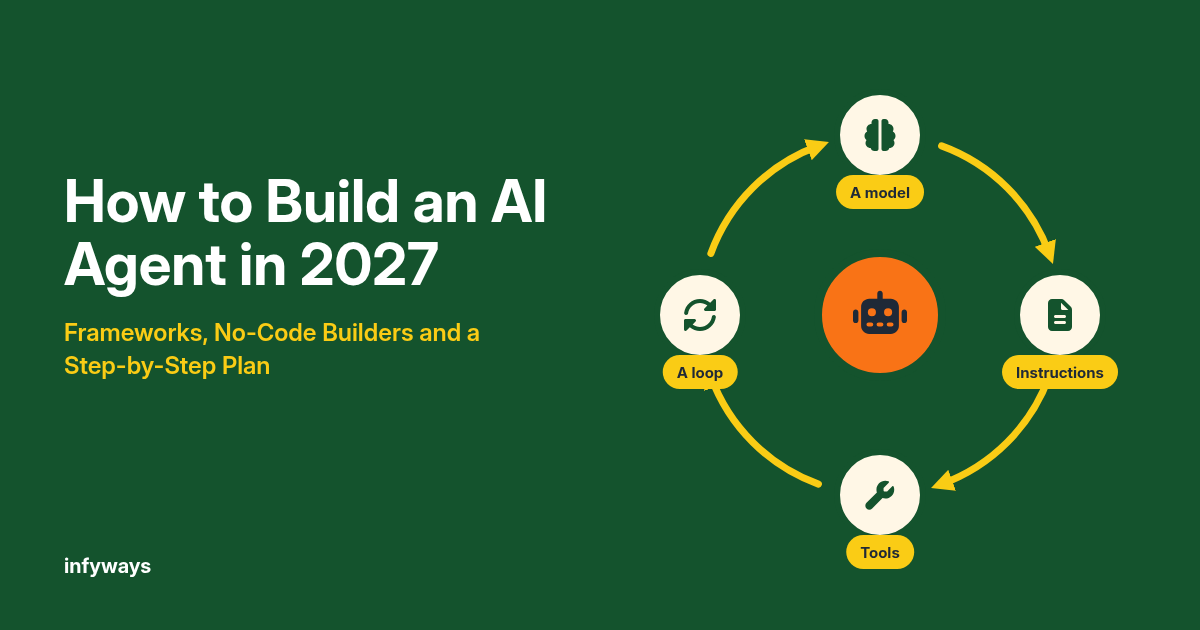
To build an AI agent, pick one narrow task, give a large language model a clear instruction, two to five well-described tools, and a loop that checks results after every step. Start with a framework like the OpenAI Agents SDK or LangGraph, or a no-code builder like n8n, then add tests, guardrails and human approval before it touches real data.
Plenty of business owners see an AI agent demo and want one for their own team. The honest answer is that a useful agent is simpler than the demos suggest, and a risky one is easier to build than most people think.
Interest is real. McKinsey’s 2025 survey found 62% of respondents say their organizations are at least experimenting with AI agents, but only 23% report scaling an agentic system anywhere in the business. Gartner goes further and predicts over 40% of agentic AI projects will be canceled by the end of 2027, due to costs, unclear value or weak risk controls.
This guide is the plan I would use to land on the right side of that number: what an agent is, when you need one, how to build it step by step, and which frameworks and no-code builders fit which job.
Key takeaways
- An AI agent is an LLM that uses tools in a loop to finish a task. Anthropic describes agents as LLMs using tools based on environmental feedback in a loop.
- Start simple. Anthropic recommends finding the simplest solution possible, and only increasing complexity when needed, which often means a fixed workflow instead of a fully autonomous agent.
- The core build steps are the same in every framework: define the task, choose a model, design tools, write instructions, add memory or retrieval, test, add guardrails, then deploy and monitor.
- Prompt injection is the main security risk. OWASP lists it as LLM01, the first entry in its 2025 Top 10 for LLM applications.
1. What Is an AI Agent?
An AI agent is software where a language model decides which steps to take and which tools to call to complete a goal, checking the results as it goes.
McKinsey defines AI agents as systems based on foundation models capable of acting in the real world, planning and executing multiple steps in a workflow. In practice, an agent has four parts:
- A model that reasons about the next step.
- Instructions that set its role, limits and stopping rules.
- Tools, such as a search function, a database query or an API call, that let it act.
- A loop that feeds each tool result back to the model until the task is done or a limit is reached.
Anthropic draws a useful line between two designs. Workflows are systems where LLMs and tools are orchestrated through predefined code paths, while agents let the model direct its own process and tool use.
If you want the wider picture of how agents differ from generative AI and agentic AI, read our guide to generative AI vs AI agents vs agentic AI.
Key insight: most business “agents” that work well in production are really workflows with one or two decision points handled by a model.
2. Do You Actually Need an AI Agent?
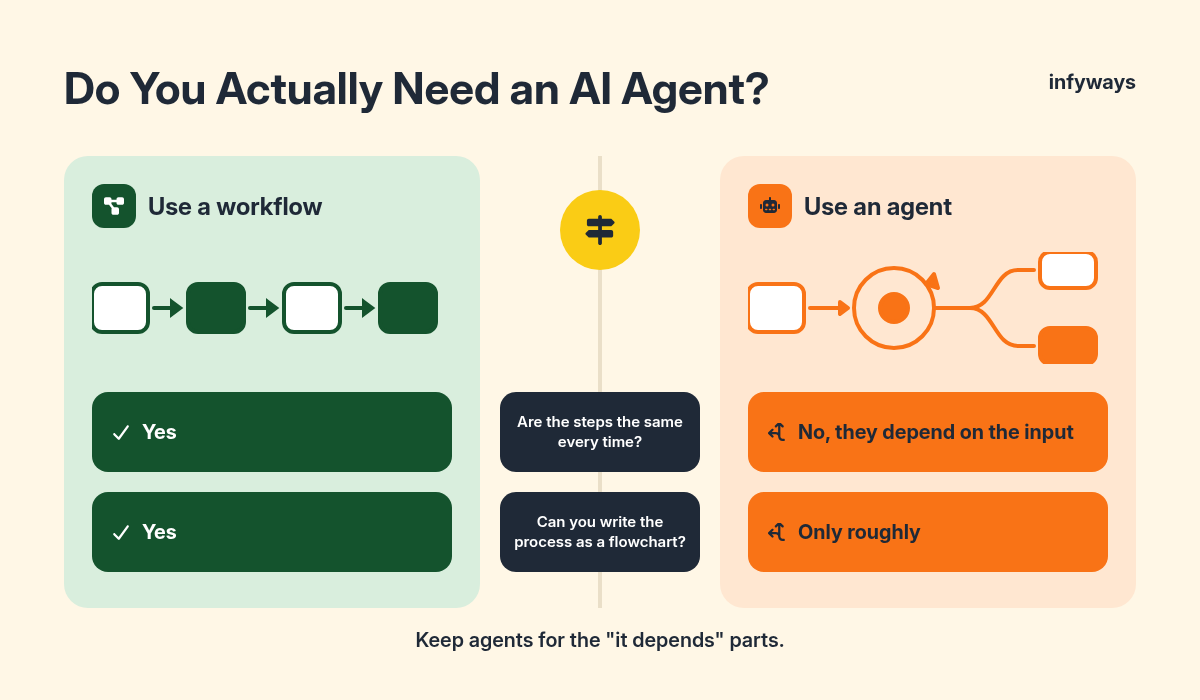
You need an agent only when the steps cannot be predicted in advance. If the steps are known, a workflow is cheaper, faster and easier to test.
Anthropic notes that agentic systems often trade latency and cost for better task performance, and that for many applications a single well-built LLM call with retrieval is enough. Gartner makes a similar point: many use cases positioned as agentic today don’t require agentic implementations.
| Question | Use a workflow | Use an agent |
|---|---|---|
| Are the steps the same every time? | Yes | No, they depend on the input |
| Can you write the process as a flowchart? | Yes | Only roughly |
| How much does a wrong action cost? | Any level (easier to control) | Low, or every action is approved by a person |
| Do you need predictable cost and speed? | Yes | You can accept variation |
| Examples | Summarize every new support ticket, route leads by rules | Research a question across sources, fix a failing test, triage messy requests |
A good test: if you can draw the process on a whiteboard without any “it depends” boxes, build a workflow. Keep agents for the “it depends” parts.
3. How to Build an AI Agent Step by Step
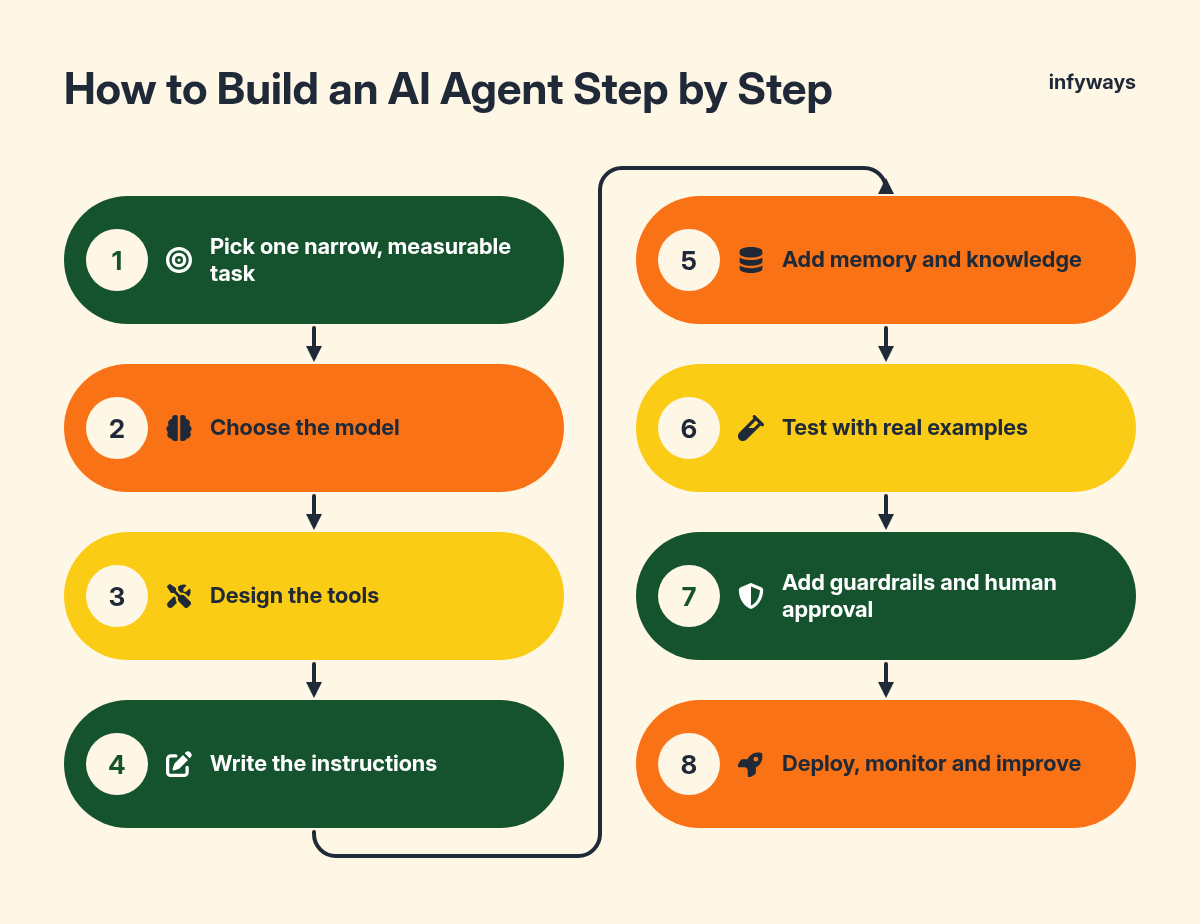
Building an agent takes eight steps, and the same steps apply whether you write code or use a no-code builder.
Step 1: Pick one narrow, measurable task
Choose a task with a clear finish line, such as “answer order-status questions using our order system” or “draft a reply for every new support email”. Write down what success looks like and how you will measure it.
Step 2: Choose the model
Start with a capable general model from a major provider and measure quality before you optimize cost. Anthropic suggests routing easy questions to smaller, cost-efficient models and hard ones to more capable models as one way to save money later.
Step 3: Design the tools
Tools are functions the agent can call. Keep the list short, give each one a clear name and description, and make inputs hard to get wrong. Anthropic says its team spent more time optimizing tools than the overall prompt while building a coding agent.
If your tools already live in other apps, the Model Context Protocol (MCP) gives agents a standard way to connect to them. Our guides on MCP vs API and building your first MCP server show how it works in practice.
Step 4: Write the instructions
Write a system prompt that states the role, the goal, what the agent must never do, when to ask a person for help and when to stop. Add a maximum number of steps so a confused agent cannot loop forever.
Step 5: Add memory and knowledge
Give the agent access to the documents it needs through retrieval-augmented generation (RAG). Our guide to a production RAG pipeline covers chunking, search and evaluation.
Step 6: Test with real examples
Collect 20 to 50 real requests, including awkward ones, and check every answer and every tool call. Re-run the same set after each change so you can see whether quality went up or down.
Step 7: Add guardrails and human approval
Limit what each tool can do, validate inputs and outputs in code, and require a person to approve anything risky, such as refunds, emails to customers or database changes. OWASP recommends you require human approval for high-risk actions and restrict the model’s access privileges to the minimum necessary.
Step 8: Deploy, monitor and improve
Log every run, including the tool calls, cost and outcome. Review failures weekly, add them to your test set, and only widen what the agent is allowed to do once it has earned that trust.
Key insight: the test set from Step 6 is the most valuable thing you build. It tells you whether a new model, prompt or framework is actually better.
4. AI Agent Frameworks Compared
Frameworks handle the loop, tool calling and state for you. The best choice depends on your language, your cloud and how much control you want.
| Framework | Maintainer | Main language | License | Best for |
|---|---|---|---|---|
| OpenAI Agents SDK | OpenAI | Python (GitHub) | MIT | A light, quick start with handoffs between agents |
| LangGraph | LangChain | Python (GitHub) | MIT | Stateful, multi-step agents that need fine control |
| CrewAI | CrewAI | Python (GitHub) | MIT | Teams of role-based agents working together |
| Agent Development Kit (ADK) | Python (GitHub) | Apache-2.0 | Teams building on Google Cloud and Gemini | |
| Microsoft Agent Framework | Microsoft | Python and .NET (Go in preview) | MIT (GitHub) | Teams building on Azure and .NET |
| Pydantic AI | Pydantic | Python (GitHub) | MIT | Type-safe agents with structured, validated outputs |
Anthropic also suggests trying LLM APIs directly before adopting a framework, because many patterns take only a few lines of code. Whatever you pick, make sure you can see the prompts and tool calls it sends.
5. No-Code AI Agent Builders
No-code builders let you assemble an agent from visual blocks and ready-made app connections, which suits operations teams and quick pilots.
| Builder | Free option | Paid entry price | Agent features | Watch out for |
|---|---|---|---|---|
| n8n | Self-hosted Community Edition | €20/month (Starter, billed annually) | AI Agent node, MCP client and server, human approval for tool calls | Cloud prices are in euros; executions are capped by plan |
| Zapier Agents | Free plan includes 400 agent activities/month | Pro from about $33.33/month (annual) for 1,500 activities | Agents act across Zapier’s 9,000+ app connections | Agent activities are billed separately from Zap tasks |
n8n can run on your own server, which keeps data in-house. Our step-by-step guides cover installing n8n with Docker, installing it with npm and hosting it on DigitalOcean. The n8n Advanced AI docs explain its agent nodes in detail.
If you would rather learn agent development properly before you build, a structured course that covers tool calling, RAG, evaluation and deployment will save you a lot of trial and error. Check that it includes a hands-on project, not just theory.
6. How to Keep an AI Agent Safe, Tested and Affordable
Treat every input an agent reads as untrusted, give each tool the smallest possible permissions, and watch cost per task from day one.
Prompt injection is the biggest risk. OWASP explains that indirect prompt injections occur when an LLM accepts input from external sources, such as websites or files, which is exactly what agents do all day.
- Keep secrets and API keys in your code, never in the prompt.
- Separate read-only tools from tools that change data, and gate the second group behind approval.
- Validate tool inputs and outputs with code, not with another prompt alone.
- Set limits on steps, run time and spend per task.
- Log everything, so you can explain any action the agent took.
Skills in this area are in demand. Lightcast found the agentic AI skill cluster grew from 0.06% of U.S. job postings in 2024 to 0.23% in 2025, about 90,000 postings. If you want to build agents for a living, our guide on how to become an AI engineer sets out the full path.
7. Which Way Should You Build Your Agent?
Match the tool to the team: no-code for operations pilots, a light SDK for developers starting out, and a full framework for complex, long-running agents.
| Your situation | Good starting point |
|---|---|
| Operations team, no developers, needs results this month | n8n or Zapier Agents |
| Developer building a first agent | OpenAI Agents SDK or Pydantic AI |
| Complex agent with branching, retries and long-running state | LangGraph |
| Several specialist agents that hand work to each other | CrewAI or OpenAI Agents SDK handoffs |
| Company standardized on Google Cloud or Azure | Google ADK or Microsoft Agent Framework |
| Sensitive data that must stay on your servers | Self-hosted n8n or a framework on your own infrastructure |
Frequently Asked Questions
How do I build an AI agent with no code?
Use a no-code builder such as n8n or Zapier Agents. Connect the apps the agent needs, add an AI agent step with a clear instruction, give it a few actions as tools, and test it on real examples. Add an approval step before any action that sends messages, spends money or changes records.
What is the best AI agent framework?
There is no single best framework. The OpenAI Agents SDK and Pydantic AI are light and quick to learn, LangGraph gives the most control over complex state, CrewAI suits teams of role-based agents, and Google ADK or Microsoft Agent Framework fit teams already on those clouds. Pick the one that matches your language and stack.
How much does it cost to build an AI agent?
A simple no-code agent can start on a free plan, such as n8n’s self-hosted Community Edition or Zapier’s free plan with 400 agent activities a month. Costs then come from model usage, hosting and the time spent testing. Custom agents connected to business systems cost more, mainly in engineering and testing time.
Can I build an AI agent in Python?
Yes. Python is the main language for most agent frameworks, including the OpenAI Agents SDK, LangGraph, CrewAI, Google ADK and Pydantic AI. You can also start with an LLM provider’s API directly and add a framework only when you need features like state management or multi-agent handoffs.
Are AI agents safe to use with company data?
They can be, with the right controls. Give each tool the minimum permissions it needs, keep credentials out of prompts, treat outside content as untrusted, and require a person to approve high-risk actions. OWASP’s guidance on prompt injection is a good checklist to work through before launch.
The Bottom Line
Build your first AI agent around one narrow task, a few well-designed tools and a real test set, and keep a person in the loop for anything risky.
Start with a workflow, add agent decisions only where the steps truly vary, and widen the agent’s permissions as it proves itself. That is how agents end up in production instead of on the canceled-projects list.
If you want help designing or building an agent around your own systems, our team at Infyways works on automation and AI agent projects for businesses.
Sources
- McKinsey, “The state of AI in 2025: Agents, innovation, and transformation”. November 5, 2025.
- Gartner, “Gartner Predicts Over 40% of Agentic AI Projects Will Be Canceled by End of 2027”. June 25, 2025.
- Anthropic, “Building effective agents”. December 19, 2024.
- OWASP Gen AI Security Project, “LLM01:2025 Prompt Injection”. 2025.
- Model Context Protocol, official documentation. Checked November 12, 2026.
- OpenAI, “OpenAI Agents SDK” documentation. Checked November 12, 2026.
- GitHub, openai/openai-agents-python repository (license and language). Checked November 12, 2026.
- LangChain, “LangGraph overview” documentation. Checked November 12, 2026.
- GitHub, langchain-ai/langgraph repository (license and language). Checked November 12, 2026.
- CrewAI documentation. Checked November 12, 2026.
- GitHub, crewAIInc/crewAI repository (license and language). Checked November 12, 2026.
- Google, “Agent Development Kit (ADK)” documentation. Checked November 12, 2026.
- GitHub, google/adk-python repository (license and language). Checked November 12, 2026.
- Microsoft Learn, “Microsoft Agent Framework overview”. Checked November 12, 2026.
- GitHub, microsoft/agent-framework repository (license). Checked November 12, 2026.
- Pydantic, “Pydantic AI” documentation. Checked November 12, 2026.
- GitHub, pydantic/pydantic-ai repository (license and language). Checked November 12, 2026.
- n8n, “Plans and Pricing”. Checked November 12, 2026.
- Zapier, “Pricing” (including Agents add-on). Checked November 12, 2026.
- n8n Docs, “Advanced AI”. Checked November 12, 2026.
- Lightcast, “The Stanford AI Index Report 2026” (labor market highlights). 2026.