The best AI coding tools in 2027 are Cursor for an AI-first code editor, Claude Code for terminal-based agent work, GitHub Copilot for teams already on GitHub, OpenAI Codex for ChatGPT subscribers and Google Antigravity as the strongest free option. For building apps without coding, Replit, Bolt and v0 are the best vibe coding tools.
I sorted these tools by the work developers actually do day to day: fixing bugs in old code, building new features, reviewing pull requests and turning a rough idea into a working prototype. This guide sorts them by workflow, not by hype, and every price was checked on the vendor’s own page in November 2026.
Key Takeaways
- Pick by workflow first: an AI code editor, a terminal agent, a GitHub-native assistant or a browser app builder.
- Most paid plans now start at $8 to $30 a month, with $100 to $200 tiers for heavy agent use.
- Windsurf is now Devin Desktop, and Google moved individual Gemini CLI and Code Assist users to Antigravity in June 2026.
- Developers use AI widely but do not fully trust it, so code review and tests matter more than ever.
- Vibe coding tools are great for prototypes; production apps still need a developer to check security and structure.
1. What Counts as an AI Coding Tool in 2027?
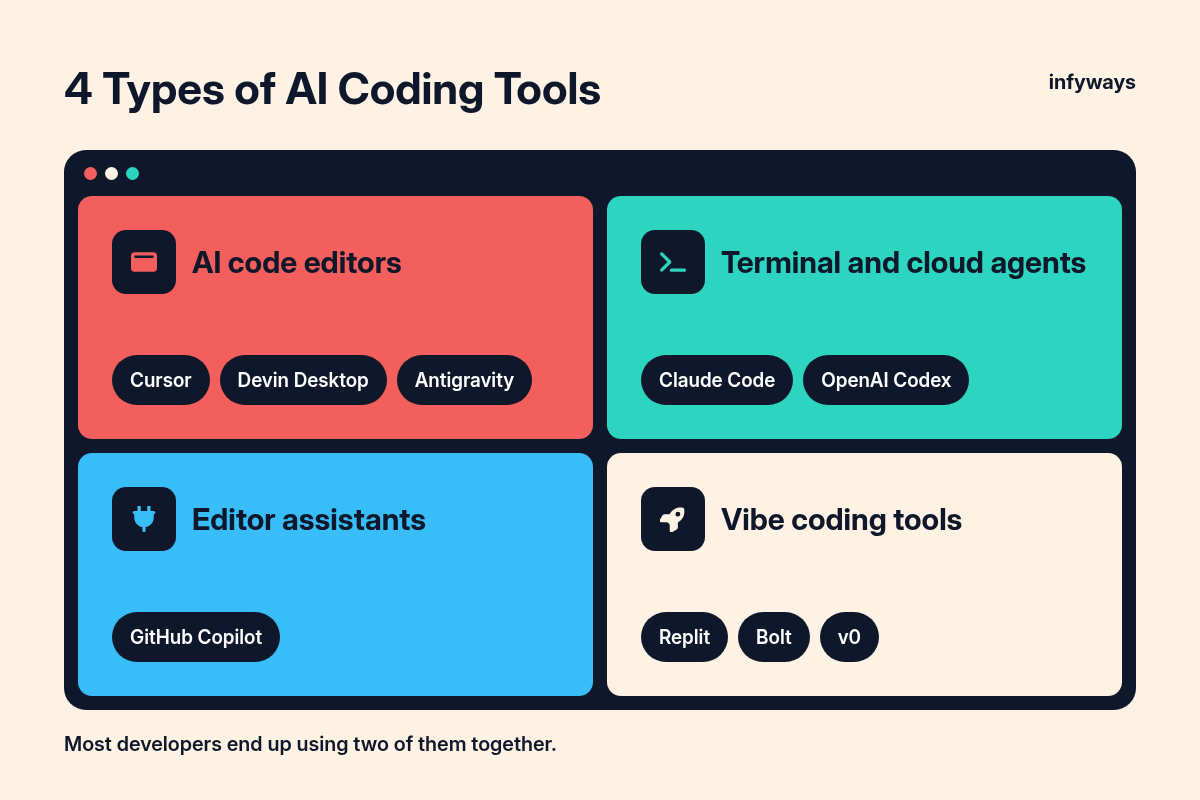
AI coding tools now fall into four groups, and most developers end up using two of them together.
- AI code editors are full editors with AI built in, such as Cursor, Devin Desktop and Antigravity. They suggest code as you type and run agents inside your project.
- Terminal and cloud agents, such as Claude Code and OpenAI Codex, take a task in plain English, edit files, run commands and hand back a change for you to review.
- Editor assistants, such as GitHub Copilot, plug into the editor you already use, including VS Code, JetBrains IDEs, Visual Studio and Xcode.
- Vibe coding tools, such as Replit, Bolt and v0, build and host a whole app from a chat in your browser, with little or no code written by you.
If you are new to vibe coding, our guide to writing vibe coding prompts that produce production-ready code explains how to brief these tools well.
2. The Best AI Coding Tools Compared
Here is how the main tools compare on type, free access and starting price for one person.
| Tool | Type | Free option | Paid plans (USD per month) | Best for |
|---|---|---|---|---|
| Cursor | AI code editor | Yes, limited | Plus $8 (Grok models only), Premium $30, Super $100, Ultra $200 | Developers who want AI built into the editor |
| Claude Code | Terminal, IDE, desktop and web agent | No (Free Claude plan does not list Claude Code) | Pro $20 ($17 billed yearly), Max $100, Ultra $200 | Large, multi-file changes from the terminal |
| GitHub Copilot | Editor assistant and cloud agent | Yes, limited chat and agent use | Pro $10, Pro+ $39, Max $100 | Teams that live in GitHub |
| OpenAI Codex | Cloud, CLI and IDE agent | Yes, limited | Go $8, Plus $20, Pro from $100 | People who already pay for ChatGPT |
| Devin Desktop (formerly Windsurf) | AI code editor with an agent manager | Yes, light quota | Pro $20, Max $200 | Running several agents from one place |
| Google Antigravity | Agent-first editor, CLI and desktop app | Yes, weekly quota | Through Google AI Pro ($20) or Ultra ($100 or $200) | The most generous free option |
| Replit | Browser app builder | Yes | Core $20, Pro $100 | Full apps with a database, built in the browser |
| Bolt | Browser app builder | Yes, 1M tokens a month | Pro $25 | Fast websites and app prototypes |
| v0 by Vercel | Browser app and UI builder | Yes, 7 messages a day | Plus from $30 per user | React and Next.js interfaces deployed to Vercel |
Key insight: the sticker price is rarely the real cost. Most of these tools meter agent usage, so a heavy week of agent tasks can push you to the next tier.
3. Best AI Code Editor: Cursor
Cursor is the best pick if you want one editor where autocomplete, chat and agents all work on your whole codebase.
Cursor is built on the same base as VS Code, so most extensions and shortcuts carry over. Its paid plans add cloud agents and automations, AI code reviews through Bugbot, and code hosting. The Plus plan at $8 a month only includes Grok models, while Premium at $30 a month unlocks third-party models, which are billed separately at API list price. Cursor plans are now also bundled with Grok and X features.
Cursor works best for developers who spend most of the day in an editor. Cloud agents also let you start work from the browser, which we covered in our look at the Cursor web app and cloud agents.
4. Best Terminal Agent: Claude Code
Claude Code is the strongest choice for big, multi-file tasks you describe once and then review.
Anthropic describes Claude Code as an agentic coding tool that reads your codebase, edits files, runs commands, and integrates with your development tools. It runs in the terminal, in VS Code and JetBrains, in a desktop app and on the web. It comes with the Claude Pro plan at $20 a month ($17 a month billed yearly), with Max at $100 and Ultra at $200 for people who run agents all day.
Claude Code is a strong fit for refactors, test writing and “read this old project and explain it” tasks. It suits developers who are comfortable reviewing diffs rather than watching every keystroke.
5. Best for GitHub Teams: GitHub Copilot
Copilot is the easiest tool to roll out across a team because it works inside the editors and GitHub workflows people already use.
Copilot runs in VS Code, Visual Studio, JetBrains IDEs, Xcode, Neovim, Eclipse and Zed, plus a command-line tool. The Free plan includes limited chat and agent use. Pro costs $10 a month, Pro+ $39 and Max $100, and each plan includes GitHub AI Credits that agent mode, code review and the cloud agent draw from. On paid plans you can assign an issue to Copilot and it opens a pull request.
6. Best for ChatGPT Users: OpenAI Codex
If you already pay for ChatGPT, Codex is included and covers the web, the command line and your IDE.
OpenAI lists a free tier, Go at $8, Plus at $20 and Pro from $100 a month, with Pro available at $100, $200 or $500. Plus adds Codex on the web, in the CLI, in the IDE extension and on iOS, along with automatic code review and a Slack integration. Business costs $20 per user a month billed yearly for two or more users.
7. Best Agent Command Center: Devin Desktop (Formerly Windsurf)
Devin Desktop is the new name for Windsurf, and it suits developers who want to manage many agents from one screen.
Cognition renamed Windsurf on June 2, 2026. Its FAQ says Devin Desktop is the same IDE, same editor, and has the same features, with the Agent Command Center as the main view. Cognition also says it is making Devin Desktop compatible with other agents via ACP. The Pro plan costs $20 a month and Max costs $200, and Pro includes access to Devin Cloud agents.
8. Best Free AI Coding Tool: Google Antigravity
Antigravity has the most useful free tier in this list, and it is now Google’s main coding product for individuals.
Google stopped serving Gemini Code Assist IDE extensions and Gemini CLI for individual, Google AI Pro and Google AI Ultra accounts from June 18, 2026, and moved those users to Antigravity. The free individual plan includes unlimited Tab completions and a weekly quota. Google AI Pro raises the limits, and Google’s docs say Ultra users get the highest quota and access to third-party models. Google lists Pro at $20 a month and Ultra at $100 or $200 a month.
If you read older guides that recommend Gemini CLI as a free option for personal accounts, that advice no longer applies.
9. Best Vibe Coding Tools: Replit, Bolt and v0
Vibe coding tools turn a plain-English description into a working, hosted app, which makes them ideal for founders and designers testing ideas.
| Tool | Free plan | Paid plan | What stands out |
|---|---|---|---|
| Replit | Yes | Core $20 ($18 billed yearly), Pro $100 ($90 billed yearly) | Databases, AI integrations and up to 15 collaborators on Pro |
| Bolt | 300K tokens a day, 1M a month | Pro $25, Teams $30 per member | Hosting, unlimited databases and custom domains on Pro |
| v0 | 7 messages a day | Plus from $30 per user, Business $100 per user | Design Mode, GitHub sync and one-click deploys to Vercel |
These tools get you to a demo in an afternoon. Before real users touch it, check the security basics in our vibe coding security rules, because generated apps often ship with exposed keys, weak access rules or missing input checks.
Key insight: vibe coding tools are best at the first 80% of an app. The last 20%, including security, payments and performance, is where a developer still earns their fee.
10. Do AI Coding Tools Actually Make You Faster?
Usage is close to universal, but trust and measured speed gains are mixed, so treat AI output like a junior developer’s first draft.
In Stack Overflow’s 2025 survey, 84% of respondents were using or planning to use AI tools in development, and 51% of professional developers used them daily. Yet more developers actively distrust the accuracy of AI tools (46%) than trust it (33%).
A METR randomized trial found that experienced open-source developers using early-2025 AI tools took 19% longer to finish tasks in their own repositories. METR calls this a snapshot of early-2025 tools, and the tools have improved a lot since, but the lesson holds: AI speeds up some work and slows down other work.
Many developers pair tools, for example an editor for daily work and a terminal agent for bigger jobs. Our write-up on pairing OpenCode with Cursor shows one such setup.
Key insight: measure your own team. Track pull requests merged, bugs found in review and time to ship for a month before and after you adopt a tool.
11. How to Choose the Right AI Coding Tool
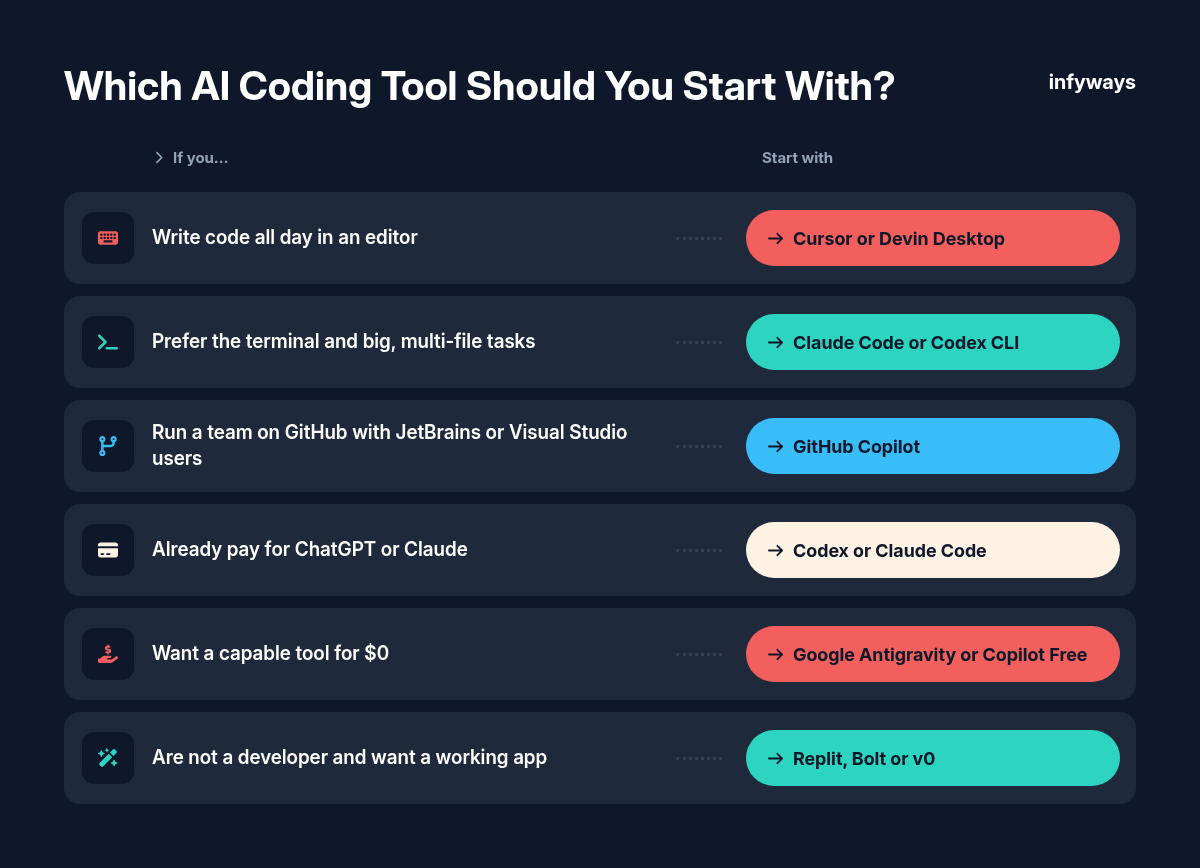
Choose by the work you do every day, then run a two-week trial on a real project before you commit a team.
| If you… | Start with |
|---|---|
| Write code all day in an editor | Cursor or Devin Desktop |
| Prefer the terminal and big, multi-file tasks | Claude Code or Codex CLI |
| Run a team on GitHub with JetBrains or Visual Studio users | GitHub Copilot |
| Already pay for ChatGPT or Claude | Codex or Claude Code, which come with those plans |
| Want a capable tool for $0 | Google Antigravity or Copilot Free |
| Are not a developer and want a working app | Replit, Bolt or v0 |
- Check which models each plan includes, since cheaper tiers may limit them.
- Read how usage is metered and what happens when you hit the limit.
- Confirm data and privacy terms before you connect company code.
- Make code review and automated tests a rule, whatever tool you pick.
Frequently Asked Questions
What is the best AI coding tool for beginners?
For beginners who want to learn to code, GitHub Copilot Free or Google Antigravity’s free plan are good starts because they cost nothing and explain code as you go. For people who only want a working app, Replit or Bolt are easier because they handle hosting and setup for you.
What is the best free AI coding tool?
Google Antigravity has the most generous free individual plan in 2027, with unlimited Tab completions and a weekly agent quota. GitHub Copilot Free, Cursor’s free plan and Devin Desktop’s free plan are also useful, but their agent and chat limits are tighter.
Is Cursor better than GitHub Copilot?
Cursor is better if you want an editor built around AI agents and are happy to switch editors. Copilot is better if your team uses several editors or relies on GitHub for issues and pull requests, because it fits into the tools you already have. Both have free plans, so try each on the same task.
What are vibe coding tools?
Vibe coding tools build software from plain-English instructions, so you describe what you want and the tool writes, runs and often hosts the code. Replit, Bolt and v0 are popular examples. They are excellent for prototypes, but production apps still need a developer to review security and structure.
Will AI coding tools replace developers?
Not on current evidence. Surveys show most developers use AI but many distrust its accuracy, and controlled studies show mixed speed results. AI is changing the job toward planning, reviewing and testing, so developers who use these tools well become more valuable, not less.
The Bottom Line
There is no single best AI coding tool, but there is a best tool for each workflow, and most teams do well with two.
Start with one editor tool and one agent, give them real work for two weeks, and keep strict code review in place. Use vibe coding tools for fast prototypes, and bring in a developer before anything handles customer data or payments.
If you have a prototype that needs to become a secure, production-ready product, our team at Infyways handles web development for businesses, with AI tools in the workflow and humans reviewing every change.
Sources
- Cursor, “Pricing”. Checked November 12, 2026.
- Anthropic, “Claude plans and pricing”. Checked November 12, 2026.
- GitHub, “Copilot plans and pricing”. Checked November 12, 2026.
- OpenAI, “Codex pricing”. Checked November 12, 2026.
- Cognition, “Devin plans and pricing”. Checked November 12, 2026.
- Google, “Google Antigravity pricing”. Checked November 12, 2026.
- Replit, “Pricing”. Checked November 12, 2026.
- Bolt, “Plans and pricing”. Checked November 12, 2026.
- Vercel, “v0 plans and pricing”. Checked November 12, 2026.
- Anthropic, “Claude Code overview” documentation. Checked November 12, 2026.
- Cognition, “Devin Desktop FAQ”. Checked November 12, 2026.
- Cognition, “Windsurf is now Devin Desktop”. June 2, 2026.
- Google for Developers, “Gemini Code Assist consumer accounts” deprecation notice. Checked November 12, 2026.
- Google, “Plans” (Google Antigravity documentation). Checked November 12, 2026.
- Google, “Changes to Antigravity plans”. 2026.
- Stack Overflow, “2025 Developer Survey: AI”. 2025.
- METR, “Measuring the Impact of Early-2025 AI on Experienced Open-Source Developer Productivity”. July 10, 2025.