Category: Joomla

  • Joomla Template Override Disappeared After an Update

    Joomla Template Override Disappeared After an Update

    A Joomla template override disappeared after an update because you edited the parent template (usually Cassiopeia html/), and the package put the stock files back. Child html/ is not part of that package. It stays. This is a file that vanished from disk (or was restored to vendor markup). It is not “the override never loaded.” If the PHP is still there and the public page ignores it, use Joomla template override not working instead.

    Joomla and club-template updates are allowed to replace parent files. That is how security fixes arrive. Your job is to stop storing custom PHP on a path the installer owns. Move the copy into a child template html/ folder, assign that style, and leave Cassiopeia stock. Same rule as CSS and JS: customize without editing core.
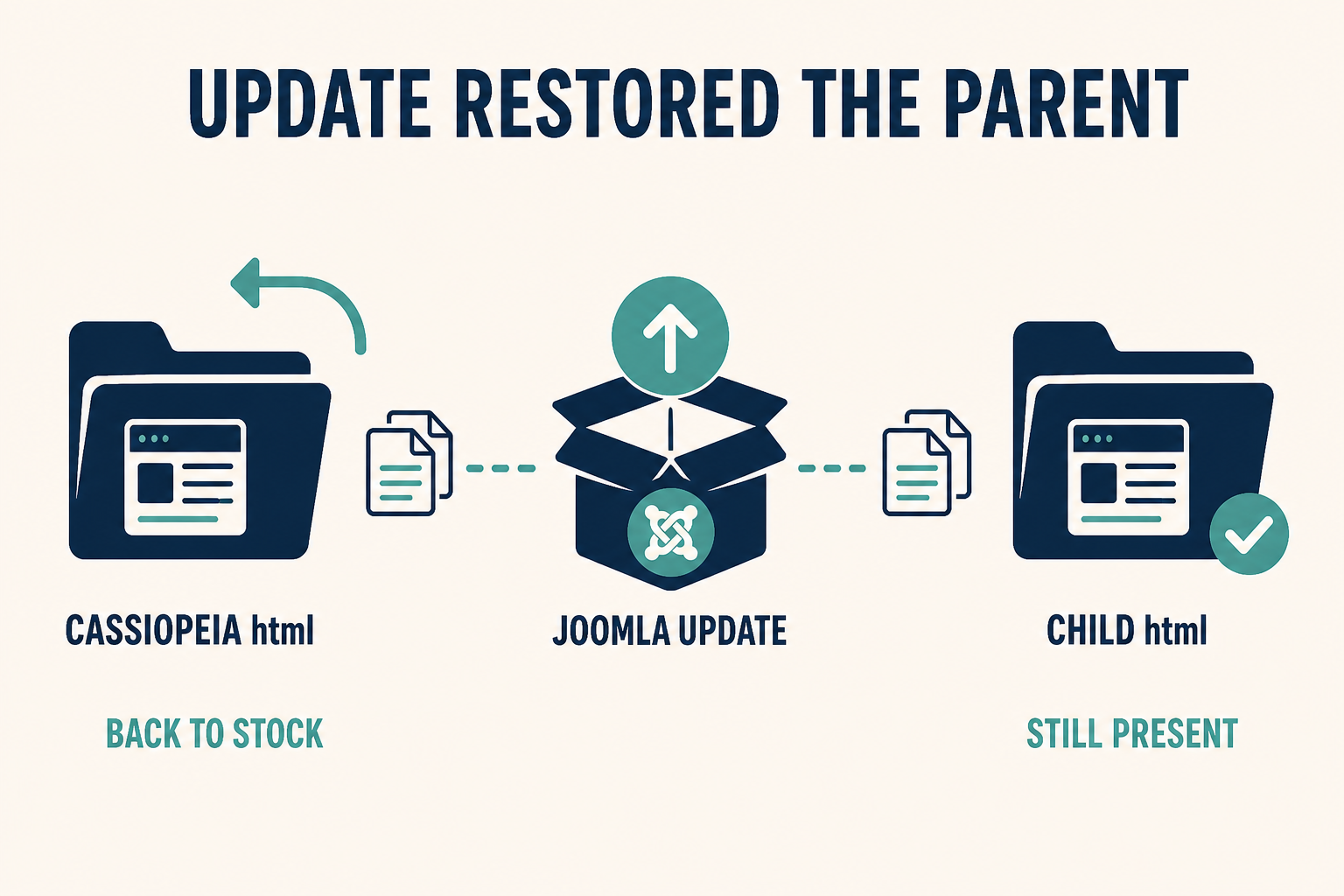
    Joomla update restoring parent html while the child html folder still holds the copy

    The update owns the parent. It does not own the child. If you customized Cassiopeia in place, the next package looks like your override “disappeared.”

    What you will learn

    • How to tell a wiped parent file from an override that never loaded
    • Why Cassiopeia html/ is not a safe home, even when Create Overrides offered it
    • How to recover markup from backup before you recreate anything
    • How to move surviving files into child html/ (including plugin plg_ copies)
    • What the template Overrides list means after the next update (stale vs gone)
    • How to keep the parent inheritable so you are not maintaining a fork

    Official references: Layout Overrides in Joomla, Child Templates, Template Overrides.

    What happened This article The other article
    FTP: html/com_content/article/default.php is gone or matches core again Yes. Parent was replaced. No
    FTP: your probe class is still in the file, public HTML is stock No Override not working
    You switched the default style to a new child and Home went stock Maybe both: files still on parent, style now child Assign and copy into the child
    Club zip reinstalled the template you renamed as “Cassiopeia custom” Yes, if that folder is what the zip overwrites Path/filename issues if the file remains
    Core layout changed and your copy still exists but looks wrong Stale override. Diff it. File did not disappear. Only if the path was always wrong

    Step 1: Confirm the file is gone (or stock) on disk

    Do not trust memory of “it used to look different.”

    1. Note the view you customized (article, blog, mod_menu, plugin Prev/Next).
    2. On the server, open parent templates/cassiopeia/html/ (or the club parent you actually edited).
    3. Compare with a stock copy: same Joomla version, unmodified Cassiopeia, or the extension’s tmpl in components/ / modules/ / plugins/.

    Outcomes:

    • Missing file: the update deleted a file that is not in the package (some hosts sync to the zip). Or you never committed it and a deploy overwrote the tree. Restore from backup first (Step 2).
    • File exists, content is vendor: the installer replaced your PHP. This is the usual Cassiopeia / extension update.
    • File exists, your markup is still there: this is not a disappearance. Go to override not working (wrong style, _default.php, alternative layout, plugin HTML).

    Also look at the child, if you have one: templates/{child}/html/. If the custom PHP is only on the parent, assigning the child after the update will look like a wipe even when the parent file was restored. The child never had a copy. That is still this article’s fix: copy into the child, do not re-edit the parent.

    Administrator overrides live under administrator/templates/atum/html/ (or an Atum child). A Joomla update can restore Atum the same way. Site and admin are separate trees.

    Step 2: Recover the last good copy from backup

    Do not recreate a 400-line article layout from a screenshot if last night’s backup still has it.

    1. Take a new backup before you copy anything around (so a bad paste has a rollback).
    2. Restore only the override files you need from the pre-update backup into a staging folder on your desk, not straight onto production parent html/.
    3. Diff against current core tmpl for this Joomla version. Core may have changed. Pasting an old override onto new Joomla can fatal. Official advice is to compare overrides after updates. The template UI Overrides (Updated Files) list is for copies that still exist and drifted from core. A replaced parent file will not show your old diff because your old file is gone.

    If you have no backup, you rebuild from Create Overrides on the child (Step 3) and re-apply the HTML you remember. That is slower. It is still safer than patching Cassiopeia again.

    Step 3: Create or open a child and put html/ there

    On Joomla 4.1, 5, and 6:

    1. System → Site Templates → Cassiopeia (inheritable parent) → Create Child Template if you do not already have one. Clicks: How to set up a Joomla child template.
    2. Open the childCreate Overrides for each component or module you had customized. That copies current core layouts into templates/{child}/html/.
    3. Merge your recovered markup into those child files. Keep new core PHP (variables, escaping) unless you know why you are dropping it.
    4. Plugin layouts: Create Overrides usually will not list them. Recreate html/plg_{group}_{element}/ by hand and paste the recovered tmpl. Guide: Joomla plugin override.

    A child does not magically inherit every parent html/ file. Same-named files in the child win. Everything you never copied still comes from the parent package. After an update, parent html/ is stock again. If you needed a customization, it must exist in the child folder.

    Do not zip-clone the whole Cassiopeia tree and call it a child. That is a fork. The next Cassiopeia security fix will not reach it, and the next vendor zip may overwrite it anyway.

    Joomla 6 Cassiopeia Extended is already a child. Put overrides on Extended (or on your own child), not on Cassiopeia parent.

    Step 4: Assign the child style, then stop editing the parent

    Creating the child does not change the public site.

    1. System → Site Template Styles. Make the child’s style default, or set it on the menu items that need the markup.
    2. Clear Cache. Test the URL as a guest if Page Cache is on.
    3. Confirm View Source has your markup (probe class).
    4. Leave templates/cassiopeia/html/ empty of custom files. If Create Overrides on the parent still looks convenient, close it. Use the child only.

    A template style duplicate is not a child. Styles store params and assignment. They still point at the same parent files. Duplicating “Cassiopeia – Default” and editing PHP in Cassiopeia will disappear again on the next update.

    Language strings do not belong in restored PHP. Use language overrides. CSS that died with the parent user.css is the CSS checklist: Joomla CSS changes not showing. Parent user.css is also wiped or orphaned when you switch to a child. Copy it into the child’s media folder.

    Step 5: After the next update, use Overrides as a stale check, not as a time machine

    When Joomla updates a layout you overrode in the child, the file does not vanish. It can become wrong relative to core (missing a new variable, old markup).

    1. Open the child in Template Manager.
    2. Check Overrides / updated-files style notices (wording varies by version).
    3. Diff your copy against the new core tmpl. Merge.

    That list does not watch user.css or user.js. Review those yourself. It also will not bring back a parent file the installer already replaced. Prevention is the child, not the notice.

    Club templates: read the vendor’s child or “custom” folder rules. If their zip replaces templates/yourname/html/, you are still on a parent-shaped path. Ask for an inheritable parent or keep a true Joomla child.
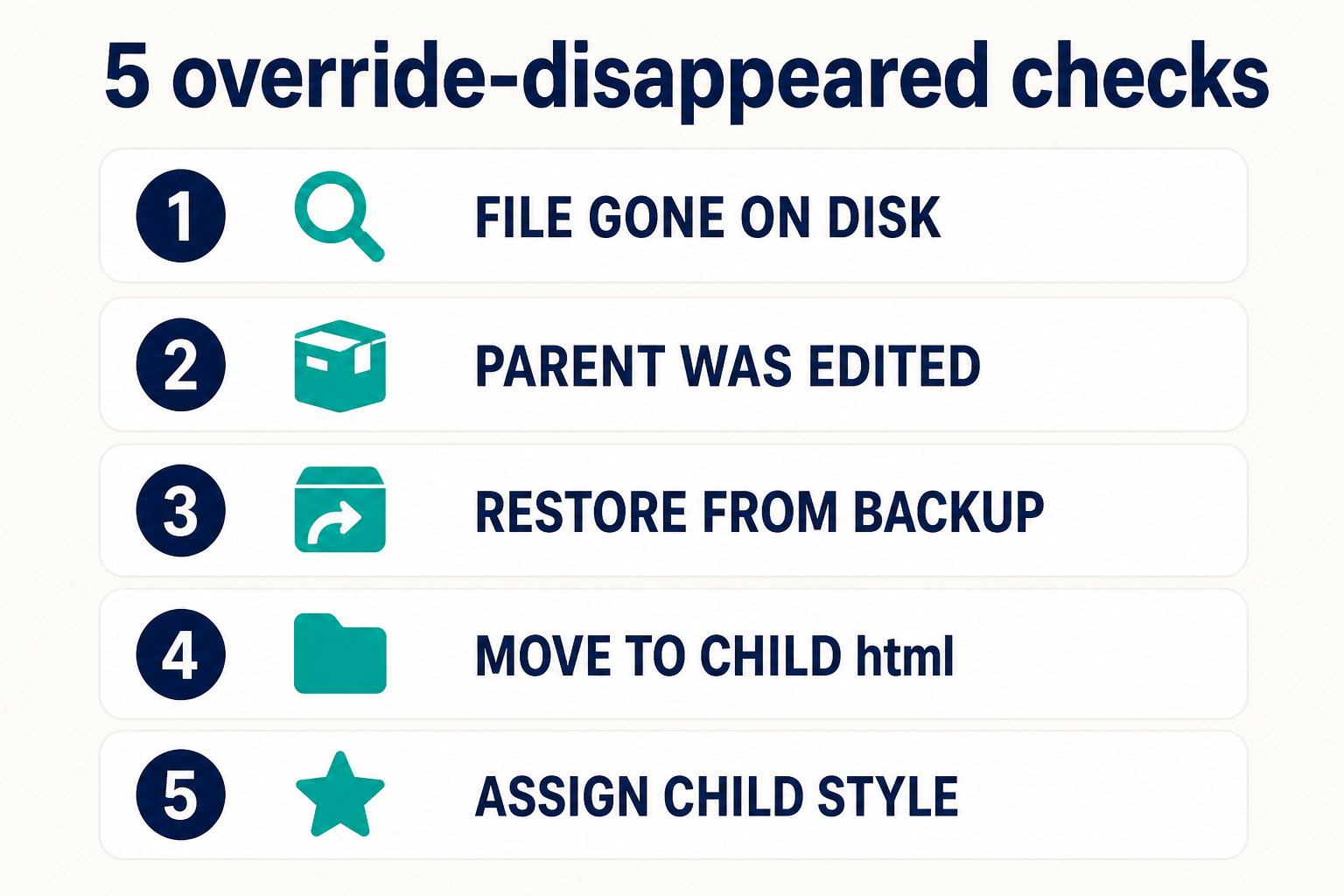
    Five checks: file gone on disk, parent was edited, backup, move to child html, assign child style

    Disk first. If the file is still there, you are on the not-working article. If it is stock or missing, backup, child html, assign the style, never edit the parent again.

    Key takeaways

    1. Disappeared means the custom PHP is gone or stock on disk after an update. Not-working means the file is still there and unused.
    2. Parent Cassiopeia html/ is owned by the installer. Child html/ is yours.
    3. Create Overrides on the parent is how this incident starts. Run it on the child.
    4. Restore from backup into the child, then diff against current core. Do not paste an old override onto new Joomla blindly.
    5. Assign the child style. Creating a child does not publish it.
    6. Plugin copies in parent html/plg_… disappear the same way. Recreate them on the child: plugin override.
    7. After future updates, diff stale child overrides. That is not a disappearance.
    8. Keep the stack in customize without editing core.

    Frequently asked questions

    Why did my Joomla template override disappear after an update?

    You stored it in the parent template. The Joomla or club package replaced those files. Move the override into a child html/ folder and assign that style.

    Is this the same as a template override not working?

    No. Not working: the file is on disk and Joomla never includes it (folder, style, _default.php, alternative layout, plugin). Disappeared: the file was restored or deleted by an update. Different checklists.

    Will a child template survive a Joomla update?

    The child folder is not in the Cassiopeia package, so your html/ copies stay. You still diff them if core layouts change. Official description: Child Templates.

    Can I copy the whole Cassiopeia folder instead of a child?

    You can. You then own a fork. Security fixes in Cassiopeia will not apply until you merge by hand. Use Create Child Template on Joomla 4.1+.

    Where do I put plugin overrides so they do not vanish?

    templates/{child}/html/plg_{group}_{element}/, same as other overrides. Manual copy: Joomla plugin override.

    The Overrides tab still lists my file. Did it disappear?

    No. That list is for overrides that exist and may be out of date versus core. A true disappearance is a missing or stock file in parent html/ after the package ran.

    Should I edit Cassiopeia html again “just this once”?

    No. That is how this article starts the next time you click Update. Use the child. Setup: Joomla child template.

    Conclusion

    When a Joomla template override disappeared after an update, believe the disk. Parent html/ comes back from the zip. Child html/ does not. Restore the last good PHP on staging, merge it into a child created with Create Child Template, assign that style, and leave Cassiopeia alone. If the file is still sitting on disk and the site ignores it, you opened the wrong guide: override not working.

    If production was customized for years inside the parent, Joomla support and maintenance can move the tree to a child without another surprise on the next security release. Layout you would rather not own: Joomla design services.

  • Joomla Template Override Not Working: Causes and Fixes

    Joomla Template Override Not Working: Causes and Fixes

    A Joomla template override is not working when Joomla never loads the PHP file you edited. The usual causes are the wrong html/ folder, a template style that is not the one assigned to the page, a filename of _default.php (a sublayout, not the layout), an alternative layout selected on the menu item or module, plugin HTML that does not live in the component override, or cache still serving the old markup. This is a file that never loaded. If the file used to work and vanished after an update, that is a different article: template override disappeared after an update.

    Create Overrides is the safe copy for components and modules. Plugin tmpl is usually copied by hand into html/plg_…. Official map: Layout Overrides in Joomla. User-manual walkthrough: Template Overrides. Put the copy on a child template, not in parent Cassiopeia.

    _default.php rejected versus default.php in html/com_content/article

    The layout Joomla looks for is default.php. A leading underscore is a sublayout. The assigned template style must be the folder that contains the file.

    What you will learn

    • How to prove the override file is the one PHP included
    • Why Create Overrides for com_ and mod_ is safer than a hand-made path
    • Why plugin HTML is usually html/plg_…, not the article default.php
    • Why _default.php never replaces default.php
    • What an alternative layout on the menu item actually selects
    • Why cache and the wrong template style look like a “dead” override
    What you see Likely cause Wrong rabbit hole
    Stock markup, your PHP comment missing Wrong folder, wrong template style, or _default.php Editing components/
    Override works on Home, not on a landing page That menu item uses another template style Recreating the override
    Article body changed, Prev/Next did not Page navigation is a plugin layout More com_content PHP
    Blog looks stock, single article changed You overrode article/default.php. The blog uses articles/… (or blog.php) Cache only
    File on disk, still stock Alternative layout selected, or cache Reinstalling the component
    Child looks stock Override still sits in parent html/ “Overrides are broken”

    Step 1: Prove which template is assigned, then prove the file is included

    Overrides are files on a template. They are not a Global Configuration switch.

    1. Open the public URL that should use the override.
    2. System → Site Template Styles. Note the default (star).
    3. Open that menu item. Template Style may be a different style (child vs parent, or a club template).

    If the page uses cassiopeia_brand and you edited templates/cassiopeia/html/…, Joomla will not load your copy. Child html/ wins for that style. Parent Cassiopeia html/ is unused when the child is assigned. The reverse is also true: assign the parent, and the child’s override is ignored.

    Prove inclusion:

    1. On the file you believe is active, add a unique class on a wrapper you already have, for example js-override-probe. Do not use a core-edit in components/.
    2. System → Maintenance → Clear Cache. Test logged out if Page Cache is on.
    3. View Source. Search for js-override-probe.

    If the class is missing, Joomla did not include that file. Keep going. If the class is present and the page still “looks stock,” you changed the wrong markup, or CSS is hiding it: Joomla CSS changes not showing.

    Step 2: Use Create Overrides for components and modules

    Hand-built folders are how silent misses happen.

    1. System → Templates → Site Templates → open the active template (the child).
    2. Open Create Overrides.
    3. Pick the component view (com_contentarticle, category, …) or the module (mod_login, mod_menu, …).
    4. Joomla copies into templates/{template}/html/com_… or html/mod_….
    5. Edit that copy only.

    Typical paths:

    • Article: templates/{child}/html/com_content/article/default.php
    • Category blog: templates/{child}/html/com_content/category/blog.php (and often blog_item.php as a sublayout)
    • Module: templates/{child}/html/mod_login/default.php

    Wrong folders that fail silently:

    • html/com_content/articles/ when the view is article (singular) or the reverse
    • html/modules/mod_login/ (extra modules segment)
    • html/com_content/article/tmpl/default.php (no extra tmpl under html)
    • An override on Atum while you are looking at the site

    Create Overrides exists so the path matches what Joomla searches. Official folder rules: Layout Overrides in Joomla. Joomla 4 layout notes: Template Layouts.

    JLayouts (Read more, images, fields chrome) are not always the view default.php. They live under html/layouts/… after you override them from the Layouts list. If you changed article/default.php and the intro image is still stock, you needed html/layouts/joomla/content/…. The user manual shows the LayoutHelper::render mapping: Template Overrides.

    Step 3: Name the file default.php, not _default.php

    The layout file is default.php. A leading underscore marks a sublayout. Joomla will not use _default.php as the main view.

    Create Overrides copies default.php. Some views also copy default_logout.php, blog_item.php, and similar. Those extra files are included from the main layout ($this->loadTemplate('item') looks for {layout}_item.php). They do not replace default.php.

    If you renamed the copy to _default.php because a blog said “underscore means override,” you hid the file from the layout resolver. Rename it back to default.php.

    If you only edited blog_item.php while the menu item still uses the default layout (not blog), that sublayout is never included. Match the layout name Joomla is actually rendering (next step).

    Step 4: Check Alternative Layout on the menu item, module, or article

    Joomla can select a file that is not default.php.

    On the menu item: Options (or the Blog / Article tab) → Layout / Alternative Layout. Values such as blog, a template-specific layout, or a custom mylayout.php mean your default.php override is idle for that view.

    On a module: Advanced → Alternative Layout. A module can use default.php on one instance and a custom layout on another. You overrode the file the instance is not using.

    On an article: some views let the article pick a layout. If that is set, it wins for that article.

    Fix:

    • Set Alternative Layout back to default (or inherited), or
    • Create or copy the override with the same basename as the selected layout (blog.php, mylayout.php), still without a leading underscore.

    A custom alternative layout is a second file in html/com_…/. It is not a child-template feature by itself. The child only decides which template’s html/ is searched.

    Step 5: If the HTML comes from a plugin, do not expect a component override

    Content plugins inject markup after (or beside) the component layout. Prev/Next, vote, some field types, and many extra buttons are plugin tmpl files.

    Overriding html/com_content/article/default.php will not restyle page navigation. You need html/plg_content_pagenavigation/default.php (and a plugin that actually calls getLayoutPath). Create Overrides usually does not list plugins. You copy tmpl by hand.

    Full path, tmpl test, and what cannot be overridden: Joomla plugin override.

    If the string is only a label, use a language override instead of PHP.

    Step 6: Clear cache, then decide if the file was never going to survive an update

    After a path fix:

    1. Clear Cache (and Page Cache for guests).
    2. Hard refresh.
    3. Search View Source for your probe class again.

    If the override used to appear and the PHP file is gone from disk after a Joomla or template update, stop this article. You edited the parent. Read template override disappeared after an update.

    If the file is still there and still unused, you are still on folder, style, filename, alternative layout, or plugin output.

    Keep new overrides on the child so the next Cassiopeia package cannot replace them. Policy: customize without editing core. Visual markup you do not want to maintain: Joomla design services.

    Five checks: folder, template style, default.php, alternative layout, plugin output

    Folder path, then the assigned style, then default.php versus a sublayout, then Alternative Layout, then plugin HTML. Cache last.

    Key takeaways

    1. An override that “does nothing” did not load. Prove it with a probe class in View Source after Clear Cache.
    2. Create Overrides for com_ and mod_ on the active child. Hand-typed folders fail silently.
    3. Plugin output is html/plg_{group}_{element}/, usually manual. Guide: plugin override.
    4. The main file is default.php. _default.php is a sublayout. blog_item.php does not replace blog.php.
    5. Alternative Layout on the menu item or module selects a different basename. Override that file, or set layout back to default.
    6. Child html/ wins only when that child’s style is assigned. Parent and child are not a merge of every PHP file.
    7. JLayouts live under html/layouts/, not always in the view default.php.
    8. A file that vanished from disk after an update is not this diagnosis. Use the disappeared checklist.

    Frequently asked questions

    Why is my Joomla template override not working?

    Joomla is not including that PHP file. The folder does not match the view, the assigned template style is a different template, the file is named _default.php, Alternative Layout points at another basename, or the HTML comes from a plugin. Prove it with a probe class in View Source.

    Should the override file be named _default.php?

    No. Name it default.php (or blog.php if that is the layout in use). A leading underscore is a sublayout. Create Overrides already uses the correct names.

    Why did Create Overrides copy default.php and default_logout.php?

    default_logout.php is a sublayout of the login module’s default layout. Edit the file that prints the markup you care about. Deleting default.php when you only wanted logout is correct if you do not want to override the login form. The user manual does exactly that: Template Overrides.

    Can I override a plugin from the article layout?

    No. Plugin HTML that uses tmpl is overridden under html/plg_…. See Joomla plugin override.

    Does a child template automatically use the parent html folder?

    No. Same-named files in the child win. Files you never copied stay on the parent. An override that exists only on the parent is unused while the child style is assigned.

    I updated Joomla and the override vanished. Is that this article?

    No. That is the parent getting restored. Use Joomla template override disappeared after an update.

    Where are the official override rules?

    Layout Overrides in Joomla and Understanding Output Overrides. Child placement: Child Templates.

    Conclusion

    When a Joomla template override is not working, stop editing components/ and stop renaming files with a leading underscore. Assign the child style, put default.php (or the alternative layout’s real name) in the matching html/com_ or html/mod_ folder, and treat plugin markup as html/plg_. A probe class in View Source tells you in one reload whether PHP included the file. If the file used to exist and the disk is stock after an update, switch to the disappeared guide and move the work into a child.

    Need the markup rebuilt without another silent path? Joomla design services or Joomla support and maintenance.

  • Joomla JavaScript Not Working

    Joomla JavaScript Not Working

    Joomla JavaScript is not working when the browser never executes the file you think you added, or it executes and throws before your code runs. Open the console first. Then confirm user.js is requested from media/templates/site/{template}/js/user.js on the active template (a child does not load the parent’s user.js). Typical failures after that are $ is not defined (jQuery is not on the page), an ES module in a classic deferred script, script order, Content-Security-Policy, or another extension overwriting the same global.

    This article is why it fails. The how-to for adding a file the supported way is Add custom JavaScript to Joomla. Keep custom JS on a child template, not in core index.php. Same overlay rule as CSS: customize without editing core.

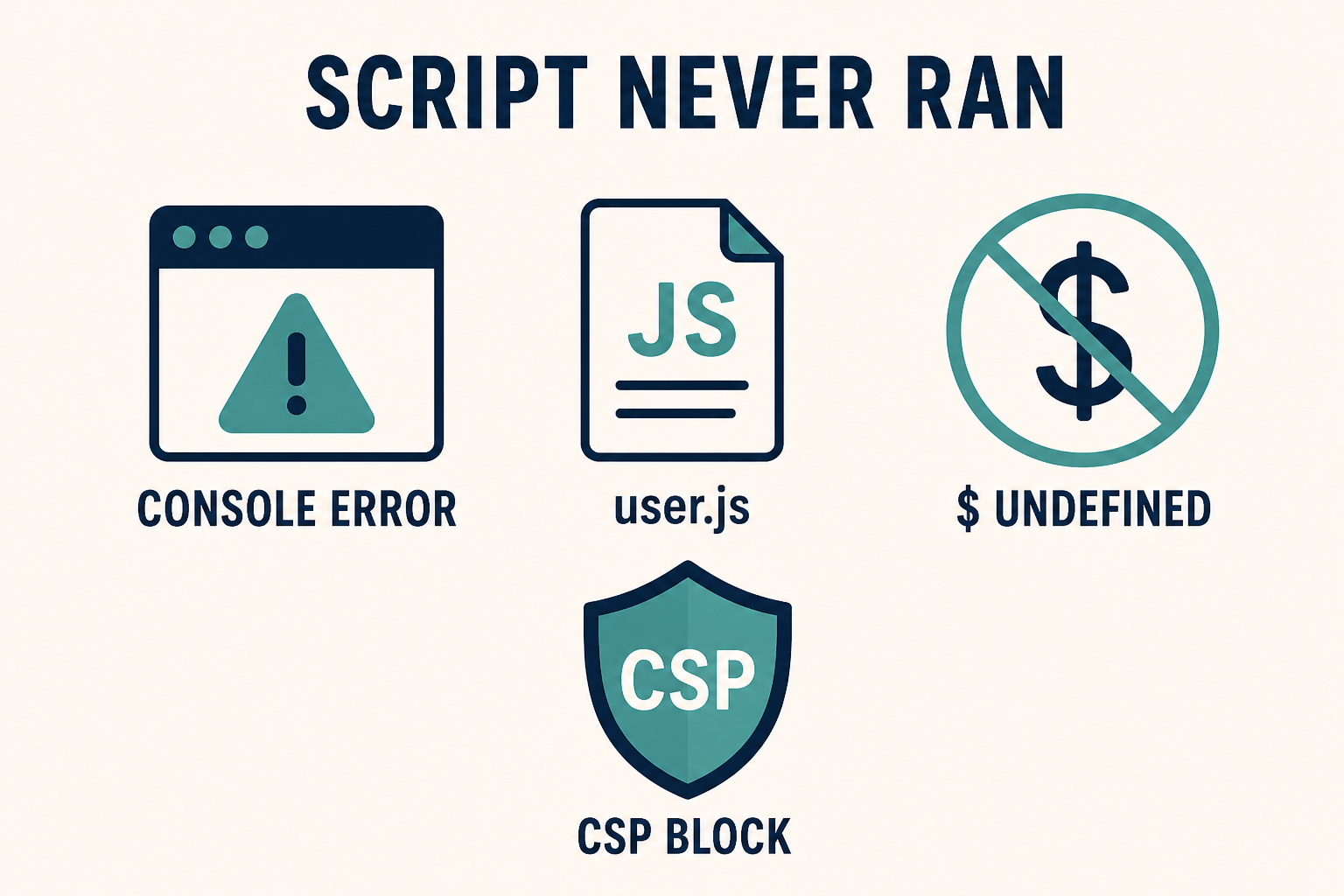
    Console error, missing user.js, and jQuery dollar undefined

    Read the console before you add another script tag. $ is not shipped on Cassiopeia by default. CSP can block a file that 200s in Network.

    What you will learn

    • How to separate a 404 path from a runtime exception
    • Where Cassiopeia user.js lives (and why the child ignores the parent file)
    • Why $ and jQuery fail on Joomla 4, 5, and 6 front ends
    • What defer and ES modules do to order
    • How the HTTP Headers plugin (CSP) blocks inline or third-party scripts
    • How to spot a conflict without disabling the whole site in public

    Official references: Web Asset Manager, Adding JavaScript and CSS to the page, Cassiopeia Template Customisation, HTTP Headers plugin.

    What you see Likely cause Wrong rabbit hole
    Console Failed to load resource / 404 user.js on the parent, old templates/…/js/ path, or user.js.js Rewriting the script
    $ is not defined / jQuery is not defined Cassiopeia does not load jQuery unless an extension called it Copy-pasting a Joomla 3 snippet
    Cannot use import statement outside a module ES import inside Cassiopeia’s classic user.js (deferred, not type="module") More defer
    Script in Network 200, nothing happens Error earlier in the same file, wrong selector, or you tested a page that does not include the node Cache only
    Console CSP Refused to execute HTTP Headers plugin or server Content-Security-Policy Disabling SEF
    Works in admin, fails on the site Site template user.js vs Atum. Two templates, two files “Joomla JS is broken”
    Works logged in, fails as guest Page Cache serving HTML without your new <script>, or a guest-only extension Access on a module

    Step 1: Read the browser console before you add another file

    Do not stack a second snippet on top of a SyntaxError.

    1. Open the public page that should run the script. Use a private window so extensions and your admin session are not in the way.
    2. DevTools → Console. Reload.
    3. DevTools → Network → filter JS. Reload again.

    Write down, in this order:

    • The first red error (file name and line). Later errors are often fallout.
    • Whether user.js (or the extension file you care about) appears, and its HTTP status.
    • Whether the URL is /media/templates/site/{active-template}/js/user.js.

    A 404 is a path problem (Step 2). A 200 plus a TypeError is a runtime problem (Steps 3 to 6). No request at all means the template never registered the asset, or you pasted the script in a Custom module that is unpublished: Joomla module not showing.

    If the console is clean and the feature still “does nothing,” the script ran against markup that is not on this view. Inspect the DOM. CSS hiding the node is CSS changes not showing, not a JS failure.

    Step 2: Put user.js on the media path of the active template

    Cassiopeia loads user.js the same way it loads user.css: from the assigned template’s media folder.

    On Joomla 4.1, 5, and 6:

    media/templates/site/{template}/js/user.js

    A child named cassiopeia_brand uses media/templates/site/cassiopeia_brand/js/user.js. A child does not load the parent’s user.js. If you added the file on Cassiopeia and then assigned the child, the public page will not request the parent script.

    In Template Manager:

    1. System → Templates → Site Templates → the active template (child if you have one).
    2. New File. Select the js folder.
    3. Filename: user with no suffix. File type: .js.
    4. Create, paste, Save.

    The Joomla 4.0-era path templates/cassiopeia/js/user.js is the same class of mistake as the old CSS folder. Current Cassiopeia looks in media/. Filename user.js.js 404s for the same reason as user.css.css.

    Confirm the menu item’s Template Style. Home can use the child while the page you tested still uses the parent. Two styles, two user.js files.

    Cassiopeia typically registers user.js through the Web Asset Manager as a deferred classic script, not as type="module". That matters in Step 4.

    How to add JS through WAM, a Custom module, or an extension asset JSON: Add custom JavaScript to Joomla. This checklist stops when the file is in the right folder and the Network tab shows 200.

    Step 3: Separate jQuery snippets from vanilla and from ES modules

    Joomla 4, 5, and 6 front ends are not Joomla 3.

    Cassiopeia uses Bootstrap 5. It does not enqueue jQuery for every page. $ and jQuery exist only if some extension called the jQuery asset (jquery / jquery-noconflict in the Web Asset Manager). A blog you copied that starts with jQuery(document).ready(...) will throw $ is not defined on a stock site.

    Fixes that are honest:

    • Rewrite the snippet in vanilla JS (document.addEventListener('DOMContentLoaded', …)).
    • If you truly need jQuery, load it as a dependency of your asset, not by pasting a second copy of jQuery 1.12 into user.js. Duplicate jQuery is a classic conflict (Step 6).

    ES modules: import / export are a SyntaxError in a non-module script. Cassiopeia’s user.js is a normal deferred file. Do not put import { … } from '…' in it unless you register that file as a module asset (type="module") in joomla.asset.json. Mixing module syntax into user.js is why “I followed a Vite example and Joomla exploded.”

    document.write and inline onclick= in article HTML are separate from user.js. They fail for the same CSP reasons in Step 5, and they are harder to cache-bust. Prefer one file in the child.

    Step 4: Account for defer, order, and DOM timing

    Web Asset Manager can output defer (Cassiopeia’s user.js usually has it). Deferred scripts run in order after the document is parsed. They do not run before a script without defer that sits earlier in the HTML.

    Typical races:

    • Your user.js assumes a calendar plugin’s global already exists. That plugin’s file is deferred later, or only loads on one menu item.
    • An inline script in a Custom module runs immediately, then user.js runs later and overwrites it (or the reverse).
    • You query #mod-finder-searchword on a page that has no finder module. querySelector returns null. The next line throws. The rest of user.js never runs. Put a guard around the node, or split files.

    Do not “fix” order by pasting <script> into core index.php. Register dependencies in joomla.asset.json or load from the child the way the custom JavaScript guide describes. Official model: Web Asset Manager.

    DOMContentLoaded in a deferred user.js may have already fired. If your snippet never runs, listen for DOMContentLoaded only when document.readyState === 'loading'; otherwise run immediately.

    Step 5: Check Content-Security-Policy and mixed content

    A file can 200 in Network and still never execute.

    System → Plugins → System – HTTP Headers. If Content-Security-Policy is on, script-src may allow 'self' and block:

    • Inline <script> in a Custom module or article
    • eval / new Function (some older sliders)
    • A CDN copy of jQuery or analytics you added in user.js via a remote URL
    • unsafe-inline missing when you still have inline handlers

    The console message is explicit: Refused to execute inline script or Refused to load the script 'https://…'. That is CSP, not a Joomla path bug. Loosen the policy on staging, or move the code into user.js on the same origin so 'self' allows it. Do not turn CSP off on production to “make a snippet work.”

    HTTPS pages that still request http:// scripts are mixed content. The browser blocks them. Same class of failure as images not loading on HTTPS.

    Server-level headers (Cloudflare, nginx add_header) override or duplicate the plugin. If the plugin is off and CSP still appears in Response Headers, fix the host, not Joomla.

    Step 6: Isolate a conflict without guessing

    Two scripts can both “work” and still cancel the feature.

    Signs:

    • The console shows your console.log at the top of user.js, then a third-party file throws, then your click handler is missing.
    • Bootstrap’s data-bs-toggle stops after you load a second Bootstrap JS.
    • A Mootools-era extension and a modern module both bind window.onload.

    On staging:

    1. Backup.
    2. System → Manage → Plugins. Batch-disable recently installed system plugins (not authentication). Retest.
    3. Switch the page to stock Cassiopeia (parent style) with an empty user.js. If the extension feature returns, your script or the child’s JS is the conflict.
    4. Re-enable plugins one at a time. Ordering on the same event is Joomla extension conflict.

    Do not debug this on production by disabling the Language Filter or Page Cache in public. Staging first.

    Clear Joomla cache after JS changes. Page Cache will keep old HTML that does not include your new <script src>. Guests then look like “JS does nothing” while you, logged in, skip Page Cache and see it work. Same guest-vs-login split as cache showing old content.

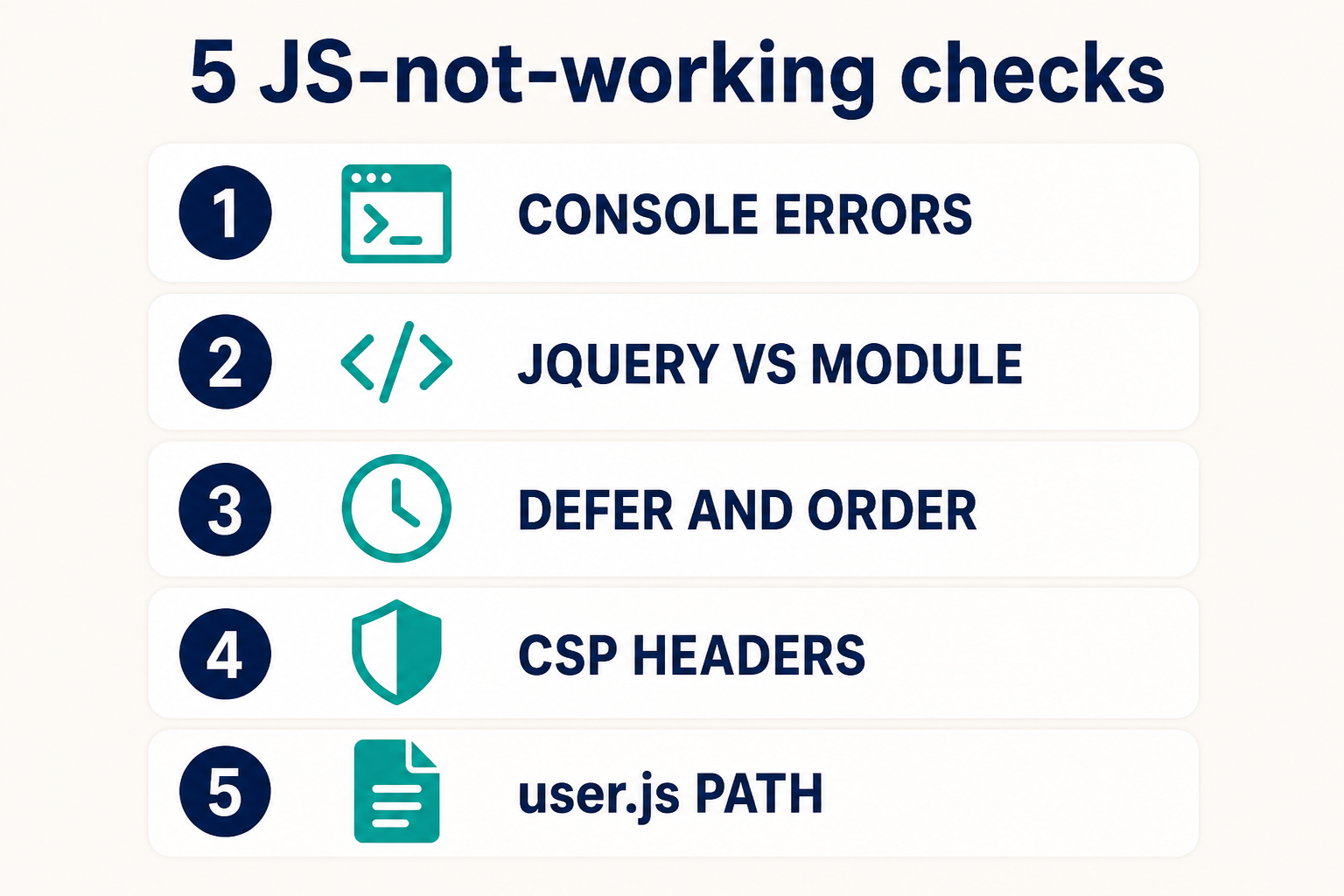
    Five checks: console, jQuery vs module, defer, CSP, user.js path

    Console first. Then jQuery versus module syntax. Then defer and order. Then CSP. Then the user.js path on the active template.

    Key takeaways

    1. Joomla JavaScript not working is a console diagnosis, not a reason to paste a second <script> into core.
    2. Cassiopeia user.js is media/templates/site/{template}/js/user.js on the active template. A child does not load the parent file.
    3. New File: name user, type .js. The old templates/…/js/ path is Joomla 4.0.
    4. $ is not defined on stock Cassiopeia. Rewrite vanilla or declare jQuery as a Web Asset dependency. Do not ship two jQuery copies.
    5. import belongs in a module asset, not in default deferred user.js.
    6. Deferred order and a missing DOM node throw and abort the rest of the file.
    7. CSP from HTTP Headers or the server will refuse inline and remote scripts even when Network is 200.
    8. Add files using Add custom JavaScript to Joomla. Keep them on a child.

    Frequently asked questions

    Why is my Joomla JavaScript not working?

    The console has a 404, a $ is not defined, a module SyntaxError, a CSP refusal, or an earlier exception that stopped the file. Read the first red line. Then confirm user.js is on the assigned template’s media path.

    Where do I put user.js in Joomla 5?

    media/templates/site/{template}/js/user.js, same pattern as user.css. Create it with filename user and type .js in the template’s js folder. Official customisation notes: Cassiopeia Template Customisation.

    Does Joomla 5 still include jQuery on every page?

    No. Cassiopeia does not load jQuery unless an extension (or your asset JSON) asks for it. Joomla 3 snippets that start with $ will fail on a stock 4, 5, or 6 site.

    Can Content-Security-Policy block user.js?

    'self' allows a same-origin user.js. It still blocks inline script in articles and many CDN URLs. Check the console for Refused to execute and the HTTP Headers plugin. Docs: HTTP Headers plugin.

    Why does my script work in the administrator but not on the site?

    Administrator uses Atum (or an Atum child). The site uses Cassiopeia (or a site child). user.js is per template. Put site scripts in the site child. Put admin scripts in an administrator child.

    Should I add JavaScript in this article or in the how-to?

    Use this page to find the failure. Use Add custom JavaScript to Joomla to register the file. Do not paste into core index.php.

    I cleared cache and guests still run old JS. Why?

    System – Page Cache stores full HTML. Logged-in users skip it. Clear cache, purge the CDN, test a private window. See cache showing old content.

    Conclusion

    When Joomla JavaScript is not working, the console already knows. 404 means the user.js path (child vs parent, media/ vs the old templates/ folder). $ is not defined means a Joomla 3 habit on a Cassiopeia page. import means a module in a classic deferred file. CSP means the headers, not SEF. Conflicts mean a second Bootstrap or a system plugin on staging, not a core hack.

    Add the file the supported way, on a child, using Add custom JavaScript to Joomla. If production is a pile of inline snippets and HTTP Headers, Joomla support and maintenance is cheaper than one more script tag in index.php.

  • Joomla 6 vs Joomla 3: Why You Should Upgrade Now

    Joomla 6 vs Joomla 3: Why You Should Upgrade Now

    Joomla 6 is the current major CMS line. Joomla 3 reached end of life on 17 August 2023, and paid extended security support ended on 17 February 2025. A Joomla 3 site in 2026 is running core software the Joomla Project will not patch. Joomla 4 is not the destination either. Its security window closed on 14 October 2025. If you still have a 3.x site, the supported landing zone is Joomla 6.1.x (6.2 is next), not a 2021-era Joomla 4 install.

    This page used to compare Joomla 4 and Joomla 3. That framing is outdated. Joomla 4 shipped on 17 August 2021 as the way off Joomla 3. Four years later, Joomla 4 is also unsupported. The question in 2026 is simpler: stay on an unpatched 3.x stack, or move to Joomla 6 on modern PHP.

    Infyways has migrated Joomla sites since the Mambo era. If you want a managed cutover, use Joomla Upgrade. For the current 6.x train, see Joomla 6.

    What you will learn

    • How Joomla 6 vs Joomla 3 compares on support, PHP, speed, security, templates, and SEO
    • What share of Joomla sites still run version 3, and why that majority is in the danger zone
    • Why Joomla 4 is no longer the upgrade target
    • Official dates you can cite (EOL, eLTS, current 6.x support)
    • The real upgrade path: 3.10 to 4.4 to 5.4 to 6.x (you cannot jump 3 to 6)
    • What usually breaks: Protostar, K2, old page builders, abandoned extensions
    • When to call Joomla upgrade or support help

    How many Joomla sites still run version 3

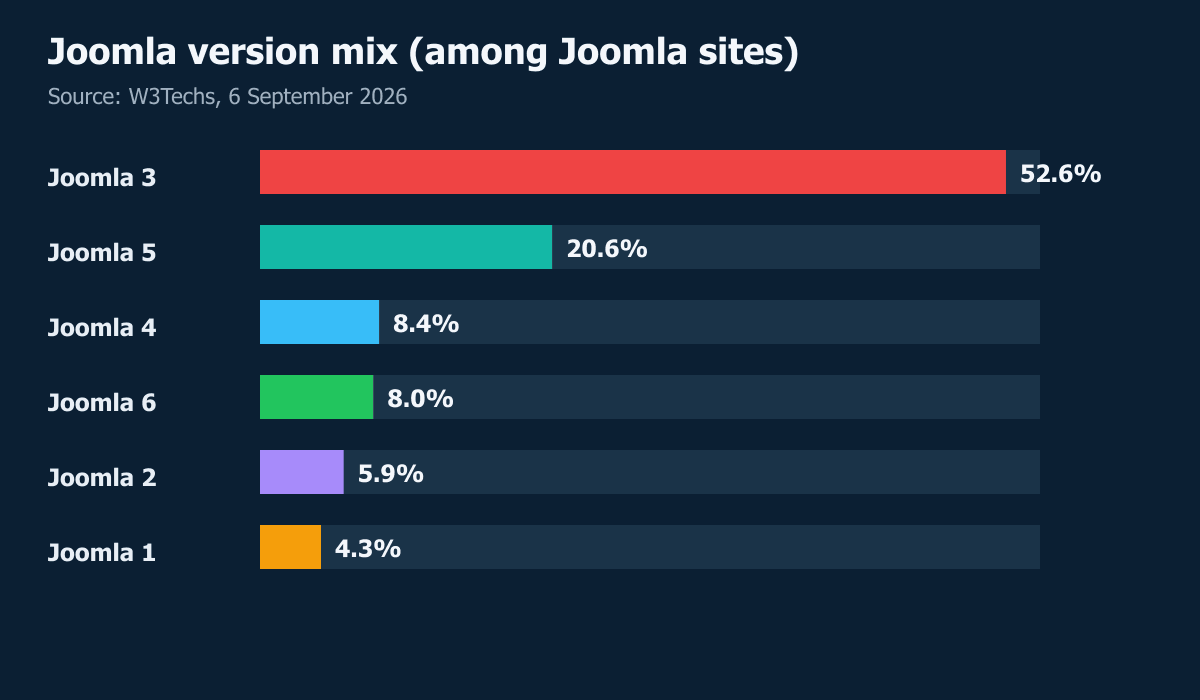
    W3Techs (7 September 2026) reports this mix among websites it detects as Joomla:

    Joomla version Share of detected Joomla sites Project patch status in Sep 2026
    3.x 52.6% None. Community support ended 17 Aug 2023. Paid eLTS ended 17 Feb 2025
    5.x 20.6% Supported (bugfix until 13 Oct 2026, security until 12 Oct 2027)
    4.x 8.4% None. Security support ended 14 Oct 2025
    6.x 8.1% Current line (bugfix until 17 Oct 2028, security until 16 Oct 2029)
    2.x 5.9% None. Retired years ago
    1.x 4.3% None. Retired years ago

    How to read it:

    • About 1 in 2 Joomla sites is still on Joomla 3. That is not a rounding error. It is the majority of the public install base W3Techs can fingerprint.
    • About 71% are in the danger zone: versions 1, 2, 3, and 4 together (52.6 + 8.4 + 5.9 + 4.3). Those majors do not get official core patches.
    • Only about 29% are on a supported train: Joomla 5 plus Joomla 6 (20.6 + 8.1).

    This is a website census, not a poll of “people.” W3Techs counts public sites it can identify. It will miss locked-down intranets. It can also lag a recent upgrade until the next crawl. Treat 52.6% as the public web’s Joomla 3 share, not as Infyways telemetry.

    The share is falling, slowly. W3Techs’ version history had Joomla 3 around 61% in July 2025. A year later it is still over half. Migrations are happening. They are not happening fast enough to empty the unpatched pool.

    Why Joomla 3 sites are in the danger zone

    “Danger zone” here means unpatched core on the public internet, not a marketing label.

    1. The core will not get another official fix. Any new Joomla 3 vulnerability stays open. Firewalls and Admin Tools lower noise. They do not replace a vendor patch. Community “dot 999” hardening is a stopgap, not a support contract.
    2. Attackers prefer the popular leftover. When more than half of detected Joomla sites still answer as 3.x, scanners and exploit kits keep Joomla 3 fingerprints in rotation. You are not an interesting target. You are a matching banner.
    3. The PHP under it is usually old too. Joomla 3 can boot on PHP 5.3.10. Many live 3.x sites sit on PHP 7.4 or 8.0 because a template or checkout dies on 8.3. Old PHP means old OpenSSL, ended distro packages, and a host that will someday force an upgrade and white-screen the site.
    4. The extension layer is abandoned. Template and page-builder vendors have stopped Joomla 3 security work. A “patched” builder on unpatched core is still an unpatched CMS.
    5. Joomla 4 is not a safe parking spot. Another 8.4% of detected sites are on 4.x, which lost security support on 14 October 2025. Migrating 3 to 4 and stopping leaves you in the same danger zone under a newer number.
    6. Compliance already failed. PCI questionnaires, cyber insurance, and enterprise IT reviews ask whether the CMS still receives vendor patches. “Joomla 3.10.12” is a no. “We have not been hacked yet” is not a control.

    If you are in that 52.6%, the risk is not theoretical. It is the default condition of an EOL CMS that most of the remaining Joomla web has not left. Upgrade path below. Incident first if you are already compromised: repair a hacked Joomla website.

    Joomla 6 vs Joomla 3 at a glance

    These figures are from the Joomla Project roadmap, the Joomla 6.0 / 5.4 announcement, Joomla 3 downloads, and the Joomla 6 technical requirements. Current stable 6.x at writing (September 2026) is 6.1.3.

    Area Joomla 3.10 Joomla 4.4 Joomla 6.1
    Last official core 3.10.12 (11 July 2023) 4.4.x, security ended 14 Oct 2025 6.1.3 (18 Aug 2026), 6.1.4 due 29 Sep 2026
    Community support Ended 17 Aug 2023 Security ended 14 Oct 2025 Bugfix until 17 Oct 2028, security until 16 Oct 2029
    Paid eLTS Ended 17 Feb 2025 None Not needed while 6.x is current
    PHP minimum 5.3.10 7.2.5 8.3.0
    PHP recommended 8.0 (late 3.x docs) 8.2 8.4
    MySQL minimum 5.1 (InnoDB) 5.6 8.0.13
    Frontend template Protostar (Bootstrap 2 era) Cassiopeia (Bootstrap 5) Cassiopeia plus Cassiopeia Extended child
    Admin template Isis Atum Atum with CSS transitions
    Core updates Manual, unsigned in the old model Manual, later TUF on 5.x TUF-signed plus automatic core updates
    Native child templates No From 4.1 Yes, including the Extended child in 6.0
    MFA in core Plugin era First-class MFA MFA plus POW captcha in 6.1
    Web Services API Limited / add-on era Core web services Core APIs, Framework 4
    You should run this in 2026 No No Yes

    Read that table as a support clock, not a feature brochure. Joomla 3 is not “old but patched.” It is unpatched core.

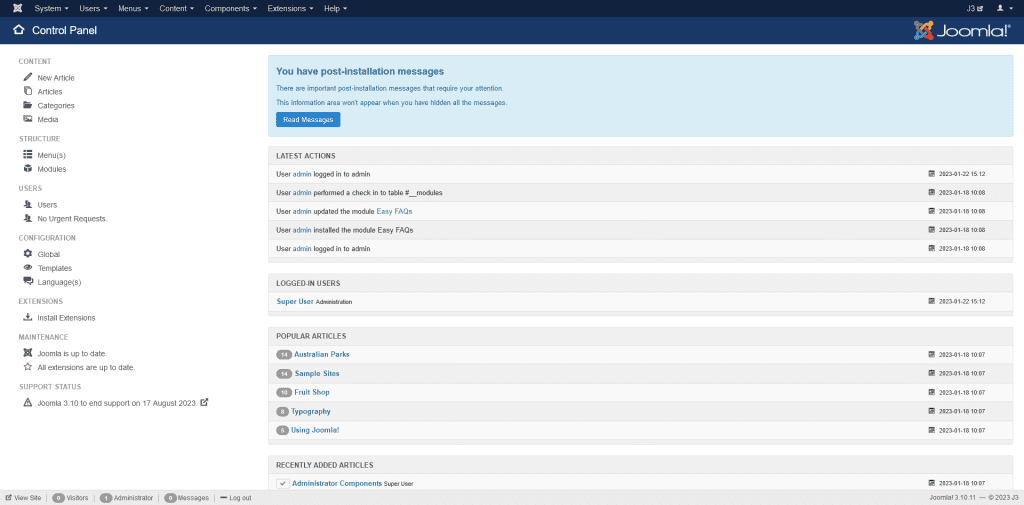
    Joomla 3 Isis administrator dashboard still used on many end-of-life sites
    Joomla 3 administrator (Isis). This is still the backend on many sites that have had no official core patches since 2023.
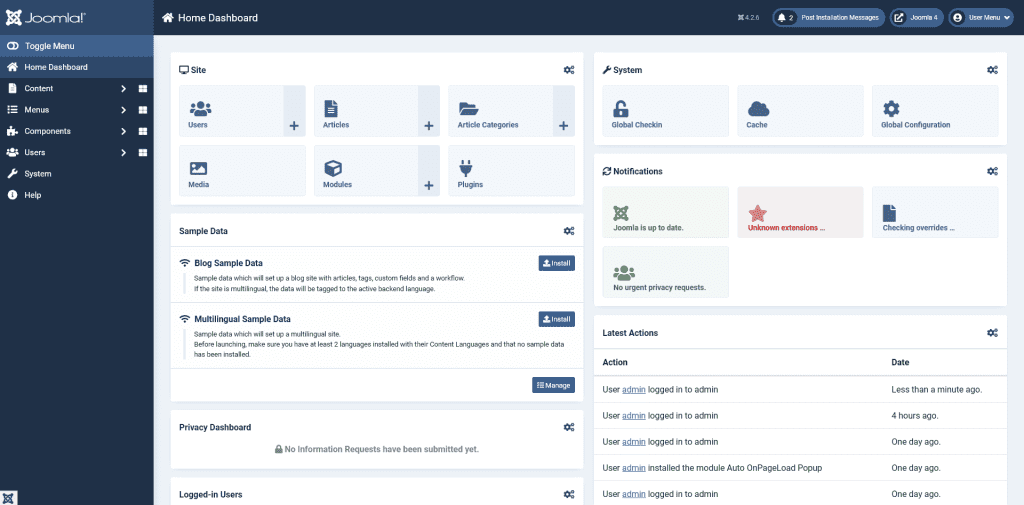
    Joomla 4 Atum administrator dashboard, the 2021 to 2025 bridge release that is now also unsupported
    Joomla 4 administrator (Atum). Joomla 4 was the hop off 3.x. Security support for 4.x ended 14 October 2025, so it is not the 2026 destination.

    Why you should upgrade now

    Waiting made sense in 2022, when Joomla 4 was new and many extensions lagged. It does not make sense in September 2026.

    1. There is no official Joomla 3 patch at any price. Community support ended 17 August 2023 (project announcement). The commercial eLTS programme closed 17 February 2025. Community hardening repos exist as a stopgap. They are not a product roadmap.
    2. Joomla 4 is also closed. Teams that migrated 3 to 4 and stopped there are on another EOL line as of 14 October 2025. Stopping at 4 only delays the same job.
    3. Hosts are dropping the PHP Joomla 3 was built for. Joomla 6 requires PHP 8.3 (8.4 recommended). Shared hosts that still offer PHP 7.4 or 8.0 are shrinking. A 3.x site that “works” on an old PHP pool is one host policy change away from a white screen. If the site is already down, treat it as an incident, then upgrade. Do not patch PHP on production and hope 3.x survives.
    4. Extension vendors have left 3.x. Major template and page-builder shops have stopped Joomla 3 security work. A patched Helix or SP Page Builder on top of unpatched core is not a secure site.
    5. Joomla 5.4 bugfix ends 13 October 2026, the same week Joomla 6.2 is planned. If you start from 3.x now, you still pass through 4.4 and 5.4. Starting after those windows close makes the staging work harder, not easier.
    6. Insurers, payment processors, and enterprise IT questionnaires ask for supported software. “We are on Joomla 3.10.12” fails that test. PCI and cyber policies do not care that the site “has not been hacked yet.”

    If the site is already compromised, fix the incident first: repair a hacked Joomla website. Then upgrade. Patching malware on Joomla 3 and staying there repeats the incident.

    Speed: Joomla 6 vs Joomla 3

    Joomla 3 can feel fine on a tiny brochure site with a CDN in front. The gap shows up in admin, multilingual sites, and anything that loads a pile of modules.

    PHP is the largest lever. Joomla 3 can boot on PHP 5.3.10. Plenty of live 3.x sites still sit on PHP 7.4 because a template or VirtueMart fork dies on 8.x. Joomla 6 will not install below PHP 8.3. You pick up years of Zend engine, JIT, and opcode-cache work the 3.x codebase was never written to use. That is not a lab synthetic. It is the language runtime your host actually executes.

    Joomla 6 caches language file parsing. The 6.0 release notes added a cache layer around languageHelper::parseIniFile. Multilingual and large language-pack sites spend less time re-parsing INI on every request. Joomla 3 does this the old way.

    Asset loading is no longer “jQuery and Bootstrap 2 on every page.” Joomla 3’s Protostar stack is a custom Bootstrap 2.3.2 plus a jQuery era front end. Joomla 4 introduced the Web Asset Manager. Joomla 6 still uses it on Bootstrap 5.3. Extensions that opt in ship only the CSS and JS they need. A 3.x site with five club templates and a page builder often ships several jQuery copies. That is why speeding up Joomla on 3.x is mostly caching and images, while 6.x can also drop unused JS.

    Admin is a different application. Isis on Joomla 3 was built for another decade of screens. Atum on 4/5/6 is the accessibility-first admin. Joomla 6 added CSS transitions in Atum and Cassiopeia so admin navigation feels less like a full reload. Editors on 3.x still complain that “Joomla admin is slow.” Often it is PHP workers plus Isis plus uncached language strings. Front-end caching help is in how to speed up Joomla.

    Media and images. Joomla 6’s media manager can generate thumbnails for more file types, and 6.1 adds audio, video, and document custom fields. Joomla 3’s media manager is a drag for large libraries. Pair the CMS move with modern formats: WebP for Joomla.

    Do not expect a magic “Joomla 6 is 40% faster” number. Measure TTFB and LCP on staging after PHP 8.4, cache, and image work. The consistent pattern we see: origin time drops when you leave PHP 7 and a Bootstrap 2 template, then front-end LCP drops when you stop shipping unused JS.

    Security: Joomla 6 vs Joomla 3

    Security is the reason to move, not a bullet on a marketing slide.

    Unpatched core is the whole story on Joomla 3. New CVE-class bugs in 3.x stay open. Firewalls and “we have Admin Tools” reduce noise. They do not patch core. If you need the honest incident path, we wrote how to repair a hacked Joomla site.

    Joomla 6 still gets a security train. Roadmap: regular bugfix for 6.x until 17 October 2028, security-only until 16 October 2029. That is years of project-signed fixes Joomla 3 will never receive.

    Updates are signed and can be automatic. Joomla 5.1 introduced TUF-secured updates. Joomla 5.4 and 6.0 added automatic core updates for minor releases (example: 6.1.2 to 6.1.3). Joomla 3’s updater was a manual, often skipped, ritual. Sites die in the gap between “we will update next quarter” and a disclosed exploit.

    MFA and bot friction are core. Joomla 4 made multi-factor authentication a first-class system plugin. Joomla 6.1 added a built-in proof-of-work captcha as a core alternative to Google reCAPTCHA. Joomla 3 sites still bolt this on, if they bother.

    Password hashing and session handling moved with PHP. Staying on 3.x often means staying on old PHP. Old PHP means old OpenSSL, old hash APIs, and host packages that nobody is backporting.

    SVG and media uploads. Joomla 6 improved SVG validation errors in Media Manager so a failed upload is a real diagnostic, not a vague XSS warning. Joomla 3 media uploads are a frequent malware drop if the site allows untrusted users.

    Security is also template PHP. Protostar forks and “null” templates from 2016 execute on the same PHP as core. Joomla 6 child templates (how to set up a Joomla child template) let you keep CSS without forking core files that need patches.

    Feature comparison: daily CMS work

    Job Joomla 3 Joomla 6
    Edit an article TinyMCE of that era, fewer field types TinyMCE 8.x, notes and number custom fields, versioning that includes custom fields
    Customise the design Edit Protostar or duplicate the whole template Child template of Cassiopeia; Cassiopeia Extended ships extra colour and font params
    Run two languages Native multilingual exists, incomplete packs leave gaps Native multilingual plus a language fallback chain in 6.2
    Keep core patched Manual, then impossible after EOL TUF updates, optional automatic minor updates
    Workflow Limited Graphical workflow editor in 6.1
    Headless / app backend Thin Core Web Services, Framework 4
    Accessibility Partial WCAG-oriented admin and frontend from the J4 rewrite onward
    SEO defaults SEF plus third-party SEO extensions Same SEF model, cleaner HTML, better default robots/accessibility; still use a capable SEO extension if you need it

    One correction to older “Joomla 4 vs 3” posts, including the 2023 version of this URL: Joomla 3 already had native multilingual. Joomla 6 does not “add languages.” It makes incomplete language packs less painful and keeps the rest of the stack on a supported PHP line.

    What usually breaks on the way off Joomla 3

    Plan for these. They are why a 3 to 6 job is a migration, not a one-click installer.

    • Protostar and Isis. They do not come across as Cassiopeia and Atum. Rebuild the look as a Cassiopeia child, or replace with a Joomla 6-ready commercial template. Do not copy Protostar PHP into 6.
    • K2. K2 is a Joomla 3-era content stack. Move K2 items into core articles or a J6-ready CCK. Infyways runs this as K2 migration.
    • VirtueMart and old checkout. Test every payment plugin on PHP 8.3. Some gateways never shipped J4+ builds. That is a commerce project, not a core bump. See VirtueMart upgrade.
    • Page builders and Helix/SP Page Builder 3-era sites. Vendor J6 builds exist for current product lines. Joomla 3-only licences do not. Budget a rebuild of landing pages if the builder is abandoned.
    • Overrides. html/com_content copies from 2014 will fatal on namespaced J6 classes. Inventory overrides before you touch production.
    • SEO URLs. Most menu aliases survive. Third-party sh404SEF or similar needs a J6-native replacement or a redirect map. Do not go live without a 301 sheet.

    You cannot jump from Joomla 3 to Joomla 6

    The installer will not let you. GitHub’s 6.0 notes are explicit for the last hop: do not update to 6.x from anything below 5.4. Get to 5.4 first.

    Practical path we use on client sites:

    1. Joomla 3.10.12 (last official 3.x) with a full backup
    2. Staging clone, PHP raised as far as 3.10 will run (often 8.0) so the pre-update checker works
    3. Migrate 3.10 to 4.4 (this is the hard hop: templates and extensions)
    4. Upgrade 4.4 to 5.4 (upgrade, not a second migration, if extensions dropped J3-only APIs)
    5. Enable the Behaviour – Backward Compatibility 6 plugin on 5.4, then upgrade 5.4 to 6.1.x
    6. Retest, then plan to turn the compatibility plugin off once vendors are native

    Official notes: Joomla 5.4 to 6.0 migration. For the 3 to 4 hop, Joomla’s 3.10 pre-update checker is still the right first screen. We also keep a dedicated walkthrough at Joomla 3 to Joomla 4 upgrade because that hop is where most sites stall.

    Step 1: Inventory the Joomla 3 site

    1. Record Joomla version, PHP, MySQL/MariaDB, and host.
    2. Export the extension list (core, libraries, templates, modules, plugins).
    3. Mark each item: Joomla 6-ready, replace, or drop.
    4. List overrides, custom cron, payment callbacks, and multilingual associations.
    5. Capture Search Console, analytics, and a crawl of indexable URLs.

    Filter the Joomla Extensions Directory by Joomla 6. If a vendor vanished in 2019, budget a replacement now. Do not discover it on launch night.

    Step 2: Fix hosting and PHP first

    Joomla 6 needs PHP 8.3+, MySQL 8.0.13+ or MariaDB 10.4+ (10.6 supported, 12.0 recommended), and enough PHP memory (plan 256MB). Raise staging to the J6 target PHP before you chase template bugs. If production cannot offer PHP 8.3, change host before you change CMS. A 6.x site on an old PHP pool will not install.

    Step 3: Stage, never upgrade live first

    1. Full files plus database backup, stored off the server.
    2. Clone to staging with the same PHP you will use in production for the current hop.
    3. Disable or remove junk extensions on the clone.
    4. Run 3.10 to 4.4 on staging until frontend, login, forms, and checkout work.
    5. Only then continue 4.4 to 5.4 to 6.1.x on that clone.

    If staging is not possible, do not improvise on production. That is how “upgrade” becomes an outage. Infyways can run the clone under Joomla Upgrade or outsource Joomla services.

    Step 4: Rebuild the template as a child, not a fork

    On Joomla 6, create a child of Cassiopeia (or use Cassiopeia Extended) and move only CSS, logo, and overrides you still need. Do not paste Protostar index.php into 6. Details: Joomla child template setup. For a full visual rebuild, Joomla design services.

    Step 5: QA, SEO, and production cutover

    1. Frontend: home, menus, articles, category blogs, search, forms, login, checkout.
    2. Admin: article edit, media, installer, users, MFA.
    3. SEO: aliases, canonicals, redirects, XML sitemap, Search Console comparison crawl.
    4. Performance: cache, CDN, WebP, PHP-FPM workers.
    5. Security: latest 6.1.x patch, automatic updates policy, failed-login limits.

    Cut over in a low-traffic window with a restore point. Then watch logs for 48 hours. Ongoing patching belongs on a retainer: Joomla support and maintenance.

    Key takeaways

    1. Most detected Joomla sites are still on 3.x. W3Techs (7 Sep 2026): 52.6% on version 3. About 71% sit on 1.x, 2.x, 3.x, or 4.x, none of which get official core patches.
    2. Joomla 6 vs Joomla 3 is not a style debate. Joomla 3 has had no official core patches since August 2023. eLTS ended February 2025.
    3. Do not migrate 3 to 4 and stop. Joomla 4 security support ended 14 October 2025. Land on Joomla 6.1.x.
    4. Speed comes from PHP 8.3/8.4, Web Assets, language-file caching, and dropping Bootstrap 2 templates, not from a slogan.
    5. Security comes from a supported train: TUF-signed updates, optional automatic minor updates, MFA, and vendors who still ship J6 builds.
    6. You cannot jump 3 to 6. Path is 3.10 to 4.4 to 5.4 to 6.x on staging.
    7. Budget template, K2, and checkout work. Core is the easy part. Overrides and abandonware are the project.
    8. Infyways can run the cutover: Joomla Upgrade.

    Frequently asked questions

    What percentage of Joomla sites still use Joomla 3?

    W3Techs reported 52.6% of detected Joomla sites on version 3 on 7 September 2026. About 71% are on any unsupported major (1, 2, 3, or 4). Source: W3Techs Joomla usage.

    Is Joomla 3 still supported in 2026?

    No. Official community support ended 17 August 2023. Paid eLTS ended 17 February 2025. There is no official Joomla 3 core patch at any price. That is why the 52.6% still on 3.x are in the danger zone.

    Should I upgrade Joomla 3 to Joomla 4 or Joomla 6?

    Go to Joomla 6. Joomla 4 is a required hop on the path, not the destination. Joomla 4 security support ended 14 October 2025.

    Can I upgrade directly from Joomla 3 to Joomla 6?

    No. Update to 3.10, migrate to 4.4, upgrade to 5.4, then to 6.x. Do not skip 5.4. The project tells you not to update to 6 from anything below 5.4.

    What PHP version does Joomla 6 need compared with Joomla 3?

    Joomla 6 requires PHP 8.3.0 minimum and recommends 8.4. Joomla 3.10’s absolute minimum is PHP 5.3.10. That gap is why many 3.x sites cannot even install 6 until hosting changes.

    Is Joomla 6 faster than Joomla 3?

    Usually yes on real hosting, because you leave PHP 7 and Bootstrap 2, and 6.x caches language parsing and uses the Web Asset Manager. Measure on staging. Do not quote a fake percentage.

    Will my Joomla 3 template work on Joomla 6?

    Almost never if it is Protostar or a 2016 club fork. Rebuild as a Cassiopeia child or replace with a Joomla 6-ready template.

    What about K2 sites still on Joomla 3?

    Migrate K2 content before or as part of the CMS move. Core articles or a J6-ready CCK, not a K2 install on Joomla 6. See Joomla K2 migration.

    How long does a Joomla 3 to Joomla 6 upgrade take?

    A small brochure site with a replaceable template can be days on staging. A VirtueMart plus page-builder plus 80 extensions site is weeks. Inventory first. Infyways quotes after that list, not before: Joomla Upgrade.

    Conclusion

    Joomla 6 vs Joomla 3 is a supported CMS versus an unpatched one. W3Techs still finds 52.6% of detected Joomla sites on version 3. Speed and UX are real. They are not why you should move this quarter. You should move because that majority is already in the danger zone: no official core patch, aging PHP, abandoned extensions, and Joomla 4 already closed behind you.

    Inventory extensions, raise PHP on a clone, walk 3.10 to 4.4 to 5.4 to 6.1.x, and rebuild the template as a child. If you want that done without gambling on production, start with Joomla Upgrade or hire Joomla developers.

  • How to Enable, Disable, and Clear Cache in Joomla

    How to Enable, Disable, and Clear Cache in Joomla

    Joomla caching stores generated HTML or module output so the next visitor gets a faster response without rebuilding the page from the database every time. You control three layers: Global Configuration System Cache (Off, Conservative, or Progressive), the System – Page Cache plugin for full-page snapshots (guests), and module-level cache choices. Clearing cache is System → Clear Cache (or Maintenance → Clear Cache on some layouts). The same model applies on Joomla 3, 4, 5, and 6. Official overview: Joomla Cache documentation.

    This guide is the operations playbook: when to turn each layer on, how to turn it off for debugging, how to purge safely, and how to stop fighting CDN or browser cache that is not Joomla at all. If Clear Cache does nothing to storage, see Joomla cache not clearing. If you published and still see yesterday’s HTML, see cache showing old content. For speed work beyond cache: speed up Joomla.

    What you will learn

    • What each Joomla cache layer actually stores
    • Conservative vs Progressive vs Page Cache (and when Progressive bites)
    • Step-by-step enable, disable, and clear flows
    • Handler choices: File, APCu, Redis, Memcached
    • Guest vs logged-in behavior
    • A go-live checklist and troubleshooting matrix

    Infyways: Joomla website optimization · Joomla support · Joomla development.

    Cache layers at a glance

    Layer What it caches Who it usually serves Where you control it
    System Cache: Off Nothing from global view/module caching N/A Global Configuration → System → Cache Settings
    Conservative Views/modules you allow (module Advanced → Use Global / No caching) Guests mainly for shared output Global Configuration + per-module
    Progressive Broader module combinations; overrides many per-module “No caching” expectations Guests; easy to show wrong modules on wrong pages Global Configuration
    System – Page Cache Full HTML page snapshot Guests only (logged-in users bypass) Plugins → System – Page Cache
    CDN / host / browser Edge or client copies Everyone who hits that layer Cloudflare, LiteSpeed, browser

    Global System Cache alone does not equal full-page caching. Page Cache is a separate plugin. That distinction is the number one agency misunderstanding.

    Recommended defaults (production vs build)

    Situation System Cache Page Cache plugin Notes
    Active development / styling Off Disabled Otherwise you chase ghosts
    Content-heavy marketing site Conservative Enable after testing Set dynamic modules to No caching
    Rarely changing brochure site Conservative or carefully tested Progressive Often enabled for guests Progressive needs QA on module assignment
    Membership / cart / personalized UI Conservative + strict module exclusions Use exclusions or keep Off on private paths Never assume Page Cache is safe on personal pages

    Step 1: Open Cache Settings

    1. Log in to Administrator.
    2. Go to System → Global Configuration.
    3. Open the System tab.
    4. Find Cache Settings.

    Typical fields (labels vary slightly by version):

    Field Meaning
    System Cache Off / Conservative / Progressive
    Cache Handler Usually File; APCu, Redis, or Memcached when PHP extensions and host support them
    Cache Time Minutes until an entry expires (default often 15)
    Path to Cache Folder Leave blank for default cache/ unless you have a deliberate custom path
    Platform Specific Caching Adds device-type flavor to cache IDs when Yes

    Official walkthrough: Cache docs.

    Step 2: Enable Conservative caching (safe default)

    1. Set System Cache to ON – Conservative caching.
    2. Set Cache Handler to File unless your host already standardized on Redis/Memcached and you know how to flush it.
    3. Set Cache Time (start at 15–60 minutes; raise after you trust purge habits).
    4. Save.
    5. For each module that must stay dynamic (cart, login, personalized greetings), open the module → Advanced → set Caching to No caching.
    6. Leave stable modules on Use Global.

    Conservative is the default you should prefer on client sites unless you have a reason and a test plan for Progressive.

    Step 3: Enable Progressive caching only with eyes open

    1. Set System Cache to ON – Progressive caching.
    2. Save and clear cache.
    3. Walk key menu items as a guest. Confirm modules appear only where assigned.
    4. If a module “follows” you across pages incorrectly, switch back to Conservative immediately.

    Progressive is faster on paper and famous for wrong-module-on-wrong-page tickets. Treat it as an advanced mode, not a trophy setting.

    Step 4: Enable System – Page Cache (full pages for guests)

    1. Go to System → Manage → Plugins (or Extensions → Plugins on older menus).
    2. Search for System – Page Cache.
    3. Enable it.
    4. Review plugin options (browser cache, exclusions) for your version.
    5. Clear cache.
    6. Test as guest in a private window, then as a logged-in user.

    Page Cache is the biggest win for anonymous traffic. Logged-in sessions normally bypass it. If editors say “I see the update but visitors do not,” clear the page cache group and check CDN.

    Step 5: Disable caching for debugging

    Use this order when something looks stale or broken:

    1. Disable System – Page Cache plugin.
    2. Set Global System Cache to OFF – Caching disabled.
    3. Clear Cache (Delete All).
    4. Bypass CDN (origin URL or development mode) and use a private browser window.
    5. Reproduce the bug.
    6. Re-enable Conservative (and Page Cache if needed) only after the fix is confirmed.

    Do not leave production on Off after a support call ends.

    Step 6: Clear cache in Administrator

    Clear all

    1. Go to System → Clear Cache (sometimes under Maintenance).
    2. Check all groups or use Delete All / equivalent.
    3. Confirm the list empties or refreshes.

    Clear one group

    1. Open Clear Cache.
    2. Tick a group such as page (Page Cache plugin) or a component/module group.
    3. Delete.

    After content edits on a Page Cache site, clearing the page group is the move that fixes “guest still sees old article.”

    CLI (when you automate)

    From the site root, modern Joomla installs can use the console cache clean command provided by your version (joomla.php / CLI entry). Wire it into deploy hooks so releases purge File or Redis consistently. If the Admin broom works but Redis still serves old HTML, the handler was not File: cache not clearing.

    Step 7: Clear what is not Joomla

    Layer How to purge
    Cloudflare / CDN Purge URL or cache everything after major publishes
    LiteSpeed / host page cache Host panel or LSCache purge
    Browser Private window or hard refresh
    Opcode (APCu/OPcache) Host restart or panel tools after PHP deploys

    Joomla Clear Cache never empties Cloudflare by itself.

    Handler cheat sheet

    Handler Use when Watch-out
    File Default shared hosting Permissions on cache/; disk full
    APCu Single-server PHP with APCu Not shared across multiple app servers
    Redis / Memcached Multi-node or high traffic Must flush the right instance; FTP delete of cache/ does nothing

    Always match Clear Cache expectations to the handler you configured.

    Guest vs logged-in checklist

    1. Publish the change.
    2. Open a private window logged out. That is the Page Cache audience.
    3. Open the same URL logged in. You may see fresher HTML.
    4. If only guests are stale, purge Page Cache + CDN.
    5. If both are stale, check Progressive/Conservative and module cache, then CDN.

    Deep dive: cache showing old content.

    Troubleshooting matrix

    Symptom Likely cause Fix
    Changes invisible to guests only Page Cache or CDN Clear page group; purge CDN; test private window
    Wrong module on wrong page Progressive caching Switch to Conservative; clear cache
    Clear Cache “works” but Redis still old Handler is Redis/Memcached Flush that store; see not clearing
    CSS/JS look cached Browser or CDN, not view cache Version assets; purge CDN; hard refresh
    Site slow after turning cache Off Expected Re-enable Conservative after debug
    Cart/login weirdness Module cached Module Advanced → No caching
    Admin slow unrelated to front cache Different problem Profile Admin separately

    Key takeaways

    1. Conservative + selective module exclusions is the safe production baseline.
    2. Page Cache is separate and mainly for guests. It is the big anonymous speed win.
    3. Progressive is optional and easy to misconfigure.
    4. Clear the layer that served the response: Joomla groups, then CDN, then browser.
    5. Match purge method to Cache Handler (File vs Redis).

    Frequently asked questions

    How do I enable cache in Joomla?

    Open Global Configuration → System → Cache Settings, set System Cache to Conservative (recommended) or Progressive, save, then optionally enable the System – Page Cache plugin for guest full-page caching.

    How do I disable cache in Joomla?

    Set System Cache to Off and disable the System – Page Cache plugin, then Clear Cache. Also bypass CDN while debugging.

    How do I clear cache in Joomla?

    Use System → Clear Cache and Delete All, or delete specific groups such as page. Flush Redis/Memcached if that is your handler.

    What is the difference between Conservative and Progressive caching?

    Conservative respects module-level “No caching” choices more sanely for mixed sites. Progressive caches module combinations more aggressively and often causes assignment bugs.

    Does Page Cache work for logged-in users?

    Normally no. System – Page Cache is aimed at guests. Logged-in users generate personalized output.

    Why do visitors still see old content after I clear cache?

    Another layer is hot: CDN, host cache, or browser. Or Page Cache was not cleared. See cache showing old content.

    Should I use Redis instead of File?

    Use Redis when traffic or multi-server architecture needs it and your team can flush it on deploy. File is fine for many sites.

    Does this guide apply to Joomla 4, 5, and 6?

    Yes. Menu labels move slightly, but Off / Conservative / Progressive, handlers, Clear Cache, and System – Page Cache remain the core model.

    Can Infyways tune caching on my site?

    Yes: Joomla website optimization and support and maintenance.

  • Joomla SEF URLs: Enable, Rewrite, and Fix Clean Links

    Joomla SEF URLs: Enable, Rewrite, and Fix Clean Links

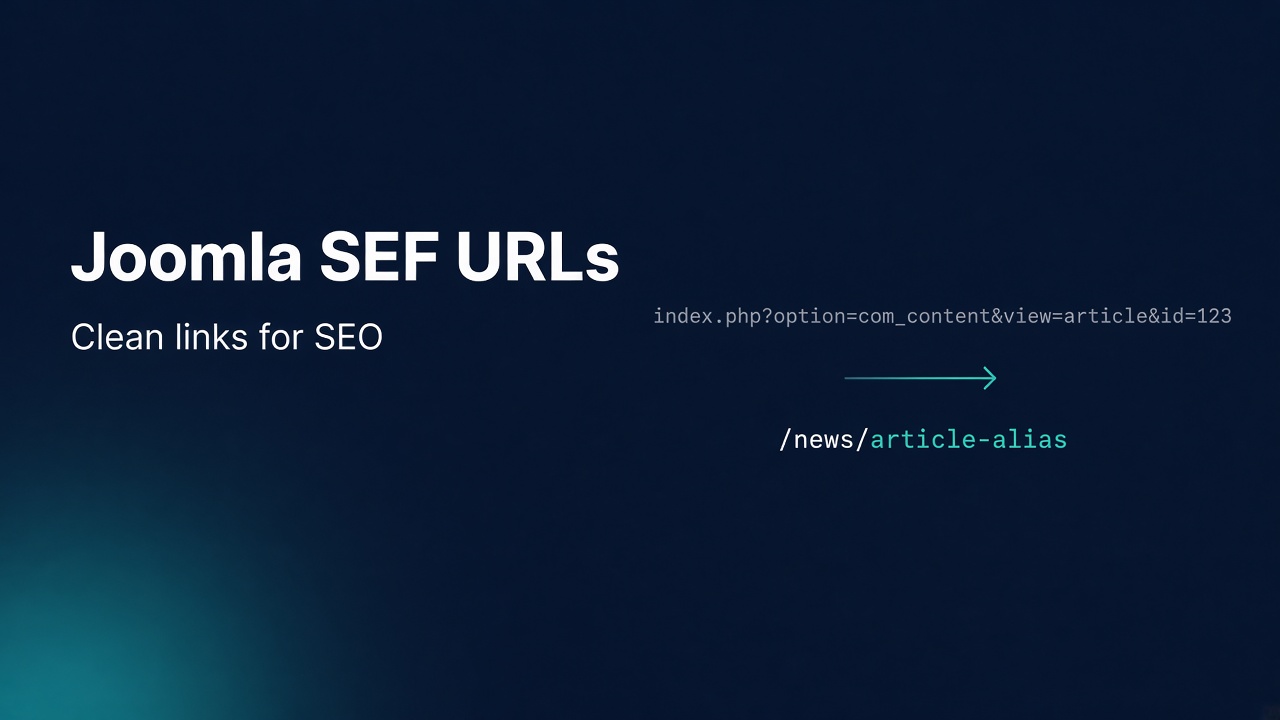
    Joomla SEF URLs (Search Engine Friendly URLs) turn long query strings into readable paths built from menu and content aliases. Enable Search Engine Friendly URLs in Global Configuration so Joomla builds paths like /index.php/news/my-article. Enable Use URL Rewriting and activate the server rewrite file (.htaccess, web.config, or nginx rules) so index.php disappears and you get /news/my-article. The same settings apply on Joomla 3, 4, 5, and 6. Official overview: Search Engine Friendly URLs.

    SEF is not a ranking switch. It is URL hygiene: clearer links for people, crawlers, and analytics. Pair it with solid aliases, one canonical host, and redirects when you rename paths. Deep server rewrite help: Joomla .htaccess guide. Redirect layers: Joomla Redirect Guide. Broader SEO: Joomla SEO.

    What you will learn

    • What SEF URLs are in Joomla (and what they are not)
    • The difference between SEF URLs and URL rewriting
    • Exact Global Configuration switches, including Unicode aliases and .html suffixes
    • Step-by-step setup on Apache/LiteSpeed, IIS, and nginx
    • How menus and aliases actually build the path
    • Duplicate URL traps, multilingual SEF, and API routes on Joomla 4+
    • A verification and troubleshooting matrix agencies use on go-live

    Infyways: Joomla development · Joomla on-page optimization · Joomla website optimization.

    Quick URL transformation table

    Stage Example URL What turned it on
    Raw (non-SEF) /index.php?option=com_content&view=article&id=42&Itemid=101 SEF Off
    SEF without rewrite /index.php/news/42-my-article (pattern varies by menu) Search Engine Friendly URLs = Yes
    SEF with rewrite /news/my-article Use URL Rewriting = Yes + server rewrite file
    Broken “pretty” links 404 on /news/... while /index.php/news/... works Rewrite file missing, RewriteBase wrong, or AllowOverride blocked

    SEF vs rewriting: do not conflate them

    Setting Job Needs .htaccess / nginx / IIS rewrite?
    Search Engine Friendly URLs Joomla generates human-readable path segments from aliases No
    Use URL Rewriting Server strips index.php from those paths Yes
    System – SEF plugin Rewrites many hard-coded links inside article HTML toward SEF forms No (plugin), but still benefits from correct site SEF

    You can run SEF with index.php still visible. Many thin guides skip that and blame Joomla when rewriting fails.

    Official Apache steps: Enabling SEF URLs on Apache.

    Global Configuration SEO panel (all modern versions)

    Path: System → Global Configuration → Site (SEO / Search Engine Friendly block). Labels vary slightly by version, but the controls match.

    Option Recommended default Notes
    Search Engine Friendly URLs Yes On by default since Joomla 1.6-era configs for new sites
    Use URL Rewriting Yes only after rewrite file works Rename htaccess.txt first on Apache/LiteSpeed
    Add Suffix to URLs Usually No Adds .html. Cosmetic; changing later creates redirect debt
    Unicode Aliases No for ASCII-first sites; Yes when you need native script in aliases Affects future auto-aliases, not a mass rewrite of old ones (Global Configuration guide)
    Site Name in Page Titles Project choice Not an SEF path setting, but sits in the same SEO mental model

    Tip from the official guide: after changing SEO settings, hard-refresh open front-end tabs. Stale browser tabs make internal links look broken when they are only cached against the old format.

    Do not casually flip SEO settings on a live indexed site. Changing suffix, Unicode behavior, or rewrite mode can orphan old URLs. Plan 301 redirects first.

    Step 1: Decide the target URL shape

    Write down three example URLs you want live:

    1. Home
    2. A category/blog listing
    3. One article under a menu item

    Agree on:

    • www vs bare host
    • HTTPS only
    • Trailing slash policy (be consistent; do not mix randomly)
    • Whether .html suffixes are required (usually not)

    If those are undecided, fix hosting and redirects before SEF theater.

    Step 2: Activate the server rewrite file

    Apache / LiteSpeed / OpenLiteSpeed

    1. In the Joomla root (same folder as configuration.php), rename htaccess.txt to .htaccess.
    2. If the site lives in a subdirectory, set RewriteBase /yourfolder/.
    3. If you get HTTP 500, comment Options +FollowSymlinks as hosts often forbid it.
    4. On OpenLiteSpeed, restart the server after edits.

    Full breakdown: htaccess-joomla.

    IIS

    Rename web.config.txt to web.config, then enable Use URL Rewriting.

    nginx

    .htaccess does nothing. Use try_files to index.php (and /api/api/index.php on Joomla 4+). Keep Use URL Rewriting aligned with that nginx config.

    Step 3: Turn on SEF, then rewriting

    1. Open System → Global Configuration.
    2. Set Search Engine Friendly URLs to Yes. Save.
    3. Confirm front-end links look like /index.php/... style SEF paths.
    4. Set Use URL Rewriting to Yes. Save.
    5. Confirm index.php is gone from normal menu URLs.
    6. Enable System – SEF plugin if it is not already enabled (Plugin Manager). It helps SEF-ify many links embedded in content HTML.

    Order matters: rename/configure rewrite first (or immediately before enabling rewriting). Enabling rewriting with no rewrite engine produces widespread 404s.

    Step 4: Control aliases like a product manager

    Aliases are the vocabulary of your URLs.

    1. Set a clear menu alias for each important Itemid path.
    2. Set article/category aliases deliberately. Auto-alias from title is fine for drafts; edit before publish for money pages.
    3. Avoid duplicate aliases under the same parent context.
    4. Prefer short, stable aliases. Do not stuff every keyword into the slug.
    5. When you rename an alias on an indexed URL, add a 301 the same day.

    Joomla builds paths from the active menu tree more than from “category folders” alone. Two menu items pointing at similar content can create two valid URLs. That is an IA problem, not an SEF bug.

    Step 5: Multilingual SEF

    On multilingual sites:

    1. Each language needs its own menu tree and associations where required.
    2. Language codes or domains must be planned (subdirectory vs domain).
    3. Do not enable Unicode aliases casually if half your audience cannot type those characters.
    4. Test language switcher targets resolve to associated items, not 404s.

    Native multilingual is a Joomla strength. SEF mistakes show up as “wrong language URL” tickets faster than on monolingual sites.

    Step 6: Joomla 4+ API routes vs site SEF

    Modern stock .htaccess routes /api/ to api/index.php for Web Services. Site SEF and API routing share the rewrite engine but different front controllers. If pretty site URLs work but /api/v1/... 404s, your .htaccess may be an old Joomla 3-era file missing the API block. Merge forward from current htaccess.txt.

    Duplicate URLs and canonical hygiene

    Common duplicate classes:

    Pattern Cause Fix
    /index.php/alias and /alias both 200 Rewrite on, but old links still circulate 301 index.php variants to clean URLs at server or redirect component
    Same article under two menus Two Itemids Pick one primary menu path; redirect or noindex the other
    www and non-www Host not canonicalized Server 301 (redirect guide)
    HTTP and HTTPS TLS not forced Server 301 + HSTS when ready
    Alias change without 301 Editor renamed slug Immediate redirect

    Search engines tolerate some duplication. Humans and analytics do not.

    Performance notes

    SEF itself is cheap compared with uncached page generation. Rewriting is handled by the web server before PHP for the route hop. Performance work still belongs in caching, images, and extension hygiene (speed up Joomla if you maintain that URL). Do not disable SEF “for speed” unless you have measured a real rewrite misconfiguration.

    Verification checklist

    curl -I https://www.example.com/
    curl -I https://www.example.com/your-menu-alias
    curl -I https://www.example.com/index.php/your-menu-alias
    

    Pass criteria:

    1. Canonical host and HTTPS in one hop where possible
    2. Clean alias returns 200
    3. index.php variant 301s to clean URL (ideal) or at least is not the only working form
    4. CSS/JS still load (broken RewriteBase often breaks assets)
    5. Administrator login still works

    Troubleshooting matrix

    Symptom Likely cause Fix
    Pretty URLs 404; /index.php/... works Rewrite not active Rename htaccess.txt, fix nginx/IIS, check AllowOverride
    Entire site 500 after rename Options +FollowSymlinks Comment that line
    Assets 404 in subfolder Bad RewriteBase Set /subfolder/
    SEF On but URLs unchanged Cache / CDN / wrong site Clear Joomla and CDN cache; confirm you edited the live Global Config
    Only some article links stay ugly Hard-coded non-SEF links in content Enable System – SEF; edit content; use Joomla link picker
    Works on Apache staging, fails on nginx prod .htaccess unused Write nginx try_files
    API 404 on J4+ Old rewrite file Add /api/ block from modern htaccess.txt
    Sudden ranking dip after SEO flips URL shape changed Restore pattern or 301 old → new

    Key takeaways

    1. SEF URLs make paths readable. Rewriting removes index.php. They are separate switches.
    2. Activate the server rewrite file before or as you enable Use URL Rewriting.
    3. Aliases and menu structure define the URL vocabulary more than a mythical “category folder” alone.
    4. Changing SEO settings on a live site without redirects creates avoidable debt.
    5. Keep .htaccess / nginx / IIS rules current when you move across Joomla 3 → 4 → 5 → 6.

    Frequently asked questions

    What are Joomla SEF URLs?

    They are human-readable Joomla URLs built from aliases instead of long option= query strings. See the official SEF documentation.

    How do I enable SEF URLs in Joomla?

    Set Search Engine Friendly URLs to Yes in Global Configuration. To remove index.php, also enable Use URL Rewriting after configuring .htaccess, web.config, or nginx.

    Why do I still see index.php in my URLs?

    Use URL Rewriting is Off, or the server rewrite file is missing or ignored. SEF alone keeps index.php in the path.

    Do I need .htaccess for SEF?

    Not for SEF generation. Yes for Apache/LiteSpeed rewriting that removes index.php. Details: htaccess-joomla.

    Should I add .html suffixes to Joomla URLs?

    Usually no. Suffixes are optional cosmetics. Changing them later forces redirects across the site.

    What are Unicode aliases?

    When Yes, Joomla can keep native characters in new aliases instead of transliterating to ASCII. Choose based on audience and keyboard reality. It does not mass-convert existing aliases.

    Will enabling SEF improve Google rankings by itself?

    Not by itself. Clean URLs help usability and consistency. Rankings still need content, links, crawl health, and technical SEO.

    How do I fix SEF 404 errors after enabling rewriting?

    Turn Use URL Rewriting Off to confirm, restore or fix the rewrite file, set RewriteBase for subfolders, then re-enable. Use the troubleshooting matrix above.

    Does this apply to Joomla 4, 5, and 6?

    Yes. The Global Configuration switches and rewrite workflow are the same family. Modern files add /api/ routing for Web Services.

    Can Infyways help with SEF and SEO setup?

    Yes: Joomla SEO services, on-page optimization, and development.

  • Benefits of Using Joomla in 2026: Features, Stats, and Proof

    Benefits of Using Joomla in 2026: Features, Stats, and Proof

    The benefits of using Joomla are strongest when you need native multilingual sites, fine-grained access control, workflows, and structured content without assembling five plugins to get a baseline CMS. Joomla is not the most popular CMS on the public web. Measured by W3Techs in September 2026, it powers about 1.7% of sites with a known CMS (about 1.1% of all websites). WordPress leads by a wide margin. The case for Joomla is architectural fit, upgrade discipline on the modern 5.x/6.x line, and total cost when “plugin glue” becomes the real product.

    This article is the honest, evidence-first version of “why Joomla.” It uses public telemetry, a version mix chart most “benefits” posts ignore, and a capability scorecard that separates popularity from product strength. For equal-weight CMS comparison, see Joomla vs WordPress and Joomla 6.1 vs WordPress 7.1. For the current release line, see Joomla 6.

    What you will learn

    • What public market-share numbers actually say (and what they do not)
    • Why more than half of detected Joomla sites still run version 3, and what that means for buyers
    • The core benefits that show up in real projects: multilingual, ACL, fields, workflows, SEO controls, Web Services
    • Where WordPress or Drupal still win
    • A decision checklist before you commit budget

    Infyways has shipped Joomla since the Mambo era: Joomla development · Joomla upgrade · CMS development.

    The one-sentence verdict

    Choose Joomla when the site is a system of permissions, languages, and structured sections. Choose WordPress when the site is a content marketing machine with maximum plugin gravity. Choose Drupal when you want enterprise information architecture and can staff for it.

    Popularity is a hiring and ecosystem signal. It is not a feature checklist.

    Stat pack: what the data shows in 2026

    CMS market share (known CMS)

    W3Techs (August 2026 snapshot family) reports roughly:

    CMS Share of known CMS Share of all websites
    WordPress ~59% ~41%
    Joomla ~1.7% ~1.1%
    Drupal ~1.0% ~0.7%
    Bar chart of WordPress, Joomla, and Drupal CMS market share from W3Techs 2026

    CMS market share among sites whose CMS W3Techs can identify. Source: W3Techs, August–September 2026.

    How to read this without fooling yourself

    • WordPress wins the density war: freelancers, themes, WooCommerce, tutorials.
    • Joomla still outranks Drupal on overall public install share in these surveys, while Drupal often punches above its weight in higher-traffic bands (see W3Techs ranking breakdowns).
    • SaaS builders (Shopify, Wix, Squarespace) took much of the “easy brochure site” demand that older open-source CMS fought over a decade ago. That is market structure, not a feature score for ACL or multilingual.

    Version mix among Joomla sites (the chart almost nobody publishes)

    On 6 September 2026, W3Techs reported this mix among sites that use Joomla:

    Version Share of Joomla sites
    Joomla 3 52.6%
    Joomla 5 20.6%
    Joomla 4 8.4%
    Joomla 6 8.0%
    Joomla 2 5.9%
    Joomla 1 4.3%
    Bar chart of Joomla version distribution among Joomla sites from W3Techs September 2026

    Over half of detected Joomla sites still report version 3. Modern 5.x/6.x share is rising but is not the majority yet. Source: W3Techs, 6 September 2026.

    Why this chart belongs in a “benefits” article

    1. It proves a large installed base still needs migration and upgrade work.
    2. It shows the product story for 2026 is not “everyone already left.” It is “many estates are lagging the modern core.”
    3. Benefits of current Joomla (5.4 LTS bridge and 6.1.x) only apply if you are actually on those lines. Staying on unmaintained 3.x is not a Joomla benefit. It is technical debt.

    Current stables as of late August 2026: Joomla 6.1.3 and Joomla 5.4.8 (release announcement). Confirm downloads on downloads.joomla.org.

    Project health signals (not market share)

    Signal Evidence
    Age and governance Forked from Mambo on 17 August 2005; GPL-2.0; Open Source Matters (project history)
    Codebase activity joomla/joomla-cms on GitHub: on the order of 5k+ stars, thousands of forks, continuous release train into 2026
    Security cadence Parallel 5.4.x and 6.1.x security/bugfix drops (example: 18 August 2026)
    Extension ecosystem Thousands of listings on the Joomla Extensions Directory, smaller than WordPress.org plugins, stronger specialist density for Joomla-native problems

    Capability scorecard: where Joomla actually scores

    The chart below is an editorial score out of 5 for mid-market sites that need more than a blog. It is not W3Techs data. It exists so buyers stop confusing “most websites use X” with “X has the best native ACL.”

    Capability scorecard comparing Joomla, WordPress, and Drupal core strengths

    Editorial core-capability scores for typical mid-market builds. Plugin density and hiring favor WordPress. Multilingual and ACL favor Joomla. Drupal remains strong on complex IA and ACL with higher staffing cost.

    Benefit 1: Native multilingual without a plugin maze

    Joomla ships language packs, content associations, language switcher patterns, and per-language menus as first-class concepts. For associations, government, education, tourism, and regional brands, that core model reduces “which plugin owns translations this year” risk.

    Proof in practice: fewer moving parts means fewer upgrade breakages when language plugins churn. You still need translation workflow and quality control. The CMS does not invent good copy.

    Benefit 2: Access Control Lists that match real organizations

    Joomla’s ACL (user groups, access levels, asset permissions) is designed for multi-role publishing: editors who can change Category A but not Category B, front-end submitters, department sites, extranets.

    WordPress roles are simpler out of the box. Fine grain usually means membership plugins or custom capabilities. Drupal also has deep permissions. Joomla’s advantage is depth with a friendlier mid-market curve than Drupal for many agency teams.

    Benefit 3: Structured content in core (fields, categories, tags, workflows)

    Custom Fields, nested categories, tags, and workflows let you model products, directories, people, and case studies without bolting on a second content engine on day one. That is the modern replacement path for many K2-era patterns (K2 migration notes).

    Benefit 4: SEO controls that sit next to content

    SEF URLs, menu-driven information architecture, metadata per item, sitemaps via extensions or core-adjacent tooling, and clean .htaccess rewriting on Apache/LiteSpeed (htaccess guide). Joomla does not magically rank. It gives editors structured places to set canonical intent when the IA is planned well. Broader SEO playbook: Joomla SEO.

    Benefit 5: Security model that starts with permissions, not “install a shield plugin”

    No CMS is “secure by brand.” Joomla’s benefit is that least-privilege ACL, MFA options on modern lines, and a serious core security release process exist before you buy a firewall extension. You still must patch core and extensions. August 2026 core advisories are a reminder that updates are the benefit, not a slogan (6.1.3 / 5.4.8). Field hardening: Joomla security.

    Benefit 6: Web Services and modern PHP for headless or hybrid builds

    From Joomla 4 onward, the Web Services API and stock rewrite rules for /api/ support headless and hybrid fronts (including Next.js cases). That matters when marketing wants a modern front end but operations still need Joomla’s content and ACL model.

    Benefit 7: Total cost when the alternative is plugin debt

    WordPress can be cheaper to start. Joomla can be cheaper to own when the alternative is five premium plugins for multilingual, membership, fields, workflow, and role editors, plus the labor to keep them compatible every quarter.

    Run the spreadsheet: licenses + hours + failure risk. That is the real benefit calculation.

    Benefit 8: Open source with no per-seat CMS tax

    Joomla is GPL-2.0. You pay hosting, people, and extensions you choose. You do not pay a CMS vendor per editor seat for the core. Governance longevity past 20 years is documented in the project’s own 21st anniversary retrospectives.

    Feature table: benefits vs common alternatives

    Need Joomla benefit Watch-out
    Multilingual corporate site Native associations and language framework Plan IA and fallback languages early
    Departmental publishing rights Native ACL Design groups before content volume explodes
    Brochure site for a local shop Possible, but often overkill WordPress or a site builder may be faster
    Woo-style commodity commerce VirtueMart and others exist WooCommerce ecosystem is larger
    Maximum freelance supply Smaller pool Budget for specialists; quality can be high
    Long-lived custom portal Overrides, components, fields, API Needs coding standards and staging discipline
    Staying on Joomla 3 forever Not a benefit Upgrade path to 5.4 then 6.x

    Who should use Joomla in 2026

    Strong fit

    1. Multilingual public-sector, education, association, and tourism sites
    2. Intranets / extranets with real permission matrices
    3. Content estates migrating off Joomla 3 or K2 into modern com_content
    4. Hybrid headless where ACL still lives in Joomla
    5. Agencies that already staff Joomla and want predictable core features

    Weak fit

    1. Solo marketers who live inside Gutenberg and WooCommerce tutorials
    2. Teams that cannot hire or retain a Joomla-capable maintainer
    3. Projects that need the absolute largest plugin marketplace as a first principle
    4. Sites that will never leave unmaintained Joomla 3

    Myths the data kills

    Myth Reality
    “Nobody uses Joomla anymore.” ~1.1% of all sites and ~1.7% of known-CMS sites is smaller than WordPress, not zero (W3Techs).
    “Market share proves WordPress is always better.” Share proves ecosystem density. Feature fit is separate (see scorecard).
    “Joomla 6 means everyone upgraded.” Detected mix still shows a Joomla 3 majority among Joomla sites as of 6 Sep 2026.
    “Benefits articles should only cheerlead.” Honest constraints build trust and better project selection.

    Implementation checklist if you choose Joomla

    1. Target Joomla 5.4.x or 6.1.x, not legacy 3.x for new work.
    2. Inventory extensions for J6 readiness before go-live.
    3. Design ACL groups and languages in week one, not month six.
    4. Use staging, backups, and a written upgrade path (upgrade services).
    5. Keep .htaccess / nginx rewrite rules correct for SEF and API (htaccess guide).
    6. Measure success as editor throughput and permission incidents, not vanity CMS rankings.

    Key takeaways

    1. Joomla’s best benefits are native multilingual, ACL, structured content, and open-source ownership, not winning a popularity contest.
    2. W3Techs puts Joomla near 1.7% of known CMS and 1.1% of all sites in 2026 snapshots. Use that for ecosystem planning.
    3. More than half of detected Joomla sites still report version 3. Modern benefits require modern versions.
    4. WordPress still wins plugin density and hiring ease. Drupal remains an enterprise IA peer.
    5. Pick Joomla when the product is a permissioned, multilingual system. Otherwise pick the tool your team can operate.

    Frequently asked questions

    What are the main benefits of using Joomla?

    Native multilingual support, fine-grained ACL, custom fields and workflows, solid SEO building blocks, Web Services for hybrid builds, and GPL licensing without a core seat tax.

    Is Joomla still used in 2026?

    Yes. W3Techs still measures it at roughly 1.7% of known CMS sites and 1.1% of all websites as of September 2026.

    Is Joomla better than WordPress?

    Not universally. Joomla is often better for multilingual and ACL-heavy sites. WordPress is often better for marketing sites that need maximum plugins and freelancers. See Joomla vs WordPress.

    What is the latest Joomla version?

    Joomla 6.1.3 is the current 6.x stable as of the 18 August 2026 security release, with 5.4.8 on the 5.x line. Verify on downloads.joomla.org.

    Why do so many Joomla sites still run version 3?

    Upgrades need extension readiness, budget, and testing. W3Techs’ September 2026 mix shows 52.6% of detected Joomla sites still on version 3. That is debt, not a feature.

    Does low market share mean Joomla is dying?

    Low share means a smaller mainstream funnel. The project still ships modern majors, security releases, and GitHub activity into 2026. Fit matters more than podium finishes.

    When should I avoid Joomla?

    Avoid it when your team only knows WordPress plugins, when you need commodity WooCommerce depth, or when nobody will maintain upgrades.

    Can Infyways help evaluate or build on Joomla?

    Yes. Start with Joomla development, Joomla upgrade, or CMS development.

  • Joomla .htaccess Guide: SEF, Security, Speed (All Versions)

    Joomla .htaccess Guide: SEF, Security, Speed (All Versions)

    Joomla’s .htaccess file is an Apache (and LiteSpeed) per-directory config that enables URL rewriting, blocks common query-string exploits, and optionally hardens headers and compression. Joomla does not activate it by default. It ships htaccess.txt in the site root. You rename that file to .htaccess, then turn on Search Engine Friendly URLs and Use URL Rewriting in Global Configuration. The same workflow applies on Joomla 3, 4, 5, and 6. Only the stock file contents have grown over time (notably Web Services /api/ routing from Joomla 4 onward).

    This guide is written for production agencies and serious site owners. It goes beyond “rename the file and hope.” You get a version matrix, the real rule order, FastCGI Authorization quirks, OpenLiteSpeed restarts, Cloudflare HTTPS loops, double-gzip failures, subdirectory RewriteBase, sensitive-path locks, and a verification checklist with curl. For a dedicated redirect playbook (www, HTTPS, com_redirect), use Joomla Redirect Guide. For upgrades that may overwrite or diverge from stock rules, see Joomla Upgrade.

    Official anchors: Enabling SEF URLs on Apache, Joomla user guide: htaccess.txt, and the live stock file in the Joomla CMS repository.

    What you will learn

    • Why Joomla ships htaccess.txt instead of an active .htaccess
    • What changed between Joomla 3, 4, 5, and 6 stock files
    • Exact Global Configuration settings that pair with Apache rewriting
    • The rule order that decides whether your 301s, API calls, and SEF URLs work
    • Security headers, exploit blocks, and extra path locks most blog posts skip
    • Speed pitfalls: double gzip, Brotli flags, and CDN cache poisoning on 301s
    • nginx and IIS alternatives when .htaccess is the wrong tool
    • A field checklist to prove the file is loaded before you blame Joomla

    Infyways builds and hardens Joomla estates end to end: Joomla development · Joomla website optimization · Joomla support and maintenance.

    Quick answer: do you need .htaccess?

    Goal Need .htaccess? Notes
    SEF URLs with index.php still visible No Enable Search Engine Friendly URLs only
    Remove index.php from public URLs Yes (Apache/LiteSpeed) Also set Use URL Rewriting = Yes
    Web Services /api/... pretty paths (J4+) Yes Stock file routes /api/ to api/index.php
    Block base64 / script / GLOBALS query tricks Yes Built into stock exploit section
    Force HTTPS or www ↔ bare domain Often yes Put rules in the Custom redirects zone; details in redirect guide
    Site runs on nginx only No Use nginx try_files (no .htaccess)
    Site runs on IIS Use web.config Rename web.config.txt instead

    Version matrix: what the stock file actually changed

    Always copy rules from your installed htaccess.txt, not from a random gist. After a major upgrade, diff your live .htaccess against the new htaccess.txt.

    Topic Joomla 3.10 era Joomla 4.x Joomla 5.x / 6.x (current line)
    Rename htaccess.txt.htaccess Required for rewrite Same Same
    Options +FollowSymlinks / -Indexes Yes Yes Yes
    Query-string exploit blocks Yes Yes Yes
    HTTP_AUTHORIZATION env fix Present Present Present (critical for API tokens on FastCGI)
    Route /api/api/index.php No Yes Yes
    OpenLiteSpeed “restart required” note Rare / absent Documented in file Documented in file
    SVG Content-Security-Policy: script-src 'none' Later ports vary Present in modern stock Present
    Optional CORP / COEP header stubs Rare Commented stubs Commented stubs
    Precompressed .css.gz / .js.gz serve rules Limited / older forms GZIP & BROTLI section Same family; watch double compression
    Fallback when mod_rewrite missing RedirectMatch pattern Same idea Same idea

    Practical takeaway: A Joomla 3 site upgraded to 5 or 6 that still runs a 2018 .htaccess may miss /api/ routing and newer header/SVG protections. Merge forward carefully. Do not paste a 6.x file onto 3.x and assume every path exists.

    How Joomla and Apache share the job

    Joomla builds links. Apache rewrites requests.

    1. Search Engine Friendly URLs = Yes changes how Joomla generates URLs (pretty paths instead of long option= query strings).
    2. Use URL Rewriting = Yes tells Joomla it is safe to omit index.php from those links.
    3. .htaccess + mod_rewrite catches the pretty path and internally routes it to index.php (or api/index.php) without a visible redirect.

    If you enable rewriting in Global Configuration but never rename htaccess.txt, you get broken menus and 404s. If you rename the file but leave rewriting Off, index.php stays in URLs. Both switches must match the server.

    Confirm overrides are allowed. Apache must permit .htaccess with something like AllowOverride All (or at least FileInfo + Options) for the site directory. Official walkthrough: SEF URLs on Apache.

    Step 1: Back up, then activate the stock file

    1. Download a copy of the current root htaccess.txt and any existing .htaccess.
    2. In FTP, SFTP, or hosting File Manager, rename htaccess.txt to .htaccess.
    3. On Windows local stacks, show hidden files. A leading-dot name is easy to “lose.”
    4. If the host already had a custom .htaccess, merge; do not blindly overwrite years of redirects.
    5. On OpenLiteSpeed, restart the web server after edits. The stock file warns that changes do not apply until restart.

    Permissions: typically 644 for .htaccess is enough. Avoid 777.

    Step 2: Turn on SEF and URL rewriting

    In the Administrator:

    1. Open System → Global Configuration (or Configuration on older layouts).
    2. Set Search Engine Friendly URLs to Yes.
    3. Set Use URL Rewriting to Yes (label may say Apache mod_rewrite / URL rewriting depending on version).
    4. Save.
    5. Open the site frontend in a private window. Click several menu items. Confirm URLs lack index.php and pages load.

    Rollback if the site whitescreens or 500s: set Use URL Rewriting back to No, or rename .htaccess to htaccess.txt again. Then fix the server issue (often Options +FollowSymlinks).

    Step 3: Fix the three activation failures everyone hits

    FollowSymlinks causes HTTP 500

    Stock file includes:

    Options +FollowSymlinks
    Options -Indexes
    

    Many shared hosts already set symlink policy in the vhost and forbid changing Options in .htaccess. Symptom: instant 500 after rename.

    Fix: comment the FollowSymlinks line:

    # Options +FollowSymlinks
    Options -Indexes
    

    Retest SEF. If URLs work, the host already provides what rewrite needs. Some hosts prefer SymLinksIfOwnerMatch instead. Only use what your host documents.

    RewriteBase for subdirectory installs

    If Joomla lives at https://example.com/portal/ rather than the domain root, uncomment and set:

    RewriteBase /portal/
    

    Wrong RewriteBase produces asset 404s, login loops, or API failures that look like “Joomla bugs.”

    Also check:

    • $live_site in configuration.php (usually leave empty unless you have a known need)
    • Administrator → Global Configuration → Live Site (keep empty on most modern installs)
    • Hardcoded old paths in templates or CDN settings

    MultiViews quietly breaks SEF

    Content negotiation (Options +MultiViews) can make Apache serve something.php or variant paths before Joomla’s rewrite runs. If pretty URLs intermittently 404 while index.php/... works, try:

    Options -MultiViews
    

    Place it near the other Options lines. Test thoroughly; hosts differ.

    Anatomy: rule order is the product

    Apache applies rules top to bottom. The stock Joomla layout is intentional. Custom 301s belong in the Custom redirects section, before RewriteBase and before the core SEF block. If you append redirects after RewriteRule .* index.php [L], many never fire.

    Logical map of a modern stock file:

    1. Options (symlinks, no indexes)
    2. IndexIgnore
    3. Early headers (X-Content-Type-Options: nosniff, optional CORP/COEP, SVG CSP)
    4. RewriteEngine On
    5. Exploit blocks (query string patterns → forbid)
    6. Custom redirects (your HTTPS, www, legacy paths)
    7. RewriteBase (if needed)
    8. Core SEF (HTTP_AUTHORIZATION, /api/ router, site index.php router)
    9. Fallback if rewrite module missing (RedirectMatch)
    10. GZIP section for precompressed static assets

    That order is why agencies lose hours: a perfect HTTPS rule pasted at the bottom of the file does nothing useful after [L] SEF routing.

    Core SEF section explained (site + API)

    Modern Joomla (4+) does two internal rewrites.

    Authorization passthrough (all modern lines):

    RewriteRule .* - [E=HTTP_AUTHORIZATION:%{HTTP:Authorization}]
    

    PHP running as CGI/FastCGI often drops the Authorization header. Joomla Web Services (bearer tokens) and some extensions need this environment copy. If API calls return 401 with a valid token only on production (not on Apache mod_php), this line is the first suspect. Confirm it exists after upgrades.

    API application (Joomla 4+):

    RewriteCond %{REQUEST_URI} ^/api/
    RewriteCond %{REQUEST_URI} !^/api/index\.php
    RewriteCond %{REQUEST_FILENAME} !-f
    RewriteCond %{REQUEST_FILENAME} !-d
    RewriteRule .* api/index.php [L]
    

    Without this block, /api/index.php/v1/... may work while /api/v1/... 404s.

    Site application:

    RewriteCond %{REQUEST_URI} !^/index\.php
    RewriteCond %{REQUEST_FILENAME} !-f
    RewriteCond %{REQUEST_FILENAME} !-d
    RewriteRule .* index.php [L]
    

    Physical files and folders still win (!-f / !-d). That is why /images/logo.png is not swallowed by Joomla routing.

    Built-in exploit rules (what they catch)

    The stock block rejects request query strings that try to:

    • Smuggle base64_encode(...) in the URL
    • Inject <script style payloads via query encoding tricks
    • Set GLOBALS or _REQUEST through the query string

    Matched requests are forbidden ([F]). If a legitimate extension breaks after enabling .htaccess, temporarily comment the exploit lines to confirm, then fix the extension or narrow the pattern. Do not leave exploit rules disabled long term on a public site.

    These rules are not a full WAF. Pair with host firewall, extension hygiene, and Joomla security practice.

    Security hardening beyond the stock file

    Prefer one owner for each concern. Joomla’s System – HTTP Headers plugin can set HSTS, frame options, referrer policy, CSP, and more. If the plugin manages a header, do not also set conflicting values in .htaccess.

    Headers the stock file already leans on

    • X-Content-Type-Options: nosniff (stock)
    • SVG-specific CSP disabling script when serving .svg (stock)
    • Optional CORP / COEP (commented; only enable if you understand cross-origin isolation)

    Extra path locks agencies actually use

    Add carefully after backups. Adjust if a legitimate tool needs a path.

    # Deny dotfiles that are not the rewrite file itself
    <FilesMatch "^\.">
    	Require all denied
    </FilesMatch>
    <Files ".htaccess">
    	Require all granted
    </Files>
    
    # Block common leak targets in the web root
    <FilesMatch "(?i)^(configuration\.php|composer\.(json|lock)|package\.json|\.env|\.user\.ini)$">
    	Require all denied
    </FilesMatch>
    
    # Optional: deny web access to logs and tmp if they are web-reachable
    RewriteRule ^(tmp|logs|cache)/ - [F,L]
    

    On Apache 2.2-only fossils, Require syntax differs (Deny from all). Match your Apache major version.

    Administrator and installation leftovers

    • Keep /administrator/ protected with strong passwords, 2FA, and IP allow lists at the firewall when possible.
    • Remove or block leftover /installation/ after install.
    • Root web.config.txt, README.txt, and sample files are informational; they are not secrets, but reduce noise where you can.

    HTTPS and HSTS

    Force HTTPS in the Custom redirects section, and account for reverse proxies:

    RewriteCond %{HTTPS} !=on [OR]
    RewriteCond %{HTTP:X-Forwarded-Proto} =http
    RewriteRule ^ https://%{HTTP_HOST}%{REQUEST_URI} [R=301,L]
    

    Cloudflare Flexible SSL warning: origin may see HTTP while the browser already used HTTPS. A naive HTTPS off redirect can loop. Prefer Full (strict) between Cloudflare and origin, or always honor X-Forwarded-Proto.

    Enable HSTS only after HTTPS works on every hostname you serve. Browsers remember HSTS for max-age. Mistakes hurt. Many teams set HSTS via the HTTP Headers plugin once TLS is stable.

    Deep redirect patterns: Joomla Redirect Guide.

    Speed: compression, caching, and the double-gzip trap

    Stock GZIP section

    Modern htaccess.txt can serve precompressed .css.gz / .js.gz when the client accepts gzip, set Content-Encoding, and set flags to avoid double compression with mod_deflate / Brotli.

    Symptom of conflict: CSS/JS fail to load; browser console shows ERR_CONTENT_DECODING_FAILED.

    Fix: comment out the entire GZIP section in .htaccess when the host or CDN already compresses those assets. The stock comments describe this exact failure.

    What not to force in .htaccess on PHP-FPM hosts

    Avoid php_flag / php_value directives on modern PHP-FPM or LiteSpeed setups unless the host says they work. They often 500 the site. Set PHP limits in the panel, .user.ini (when supported), or pool config instead.

    Cache-Control for static media (optional)

    Long-cache hashed media carefully. Do not aggressive-cache HTML document responses from Joomla if you rely on logged-in personalization without a proper cache layer (Joomla page cache, Varnish, or CDN rules). Wrong HTML caching creates “I updated the article but the site shows the old one” tickets that look like .htaccess bugs and are not.

    Custom redirects: placement and ownership

    Inside the stock markers:

    ## Begin - Custom redirects
    # your rules here with [R=301,L]
    ## End - Custom redirects
    

    Use this zone for:

    • HTTP → HTTPS
    • www ↔ apex
    • Permanent moves that still return 200 under the old path
    • Stripping legacy index.php/ prefixes at the edge

    Use com_redirect when the old URL already 404s inside Joomla. Server rules win for anything that never reaches a Joomla 404. Full decision tree: joomla-redirect.

    CDN note: once a 301 is cached at the CDN or browser, fixing the rule is not instant. Use short test TTLs on staging, and curl -I against origin when debugging.

    Subdirectory, reverse proxy, and “two CMSs” layouts

    Joomla in a subfolder

    RewriteBase /folder/ plus correct menu domains. Test /folder/api/ if you use Web Services.

    Reverse proxy / container

    Terminate TLS at the proxy. Pass X-Forwarded-Proto and often X-Forwarded-For. Align Joomla behind the proxy so generated URLs stay HTTPS.

    Joomla under a parent .htaccess (WordPress at root, Joomla in /cms)

    Parent rewrite rules can steal requests before child .htaccess runs. You may need parent exceptions:

    RewriteRule ^cms/ - [L]
    

    Order and specificity matter. This layout is a frequent agency footgun.

    When .htaccess is the wrong file

    Server Do this instead
    nginx try_files $uri $uri/ /index.php?$args; plus a separate /api/ location to api/index.php on J4+
    IIS Rename web.config.txtweb.config
    Apache without AllowOverride Move rules into the vhost <Directory> block
    Static export / headless only Edge config on the front-end host; Joomla origin still needs API routing if used

    Official nginx notes live under Joomla documentation for SEF on nginx. Do not expect .htaccess to run on nginx.

    Administrator folder notes

    Joomla may ship additional guidance files under /administrator/. Frontend SEF is controlled by the site root .htaccess. Do not assume copying root rules into /administrator/ is required for normal Admin access. Protect Admin with auth, IP policy, and updates rather than experimental rewrite stacks unless you know you need them.

    After every major Joomla upgrade

    1. Diff htaccess.txt (new) vs live .htaccess.
    2. Port missing API, header, or gzip fixes.
    3. Keep your Custom redirects section intact.
    4. Retest frontend SEF, /api/ (if used), and HTTPS redirects.
    5. On OpenLiteSpeed, restart after the merge.

    Skipping this step is how “API worked on 4.4 and died on 5.2” tickets start when someone restored an old .htaccess from backup.

    Field verification checklist

    Run these from a machine that can reach the site (adjust host and paths):

    curl -I https://www.example.com/
    curl -I http://www.example.com/
    curl -I https://example.com/
    curl -I https://www.example.com/a-real-menu-alias
    curl -I https://www.example.com/api/index.php/v1/content/articles
    

    What to read in headers:

    • Final HTTP/1.1 200 (or expected 301 chain length of one hop to canonical)
    • No redirect loop
    • x-content-type-options: nosniff when expected
    • For API: 401/200 from Joomla is fine; HTML 404 from the wrong front controller is not

    Inside Joomla:

    • Menu links omit index.php when rewriting is on
    • Media URLs still 200
    • Administrator login still works

    If pretty URLs 404 but https://site/index.php/alias works, rewriting or RewriteBase is wrong, not article content.

    Common issues and fixes

    Symptom Likely cause Fix
    HTTP 500 right after rename Options +FollowSymlinks forbidden Comment that line
    All CSS broken, decoding error Double gzip Disable stock GZIP section
    SEF 404s, index.php URLs work Rewrite off, missing file, or AllowOverride Rename file, enable rewriting, fix vhost
    Only subfolder site breaks Bad RewriteBase Set /subfolder/
    API 401 only on FastCGI Missing Authorization env rule Restore stock HTTP_AUTHORIZATION line
    /api/v1 404 on J4+ Old J3-era .htaccess Merge API rewrite block
    HTTPS loop behind CDN Flexible SSL + force HTTPS Full strict TLS; use X-Forwarded-Proto
    Edits do nothing on OLS No restart Restart OpenLiteSpeed
    Redirect rule “ignored” Placed after SEF [L] Move into Custom redirects section
    Works on Apache, fails on nginx .htaccess not used Write nginx try_files

    Key takeaways

    1. Joomla .htaccess is opt-in: rename htaccess.txt, then enable SEF + URL rewriting.
    2. The same process covers Joomla 3 through 6; stock contents differ (especially /api/ from Joomla 4+).
    3. Rule order is not cosmetic. Custom 301s go above core SEF.
    4. Comment FollowSymlinks when hosts 500; set RewriteBase for subfolders.
    5. Treat Authorization passthrough and API routing as first-class on modern Joomla.
    6. Disable stock GZIP rules when the server already compresses assets.
    7. Diff .htaccess against new htaccess.txt after every major upgrade.
    8. Use nginx/IIS native config when Apache per-directory files do not apply.

    Frequently asked questions

    Does every Joomla site need a .htaccess file?

    No. You need it on Apache/LiteSpeed when you want rewrite-based URLs, stock exploit blocks, or related header/compression rules. nginx and IIS use other config files.

    Is .htaccess different for Joomla 4, 5, and 6?

    The activation steps are the same. File contents evolved. Joomla 4+ stock files route /api/ to api/index.php and include newer header/SVG/gzip notes. Always start from the htaccess.txt that shipped with your version.

    Where is the Joomla .htaccess file?

    It is not active until you rename root htaccess.txt to .htaccess in the same directory as configuration.php and index.php.

    Why do I get a 500 error after enabling it?

    Most often Options +FollowSymlinks is disallowed by the host. Comment that line and retest.

    Should I enable Use URL Rewriting before renaming the file?

    No. Rename first (or confirm rewrite works), then enable Use URL Rewriting. Doing it backwards usually produces a broken frontend.

    Can I force HTTPS in Joomla .htaccess?

    Yes. Put a 301 rule in the Custom redirects section and handle X-Forwarded-Proto behind proxies. See the redirect guide.

    Does .htaccess replace com_redirect?

    No. .htaccess runs before PHP. com_redirect runs after Joomla decides a request is a 404. Use both for different jobs.

    What about LiteSpeed or OpenLiteSpeed?

    LiteSpeed family generally understands .htaccess rewrite rules. On OpenLiteSpeed, restart the server after changes or they may not load.

    How do I protect configuration.php with .htaccess?

    Deny web access with a FilesMatch/Files rule for configuration.php. Still keep file permissions tight and outside world-writable.

    Will a Joomla update overwrite my .htaccess?

    Core updates do not normally replace an existing .htaccess, but new installs and some migrations refresh htaccess.txt. Your customized .htaccess can drift. Diff after major upgrades.

    Where can Infyways help?

    Joomla development, Joomla website optimization, Joomla upgrade, and ongoing support.

  • K2 Not Working in Joomla 5 or 6: Migration Fix

    K2 Not Working in Joomla 5 or 6: Migration Fix

    K2 Not Working in Joomla 5 or 6: Migration Fix

    K2 does not work on Joomla 5 or Joomla 6 because there is no supported K2 release for those versions. If you upgraded first, K2 views fatal, but the data usually still sits in #__k2_* tables. The fix is not “force K2 to load.” The fix is to copy K2 into native Joomla articles on a Joomla 3.10 site with Migrate K2 Pro, then uninstall K2 and climb to Joomla 5 or 6.

    That is why so many owners feel stuck on Joomla 3: security pressure goes up, K2 will not follow, and a manual move of thousands of items looks impossible. Migrate K2 Pro (by Infyways Solutions / JoomlaX) is the operator path listed on the Joomla Extensions Directory: one component run for items, categories, tags, extra fields, images, and 301 redirects, with live progress, export, and full rollback.

    Product page: Migrate K2 Pro on JoomlaX. Docs: Migrate K2 Pro documentation. Deep how-to for the copy-and-upgrade ladder: Migrate K2 to Joomla articles.

    What you will learn

    • Why K2 breaks on Joomla 4, 5, and 6
    • What to do if you already upgraded and K2 is dead in admin
    • Why uninstalling K2 without a content copy destroys SEO
    • What Migrate K2 Pro migrates (and what it exports only)
    • Step-by-step recovery and migration on Joomla 3.10
    • When to use the tool vs Infyways K2 migration services

    Why K2 fails on Joomla 5 and 6

    K2 was a full content stack on Joomla 3: items, nested categories, extra fields, tags, galleries, attachments, and images under media/k2/. Joomla core later grew custom fields, tags, and nested categories. The K2 project did not ship a supported Joomla 4 / 5 / 6 line.

    So in 2026 the failure mode is mechanical:

    What you did What you see What the data is doing
    Still on Joomla 3 with K2 Site works, but you cannot upgrade safely K2 tables are readable
    Upgraded to Joomla 4/5/6 with K2 still installed White screens, fatal errors, missing menus Rows often remain in #__k2_* but PHP will not run
    Uninstalled K2, then upgraded 404s on old URLs, empty content areas Content may be gone or orphaned

    You cannot “patch K2 to work on Joomla 5.” You migrate off K2 while Joomla 3 can still execute it.

    If K2 already broke after a Joomla 5 or 6 upgrade

    Do not uninstall K2 on the broken production site until you know the tables and a backup exist.

    1. Take a full backup (files + database) of the broken site.
    2. Restore a Joomla 3.10 copy to staging (from a pre-upgrade backup if that is all you have).
    3. Confirm K2 loads on that Joomla 3 staging copy and item counts look right.
    4. Run Migrate K2 Pro there (next sections).
    5. Only after articles, fields, tags, images, and redirects look correct, plan the upgrade ladder on staging: 3.10 → 4.4 → 5.4 → 6.x as your extensions allow.
    6. Cut over with a tested plan, or hand the estate to Joomla K2 migration services / Joomla upgrade.

    If you have no Joomla 3 backup and only a dead Joomla 5/6 site with K2 tables left, stop and get a recovery plan. Exporting raw #__k2_* tables is possible, but rebuilding without a working K2 admin is a service job, not a one-click afternoon.

    The wrong fixes people try

    Approach Result
    Stay on Joomla 3 forever Temporary peace, rising security and hosting risk
    Hack K2 PHP for Joomla 5 Unsupportable. Breaks again on the next core update
    Upgrade first, keep K2 K2 fatals. Content trapped
    Uninstall K2, hope articles appear They do not. URLs and extra fields vanish
    Manual SQL copy Easy to miss images, tags, fields, and redirects

    The correct row: copy to com_content on Joomla 3.10, then upgrade.

    Migrate K2 Pro: the JED migration fix

    Migrate K2 Pro is a professional Joomla 3.10+ component from Infyways Solutions. It reads K2 and writes native Joomla content. It does not delete or rewrite K2 rows. JED summary: items, categories, tags, extra fields, images, URL redirects, live progress, AJAX batches, CSV/JSON/SQL export, full rollback, migration log.

    Store listing: joomlax.com/migrate-k2-pro.html (Joomla 3, v1.2.1, 30-day money-back). Requirements from the listing: PHP 7.2+, MySQL 5.6+ / MariaDB 10.1+, K2 installed with data, writable images/, ZipArchive for CSV export.

    What it migrates

    K2 Native Joomla
    Items Articles (title, alias, intro/full text, meta, author, dates, state, featured, hits, access, language)
    Categories Content categories with parent/child hierarchy
    Tags com_tags plus article associations
    Extra fields + values Custom field groups, fields, and per-article values
    Item images, captions, credits Files under a configurable path (default images/k2-migrated) plus intro/full image JSON
    Item URLs com_redirect 301s for /component/k2/item/{id} and /component/k2/item/{alias}

    What it does not turn into core articles

    Comments and attachments are available via export (CSV, JSON, SQL), not as core article comments. Author profile pages have no native K2 equivalent. Plan those before you delete K2. Field display chrome after migration is covered in Joomla custom fields.

    Operator features that matter on large sites

    • AJAX batches so 10,000+ items do not time out the browser
    • Live progress (for example 4,521 / 10,000) with phase steps: Categories → Fields → Tags → Items
    • Pause / resume and auto-retry on network errors
    • Idempotent re-runs without duplicate categories
    • One-click rollback of migrated articles, fields, tags, and MigrateK2-tagged redirects
    • Dashboard checks: K2 detection, counts, media folder

    Step 1: Back up and install on Joomla 3.10

    1. Full backup of the Joomla 3 site (or the restored Joomla 3 staging copy).
    2. Download from JoomlaX or follow the JED listing.
    3. Extensions → Manage → Install and upload the com_migratek2pro_….zip package.
    4. Open Components → MigrateK2 Pro.
    5. Confirm the dashboard sees K2 and sensible item/category counts.

    Step 2: Configure options

    1. Click Options.
    2. Set Image Base Path (default images/k2-migrated).
    3. Leave Skip Trashed on unless you need trashed K2 rows.
    4. Set Fallback User if some K2 authors have no matching Joomla user.
    5. Save.

    Optional: use dashboard CSV / JSON / SQL export for an offline archive before you migrate.

    Step 3: Run the migration

    1. Click Start Migration and confirm you have a backup.
    2. Watch the live progress bar until completion.
    3. Open Content → Articles, categories, tags, and custom fields. Spot-check intro images and a few extra field values.
    4. Enable System – Redirect if it is off, then hit a sample old /component/k2/item/... URL and confirm a 301.
    5. Only then uninstall K2 on that staging site and begin the core upgrade path.

    Full phase notes and field map: Migrate K2 to com_content and documentation.

    Step 4: After native articles exist, leave Joomla 3

    Suggested ladder (adjust for your extensions):

    1. Joomla 3.10 with native articles and redirects verified
    2. Joomla 4.4
    3. Joomla 5.4
    4. Joomla 6.x when your template and extensions are ready (Joomla 6 guide)

    Need a managed cutover: Joomla upgrade services and K2 migration services.

    Tool vs done-for-you

    Situation Use
    Clean Joomla 3.10 + standard K2 Migrate K2 Pro on staging
    Already on Joomla 5/6, no Joomla 3 backup Recovery + service
    Custom K2 templates, heavy attachments, comments product Service or hybrid
    Agency multi-site rollouts Tool + outsource Joomla or white-label support

    Support: support.joomlax.com.

    Key takeaways

    1. K2 will not run on Joomla 5 or 6. That is the whole problem.
    2. Do not uninstall K2 until content lives in native articles.
    3. Migrate on Joomla 3.10 with Migrate K2 Pro.
    4. Keep SEO with automatic com_redirect 301s, then upgrade core.
    5. Use Infyways K2 migration services when the site is already broken or non-standard.

    Frequently asked questions

    Why is K2 not working in Joomla 5 or 6?

    Because there is no supported K2 release for those versions. The component’s PHP targets Joomla 3. After an upgrade, K2 views fail even if database tables remain.

    What is the easiest migration fix?

    Copy K2 into native Joomla articles on Joomla 3.10 with Migrate K2 Pro, verify redirects, uninstall K2, then upgrade. That is the path Infyways documents and ships.

    Will I lose my K2 data?

    Migrate K2 Pro only reads and copies. It does not modify K2 tables. Always take a full backup first. Rollback removes migrated Joomla content, not original K2 rows.

    Can it handle large K2 sites?

    Yes. AJAX batch processing, live progress, resume, and auto-retry are built for large libraries (thousands of items). Export first if you want an offline safety copy.

    Does Migrate K2 Pro run on Joomla 5?

    No. It runs on Joomla 3.10+ where K2 still executes. After migration, the content runs on Joomla 5 and 6 as native articles.

    Do I need coding knowledge?

    No for a standard K2 site. Install, configure image path, start migration, verify. Custom templates and attachment workflows may need a developer.

    Where do I get the extension?

    Joomla Extensions Directory listing, JoomlaX product page, and documentation.

    Prefer a done-for-you service?

    Use Joomla K2 migration services when production is already on Joomla 5/6, backups are incomplete, or content rules are custom.


    SEO Metadata

    Field Value
    Meta Title K2 Not Working in Joomla 5 or 6: Migration Fix
    Meta Description K2 fails on Joomla 5/6. Fix it with Migrate K2 Pro on Joomla 3.10: articles, fields, images, 301s, then upgrade. JED listing and steps.
    URL Slug k2-not-working-joomla-5-migration-fix
    Focus Keyword K2 not working Joomla 5