Updated 16 October 2026 · By Abhilash Sahoo, Infyways
Quick answer: update_post_meta() saves a custom field (post meta) value. If the key doesn’t exist for that post, it adds it; if it does, it updates it.
$result = update_post_meta( $post_id, $meta_key, $meta_value, $prev_value = '' );- Returns the new meta ID (int) when it adds a row,
truewhen it changes a value, andfalseon failure or when the value is unchanged. - Without
$prev_valueit overwrites every row with that key. - Arrays are serialized for you, and backslashes are stripped unless you wrap the value in
wp_slash().
Every result on this page comes from a real WordPress 7.1.3 install (PHP 8.4) tested with WP-CLI, not copied from the manual.
What are the parameters of update_post_meta()?
The signature from the official WordPress developer reference is:
update_post_meta( int $post_id, string $meta_key, mixed $meta_value, mixed $prev_value = '' ): int|bool| Parameter | Type | Notes |
|---|---|---|
$post_id |
int | Required. If you pass a revision ID, WordPress saves the meta on the parent post instead. |
$meta_key |
string | Required. Start it with _ to hide it from the Custom Fields box. |
$meta_value |
mixed | Required. Arrays and objects are serialized. Expected to be slashed. |
$prev_value |
mixed | Optional. Only update rows that currently hold this value. Default '' means all rows with the key. |
Internally, update_post_meta() is a thin wrapper: it swaps a revision ID for its parent and then calls update_metadata( 'post', ... ), the same engine behind user, term and comment meta.
What does update_post_meta() return?
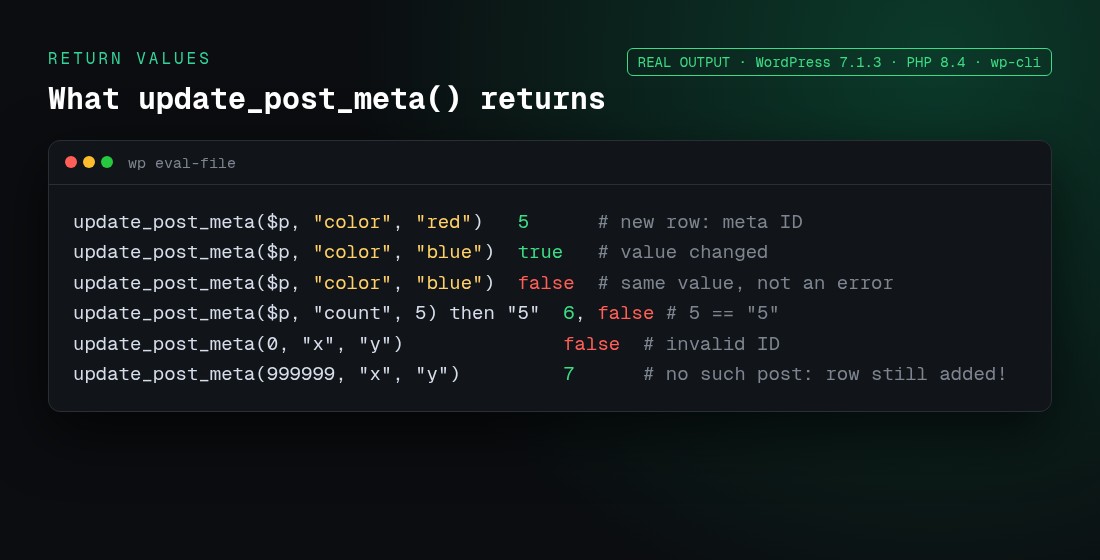
| Situation (tested) | Return |
|---|---|
| Key didn’t exist, so a row was added | Meta ID, e.g. 5 |
| Key existed and the value changed | true |
| Same value as stored | false |
Integer 5 stored, then string "5" saved |
false (treated as unchanged) |
$post_id of 0, or an empty $meta_key |
false |
| A post ID that doesn’t exist (999999) | Meta ID: the row is still added |
A filter on update_post_metadata short-circuits it |
Whatever the filter returns |
Two practical lessons follow. First, don’t treat false as an error: it usually means “nothing to change”. Second, WordPress doesn’t check that the post exists, so validate the ID yourself or you’ll leave orphaned rows in wp_postmeta:
if ( ! get_post( $post_id ) ) {
    return; // avoid orphaned meta
}
$result = update_post_meta( $post_id, 'color', 'blue' );
if ( false === $result && get_post_meta( $post_id, 'color', true ) !== 'blue' ) {
    error_log( 'Saving color failed' ); // a real failure
}
How do I use update_post_meta()? (examples)
Save a custom field on save_post (secure version)
add_action( 'save_post_product', function ( $post_id ) {
    if ( defined( 'DOING_AUTOSAVE' ) && DOING_AUTOSAVE ) return;
    if ( wp_is_post_revision( $post_id ) ) return;
    if ( ! isset( $_POST['iw_price_nonce'] ) || ! wp_verify_nonce( $_POST['iw_price_nonce'], 'iw_save_price' ) ) return;
    if ( ! current_user_can( 'edit_post', $post_id ) ) return;

    if ( isset( $_POST['iw_price'] ) ) {
        $price = sanitize_text_field( wp_unslash( $_POST['iw_price'] ) );
        update_post_meta( $post_id, '_iw_price', $price );
    }
} );
$_POST data is already slashed by WordPress, so wp_unslash() it before sanitizing. update_post_meta() then strips slashes again, so plain text values come out right. See the slashing section below for the case where this goes wrong.
Read the value back
$price = get_post_meta( $post_id, '_iw_price', true ); // single value (string)Change a page template
update_post_meta( $page_id, '_wp_page_template', 'templates/full-width.php' );Increment a counter
$views = (int) get_post_meta( $post_id, 'iw_views', true );
update_post_meta( $post_id, 'iw_views', $views + 1 );
Under heavy traffic, two requests can read the same number and both write +1. For accurate counters, use a custom table or an atomic SQL UPDATE.
How does the $prev_value parameter work?
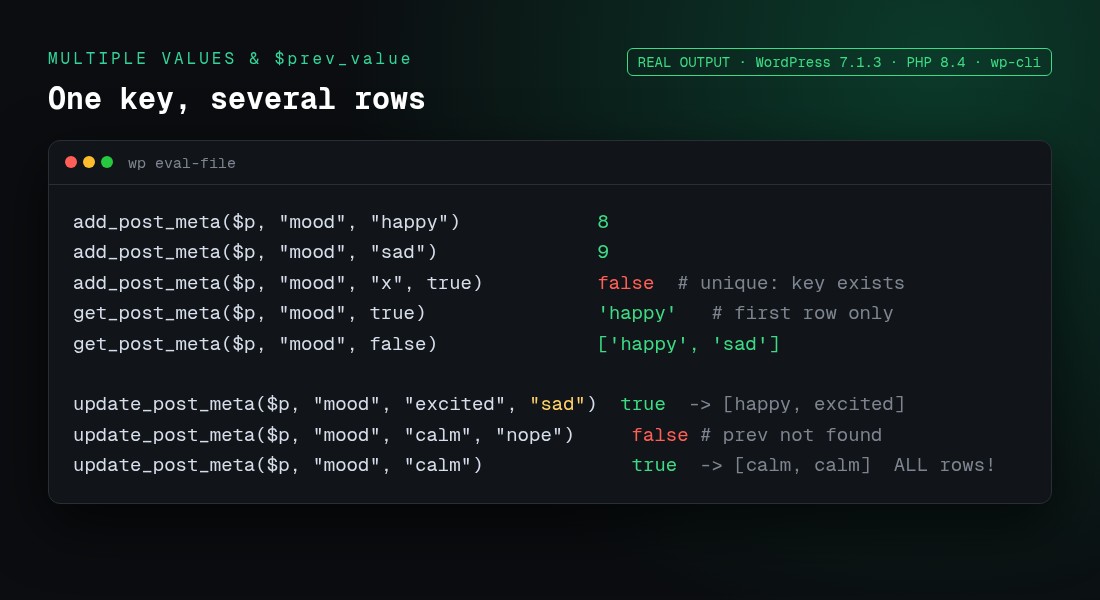
A post can hold several rows with the same key (added with add_post_meta()). $prev_value picks which one to change:
| Call (rows: happy, sad) | Return | Rows afterwards |
|---|---|---|
update_post_meta( $p, 'mood', 'excited', 'sad' ) |
true |
happy, excited |
update_post_meta( $p, 'mood', 'calm', 'nope' ) |
false |
unchanged (no match) |
update_post_meta( $p, 'mood', 'calm' ) |
true |
calm, calm (every row overwritten) |
That last row is the classic bug: calling update_post_meta() without $prev_value on a multi-value key silently destroys the other values.
Unique vs multiple values: add_post_meta() and get_post_meta()
| Call | Real result |
|---|---|
add_post_meta( $p, 'mood', 'happy' ) |
8 (meta ID) |
add_post_meta( $p, 'mood', 'sad' ) |
9, so a second row is added |
add_post_meta( $p, 'mood', 'x', true ) |
false, because $unique is true and the key exists |
get_post_meta( $p, 'mood', true ) |
'happy' (first row only) |
get_post_meta( $p, 'mood', false ) |
['happy', 'sad'] |
get_post_meta( $p, 'missing', true ) |
'' (empty string) |
get_post_meta( $p, 'missing', false ) |
[] (empty array) |
Because a missing key returns '', you can’t tell “empty” from “not set” with get_post_meta() alone. Use metadata_exists( 'post', $post_id, $key ).
What happens when you save an array?
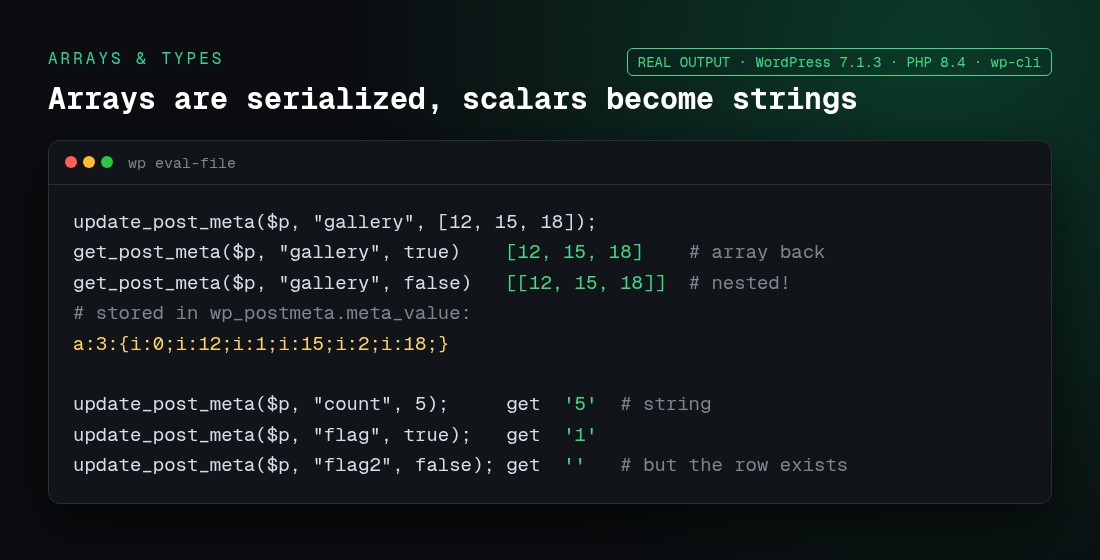
WordPress serializes arrays and objects on save and unserializes them on read. The real stored value for [12, 15, 18] is a:3:{i:0;i:12;i:1;i:15;i:2;i:18;}.
get_post_meta( $p, 'gallery', true )returns the array. Withfalseyou get it nested one level deeper ([[12, 15, 18]]), which is a common source of “my array has an extra level” bugs.- Saving the identical array again returns
false. Saving['12','15','18'](strings) returnstrue, because the serialized form differs. - Scalars come back as strings:
5→'5',true→'1',false→''(and the row still exists). - You can’t query inside serialized data with
meta_queryreliably. If you need to filter by a value, store it in its own key.
Why do backslashes disappear? (wp_slash and JSON)
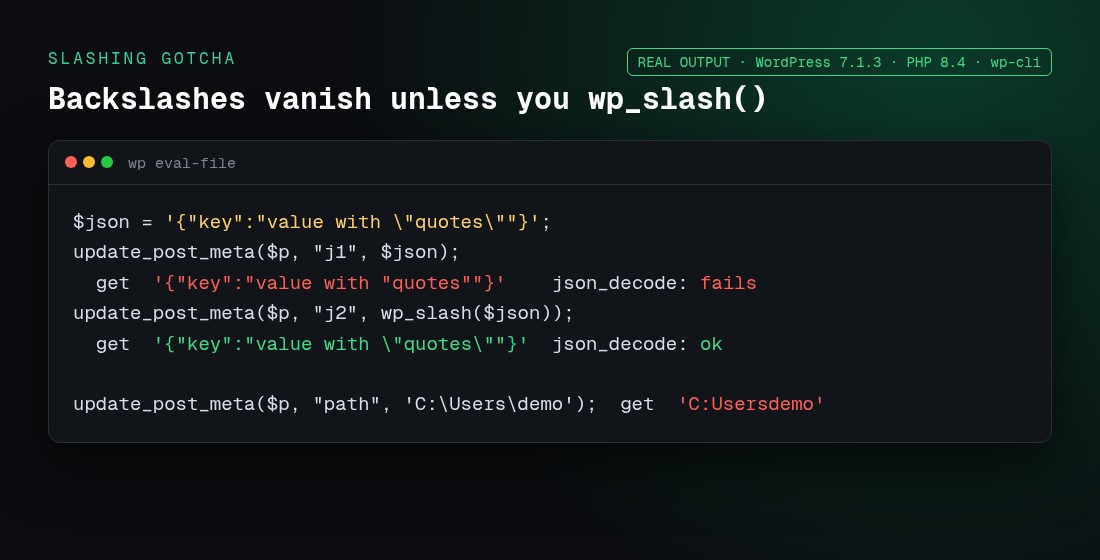
For historical reasons, update_post_meta() expects the key and value to be slashed, and runs stripslashes() on them before saving. Our test results:
| You save | You get back |
|---|---|
{"key":"value with \"quotes\""} |
{"key":"value with "quotes""}, which json_decode() can’t parse |
wp_slash( $json ) |
{"key":"value with \"quotes\""}, which decodes fine |
'C:\Users\demo' |
'C:Usersdemo' |
['p' => 'C:\Users'] |
['p' => 'C:Users'] (arrays are stripped too) |
The rule is simple: if a value can contain a backslash (JSON, Windows paths, regex), wrap it in wp_slash(). Values from $_POST are the exception, since they arrive slashed. wp_unslash() them for sanitizing, and pass the result straight to update_post_meta() only if it contains no backslashes you need to keep.
What are protected meta keys (underscore prefix)?
Keys starting with _ are “protected”: is_protected_meta( '_price', 'post' ) returns true, and is_protected_meta( 'price', 'post' ) returns false. Protected keys are hidden from the classic Custom Fields meta box, so editors can’t change them by accident. That’s why WooCommerce uses _price and core uses _wp_page_template and _thumbnail_id (see our guide to getting the featured image URL in PHP). Protection is about the UI only. It isn’t security, as the REST test below shows.
How do I delete post meta?
| Call (rows: a, b) | Return | Result |
|---|---|---|
delete_post_meta( $p, 'tag', 'a' ) |
true |
only “b” remains |
delete_post_meta( $p, 'tag' ) |
true |
all rows removed |
delete_post_meta( $p, 'tag' ) again |
false |
nothing to delete |
To remove a key from every post, use delete_post_meta_by_key( 'tag' ). Don’t set a value to '' when you mean “remove”, because that leaves a row behind.
How do I update post meta through the REST API?
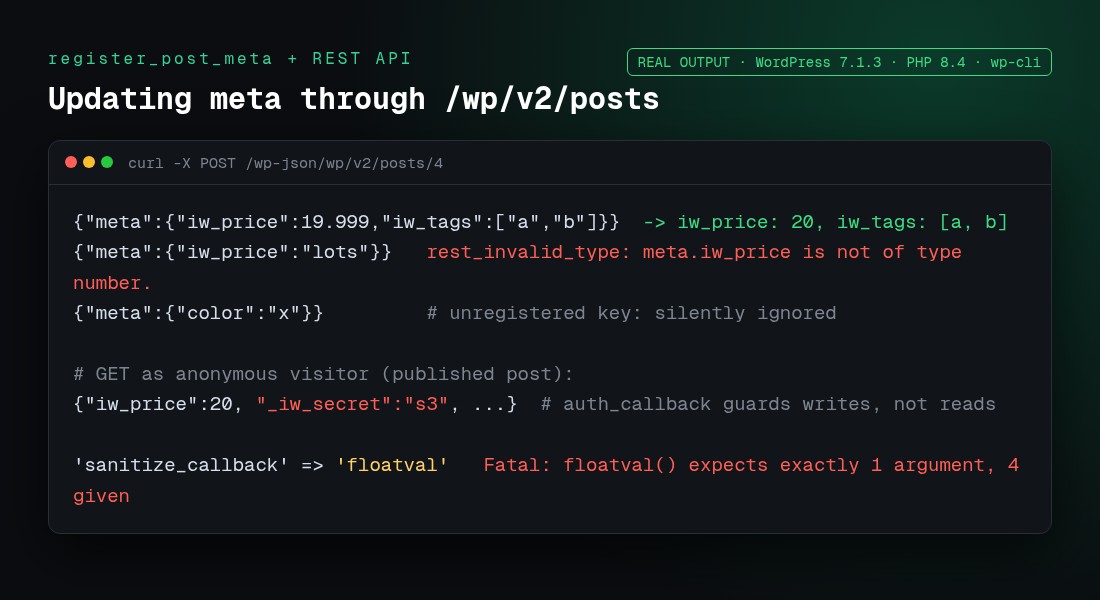
Meta only appears in /wp-json/wp/v2/posts/<id> (and in the block editor) after you register it with show_in_rest:
add_action( 'init', function () {
    register_post_meta( 'post', 'iw_price', array(
        'type'              => 'number',
        'single'            => true,
        'show_in_rest'      => true,
        'sanitize_callback' => fn( $value ) => round( (float) $value, 2 ),
        'auth_callback'     => fn() => current_user_can( 'edit_posts' ),
    ) );
    register_post_meta( 'post', 'iw_tags', array(
        'type'         => 'array',
        'single'       => true,
        'show_in_rest' => array( 'schema' => array( 'items' => array( 'type' => 'string' ) ) ),
    ) );
} );
Then send POST /wp-json/wp/v2/posts/4 with {"meta":{"iw_price":19.999,"iw_tags":["a","b"]}}. What we saw:
| Request | Real response |
|---|---|
iw_price: 19.999, iw_tags: ["a","b"] |
Saved as 20 and ["a","b"] (the sanitize_callback ran) |
iw_price: "lots" |
rest_invalid_type: “meta.iw_price is not of type number.” |
An unregistered key (color) |
Silently ignored, with no error |
Anonymous GET on a published post |
Registered meta is visible, including _iw_secret |
'sanitize_callback' => 'floatval' |
Fatal error: “floatval() expects exactly 1 argument, 4 given” |
Three gotchas here that most tutorials miss:
auth_callbackprotects writes, not reads. Never register a secret withshow_in_rest.- WordPress passes 4 arguments to
sanitize_callback, and strict PHP built-ins likefloatvalcrash. Wrap them in a closure. - The
sanitize_callbackalso runs on direct PHP calls. Ourupdate_post_meta( 4, 'iw_price', '7.456abc' )was stored as'7.46'.
Site-wide settings work the same way through register_setting(). See our WordPress get_option() guide for the REST settings endpoint.
Is update_post_meta() slow? (meta cache and performance)
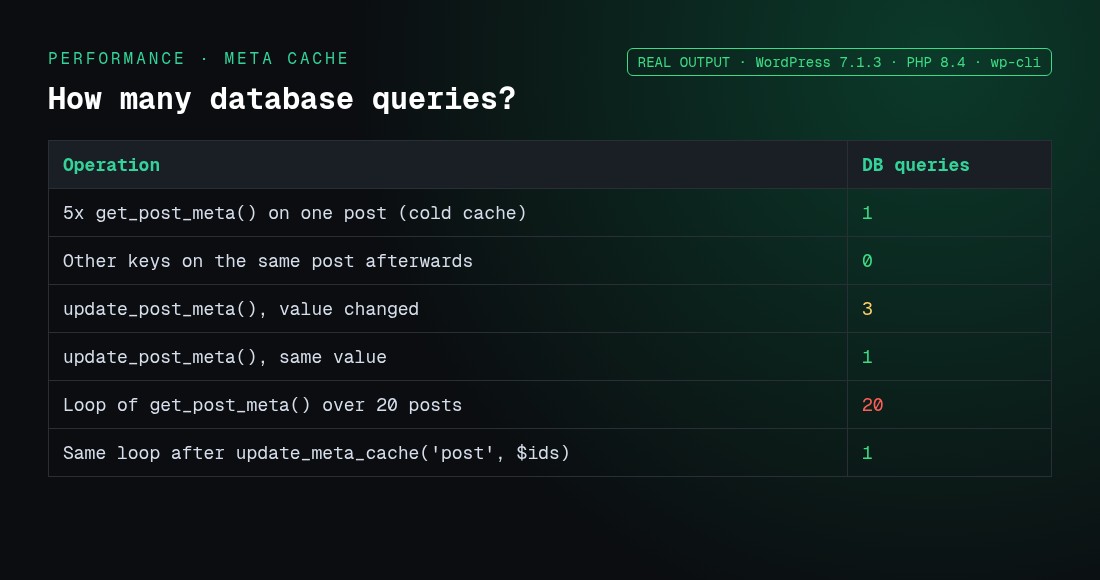
WordPress loads all meta for a post in one query and keeps it in the object cache. We counted $wpdb->num_queries:
| Operation | DB queries |
|---|---|
5× get_post_meta() on one post (cold cache) |
1 |
| Other keys on the same post afterwards | 0 |
update_post_meta() with a changed value |
3 |
update_post_meta() with the same value |
1 |
get_post_meta() in a loop over 20 posts |
20 |
The same loop after update_meta_cache( 'post', $ids ) |
1 |
- When you loop over IDs you fetched yourself, prime the cache with
update_meta_cache( 'post', $ids ).WP_Querydoes this for you by default (update_post_meta_cache). - Each changed
update_post_meta()clears that post’s meta cache. In bulk imports, compare values first or batch your writes. wp_postmetahas no index onmeta_value, someta_queryfilters on large sites get slow. Use a taxonomy or a custom table for data you filter on heavily.- On a case-insensitive collation (the default,
utf8mb4_unicode_520_ci),update_post_meta( $p, 'color2', 'Y' )updated our existingColor2row, butget_post_meta( $p, 'color2', true )returned''. Keep keys lowercase.
Which hooks fire when post meta is updated?
| Hook | When |
|---|---|
update_post_metadata (filter) |
Before saving. Return anything other than null to short-circuit. In our test, returning false blocked the write. |
add_post_meta / added_post_meta |
Before and after a new row is inserted (on the first update_post_meta() call for a key) |
update_post_meta / updated_post_meta |
Before and after an existing row changes. Doesn’t fire when the value is unchanged. |
sanitize_post_meta_{$meta_key} |
Sanitizes the value (this is what register_post_meta‘s sanitize_callback hooks into) |
update_post_meta vs add_post_meta vs update_metadata
| Function | Use it when |
|---|---|
update_post_meta() |
One value per key: add or overwrite |
add_post_meta() |
Several values per key, or “only add if missing” ($unique = true) |
delete_post_meta() |
Remove one value or the whole key |
update_metadata() |
The same logic for any object type ('post', 'user', 'term', 'comment') |
update_user_meta() / update_term_meta() |
The equivalents for users and terms |
wp_insert_post( [ 'meta_input' => [...] ] ) |
Setting meta while creating or updating a post in one call |
update_option() |
Site-wide settings, not per post (see get_option()) |
What are the most common update_post_meta mistakes?
- Treating
falseas failure. An unchanged value also returnsfalse. - Overwriting multi-value keys. Leaving out
$prev_valueoverwrites every row. - Breaking JSON. Values with backslashes need
wp_slash(). - Using
get_post_meta( ..., false )for an array. It’s nested one level deeper, so usetrue. - Skipping nonce and capability checks on
save_post, and not skipping autosaves. - Saving meta for post IDs that don’t exist. WordPress adds the orphan row without complaint.
- Thinking
_keysare private. They’re only hidden from the meta box, and REST can still expose them. - Running
get_post_meta()in a loop without priming the meta cache. - Using built-in PHP functions as
sanitize_callback, which causes an ArgumentCountError fatal.
Need the current page’s slug or title before saving meta for it? See how to get the current page name in WordPress.
FAQs
What does update_post_meta return?
The new meta ID (int) if the key didn’t exist, true if an existing value changed, and false on failure or when the new value equals the stored one.
Why does update_post_meta return false?
Most often because the value is identical to what’s stored (including 5 vs "5"). It also returns false for a post ID of 0, an empty key, a $prev_value that doesn’t match, or a filter that blocks the write.
Does update_post_meta create the key if it doesn’t exist?
Yes. It behaves like add_post_meta() and returns the new meta ID.
Does update_post_meta check that the post exists?
No. In our test, update_post_meta( 999999, 'x', 'y' ) returned a meta ID for a post that doesn’t exist. Check with get_post() first.
How do I update only one of several values with the same key?
Pass the current value as the fourth argument: update_post_meta( $id, 'mood', 'excited', 'sad' ).
Can I store an array with update_post_meta?
Yes. WordPress serializes it automatically. Read it back with get_post_meta( $id, $key, true ).
Why are backslashes removed from my meta value?
update_post_meta() runs stripslashes() on input. Wrap the value in wp_slash() to keep backslashes in JSON or file paths.
What is the difference between update_post_meta and add_post_meta?
update_post_meta() adds or overwrites. add_post_meta() always adds a new row, unless $unique is true and the key already exists.
How do I update post meta via the REST API?
Register the key with register_post_meta() and show_in_rest => true, then send {"meta":{"key":"value"}} to /wp-json/wp/v2/posts/<id> as an authenticated user. Unregistered keys are ignored.
Does update_post_meta work on revisions?
If you pass a revision ID, the meta is saved on the parent post. In our test, the revision itself got nothing.
Is calling get_post_meta many times slow?
Not for one post. All its meta loads in one query and is then cached. Across many posts, prime the cache with update_meta_cache(), or let WP_Query do it.
Conclusion
update_post_meta() is simple to call but easy to misuse. Treat false as “maybe unchanged”, use $prev_value for multi-value keys, wp_slash() anything with backslashes, register keys before using them over REST, and prime the meta cache in loops. If you’d rather have a team build custom fields, meta boxes or a full plugin for you, our WordPress plugin development service can help.