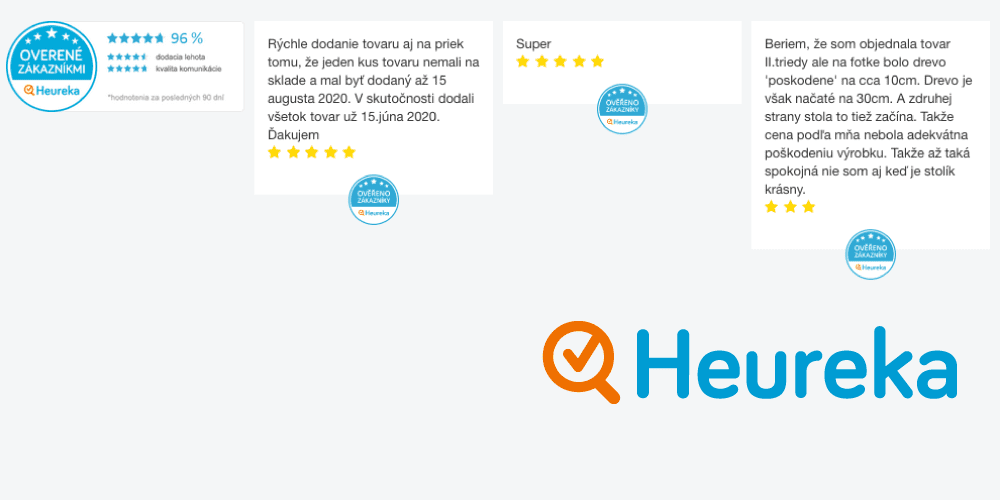
Heureka reviews on your website come from the Verified by Customers program (Ověřeno zákazníky). Heureka does not give you a public reviews API. You display shop and product ratings with secret-key XML exports, plus official certificate icons and widgets from Heureka administration. The practical path for most stores is a custom Joomla module, WordPress plugin, or CMS integration that syncs those feeds safely and matches your theme.
Infyways builds that integration. We already shipped a production Joomla module for estilofina.sk. Packages start at USD 149. This guide covers DIY XML setup and when to hire us for Joomla, WordPress, Magento, OpenCart, Shopify, or custom PHP.
What you will learn
- How Verified by Customers shop and product XML exports work (CZ and SK)
- How official badges and widgets differ from parsed review lists
- The legal notice Heureka expects when you republish verified reviews
- Why caching and cron sync beat live XML on every page view
- What Infyways delivers in a paid Heureka reviews plugin or module from USD 149
Why put Heureka reviews on your own site
Heureka is the trust layer for many Czech and Slovak shops. Showing those same verified ratings on your product pages, homepage, and checkout reduces tab-switching and keeps social proof where buyers decide.
You get three building blocks from Heureka:
- Shop review XML (last about 500 store reviews)
- Product review XML (product reviews from roughly the last 6 months)
- Verified by Customers icons and widgets (auto-updating certificate UI)
Exports refresh about every 6 hours. Icons and widgets follow your current certificate status (blue or gold). If you lose the certificate, Heureka stops showing those embeds automatically.
Official references:
DIY vs custom plugin: which path fits
| Approach | Best for | Limits |
|---|---|---|
| Paste Heureka icon / widget code | Quick trust badge on footer or sidebar | No custom layout, no product-page review list, no theme match |
| WooCommerce / third-party importer | WordPress shops that already use that stack | Rare outside WooCommerce; limited design and caching control |
| Custom Joomla module / WP plugin / CMS module | Stores that want shop + product reviews, cron sync, schema, and brand styling | Needs a developer once; then you own the control panel |
| Infyways Heureka integration (from USD 149) | Joomla, WordPress, Magento, OpenCart, Shopify, custom PHP | Scoped build with support and handoff |
If you only need the blue or gold badge, use Heureka’s SVG icon codes. If you want testimonials, product ratings, and a design that matches your store, you need a parser and a front-end component. That is the paid build.
Step 1: Join Verified by Customers and get your export key
You must already send orders through the Verified by Customers script and earn enough feedback for a certificate. Heureka awards blue or gold automatically from recommendation rates over the tracked windows (blue around 90% recommend over 180 days; gold around 97% over 90 days, with higher review volume). Exact thresholds can change. Confirm current rules in Heureka administration.
In Heureka admin, open the Verified by Customers section and copy:
- Shop review export URL
- Product review export URL
- Icon and widget embed codes
Typical shapes:
https://www.heureka.cz/direct/dotaznik/export-review.php?key=YOUR_SECRET_KEY
https://www.heureka.sk/direct/dotaznik/export-review.php?key=YOUR_SECRET_KEY
https://www.heureka.cz/direct/dotaznik/export-product-review.php?key=YOUR_SECRET_KEY
Treat the key like a password. Do not commit it to public repos. Prefer server-side fetch and cache over exposing the full URL in browser JavaScript.
Step 2: Understand the shop review XML
Shop exports wrap reviews under a root reviews element. Each review commonly includes fields such as:
rating_idorder_idunix_timestampdelivery_time,transport_quality,communication,web_usability(scores often 0.5 to 5)recommends/ recommendation signalpros,cons,summaryreaction(store reply, when present)
Example structure:
<reviews>
  <review>
    <rating_id>XXXXXX</rating_id>
    <unix_timestamp>1453155494</unix_timestamp>
    <delivery_time>5</delivery_time>
    <transport_quality>5</transport_quality>
    <communication>5</communication>
    <pros><![CDATA[Fast delivery]]></pros>
    <cons><![CDATA[]]></cons>
    <summary><![CDATA[Great shop]]></summary>
    <order_id>123</order_id>
  </review>
</reviews>
Field names can vary slightly by market and export generation. Always inspect your live feed before hard-coding a schema.
Step 3: Understand the product review XML
Product exports use a products root. Each product carries identifiers (name, URL, price, EAN, and related IDs) plus nested reviews. Each product review typically includes:
rating_idandrating_id_type(offerorproduct)unix_timestamprating(0 to 5 in half-star steps)pros,cons,summaryrecommends
Optional filter on the export URL:
&from=2026-01-01 00:00:00That shortens the default ~6 month window to reviews created from that timestamp onward.
For product reviews to accumulate, send a stable ITEM_ID in both your Heureka product feed and the Verified by Customers order script. Do not recycle ITEM_ID values across different products.
Step 4: Add official badges and widgets
Certificate icons and side widgets are separate from XML parsing. Heureka generates HTML/SVG snippets that reflect your live rating and recommendation percentage. Prefer SVG so mobile layouts stay sharp.
Blue vs gold is certificate status, not a different XML format. When eligibility drops, Heureka hides those embeds. Your custom review list from XML can still show historical text reviews unless you choose to gate it behind certificate status yourself.
Step 5: Add the required authenticity notice
If you republish consumer reviews, EU consumer rules expect transparent origin wording. Heureka recommends language similar to this (adapt for SK/CZ legal counsel):
Verified reviews come from customers who have purchased goods or services from us. They are collected via completed customer satisfaction questionnaires within the “Verified by Customers” program provided by Heureka Group a.s. Satisfaction questionnaires are sent only to customers who purchased from us.
Put that near the review block. Infyways includes a configurable notice in every integration.
Step 6: Cache, cron, and performance (do not hit XML on every request)
Feeds update about every 6 hours. Fetching Heureka on each page view is slow, brittle, and unnecessary.
Production pattern:
- Cron or scheduled task pulls shop and product XML every few hours
- Parse and store reviews in your CMS (database table, cache, or custom fields)
- Front end reads local data only
- Fail soft if Heureka is unreachable (keep last good cache)
That is how our estilofina.sk Joomla module is designed to behave in production: admin URL + display options, then reliable front-end output.
What Infyways builds for you
Heureka Reviews Integration starts at USD 149. Scope scales with CMS and features.
Included capabilities
- Shop reviews from Heureka XML export (CZ and/or SK)
- Product reviews on product detail pages
- Official Verified by Customers badge / widget placement
- Caching + cron sync (not live XML on every view)
- Schema / rich-snippet friendly markup where appropriate
- Multilingual support for Czech and Slovak feeds
- Design match to your store theme (colors, typography, carousel or grid)
- Admin settings: feed URL/key, count, minimum rating, layout, legal notice text
Platforms we cover
- Joomla module (proven on estilofina.sk)
- WordPress plugin (WooCommerce or classic themes)
- Magento, OpenCart, Shopify, and custom PHP
Proof: estilofina.sk
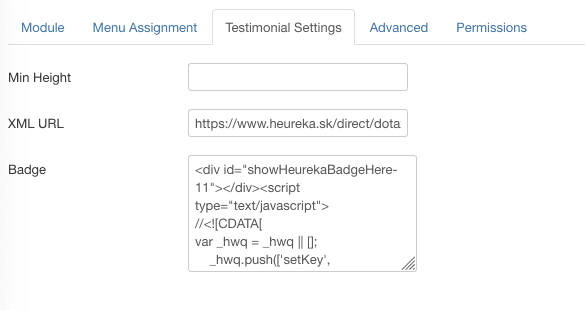
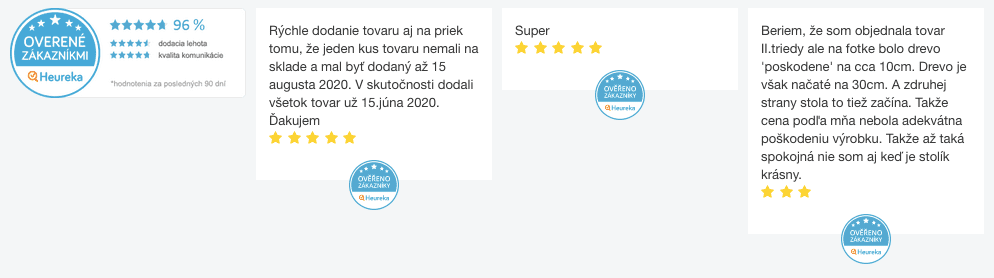
We delivered a custom Joomla module for estilofina.sk that shows the Heureka badge plus latest reviews and ratings from the XML feed, with backend parameters for feed URL, testimonial height, and badge options. The same architecture ports to WordPress and other CMS stacks.
Pricing
| Package | Starting price | Typical deliverable |
|---|---|---|
| Starter badge + shop reviews | USD 149 | Module/plugin, cron cache, theme-styled shop reviews, legal notice |
| Shop + product reviews | Custom quote | Product-page mapping, ITEM_ID alignment, schema |
| Multi-market CZ + SK | Custom quote | Dual feeds, language-aware display |
| Full design + carousel + ongoing support | Custom quote | Pixel-matched UI and maintenance |
Want Heureka reviews live on your site without building the parser yourself? Contact Infyways and request a Heureka Reviews Integration. Mention your CMS and whether you need shop reviews, product reviews, or both.
Key takeaways
- Heureka reviews on your site come from XML exports and certificate widgets, not a public API.
- Shop feeds cover recent store reviews; product feeds cover roughly six months of product ratings.
- Always cache and sync on a schedule. Do not call the export URL on every page view.
- Add clear verified-origin wording when you republish reviews.
- Infyways ships Joomla, WordPress, and any-CMS integrations from USD 149, with a live Joomla reference on estilofina.sk.
Frequently asked questions
Is there a public Heureka reviews API?
No. Merchants use secret-key XML exports from Verified by Customers plus official icon and widget codes from Heureka administration.
How often do Heureka review exports update?
About every 6 hours. Design your sync around that cadence.
Can I show Heureka reviews on Joomla?
Yes. Infyways already built a production Joomla module for estilofina.sk. We can deliver the same pattern for your template.
Do you support WordPress and other CMS platforms?
Yes. WordPress plugins, Magento, OpenCart, Shopify, and custom PHP are all in scope. Starting packages begin at USD 149.
What is the difference between the badge and the XML list?
The badge/widget is Heureka’s embed for certificate status and summary rating. The XML list is your own UI for individual shop or product reviews.
Do I need both heureka.cz and heureka.sk feeds?
Only if you sell into both markets with separate Verified by Customers setups. We can wire one or both feeds.
Will this work without a Verified by Customers certificate?
XML exports require the service and your key. Official icons and widgets only display while you hold a valid certificate.
How do I get a quote?
Send your CMS, Heureka market (CZ/SK), and whether you need shop reviews, product reviews, or badges via the contact form. Packages start at USD 149.