If you published in Joomla and still see the old page, you are looking at a cache layer, not a failed save. The copy can sit in Conservative or Progressive view/module cache, in the System – Page Cache plugin (guests only), in Cloudflare or another CDN, or in the browser. Logged-in users and guests often see different HTML. Clear the layer that actually served the response. This article is “stale content.” If the Clear Cache button does not change storage at all, use Joomla cache not clearing properly.
Joomla 4, 5, and 6 expose cache under System → Global Configuration → System (Cache Settings): OFF, ON Conservative caching, ON Progressive caching, plus Cache Handler and Cache Time. Whole-page HTML is the System – Page Cache plugin, documented separately in Joomla Cache. Programmer view of the three mechanisms: Caching components and modules. Page Cache serves logged-out visitors. Logged-in requests rebuild. That single fact explains “I see the new article, my boss does not.”
Cloudflare (and Varnish, LiteSpeed, nginx reverse proxy) sit in front of Joomla. Joomla’s Clear Cache cannot purge them. Official Cloudflare purge: Purge cache.
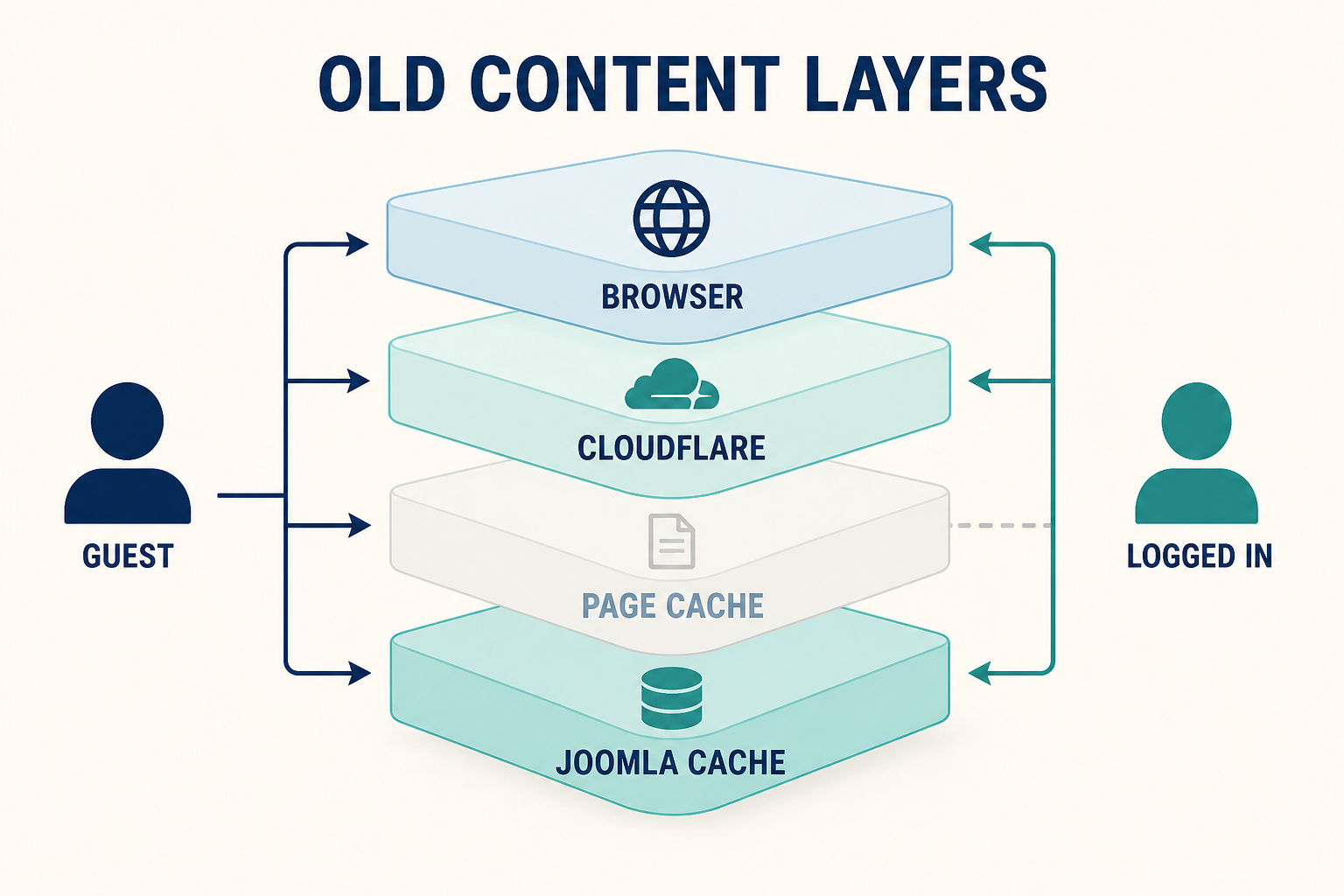
Four layers. Guests hit Page Cache and CDNs. Logged-in users skip Page Cache. Progressive cache is the usual “wrong module” layer.
What you will learn
- Which Global Configuration cache mode you are on (and why Progressive looks “stuck”)
- How Page Cache differs from Conservative caching
- Why guests and logged-in users disagree
- How browser cache and “Use Browser Caching” hide a good origin
- How to purge Cloudflare without guessing
- When stale content is working as designed (Cache Time still valid)
The layers, in the order you should blame them
| Layer | Who it hits | Where to clear |
|---|---|---|
| Browser | That one person | Hard refresh, private window. Check plugin Use Browser Caching |
| Cloudflare / CDN / reverse proxy | Everyone at the edge | CDN purge or development mode. Not Joomla Clear Cache |
| System – Page Cache plugin | Guests only | Clear Cache (page group) plus disable or exclude if it keeps winning |
| Conservative system cache | Views/modules per Joomla’s cache IDs (includes access levels) | System → Maintenance → Clear Cache |
| Progressive system cache | More aggressive module reuse | Switch to Conservative on staging, then clear |
| File vs Redis/Memcached/APCu | Wherever Cache Handler points | Clearing files does nothing if the handler is Redis. See the sister article |
Official plugin note: Page Cache keeps serving until Cache Time in Global Configuration expires, unless you delete that cache. Default Cache Time in the Cache tutorial is 15 minutes.
Step 1: Prove it is cache, not a second page
Confirm you edited the article that the URL actually loads (right menu item, right language, right category blog vs single article). Then:
- Open the URL in a private window, logged out.
- Open the same URL logged in.
- Compare.
| Logged out | Logged in | Likely layer |
|---|---|---|
| Old | New | Page Cache and/or CDN. Guest HTML is frozen |
| Old | Old | Conservative/Progressive, CDN, or browser. Or you are not hitting the article you saved |
| New | Old | Unusual. Different menu/ACL, or a personalised module cache. Check Progressive and per-module caching |
If a private window logged out is new and your normal browser is old, it is browser cache. Hard refresh. If the Page Cache plugin has Use Browser Caching enabled, the visitor’s browser is allowed to keep the page until headers expire. Joomla cannot remotely smash that copy. Leave Use Browser Caching off unless you accept that.
Step 2: Read System Cache: Conservative vs Progressive
System → Global Configuration → System → Cache Settings.
OFF: Joomla is not keeping view/module cache. If you still see old HTML, it is Page Cache, CDN, browser, or a proxy. Global OFF does not disable Cloudflare.
ON – Conservative caching: Views and modules cache with context (pages and access levels). Modules may set Advanced → Caching to Use Global or No caching. Official Cache doc: enable Conservative, then set modules you want cached to Use Global.
ON – Progressive caching: Official docs: turn it on in the same System Cache dropdown. It is more aggressive. Module-level No caching is not a reliable guest escape hatch under Progressive (documented across Joomla cache explainers and the programmer manual’s progressive vs conservative split). Symptom: a module from another page, or a module that should have updated. Fix: set System Cache to Conservative on staging, Clear Cache, retest logged out.
Do not jump to Progressive to “fix stale.” Progressive makes more cache, not less.
Cache Handler File stores under cache/ (site) and administrator/cache/ (admin). Redis/Memcached/APCu store in memory. The dropdown is the source of truth, not the folder you happened to empty in FTP.
Step 3: Check the System – Page Cache plugin
System → Manage → Plugins → System – Page Cache.
Enabled means guests can receive a full HTML snapshot of the URL. That snapshot includes component and modules. It is supposed to be stale up to Cache Time. After you publish:
- System → Maintenance → Clear Cache → Delete All (or the page cache group if you can identify it).
- Reload logged out.
If it is immediately old again, something in front (CDN) re-cached, or Cache Time is so short you are confused with a different bug. If it never updates until you disable the plugin, the plugin is the layer. Use Excluded Menu Items / Exclude URLs for pages that must always be live (login, contact, cart), as the Cache documentation’s page-cache section implies by design: a full page snapshot is the least flexible option.
Page Cache does not apply the way people think for logged-in users. Do not use a super-admin window as proof that guests are fresh.
Step 4: Purge Cloudflare (and any other CDN) on purpose
If DNS is proxied through Cloudflare, you have at least two caches. Joomla Clear Cache is not a Cloudflare API call.
In Cloudflare: purge that URL, purge everything (heavier), or enable Development Mode while you test. Docs: Purge cache. Then retest logged out.
Other stacks (LiteSpeed cache plugin, Varnish, nginx proxy_cache) need their own purge. If you do not control the CDN, ask the host which cache sits in front.
Page rules that “cache everything” on HTML will fight Joomla. Bypass /administrator/ always. Bypass or respect origin headers for HTML if you need instant publishes.
Step 5: Clear Joomla cache the official way, then retest guests
System → Maintenance → Clear Cache deletes groups (or Delete All). Clear Expired Cache only drops items past Cache Time. Expired files can sit on disk until purge. If you need the new article now, use Clear Cache, not only expired.
After a template or override change, Delete All. After a routine article save, core often fires cache-clean events, but Page Cache and CDNs still need the steps above.
Retest:
- Private window, guest: must match the editor.
- Logged-in: already skipped Page Cache.
- Phone on cellular: often a different CDN POP or a ruthless browser cache.
If Clear Cache reports success but Redis still serves old HTML, you did not fail to publish. The handler was not File. That failure mode is cache not clearing.
Speed after a correct clear: speed up Joomla. Do not disable all cache forever because one guest saw a 15-minute-old home page. That is Cache Time doing its job.
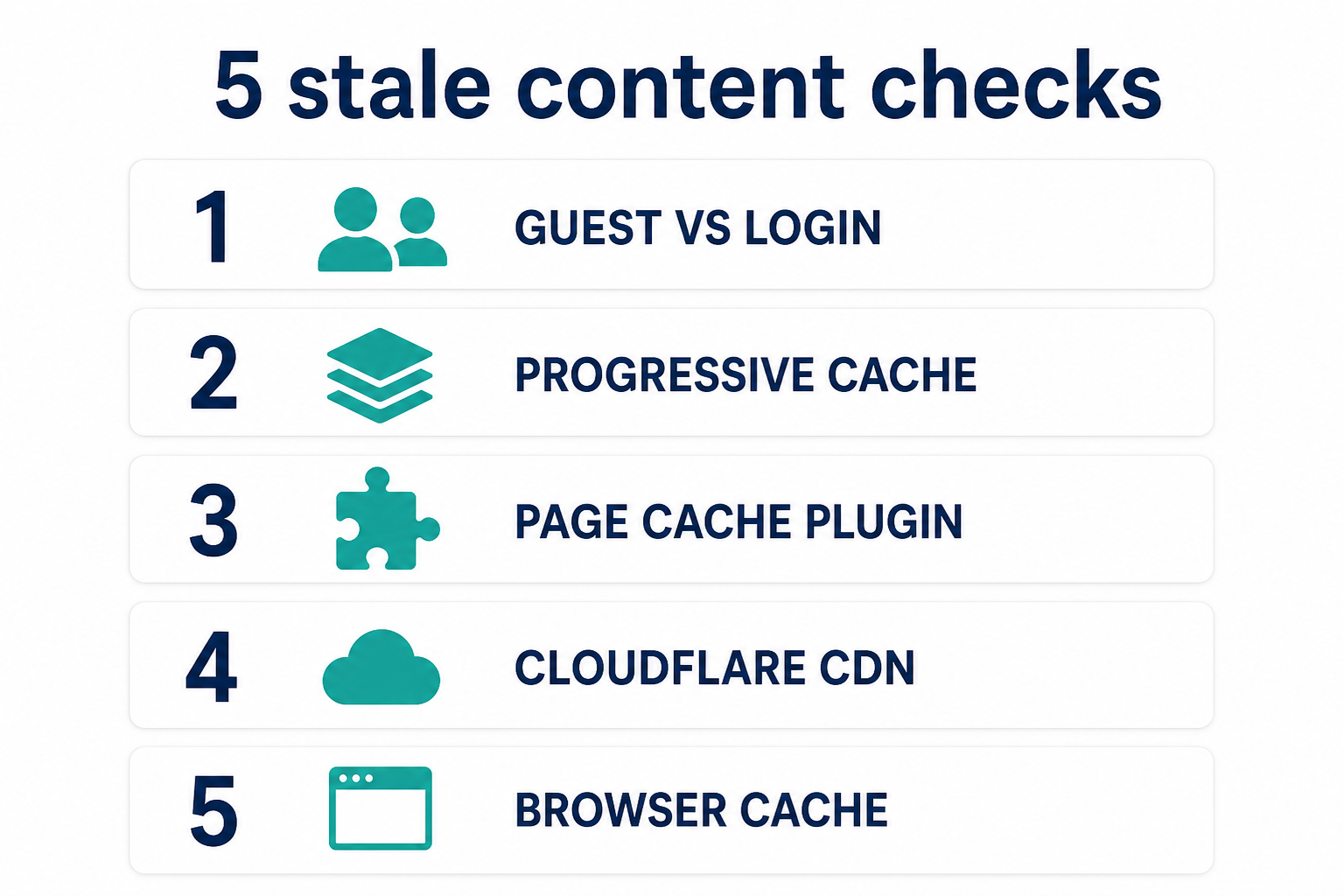
Guest vs logged-in first. Then Progressive vs Conservative. Then Page Cache. Then Cloudflare. Then the browser.
Key takeaways
- Stale public HTML is a layer problem. The article in the database can already be new.
- Page Cache is guest-only. Compare private-window guests to your logged-in editor.
- Conservative is the usual System Cache. Progressive is the usual wrong-module stale.
- Cloudflare does not listen to Joomla Clear Cache. Purge the CDN separately.
- Use Browser Caching on Page Cache moves staleness into the visitor’s machine.
- Cache Time (minutes, default 15 in core docs) means “old” can be correct until expiry.
- If storage never changes when you click Clear, switch to the not-clearing article.
Frequently asked questions
Why does my Joomla site show old content after I publish?
A cache still holds the previous HTML. For guests that is often System – Page Cache or Cloudflare. For modules on the wrong page, Progressive caching is a frequent cause. Clear the matching layer and retest logged out.
Do logged-in users see Joomla Page Cache?
The System – Page Cache plugin is built to serve logged-out visitors. A logged-in Super User is a bad test for what the public sees. Use a private window without logging in.
What is the difference between Conservative and Progressive caching?
Both are System Cache modes in Global Configuration. Conservative respects per-module Use Global vs No caching more the way people expect. Progressive caches modules more aggressively and is a common source of stale or misplaced module output. Official options: OFF, Conservative, Progressive.
How do I clear Joomla cache in Joomla 4, 5, and 6?
System → Maintenance → Clear Cache, then Delete All or selected groups. Settings live under System → Global Configuration → System. Expired-only cleanup is Clear Expired Cache.
Does Cloudflare cache Joomla HTML?
If the zone is proxied and the page is eligible, yes. Purge in Cloudflare. Joomla’s cache/ folder is not the edge cache. See Cloudflare’s purge documentation.
Should I turn cache off to stop old content?
Only as a short staging test. Turning everything off makes the front end slow. Prefer Conservative, sensible Cache Time, Page Cache exclusions, and CDN purge on publish.
Why is the home page old but the article URL is new?
Different cache IDs and often a cached home module or Page Cache entry for /. Clear all, purge the home URL at the CDN, and check Progressive if a module is showing yesterday’s list.
Conclusion
Old Joomla content after a save means a layer still has the previous response. Split guest vs logged-in, then Progressive vs Conservative, then Page Cache, then Cloudflare, then the browser. Clear that layer. Keep cache on for speed once publish-and-purge is a habit. The how-to for performance is speed up Joomla. The how-to when the broom itself is broken is cache not clearing.