Cursor vs Claude Code comes down to where you like to work. Cursor is an AI-first code editor that lets you watch, steer and accept changes line by line, with many model choices. Claude Code is an agent you brief in the terminal, IDE, desktop app or browser, and it works through large, multi-file tasks on its own.
Both tools now overlap more than ever. Cursor has a CLI and cloud agents, and Claude Code has IDE extensions and a desktop app. So the real question is not which one can do the job, but which one fits the way you and your team like to build, review and pay for code.
Key Takeaways
- Pick Cursor if you want to stay in an editor, see every change as it happens and switch between models from several providers.
- Pick Claude Code if you prefer to hand off a well-described task, then review the result, and you are happy using Claude models.
- Entry prices are close: Cursor Premium is $30 a month and Claude Pro, which includes Claude Code, is $20 a month.
- Both support project instruction files, subagents, hooks, MCP and cloud runs, so team setup carries over.
- Many developers use both: Cursor for daily editing and Claude Code for big refactors and background jobs.
1. What Are Cursor and Claude Code?
Cursor is a code editor with AI built in. Claude Code is Anthropic’s coding agent that runs wherever you prefer to work.
Cursor’s Agent is described as an assistant that can complete complex coding tasks independently, run terminal commands, and edit code. It sits inside an editor based on VS Code, next to tab completion, chat and code review.
Anthropic calls Claude Code an agentic coding tool that reads your codebase, edits files, runs commands, and integrates with your development tools. It runs in the terminal, VS Code, JetBrains IDEs, a desktop app and the browser.
2. Cursor vs Claude Code at a Glance
Here is the side-by-side view on the points that matter most when choosing.
| Cursor | Claude Code | |
|---|---|---|
| What it is | AI-first code editor with agents | Coding agent for terminal, IDE, desktop and web |
| Main way of working | Edit and review inside the editor | Describe a task, then review the diff |
| Models | Many providers: Claude, Gemini, GPT, Grok and Cursor’s own Composer | Claude models (the CLI and IDE extensions also support third-party providers for hosting) |
| Project instructions | .cursor/rules files, User and Team Rules, AGENTS.md | CLAUDE.md files, .claude/rules/, and AGENTS.md |
| Subagents | Yes, in the editor, CLI and cloud agents | Yes, each with its own context window and permissions |
| Hooks | Yes, via hooks.json | Yes: shell commands, HTTP endpoints, MCP tools, prompts or subagents |
| Cloud runs | Cloud agents in isolated VMs | Cloud sessions from the browser, app, desktop or claude –cloud |
| Code review | Bugbot reviews pull requests | GitHub Actions that respond to @claude mentions |
| Paid plans (USD per month) | Plus $8, Premium $30, Super $100, Ultra $200; Teams from $30 per user | Pro $20 ($17 billed yearly), Max $100, Ultra $200 |
Key insight: on features, Cursor and Claude Code now look alike. The difference is the default experience: Cursor puts you in the editor, and Claude Code puts the agent in charge.
3. Workflow: Editor-First vs Agent-First
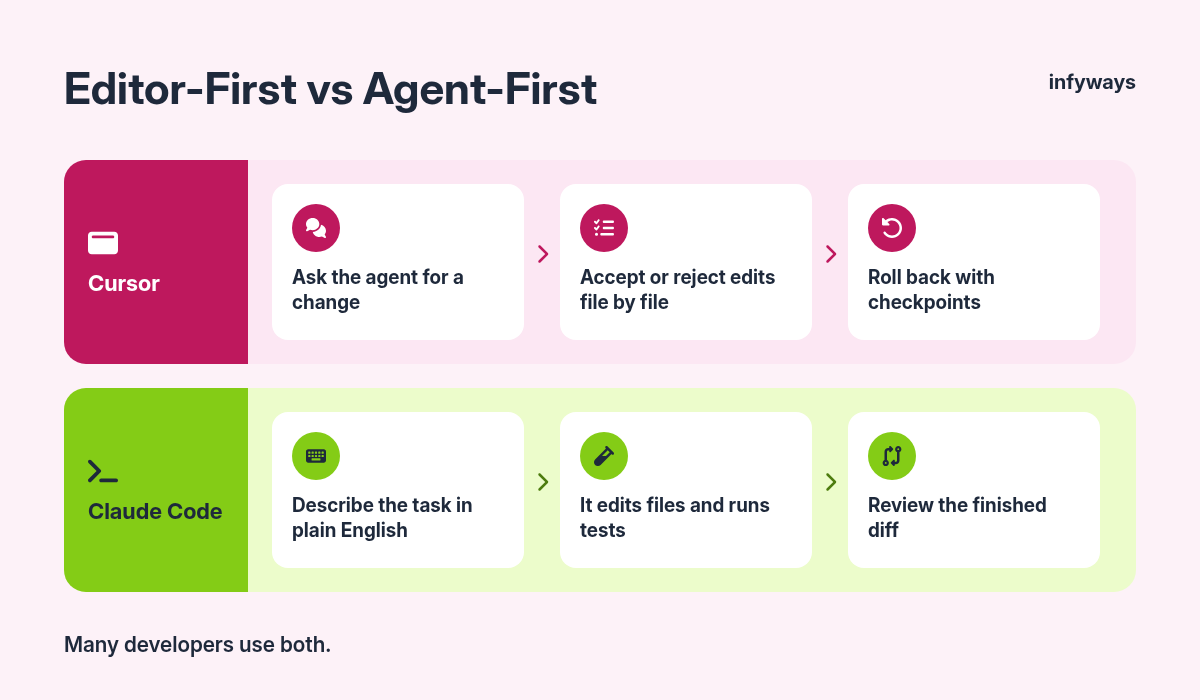
Cursor suits developers who want tight control over each edit. Claude Code suits developers who would rather review a finished change.
In Cursor you see suggestions as you type, ask the agent for a change, and accept or reject edits file by file. Cursor also saves checkpoints so you can roll back if the agent takes a wrong turn. For bigger jobs, Cursor can create a Project where a coordinator agent plans the work and delegates it.
Claude Code starts from a plain-English task. It searches the code, plans, edits several files and runs commands such as tests, then hands back the result. That makes it a strong fit for refactors, migrations, writing tests and explaining an unfamiliar codebase.
Whichever you choose, clear instructions matter. Our guide to prompts that produce production-ready code works for both tools.
4. Models and Code Quality
Cursor lets you choose between many models, while Claude Code is built around Claude.
Cursor’s model list includes Claude Sonnet 5.5 and Opus 5.5, Gemini, GPT, Grok and Cursor’s own Composer models. The catch is the plan: Plus only includes Grok models, and third-party models on Premium and above are billed separately at API list price.
Claude Code uses Anthropic’s Claude models and is tuned for them. If your team already rates Claude highly for code, Claude Code gets you those models with an agent built by the same company. If you want to test different models on the same task, Cursor is more flexible.
Whatever the model, check the output. In Stack Overflow’s 2025 survey, 46% of developers said they distrust the accuracy of AI tools, compared with 33% who trust it.
5. Pricing: What Each Tool Really Costs
For one developer the entry price is similar, but heavy agent use pushes both tools into the $100 to $200 a month range.
| Usage level | Cursor | Claude Code |
|---|---|---|
| Try it free | Free plan with limited agent and chat requests | Not on the Free Claude plan |
| Light use | Plus $8 (Grok models only) | Pro $20, or $17 billed yearly |
| Daily professional use | Premium $30, plus API cost for third-party models | Pro $20 or Max $100 |
| All-day agent use | Super $100 or Ultra $200 | Max $100 or Ultra $200 |
| Teams | Teams from $30 per user | Team and Enterprise plans (see Anthropic’s pricing page) |
Usage limits matter as much as the price. Cursor says third-party model usage is not included in the monthly prices, and Claude plans have limits that reset every five hours and every week.
For teams paying through the API instead of a subscription, Anthropic says the average cost is around $13 per developer per active day and $150-250 per developer per month across enterprise deployments.
Key insight: run a two-week pilot and track spend per developer. Agent-heavy weeks can cost several times more than light editing weeks on either tool.
6. Team Setup, Review and Security
Both tools let you share rules and review AI changes, so the deciding factor is usually your existing editor and GitHub setup.
- Shared instructions: Cursor reads project rules in .cursor/rules and AGENTS.md, and Claude Code reads CLAUDE.md and AGENTS.md. Keeping one AGENTS.md lets both tools follow the same house rules.
- Automation: hooks in both tools can block risky commands or run formatters after every edit.
- Pull request review: Cursor’s Bugbot reviews pull requests, and Claude Code can run in GitHub Actions when someone mentions @claude.
- Working together: Anthropic’s extension page offers an Install for Cursor option, so you can run Claude Code inside Cursor.
- Command-line use: Cursor also ships a CLI for scripts and CI, so terminal fans are not locked out.
Treat agent output like any other code: review it, test it and keep secrets out of prompts. Our vibe coding security rules list the checks we run before AI-written code ships.
7. Cursor vs Copilot and Windsurf: Where the Others Fit
If neither tool feels right, GitHub Copilot and Devin Desktop (formerly Windsurf) are the main alternatives.
| Tool | Paid plans (USD per month) | Best for |
|---|---|---|
| GitHub Copilot | Pro $10, Pro+ $39, Max $100 | Teams on GitHub using several editors, including JetBrains, Visual Studio and Xcode |
| Devin Desktop (formerly Windsurf) | Pro $20, Max $200 | Managing several local and cloud agents from one screen |
| Cursor | Plus $8 to Ultra $200 | An AI-first editor with many model choices |
| Claude Code | Pro $20 to Ultra $200 | Agent-led work on large tasks |
Windsurf users searching “Windsurf vs Cursor” should know that Windsurf was renamed Devin Desktop on June 2, 2026, and Cognition says it is the same IDE, same editor, and has the same features. For the wider field, see our roundup of the best AI coding tools.
8. Which Should You Choose?
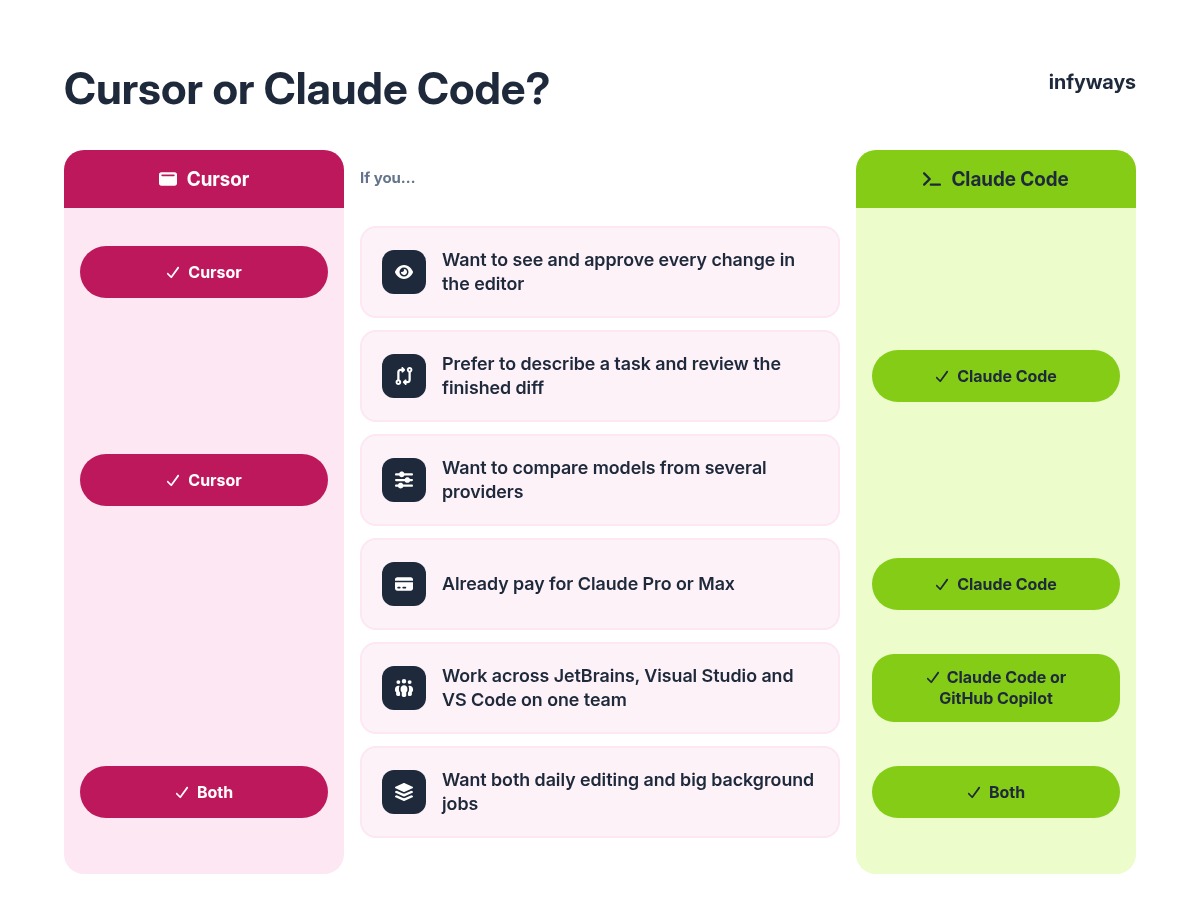
Choose by how you like to work, then confirm with a short trial on real tickets.
| If you… | Choose |
|---|---|
| Want to see and approve every change in the editor | Cursor |
| Prefer to describe a task and review the finished diff | Claude Code |
| Want to compare models from several providers | Cursor |
| Already pay for Claude Pro or Max | Claude Code (it is included) |
| Work across JetBrains, Visual Studio and VS Code on one team | Claude Code or GitHub Copilot |
| Want both daily editing and big background jobs | Both: Cursor for editing, Claude Code for large tasks |
Using two tools is common. Our write-up on pairing OpenCode with Cursor shows how a hybrid setup works, and our look at Cursor’s web app and cloud agents covers running Cursor from the browser.
Frequently Asked Questions
Is Claude Code better than Cursor?
Neither is better for everyone. Claude Code is usually stronger when you hand off large, multi-file tasks and review the result. Cursor is better when you want to stay in the editor, guide changes step by step and switch between models. Try both on the same real task before you decide.
Can I use Claude models inside Cursor?
Yes. Cursor lists Claude Sonnet and Opus models alongside Gemini, GPT and Grok models. On Cursor’s Plus plan only Grok models are included, and on Premium and higher plans third-party models such as Claude are billed separately at API list price.
Is Claude Code free?
No. Claude Code is not listed on Anthropic’s Free plan. It comes with Claude Pro at $20 a month, or $17 a month billed yearly, and with the Max and Ultra plans. Teams can also pay through the Anthropic API based on usage.
Can I use Cursor and Claude Code together?
Yes, and many developers do. You can run Claude Code in Cursor’s built-in terminal or through its IDE extension, and keep one AGENTS.md file so both tools follow the same project rules. A common split is Cursor for everyday edits and Claude Code for big refactors.
Which is cheaper, Cursor or Claude Code?
At the entry level Cursor Plus is cheaper at $8 a month, but it only includes Grok models. For professional use, Claude Pro at $20 and Cursor Premium at $30 are close, and heavy agent users on either tool tend to need the $100 or $200 plans.
The Bottom Line
Cursor is the better pick for editor-first developers who want control and model choice, and Claude Code is the better pick for agent-first work on big tasks.
If you are unsure, start with the one that matches how you work today, run it on real tickets for two weeks and track speed, review findings and cost. Many teams end up using both.
If your team wants help building or reviewing a product with AI coding tools in the workflow, our developers at Infyways offer web development services with human review on every change.
Sources
- Cursor Docs, “Agent overview”. Checked November 12, 2026.
- Claude Code Docs, “Overview”. Checked November 12, 2026.
- Cursor Docs, “Models and pricing”. Checked November 12, 2026.
- Cursor Docs, “Rules”. Checked November 12, 2026.
- Claude Code Docs, “How Claude remembers your project” (CLAUDE.md and AGENTS.md). Checked November 12, 2026.
- Cursor Docs, “Subagents”. Checked November 12, 2026.
- Claude Code Docs, “Subagents”. Checked November 12, 2026.
- Cursor Docs, “Hooks”. Checked November 12, 2026.
- Claude Code Docs, “Hooks reference”. Checked November 12, 2026.
- Cursor Docs, “Cloud Agents”. Checked November 12, 2026.
- Claude Code Docs, “Use Claude Code in the cloud”. Checked November 12, 2026.
- Cursor Docs, “Bugbot”. Checked November 12, 2026.
- Claude Code Docs, “Claude Code GitHub Actions”. Checked November 12, 2026.
- Cursor, “Pricing”. Checked November 12, 2026.
- Anthropic, “Claude plans and pricing”. Checked November 12, 2026.
- Stack Overflow, “2025 Developer Survey: AI”. 2025.
- Claude Code Docs, “Manage costs effectively”. Checked November 12, 2026.
- Claude Code Docs, “Use Claude Code in VS Code” (includes install for Cursor). Checked November 12, 2026.
- Cursor Docs, “Cursor CLI”. Checked November 12, 2026.
- GitHub, “Copilot plans and pricing”. Checked November 12, 2026.
- Cognition, “Devin plans and pricing”. Checked November 12, 2026.
- Cognition, “Devin Desktop FAQ” (Windsurf rename). Checked November 12, 2026.