Short answer: you can’t, and shouldn’t, switch off every cookie on a Joomla site. Joomla core sets a session cookie for every visitor. Forms, logins and CSRF protection need it, and it counts as strictly necessary. What the law asks you to stop is non-essential cookies and scripts, such as analytics, advertising pixels and many video or map embeds. Under EU and UK rules they can’t run until the visitor opts in. Under most US state privacy laws, visitors must be able to opt out of the sale or sharing of their data. Joomla 5, 6 and 6.2 have no built-in cookie banner, so you need a consent extension that blocks scripts before the visitor chooses, not just a notice bar.
In this guide: what Joomla core actually sets (checked against the 6.2.0 code), what GDPR, ePrivacy and US state laws require, a step-by-step setup, a comparison of consent extensions from their Joomla Extensions Directory listings, how to test the result, and an FAQ. This article is general information, not legal advice. See the note at the end.
What cookies does Joomla core set?
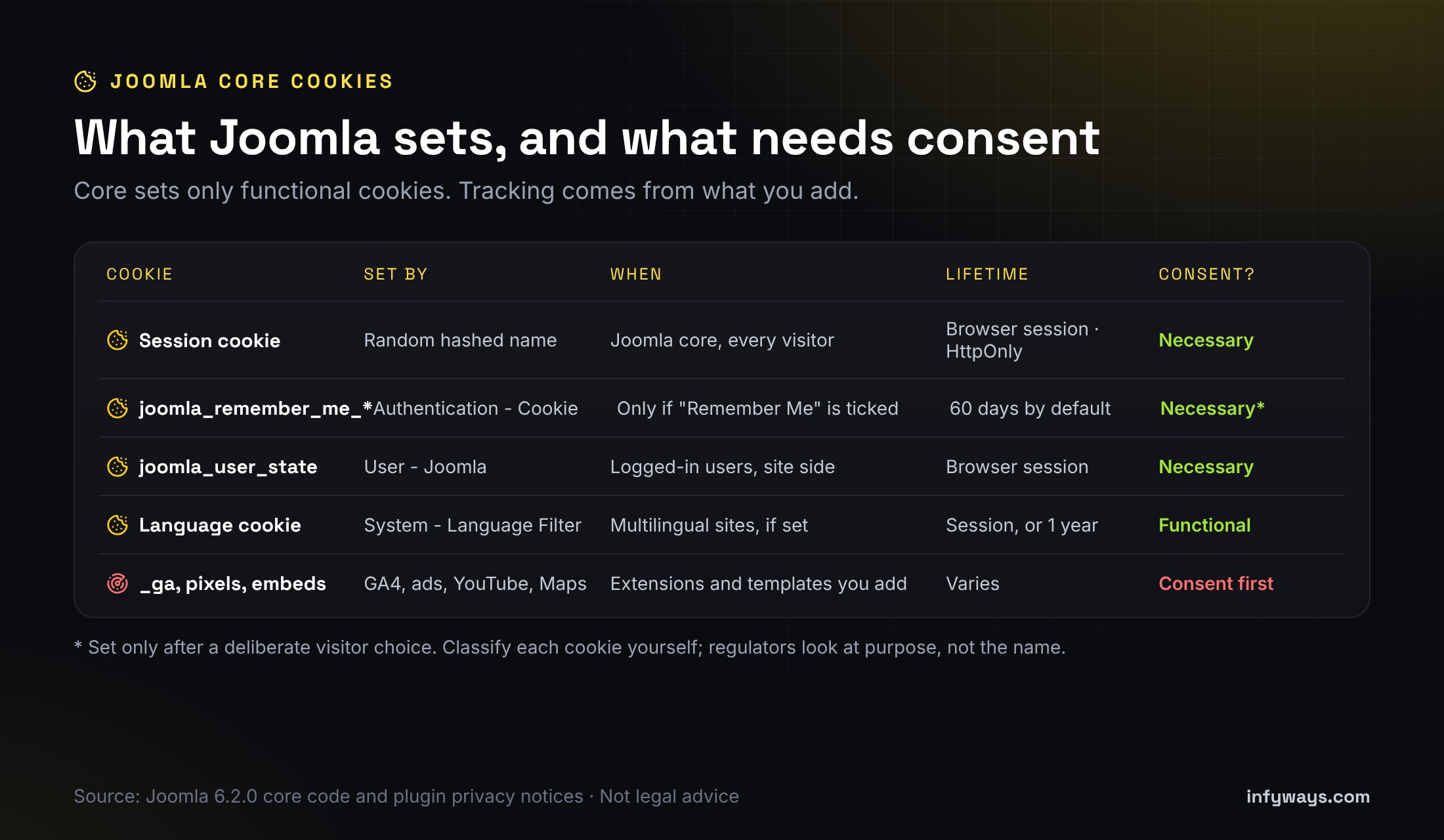
We went through the Joomla 6.2.0 source code for every place core sets a cookie on the public site. A default install sets very few, and none of them track visitors across sites:
| Cookie | Set by | When | Lifetime | Typical category |
|---|---|---|---|---|
| Session cookie (random hashed name) | Joomla core session | Every visitor, on every page that starts a session | Until the browser closes. HttpOnly, and Secure when Force HTTPS is on. | Strictly necessary |
joomla_remember_me_* | Authentication – Cookie plugin | Only when a user ticks “Remember Me” at login | 60 days by default (plugin setting) | Strictly necessary for a feature the user asked for |
joomla_user_state | User – Joomla plugin | Logged-in users on the site side, for reverse caching proxies | Until the browser closes | Strictly necessary |
| Language cookie (random hashed name) | System – Language Filter | Multilingual sites only | Session, or one year if Cookie Lifetime is set to Year | Functional (preference) |
| Logout helper cookie | System – Logout | Briefly, after logout | Deleted on the next request | Strictly necessary |
Everything else comes from what you add: Google Analytics or Tag Manager, Meta or LinkedIn pixels, chat widgets, reCAPTCHA, YouTube and Vimeo embeds, Google Maps and Google Fonts loaded from Google’s servers. That’s where nearly all of your consent work sits.
Where are the cookie settings in Joomla?
- System → Global Configuration → System → Session: Session Lifetime, Session Handler, Shared Sessions and the Track Session Metadata and Track Guest Session Metadata options. These change how sessions are stored. None of them removes the session cookie.
- System → Global Configuration → Site → Cookie: Cookie Domain and Cookie Path. Leave them empty unless you share cookies across subdomains.
- System → Global Configuration → Server → Force HTTPS: set it to Entire Site so the session cookie is marked Secure.
- Users → Privacy → Capabilities: a report of what installed extensions say they store. Use it as a starting point, but Joomla itself warns it isn’t a complete list.
- Plugins: Authentication – Cookie and System – Remember Me control the remember-me cookie. System – Language Filter controls the language cookie.
Did Joomla 6.2 change anything about cookies?
No. The Joomla 6.2 release notes list editor, module, admin, security-update and email changes, with nothing new on cookies or consent. Core still has no cookie banner or consent manager. That’s why the advice in this guide applies the same to Joomla 4, 5, 6.0, 6.1 and 6.2.
Why not just disable the session cookie for guests?
Old forum posts suggest hacking index.php or the session handler so guests get no session. Don’t. Joomla’s form tokens depend on the session, so contact forms, login and registration break or lose CSRF protection. Strictly necessary cookies don’t need consent anyway, so removing this one gains you nothing legally. Just list it in your cookie policy.
What do GDPR and the ePrivacy Directive require?
In the EU, the rule on cookies comes from Article 5(3) of the ePrivacy Directive: storing or reading information on a visitor’s device needs their consent, unless it’s strictly necessary for a service they asked for. The meaning of consent comes from the GDPR. Article 4(11) says it must be freely given, specific, informed and unambiguous. Article 7(3) says withdrawing it must be as easy as giving it. Article 7(1) says you must be able to show it was given. In practice this means:
| Requirement | What it means on your Joomla site | Where it comes from |
|---|---|---|
| Ask before setting | Analytics, ad and similar cookies stay off until the visitor opts in | ePrivacy Art. 5(3) |
| No pre-ticked boxes | Optional categories start switched off | CJEU Planet49 (C-673/17), 2019 |
| Scrolling isn’t consent | Only a clear click on Accept (or a category toggle) counts | EDPB Guidelines 05/2020 |
| Easy refusal | Reject is as easy to find and use as Accept | EDPB cookie banner taskforce report (2023) |
| Specific and informed | Name the categories, their purpose, and who else receives data | GDPR Art. 4(11), 13 |
| Withdraw anytime | A persistent link or button reopens the settings | GDPR Art. 7(3) |
| Keep proof | Store the choice, the time and the policy version | GDPR Art. 7(1) |
| No cookie walls by default | Don’t block access to the whole site until someone accepts tracking | EDPB Guidelines 05/2020 |
The UK applies similar rules through PECR and the UK GDPR. The ICO’s cookie guidance is the place to check for UK-specific detail.
The EU is also negotiating changes to the cookie rules as part of the Commission’s “Digital Omnibus” proposal. Nothing has been adopted yet, so the current rules above still apply. We’ll update this guide if that changes.
What do US state privacy laws require?
Most US state laws use an opt-out model rather than opt-in. You can usually run analytics with a clear notice, but visitors must be able to opt out of the “sale” or “sharing” of personal data, including cross-context behavioural advertising and, in many states, targeted advertising. Each law has its own thresholds, so many small sites aren’t covered at all. Check each law’s applicability section.
| State law | What it means for cookies and tags | Official text |
|---|---|---|
| California CCPA / CPRA | A “Do Not Sell or Share My Personal Information” link if you sell or share data, such as through ad pixels. Honour the Global Privacy Control (GPC) browser signal as a valid opt-out. | California AG · CPPA regulations (§7025) |
| Colorado Privacy Act | Opt-out of targeted advertising and sale. Honour universal opt-out signals such as GPC (from 1 July 2024). | Colorado AG |
| Connecticut Data Privacy Act | Opt-out of targeted advertising and sale. Honour opt-out preference signals (from 1 January 2025). | Connecticut AG |
| Texas Data Privacy and Security Act | Opt-out of targeted advertising and sale. Honour global opt-out signals (from 1 January 2025). | Texas AG |
| Indiana, Kentucky and Rhode Island | New comprehensive laws in force from 1 January 2026, with opt-out rights for targeted advertising and sale. | Indiana AG · Kentucky AG · Rhode Island statute |
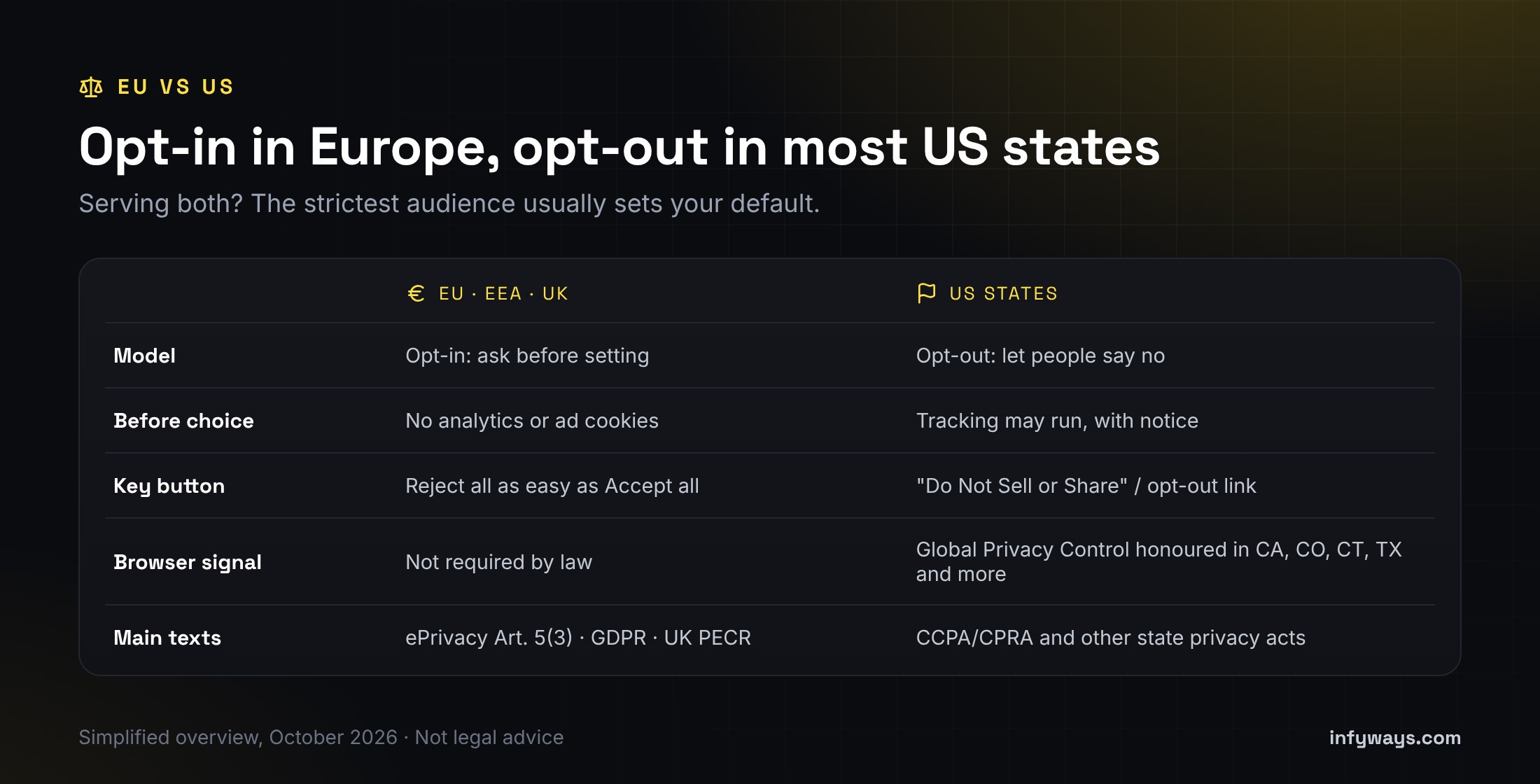
If you serve visitors in both Europe and the US, the simplest setup is opt-in for everyone, plus a “Do Not Sell or Share” link and GPC support. Some consent tools can instead show different rules by region.
How do you set up cookie consent on Joomla, step by step?
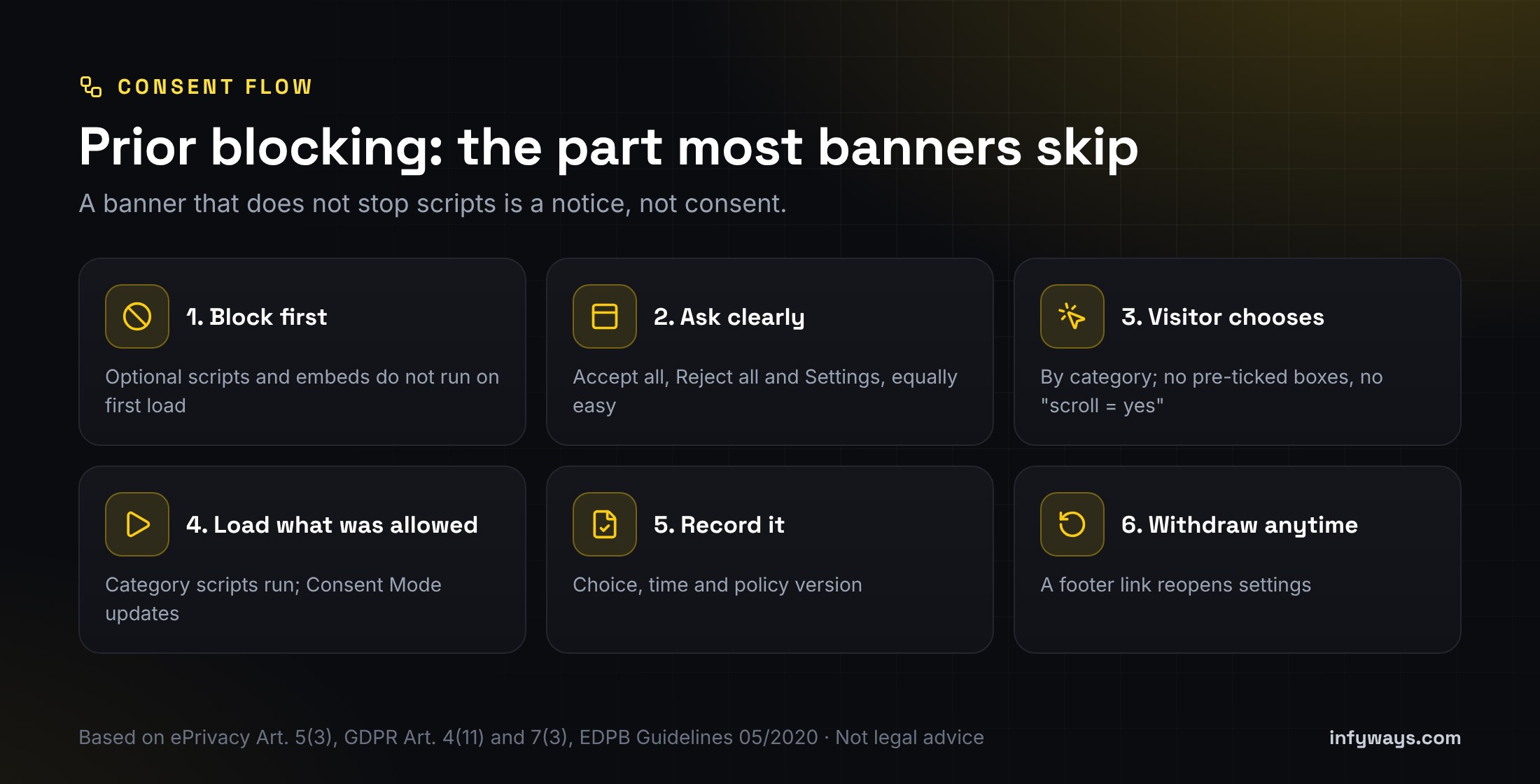
- List what you load. Open the site in a private window, then check DevTools → Application → Cookies and the Network tab. Write down every third-party host and cookie, and which extension or template adds it.
- Group them by purpose: Necessary, Preferences (functional), Analytics and Marketing. Purpose decides the category, not the cookie name.
- Pick a consent extension that does prior blocking (see the comparison below), and install it.
- Move tags out of the template. Remove hard-coded analytics and pixel snippets from the template, “custom code” plugins and modules. Add them through the consent tool’s category slots or blocking rules instead.
- Turn on Google Consent Mode v2 if you use Google tags. The defaults should be denied before any tag runs, then updated after the visitor’s choice (Google guide).
- Gate embeds. Replace YouTube, Vimeo and Maps iframes with a placeholder until the right category is allowed, or use privacy-enhanced embed modes.
- Write the banner text. Say plainly what each category does, and link to your privacy and cookie policy. Give equal weight to Accept all and Reject all.
- Add a persistent “Cookie settings” link in the footer so visitors can change their mind.
- For US traffic, add a “Do Not Sell or Share” link if you sell or share data, and check the tool honours GPC.
- Test, then retest after every change of template, tag or extension (see below).
Which Joomla cookie consent extension should you use?
We compared consent extensions for Joomla 5 and 6 using their own Joomla Extensions Directory (JED) listings in October 2026. Features are as the developers describe them. We haven’t audited each one.
| Extension | Type (JED) | Joomla | Prior blocking | Consent Mode v2 | Consent records | US opt-out / GPC |
|---|---|---|---|---|---|---|
| NexusConsent | Free plugin | J5, J6 | Yes, server-side, with presets and a site scanner | Yes | Optional anonymised audit trail | Not listed |
| ConsentLab | Free component + plugin | J5, J6 | Yes, by script attribute | Not listed | Yes, with CSV export | Not listed |
| ConsentX | Free plugin | J5, J6 | Yes | Yes | Yes | GPC support and geo-aware rules |
| Cookies Policy Notification Bar (Web357) | Paid component + plugin | J3 to J6 | Yes, by script URL and element | Yes | Yes (IP logging can be off) | GeoIP targeting |
| Easy Cookie Alert (made by us, Infyways) | Paid module | J4 to J6 | Category script slots and embed blocking | Yes | Optional anonymised receipts | “Do Not Sell or Share” link |
Disclosure: Easy Cookie Alert is our own extension, so weigh our view of it accordingly. In short:
- Want free with the least manual work? Look at NexusConsent’s presets and scanner, or ConsentX if you need GPC and region rules.
- Want a simple free banner with a consent log? ConsentLab covers the basics.
- Still on Joomla 3 or 4? Only the Web357 extension lists J3, and only it and our module list J4. Plan an upgrade either way.
- Want a module you place like any other, with themes and a US opt-out link? That’s the gap our own module was built for.
Whatever you choose, check three things before you buy or install: it blocks scripts before consent, Reject all is on the first layer, and it’s listed as compatible with your Joomla version.
How do you check that your banner actually works?
- Open a private window with no consent cookie, then load the home page and a page with embeds.
- Before you click anything, DevTools → Application → Cookies should show only necessary cookies, and the Network tab should show no requests to analytics or ad hosts.
- Click Reject all and reload. Still no tracking cookies or requests.
- Clear cookies, click Accept all (or allow only Analytics) and reload. Only the allowed tags should now load.
- Submit a contact form after rejecting. It should still work, because the session cookie is necessary.
- Reopen Cookie settings from the footer, withdraw consent and check the tags stop.
- For US traffic, turn on GPC in a browser that supports it and check your tool treats it as an opt-out.
If tracking still fires before consent, a tag is hard-coded somewhere: in the template, a module, a “custom code” plugin or an extension’s own settings. Remove it there.
What mistakes do Joomla sites make most often?
| Mistake | Why it’s a problem | Fix |
|---|---|---|
| An “OK, got it” notice bar | It informs but doesn’t ask, and scripts still run | Use a tool with prior blocking and a Reject option |
| GA4 in the template head | It runs before any choice | Load it through the consent tool, with Consent Mode defaults set to denied |
| Accept is a big button, Reject is a hidden link | Authorities treat that as nudging | Make both equally easy on the first layer |
| Pre-ticked Analytics toggle | Not valid consent under Planet49 | Start optional categories switched off |
| No way back to the settings | Withdrawing has to be as easy as consenting | Add a footer “Cookie settings” link |
| Cookie policy never updated | Tags change, but the policy still lists 2019 cookies | Review after every new extension and bump the consent version |
| Disabling Joomla sessions | Breaks forms and security for no legal gain | Keep the session cookie and document it |
When should you get help?
Get help if your site runs many extensions, a page builder or a shop, serves both EU and US visitors, or still runs Joomla 3. Infyways has built Joomla sites since 2010 and makes 125 Joomla extensions, so we know where scripts hide in templates and extensions. We can audit what your site loads, set up consent with prior blocking, clean up hard-coded tags, and upgrade older sites so a current consent tool will run. We don’t give legal advice; your lawyer or DPO decides the policy, and we make the site do what it says. Send us your site URL. We reply within 12 hours.
Sources we checked (October 2026)
- ePrivacy Directive 2002/58/EC (consolidated), Article 5(3)
- GDPR (Regulation (EU) 2016/679), Articles 4(11) and 7
- EDPB Guidelines 05/2020 on consent
- EDPB report of the cookie banner taskforce (January 2023)
- CJEU, Case C-673/17 Planet49 (1 October 2019)
- UK ICO: cookies and similar technologies
- California Attorney General: CCPA
- California Privacy Protection Agency: CCPA regulations
- Colorado Attorney General: Colorado Privacy Act
- Connecticut Attorney General: Connecticut Data Privacy Act
- Texas Attorney General: Texas Data Privacy and Security Act
- Indiana Attorney General: Consumer Data Protection Act
- Kentucky Attorney General: Office of Data Privacy (KCDPA)
- Rhode Island General Laws § 6-48.1
- Google: Consent Mode
- Joomla 6.2.0 source code
- Joomla 6.2 release announcement
Frequently Asked Questions
Does Joomla have a built-in cookie consent banner?
No. Joomla 4, 5, 6 and 6.2 have no cookie banner or consent manager in core. You need a consent extension, ideally one that blocks optional scripts until the visitor chooses.
What cookies does Joomla set by default?
A session cookie with a random hashed name for every visitor. Optional core features add a remember-me cookie when users tick “Remember Me”, a user-state cookie for logged-in users, and a language cookie on multilingual sites. None of these track visitors across sites.
Does the Joomla session cookie need consent?
Generally no. It’s needed for forms, logins and security, which falls under the strictly necessary exemption in the ePrivacy Directive. List it in your cookie policy all the same.
Can I disable cookies completely in Joomla?
Not without breaking forms and login security. What you should disable is non-essential cookies, such as analytics, ads and some embeds, until the visitor consents.
Is a cookie notice bar enough for GDPR?
No. EU rules need prior consent for non-essential cookies. That means no tracking before a choice, a real Reject option and a way to withdraw later. A bar that only says “OK” doesn’t do that.
Do US websites need a cookie banner?
Most US state laws don’t require opt-in consent for cookies. They do require an opt-out from sale, sharing or targeted advertising where the law applies, and several states require you to honour the Global Privacy Control signal.
Does Google Analytics on Joomla need consent?
For EU and UK visitors, analytics cookies generally need consent first. Load GA4 through your consent tool and set Google Consent Mode defaults to denied until the visitor allows analytics.
Did Joomla 6.2 change how cookies work?
No. The 6.2 release added editor, module, admin and email features, but nothing on cookies or consent. The session and plugin cookies work as they did in 6.1.
Legal note: This article is general information about cookie and privacy rules as of October 2026. It isn’t legal advice, and following it doesn’t guarantee compliance with GDPR, ePrivacy, PECR, the CCPA or any other law. Laws and guidance change, and which ones apply depends on your organisation and visitors. Check your obligations with a qualified lawyer or your data protection officer.