Updated 15 October 2026 · By Abhilash Sahoo, Founder, Infyways
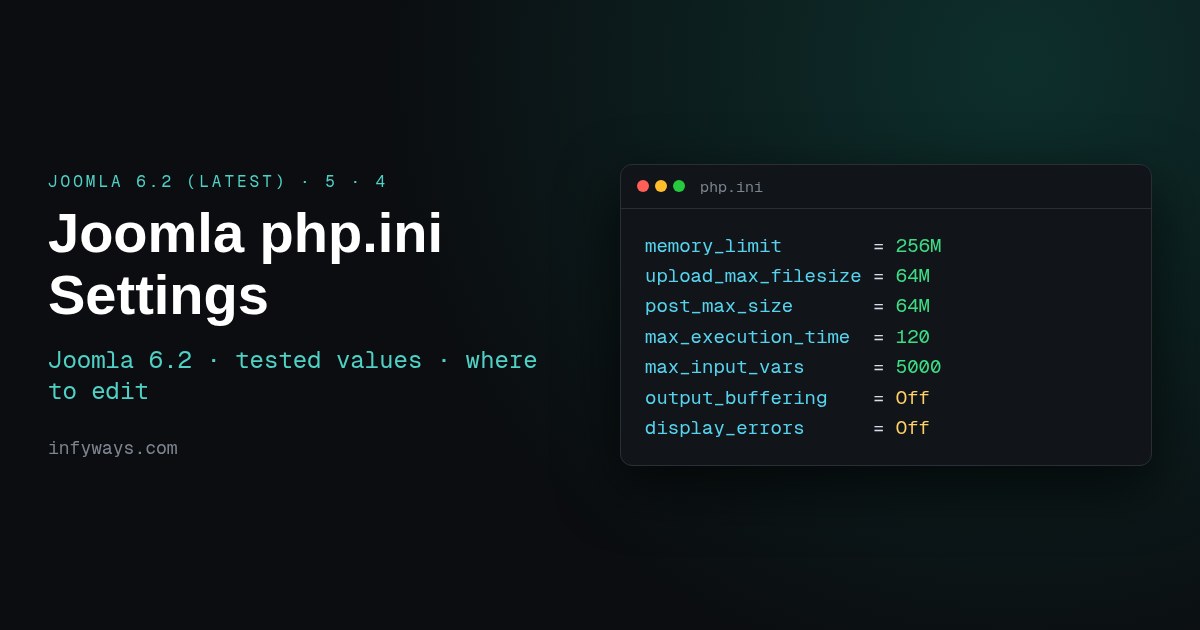
Quick answer: as of Joomla 6.2, the latest version (released 13 October 2026), a good starting point for Joomla 6 and 5 is:
memory_limit        = 256M
upload_max_filesize = 64M
post_max_size       = 64M
max_execution_time  = 120
max_input_time      = 120
max_input_vars      = 5000
output_buffering    = Off
display_errors      = Off
Joomla 6.2 needs PHP 8.3.0 or newer (8.4 recommended), and Joomla 5.4 needs PHP 8.1.0 or newer. Check what is actually applied in System → System Information → PHP Settings. Then edit the file your server really reads:
.htaccessphp_valuelines for Apache mod_php.user.inifor CGI, FastCGI or PHP-FPM- cPanel’s MultiPHP INI Editor
- Plesk’s PHP Settings
- the PHP-FPM pool file on a VPS
- the main
php.inion XAMPP
I tested this on a real Joomla 5.4.10 install on XAMPP 8.2.12 (Apache with mod_php, PHP 8.2.12). I changed values with each method and read the results back. The images marked “real output” are screenshots and output from that site. The requirements come from the official Joomla technical requirements, and the directive behaviour comes from the php.net ini reference.
What PHP version and settings do Joomla 6.2, 5 and 4 need?
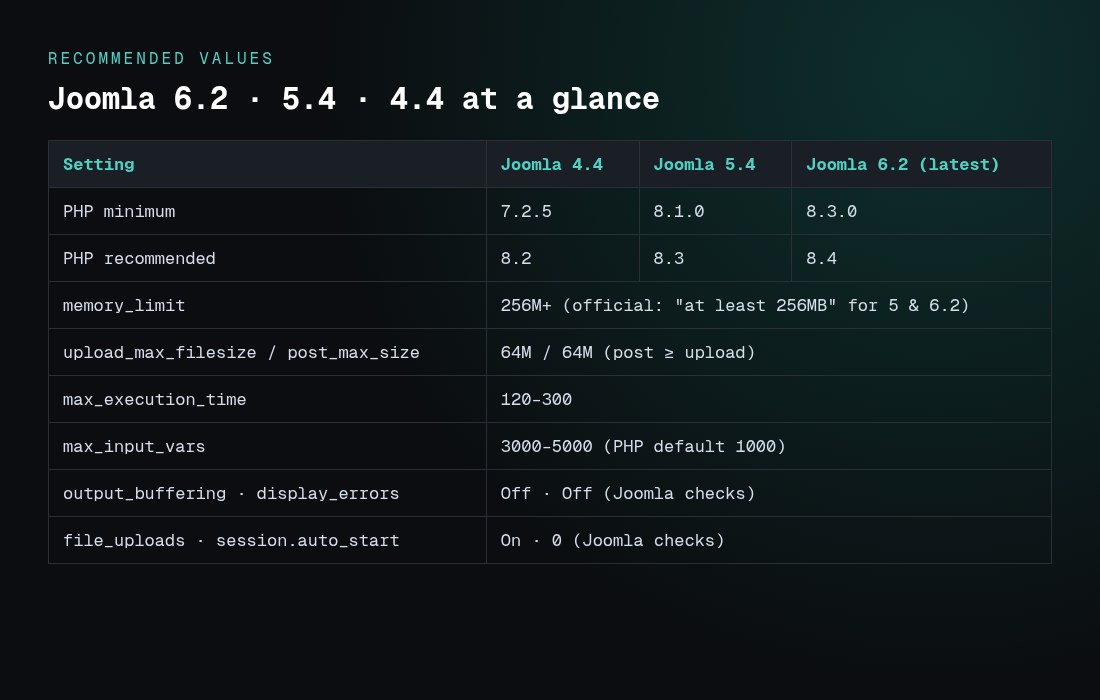
| Requirement | Joomla 4.x | Joomla 5.x | Joomla 6.2 (latest) | Source |
|---|---|---|---|---|
| PHP minimum | 7.2.5 | 8.1.0 | 8.3.0 | Joomla manual |
| PHP recommended | 8.2 | 8.3 | 8.4 | Joomla manual |
| Memory limit | not stated | “at least 256MB” | “at least 256MB” | Joomla manual |
| Required PHP modules | json, simplexml, dom, zlib, gd, mysqlnd or pdo_mysql or pdo_pgsql (mbstring recommended) | Joomla manual | ||
| output_buffering, display_errors | Off (recommended) | Joomla installer and update checks | ||
| file_uploads, session.auto_start | On, Off | Joomla installer and update checks | ||
Joomla 6.2 (Mwezi) is the current release; its own code enforces JOOMLA_MINIMUM_PHP 8.3.0, and 5.4.10, released the same day, is the last Joomla 5 bugfix release. Joomla 4 reached end of life, so plan your Joomla 6 compatibility check and upgrade. My test site showed this live warning on the dashboard: “Your PHP version, 8.2.12, is only receiving security fixes … Joomla 5 has entered security only mode. Support ends 12 October 2027.”
Which php.ini values should I set for Joomla?
| Directive | PHP default | Joomla value | Why |
|---|---|---|---|
| memory_limit | 128M | 256M (512M for big shops or migrations) | Joomla’s documented minimum for 5 and 6. Too low gives “Allowed memory size … exhausted”. |
| upload_max_filesize | 2M | 64M | Extension, template and media uploads |
| post_max_size | 8M | 64M (≥ upload_max_filesize) | php.net: it “must be larger than upload_max_filesize”, and memory_limit “should be larger than post_max_size” |
| max_execution_time | 30 | 120–300 | Core updates, backups, imports |
| max_input_time | -1 | 120 or -1 | Slow uploads |
| max_input_vars | 1000 | 3000–5000 | Large forms, such as permissions, menus and big article forms, are cut off at 1000 |
| output_buffering | Off (php.ini-production sets 4096) | Off | Joomla’s installer and updater recommend Off |
| display_errors | On (php.ini-production sets Off) | Off on live sites | Don’t show paths to visitors. Use Joomla’s Error Reporting setting for debugging. |
| session.auto_start | 0 | 0 | Joomla manages its own sessions |
| opcache.enable | 1 | 1 | Speeds up PHP. If code changes don’t show, check opcache.validate_timestamps. |
The max_input_vars limit is easy to miss. I posted 1,500 form fields to the test site with the default limit. PHP kept the first 1,000, dropped the rest without any visible error, and only logged a warning:
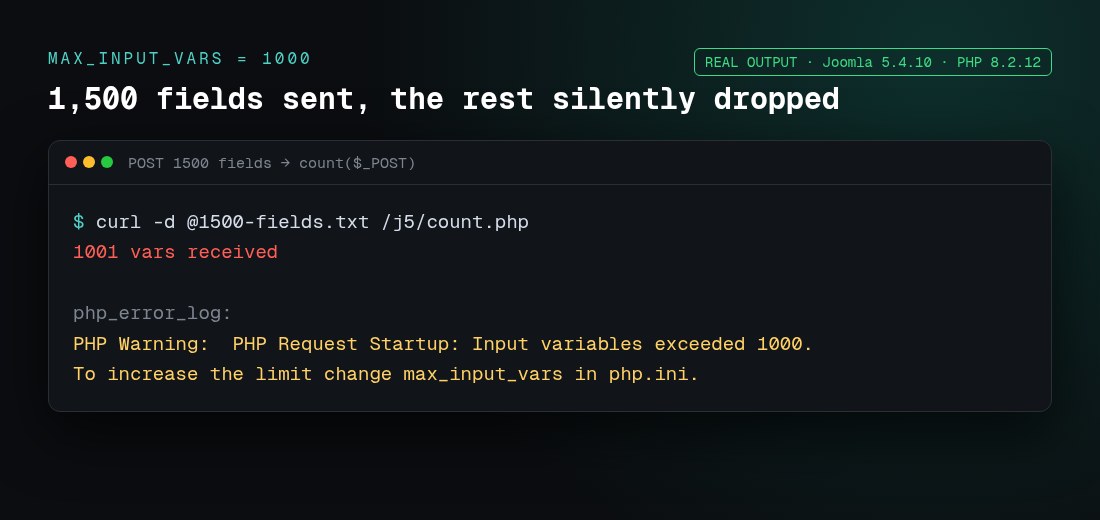
If a large Joomla form “saves” but some changes disappear, raise max_input_vars first.
How do I check my current PHP settings in Joomla?
In the Administrator, go to System → System Information. The PHP Settings tab shows the values Joomla actually gets, and PHP Information shows the full phpinfo output.
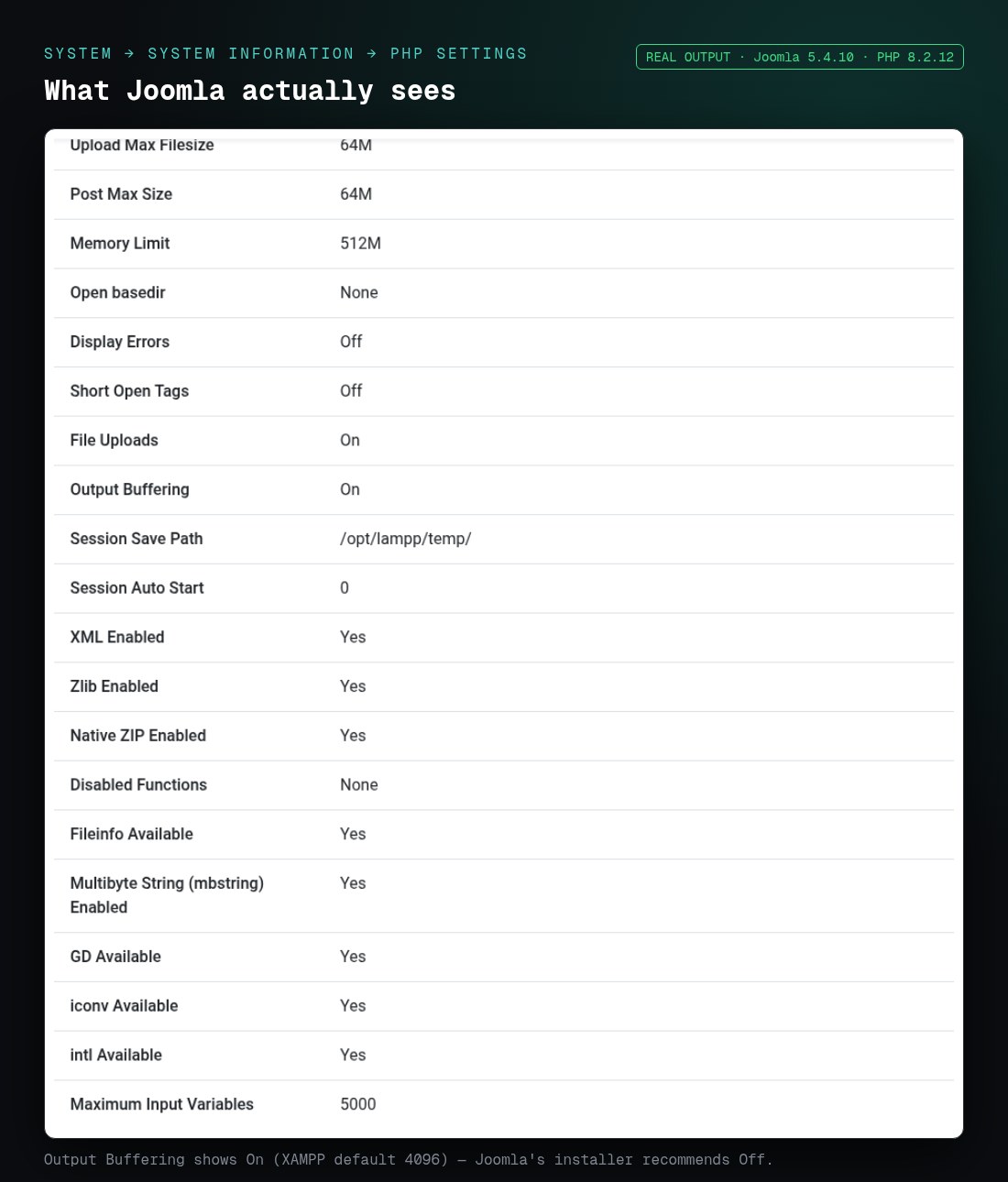
Note what the PHP Settings tab doesn’t list: max_execution_time and max_input_time. Search the PHP Information tab for those. In my test, Output Buffering showed On, because XAMPP ships output_buffering=4096, while Joomla recommends Off.
In PHP Information, look for three lines:
- Server API tells you which edit method works.
- Loaded Configuration File is the main php.ini.
- Additional .ini files parsed lists extra ini files that can override it.
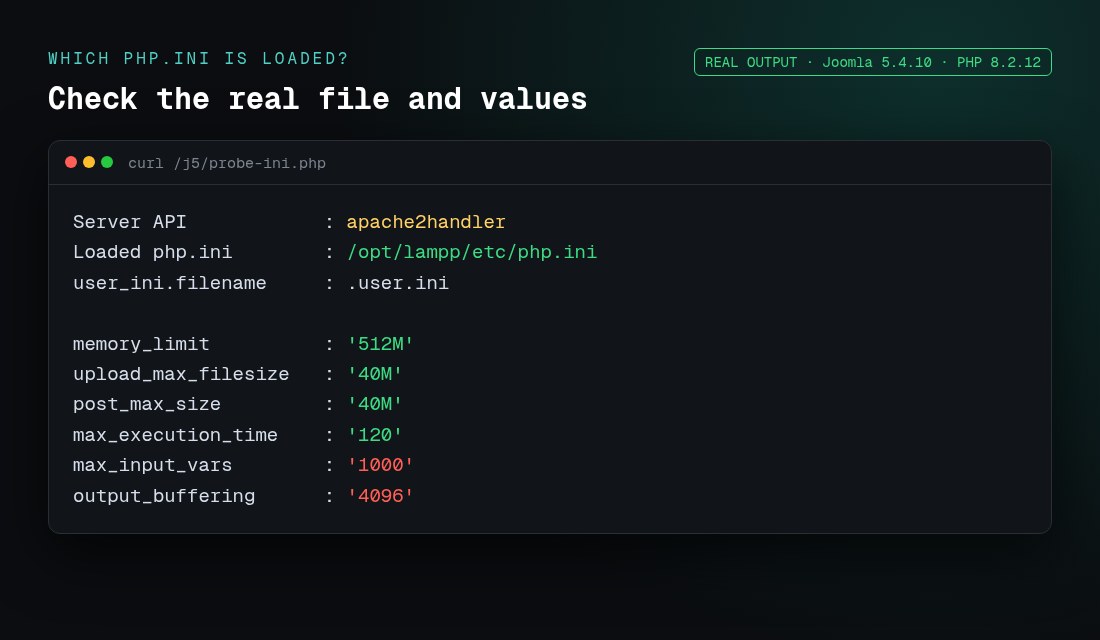
Don’t trust php -i on the command line. CLI PHP can load a different php.ini from the web server. Check from the browser, or with a temporary file containing <?php echo php_ini_loaded_file(), ' ', php_sapi_name();, and delete it afterwards.
Where do I change PHP settings for Joomla?
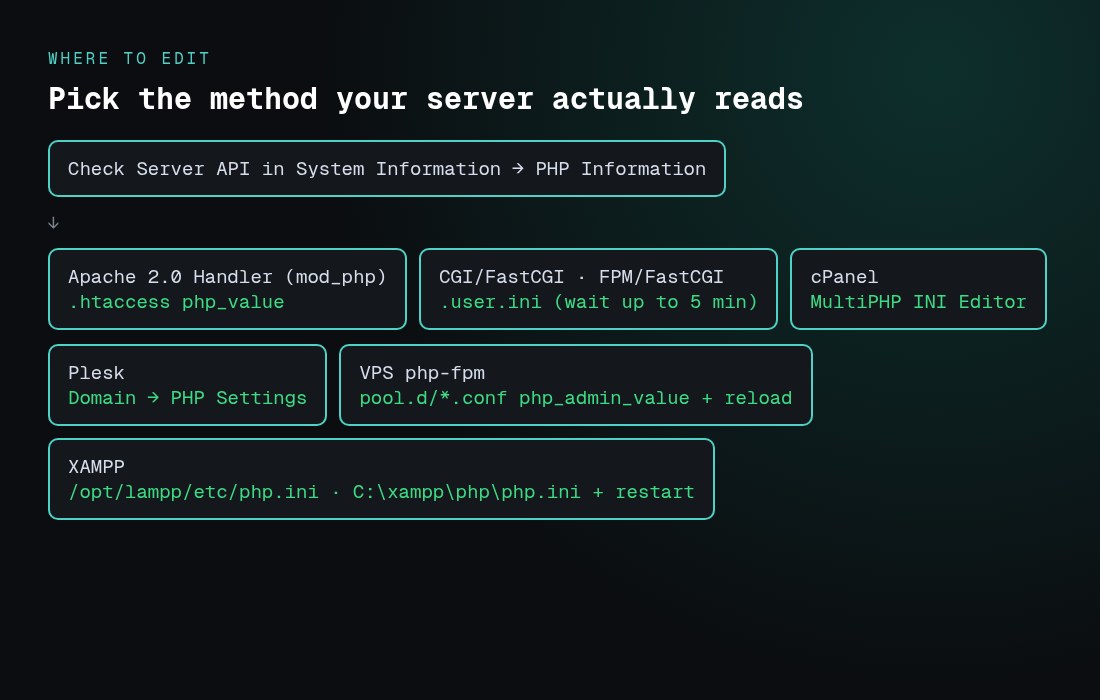
The right method depends on the Server API line. I tested both per-folder methods on the same mod_php server. The .user.ini file was ignored, and the .htaccess lines applied straight away:
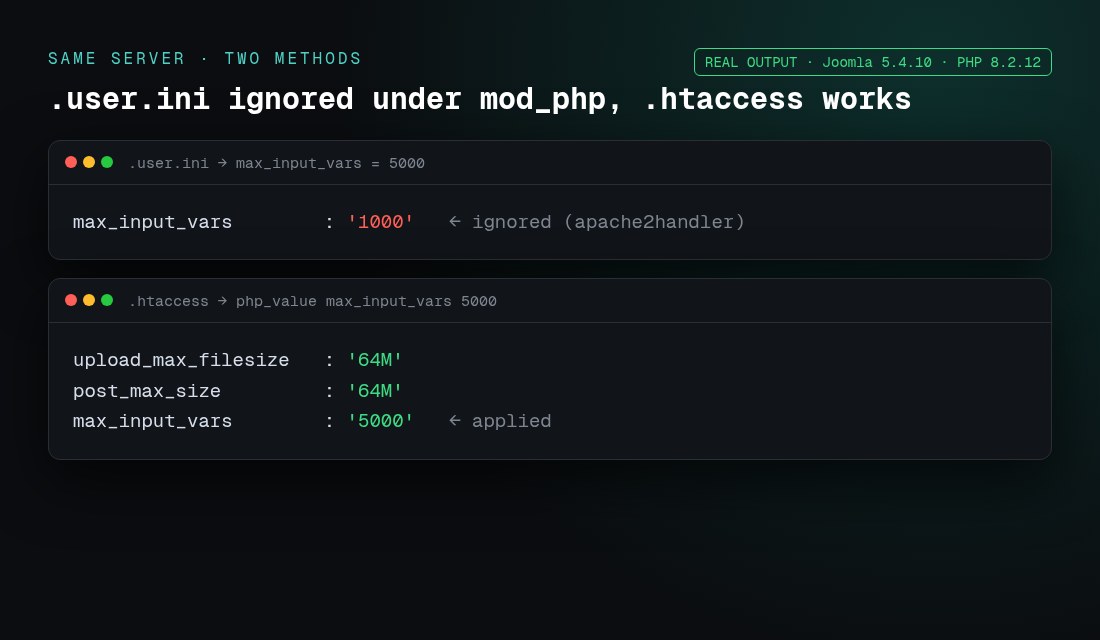
That matches php.net, which says .user.ini files “are processed only by the CGI/FastCGI SAPI. If you are running PHP as Apache module, use .htaccess files for the same effect.”
Apache mod_php (“Apache 2.0 Handler”): .htaccess
# In Joomla's root .htaccess
php_value memory_limit 256M
php_value upload_max_filesize 64M
php_value post_max_size 64M
php_value max_execution_time 120
php_value max_input_vars 5000
php_flag  output_buffering Off
Apache must allow overrides (AllowOverride Options or All). On any other Server API, php_value causes a 500 Internal Server Error, so remove the lines if the site goes down. Our Joomla .htaccess guide covers the rest of that file.
CGI, FastCGI or PHP-FPM: .user.ini
; .user.ini in the Joomla root (and in /administrator if needed)
memory_limit = 256M
upload_max_filesize = 64M
post_max_size = 64M
max_execution_time = 120
max_input_vars = 5000
output_buffering = Off
PHP reads it from the script’s folder upwards to the document root. Changes can take up to user_ini.cache_ttl to apply (300 seconds by default). Only directives that can be set per directory work here.
cPanel: MultiPHP INI Editor
- Go to cPanel → Software → MultiPHP INI Editor.
- In Basic Mode, select the domain, then set memory_limit, upload_max_filesize, post_max_size, max_execution_time, max_input_time and max_input_vars.
- Click Apply. cPanel writes the right file for your PHP handler. Check the PHP version in MultiPHP Manager too.
Plesk: PHP Settings
Go to Websites & Domains → your domain → PHP (PHP Settings). Choose the PHP version and handler, set the performance and common settings (memory_limit, max_execution_time, post_max_size, upload_max_filesize), and add max_input_vars = 5000 under additional directives. Then click OK or Apply.
VPS with PHP-FPM (Nginx or Apache)
; /etc/php/8.3/fpm/pool.d/www.conf  (Debian/Ubuntu path; varies by distro)
php_admin_value[memory_limit] = 256M
php_admin_value[upload_max_filesize] = 64M
php_admin_value[post_max_size] = 64M
php_admin_value[max_execution_time] = 120
php_admin_value[max_input_vars] = 5000

sudo systemctl reload php8.3-fpm
On Nginx, also raise client_max_body_size, which defaults to 1m. Otherwise uploads fail with 413 before PHP sees them. If PHP’s time limit is higher than the web server’s, increase fastcgi_read_timeout or proxy_read_timeout as well.
XAMPP and local development
Edit /opt/lampp/etc/php.ini on Linux, C:\xampp\php\php.ini on Windows (Apache → Config → PHP (php.ini) in the Control Panel), or /Applications/XAMPP/xamppfiles/etc/php.ini on macOS. Then restart Apache. XAMPP runs Apache with mod_php, so .htaccess also works and .user.ini doesn’t. If MySQL won’t start on XAMPP, see our XAMPP MySQL fix guide.
How do I verify the change worked?
- Reload System → System Information → PHP Settings. Don’t rely on the panel showing your edit as saved.
- If the value didn’t change, check Server API and Loaded Configuration File in PHP Information.
- Test the real task: upload a 50 MB extension, or save the Global Configuration permissions.
- On PHP-FPM, reload the service. With
.user.ini, wait up to 5 minutes.
Why are my php.ini changes not applying?
| Symptom | Cause | Fix |
|---|---|---|
| .user.ini has no effect | Server API is Apache 2.0 Handler | Use .htaccess php_value instead |
| 500 error after editing .htaccess | php_value on FastCGI or FPM | Remove the lines and use .user.ini or the host panel |
| Edited php.ini but nothing changed | Wrong file, or no restart | Match “Loaded Configuration File”, then restart Apache or reload FPM |
| Value reverts or is capped | php_admin_value in the pool, or host limits | Ask the host. A pool admin value can’t be overridden. |
| Upload still fails at 64M | post_max_size smaller, or Nginx client_max_body_size | Make post ≥ upload and raise the Nginx limit |
| Form saves but changes are lost | max_input_vars at 1000 | Set 3000–5000 |
| Admin settings only fail | .user.ini only in the root | Usually inherited, but some hosts need a copy in /administrator |
Which Joomla settings sit on top of PHP?
- Global Configuration → Server → Error Reporting controls what Joomla shows. Keep it at “System Default” or “None” on live sites.
- Global Configuration → System → Debug System is for development only.
- Media → Options → Maximum Size (in MB) is Joomla’s own upload cap. It can’t exceed PHP’s limits.
- Global Configuration → Server → Gzip Page Compression overlaps with server compression, so use one or the other.
Locking PHP down also matters for security. See our Joomla security guide, which covers display_errors, disable_functions and open_basedir.
Frequently asked questions
Where is the php.ini file for Joomla?
Joomla doesn’t have its own php.ini. Go to System → System Information → PHP Information and read “Loaded Configuration File”. On shared hosting, use your host’s panel or a .user.ini in the Joomla root instead.
What PHP settings does Joomla 6.2 need?
Joomla 6.2 is the latest version (13 October 2026). It needs PHP 8.3.0 or newer (8.4 recommended) and memory_limit of at least 256M. In practice, use upload_max_filesize and post_max_size of 64M, max_execution_time of 120, max_input_vars of 5000, and turn output_buffering and display_errors Off.
What PHP version does Joomla 6 need?
PHP 8.3.0 at minimum, with 8.4 recommended, according to the Joomla technical requirements. Joomla 5 needs 8.1.0 or newer, with 8.3 recommended.
What memory_limit should I set for Joomla?
At least 256M, which is the official recommendation for Joomla 5 and 6. Use 512M for large e-commerce sites, big imports or migrations.
What max_input_vars does Joomla need?
Use 3000–5000. The PHP default of 1000 silently drops fields on large forms such as permissions and menus. The old Joomla 3 help screens suggested 2500.
Should output_buffering be on or off for Joomla?
Off. Joomla’s installer and pre-update checks list output_buffering as a recommended “Off” setting. XAMPP and many php.ini-production files set it to 4096, which Joomla shows as “On”.
Why does php_value in .htaccess give a 500 error?
php_value only works when PHP runs as an Apache module. On FastCGI or PHP-FPM, Apache doesn’t recognise the directive and returns a 500 error. Use .user.ini instead.
What is the difference between php.ini and .user.ini?
php.ini is the main server file. .user.ini is a per-folder override that only CGI, FastCGI and PHP-FPM read, it’s cached for up to 5 minutes, and it only accepts per-directory directives.
Why can’t I upload a 50 MB extension after raising upload_max_filesize?
The smallest limit wins. post_max_size must be at least as large, and so must Nginx’s client_max_body_size and Joomla’s Media “Maximum Size”.
Do I need to restart anything after editing php.ini?
Yes. Restart Apache for mod_php, or reload PHP-FPM. .htaccess changes apply straight away, and .user.ini changes apply within user_ini.cache_ttl (300 seconds by default).
Can I change PHP settings from inside Joomla?
No. Joomla only shows them. Change them in the host panel or the server files, then check them in System Information.