A Joomla template override disappeared after an update because you edited the parent template (usually Cassiopeia html/), and the package put the stock files back. Child html/ is not part of that package. It stays. This is a file that vanished from disk (or was restored to vendor markup). It is not “the override never loaded.” If the PHP is still there and the public page ignores it, use Joomla template override not working instead.
Joomla and club-template updates are allowed to replace parent files. That is how security fixes arrive. Your job is to stop storing custom PHP on a path the installer owns. Move the copy into a child template html/ folder, assign that style, and leave Cassiopeia stock. Same rule as CSS and JS: customize without editing core.
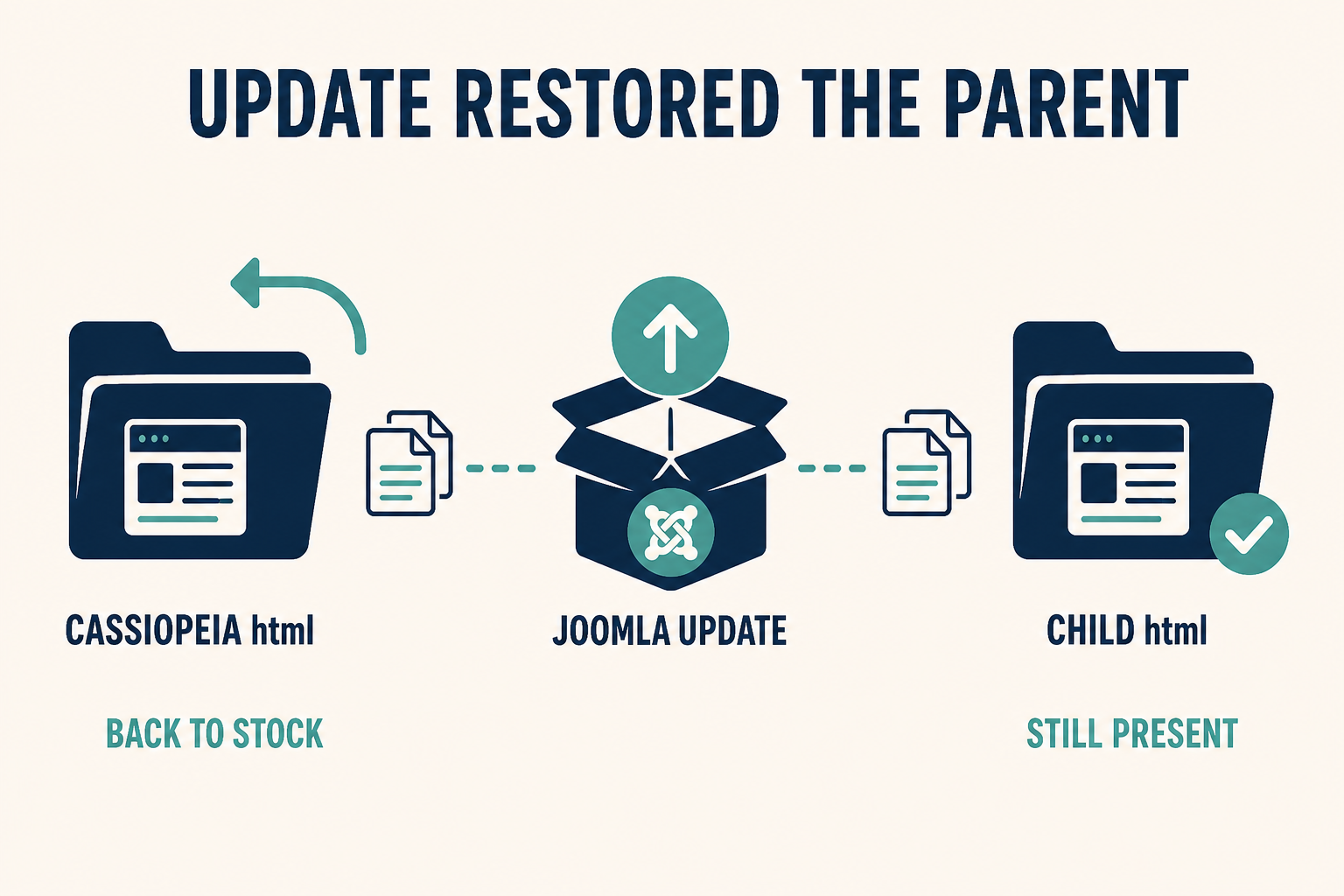
The update owns the parent. It does not own the child. If you customized Cassiopeia in place, the next package looks like your override “disappeared.”
What you will learn
- How to tell a wiped parent file from an override that never loaded
- Why Cassiopeia
html/is not a safe home, even when Create Overrides offered it - How to recover markup from backup before you recreate anything
- How to move surviving files into child
html/(including pluginplg_copies) - What the template Overrides list means after the next update (stale vs gone)
- How to keep the parent inheritable so you are not maintaining a fork
Official references: Layout Overrides in Joomla, Child Templates, Template Overrides.
| What happened | This article | The other article |
|---|---|---|
FTP: html/com_content/article/default.php is gone or matches core again |
Yes. Parent was replaced. | No |
| FTP: your probe class is still in the file, public HTML is stock | No | Override not working |
| You switched the default style to a new child and Home went stock | Maybe both: files still on parent, style now child | Assign and copy into the child |
| Club zip reinstalled the template you renamed as “Cassiopeia custom” | Yes, if that folder is what the zip overwrites | Path/filename issues if the file remains |
| Core layout changed and your copy still exists but looks wrong | Stale override. Diff it. File did not disappear. | Only if the path was always wrong |
Step 1: Confirm the file is gone (or stock) on disk
Do not trust memory of “it used to look different.”
- Note the view you customized (article, blog,
mod_menu, plugin Prev/Next). - On the server, open parent
templates/cassiopeia/html/(or the club parent you actually edited). - Compare with a stock copy: same Joomla version, unmodified Cassiopeia, or the extension’s
tmplincomponents//modules//plugins/.
Outcomes:
- Missing file: the update deleted a file that is not in the package (some hosts sync to the zip). Or you never committed it and a deploy overwrote the tree. Restore from backup first (Step 2).
- File exists, content is vendor: the installer replaced your PHP. This is the usual Cassiopeia / extension update.
- File exists, your markup is still there: this is not a disappearance. Go to override not working (wrong style,
_default.php, alternative layout, plugin HTML).
Also look at the child, if you have one: templates/{child}/html/. If the custom PHP is only on the parent, assigning the child after the update will look like a wipe even when the parent file was restored. The child never had a copy. That is still this article’s fix: copy into the child, do not re-edit the parent.
Administrator overrides live under administrator/templates/atum/html/ (or an Atum child). A Joomla update can restore Atum the same way. Site and admin are separate trees.
Step 2: Recover the last good copy from backup
Do not recreate a 400-line article layout from a screenshot if last night’s backup still has it.
- Take a new backup before you copy anything around (so a bad paste has a rollback).
- Restore only the override files you need from the pre-update backup into a staging folder on your desk, not straight onto production parent
html/. - Diff against current core
tmplfor this Joomla version. Core may have changed. Pasting an old override onto new Joomla can fatal. Official advice is to compare overrides after updates. The template UI Overrides (Updated Files) list is for copies that still exist and drifted from core. A replaced parent file will not show your old diff because your old file is gone.
If you have no backup, you rebuild from Create Overrides on the child (Step 3) and re-apply the HTML you remember. That is slower. It is still safer than patching Cassiopeia again.
Step 3: Create or open a child and put html/ there
On Joomla 4.1, 5, and 6:
- System → Site Templates → Cassiopeia (inheritable parent) → Create Child Template if you do not already have one. Clicks: How to set up a Joomla child template.
- Open the child → Create Overrides for each component or module you had customized. That copies current core layouts into
templates/{child}/html/. - Merge your recovered markup into those child files. Keep new core PHP (variables, escaping) unless you know why you are dropping it.
- Plugin layouts: Create Overrides usually will not list them. Recreate
html/plg_{group}_{element}/by hand and paste the recoveredtmpl. Guide: Joomla plugin override.
A child does not magically inherit every parent html/ file. Same-named files in the child win. Everything you never copied still comes from the parent package. After an update, parent html/ is stock again. If you needed a customization, it must exist in the child folder.
Do not zip-clone the whole Cassiopeia tree and call it a child. That is a fork. The next Cassiopeia security fix will not reach it, and the next vendor zip may overwrite it anyway.
Joomla 6 Cassiopeia Extended is already a child. Put overrides on Extended (or on your own child), not on Cassiopeia parent.
Step 4: Assign the child style, then stop editing the parent
Creating the child does not change the public site.
- System → Site Template Styles. Make the child’s style default, or set it on the menu items that need the markup.
- Clear Cache. Test the URL as a guest if Page Cache is on.
- Confirm View Source has your markup (probe class).
- Leave
templates/cassiopeia/html/empty of custom files. If Create Overrides on the parent still looks convenient, close it. Use the child only.
A template style duplicate is not a child. Styles store params and assignment. They still point at the same parent files. Duplicating “Cassiopeia – Default” and editing PHP in Cassiopeia will disappear again on the next update.
Language strings do not belong in restored PHP. Use language overrides. CSS that died with the parent user.css is the CSS checklist: Joomla CSS changes not showing. Parent user.css is also wiped or orphaned when you switch to a child. Copy it into the child’s media folder.
Step 5: After the next update, use Overrides as a stale check, not as a time machine
When Joomla updates a layout you overrode in the child, the file does not vanish. It can become wrong relative to core (missing a new variable, old markup).
- Open the child in Template Manager.
- Check Overrides / updated-files style notices (wording varies by version).
- Diff your copy against the new core
tmpl. Merge.
That list does not watch user.css or user.js. Review those yourself. It also will not bring back a parent file the installer already replaced. Prevention is the child, not the notice.
Club templates: read the vendor’s child or “custom” folder rules. If their zip replaces templates/yourname/html/, you are still on a parent-shaped path. Ask for an inheritable parent or keep a true Joomla child.
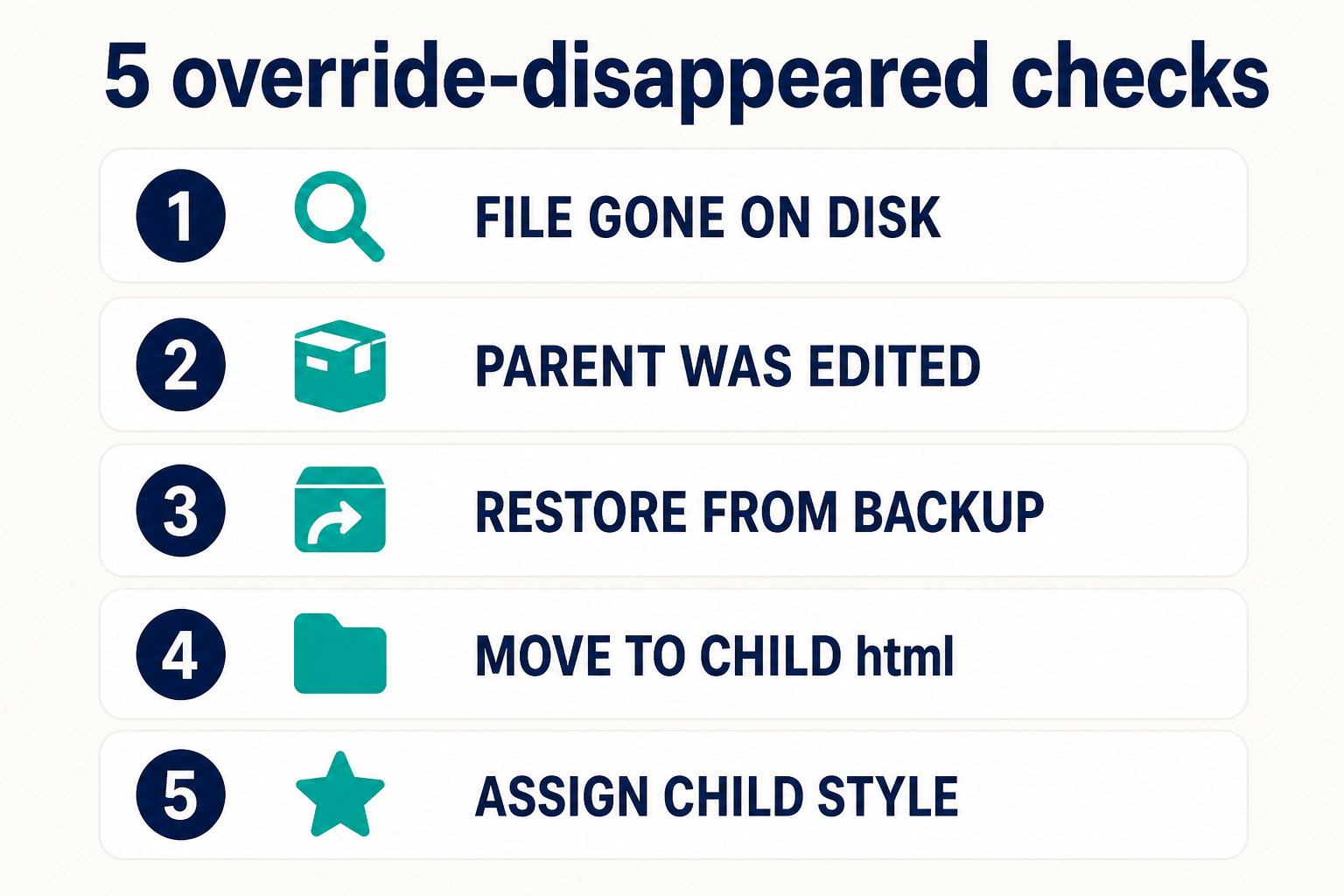
Disk first. If the file is still there, you are on the not-working article. If it is stock or missing, backup, child html, assign the style, never edit the parent again.
Key takeaways
- Disappeared means the custom PHP is gone or stock on disk after an update. Not-working means the file is still there and unused.
- Parent Cassiopeia
html/is owned by the installer. Childhtml/is yours. - Create Overrides on the parent is how this incident starts. Run it on the child.
- Restore from backup into the child, then diff against current core. Do not paste an old override onto new Joomla blindly.
- Assign the child style. Creating a child does not publish it.
- Plugin copies in parent
html/plg_…disappear the same way. Recreate them on the child: plugin override. - After future updates, diff stale child overrides. That is not a disappearance.
- Keep the stack in customize without editing core.
Frequently asked questions
Why did my Joomla template override disappear after an update?
You stored it in the parent template. The Joomla or club package replaced those files. Move the override into a child html/ folder and assign that style.
Is this the same as a template override not working?
No. Not working: the file is on disk and Joomla never includes it (folder, style, _default.php, alternative layout, plugin). Disappeared: the file was restored or deleted by an update. Different checklists.
Will a child template survive a Joomla update?
The child folder is not in the Cassiopeia package, so your html/ copies stay. You still diff them if core layouts change. Official description: Child Templates.
Can I copy the whole Cassiopeia folder instead of a child?
You can. You then own a fork. Security fixes in Cassiopeia will not apply until you merge by hand. Use Create Child Template on Joomla 4.1+.
Where do I put plugin overrides so they do not vanish?
templates/{child}/html/plg_{group}_{element}/, same as other overrides. Manual copy: Joomla plugin override.
The Overrides tab still lists my file. Did it disappear?
No. That list is for overrides that exist and may be out of date versus core. A true disappearance is a missing or stock file in parent html/ after the package ran.
Should I edit Cassiopeia html again “just this once”?
No. That is how this article starts the next time you click Update. Use the child. Setup: Joomla child template.
Conclusion
When a Joomla template override disappeared after an update, believe the disk. Parent html/ comes back from the zip. Child html/ does not. Restore the last good PHP on staging, merge it into a child created with Create Child Template, assign that style, and leave Cassiopeia alone. If the file is still sitting on disk and the site ignores it, you opened the wrong guide: override not working.
If production was customized for years inside the parent, Joomla support and maintenance can move the tree to a child without another surprise on the next security release. Layout you would rather not own: Joomla design services.