If you’re running a Joomla website, you may come across an error message that reads “Fatal error: Class ‘ContentHelperRoute’ not found.” This error can occur for a variety of reasons, including issues with the Joomla core files, missing or corrupt files, or database problems. In this blog post, we’ll walk you through the steps to troubleshoot this error and get your Joomla website up and running again.
Clear your Joomla website’s cache
The first step to troubleshoot this error is to clear your Joomla website’s cache. To do this, go to the Joomla administrator area and navigate to System -> Clear Cache. Click on all the options to clear the cache.
Check the Joomla version
Next, check that you are running a supported version of Joomla and that the com_content component is installed correctly. ContentHelperRoute is a part of the com_content component, which is a core component of Joomla. Make sure that you are using a version of Joomla that is supported and that the com_content component is installed correctly.
Check for missing or corrupt files
Check that there are no missing or corrupt files in your Joomla installation. You can do this by navigating to Extensions -> Manage -> Discover in the Joomla administrator area and clicking on the “Discover” button. This will help identify any missing or corrupt files that need to be fixed.
Check the database
Ensure that the Joomla database is functioning correctly by navigating to System -> Global Configuration -> Server and checking the database settings. Verify that the database connection is working correctly and that the database server is running.
Reinstall Joomla core files
If none of the above steps work, try reinstalling the Joomla core files. This will help replace any missing or corrupt files that are causing the “Fatal error: Class ‘ContentHelperRoute’ not found” error.
In conclusion, the “Fatal error: Class ‘ContentHelperRoute’ not found” error in Joomla can be frustrating to deal with, but there are several steps you can take to fix the issue. By clearing your Joomla website’s cache, checking the Joomla version and com_content component, checking for missing or corrupt files, and verifying the Joomla database, you can eliminate many of the most common causes of this error. If you are still experiencing issues, consider seeking help from a Joomla developer or support team.
Slideshow templates are great for people who are not creative and don’t know how to design their slideshow video. The template usually comes in a set of scenes so you different design to use for presenting different forms of information in the slideshow. The following are 9 sites where you can download free slideshow templates.
SlidesCarnival
SlidesCarnival offers fully editable Google Slides and PowerPoint templates for business presentation. You must go to the All Templates category to find the slideshow templates. For each template, it provides details such as the number of slides, icons, can be used for what slideshow program, and the supported screen layout. There is the library of slideshow templates.
Envato Elements
Envato Elements has a collection of thousands of slideshow templates under the video templates category. You can find a lot of slideshow templates for Keynote, PowerPoint, Google Slides and After Effects on this site. You can preview it by pressing the thumbnail. On the left, you can filter the slideshow templates you are looking for by categories, applications supported, plugins required and minimum resolution. If you want to download a template, you must first create a free account with them. There is the library of slideshow templates.
Movavi
Movavi also publishes some free slideshow templates that you can download to use for your presentations. You can download the template directly onto your computer and start using it to design your slideshow. The template is compatible with Movavi Slideshow Maker. The template will only work correctly if you upload at least 15 images. There is the library of slideshow templates.
Canva
Canva is one of the best resources for free presentation slideshow templates. You can preview each scene that comes with the template. To use Canva free template, you must first sign up for a free account. There are lots of categories to choose from including creative, simple, education, cool, brand guidelines, product, marketing, and professional. There is the library of slideshow templates.
Slidesgo
Slidesgo offers a wide selection of free Google Slides and PowerPoint templates. You can browse the templates in several categories including business, education, and marketing. The templates are easy to edit by beginners. Along with the template, you also get access to 1000+ icons and editable graphics. There is the library of slideshow templates.
Biteable
Biteable also has a templates section where you can find a lot of slideshow templates. However, you can’t download the templates directly onto your computer. You must edit the video and then upload your photo to make the slideshow. After that, you will be able to download the finished slideshow to your computer. You must sign up for a free account to use the template at Biteable. There is the library of slideshow templates.
Renderforest
Renderforest offers a lot of slideshow templates that include multiple scenes. To use the template, you must first click on the thumbnail and then click the Create Now button. This will take you to the online designer tool where you can customize the template. You will be able to add scenes, video holders and logo animations. When you finish creating the slideshow, you can download it to your computer. You don’t need an account to use the free slideshow templates at Renderforest. There is the library of slideshow templates.
Slides Gala
Slides Gala is another popular resource for downloading Google and Powerpoint slideshow templates. The templates are open source so you can modify the design in any way you want. They do request that you put a link back to them when you download their free template. You can fully customize the template by changing the colour, text and photos. The template can also be exported to other formats like PDF and JPG. There is the library of slideshow templates.
Motion Array
Motion Array provides a lot of slideshow templates you can use in Adobe after Effects. On the left, you must select After Effects Templates and toggle the free switch to filter the results for free After Effects Templates. If you want to download a template, you simply click the download button with the down arrow. It will ask you to create a free account when you click the download button. The free templates do not include plugins. There is the library of slideshow templates.
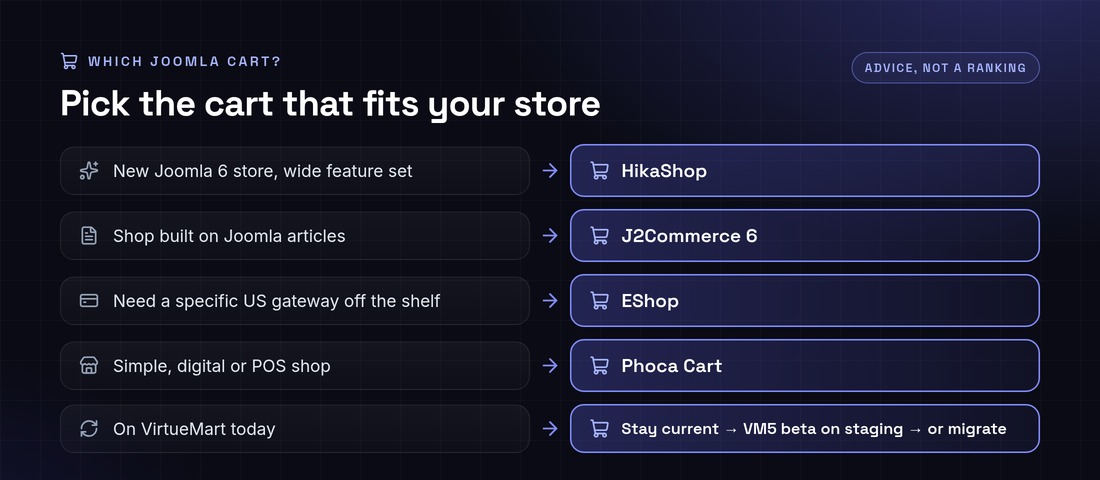
For a new Joomla 6 store in 2026, choose an actively maintained cart that already supports Joomla 6: HikaShop, J2Commerce 6, EShop or Phoca Cart.VirtueMart 4 does not run on Joomla 6. VirtueMart 5 does, but it is still a beta (released as 4.9.x). Pick the cart that fits your catalogue, your payment gateway and your migration path. Joomla 6.2, released on 13 October 2026, is the current version.
This guide compares the Joomla shopping carts that are still alive, using data we checked on the Joomla Extensions Directory (JED) and vendor sites in October 2026. It explains what is happening with VirtueMart, maps the US payment gateways each cart supports, and shows how to move a store safely. Need a hand? Tell us your cart, Joomla version and payment gateway. A senior engineer replies within 12 hours. Contact Infyways.
What is the best shopping cart for Joomla in 2026?
There is no single winner. Match the cart to the store:
New Joomla 6 store that needs a wide feature set: HikaShop. It is actively updated, supports J3 to J6, and ships Authorize.net and PayPal Checkout in the core.
A content-led shop built on Joomla articles: J2Commerce 6. It turns articles into products and is built natively for Joomla 6.
Many payment gateways off the shelf: EShop. Five gateways are built in, and the vendor sells more than 50 add-ons, including Stripe, Braintree and Square.
Simple, digital or point-of-sale shops: Phoca Cart. It is free and includes a POS view.
Running VirtueMart today: no need to panic. Read what’s going on with VirtueMart before you decide to stay, wait for VirtueMart 5, or migrate.
Joomla shopping cart comparison (October 2026)
Reviews, ratings, versions and compatibility come from each cart’s JED listing, checked on 16 October 2026. Ratings are the star rating shown on the JED. Built-in gateways come from vendor documentation.
Not recommended for new stores: Quick2Cart (JED lists J3 to J5 and no Joomla 6, last updated 15 July 2025), and older names such as MijoShop, jMarket and JomDirectory Cart, which have no Joomla 5 or 6 builds on the JED.
J2Commerce vs HikaShop: which should you choose?
J2Commerce 6
HikaShop
Product model
Joomla articles become products
Separate product catalogue
Joomla versions
6.x needs Joomla 6 and PHP 8.3+. Use 4.1.x for J5
One package for J3 to J6
Built-in US payments
PayPal
Authorize.net, PayPal Checkout, Advanced and Pro
Recurring payments
Check its marketplace
Stripe Checkout and PayPal recurring for HikaSubscription
Upgrade risk
Version 6 needs J2Commerce 6 versions of every plugin
Same plugins across Joomla versions, provided each declares J6
Choose it when
Your shop lives inside editorial content
You want the widest feature set and gateway choice today
What’s going on with VirtueMart (and what should you do)?
Short answer: VirtueMart is still developed, but its JED listing is unpublished, current 4.x downloads need a membership, and the Joomla 6 version is still in beta. Existing stores do not need to panic-migrate. New Joomla 6 stores should pick a cart with stable Joomla 6 support today.
Verified: the VirtueMart JED listing says it “has been unpublished” with reason code PE1.
Verified: VirtueMart’s own news of 14 April 2026 offers VirtueMart 4.6.8 as a download that “needs Membership”. It also says “VirtueMart 5 is already running on Joomla 6”, with the VirtueMart 5 beta published as version 4.9 (virtuemart.net).
Reported, not confirmed by us: a third-party review on FAUN.dev says the listing was pulled in August 2026 after a security audit and that newer 4.8.x fixes go to members only (FAUN.dev review). The JED page itself gives only the reason code.
Your situation
Sensible next step
VirtueMart on Joomla 4 or 5, store works
Stay current through the membership, keep Joomla patched, and plan: wait for a stable VirtueMart 5, or migrate on your own timeline
VirtueMart and you must move to Joomla 6 soon
Test the VirtueMart 5 beta on staging only, or migrate to a cart with stable Joomla 6 support
Starting a new store on Joomla 6
Choose HikaShop, J2Commerce 6, EShop, Phoca Cart or another cart with a J6 build
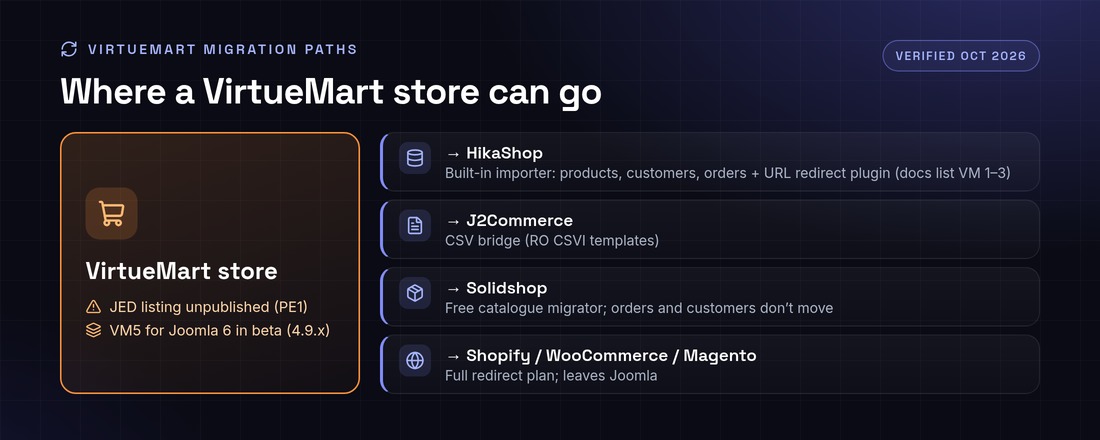
VirtueMart migration paths
VirtueMart to HikaShop: HikaShop’s built-in “Import from VirtueMart” moves categories, taxes, products, images, files, customers and orders, and a redirect plugin forwards old VirtueMart URLs. The documentation lists VirtueMart 1.x, 2.x and 3.x, so test a VirtueMart 4 store carefully on staging (HikaShop import docs).
VirtueMart to J2Commerce: use a CSV bridge such as RO CSVI, which publishes VirtueMart export templates for HikaShop and J2Store (RO CSVI).
VirtueMart 4 to Solidshop: a free migrator for the catalogue, according to Solidshop. Orders and customers do not move.
Off Joomla (Shopify, WooCommerce, Magento): possible, but you lose Joomla content integration and need a full URL redirect plan.
Product, category and manufacturer URLs, with a 301 redirect for every URL that changes
Titles, meta descriptions and structured data
Customers, addresses and order history
Taxes, shipping zones and coupons, which are rebuilt and tested
Saved cards and subscriptions: payment tokens usually cannot be moved between plugins, so plan for customers to re-enter cards or for a gateway-side token migration
All of it rehearsed on staging before the live switch
Is your Joomla shop ready for Joomla 6?
Joomla 6.2 is the latest version, released on 13 October 2026, and Joomla 6 needs PHP 8.3 or newer. The cart itself is rarely the only blocker. Payment, shipping and template plugins usually are.
Which payment gateways work with Joomla shopping carts?
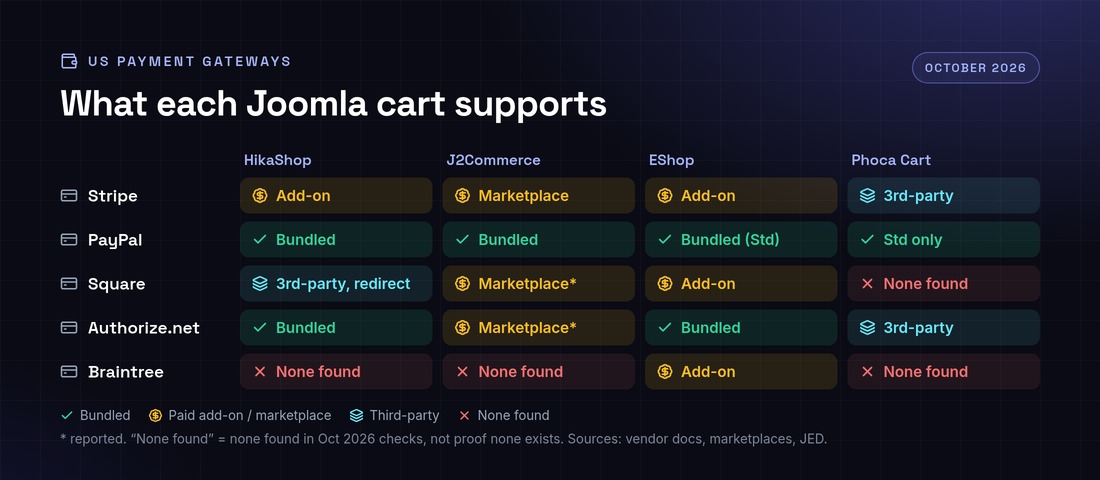
Stripe, PayPal and Authorize.net are available for most major carts. Square and Braintree are where the gaps are. This matrix shows what we found in October 2026. “None found” means we did not find one, not that one cannot exist.
US payment gateways by Joomla cart, October 2026
Gateway
HikaShop
J2Commerce
EShop
Phoca Cart
Stripe
Paid add-on (official Stripe Checkout, with recurring)
Marketplace
Paid add-on
Third-party (NorrNext)
PayPal
Bundled: Checkout, Advanced, Pro
Bundled
Bundled Standard; Pro as an add-on
Bundled Standard (redirect) only
Square
Third-party, redirect and cards only
Marketplace (reported)
Paid add-on (Squareup)
None found; via the PaymentHood aggregator
Authorize.net
Bundled AIM/SIM; Accept.js third-party
Marketplace (reported)
Bundled
Third-party (NorrNext)
Braintree
None found
None found
Paid add-on
None found; via the PaymentHood aggregator
Gaps worth knowing about:
Square on HikaShop: the marketplace plugin by Tsuki Dev redirects to Square and supports cards only; its page says digital wallets could not be properly tested (HikaShop marketplace, last updated 6 February 2023).
Recurring Authorize.net on HikaShop: HikaShop’s team said token-based recurring with Authorize.net “would require some development”. Stripe Checkout recurring was added later, and recurring for PayPal Checkout was announced for HikaShop 6.4.1 (HikaShop forum).
Phoca Cart: the core ships PayPal Standard, Cash on Delivery and POS Cash only (Phoca Cart plugins). We found no native Square, Braintree or PayPal Advanced plugin.
J2Commerce 6: older J2Store plugins are not compatible with version 6, so less common gateways may not have a version 6 build yet. Check the marketplace before you upgrade.
Custom payment gateway development
When the gateway you need is missing, or exists only as a redirect, we build it. Infyways develops and maintains payment plugins for HikaShop, J2Commerce, Phoca Cart, EShop and VirtueMart. A typical plugin covers:
Prefer hosted fields or tokenisation (Stripe Elements, the Square Web Payments SDK, Authorize.net Accept.js), so card numbers never touch your server and your PCI scope stays small.
Serve the whole store over HTTPS and keep Joomla, the cart and every payment plugin updated.
Verify webhook signatures and never mark an order paid from the browser redirect alone.
Remove payment plugins you no longer use.
How Infyways builds and migrates Joomla stores
Audit: cart and version, add-ons, payment and shipping plugins, Joomla and PHP versions, URLs.
Staging: a full copy of the store. Nothing changes on the live site.
Upgrade or migration: core, cart, data, templates and redirects.
Gateway integration: existing plugins configured, or custom plugins built, then sandbox and live test orders.
SEO-safe cutover: 301 redirects, titles, structured data and sitemap checked after go-live.
Support: fixes and updates after launch.
We work with US merchants and agencies with daily overlap with US business hours, and reply within 12 hours. For dedicated or hourly work, hire Joomla developers.
Why Infyways: we have built Joomla sites and extensions since 2010, and have published 125 Joomla extensions.
Setting up a Joomla shop in five steps
Install Joomla 6.2 on PHP 8.3+ (8.4+ if you choose Solidshop), with HTTPS and SEF URLs on.
Choose a cart from the table above and install it from the vendor or the JED.
Configure currency, taxes, shipping zones and one payment gateway in sandbox mode.
Add products and categories, and check product pages and checkout on mobile.
Place real test orders, check emails and invoices, then switch the gateway to live.
Frequently asked questions
What is the best shopping cart for Joomla 6 in 2026?
For most new stores, HikaShop or J2Commerce 6. Both are actively updated and list Joomla 6 support on the JED. EShop suits stores that need many gateways out of the box, and Phoca Cart suits simple, digital or POS shops.
Does VirtueMart work with Joomla 6?
Not VirtueMart 4. VirtueMart 5 runs on Joomla 6, according to virtuemart.net, but it is still a beta released as version 4.9.x.
Is VirtueMart still on the Joomla Extensions Directory?
No. As of October 2026 its JED listing is unpublished with reason code PE1. Current releases are on virtuemart.net, and 4.6.8 needs a membership.
How do I migrate from VirtueMart to HikaShop?
On staging, use HikaShop’s built-in Import from VirtueMart, which moves products, categories, taxes, customers and orders, then publish its redirect plugin. The docs list VirtueMart 1.x to 3.x, so test a VirtueMart 4 store carefully.
J2Commerce vs HikaShop: which should I choose?
J2Commerce turns Joomla articles into products, and version 6 is native to Joomla 6. HikaShop has a separate catalogue and more built-in gateways. Choose based on your content model and the gateway you need.
Which Joomla carts support Square?
EShop (paid Squareup add-on), J2Commerce (marketplace) and HikaShop (third-party plugin, redirect and cards only). We found no native Phoca Cart plugin in October 2026. You would need the PaymentHood aggregator or custom development.
Can I take recurring payments with Authorize.net on Joomla?
Not with HikaShop’s current plugins; HikaShop has said it would need development. Stripe recurring is available for HikaShop (HikaSubscription) and DJ-Catalog2, and custom development can add Authorize.net recurring.
Can you build a custom payment gateway for my Joomla store?
Yes. We build payment plugins with on-site fields, webhooks, refunds and recurring tokens for HikaShop, J2Commerce, Phoca Cart, EShop and VirtueMart. Send us your cart and gateway, and a senior engineer replies within 12 hours.
There are two things people mean by “uninstall Joomla”: removing one extension from a Joomla site, or deleting the whole Joomla installation from hosting. Both are covered here for Joomla 4, 5 and 6.
Uninstall an extension
Go to System → Manage → Extensions.
Search for the extension and tick it. Packages (type “Package”) remove all their parts at once, so uninstall the package rather than each plugin or module.
Click Uninstall and confirm.
Clear the cache (System → Clear Cache) and check the front end.
Core extensions are protected and cannot be uninstalled; disable them instead. If an uninstall fails with an SQL error, check System → Maintenance → Database.
Delete a whole Joomla site with Softaculous or an installer
If Joomla was installed with Softaculous, Installatron or a similar tool in cPanel or Plesk, remove it there: open the installer, go to All Installations, click the delete (X) icon next to the site and tick “remove database” and “remove directory”. This deletes files, the database and the database user in one go.
Delete a Joomla site manually
Back up first (see how to back up Joomla); deleted files cannot be recovered from Joomla.
Open configuration.php and note the values of $db, $user and $dbprefix.
In the file manager or over SFTP, delete the Joomla folder (or its contents if it is the site root, keeping anything that is not Joomla).
In cPanel → MySQL Databases (or phpMyAdmin), delete that database and its user. If the database is shared with another app, drop only the tables that start with your prefix.
Remove any cron jobs, email forwarders or subdomains you created for the site.
If Softaculous installed it, delete it from All Installations with “remove database” ticked. Otherwise delete the Joomla folder and then the database and its user in MySQL Databases.
Why can’t I uninstall some Joomla extensions?
Core extensions are protected. Disable them instead of uninstalling.
Does uninstalling an extension delete its data?
Usually yes; most extensions drop their tables on uninstall. Export anything you need first.
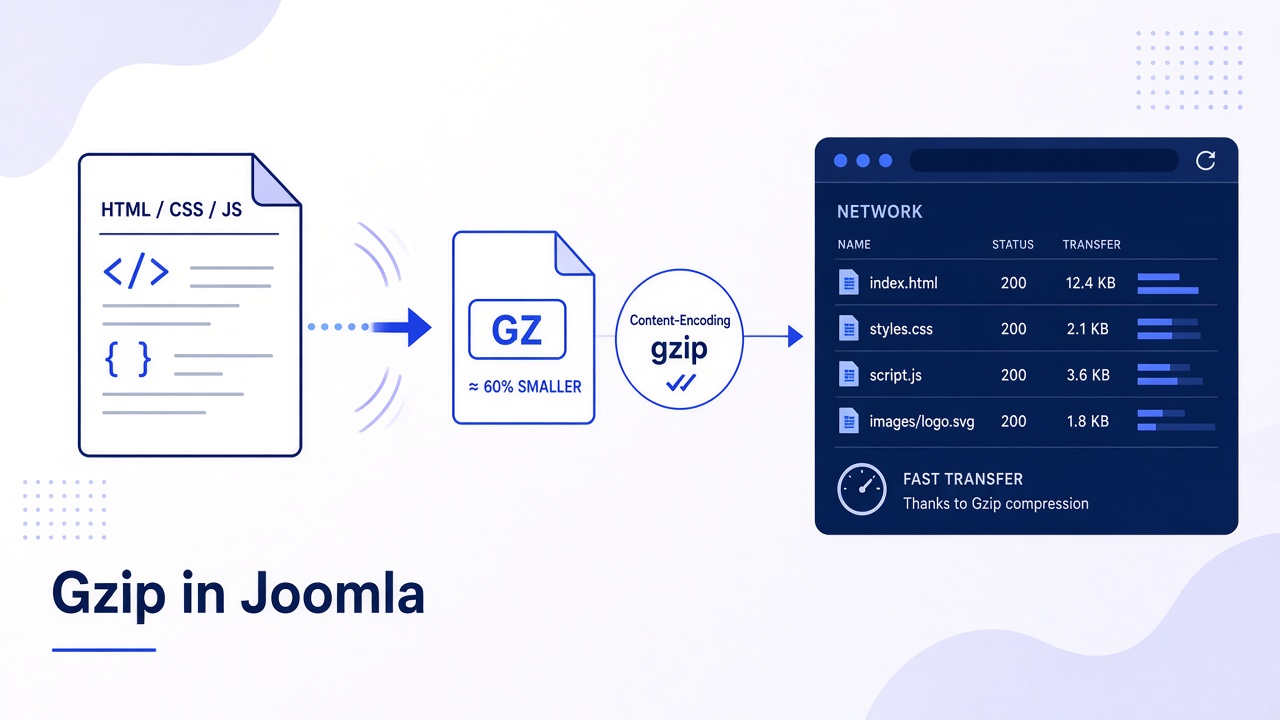
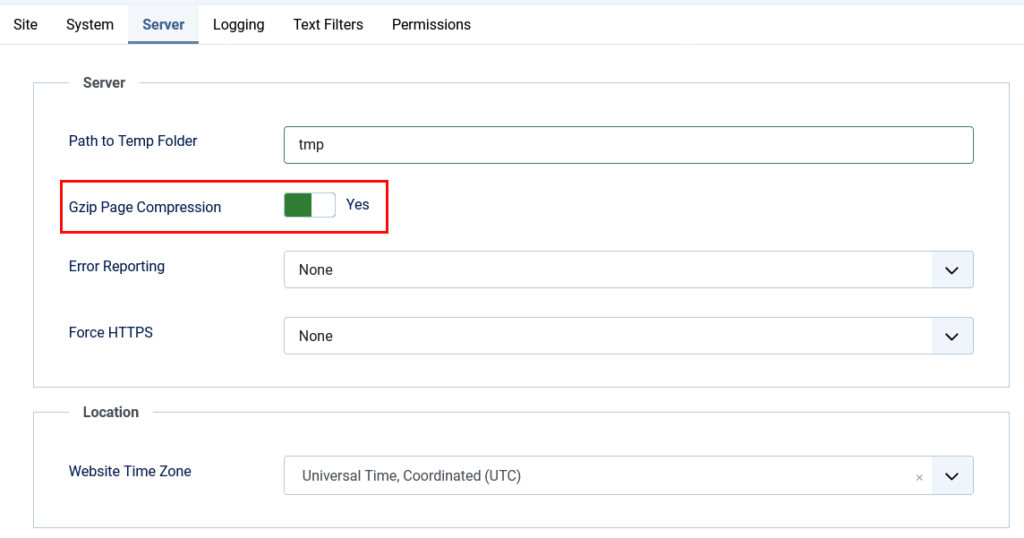
Gzip compression in Joomla shrinks text responses (especially HTML that PHP builds) before they leave the server, so browsers download less data. On Joomla 4, 5, and 6 you enable Gzip Page Compression under System → Global Configuration → Server. That switch compresses Joomla’s buffered page output when PHP zlib is available. Static CSS and JavaScript files are a separate job for Apache mod_deflate / the Joomla .htaccess gzip section, Nginx, LiteSpeed, or a CDN (often Brotli with Gzip fallback).
Many “5 simple steps” posts turn the Global Configuration toggle on and stop. Then GTmetrix still complains about uncompressed assets, or the site shows ERR_CONTENT_DECODING_FAILED from double compression. This guide covers what the toggle really does, how to test correctly, DIY server rules, Brotli in 2026, and how to undo a bad stack without guessing.
What you will learn
Gzip Page Compression vs server or CDN compression for static files
How to enable and disable the Joomla setting safely
How to test with DevTools and curl (not only a random online badge)
DIY .htaccess / host panel options and the official htaccess.txt gzip block
Why double Gzip breaks pages and how to fix it
Where Brotli fits, and when compression is not the real speed problem
What Joomla Gzip Page Compression actually compresses
Layer
Compresses
Where you enable it
Gzip Page Compression
Buffered HTML (and related PHP output) when zlib works
Global Configuration → Server
Apache / LiteSpeed / Nginx
Often CSS, JS, HTML, JSON, SVG, fonts
Host panel, vhost, or .htaccess
Joomla htaccess.txt gzip section
Prebuilt .css.gz / .js.gz if those files exist
Root .htaccess from current htaccess.txt
CDN (Cloudflare and similar)
Edge compression, often Brotli + Gzip
CDN dashboard
Official help describes the setting as compressing buffered output if supported. Requirements: PHP compiled with zlib, and no second compressor already mangling the same response.
Step 1: Confirm zlib and current headers
System → System Information → PHP Settings. Confirm zlib (or zlib compression support) is available.
Open the live homepage in a private window.
DevTools → Network → select the document request → Headers. Look for Content-Encoding: gzip or br.
Optional curl check from any machine that can reach the site:
Note whether compression is already on before you change anything. Many hosts and CDNs already gzip HTML.
Step 2: Enable Gzip Page Compression in Joomla
System → Global Configuration → Server tab.
Gzip Page Compression: Yes.
Save & Close.
System → Clear Cache.
Retest the document response for Content-Encoding: gzip.
If the site breaks (blank page, encoding error), set the option back to No immediately, clear cache, and jump to the troubleshooting section. Double compression is the usual culprit.
Step 3: Test properly (HTML vs CSS/JS)
What you test
How
Pass looks like
HTML document
DevTools Network → first document, or curl -I with Accept-Encoding
Content-Encoding: gzip or br
A CSS file
Click a .css request in Network
Same header, or CDN br
A JS file
Click a .js request
Same
Online checkers
GTmetrix, KeyCDN HTTP Header Checker, giftofspeed, etc.
Joomla’s toggle can pass HTML while CSS/JS stay uncompressed. That is expected until the server or CDN compresses static files.
Step 4: DIY server compression for static assets
Prefer the host’s “Optimize website” / “Compress content” panel when it exists. On Apache, a minimal deflate block (only if the host does not already compress) looks like:
Do not stack aggressive mod_deflate on top of Joomla Gzip Page Compression if HTML starts failing. Pick one HTML compressor.
Keep a backup of .htaccess before editing.
After Joomla updates, diff your .htaccess against the shipping htaccess.txt. The GZIP & BROTLI section evolved (including E=no-brotli:1 on precompressed assets).
Official notes: The htaccess.txt file. If the site looks strange after enabling that gzip section, the comments in htaccess.txt say your server may already gzip CSS/JS. Comment the block out.
Step 5: Brotli and CDN in 2026
Modern browsers prefer Brotli (Content-Encoding: br) when the edge supports it. Joomla has no “Brotli Page Compression” switch. Enable Brotli on LiteSpeed, Cloudflare, or Nginx with the brotli module, and keep Gzip as fallback for older clients.
If the CDN already compresses, you often leave Joomla Gzip on or off based on whether origin HTML is still uncompressed in a bypass test
Test with a cache-bypassing header or orange-cloud off briefly so you know whether origin or edge is doing the work
Precompressed .js.gz / .css.gz must not be compressed again (the stock htaccess rules set no-gzip / no-brotli for those files)
Step 6: Troubleshoot and disable cleanly
Symptom
Likely cause
Fix
ERR_CONTENT_DECODING_FAILED
Double Gzip / Brotli
Turn Joomla Gzip off, or remove duplicate server rules, clear caches
HTML compressed, CSS/JS not
Only page compression on
Enable server/CDN compression for static types
Nothing compressed
No zlib, proxy stripping encoding, or Accept-Encoding missing in the test
Check PHP info, retest with the curl header above
Works in curl, fails in browser
Extension, SW, or CDN cache serving a bad body
Purge CDN, disable service worker, retest private window
To disable Joomla’s layer only: Global Configuration → Server → Gzip Page Compression → No → Save → Clear Cache. That does not turn off host or CDN compression.
Gzip is not a substitute for a healthy stack
Compression helps text weight. It does not replace image optimisation, a current PHP version, or leaving Joomla 3. If Core Web Vitals stay poor after Gzip and cache, fix the platform. Infyways upgrades start at $149 with a free audit within 12 hours: Joomla Upgrade Services.
What thinner articles leave out
Topic
Typical post
This guide
Scope of the toggle
“Compresses all files”
HTML buffer vs static assets vs CDN
Testing
One online badge
DevTools + curl for HTML and JS/CSS
Double compression
Rarely mentioned
ERR_CONTENT_DECODING_FAILED playbook
htaccess.txt
Random deflate snippet
Official gzip/brotli notes and when to disable
Brotli
Missing or hand-wavy
CDN/server layer, not a Joomla switch
Next bottleneck
Stop at Gzip
Cache and upgrade path
Key takeaways
Turn on Gzip Page Compression for buffered HTML when zlib is present.
Compress CSS/JS at the server or CDN. The Joomla toggle alone is not enough.
Test the document and at least one CSS and one JS request.
Avoid double compression. Decoding errors mean turn a layer off.
Keep .htaccess aligned with current htaccess.txt after upgrades.
Prefer Brotli at the edge when available, with Gzip fallback.
Pair compression with caching. Compression on an uncached PHP hit still costs CPU.
Frequently asked questions
How do I enable Gzip compression in Joomla?
Go to System → Global Configuration → Server, set Gzip Page Compression to Yes, save, and clear cache. Then verify Content-Encoding on the HTML document.
Does Gzip Page Compression compress CSS and JavaScript?
Not reliably. It targets Joomla’s buffered page output. Static files need server, htaccess, or CDN compression.
How do I test Gzip on a Joomla site?
Use DevTools Network headers or curl with Accept-Encoding: gzip and look for Content-Encoding: gzip or br on HTML and assets.
What causes ERR_CONTENT_DECODING_FAILED after enabling Gzip?
Usually two compressors on the same response. Disable Joomla Gzip or the extra server rule, purge caches, and retest.
Should I use Gzip and Brotli together?
Yes at the edge when configured correctly: Brotli for supporting browsers, Gzip as fallback. Do not double-compress the same payload.
Do I need zlib for Joomla Gzip Page Compression?
Yes. Without zlib support in PHP, the Joomla setting cannot compress buffered output.
Is Gzip enough to make Joomla fast?
No. It reduces transfer size for text. You still need caching, modern PHP, lean extensions, and optimised images.
How do I turn Gzip off again?
Set Gzip Page Compression to No, save, clear Joomla cache, and purge CDN cache if you use one.
Where do we start if the site is slow even with Gzip?
Are you an owner of a business that has its own Intranet network? A website of your own where your workers can communicate, learn and get tasks can be very beneficial for your success. So, today we have gathered for you a collection of 20 premium WordPress themes to suit your needs.
Why choose a ready-made template?
The answer is very simple. By getting a pre-designed template, you basically get a website that works pretty much out of the box. These themes boast a wide range of features, which enable you to install and customize them to your liking without ever having to touch a line of code. They are also quite SEO-friendly ensuring that your website gets the visitors it deserves and optimized for performance so that your pages never take too long to load. Getting such a theme is also much faster than creating one from scratch and much cheaper than hiring someone to do it for you! And if you have any questions or need help with your template, you can always ask the support team and get your problems sorted out in the shortest possible time.
What’s WordPress?
All of the themes present in the list below are powered by WordPress, which is one of the most popular content management systems on the market. It is highly flexible, user-friendly, and, most importantly, free to use. Anybody with a computer can download WP and start working with it right away. It is a great CMS to use for your first website because of its combination of simplicity and potential, which is essentially limitless and can be extended even further with thousands of user-created plugins and add-ons.
But enough talk, we all know you came here for the templates and not walls of text. So go ahead, feel free to check out the list of amazing themes we have prepared for you and pick something for yourself!
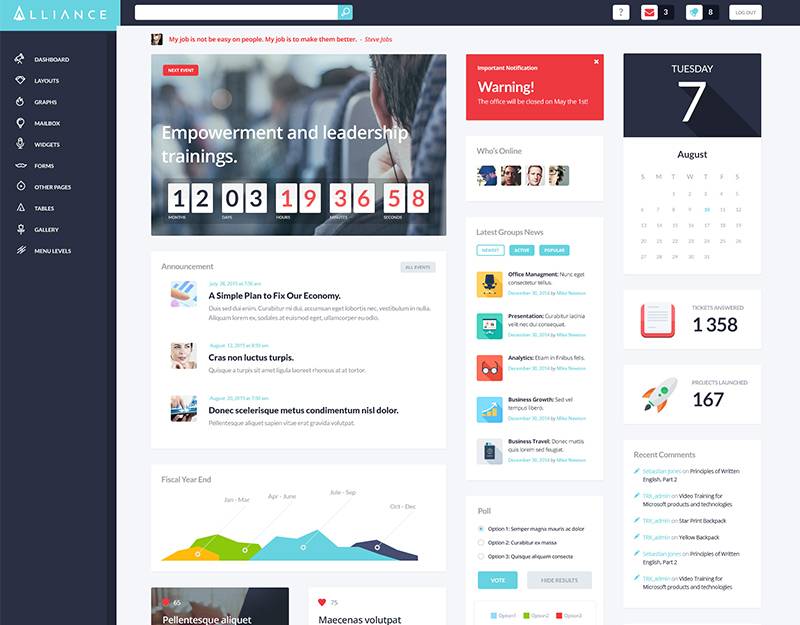
This is a modern, fresh and clean theme with accents on performance and usability. It’s perfect for improving communication inside of your company, firm or agency and for providing easy, stylish and user-friendly access to corporate data. It also supports awesome dashboards, file sharing, polls, education tools, Booked Appointments and much, much more.
This theme is compatible with WPBakery visual page builder to provide you with awesome customization opportunities that don’t involve any code. It also supports Revolution Slider, Essential Grid, EventON, BuddyPress, Content Timeline, WP Pro Quiz, Responsive Poll and many more amazing plugins. The theme is fully responsive, Retina-ready and optimized for mobile devices.
WotaHub was designed for trendy corporate websites to represent your company in the best way possible. It supports top-rated WP plugins like WPBakery Page Builder, Essential Grid, Revolution Slider, Events Calendar etc. The theme is fully responsive and easily customizable with the user-friendly admin panel and handy page builder.
This is a fully responsive and Retina ready theme with a strong business look that will fit for any market niche. It comes with three homepage layouts, a powerful admin panel, a whole set of shortcodes, a pack of popular plugins and even Parallax animations! It even features one-click demo installation options.
Artrium is a stylish, responsive and easy-to-use template best suited for a contemporary web design studio or creative agency. It is made with Elementor and will let you manage your website’s visual and operational sides within minutes. The theme is optimized to work with such popular plugins as Revolution Slider, Essential Grid, MailChimp for WP, ThemeREX Add-ons and more.
Coworking – Open Office & Creative Space WordPress Theme
Coworking has an intuitive visual interface and informative layout that looks great on any platform since it’s fully responsive and Retina ready. It has everything you need to create a corporate website, including premade amenities blocks along with pricing, an awesome forum, video tour, our team, and products modules, dozens of shortcodes and advanced contact forms. It even comes with full WooCommerce store compatibility.
Consultor was designed as a multipurpose business template, so you can use it to build any corporate website. The theme is supplied with a collection of powerful shortcodes and widgets along with a premium drag & drop page builder for ease and depth of customization. It is SEO friendly and offers Contact Form 7 support, giving your users the ability to sign up.
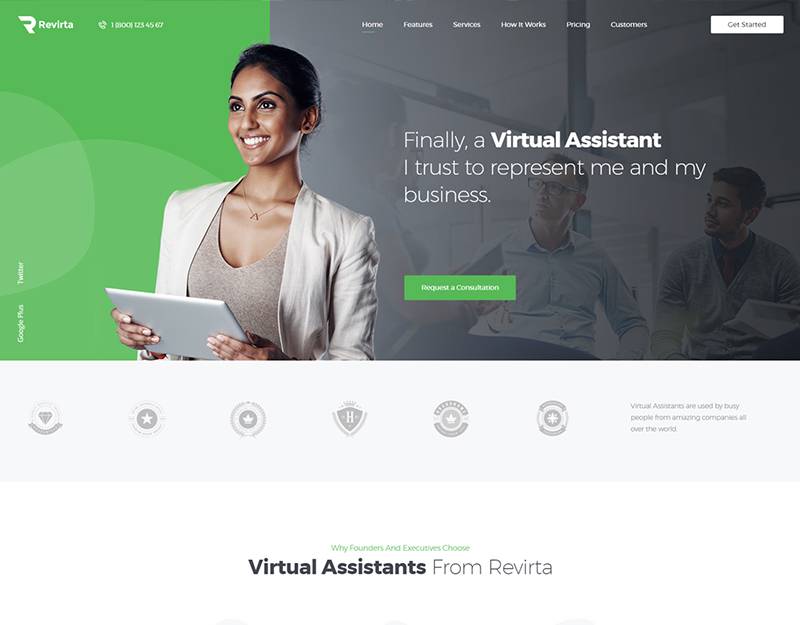
Revirta is perfect for both small and large-scale businesses and its pure corporate design gives you maximum flexibility. The theme is integrated with the ThemeREX Addos plugin, providing you with 12 new widgets, CV Card functionality, image optimization options and much more. It also supports Visual Composer, Revolution Slider, Booked Appointments, Essential Grid, MailChimp and Contact Form 7.
uReach is a stylish and elegant theme designed for migration bureaus, immigration firms and emigration offices. WPBakery Page Builder, Revolution Slider, Essential Grid along with many other outstanding plugins will help you in creating a respectable online platform for your website. It also comes with full WooCommerce store compatibility, allowing you to use your website as a platform to sell goods.
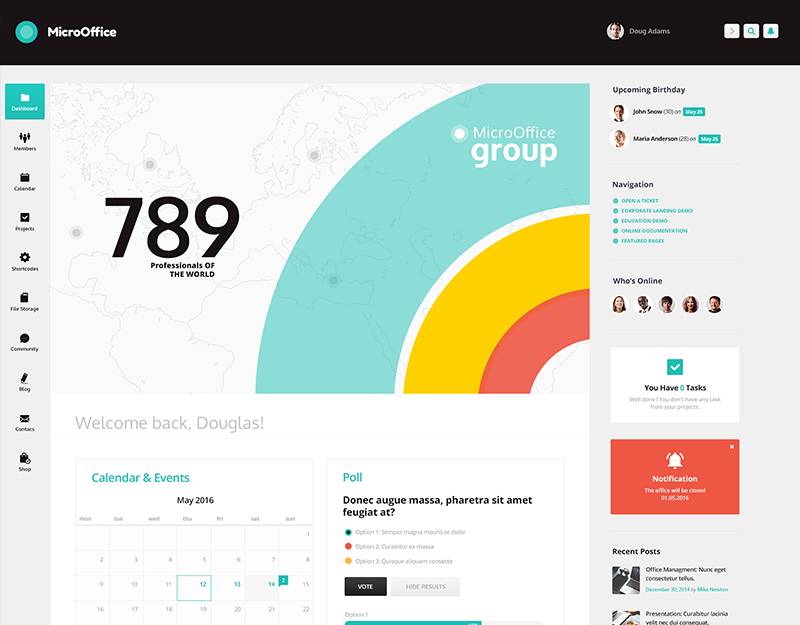
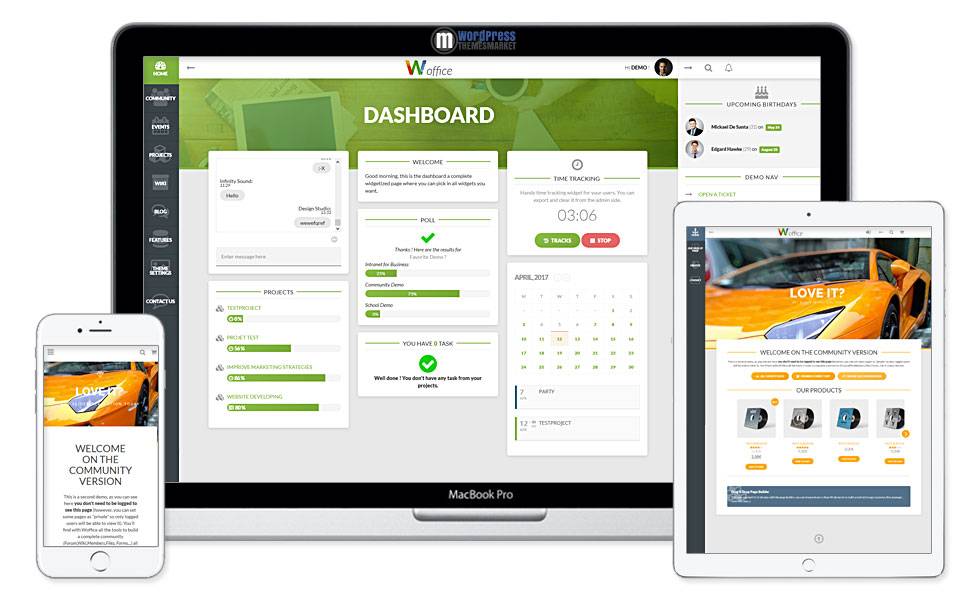
Woofice is a very powerful and feature-rich multipurpose theme for Intranet sites. It comes with a complete BuddyPress Network, a custom login page, Projects management, Wiki, Chat and messaging, Files Manager, Calendar, Directory Extension, Forum, E-commerce and much more. It is also bundled with 5 premium plugins, saving you a total of $180!
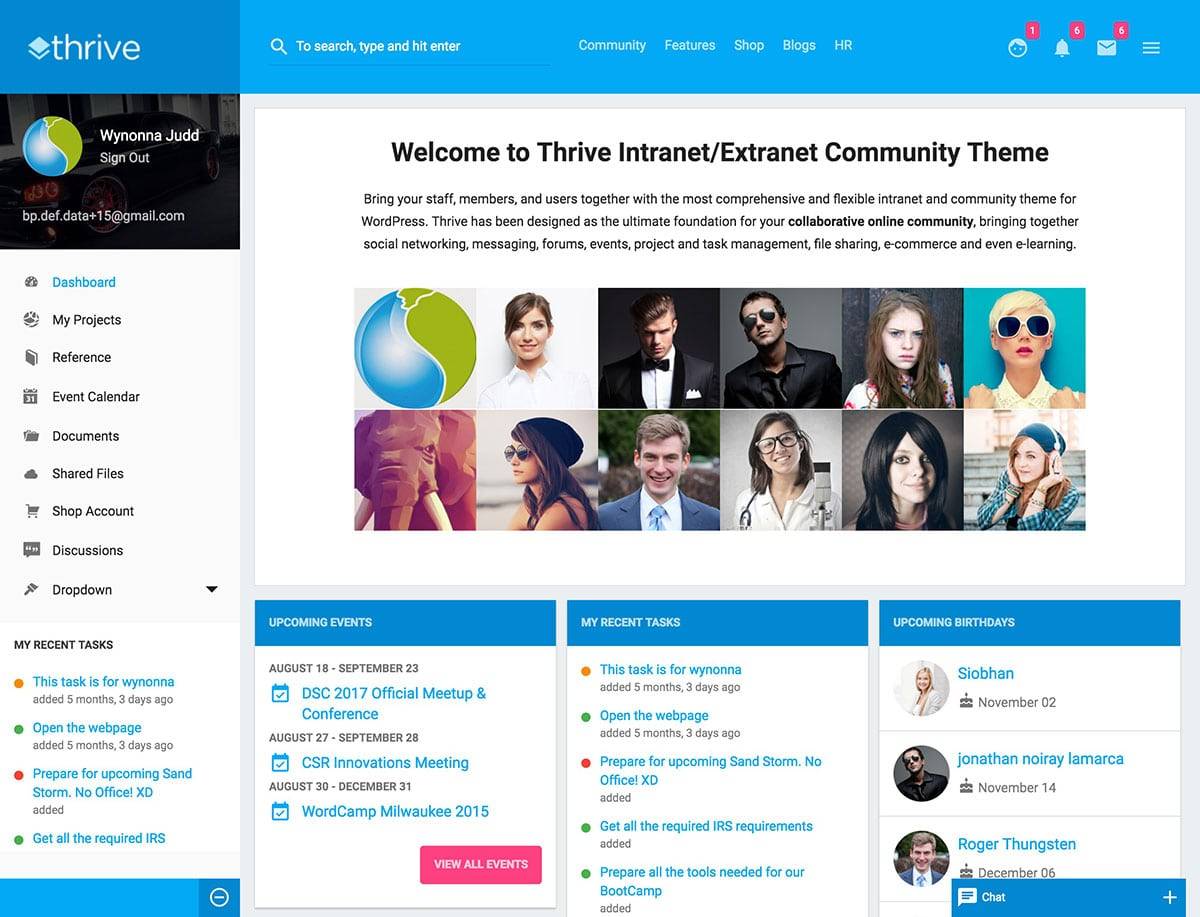
Thrive has been designed as the ultimate foundation for your collaborative online community. It brings together social networking, messaging, forums, events, project and task management, file sharing, e-commerce, and even e-learning. It also offers a private site option with a secure login for your members.
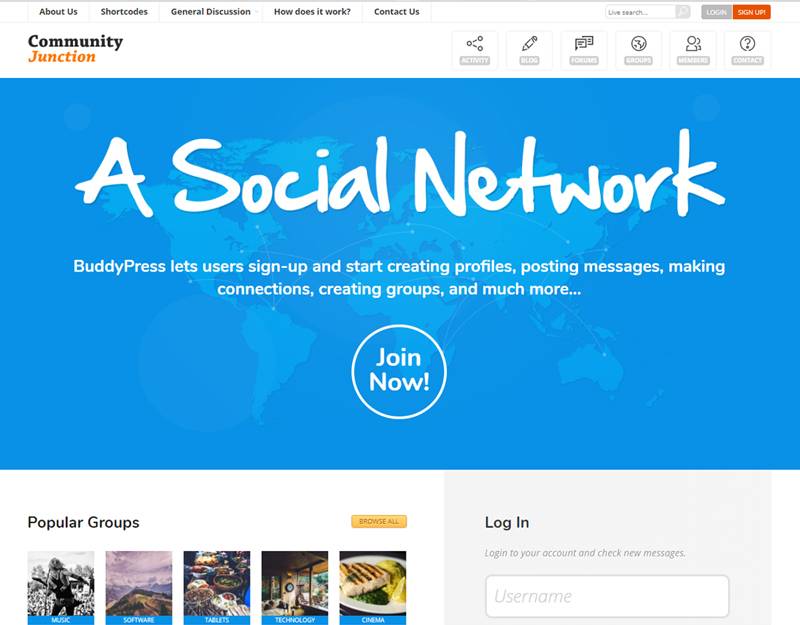
CommunityJunction uses a flexible modular layout and is integrated with a powerful page builder so you have complete freedom in regards to customization. It is highly optimized for performance, ensuring that your workflow won’t be interrupted by slow load times. It is also integrated with bbPress, rtMedia, WooCommerce, WPMU, jQuery Masonry and many more amazing plugins.
This is the ultimate template for an online community. Every single one of its pages and details is polished, the colors are neat-looking, all of its typography is clear and readable and is designed to depict your company in the best possible light. It has been built with a modular design system so you can rearrange design blocks on the front page as you wish.
This is a multipurpose theme fit for any business in any niche. Its 200+ customization options allow you to easily create a good-looking site without ever touching a line of code. It is also integrated with BuddyPress, bbPress, WooCommerce, Paid Membership Pro, Sensei, Event Manager, and many more awesome premium plugins.
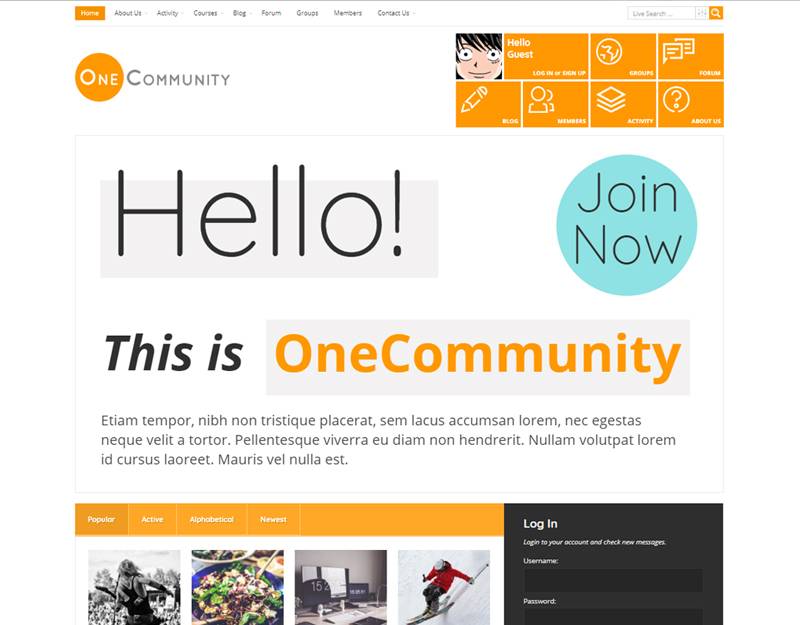
OneCommunity comes with 9 different color schemes, 3 blog layouts, full bbPress integration, Visual Composer 5 support, and quick demo content installation. It is packed with $108 worth of premium plugins, a modular layout and all of the BuddyPress features. The theme also features a private messaging system and LearnPress compatibility.
WildCommunity lets you build a social network for your company, school, sports team or niche community. It works with the latest 4.0 version of BuddyPress and is fully integrated with bbPress along with Theme Customization API, Events Manager, rtMedia and others. It also includes over 40 varying inner pages, 4 frontpage designs and a bundle of shortcodes.
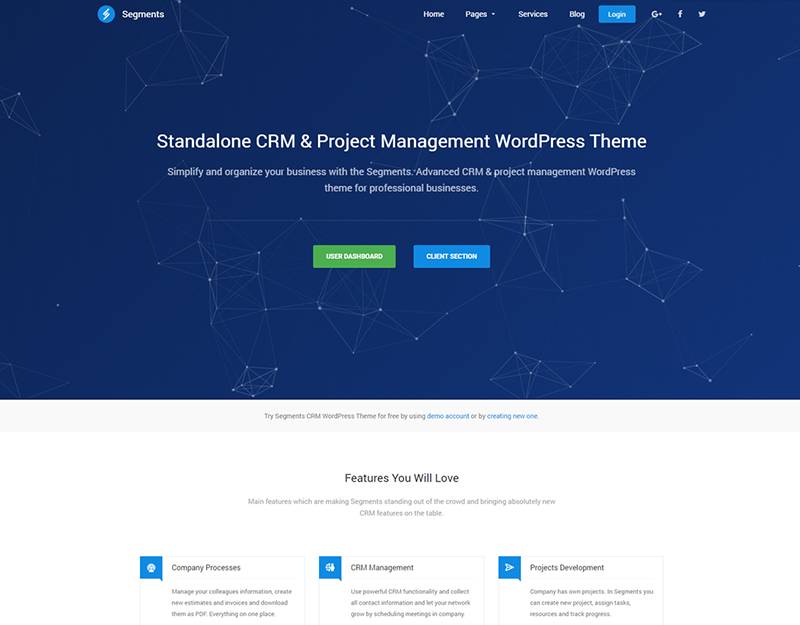
Segments is an advanced CRM and project management theme made for WordPress. It is extremely simple to install and then modify with Visual Composer. It is also fully responsive and looks amazing on all screen resolutions.
Details |
Demo
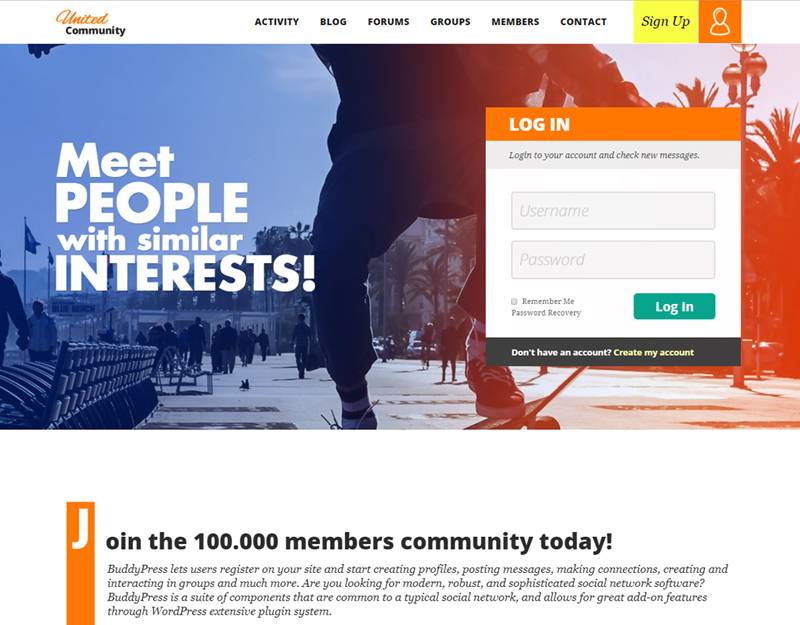
UnitedCommunity – BuddyPress Theme
UnitedCommunity is an awesome theme that combines everything you need to create a website for your community. Its modular layout is highly flexible and is integrated with a page builder so you can customize your pages with no coding skills required. It is compatible with the latest version of BuddyPress, rtMedia, BuddyPress Global Search, Event Manager, WooCommerce, Theme Customization API, Contact Form 7m jQuery Masonry and much more.
With a creative design and a mobile first approach, this is a theme that lets you build a site that stands out from the crowd. It includes Visual Composer, WooCommerce integration, 600+ Google Fonts, Child Theme functionality, unlimited sidebars, and custom post types. It also supports WPML, allowing you to turn your site into a multilingual one in minutes.
This beautiful and clean theme is ideally suitable for coworking spaces, meeting, creative, conference space rental, and other business websites. It’s integrated with the most powerful eCommerce plugin- WooCommerce, allowing you to create an online store on your website. It is also fully responsive and Retina ready, making it look sharp and impressive on all devices.
So, that’s that for today’s showcase! Be sure to tell us your thoughts on the templates we’ve picked in the comments section! Did you find anything that appeals to your taste? If so, awesome! And if not, remember that there are always more themes at ThemeRex! Have a nice day and good luck with your new website!
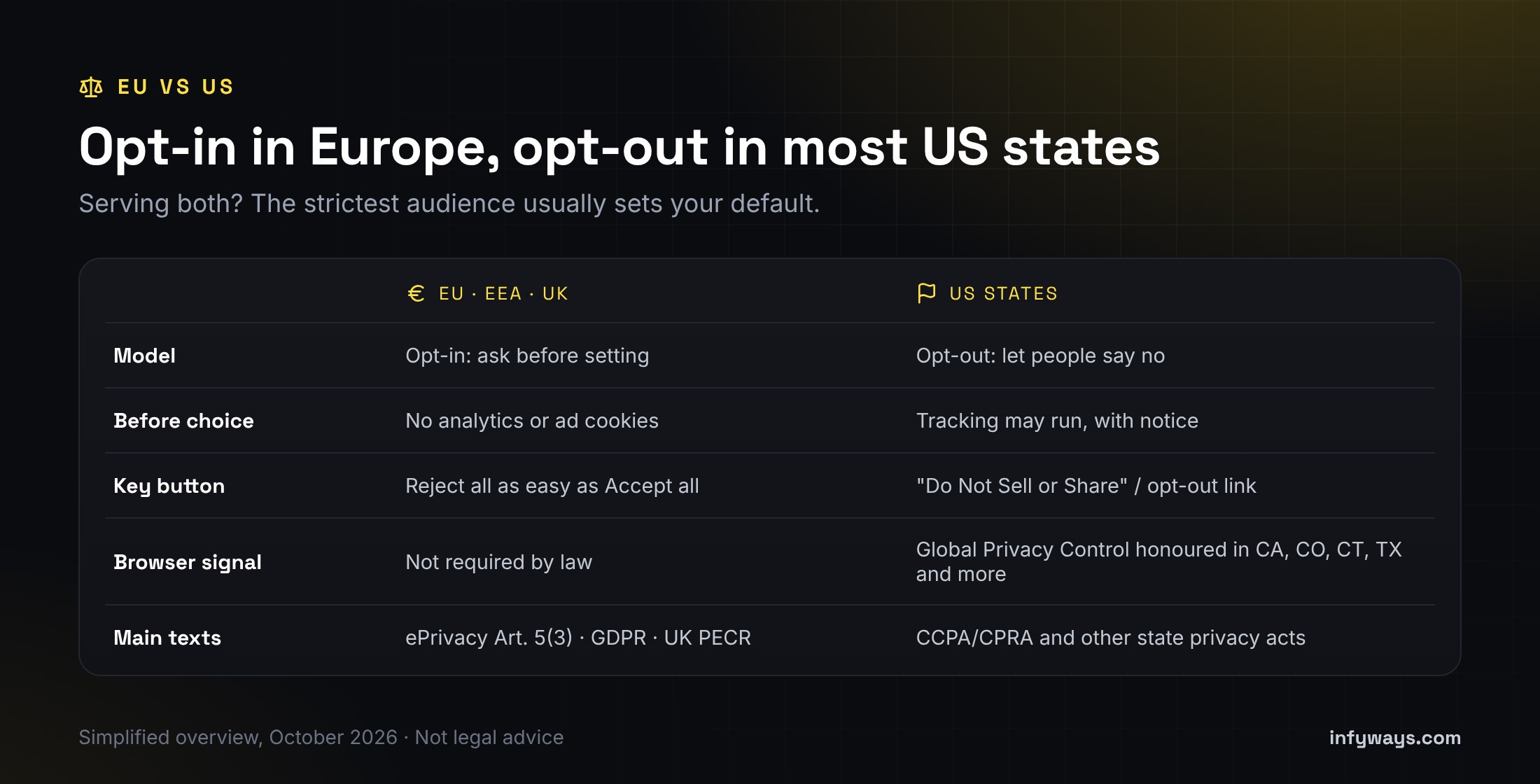
Short answer: you can’t, and shouldn’t, switch off every cookie on a Joomla site. Joomla core sets a session cookie for every visitor. Forms, logins and CSRF protection need it, and it counts as strictly necessary. What the law asks you to stop is non-essential cookies and scripts, such as analytics, advertising pixels and many video or map embeds. Under EU and UK rules they can’t run until the visitor opts in. Under most US state privacy laws, visitors must be able to opt out of the sale or sharing of their data. Joomla 5, 6 and 6.2 have no built-in cookie banner, so you need a consent extension that blocks scripts before the visitor chooses, not just a notice bar.
In this guide: what Joomla core actually sets (checked against the 6.2.0 code), what GDPR, ePrivacy and US state laws require, a step-by-step setup, a comparison of consent extensions from their Joomla Extensions Directory listings, how to test the result, and an FAQ. This article is general information, not legal advice. See the note at the end.
What cookies does Joomla core set?
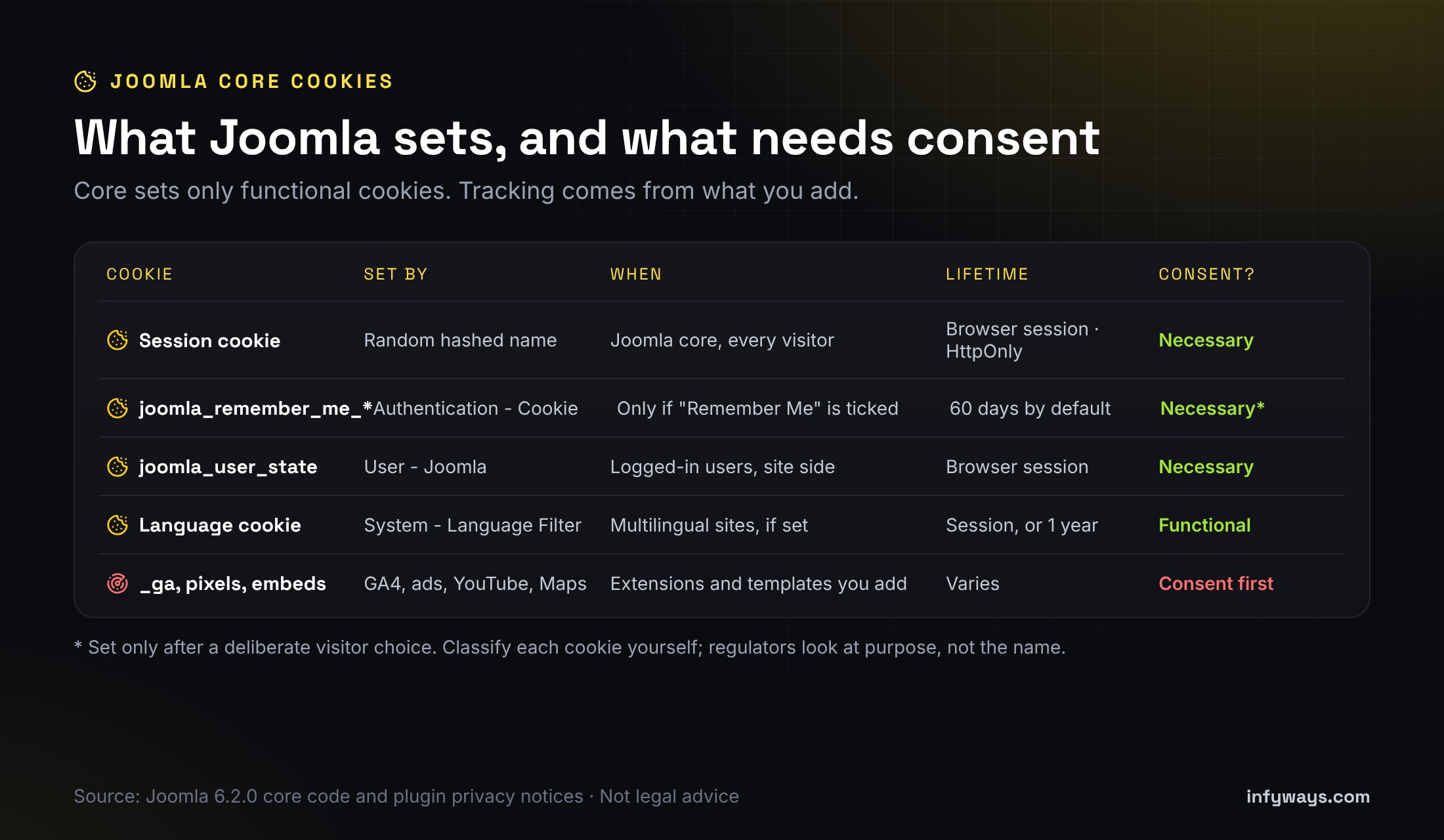
We went through the Joomla 6.2.0 source code for every place core sets a cookie on the public site. A default install sets very few, and none of them track visitors across sites:
Cookie
Set by
When
Lifetime
Typical category
Session cookie (random hashed name)
Joomla core session
Every visitor, on every page that starts a session
Until the browser closes. HttpOnly, and Secure when Force HTTPS is on.
Strictly necessary
joomla_remember_me_*
Authentication – Cookie plugin
Only when a user ticks “Remember Me” at login
60 days by default (plugin setting)
Strictly necessary for a feature the user asked for
joomla_user_state
User – Joomla plugin
Logged-in users on the site side, for reverse caching proxies
Until the browser closes
Strictly necessary
Language cookie (random hashed name)
System – Language Filter
Multilingual sites only
Session, or one year if Cookie Lifetime is set to Year
Functional (preference)
Logout helper cookie
System – Logout
Briefly, after logout
Deleted on the next request
Strictly necessary
Everything else comes from what you add: Google Analytics or Tag Manager, Meta or LinkedIn pixels, chat widgets, reCAPTCHA, YouTube and Vimeo embeds, Google Maps and Google Fonts loaded from Google’s servers. That’s where nearly all of your consent work sits.
Where are the cookie settings in Joomla?
System → Global Configuration → System → Session:Session Lifetime, Session Handler, Shared Sessions and the Track Session Metadata and Track Guest Session Metadata options. These change how sessions are stored. None of them removes the session cookie.
System → Global Configuration → Site → Cookie:Cookie Domain and Cookie Path. Leave them empty unless you share cookies across subdomains.
System → Global Configuration → Server → Force HTTPS: set it to Entire Site so the session cookie is marked Secure.
Users → Privacy → Capabilities: a report of what installed extensions say they store. Use it as a starting point, but Joomla itself warns it isn’t a complete list.
Plugins:Authentication – Cookie and System – Remember Me control the remember-me cookie. System – Language Filter controls the language cookie.
Did Joomla 6.2 change anything about cookies?
No. The Joomla 6.2 release notes list editor, module, admin, security-update and email changes, with nothing new on cookies or consent. Core still has no cookie banner or consent manager. That’s why the advice in this guide applies the same to Joomla 4, 5, 6.0, 6.1 and 6.2.
Why not just disable the session cookie for guests?
Old forum posts suggest hacking index.php or the session handler so guests get no session. Don’t. Joomla’s form tokens depend on the session, so contact forms, login and registration break or lose CSRF protection. Strictly necessary cookies don’t need consent anyway, so removing this one gains you nothing legally. Just list it in your cookie policy.
What do GDPR and the ePrivacy Directive require?
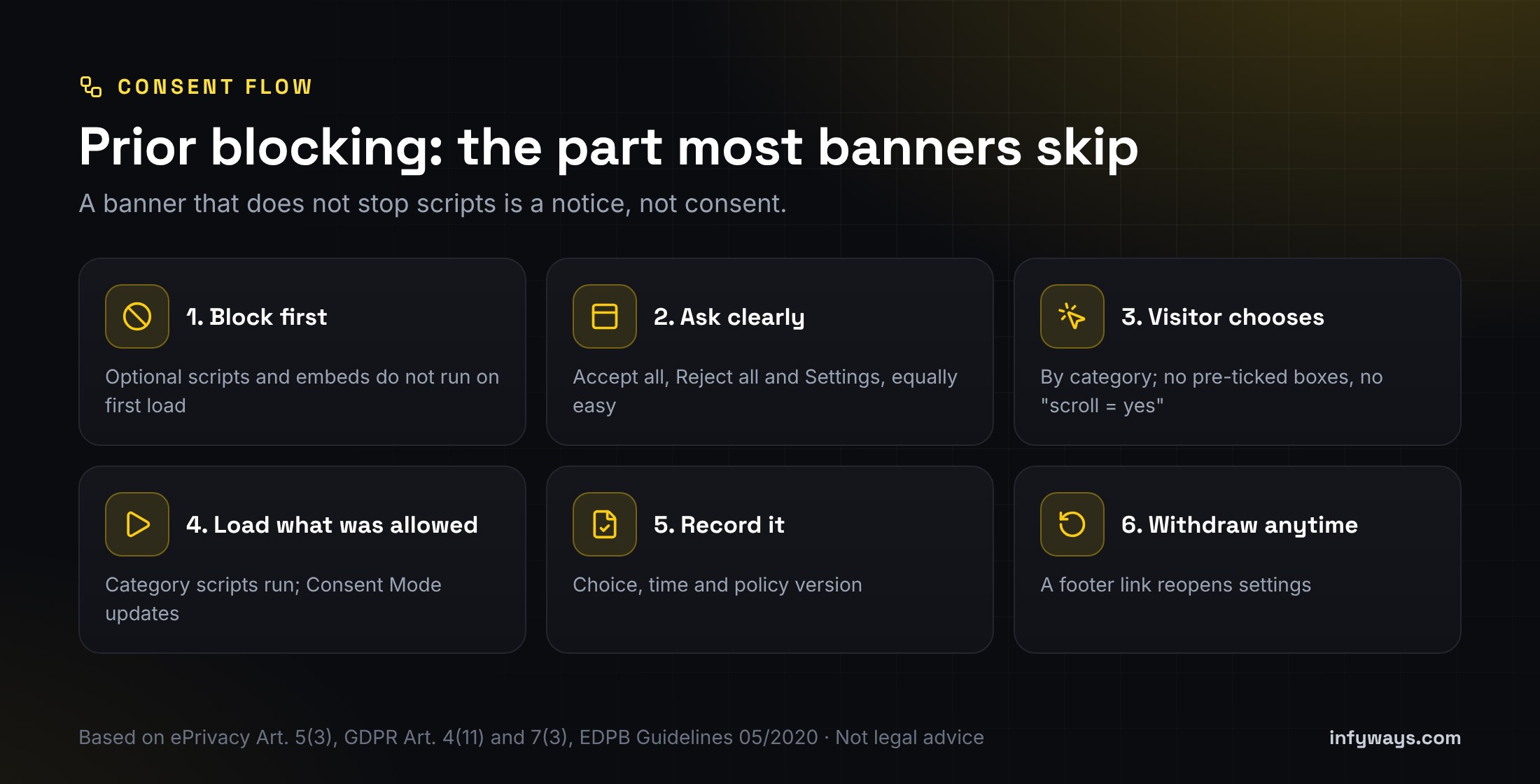
In the EU, the rule on cookies comes from Article 5(3) of the ePrivacy Directive: storing or reading information on a visitor’s device needs their consent, unless it’s strictly necessary for a service they asked for. The meaning of consent comes from the GDPR. Article 4(11) says it must be freely given, specific, informed and unambiguous. Article 7(3) says withdrawing it must be as easy as giving it. Article 7(1) says you must be able to show it was given. In practice this means:
Requirement
What it means on your Joomla site
Where it comes from
Ask before setting
Analytics, ad and similar cookies stay off until the visitor opts in
The UK applies similar rules through PECR and the UK GDPR. The ICO’s cookie guidance is the place to check for UK-specific detail.
The EU is also negotiating changes to the cookie rules as part of the Commission’s “Digital Omnibus” proposal. Nothing has been adopted yet, so the current rules above still apply. We’ll update this guide if that changes.
What do US state privacy laws require?
Most US state laws use an opt-out model rather than opt-in. You can usually run analytics with a clear notice, but visitors must be able to opt out of the “sale” or “sharing” of personal data, including cross-context behavioural advertising and, in many states, targeted advertising. Each law has its own thresholds, so many small sites aren’t covered at all. Check each law’s applicability section.
State law
What it means for cookies and tags
Official text
California CCPA / CPRA
A “Do Not Sell or Share My Personal Information” link if you sell or share data, such as through ad pixels. Honour the Global Privacy Control (GPC) browser signal as a valid opt-out.
If you serve visitors in both Europe and the US, the simplest setup is opt-in for everyone, plus a “Do Not Sell or Share” link and GPC support. Some consent tools can instead show different rules by region.
How do you set up cookie consent on Joomla, step by step?
List what you load. Open the site in a private window, then check DevTools → Application → Cookies and the Network tab. Write down every third-party host and cookie, and which extension or template adds it.
Group them by purpose: Necessary, Preferences (functional), Analytics and Marketing. Purpose decides the category, not the cookie name.
Pick a consent extension that does prior blocking (see the comparison below), and install it.
Move tags out of the template. Remove hard-coded analytics and pixel snippets from the template, “custom code” plugins and modules. Add them through the consent tool’s category slots or blocking rules instead.
Turn on Google Consent Mode v2 if you use Google tags. The defaults should be denied before any tag runs, then updated after the visitor’s choice (Google guide).
Gate embeds. Replace YouTube, Vimeo and Maps iframes with a placeholder until the right category is allowed, or use privacy-enhanced embed modes.
Write the banner text. Say plainly what each category does, and link to your privacy and cookie policy. Give equal weight to Accept all and Reject all.
Add a persistent “Cookie settings” link in the footer so visitors can change their mind.
For US traffic, add a “Do Not Sell or Share” link if you sell or share data, and check the tool honours GPC.
Test, then retest after every change of template, tag or extension (see below).
Which Joomla cookie consent extension should you use?
We compared consent extensions for Joomla 5 and 6 using their own Joomla Extensions Directory (JED) listings in October 2026. Features are as the developers describe them. We haven’t audited each one.
Disclosure: Easy Cookie Alert is our own extension, so weigh our view of it accordingly. In short:
Want free with the least manual work? Look at NexusConsent’s presets and scanner, or ConsentX if you need GPC and region rules.
Want a simple free banner with a consent log? ConsentLab covers the basics.
Still on Joomla 3 or 4? Only the Web357 extension lists J3, and only it and our module list J4. Plan an upgrade either way.
Want a module you place like any other, with themes and a US opt-out link? That’s the gap our own module was built for.
Whatever you choose, check three things before you buy or install: it blocks scripts before consent, Reject all is on the first layer, and it’s listed as compatible with your Joomla version.
How do you check that your banner actually works?
Open a private window with no consent cookie, then load the home page and a page with embeds.
Before you click anything, DevTools → Application → Cookies should show only necessary cookies, and the Network tab should show no requests to analytics or ad hosts.
Click Reject all and reload. Still no tracking cookies or requests.
Clear cookies, click Accept all (or allow only Analytics) and reload. Only the allowed tags should now load.
Submit a contact form after rejecting. It should still work, because the session cookie is necessary.
Reopen Cookie settings from the footer, withdraw consent and check the tags stop.
For US traffic, turn on GPC in a browser that supports it and check your tool treats it as an opt-out.
If tracking still fires before consent, a tag is hard-coded somewhere: in the template, a module, a “custom code” plugin or an extension’s own settings. Remove it there.
What mistakes do Joomla sites make most often?
Mistake
Why it’s a problem
Fix
An “OK, got it” notice bar
It informs but doesn’t ask, and scripts still run
Use a tool with prior blocking and a Reject option
GA4 in the template head
It runs before any choice
Load it through the consent tool, with Consent Mode defaults set to denied
Accept is a big button, Reject is a hidden link
Authorities treat that as nudging
Make both equally easy on the first layer
Pre-ticked Analytics toggle
Not valid consent under Planet49
Start optional categories switched off
No way back to the settings
Withdrawing has to be as easy as consenting
Add a footer “Cookie settings” link
Cookie policy never updated
Tags change, but the policy still lists 2019 cookies
Review after every new extension and bump the consent version
Disabling Joomla sessions
Breaks forms and security for no legal gain
Keep the session cookie and document it
When should you get help?
Get help if your site runs many extensions, a page builder or a shop, serves both EU and US visitors, or still runs Joomla 3. Infyways has built Joomla sites since 2010 and makes 125 Joomla extensions, so we know where scripts hide in templates and extensions. We can audit what your site loads, set up consent with prior blocking, clean up hard-coded tags, and upgrade older sites so a current consent tool will run. We don’t give legal advice; your lawyer or DPO decides the policy, and we make the site do what it says. Send us your site URL. We reply within 12 hours.
Does Joomla have a built-in cookie consent banner?
No. Joomla 4, 5, 6 and 6.2 have no cookie banner or consent manager in core. You need a consent extension, ideally one that blocks optional scripts until the visitor chooses.
What cookies does Joomla set by default?
A session cookie with a random hashed name for every visitor. Optional core features add a remember-me cookie when users tick “Remember Me”, a user-state cookie for logged-in users, and a language cookie on multilingual sites. None of these track visitors across sites.
Does the Joomla session cookie need consent?
Generally no. It’s needed for forms, logins and security, which falls under the strictly necessary exemption in the ePrivacy Directive. List it in your cookie policy all the same.
Can I disable cookies completely in Joomla?
Not without breaking forms and login security. What you should disable is non-essential cookies, such as analytics, ads and some embeds, until the visitor consents.
Is a cookie notice bar enough for GDPR?
No. EU rules need prior consent for non-essential cookies. That means no tracking before a choice, a real Reject option and a way to withdraw later. A bar that only says “OK” doesn’t do that.
Do US websites need a cookie banner?
Most US state laws don’t require opt-in consent for cookies. They do require an opt-out from sale, sharing or targeted advertising where the law applies, and several states require you to honour the Global Privacy Control signal.
Does Google Analytics on Joomla need consent?
For EU and UK visitors, analytics cookies generally need consent first. Load GA4 through your consent tool and set Google Consent Mode defaults to denied until the visitor allows analytics.
Did Joomla 6.2 change how cookies work?
No. The 6.2 release added editor, module, admin and email features, but nothing on cookies or consent. The session and plugin cookies work as they did in 6.1.
Legal note: This article is general information about cookie and privacy rules as of October 2026. It isn’t legal advice, and following it doesn’t guarantee compliance with GDPR, ePrivacy, PECR, the CCPA or any other law. Laws and guidance change, and which ones apply depends on your organisation and visitors. Check your obligations with a qualified lawyer or your data protection officer.
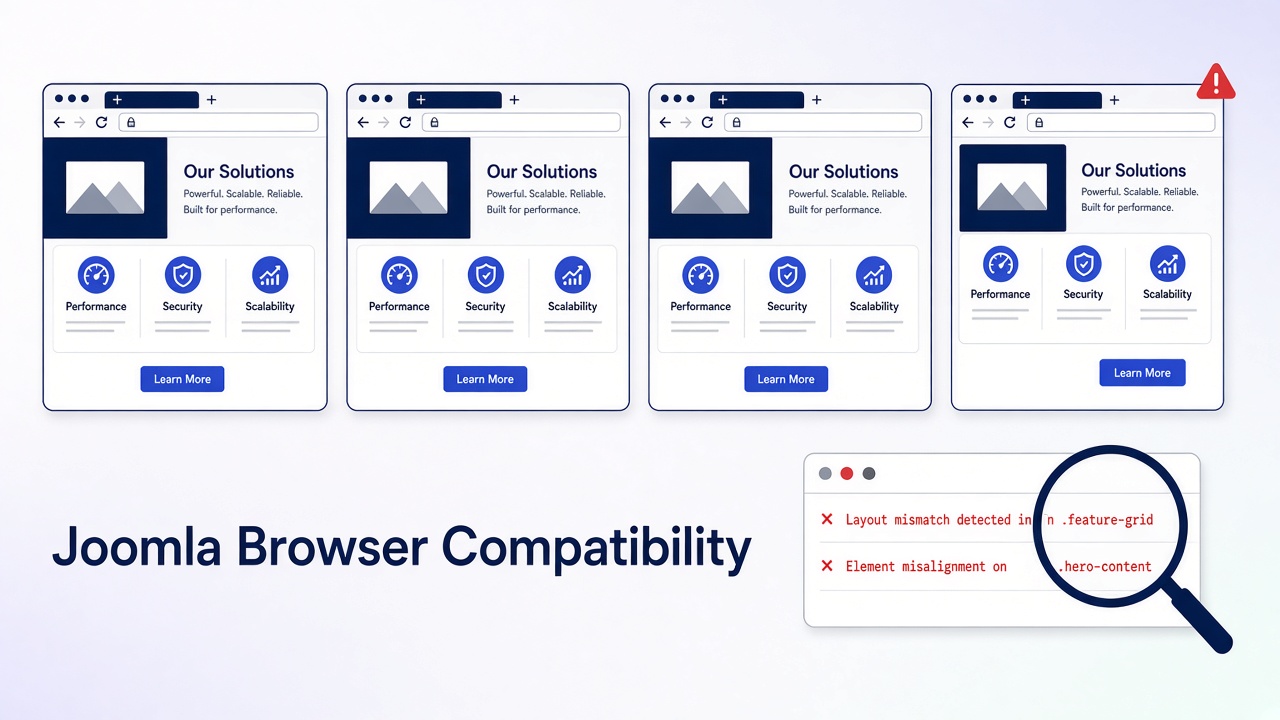
A Joomla browser compatibility issue is a page that works in one current browser and fails in another. Joomla 4, 5, and 6 support the current major version and the one before it of Chrome, Edge, Firefox, and Safari (the n-2 policy the project adopted in 2019). Internet Explorer is not supported. Most reports are not browser bugs at all: they are a cached stylesheet, a browser extension, a Joomla 3 template, a cookie scoped to the wrong host, or one of three documented core bugs (Safari 15 and Joomla’s ranged media queries, Firefox 148 and TinyMCE in Joomla 5.4.3 / 6.0.3, and Conservative caching breaking the Web Asset Manager). This guide separates them in order and gives the fix for each.
Generic cross-browser posts tell you to “test on real devices” and “check Can I Use.” That does not help when the administrator dashboard renders as a single column on a client’s Mac or the article editor flickers forever in Firefox. Those are known Joomla issues with issue-tracker numbers, version ranges, and specific fixes. You will find them here, together with a triage that stops you rewriting CSS for a problem the private window would have solved.
What you will learn
Which browsers Joomla 4, 5, and 6 actually support and where that policy is written
How to tell a browser bug from cache, an extension, a responsive bug, or a PHP error
The three documented Joomla core bugs that only show in one browser, with fixes
Which modern CSS features are safe for Joomla templates in 2026 and which still need fallbacks
Safari-specific quirks (100vh, hover, date inputs, backdrop-filter, autoplay) and how to code around them
The Safari login failure that is really the site URL
A tested one-command fix that makes Cassiopeia render on Safari 15 from a child template
Which testing tools are worth using and in what order
Supported browsers by Joomla version
Joomla
Browsers to test
Policy source
Do not spend time on
3.10 (end of life)
Current Chrome, Edge, Firefox, Safari
Old docs list still names IE. Not a 2026 requirement
IE8 to IE11. Joomla 3 itself is unsupported
4.x
Current and previous major of Chrome, Edge, Firefox, Safari
Production motion PROD2019/005: n-2, drop Internet Explorer. Bootstrap 5 UI
IE11. Bootstrap 5 does not support it
5.x and 6.x
Same four, current and previous major
Same policy. Core JavaScript is ES2018, IE11 es5.js builds removed in 5.0
What n-2 means in practice: Safari ships one major per year, so a Mac that cannot go past Safari 15 (macOS Monterey and older) is outside support for every Joomla 4.4.1 or newer release. Chrome, Edge, and Firefox update monthly and auto-update, so “old Chrome” is almost never the cause. Firefox ESR is supported because it tracks a recent major.
Documented one-browser bugs in Joomla core
Check this table before you touch any CSS. If the symptom, browser, and Joomla version match, the fix is known.
Symptom
Browser
Joomla versions
Cause
Fix
Administrator dashboard, sidebars, and Cassiopeia grid collapse to one mobile column on a wide screen
Safari 15 and older (macOS Monterey, Big Sur)
4.4.1 and newer, all 5.x, 6.0.x, 6.1.0 (we checked the shipped files)
Core CSS is compiled with ranged media queries @media (width >= 1200px). Safari added support in 16.4. Older Safari drops the whole rule. Issues #42439 and #45674
Update Safari (16.4 or newer). If the Mac cannot, the browser is outside policy; use Chrome or Firefox on that Mac. For a public site with many legacy Safari visitors, transpile the template CSS to classic min-width syntax and ship it from a child template (tested procedure in Step 9). Do not overwrite core files; the next update reverts them
TinyMCE editor flickers and reloads forever, articles cannot be edited
Firefox 148 and newer
5.4.3 and 6.0.3
Firefox 148 (February 2026) changed behaviour TinyMCE relied on. Listed on the Joomla 6.0.3 known issues page
Install the “Firefox 148 TinyMCE Hotfix” one-time patcher from the Joomla 6.0.3 / 5.4.3 download page (System → Install → Extensions), or update to 5.4.4 / 6.0.4 or newer. Chrome users are unaffected, which is why it looks like “Firefox is broken”
Site error “Unsatisfied dependency … for an asset” or missing scripts on some pages, only after caching is on
All browsers, but appears random per visitor
4.0 to 4.1.0 with Conservative caching; any version with a broken third-party cache plugin
Module caching stored Web Asset Manager dependencies with the wrong owner. Issue #37122, fixed in 4.1.1
Update Joomla. Clear cache. If a page-cache extension reproduces it, exclude the administrator and logged-in users. Details in caching in Joomla
Cassiopeia menus “act strangely” in Safari
Safari 15 and older
5.0.x
Same root cause as the first row. Issue #42713 was closed in favour of #42439
Same fix
Name the failure before you edit CSS
What you see
In which browsers
What it usually is
Layout wrong only on a phone width
All of them
Responsive CSS or a missing viewport tag. Not a browser bug
Site URL, www versus apex, or HTTP versus HTTPS. Cookie scope, not WebKit
Editor will not load or keeps refreshing
Firefox 148+
TinyMCE bug in 5.4.3 / 6.0.3. Install the hotfix or update
A slider or menu dies in one browser
One
An extension script. Read the console
Fonts, icons, or a map missing in Firefox or Brave only
Firefox, Brave
Tracking protection or Shields blocking a third-party host. Self-host the asset
Only the administrator is broken
One or all
Atum, or an admin module. The site template is innocent
Blank page, no layout talk
All
A PHP fatal, not CSS. Read the host log
Step 1: Write down the browser, the version, and the URL
Note the browser name and a major version (Chrome 14x, Safari 18, Firefox ESR). “Doesn’t work on Mac” is not a report. On a Mac, Safari → About Safari shows the version; the macOS version tells you the maximum Safari it can run.
Note the exact URL. Site homepage, one article, and /administrator/ are three different products.
If the browser is Internet Explorer, stop. On Joomla 4, 5, or 6 that is expected. Send the user to current Edge, Chrome, Firefox, or Safari.
If the browser is Safari 15 or older and the layout is the complaint, go to the core bugs table. You are done diagnosing.
If every current browser fails the same way, you are not debugging compatibility. Fix the error, the missing file, or the template, then come back.
Step 2: Rule out cache and extensions
Open a private window with extensions disabled. Retest the same URL.
If the private window is fine, the cause is a cached file or an extension (ad blockers block scripts and fonts, Firefox Enhanced Tracking Protection and Brave Shields block third-party hosts). Clear that browser’s cache for the site. Then clear Joomla’s cache (System → Maintenance → Clear Cache) and any CDN.
If the private window is still broken, the site is serving the failure. Continue.
Joomla appends its media version to core asset URLs, and that version changes when you update Joomla or an extension. A hand-edited user.css does not change it, so browsers can keep the old file for days. Clear Joomla cache after CSS edits, and on a CDN purge the CSS path.
Step 3: Read the console, not the homepage
Open developer tools in the broken browser. Console and Network.
Reload. Copy the first red error. The file name is the extension or the template.
On Network, filter CSS and JS. A red row is a 404 or a blocked request. An unstyled page with a 404 on template.css is a path problem, not a rendering engine.
Mixed content (HTTPS page calling http:// assets) is blocked hardest by Chrome and Safari. Fix the URLs in the template and in article HTML. Do not tell users to allow insecure content.
“Refused to load” or “violates the following Content Security Policy” means the System – HTTP Headers plugin (or the host) set a CSP that the extension does not satisfy. Browsers enforce CSP slightly differently, which is why it can look like a one-browser bug. Fix the policy or the inline script, do not disable CSP site-wide.
Step 4: See if the template is the only broken piece
On a staging copy, set the site template to Cassiopeia (System → Site Templates).
Retest the broken browser.
If Cassiopeia is fine, your template or one of its overrides is the bug. Update it to a build for this Joomla major, or replace it. Joomla 3 templates (Bootstrap 2, IE conditional comments, MooTools menus) will not become compatible by adding a script.
If Cassiopeia fails too, the template is not the cause. Look at modules on that page, then at the core bugs table.
Confirm the template prints a viewport tag. Cassiopeia does. A custom index.php that omits it makes phones look “broken in Safari” while the desktop looks fine:
Step 5: Disable the extension named in the console
The first console line usually names a file under /media/, /templates/, /modules/, or /plugins/. Disable that extension on staging and reload.
A menu or slider that calls MooTools or an ancient jQuery will fail in current browsers even when the rest of the page is fine. Background: remove MooTools from Joomla.
Do not “fix” it by loading jQuery again. Joomla 4, 5, and 6 core UI does not need jQuery. A second copy fights over $ and creates a new one-browser failure.
HTML5 Shiv and Respond.js were IE8 hacks. They do nothing on Joomla 4+ and add a script current browsers do not need. Remove them if a ten-year-old tutorial put them in the template.
Page builders and Helix-style frameworks that still ship -moz-, -ms-, and -webkit- prefixed rules from 2015 produce console warnings but rarely break layout. Update the template; do not hand-edit its compiled CSS.
When the template is yours or a child template, check the newer CSS features it relies on. This is the 2026 state of the features that most often produce “works in Chrome, broken in Safari or Firefox” on Joomla sites. Verify current numbers on Can I Use.
Feature
Safe in all supported browsers since
Watch out for
Ranged media queries (width >= 1200px)
Safari 16.4 (March 2023). Chrome 104, Firefox 63
Safari 15 and older drop the rule entirely. This is the Joomla core bug above
Full-height section overflows behind the iOS toolbar
100vh includes the space under the collapsing browser bar
Use 100dvh with a 100vh fallback
Dropdown menu needs two taps on iPhone
First tap fires :hover, second fires the click
Make the parent item a real link or use the Cassiopeia menu that opens on tap; test with @media (hover: none)
Background video does not play
Autoplay requires muted and playsinline
<video autoplay muted loop playsinline>
Form fields look different, date picker missing on older desktop Safari
Safari styles native controls and added input type="date" on desktop only in 14.1
Set appearance: none where you style controls; provide a text fallback for very old macOS
Fixed header jumps when the keyboard opens
iOS resizes the visual viewport
Prefer position: sticky for headers
Glass effect missing on Safari 16 and 17
Needs the -webkit- prefix before Safari 18
Write both -webkit-backdrop-filter and backdrop-filter
Fonts render heavier or lighter than Chrome
Different text rasterisation per OS, not a CSS error
Accept it. Do not chase pixel identity between operating systems
Step 8: Fix Safari login separately from CSS
If the page looks right in Safari but login or the administrator session dies, stop comparing stylesheets.
Global Configuration → Site → Site URL, and the live host, must be the same scheme and host. https://example.com and https://www.example.com are different cookie hosts. Chrome is more forgiving of the redirect. Safari drops the session.
Force one host in the server redirect, then clear cookies and test again.
Global Configuration → System → Cookie Domain and Cookie Path: leave blank unless you run subdomains that must share the session.
If the Joomla page is inside an iframe on another site, Safari blocks that third-party cookie. Do not embed the login.
Joomla 4.1 and newer support child templates. Every browser fix you write belongs there so updates do not erase it.
System → Site Templates → Cassiopeia (or your template) → Create Child Template.
Add rules to media/templates/site/{child}/css/user.css. Cassiopeia loads user.css automatically after its own CSS.
Need to override a core stylesheet? Joomla resolves a relative asset such as template.min.css by looking in media/templates/site/{child}/css/ first and only then in the parent’s folder (HTMLHelper::includeRelativeFiles). A file with the same name in the child wins. No joomla.asset.json edit is needed.
Never edit media/vendor/bootstrap, media/templates/site/cassiopeia, or media/system. The next Joomla update replaces them and the “fix” disappears in one browser first, which restarts the whole hunt.
Tested: make Cassiopeia render on Safari 15 from a child template
We inspected the files Joomla 6.0.0 and 6.1.0 ship. Cassiopeia’s template.min.css contains 111 media queries, all in range syntax and none in min-width form. Atum has 118, and media/vendor/bootstrap/css/bootstrap.min.css (Bootstrap 5.3.8) has 81. Cassiopeia does not load the vendor Bootstrap file at all; Bootstrap is compiled into template.min.css, so swapping the vendor file does nothing for Cassiopeia. The fix is to transpile the template CSS.
Create the child template (step 1 above). Note its folder name, for example cassiopeia_legacy.
On any machine with Node.js, run Lightning CSS against the shipped file with a Safari 15 target:
Result on Joomla 6.1.0: 111 ranged queries became 111 min-width / max-width queries, file size 247 KB to 251 KB, everything else unchanged. Repeat for template-rtl.min.css if you serve RTL.
Clear Joomla cache. Load the site in Safari 15 (BrowserStack macOS Monterey works) and the grid returns.
After every Joomla update that changes Cassiopeia, rerun the command. Your child file is never touched by the updater, but it also does not receive core CSS fixes until you regenerate it.
For the administrator, the same approach works with an Atum child template and media/templates/administrator/{child}/css/template.min.css. In practice, updating Safari on the one editor’s Mac is the cheaper fix. For third-party templates that load media/vendor/bootstrap/css/bootstrap.min.css, transpile that file into the child’s css/ folder and change the template’s asset URI to point at it.
Step 10: Retest the supported browsers, in this order
Chrome or Edge on desktop (same engine, still check Edge once if the client uses it).
Safari on a real Mac or iPhone. Desktop Chrome does not stand in for iOS Safari; on iOS, Chrome and Firefox are WebKit under the hood, so “works in Chrome on iPhone” tells you nothing about Chrome on desktop.
Firefox, including ESR if the client is a locked office build.
The administrator on each, not only the homepage. Article edit screen included (that is where the Firefox 148 bug shows).
Tools, in order of cost: your own devices and a colleague’s Mac; Safari Technology Preview and Firefox Developer Edition for what is coming next; Playwright (free, runs Chromium, WebKit, and Firefox from one script) for regression screenshots; BrowserStack or LambdaTest when you need a specific old macOS and Safari 15 to confirm the ranged media query case. A paid lab is not the first step, and it will not make Internet Explorer run Joomla 6.
Do not sniff the browser
Joomla’s old browser class, and any template switch based on the user-agent string, will mislabel current Edge, Brave, and in-app webviews. Safari on iPad reports itself as macOS Safari. Serve one template. Fix the CSS with @supports and media features like (hover: none). User-agent hacks are how a site ends up with a broken stylesheet that only one browser ever loads, which then looks exactly like a compatibility bug.
When the honest fix is an upgrade
If the site is Joomla 3 and the goal is “works in current Safari and Chrome”, Protostar and a pile of IE scripts are the wrong project. Move to a Joomla 5 or 6 template built on Bootstrap 5, on staging, then retest. Path notes: Joomla upgrade issues and benefits of Joomla migration. Infyways runs those jumps from $149, with a compatibility audit within 12 hours: Joomla Upgrade Services.
What thinner articles leave out
Topic
Typical post
This guide
Browser support
“Test in all major browsers”
The n-2 policy, where it is recorded, and what it means for Safari 15 Macs
Core bugs
None
Safari ranged media queries (#42439, #45674), Firefox 148 TinyMCE hotfix, Conservative caching and the Web Asset Manager (#37122), with version ranges
Triage
Start editing CSS
Private window, console, Cassiopeia control, then the named extension
Modern CSS
“Check Can I Use”
Safe-since table for the eleven features that actually break Joomla templates, with fallback pattern
Safari
“Safari is buggy”
100vh, two-tap hover, autoplay, date inputs, sticky headers, backdrop-filter prefix
Login in Safari
Not mentioned
Site URL and cookie host, iframe blocking
Where to put the fix
Edit template.css
Child template, user.css, same-name file override; never core files
Safari 15 fix
“Update Safari” or “replace Bootstrap”
Measured: Cassiopeia 6.1.0 ships 111 ranged queries, Bootstrap is compiled in, one Lightning CSS command produces a working child template.min.css
Legacy
Add HTML5 Shiv, Respond.js, jQuery
Remove them. They create the next one-browser bug
Key takeaways
Joomla 4, 5, and 6 support the current and previous major of Chrome, Edge, Firefox, and Safari. Not Internet Explorer, not Safari 15.
A wide screen showing the mobile layout in Safari 15 or older is the ranged media query bug. Update Safari, or transpile template.min.css into a child template. Do not edit core CSS.
Firefox 148 and a flickering TinyMCE on Joomla 5.4.3 or 6.0.3 means install the hotfix or update.
Same failure in every browser is not a browser bug.
Private window first, then the console, then Cassiopeia, then the extension named in the error.
Safari login failures are usually the site URL and cookie host.
Use @supports, 100dvh, and (hover: none) instead of user-agent sniffing.
Put every fix in a child template. Do not add HTML5 Shiv, Respond.js, or a second jQuery.
Frequently asked questions
Which browsers does Joomla support?
For Joomla 4, 5, and 6: the current major version and the one before it of Chrome, Edge, Firefox, and Safari. Internet Explorer is not supported. The old Joomla 3 browser list is not the matrix for current releases.
Why does the Joomla administrator show one column on a Mac in Safari?
Safari 15 and older do not understand the ranged media queries in Joomla 4.4.1 and newer core CSS, so the responsive grid collapses. Update to Safari 16.4 or newer, or use Chrome or Firefox on that Mac.
Why does the article editor keep reloading in Firefox?
Firefox 148 broke TinyMCE in Joomla 5.4.3 and 6.0.3. Install the Firefox 148 TinyMCE hotfix from the Joomla download page or update to 5.4.4 / 6.0.4 or newer.
Why does the site look fine in Chrome and broken in Safari?
Check a private window, then the console. If the layout is the mobile layout on a wide screen, check the Safari version. If only login fails, compare the Global Configuration site URL with the host Safari is using, including www and HTTPS.
Why is the administrator broken in Internet Explorer?
Joomla 4 and newer use Bootstrap 5 and modern JavaScript. IE11 is outside that support. Use Edge or another current browser.
Will HTML5 Shiv or Respond.js fix it?
No. Those scripts patched Internet Explorer 8. They do not fix Joomla 4, 5, or 6, and they should come out of the template.
The layout breaks on phones but not on desktop. Is that a browser bug?
No. If every browser breaks at the same width, it is responsive CSS or a missing viewport tag. If only iOS overflows at the bottom, replace 100vh with 100dvh.
One browser still shows the old design after I changed the template. Why?
That browser cached the CSS. Test in a private window, then clear Joomla cache and the CDN. Editing user.css does not change Joomla’s media version.
Should I load jQuery so older browsers work?
No. Extra jQuery copies cause $ conflicts. Current Joomla does not need jQuery for the core layout.
Can I make Cassiopeia work on Safari 15 without editing core files?
Yes. Transpile media/templates/site/cassiopeia/css/template.min.css with Lightning CSS targeting Safari 15 and save the output as template.min.css inside your child template’s css folder. Joomla loads the child’s copy first. Replacing media/vendor/bootstrap does nothing for Cassiopeia because Bootstrap is compiled into template.min.css.
Does Cassiopeia work in all browsers?
It works in the browsers Joomla supports. Use it as the control. If Cassiopeia is fine and your template is not, fix or replace the template.
Who can fix a template that only fails in one browser?