Short answer: For most Joomla sites, use Conservative caching plus the System – Page Cache plugin for guest pages, with exclusions for carts, forms and logged-in areas, and a fast cache handler (Redis or APCu where available). This guide is the strategy. If you only need the clicks to switch cache on or off or to clear it, see how to enable, disable and clear Joomla cache.
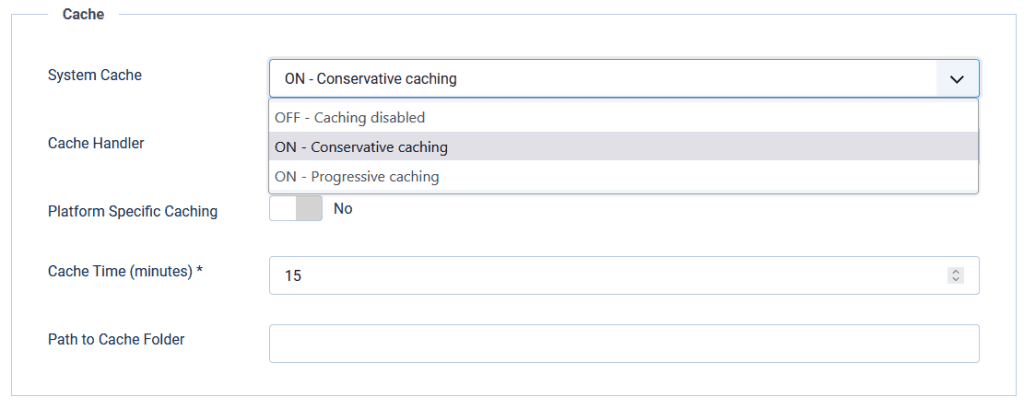
Caching in Joomla means storing rendered HTML, component views, and module output so the next guest request skips most database and PHP work. In Joomla 4, 5, and 6 you control three layers: Global Configuration System Cache (Off, Conservative, or Progressive), the System – Page Cache plugin for whole guest pages, and per-module Advanced caching. Handlers decide where copies live (File, APCu, Redis, or Memcached).
Official docs explain the switches. Deep technical posts explain com_cache internals. LiteSpeed magazine pieces cover one host stack. This guide is the operator map: which mode to pick by site type, what breaks Progressive and Page Cache, Redis and Memcached setup gotchas, how to clear and purge safely, and when caching alone cannot fix a slow EOL site. Infyways upgrades and tunes production Joomla from $149 with a free audit within 12 hours.
What you will learn
The three cache layers and the order they win
Conservative vs Progressive vs Page Cache with a decision table
File, APCu, Redis, and Memcached: when each handler is right
Exclusions for carts, forms, login, and personalised modules
Clear vs purge, CLI clean, and stale-content fixes
How LiteSpeed (or another edge cache) should sit beside Joomla cache
A staging checklist and when to call Infyways
How Joomla caching is layered
Think of three increasing levels of aggressiveness. The first layer that can answer usually wins.
Layer
Where you set it
What it caches
Who it serves
System Cache (Conservative or Progressive)
System → Global Configuration → System → Cache Settings
Component views and modules (rules differ)
Mostly guests for core content views; access levels are part of the cache id
Module Advanced tab
Each module → Advanced
That module only (Use global or No caching)
Respects Conservative; ignored for guests under Progressive
Important: turning System Cache to Conservative does not by itself cache the full page. Full-page guest caching needs the System – Page Cache plugin enabled separately.
Conservative vs Progressive vs Off
Mode
What happens
Use when
Avoid when
Off
No view or module cache from Global Configuration
Debugging, template work, chasing a stale bug
Busy production brochure sites
Conservative (recommended default)
Caches eligible component views and modules that allow caching. Module “No caching” is respected
Almost every site: membership, forms, stores, multilingual
Never the wrong starting point
Progressive
For logged-off users, all modules are cached. Module “No caching” has no effect. Module output often shares a com_modules group file
Static brochure sites after careful staging tests
Menus that change by page, random modules, login-aware chrome, anything that must differ per Itemid
Myth to kill: Progressive is not “caching for logged-in users.” Official docs are explicit that core view cachability rules do not flip that way. Progressive is more aggressive module caching for guests.
Classic Progressive failure: the wrong module appears on the wrong page because one cached module blob was reused across Itemids. If you see that, switch back to Conservative immediately.
System – Page Cache plugin
This is the fastest built-in path. On a hit, Joomla can return stored HTML before most of the site boots. It only serves guests. Logged-in visitors always get a fresh build so names, carts, and private menus stay private.
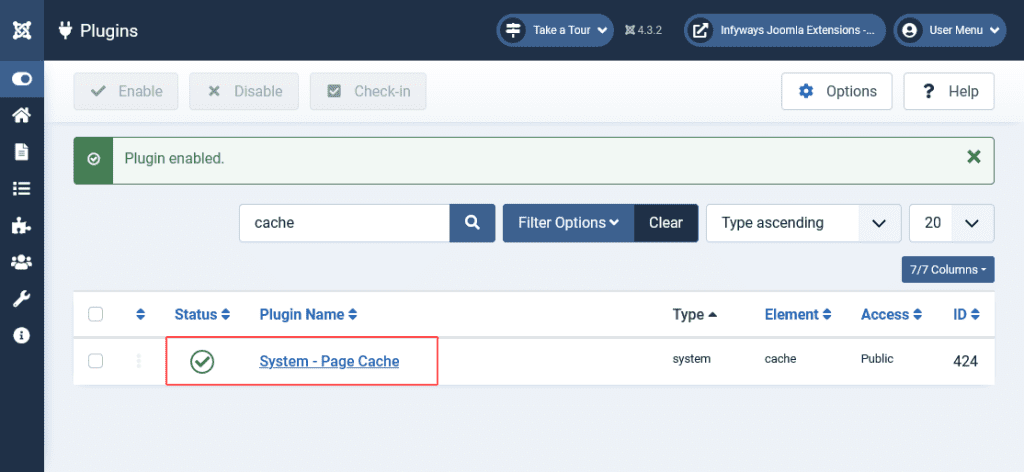
Enable: System → Manage → Plugins → System – Page Cache
It uses the same handler and Cache Time as Global Configuration
Exclude menu items and URL patterns for anything dynamic
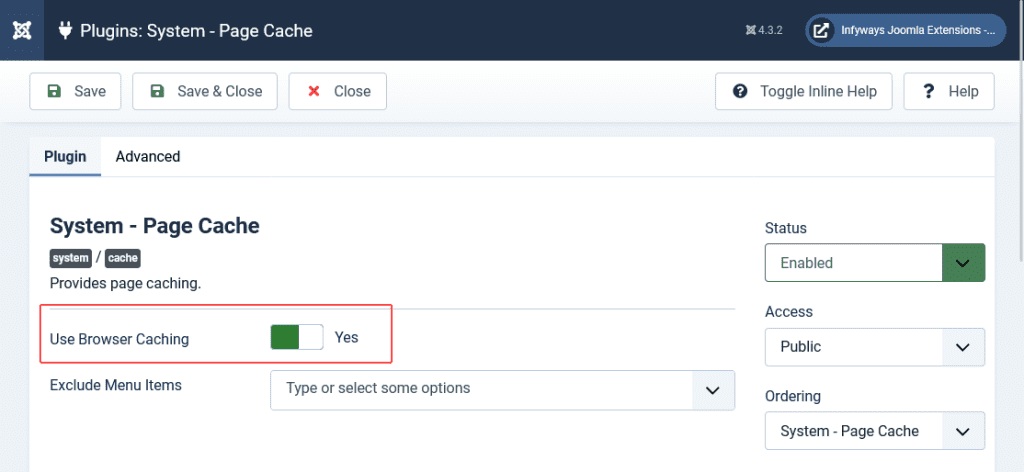
Use Browser Caching sends browser cache headers. Leave it off unless you understand that visitors can keep a page after you clear server cache
Always exclude (or never page-cache): contact and other forms, search results, login and registration, carts and checkout, tokenised or one-time pages, and any URL that must reflect the current session. Editing an article does not always clear every page that embeds it. Clear the page cache group after content launches that must be instant.
Cache handlers: File, APCu, Redis, Memcached
Handler
Stores in
Best for
Watch outs
File
cache/ and administrator/cache/
Default on shared hosting and most single servers
Many tiny files on slow disks; purge expired regularly
APCu
PHP shared memory
Single server speed win for small items
Not shared across nodes; cleared on PHP restart
Redis
Redis server or Unix socket
Clusters, high traffic, LiteSpeed object cache stacks
Wrong host or socket causes 500s; change handler before killing Redis
Memcached
Memcached server or socket
Shared cache across web nodes
Often labelled experimental in host UIs; test persistence settings
Modern Joomla no longer relies on old handlers such as XCache or eAccelerator. If a host guide still lists them, ignore that part.
Redis tip from real support threads: if you disable System Cache while Redis is already unreachable, you can still get connection errors until you switch the handler back to File (or a working Redis), save, then turn caching off. Flush cache after handler changes.
Global Configuration fields that matter
Setting
Meaning
Practical default
System Cache
Off / Conservative / Progressive
Conservative
Cache Handler
Where items are stored
File, then Redis on capable hosts
Platform Specific Caching
Adds device type into the cache id
No, unless desktop and mobile HTML truly differ on the same URL
Cache Time
Lifetime in minutes (default 15)
15 for mixed sites; lower for news; higher for static brochures
Path to Cache Folder
Custom file path
Leave blank unless you know why
Module Cache Time is in seconds. Global Cache Time is in minutes. Mixing those units is a common misconfiguration.
Per-module caching
Open the module → Advanced → Caching: Use global or No caching
Set No caching for login status, live counters, random quotes, carts, and anything personal
Under Progressive for guests, No caching is ignored. That is why Progressive breaks dynamic chrome
Some modules declare a cache mode in code (static, itemid, and similar). A badly coded static mode can freeze wrong content even on Conservative
Breadcrumbs is a safe module to use when testing Conservative caching on staging.
Decision guide by site type
Site type
System Cache
Page Cache plugin
Handler
Notes
Brochure / marketing
Conservative (try Progressive only after tests)
On, with form pages excluded
File or Redis
Biggest easy win
Membership / ACL content
Conservative
On for public pages only; exclude member areas
File or Redis
Access levels belong in cache ids; still exclude personal dashboards
Multilingual
Conservative
On
File or Redis
Language is part of identity; clear cache after language or SEF changes
VirtueMart / Hikashop / carts
Conservative
On only for static CMS pages; exclude cart, checkout, account
File or Redis
Page Cache on cart URLs causes classic “empty cart” bugs
Heavy community / logged-in traffic
Conservative
Limited; focus on guest landing pages
Redis preferred on busy hosts
Page Cache helps guests only
LiteSpeed host
Conservative
Often rely on LiteSpeed full-page; keep Joomla Conservative
Redis as object cache when offered
Magazine guidance: Conservative with LiteSpeed + Redis reduces conflicts
LiteSpeed, CDN, and Redis together
Edge page cache (LiteSpeed Cache for Joomla, Cloudflare, or a reverse proxy) sits in front of Joomla. Redis or Memcached as the Joomla cache handler speeds object and view cache behind that. Do not stack three aggressive full-page systems without a purge story.
Prefer Conservative when an external full-page cache is already on
Let the edge plugin purge on article save when it supports automatic purge
Use Redis for shared or high-traffic object cache, not as a substitute for excluding dynamic URLs
ESI and logged-in edge features vary by LiteSpeed edition. Test on staging
Clear Cache vs Clear Expired Cache
Action
Path
Removes
Use when
Clear Cache
System → Maintenance → Clear Cache
Selected groups or everything
After template, override, or extension updates; stale homepage; debugging
Clear Expired Cache
System → Maintenance → Clear Expired Cache
Only past-lifetime items
Routine housekeeping so File handler folders do not fill forever
CLI clean
php cli/joomla.php cache:clean
All (or expired with the expired argument)
Deploy scripts and cron
With the File handler you can also empty cache/ via SFTP if the admin is down. That is equivalent to a full clear. Joomla cache is not a database table.
Step 1: Set a safe baseline on staging
Clone production to staging.
System → Global Configuration → System → Cache Settings: System Cache = ON – Conservative caching, Handler = File, Platform Specific Caching = No, Cache Time = 15.
Save. Browse as a guest. Confirm pages load and dynamic modules still update.
Only then introduce Redis or Progressive on a second staging pass.
Step 2: Enable Page Cache with exclusions
Enable System – Page Cache.
Exclude contact, search, login, cart, checkout, and account menu items.
Leave Use Browser Caching off for the first week.
As a guest, load a public article twice. Confirm a cache/page entry appears when using the File handler.
Edit that article, clear the page group, and confirm the front end updates.
Step 3: Tune modules and handlers
Set personal or random modules to No caching (Conservative only).
If the host offers Redis, set handler to Redis, enter socket or host, port 0 for Unix sockets when required, save, then Clear Cache.
Retest guest and logged-in paths, forms, and checkout.
Optional: try Progressive only on a static brochure clone. Revert at the first wrong-module symptom.
Step 4: Production cutover and monitoring
Apply the proven staging settings during a low-traffic window
Clear Cache after deploy
Watch Core Web Vitals and server CPU for a week
Schedule Clear Expired Cache or CLI purge if you stay on File
Document exclusions so the next editor does not enable Page Cache on checkout
Troubleshooting stale or broken cache
Symptom
Likely cause
Fix
Old article text on guests
Page Cache still holding URL
Clear page group; shorten Cache Time if launches are frequent
Wrong module on a page
Progressive guest module cache
Switch to Conservative; clear com_modules
Empty cart or stuck form
Page Cache on dynamic URLs
Exclude those menu items and URLs; clear page cache
Redis connection 500 after “turning cache off”
Handler still Redis while server is down
Set handler to File while Redis is up, save, then disable caching
Logged-in users see no speed gain from Page Cache
By design
Rely on Conservative + Redis; Page Cache is guest-only
Mobile gets desktop chrome
Platform Specific Caching off while serving different HTML
Enable only if HTML truly differs; prefer one responsive template
Cache multiplies a healthy stack. It does not replace an unsupported Joomla 3 site, an abandoned template full of blocking scripts, or PHP that the host is about to retire. If Time to First Byte stays poor after Conservative + Page Cache on staging, fix the CMS and template path first.
Infyways runs that path as a service:
Free compatibility and performance audit within 12 hours
Fixed packages from $149 small / $299 medium / custom for stores and clusters
125 Joomla extensions built in-house when a cache-hostile extension needs a rebuild
Staging-first cutover and 30 days of post-launch support on defects we introduce
Start with Conservative caching. Add System – Page Cache for guests with strict exclusions.
Progressive is optional and dangerous for dynamic modules. It is not “logged-in caching.”
Full-page cache is a separate plugin. Global System Cache alone is not full-page cache.
File is fine for most sites. Redis or Memcached help clusters and high traffic.
Global Cache Time is minutes. Module Cache Time is seconds.
Clear the page group after launches that must be instant. Purge expired on File hosts.
Edge cache plus Joomla Conservative plus Redis is a common modern stack. Test purge behaviour.
If the site is EOL or template-bound, upgrade first. Cache cannot patch an unsupported core.
Frequently asked questions
What is caching in Joomla?
It is storing views, modules, or whole guest pages so repeat requests skip most PHP and database work. You control it with System Cache, module Advanced settings, and the System – Page Cache plugin.
Should I use Conservative or Progressive caching?
Use Conservative for almost every site. Use Progressive only on static brochure sites after staging tests, because guest modules are force-cached and “No caching” is ignored.
Does System Cache cache the whole page?
No. Conservative or Progressive cache views and modules. Whole-page guest caching needs the System – Page Cache plugin.
Does Page Cache work for logged-in users?
No. The plugin serves guests only so personalised HTML is never shared between users.
Is Progressive caching for logged-in users?
No. That is a common myth. Progressive changes how guest modules are cached. Core view rules for logged-in users stay separate.
What cache handler should I choose?
File for standard shared hosting. APCu for a fast single server. Redis or Memcached when you need shared memory cache across nodes or your host recommends it with LiteSpeed.
Why is my cart empty after enabling cache?
Page Cache is almost certainly covering cart or checkout URLs. Exclude those menu items and clear the page cache group.
How do I clear Joomla cache from the command line?
Run php cli/joomla.php cache:clean from the site root. Use the expired variant for purge-only cleanup in cron.
Will caching fix a slow Joomla 3 site by itself?
No. It can help guests, but unsupported core, old PHP, and abandoned templates still need an upgrade path. See benefits of Joomla migration.
How much does Infyways charge to tune or upgrade a slow Joomla site?
Packages start at $149 for small sites and $299 for medium sites. Stores and multi-node setups are custom after the free audit.
Joomla 5 and 6 can send users to a different page after login without any extension. Set it on the login menu item or the login module, and use separate menu items or modules when different user groups need different pages.
Method 1: Login form menu item
Go to Menus → Main Menu → New and choose Users → Login Form.
In the Options tab, set Login Redirect to the menu item users should land on, and optionally Logout Redirect.
Save. Everyone who logs in through this page goes to that menu item.
Method 2: Login module
Open Content → Site Modules → your Login module. Under Module → Login Redirection Page pick the menu item. This applies to logins from that module only; if you have both a login page and a module, set both.
Different pages for different user groups
Core Joomla redirects per form, not per group. Two core-only approaches work:
Create one login menu item per audience (for example /customer-login/ and /partner-login/), each with its own Login Redirect, and link users to the right one.
Make the landing page a menu item visible to Registered users, and put group-specific modules on it with Access set to each group or access level. Everyone lands on the same URL but sees their own content.
For a true automatic redirect by group (the same login form sending Managers, Customers and Authors to different URLs), use a JED login redirect extension that lists Joomla 5/6 support.
Why the redirect is ignored
Cause
Fix
A return URL is set
A ?return= parameter (for example from a protected page) takes priority; this is expected
Target menu item is restricted
The user’s access level cannot see the target; choose a page they can access
Caching
Exclude the login page from page caching
Login popup or third-party form
Configure the redirect in that extension; see login popup fix
Most Joomla “hosting problems” come down to five things: the PHP version, PHP limits, file permissions, a slow or overloaded server, and missing backups. Here is how to spot each one and fix it, with the requirements for Joomla 5 and 6.
1. PHP and database version too old
Joomla
PHP
Database
Joomla 5
8.1 or newer (8.2/8.3 recommended)
MySQL 8.0.13+, MariaDB 10.4+, PostgreSQL 12+
Joomla 6
8.3 or newer (8.4 recommended)
MySQL 8.0.13+, MariaDB 10.6+ recommended, PostgreSQL 14+
Symptoms: the update to the next major is never offered, or a white screen after an update. Change PHP in cPanel → Select PHP Version or MultiPHP Manager. Current figures are in the Joomla technical requirements.
2. PHP limits too low
Failed extension installs, stalled updates and “Allowed memory size exhausted” errors usually mean memory_limit, upload_max_filesize or max_execution_time is too low. Recommended values and where to change them: Joomla PHP.ini settings.
3. File permissions and ownership
Folders should be 755 and files 644, owned by the account PHP runs as. “Unable to write” or “could not open archive” errors during install point here. System → System Information → Folder Permissions shows which folders are not writable. Never set 777.
4. Slow server
Check Time To First Byte in PageSpeed Insights. If the server takes more than about 600 ms before sending anything, caching and image fixes will not be enough; enable OPcache, use PHP-FPM and HTTP/2 or HTTP/3, and move off overloaded shared hosting if needed. Site-side fixes are in how to speed up Joomla and caching in Joomla.
Host backups are often kept on the same server and for only a few days. Keep your own copies off the server with Akeeba Backup; see how to back up Joomla.
What to look for in Joomla hosting
PHP 8.3+ available, with OPcache, and an easy PHP version switcher
MySQL 8 or MariaDB 10.6+
SSH or at least SFTP access, and cron jobs
Daily backups you can download
HTTP/2 or HTTP/3 and free SSL
Hosting changes made the site slow, broken or hacked? Our Joomla support and maintenance team can audit the server and the site.
Frequently asked questions
What PHP version does Joomla 6 need?
PHP 8.3 or newer; 8.4 is recommended. Joomla 5 needs PHP 8.1 or newer.
Why does my Joomla extension install fail?
Usually upload_max_filesize, memory_limit or folder permissions. Check System Information → Folder Permissions and raise the PHP limits.
Is shared hosting fine for Joomla?
For small sites, yes, if it offers PHP 8.3+, OPcache, MySQL 8 or MariaDB 10.6+ and downloadable backups.
An image map is a single image with several clickable areas, each linking somewhere different. Joomla 5 and 6 have no image map button, but you can add one with plain HTML in the TinyMCE editor, or with an extension if editors need a visual tool.
Step 1: Upload the image
Go to Content → Media, open the images folder and upload the image. Note its width and height in pixels. Use WebP or a compressed JPEG/PNG so the map does not slow the page (see WebP and AVIF for Joomla).
Step 2: Get the coordinates
Open the image in any free image map generator or in an image editor that shows cursor positions. Coordinates are in pixels from the top-left corner of the image at its original size:
rect: x1,y1,x2,y2 (top-left and bottom-right corners)
circle: x,y,radius
poly: x1,y1,x2,y2,x3,y3… for any shape
Step 3: Allow the code in the editor
TinyMCE strips <map> and <area> for some user groups. Go to System → Plugins → Editor – TinyMCE, open your user group’s set, and under Prohibited Elements make sure they are not listed; check that Text Filters in Global Configuration allow your group to save this HTML (Super Users have No Filtering by default).
Step 4: Add the HTML to the article
Open the article, switch to the code view (Toggle Editor or the </> button) and paste:
Classic image maps use fixed pixel coordinates, so they break when a responsive template shrinks the image. Two fixes: add a small script such as the open-source image-map-resizer through the template’s user.js or a custom script module, or build the clickable areas as absolutely positioned links over the image with percentage sizes. Test on a phone before publishing.
Extension option
If non-technical editors maintain the map, a JED image map or hotspot extension gives a visual editor and responsive output. Check that it lists Joomla 5 or 6 compatibility before installing.
No. Joomla core has no image map editor, but the TinyMCE editor accepts map and area HTML, and JED extensions add a visual hotspot editor.
Why does Joomla remove my map code when I save?
The editor or Text Filters strip the map and area tags for your user group. Allow them in the TinyMCE plugin set and in Global Configuration → Text Filters.
Are image maps responsive?
Not by default, because the coordinates are fixed pixels. Use a resizer script or percentage-positioned links for mobile.
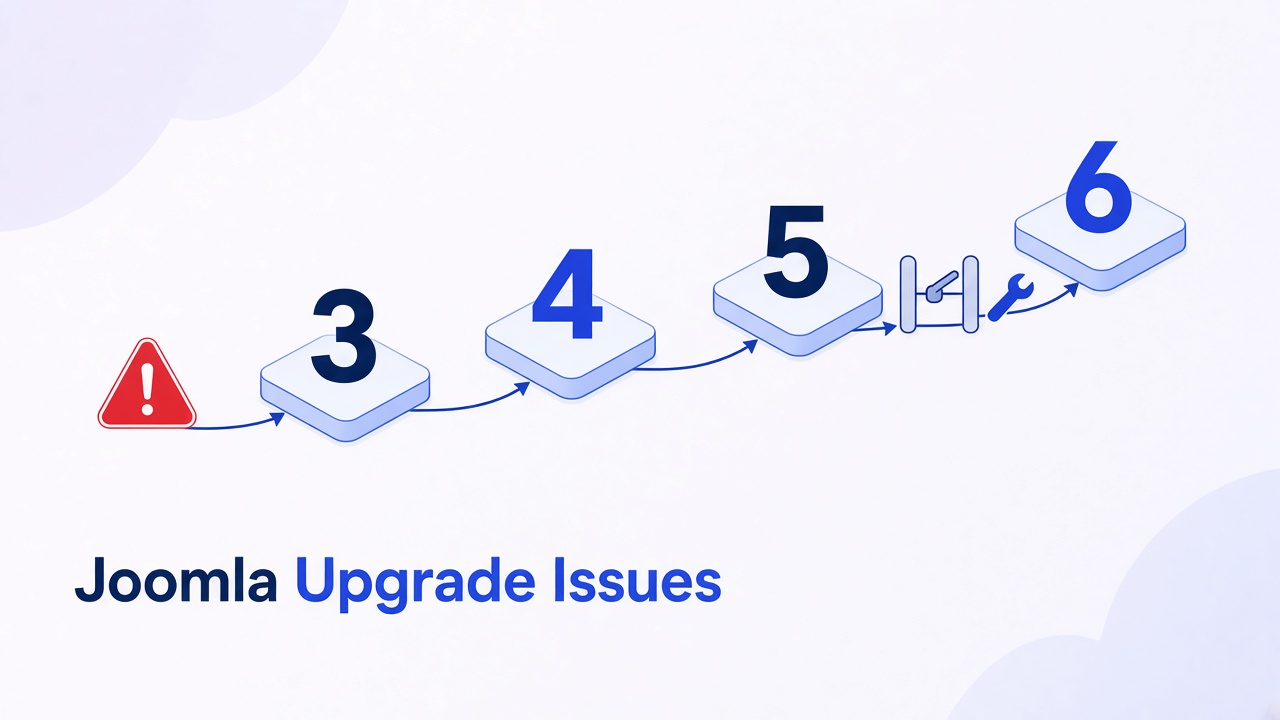
Joomla upgrade issues are failures that show up when you change major version (3.10 to 4, 4.4 to 5, or 5.4 to 6), not ordinary patch updates. The usual causes are an extension or template still calling removed classes, PHP or the database below the target floor, a schema step that never ran, or the two Behaviour – Backward Compatibility plugins set the wrong way round on the 5.4 to 6 hop. A blank page after the files copy is a PHP fatal. Fix the fatal. Do not click update again.
Most upgrade guides repeat “back up, run Pre-Update Check, click update.” This one is built from the Joomla 6.1.0 source and the issue tracker: which plugin must be off and which on before Joomla 6 will even offer the update, what those plugins actually restore (441 legacy class aliases, and not JRequest), the SQL that gets you back into a locked administrator, the exact schema record to repair when Maintenance → Database is empty, and where the updater writes its log. If the updater cannot download the package at all, that is a different problem: how to update Joomla and fix update errors.
What you will learn
Which symptoms mean an extension, a template, PHP, the schema, or a compatibility plugin
The only safe hop order: 3.10 to 4.4, then 5.4, then 6, and why 6 refuses to start from anything else
Current PHP and database floors for Joomla 5 and 6
The two-plugin gate for Joomla 6 (compat off, compat6 on) and the SQL to undo a lockout
What Behaviour – Backward Compatibility 6 restores, measured from the plugin’s own class map
Joomla 6 API removals that break extensions, with the replacement for each
How to repair #__schemas when Maintenance → Database shows nothing to fix
How to reinstall core files without restoring a backup
Joomla 6.2 update problems reported since 13 October 2026, and their fixes
When to stop and run the jump on staging instead of the live site
Issue map
What you see
Usual cause
Fix
White screen or 500 right after the upgrade
PHP fatal in an extension, template, or .htaccess
Read the host error log and administrator/logs/joomla_update.php. Disable that extension. See the 500 guide if the log mentions rewrite
Class “JTable”, “JPlugin”, “JFactory”, or “JText” not found
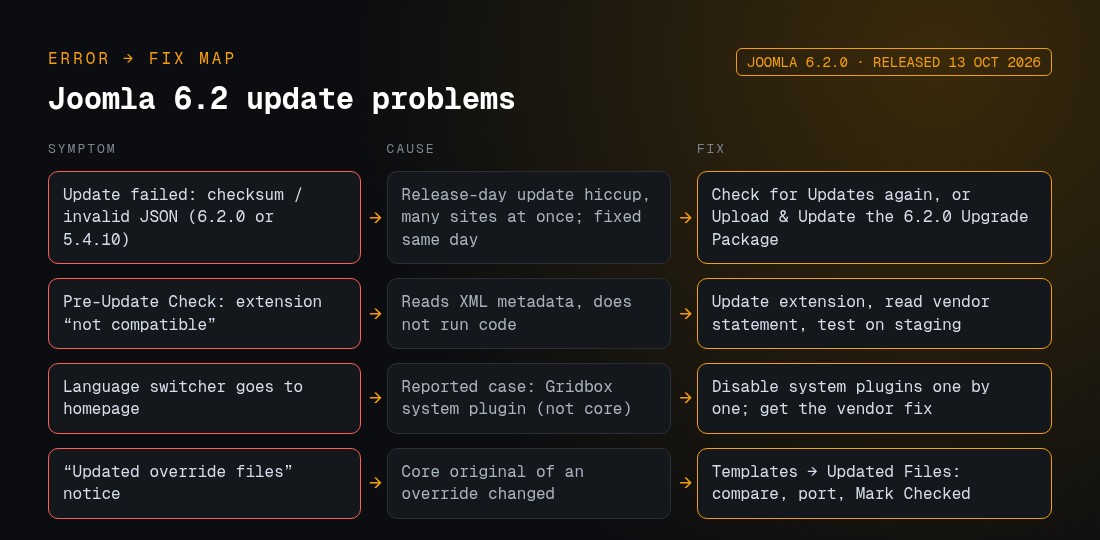
Most Joomla 6.2 update problems reported so far are not Joomla core bugs. Four came up in the first days: a checksum or JSON error that was fixed on release day, “not compatible” warnings that can be false, a language switcher fault traced to a third-party plugin, and the normal override notice. A fifth, a Smart Search error when saving articles, is still unresolved, but disabling one plugin works around it. Joomla 6.2.0 “Mwezi” was released on 13 October 2026, the same day as Joomla 5.4.10 (official announcement). It is a minor release on the 6.x line, so the 6.x floors still apply, including PHP 8.3.0 or newer. For what 6.2 adds, see what’s new in Joomla 6.x.
Symptom after clicking Update
Cause found
First fix
Update fails with a missing checksum or JSON error
Affected many sites on release day and cleared within hours. Your site was not the cause
Check for Updates again. If it still fails, use Upload & Update with the 6.2.0 package
Pre-Update Check lists extensions as not compatible
The check reads the extension’s metadata. It does not run its code
Update the extension, read the vendor’s 6.2 statement, test on staging
Language switcher links go to the other language’s homepage
In the reported case, the Gridbox system plugin. Not reproduced on core Joomla
Disable system plugins one at a time on staging, then get the vendor’s fix
Notice that overridden files have been updated
Normal. The core file behind a template override changed
Templates → Updated Files: compare, port the changes, Mark Checked
Saving an article shows “The image file does not exist”; Smart Search indexing returns a server error
Not confirmed yet. Only happens while the Smart Search – Content plugin is enabled
Disable Smart Search – Content until a fix ships, then re-enable it and rebuild the index
Why does the Joomla 6.2 update fail with a missing checksum or JSON error?
Symptom: on 13 October 2026, clicking Update to 6.2.0 failed with a missing checksum and a JSON error. Another user saw the same error on the 5.4.10 update package (Joomla forum thread).
Cause: it hit many sites at the same time and went away without any change on those sites. The thread starter reported “Seems to be fixed now” about an hour and a quarter later, and the topic is marked solved. The project has not published a cause, so treat it as a release-day problem on the update side, not on your site.
Fix:
Back up the site first.
Open System → Update → Joomla and click Check for Updates, then try again.
If it still fails, download the 6.2.0 Upgrade Package from downloads.joomla.org and use the Upload & Update tab on the same screen. In the forum thread, uploading the downloaded ZIP worked.
When to get help: the uploaded package also fails, or the update stopped halfway. Start with Step 6: Reinstall core files.
Pre-Update Check says my extensions are not compatible with 6.2. Is that true?
Symptom: before the update, Joomla lists extensions as not compatible. One report listed Community Builder plugins such as CB Auto Actions, CB AntiSpam, CB Gallery and Content – Community Builder.
Cause: the check reads the compatibility information the developer published. It does not run the code. Community Builder’s developer said their extensions are compatible with Joomla 6 and are flagged because they keep backward-compatibility code for Joomla 4 and 5, and that “the compatibility check isn’t very reliable” (Joomlapolis forum). That statement covers their extensions only. Joomla 6.2 also changed the pre-update check for the compatibility plugins, in the browser and in the CLI (pull requests #47807 and #47814).
Fix:
Update each flagged extension to its latest build.
Look for the vendor’s own statement or changelog about Joomla 6.2.
Update a staging copy and test the features those extensions power.
Treat a warning as false only when the vendor confirms it. What each label means is explained in Step 7.
Why does my language switcher go to the homepage after updating to 6.2?
Symptom: on a multilingual site updated from 6.1.4 to 6.2.0, the language switcher links to the other language’s homepage instead of the associated page. Associations are still in place, and restoring 6.1.4 brings the old behaviour back (issue #48618).
Cause: this is not a confirmed Joomla core bug. A Joomla maintainer could not reproduce it on a clean 6.1.4 site updated to 6.2.0. The reporter’s site uses Gridbox, and Balbooa support traced the problem to the Gridbox system plugin, which ran its setup in the plugin constructor. Their corrected file moves that setup to the onAfterInitialise event, and with it the switcher works on 6.2.0. The reporter called it an incompatibility between the Gridbox system plugin and Joomla 6.2.0, rather than a bug in Joomla.
Fix:
Check that the System – Language Filter plugin has Item Associations set to Yes, and that your associations still exist.
On staging, disable third-party system plugins one at a time, page builders first, and retest the switcher after each one.
If Gridbox is installed, get Balbooa’s fix. When the issue was reported, the corrected file came from Balbooa support (Balbooa forum topic) and a public update was not out yet.
If another plugin turns out to be the cause, report it to that plugin’s vendor.
When to get help: the multilingual site earns revenue, or no plugin turns out to be the culprit.
What does the “updated override files” notice mean after the update?
Symptom: after the update, Joomla tells you that files you have overridden in your template were changed by the update, with a list of files.
Cause: this is normal. Joomla tracks template overrides whose core original changed in an extension or Joomla update. Your override is not touched and still replaces the new core file, so it can miss the core changes (Joomla Magazine on override management).
Fix:
Go to System → Site Templates and open your template.
Open the Updated Files tab, which lists the overrides to review (Joomla docs).
Compare each override with the new core file and copy the changes you need into the override.
Select it and use Check Overrides → Mark Checked.
If the overrides came with a commercial template (Helix, T4 and similar), update the template from the vendor first, then mark them checked.
Do not mark everything checked without looking. The patterns to search for are in Step 8.
When to get help: you have many overrides, or the layout broke after the update.
Why does saving an article show “The image file does not exist” after updating to 6.2?
Symptom: after updating from Joomla 6.1.4 to 6.2.0, opening and saving an article in the administrator shows the error The image file does not exist. In the reported case it hit articles in several categories, including newly created ones. Starting a manual Smart Search index run also failed with an HTTP 500 server error that contained the same message. Saving worked before the update (joomla.de forum thread, in German).
What is known: the error only appears while the Smart Search – Content plugin is enabled. With that plugin disabled, articles save normally, and the Smart Search – Tag plugin on its own saved and indexed without errors. The reporter compared the Smart Search plugin files with the pre-update copy and found them identical. The cause has not been confirmed: the thread is still open, and as of 19 October 2026 we found no matching report on the Joomla issue tracker.
Workaround:
Back up the site.
Go to System → Plugins, filter by type finder, and disable Smart Search – Content.
Save an article to confirm the error is gone.
While the plugin is off, new and edited articles are not added to the Smart Search index, so site search results for articles fall behind. Leave the other Smart Search plugins as they are.
Once a fix is released, update Joomla, enable the plugin again and rebuild the index in Components → Smart Search → Index.
When to get help: site search is important to your visitors and you can’t leave article indexing off. Test on a staging copy, and if you can reproduce the error on a clean 6.2.0 install, report it on the Joomla issue tracker with the steps.
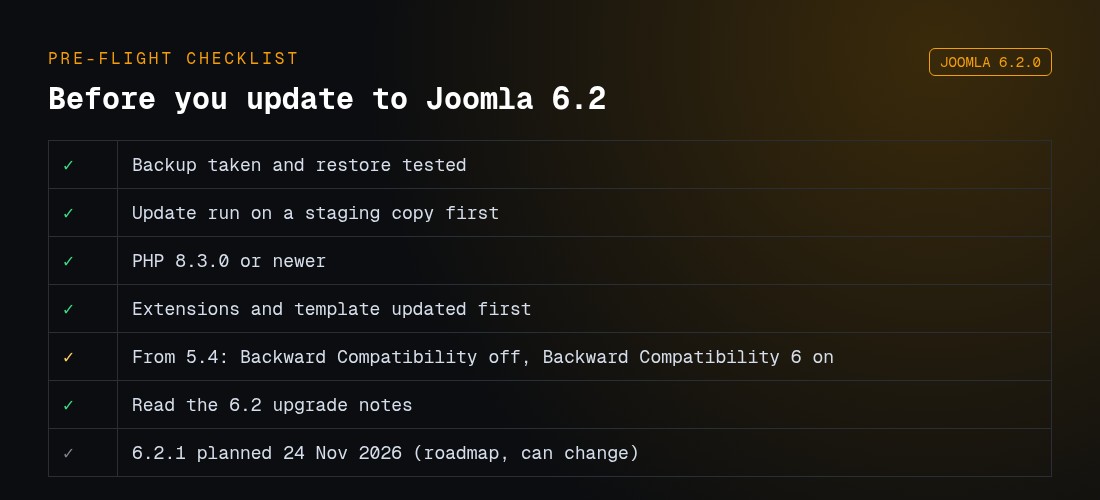
What should I check before updating to Joomla 6.2?
Take a backup and test that it restores.
Run the update on a staging copy first.
Run PHP 8.3.0 or newer.
Update extensions and the template before the core.
Coming from 5.4: Behaviour – Backward Compatibility off, Behaviour – Backward Compatibility 6 on (the Joomla 6 gate). The project calls 5.4 to 6.2 an upgrade, not a migration.
PHP 8.3+, supported database, compat off, compat6 on
Joomla 6
Ignoring Pre-Update Check
Joomla 6 only installs from 5.4 because 5.4 is where the compat6 plugin is shipped and pre-enabled, and where the updater gained the two-plugin check (pull request 45493). Earlier 5.x releases do not have it. Joomla 3 reached end of life in August 2023. Planning notes from the project: Joomla 3 to 4 step-by-step migration and Joomla 5 to 6 planning. Our path write-up: Joomla 3 to 4, 5, and 6.
MySQL 8.0.13+ or a current MariaDB. PostgreSQL 12+ if you use it
Joomla 6
8.3.0 minimum. 8.4 recommended
MySQL 8.0.13+ (8.4 recommended), MariaDB 10.6+ supported (10.4 is only the absolute floor), PostgreSQL 14+ supported
Joomla 6 also expects the PHP modules json, simplexml, dom, zlib, gd, and a database driver (mysqlnd, pdo_mysql, or pdo_pgsql). Recommended memory is at least 256M. Raise limits before the upgrade, not after a fatal: Joomla PHP.ini settings.
The Joomla 6 gate: two plugins, opposite settings
This is the part most guides get backwards. There are two plugins with almost the same name, and the updater checks both before it will offer Joomla 6 (the same check runs in php cli/joomla.php core:update):
Plugin
Element
Introduced
Purpose
Required state before 5.4 to 6
Behaviour – Backward Compatibility
compat
Joomla 5.0
Keeps Joomla 4 era code running on Joomla 5. Does not exist in Joomla 6
Disabled, and the site must still work with it off
Behaviour – Backward Compatibility 6
compat6
Joomla 5.4 (pre-enabled, inert on 5.x)
Keeps Joomla 5 era code running on Joomla 6
Enabled
The pre-update notice reads: “This plugin must be disabled and your site working correctly before updating.” The reasoning from the maintainers on issue #46299: if an extension still needs the Joomla 5 plugin, better that it fails on 5.4 where you can switch the plugin back on, than halfway through the 6 upgrade with a half-migrated database.
Click through the site and the administrator. If you get “Class JTable not found” or similar, an extension still depends on the Joomla 5 layer.
Re-enable compat to get the site back. If the administrator is dead, run this against the database (replace the prefix):
UPDATE jos_extensions SET enabled = 1
WHERE type = 'plugin' AND folder = 'behaviour' AND element = 'compat';
Find the extension. Search the plugins/, modules/, components/, and administrator/components/ folders for the class name in the error (for example JTable or JPlugin). A hit on JText inside the compat plugin itself is not your culprit.
Update, replace, or remove that extension. Disable compat again. When the site is clean with it off, take the backup and update to 6.
If you skipped the check (issue #46616) and landed on Joomla 6 with “Class JPlugin not found” on every page, the Joomla 5 plugin is gone; you cannot bring it back. Enable the 6 plugin instead:
UPDATE jos_extensions SET enabled = 1
WHERE type = 'plugin' AND folder = 'behaviour' AND element = 'compat6';
Then open the plugin in System → Plugins and confirm Classes Aliases is Yes. Extensions that needed the Joomla 5 plugin specifically will still fail and must be updated or removed. Settings detail: Behaviour – Backward Compatibility.
What Backward Compatibility 6 actually restores
We read the plugin shipped in Joomla 6.1.0 (plugins/behaviour/compat6). It has three switches:
Switch
Default on a fresh Joomla 6
What it loads
Errors it fixes
Classes Aliases
No (sites upgraded from 5.4 arrive with it on)
classmap.php: 450 aliases, 441 of them the old J* names (JFactory, JTable, JPlugin, JText, JHtml, JRoute…), plus extensions.classmap.php with 19 more
Class “JTable” / “JPlugin” / “JFactory” not found
Include Deprecated Classes
Yes
Maps JoomlaCMS onto the plugin’s classes/ folder: CMS Filesystem (File, Folder, Path, Stream, Patcher), CMS Input (Input, Cookie, Files, Json), BaseApplication and the CLI application classes. Also defines JPATH_PLATFORM
Class “JoomlaCMSFilesystemFile” not found, “JoomlaCMSInputInput” not found, undefined constant JPATH_PLATFORM
Removed Assets
Yes
Empty stubs for four Web Asset Manager entries removed in 6 (wcpolyfill, chosen)
“Unsatisfied dependency” or unknown asset exceptions from extensions that still call Joomla 5 assets
For contrast, Joomla 3.10.12 shipped 377 aliases in libraries/classmap.php. Joomla 4 kept them in core, Joomla 5 moved them into the compat plugin, Joomla 6 moved them into compat6, and the project intends to delete them in Joomla 7. An extension that still says JFactory::getApplication() in 2026 is living on a plugin with a published end date. JRequest is not in any of these maps; it was removed outright in Joomla 4.
Run that hop on a staging copy. Promote it only after the homepage, login, one form, and checkout (if any) work.
Read the known issues page for the exact target release before you start, for example Joomla 6.0.3 known issues. A documented regression is not your bug to debug.
Step 2: Capture the real error
Turn on Joomla debug only on staging: Global Configuration → System → Debug System, and set Error Reporting to Maximum.
On production, leave display_errors off. Read the host PHP log and the updater’s own log at administrator/logs/joomla_update.php (the path follows Global Configuration → System → Path to Log Folder). Its last line tells you whether the run died during download, extraction, SQL, or cleanup.
Copy the first fatal line: class name, file path, and line number. Later fatals are often fallout.
If System Information shows PHP below the floor for your target, the upgrade will fail or boot into fatals. Ask the host to switch PHP, then retest extensions on that PHP version before you change Joomla. A site that runs on PHP 8.0 cannot move to Joomla 6 until PHP is 8.3 or newer.
Same for MySQL 5.7 or a very old MariaDB. Move the database into the supported range, confirm utf8mb4, then upgrade Joomla.
Step 4: Repair the schema
If you can still open the administrator, go to System → Maintenance → Database.
Select the Joomla CMS entry (and any extension that shows problems).
Click Update Structure.
Reload the site. If the error was “unknown column” or “table doesn’t exist” and it is gone, you are done with this class of issue.
If the administrator will not load, restore the backup. Do not keep launching the updater on a half-migrated schema.
Step 5: Repair #__schemas when Database shows nothing
Some migration tools and hand-built databases leave #__schemas without a row for core. Maintenance → Database then lists nothing, and the updater refuses to run because it cannot tell which SQL files have been applied (issue #38594, procedure in Fix Database Table Structure NOT Up to Date).
In the database, find the extension_id of the row in #__extensions where name = 'files_joomla'.
List administrator/components/com_admin/sql/updates/mysql/ (or postgresql/) and take the highest file name. On Joomla 6.1.0 that is 6.1.0-2026-03-13.sql. Do not copy that value onto a different version; read your own folder.
Insert the row, with your prefix and your values:
INSERT INTO jos_schemas (extension_id, version_id)
VALUES (700, '6.1.0-2026-03-13');
Reload System → Maintenance → Database. Joomla now shows the core entry and probably some structure problems. Click Update Structure.
Step 6: Reinstall core files without a full restore
When the log shows the update died during extraction, half the core files are new and half are old. You do not need to roll back the database for that. System → Update → Joomla → Upload & Update accepts the full installation package of the version you are already on and re-copies every core file. Download the matching Full Package from the Joomla downloads page, upload it, and let it finish. Then run Step 4 once more.
Step 7: Disable the extension that crashed
When the log names a file under /plugins/, /modules/, /components/, or /templates/ that is not Joomla core:
Prefer the administrator: System → Manage → Extensions, disable that extension, clear cache.
If you cannot log in, rename that extension folder over FTP or SFTP so Joomla stops loading it.
Or set enabled = 0 for that row in #__extensions. Match element and folder, not a guess.
Install a build made for the new major, or replace the extension. Re-enable only after that.
Pre-Update Check reads the developer’s compatibility tag. It does not execute the code. The labels mean exactly this: “Compatible” is the developer’s claim, “Update Required” means a newer build declares the target version, “Missing Compatibility Tag” and “Update Information Unavailable” mean nobody has told Joomla anything. An extension can be green and still fatal on your overrides.
Step 8: Repair the template and layout overrides
Joomla 4 replaced Bootstrap 2 and MooTools with Bootstrap 5 and Web Asset Manager. A Joomla 3 template, or a templates/YOUR_TEMPLATE/html/ override copied forward, will break layout, module chrome, or the whole page.
Set the site template to Cassiopeia (System → Site Templates). If the site renders, the CMS is fine and the old template is the issue.
Update the commercial template (Helix, T4, Gantry, and similar) to a release built for your Joomla major.
Diff layout overrides against the new core layouts. On the 6 hop, grep overrides for ->get(' on items, $this->db, and $app in plugin layouts (table above). Old overrides need a rewrite, not a file copy.
Put the real template back only after a full click-through.
Step 9: Restore SEF without taking the site down
A major upgrade often rewrites .htaccess or leaves “Use URL Rewriting” on while the server still rejects Options or RewriteRule. Symptom: homepage maybe works, every other URL is a 500 or a 404.
Rename .htaccess to htaccess.bak so the site boots.
Turn off Use URL Rewriting until the new file is valid.
Confirm redirects you added by hand (www, HTTPS, old menu aliases) still exist. A fresh .htaccess drops them.
Step 10: Retest, then take the next hop
Homepage, login, one article, one contact or checkout, and the administrator, in Chrome and Firefox at least.
System → Update → Extensions, so third-party code matches the new core.
Language packs. An English core with a stale translation can hide menu types.
Clear Joomla cache and any host or CDN cache.
Keep the pre-upgrade backup until the next business day.
Only then plan the following major, on staging again. The Joomla Next channel will start announcing 7.x the same way it announced 6.
VirtueMart, K2, and page builders
These fail more often than core articles:
VirtueMart: install the VirtueMart build that declares your target Joomla major before you switch the core. A Joomla 3 cart on Joomla 5 will fatal in the shop, not in the updater.
K2: treat it as a migration. Many K2 sites need a content move, not an in-place upgrade.
Helix, SP Page Builder, Quix, Gantry: update the builder to the vendor release for that Joomla version, on staging, before the core hop.
Anything with cli/ scripts or cron: the CMS CLI application classes are gone in 6. Those jobs need console plugins or the compat6 Include Deprecated Classes switch until the vendor ships one.
When to stop clicking Update
Hire a staged upgrade if any of these are true:
You are still on Joomla 3 and the business cannot sit on a broken staging copy
Pre-Update Check lists extensions you cannot replace
Disabling the Joomla 5 compat plugin on 5.4 breaks the site and you cannot find which extension
Two attempts already left the schema or the administrator broken
Checkout, memberships, or a custom component is the revenue path
Infyways runs those jumps from $149, with a compatibility audit within 12 hours. Start at Joomla Upgrade Services.
What thinner articles leave out
Topic
Typical post
This guide
Compatibility plugins
“Enable the compatibility plugin”
Two plugins, opposite required states, the updater code that checks them, and the recovery SQL for each
What compat restores
Not stated
Measured from Joomla 6.1.0: 441 J* aliases, CMS Filesystem and Input classes, four asset stubs, and the switch that defaults to No
JRequest
“Enable compatibility”
Removed in 4, restored by nothing, must be rewritten
Joomla 6 removals
Link to the manual
Ten items mapped to the fatal you will see and the one-line replacement
Schema
“Click Update Structure”
What to do when the Database page is empty, with the exact 6.1.0 SQL filename
Half-copied files
“Restore backup”
Upload & Update with the same version reinstalls core files
Logs
“Check the logs”
administrator/logs/joomla_update.php and what its last stage means
Pre-Update Check
Treated as a verdict
What each label actually means (developer metadata, not execution)
Key takeaways
Upgrade issues are major-version breaks. Patch updates use the other guide.
Hop order is 3.10, then 4.4, then 5.4, then 6. Joomla 6 only starts from 5.4.
Joomla 6 needs PHP 8.3 or newer. Joomla 5 needs PHP 8.1 or newer.
Before the 6 hop: Behaviour – Backward Compatibility off, Backward Compatibility 6 on, and the site working with that combination on 5.4.
Backward Compatibility 6 restores 441 legacy class aliases and the old Filesystem and Input classes. It does not restore JRequest, and Joomla 7 will remove it.
Read the first fatal and joomla_update.php. Disable that extension. Then fix schema, template, and .htaccess.
Empty Maintenance → Database means a missing #__schemas row, not a healthy site.
Prove the hop on staging. Keep the backup until the live site has been quiet for a day.
Frequently asked questions
What are the most common Joomla upgrade issues?
Incompatible extensions, old templates and layout overrides, PHP or database versions below the target, an unfinished database schema, and the two Behaviour – Backward Compatibility plugins set the wrong way round on the way to Joomla 6.
Why is my site blank after a Joomla upgrade?
A PHP fatal is hiding the page. Read the host error log and administrator/logs/joomla_update.php, disable the extension or template named there, and do not run the updater again until the administrator loads.
Can I upgrade from Joomla 3 directly to Joomla 6?
No. Move 3.10 to 4.4, then to 5.4, then to 6, each hop tested on staging. Joomla 6 is only offered from 5.4.
Which compatibility plugin must be on for Joomla 6?
Behaviour – Backward Compatibility 6 must be enabled. Behaviour – Backward Compatibility (the Joomla 5 one, no number) must be disabled and the site must work without it before you update.
The site broke after I disabled Backward Compatibility on 5.4. What now?
Re-enable it (from the plugin list, or with UPDATE on #__extensions where element = ‘compat’) and search your extensions for the class named in the error. Fix or remove that extension, then disable the plugin again.
I am on Joomla 6 and every page says Class JPlugin not found. How do I recover?
Enable Backward Compatibility 6 with UPDATE on #__extensions where element = ‘compat6’, then set its Classes Aliases option to Yes. Extensions that needed the Joomla 5 plugin itself must be updated or removed.
Does the backward compatibility plugin fix every old extension?
No. In Joomla 6.1.0 it restores 441 legacy class aliases, the old CMS Filesystem and Input classes, and four asset stubs. It does not restore JRequest or anything removed in Joomla 4.
What PHP version do I need?
Joomla 5 needs PHP 8.1 or newer. Joomla 6 needs PHP 8.3.0 or newer, with 8.4 recommended. Details are in the Joomla technical requirements.
How do I fix database errors after upgrading?
Open System → Maintenance → Database and run Update Structure. If that page is empty, insert the missing #__schemas row for files_joomla with the newest SQL file name from com_admin/sql/updates. If the administrator will not load, restore the backup.
Why do extensions break when Joomla itself updated cleanly?
Core files can be new while an extension still calls classes Joomla 6 moved or removed: CMS Input, CMS Filesystem, BaseApplication, JPATH_PLATFORM, or CMSObject getters. Update or replace that extension, or disable it until a compatible build exists.
Is it safe to upgrade the live site?
Patch updates are usually safe after a backup. Major upgrades should be proven on staging first.
Why does the Joomla 6.2 update fail with a checksum or JSON error?
That error hit many sites on release day, 13 October 2026, and cleared the same day. If it still fails, download the 6.2.0 Upgrade Package and use Upload & Update.
Joomla says my extensions are not compatible with 6.2. Should I stop?
Not necessarily. The check reads the developer’s compatibility metadata, and some vendors, such as Community Builder, say their extensions are flagged falsely. Update them, check the vendor’s statement, and test on staging.
After updating to 6.2, my language switcher goes to the homepage. Why?
In the reported case (issue #48618) the cause was a third-party system plugin, Gridbox, not Joomla core. Disable system plugins one by one to find yours, then get that vendor’s fix.
Saving an article in Joomla 6.2 says “The image file does not exist”. What can I do?
Disable the Smart Search – Content plugin in System → Plugins. In the reported 6.1.4 to 6.2.0 case, that stopped the error. The cause is not confirmed yet. Turn the plugin back on and rebuild the Smart Search index once a fix is released.
What does “updated override files” mean after a Joomla update?
Core files that your template overrides replace have changed. Review each one under Templates → Updated Files, copy over the changes you need, and mark it checked.
Is there a Joomla 6.2.1 fix?
Not yet. 6.2.1 is planned for 24 November 2026 on the Joomla roadmap, and only 6.2.1-dev nightly builds exist, for testing only.
Can I update from Joomla 5.4 straight to 6.2?
Yes. The project calls 5.4 to 6.2 an upgrade, not a migration. Disable Behaviour – Backward Compatibility and enable Behaviour – Backward Compatibility 6 first.
Most Joomla books on the market were written for Joomla 3, which reached end of life in August 2023. Menus, templates and the administrator changed completely in Joomla 4, so those books now teach screens you will not find. The fastest way to learn Joomla 5 and 6 is the free official material plus a test site.
Short answer: To transfer Joomla to another server, either (1) back up the site with Akeeba Backup and restore it on the new server with Akeeba Kickstart, which is the easiest and safest way, or (2) move it manually: copy all files, export and import the database, then update configuration.php with the new database details and paths. Test the site before you switch DNS. The steps below work for Joomla 4, 5 and 6.
Before you start: pre-move checklist
Check that the new server meets your Joomla version’s requirements (PHP version and extensions, MySQL/MariaDB version). Joomla 6 needs PHP 8.3 or later. See Joomla PHP settings.
Note the old server’s PHP version and key settings (memory_limit, upload_max_filesize, max_input_vars).
Create an empty database and a database user on the new server.
Lower your DNS TTL (for example to 300 seconds) 24 hours before the switch.
Tell editors to pause content changes during the final copy.
Method 1: Akeeba Backup and Kickstart (recommended)
On the old site, install Akeeba Backup and run Backup Now with a full-site profile. Our Joomla backup guide covers the settings.
Download the .jpa archive and kickstart.php (from Akeeba’s site).
Upload both files to the empty web root on the new server.
Open https://your-new-server/kickstart.php and extract the archive.
The restoration wizard (ANGIE) starts. Enter the new database host, name, user and password, and check the site paths.
Finish the wizard, then delete the installation folder and kickstart.php when prompted.
Log in to the administrator area and test (see the checklist below).
Method 2: Manual transfer (files + database)
Step 1: Copy the files
Download the whole Joomla folder (including hidden files such as .htaccess) by SFTP, or compress it on the old server and download one archive. Upload it to the new web root and extract it there.
# On the old server (SSH)
tar -czf site.tar.gz -C /path/to/joomla .
# On the new server
tar -xzf site.tar.gz -C /path/to/new/webroot
Step 2: Export and import the database
Use phpMyAdmin (Export → SQL, then Import on the new server) or the command line for larger sites:
Edit configuration.php in the Joomla root and change these values to match the new server:
public $host = 'localhost';
public $user = 'newuser';
public $password = 'newpassword';
public $db = 'newdb';
public $dbprefix = 'abc_';   // only if the prefix changed
public $log_path = '/path/to/new/webroot/administrator/logs';
public $tmp_path = '/path/to/new/webroot/tmp';
public $live_site = '';      // normally empty
Step 4: Fix permissions and .htaccess
Typical permissions are 755 for folders and 644 for files (configuration.php can be 444 once it works). If you use SEF URL rewriting, make sure the new server allows .htaccess overrides (Apache/LiteSpeed) or has the equivalent nginx rules. See our Joomla .htaccess guide.
Switch DNS and go live
Test the new server before DNS changes by adding the domain to your computer’s hosts file.
Install the SSL certificate on the new server (or let your host issue one after DNS points there).
Run a final backup/restore or database sync if content changed.
Update the DNS A/AAAA records to the new server IP.
Keep the old server running for a few days in case of rollback.
Post-move checklist
Check
How
Front end and admin load over HTTPS
Visit as a guest and log in to /administrator
System Information shows the right paths and PHP version
System → System Information
Folder permissions are writable where needed
System Information → Folder Permissions
Emails send
System → Global Configuration → Server → Send Test Mail
Caches cleared
System → Clear Cache (plus any server/CDN cache)
SEF URLs, redirects and robots.txt work
Open a few deep links; check Search Console
Scheduled tasks/cron jobs recreated
Recreate backups and any CLI/cron jobs on the new host
Common problems after a Joomla server move
Problem
Fix
“Error displaying the error page” / database connection error
Check the $host, $user, $password, $db and $dbprefix values
Blank page or HTTP 500
Check the PHP version and extensions, then the server error log; temporarily set Error Reporting to Maximum
“Unable to write to log/tmp”
Fix $log_path and $tmp_path, and the folder permissions
404 on every page except home
Enable .htaccess (or nginx rules) for URL rewriting, or switch URL Rewriting off temporarily
Mixed-content warnings
Search and replace the old http:// URLs in content; set Force HTTPS in Global Configuration
Prefer to have it done for you? Our Joomla support team can handle the move, including staging, the DNS switch and post-move checks.
Frequently asked questions
What is the easiest way to move a Joomla site to a new server?
Akeeba Backup plus Akeeba Kickstart. Make a full backup on the old server, upload the .jpa archive and kickstart.php to the new server, run Kickstart, and enter the new database details in the restoration wizard. It rewrites configuration.php for you.
Which configuration.php values must change after a move?
The database host, user, password and database name, the table prefix if it changed, the log and tmp paths ($log_path and $tmp_path) if the folder path changed, and $live_site if you had set it (usually it should be empty).
How do I move Joomla without downtime?
Lower the DNS TTL a day before, build and test the site on the new server using a hosts-file entry or a temporary URL, freeze content changes, run a final backup and restore, then switch DNS.
Why do I get a blank page or 500 error after moving Joomla?
Usually wrong database credentials, an unsupported PHP version on the new host, missing PHP extensions, wrong file permissions, or an .htaccess that the new server does not support. Turn on error reporting temporarily and check the server error log.
Do I need to reinstall Joomla on the new server?
No. Moving the files and the database (or using Akeeba Kickstart) keeps your existing installation, extensions and content.
Will moving servers affect my Google rankings?
Not if the domain and URLs stay the same and the site works over HTTPS straight away. Check that robots.txt, SEF/URL rewriting and redirects behave the same on the new server.
Joomla, one of the most popular content management systems (CMS) in the world, has recently released its latest version, Joomla 4.x. This release brings a lot of exciting new features and improvements that will benefit website owners and developers alike. In this blog, we will discuss some of the key new features of Joomla 4.x.
New Features in Joomla 4.x
Improved User Experience
Joomla 4.x has a new user interface that has been completely revamped to make it more user-friendly and intuitive. The new interface is also fully responsive, which means that it will adapt to different screen sizes, making it easier to use on mobile devices.
Better Accessibility
Joomla 4.x has improved accessibility features, making it easier for people with disabilities to use the CMS. This includes better keyboard navigation, improved contrast, and better support for screen readers.
Enhanced Security
Joomla 4.x has several new security features, including improved two-factor authentication, stronger password hashing, and better protection against cross-site scripting (XSS) and SQL injection attacks.
Better Performance
Joomla 4.x is faster and more efficient than its predecessor, Joomla 3.x. This is due to several performance improvements, including better caching and a new routing system that makes URLs more search engine-friendly.
New Media Manager
Joomla 4.x has a new Media Manager that allows you to manage your website’s media files more efficiently. You can now easily upload, organize, and edit images and other media files directly from the Media Manager.
Improved Multilingual Support
Joomla 4.x has improved multilingual support, making it easier to create multilingual websites. You can now translate content more easily, and the new language switcher module allows users to switch between languages with ease.
Better Custom Fields
Joomla 4.x has improved Custom Fields functionality, allowing you to create more complex and customizable forms. You can now add new field types, such as color pickers and date-time pickers, and create more complex field layouts.
New Installer
Joomla 4.x has a new installer that makes it easier to install and set up a new website. The new installer is faster, more streamlined, and more user-friendly, making it easier for beginners to get started with Joomla.
Conclusion
Joomla 4.x is a significant upgrade over its predecessor, Joomla 3.x. It brings a lot of new features and improvements that will benefit website owners and developers alike. With its improved user experience, enhanced security, and better performance, Joomla 4.x is a great choice for anyone looking to build a modern, powerful, and secure website. If you are currently using Joomla 3.x, it is highly recommended that you upgrade to Joomla 4.x to take advantage of its new features and benefits.
Joomla is a powerful and flexible content management system that can be used for a variety of websites, including eCommerce sites.
Whether you’re starting a new eCommerce site or looking to improve your existing one, there are many eCommerce extensions available for Joomla.
These extensions can help you enhance your website’s functionality and features. In this blog post, we will explore some of the best eCommerce extensions for Joomla.
VirtueMart
VirtueMart is a popular and powerful eCommerce extension for Joomla. It offers a wide range of features, including multiple languages and currencies, flexible pricing and tax options, and support for various payment and shipping methods. VirtueMart is also highly customizable, with many templates and extensions available to enhance your website’s functionality.
HikaShop
HikaShop is another popular eCommerce extension for Joomla, offering a range of features such as customizable checkout, advanced tax and discount rules, and integration with various payment gateways. HikaShop also offers a drag-and-drop interface for building and managing your product catalog, making it easy to add and update products.
J2Store
J2Store is a lightweight and user-friendly eCommerce extension for Joomla. It offers features such as customizable product options, support for multiple currencies and languages, and integration with various payment gateways. J2Store also offers a range of templates and extensions to enhance your website’s functionality.
DJ-Catalog2
DJ-Catalog2 is a powerful product catalog and eCommerce extension for Joomla. It offers features such as customizable product options, advanced search and filtering options, and support for multiple currencies and languages. DJ-Catalog2 is also highly customizable, with many templates and extensions available to enhance your website’s functionality.
MijoShop
MijoShop is a popular eCommerce extension that integrates OpenCart with Joomla, offering a range of features such as advanced product options, multiple currencies and languages, and integration with various payment gateways. MijoShop also offers a drag-and-drop interface for building and managing your product catalog, making it easy to add and update products.
In conclusion, these are some of the best eCommerce extensions for Joomla, each offering a range of features and functionality to enhance your website’s eCommerce capabilities. Whether you’re looking for a lightweight and user-friendly solution or a powerful and highly customizable eCommerce extension, there is an option available for you in Joomla. Choose the one that best suits your needs and start building your eCommerce website today!