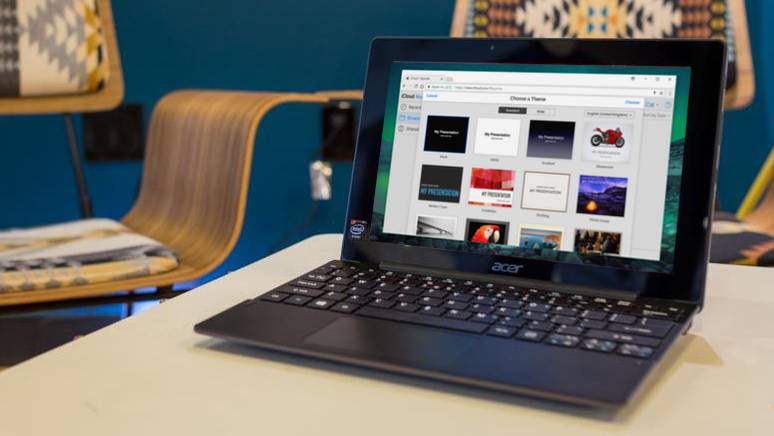
Slideshow templates are great for people who are not creative and don’t know how to design their slideshow video. The template usually comes in a set of scenes so you different design to use for presenting different forms of information in the slideshow. The following are 9 sites where you can download free slideshow templates.
SlidesCarnival
SlidesCarnival offers fully editable Google Slides and PowerPoint templates for business presentation. You must go to the All Templates category to find the slideshow templates. For each template, it provides details such as the number of slides, icons, can be used for what slideshow program, and the supported screen layout. There is the library of slideshow templates.
Envato Elements
Envato Elements has a collection of thousands of slideshow templates under the video templates category. You can find a lot of slideshow templates for Keynote, PowerPoint, Google Slides and After Effects on this site. You can preview it by pressing the thumbnail. On the left, you can filter the slideshow templates you are looking for by categories, applications supported, plugins required and minimum resolution. If you want to download a template, you must first create a free account with them. There is the library of slideshow templates.
Movavi
Movavi also publishes some free slideshow templates that you can download to use for your presentations. You can download the template directly onto your computer and start using it to design your slideshow. The template is compatible with Movavi Slideshow Maker. The template will only work correctly if you upload at least 15 images. There is the library of slideshow templates.
Canva
Canva is one of the best resources for free presentation slideshow templates. You can preview each scene that comes with the template. To use Canva free template, you must first sign up for a free account. There are lots of categories to choose from including creative, simple, education, cool, brand guidelines, product, marketing, and professional. There is the library of slideshow templates.
Slidesgo
Slidesgo offers a wide selection of free Google Slides and PowerPoint templates. You can browse the templates in several categories including business, education, and marketing. The templates are easy to edit by beginners. Along with the template, you also get access to 1000+ icons and editable graphics. There is the library of slideshow templates.
Biteable
Biteable also has a templates section where you can find a lot of slideshow templates. However, you can’t download the templates directly onto your computer. You must edit the video and then upload your photo to make the slideshow. After that, you will be able to download the finished slideshow to your computer. You must sign up for a free account to use the template at Biteable. There is the library of slideshow templates.
Renderforest
Renderforest offers a lot of slideshow templates that include multiple scenes. To use the template, you must first click on the thumbnail and then click the Create Now button. This will take you to the online designer tool where you can customize the template. You will be able to add scenes, video holders and logo animations. When you finish creating the slideshow, you can download it to your computer. You don’t need an account to use the free slideshow templates at Renderforest. There is the library of slideshow templates.
Slides Gala
Slides Gala is another popular resource for downloading Google and Powerpoint slideshow templates. The templates are open source so you can modify the design in any way you want. They do request that you put a link back to them when you download their free template. You can fully customize the template by changing the colour, text and photos. The template can also be exported to other formats like PDF and JPG. There is the library of slideshow templates.
Motion Array
Motion Array provides a lot of slideshow templates you can use in Adobe after Effects. On the left, you must select After Effects Templates and toggle the free switch to filter the results for free After Effects Templates. If you want to download a template, you simply click the download button with the down arrow. It will ask you to create a free account when you click the download button. The free templates do not include plugins. There is the library of slideshow templates.
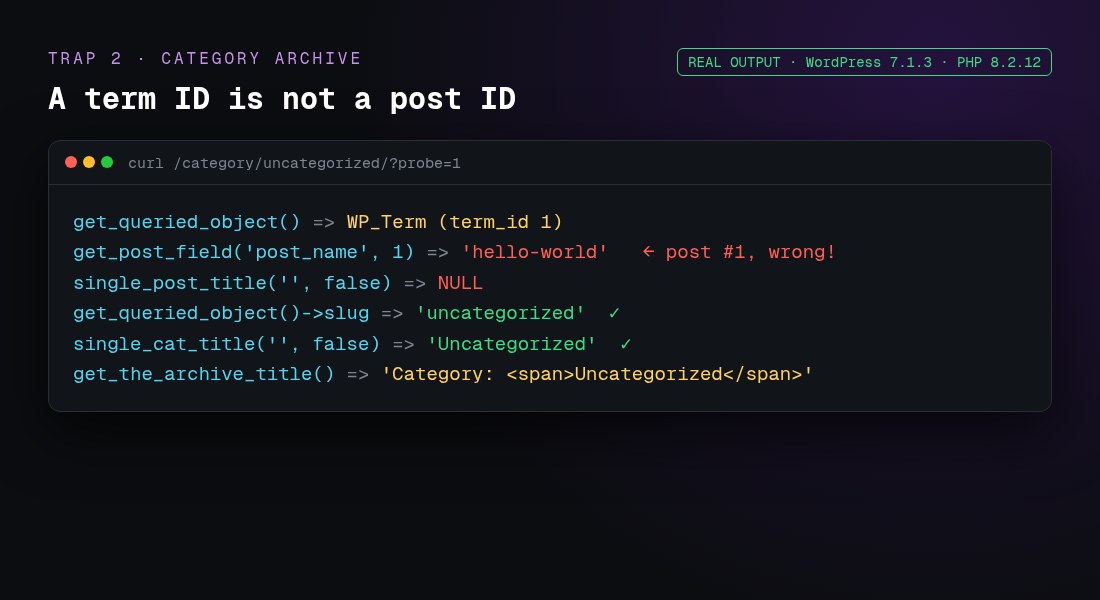
On category, tag and other term archives, use get_queried_object()->name or ->slug instead.
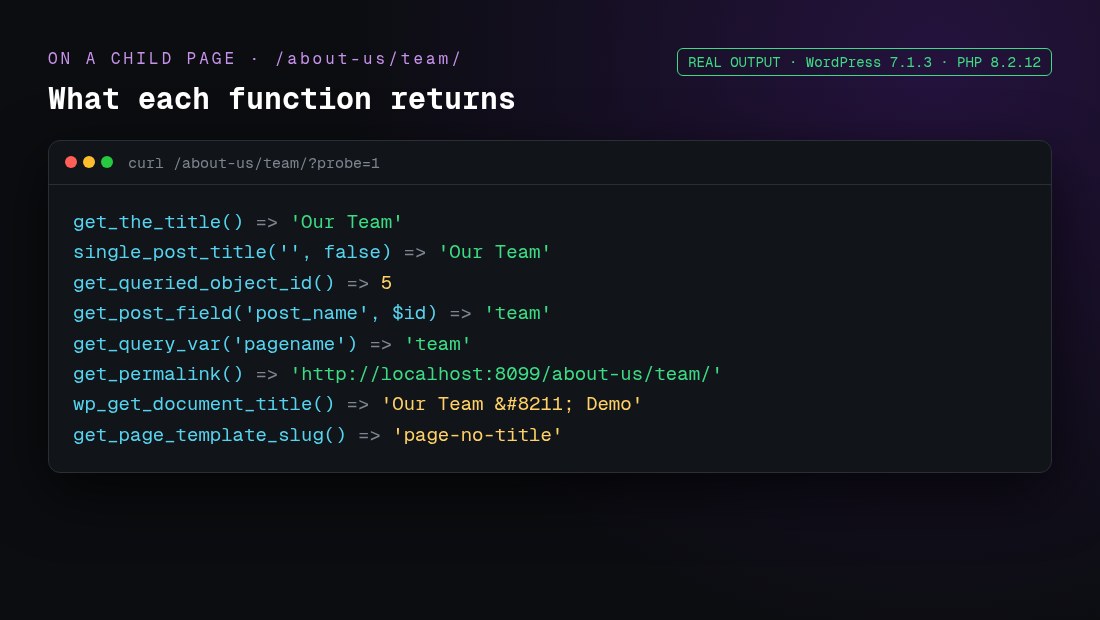
I tested every snippet below on a fresh WordPress 7.1.3 install (PHP 8.2.12, the Twenty Twenty-Five block theme) with a parent page, a child page, a posts page and a category archive. The images marked “real output” are what WordPress actually returned. The function descriptions are checked against the WordPress Code Reference.
Which function returns the page name, slug, ID or URL?
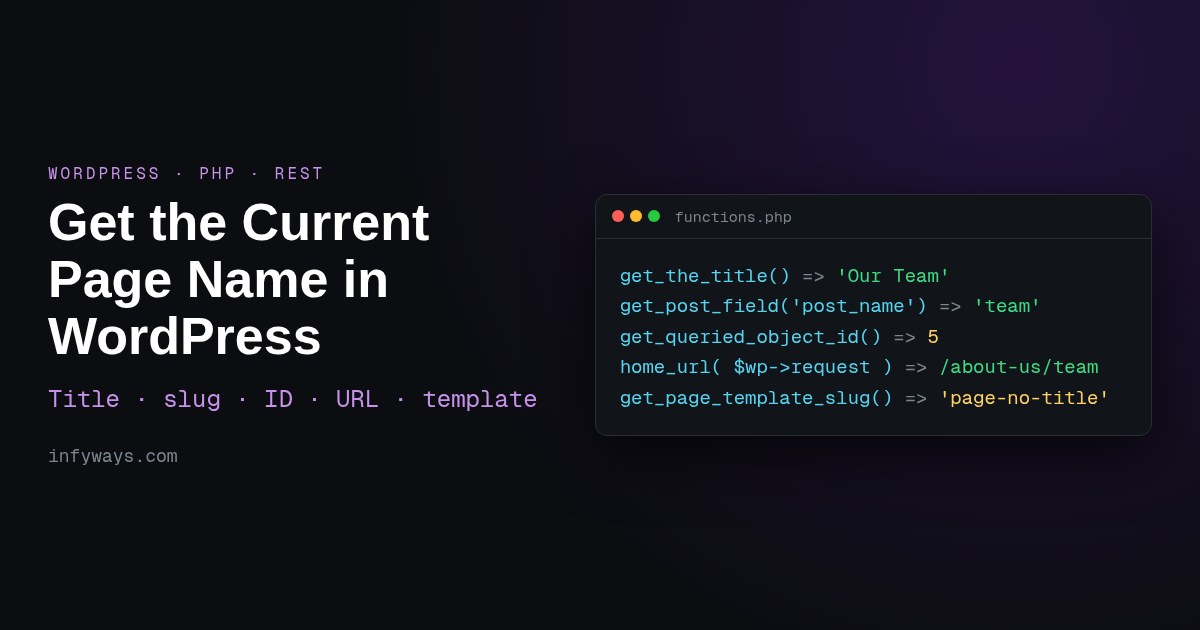
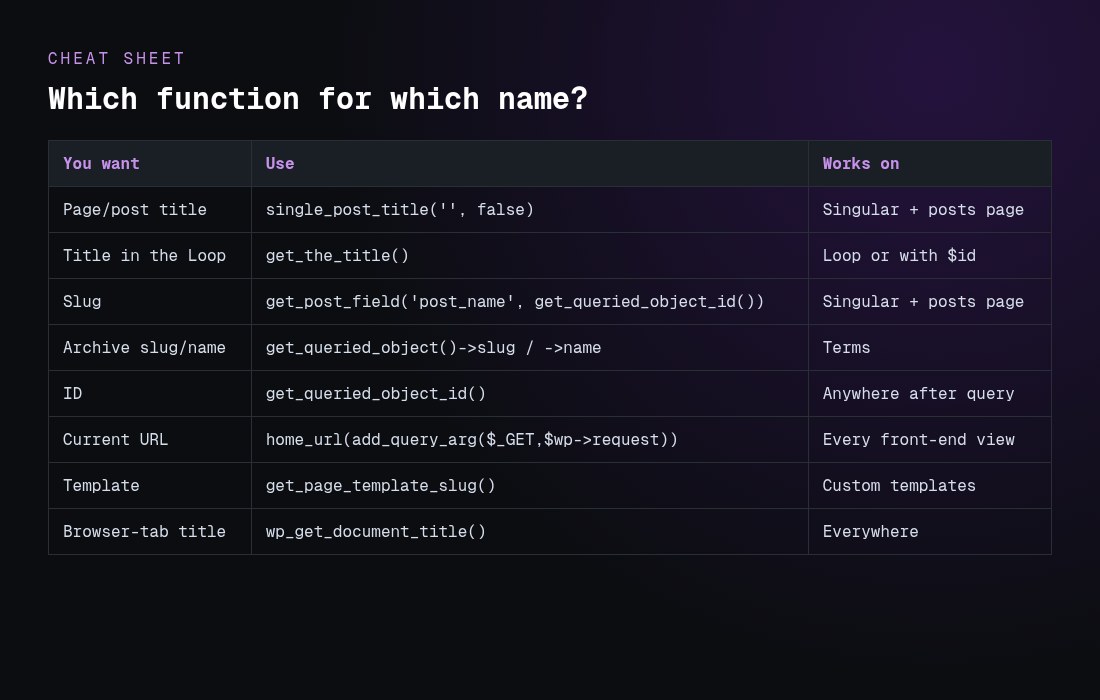
get_the_title() “retrieves the post title”. With no argument, it uses the global $post, so inside the Loop and on a single page or post it returns the right title:
<h1><?php echo esc_html( get_the_title() ); ?></h1>

// Any page by ID
echo esc_html( get_the_title( 42 ) );
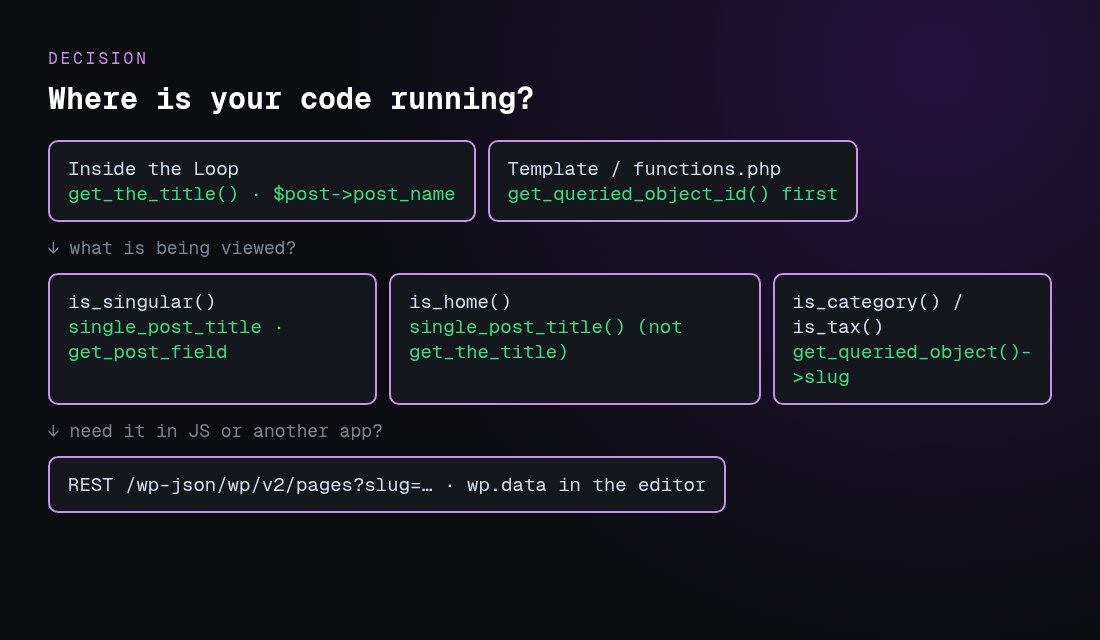
Outside the Loop, in header.php, a hook or a shortcode, use single_post_title(). It reads the queried object, not the Loop. Pass false as the second argument to get the value back instead of printing it:
$title = single_post_title( '', false );
For the browser-tab title (the <title> tag), use wp_get_document_title(). Since WordPress 4.1, themes should declare add_theme_support( 'title-tag' ) and let WordPress build the tag, instead of printing wp_title() manually.
How do I get the current page slug?
WordPress stores the slug in the post_name field. The reliable way to read it is:
Other options return the same value in the right context:
global $post; $post->post_name works inside the Loop or on a single view.
get_queried_object()->post_name works on singular views only.
get_query_var( 'pagename' ) works only for pages reached through pretty permalinks. In my test it was empty on the static front page and on single posts.
basename( get_permalink() ) returned ‘team’, but it depends on your permalink structure.
For a child page, the slug is only the last part (‘team’). To get ‘about-us/team’, use get_page_uri( get_queried_object_id() ). To get the parent page’s title, use get_the_title( wp_get_post_parent_id( get_queried_object_id() ) ).
How do I get the current page ID?
get_queried_object_id() “retrieves the ID of the currently queried object”. It’s the safest choice in templates and hooks because the Loop can’t change it. Inside the Loop, get_the_ID() gives the ID of the post currently being looped. On a category archive, get_queried_object_id() returns the term ID (see Trap 2 below).
How do I get the current page URL in WordPress?
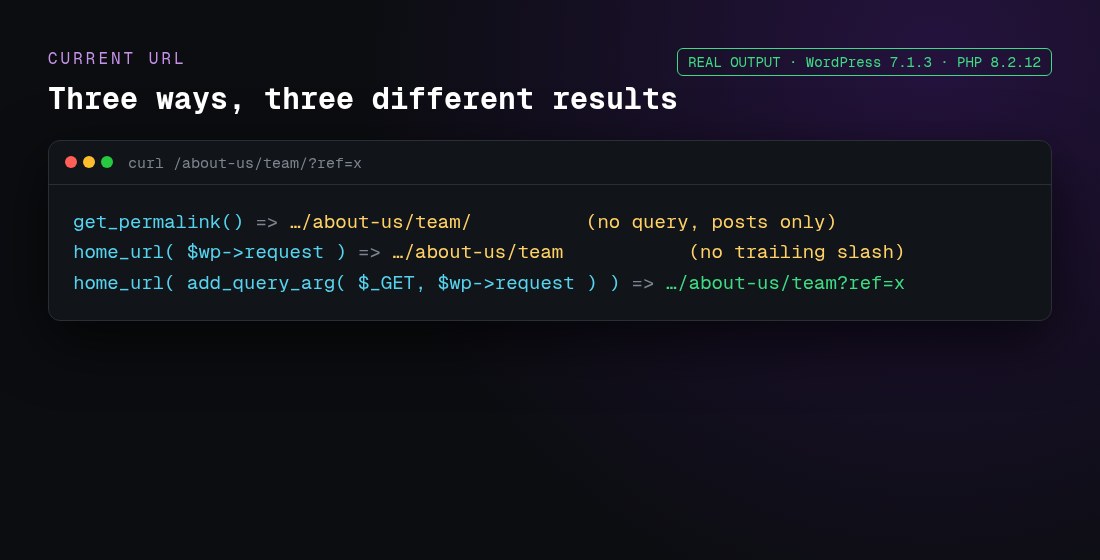
There are three common methods, and they don’t return the same thing:
// 1. Permalink of the current post or page (no query string, posts only)
$url = get_permalink();

// 2. Current path on any view, including archives (no trailing slash, no query string)
global $wp;
$url = home_url( $wp->request );

// 3. Current URL with the query string
global $wp;
$url = home_url( add_query_arg( $_GET, $wp->request ) );

echo esc_url( $url );
Method 3 works on archives, search and paginated views too. If you need the trailing slash that your permalinks use, wrap the path in trailingslashit(). The WordPress reference notes that add_query_arg() output is “not escaped by default”, so always pass it through esc_url() before you print it. $wp->request is only filled after WordPress parses the request (the parse_request step), so it’s empty very early, for example in plugins_loaded.
Why does get_the_title() return the wrong name?
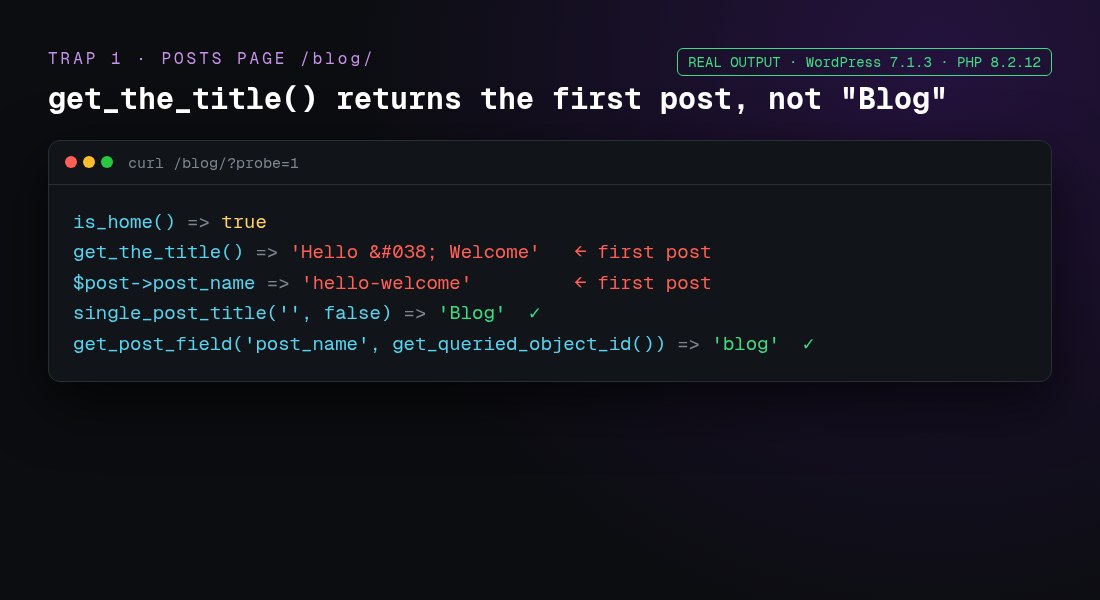
Trap 1: the posts page (is_home)
When Settings → Reading uses a page called “Blog” as the posts page, the global $post is the first post in the list. In my test, get_the_title() returned the first post’s title, not “Blog”:
Use single_post_title( '', false ), or get_the_title( get_option( 'page_for_posts' ) ).
Trap 2: archives return a term, not a post
On a category archive, get_queried_object() is a WP_Term, and get_queried_object_id() is a term ID. Passing that ID to get_post_field() silently returned the slug of post ID 1 (‘hello-world’):
With a static front page, get_query_var( 'pagename' ) was an empty string, but get_post_field( 'post_name', get_queried_object_id() ) returned ‘about-us’. Use the queried-object method there too.
Trap 4: HTML entities
get_the_title() returned 'Hello & Welcome', because it applies the the_title filters, which encode characters. For a raw value, for example in JSON or data attributes, use get_post_field( 'post_title', $id ) and escape it for the context. Use the_title_attribute() inside HTML attributes.
How do I check which page I’m on (is_page, is_home, is_front_page)?
if ( is_page( 'team' ) ) { /* slug, ID or title */ }
if ( is_page( array( 'about-us', 42 ) ) ) { /* any of these */ }
if ( is_front_page() ) { /* the homepage visitors see */ }
if ( is_home() ) { /* the posts page */ }
if ( is_singular( 'product' ) ) { /* a single CPT item */ }
In my test, on the static front page is_front_page() and is_page() were both true. On the “Blog” posts page, is_home() was true and is_page() was false. These conditionals only work after the main query runs, from the wp hook onwards, so don’t call them in functions.php outside a hook.
How do I get the page template name?
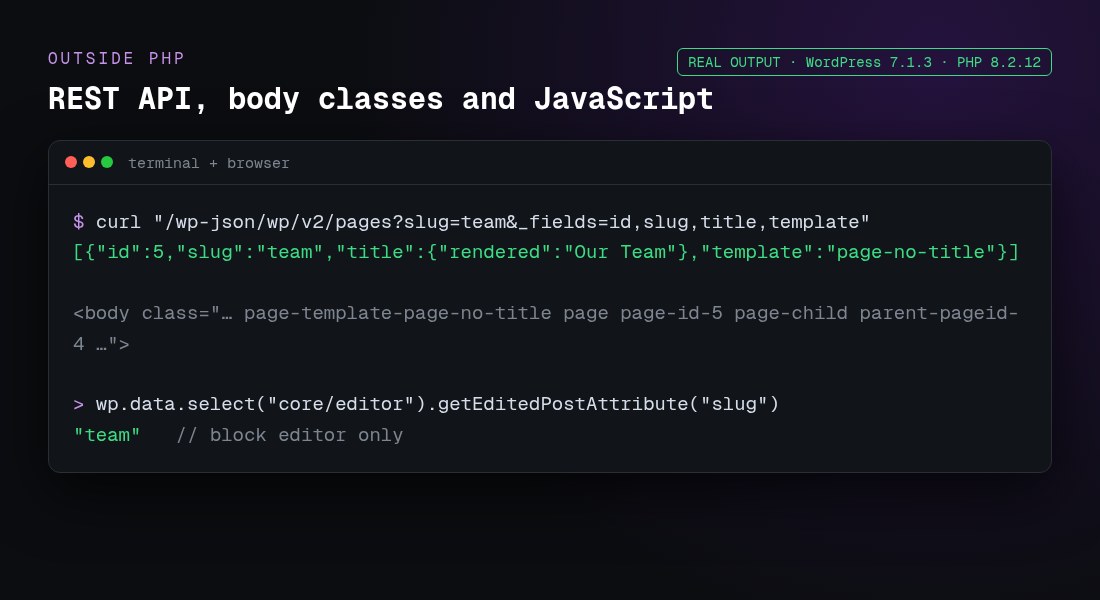
get_page_template_slug() “gets the specific template filename for a given post”. In a classic theme, it returns a file such as templates/full-width.php. In a block theme, it returns the template slug. My Twenty Twenty-Five test returned 'page-no-title'. It returns an empty string when the page uses the default template. WordPress also adds the template to the body classes (page-template-page-no-title), which is handy for CSS.
Can I get the page name with the REST API or JavaScript?
REST API:/wp-json/wp/v2/pages?slug=team&_fields=id,slug,title,template returned {"id":5,"slug":"team","title":{"rendered":"Our Team"},"template":"page-no-title"}. Use /wp/v2/posts for posts.
Front-end JavaScript: read document.title or window.location.href. You can also take the ID from the body class: document.body.className.match(/page-id-(\d+)/). My test page had page page-id-5 page-child parent-pageid-4.
Block editor:wp.data.select( 'core/editor' ).getEditedPostAttribute( 'title' ), or 'slug'. This works only in the editor, not on the front end.
Using get_the_title() or $post on the posts page or on archives. Use the queried object instead.
Passing a term ID from get_queried_object_id() to post functions.
Relying on get_query_var( 'pagename' ), which is empty on the front page, on posts and with plain permalinks.
Calling conditionals or $wp->request before the query runs. Hook into wp or template_redirect or later.
Printing values without escaping. Use esc_html(), esc_attr() or esc_url().
Using $_SERVER['REQUEST_URI'] alone. It duplicates the folder on subdirectory installs. home_url( $wp->request ) handles that.
Hard-coding wp_title() in new themes instead of using title-tag support and wp_get_document_title().
Frequently asked questions
What is the difference between page name and page title in WordPress?
The title (post_title) is the human-readable name, such as “Our Team”. The “name” (post_name) is the URL slug, such as “team”. Use single_post_title( '', false ) for the first and get_post_field( 'post_name', get_queried_object_id() ) for the second.
How do I get the page name outside the Loop?
Use single_post_title( '', false ) for the title and get_post_field( 'post_name', get_queried_object_id() ) for the slug. Both read the queried object, so the Loop can’t change them.
Why does get_the_title() show a post title on my blog page?
On the posts page, the global $post is the first post in the list. Use single_post_title( '', false ) or get_the_title( get_option( 'page_for_posts' ) ).
How do I get the current category name?
Use single_cat_title( '', false ) or get_queried_object()->name. For the slug, use get_queried_object()->slug. get_the_archive_title() adds a “Category:” prefix.
How do I get the full current URL including the query string?
Use global $wp; echo esc_url( home_url( add_query_arg( $_GET, $wp->request ) ) );. Use home_url( $wp->request ) for the path only.
How do I get the parent page’s name?
Use get_the_title( wp_get_post_parent_id( get_queried_object_id() ) ). For the full path, such as about-us/team, use get_page_uri().
Does this work in block themes and full site editing?
Yes. All the PHP functions here worked with Twenty Twenty-Five, a block theme. In block templates you’d usually use the Title block. Use PHP in a plugin, a render_callback or functions.php hooks.
How do I get the page template name?
Use get_page_template_slug( get_queried_object_id() ). It returns the file path in classic themes, the template slug in block themes, and an empty string for the default template.
Can I get the page slug with the REST API?
Yes. /wp-json/wp/v2/pages?slug=team finds a page by slug, and /wp-json/wp/v2/pages/5?_fields=slug,title,link returns the slug of page ID 5.
How do I get the current page name in JavaScript?
On the front end, use document.title, location.pathname or the page-id-N body class, or pass PHP values with wp_add_inline_script(). In the block editor, use wp.data.select( 'core/editor' ).getEditedPostAttribute( 'slug' ).
For a new Joomla 6 store in 2026, choose an actively maintained cart that already supports Joomla 6: HikaShop, J2Commerce 6, EShop or Phoca Cart.VirtueMart 4 does not run on Joomla 6. VirtueMart 5 does, but it is still a beta (released as 4.9.x). Pick the cart that fits your catalogue, your payment gateway and your migration path. Joomla 6.2, released on 13 October 2026, is the current version.
This guide compares the Joomla shopping carts that are still alive, using data we checked on the Joomla Extensions Directory (JED) and vendor sites in October 2026. It explains what is happening with VirtueMart, maps the US payment gateways each cart supports, and shows how to move a store safely. Need a hand? Tell us your cart, Joomla version and payment gateway. A senior engineer replies within 12 hours. Contact Infyways.
What is the best shopping cart for Joomla in 2026?
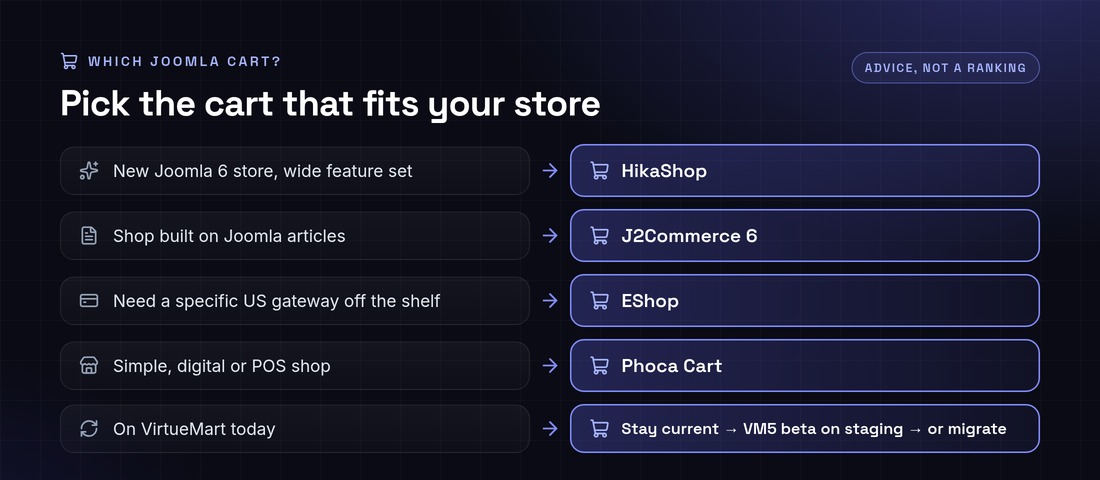
There is no single winner. Match the cart to the store:
New Joomla 6 store that needs a wide feature set: HikaShop. It is actively updated, supports J3 to J6, and ships Authorize.net and PayPal Checkout in the core.
A content-led shop built on Joomla articles: J2Commerce 6. It turns articles into products and is built natively for Joomla 6.
Many payment gateways off the shelf: EShop. Five gateways are built in, and the vendor sells more than 50 add-ons, including Stripe, Braintree and Square.
Simple, digital or point-of-sale shops: Phoca Cart. It is free and includes a POS view.
Running VirtueMart today: no need to panic. Read what’s going on with VirtueMart before you decide to stay, wait for VirtueMart 5, or migrate.
Joomla shopping cart comparison (October 2026)
Reviews, ratings, versions and compatibility come from each cart’s JED listing, checked on 16 October 2026. Ratings are the star rating shown on the JED. Built-in gateways come from vendor documentation.
Not recommended for new stores: Quick2Cart (JED lists J3 to J5 and no Joomla 6, last updated 15 July 2025), and older names such as MijoShop, jMarket and JomDirectory Cart, which have no Joomla 5 or 6 builds on the JED.
J2Commerce vs HikaShop: which should you choose?
J2Commerce 6
HikaShop
Product model
Joomla articles become products
Separate product catalogue
Joomla versions
6.x needs Joomla 6 and PHP 8.3+. Use 4.1.x for J5
One package for J3 to J6
Built-in US payments
PayPal
Authorize.net, PayPal Checkout, Advanced and Pro
Recurring payments
Check its marketplace
Stripe Checkout and PayPal recurring for HikaSubscription
Upgrade risk
Version 6 needs J2Commerce 6 versions of every plugin
Same plugins across Joomla versions, provided each declares J6
Choose it when
Your shop lives inside editorial content
You want the widest feature set and gateway choice today
What’s going on with VirtueMart (and what should you do)?
Short answer: VirtueMart is still developed, but its JED listing is unpublished, current 4.x downloads need a membership, and the Joomla 6 version is still in beta. Existing stores do not need to panic-migrate. New Joomla 6 stores should pick a cart with stable Joomla 6 support today.
Verified: the VirtueMart JED listing says it “has been unpublished” with reason code PE1.
Verified: VirtueMart’s own news of 14 April 2026 offers VirtueMart 4.6.8 as a download that “needs Membership”. It also says “VirtueMart 5 is already running on Joomla 6”, with the VirtueMart 5 beta published as version 4.9 (virtuemart.net).
Reported, not confirmed by us: a third-party review on FAUN.dev says the listing was pulled in August 2026 after a security audit and that newer 4.8.x fixes go to members only (FAUN.dev review). The JED page itself gives only the reason code.
Your situation
Sensible next step
VirtueMart on Joomla 4 or 5, store works
Stay current through the membership, keep Joomla patched, and plan: wait for a stable VirtueMart 5, or migrate on your own timeline
VirtueMart and you must move to Joomla 6 soon
Test the VirtueMart 5 beta on staging only, or migrate to a cart with stable Joomla 6 support
Starting a new store on Joomla 6
Choose HikaShop, J2Commerce 6, EShop, Phoca Cart or another cart with a J6 build
VirtueMart migration paths
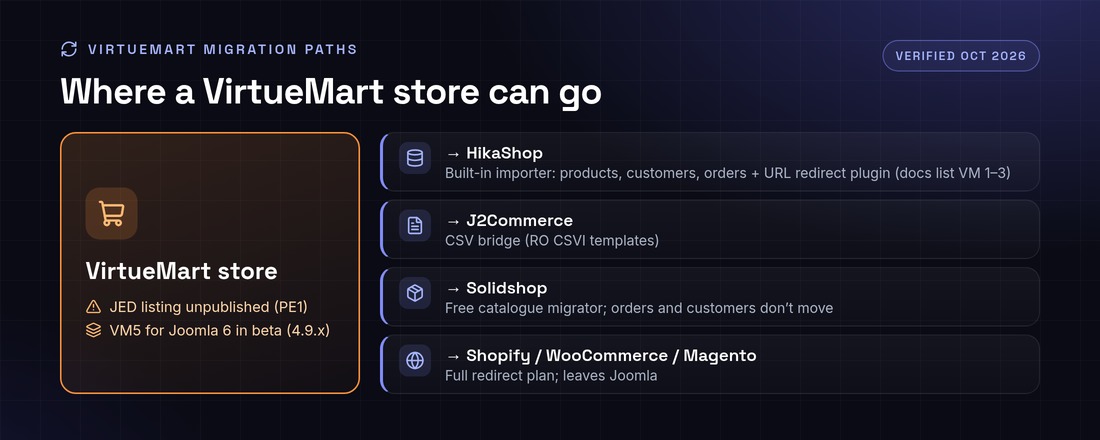
VirtueMart to HikaShop: HikaShop’s built-in “Import from VirtueMart” moves categories, taxes, products, images, files, customers and orders, and a redirect plugin forwards old VirtueMart URLs. The documentation lists VirtueMart 1.x, 2.x and 3.x, so test a VirtueMart 4 store carefully on staging (HikaShop import docs).
VirtueMart to J2Commerce: use a CSV bridge such as RO CSVI, which publishes VirtueMart export templates for HikaShop and J2Store (RO CSVI).
VirtueMart 4 to Solidshop: a free migrator for the catalogue, according to Solidshop. Orders and customers do not move.
Off Joomla (Shopify, WooCommerce, Magento): possible, but you lose Joomla content integration and need a full URL redirect plan.
Product, category and manufacturer URLs, with a 301 redirect for every URL that changes
Titles, meta descriptions and structured data
Customers, addresses and order history
Taxes, shipping zones and coupons, which are rebuilt and tested
Saved cards and subscriptions: payment tokens usually cannot be moved between plugins, so plan for customers to re-enter cards or for a gateway-side token migration
All of it rehearsed on staging before the live switch
Is your Joomla shop ready for Joomla 6?
Joomla 6.2 is the latest version, released on 13 October 2026, and Joomla 6 needs PHP 8.3 or newer. The cart itself is rarely the only blocker. Payment, shipping and template plugins usually are.
Which payment gateways work with Joomla shopping carts?
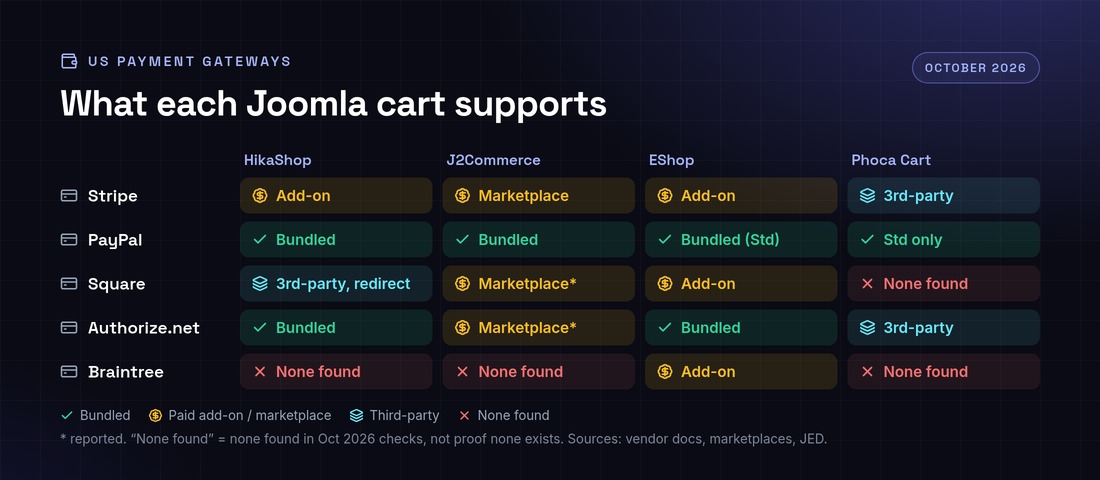
Stripe, PayPal and Authorize.net are available for most major carts. Square and Braintree are where the gaps are. This matrix shows what we found in October 2026. “None found” means we did not find one, not that one cannot exist.
US payment gateways by Joomla cart, October 2026
Gateway
HikaShop
J2Commerce
EShop
Phoca Cart
Stripe
Paid add-on (official Stripe Checkout, with recurring)
Marketplace
Paid add-on
Third-party (NorrNext)
PayPal
Bundled: Checkout, Advanced, Pro
Bundled
Bundled Standard; Pro as an add-on
Bundled Standard (redirect) only
Square
Third-party, redirect and cards only
Marketplace (reported)
Paid add-on (Squareup)
None found; via the PaymentHood aggregator
Authorize.net
Bundled AIM/SIM; Accept.js third-party
Marketplace (reported)
Bundled
Third-party (NorrNext)
Braintree
None found
None found
Paid add-on
None found; via the PaymentHood aggregator
Gaps worth knowing about:
Square on HikaShop: the marketplace plugin by Tsuki Dev redirects to Square and supports cards only; its page says digital wallets could not be properly tested (HikaShop marketplace, last updated 6 February 2023).
Recurring Authorize.net on HikaShop: HikaShop’s team said token-based recurring with Authorize.net “would require some development”. Stripe Checkout recurring was added later, and recurring for PayPal Checkout was announced for HikaShop 6.4.1 (HikaShop forum).
Phoca Cart: the core ships PayPal Standard, Cash on Delivery and POS Cash only (Phoca Cart plugins). We found no native Square, Braintree or PayPal Advanced plugin.
J2Commerce 6: older J2Store plugins are not compatible with version 6, so less common gateways may not have a version 6 build yet. Check the marketplace before you upgrade.
Custom payment gateway development
When the gateway you need is missing, or exists only as a redirect, we build it. Infyways develops and maintains payment plugins for HikaShop, J2Commerce, Phoca Cart, EShop and VirtueMart. A typical plugin covers:
Prefer hosted fields or tokenisation (Stripe Elements, the Square Web Payments SDK, Authorize.net Accept.js), so card numbers never touch your server and your PCI scope stays small.
Serve the whole store over HTTPS and keep Joomla, the cart and every payment plugin updated.
Verify webhook signatures and never mark an order paid from the browser redirect alone.
Remove payment plugins you no longer use.
How Infyways builds and migrates Joomla stores
Audit: cart and version, add-ons, payment and shipping plugins, Joomla and PHP versions, URLs.
Staging: a full copy of the store. Nothing changes on the live site.
Upgrade or migration: core, cart, data, templates and redirects.
Gateway integration: existing plugins configured, or custom plugins built, then sandbox and live test orders.
SEO-safe cutover: 301 redirects, titles, structured data and sitemap checked after go-live.
Support: fixes and updates after launch.
We work with US merchants and agencies with daily overlap with US business hours, and reply within 12 hours. For dedicated or hourly work, hire Joomla developers.
Why Infyways: we have built Joomla sites and extensions since 2010, and have published 125 Joomla extensions.
Setting up a Joomla shop in five steps
Install Joomla 6.2 on PHP 8.3+ (8.4+ if you choose Solidshop), with HTTPS and SEF URLs on.
Choose a cart from the table above and install it from the vendor or the JED.
Configure currency, taxes, shipping zones and one payment gateway in sandbox mode.
Add products and categories, and check product pages and checkout on mobile.
Place real test orders, check emails and invoices, then switch the gateway to live.
Frequently asked questions
What is the best shopping cart for Joomla 6 in 2026?
For most new stores, HikaShop or J2Commerce 6. Both are actively updated and list Joomla 6 support on the JED. EShop suits stores that need many gateways out of the box, and Phoca Cart suits simple, digital or POS shops.
Does VirtueMart work with Joomla 6?
Not VirtueMart 4. VirtueMart 5 runs on Joomla 6, according to virtuemart.net, but it is still a beta released as version 4.9.x.
Is VirtueMart still on the Joomla Extensions Directory?
No. As of October 2026 its JED listing is unpublished with reason code PE1. Current releases are on virtuemart.net, and 4.6.8 needs a membership.
How do I migrate from VirtueMart to HikaShop?
On staging, use HikaShop’s built-in Import from VirtueMart, which moves products, categories, taxes, customers and orders, then publish its redirect plugin. The docs list VirtueMart 1.x to 3.x, so test a VirtueMart 4 store carefully.
J2Commerce vs HikaShop: which should I choose?
J2Commerce turns Joomla articles into products, and version 6 is native to Joomla 6. HikaShop has a separate catalogue and more built-in gateways. Choose based on your content model and the gateway you need.
Which Joomla carts support Square?
EShop (paid Squareup add-on), J2Commerce (marketplace) and HikaShop (third-party plugin, redirect and cards only). We found no native Phoca Cart plugin in October 2026. You would need the PaymentHood aggregator or custom development.
Can I take recurring payments with Authorize.net on Joomla?
Not with HikaShop’s current plugins; HikaShop has said it would need development. Stripe recurring is available for HikaShop (HikaSubscription) and DJ-Catalog2, and custom development can add Authorize.net recurring.
Can you build a custom payment gateway for my Joomla store?
Yes. We build payment plugins with on-site fields, webhooks, refunds and recurring tokens for HikaShop, J2Commerce, Phoca Cart, EShop and VirtueMart. Send us your cart and gateway, and a senior engineer replies within 12 hours.
Webpage speed refers to the loading speed of a website.
As per the new guidelines announced by Google, the website speed has become a vital factor in determining the ranking of a website.
Undoubtedly, a slow website leads to a poor user experience, which in turn gives its visitors reduced customer satisfaction. It has been found that a website having a good webpage speed boosts conversions and leads to retention of visitors.
The speed of a website may be a key factor in its success. As discussed, websites that load faster can benefit from higher SEO rankings, higher conversion rates, lower bounce rates, longer website visit times, and better Overall user experience and engagement.
Therefore, it is important to take full advantage of the many free website speed test tools available there in order to get the best performance. Google wants your website to load in less than a second.
For this purpose, first of all, you need to find out the factors that are hampering your website speed. Here we have showcased the 5 best free online tools to check website speed to help you improve your website’s performance.
Tools to Check Website Speed
Pingdom
Pingdom is an online tool which will help you in finding out your website speed. It not only checks all sections of your website thoroughly, but also gives the performance overview, traces the performance history, checks from multiple regions, and shares the results. Besides, it also provides performance grades as well as tips. You need to give your website’s URL in the box, as shown below, and the tool will test and display your website’s details.
WebPage test provides you with a website test covering many geographical regions all over the world. The results of your test will be displayed as pagespeed optimisation checks and various resource loading charts. Besides, this tool shows six different types of performance grades. Moreover, in this tool, you can choose a specific country from where you wish to run the test for your website.
GTmetrix is another such tool which shows your website history along with graphs and also playback page loads with videos. Moreover, it sets monitored alerts and using this tool; you can even see your page performance on a real android device. Also, this helpful tool lets you download the results of your website test in the form of a PDF which can be used for future reference.
Google PageSpeed Insights is one of the most effective tools to test and grade your website’s up-time. It analyses your site in 30 different ways to help you optimise your website and increase your webpage speed. Unlike other tools, this useful tool will record the exact load time of your website, which is one of its unique features.
Load impact gives a varied range of features such as multiple user scenarios, large scale load tests, powerful reporting with charts, session recorder, automatic script generation and many more. However, after taking the test, the info about your website’s results will be displayed publicly on the load impact website if you do not sign up for a separate account on their website.
As you can see, there are many website speed testing tools to choose from. Each of them has its own unique function, as mentioned above. It is a good idea to regularly test your site and establish benchmarks so that you can make improvements over time. Once you know where the bottlenecks are, you can start solving them. Almost all tools listed above have suggestions. Some of the most common fixes include:
Do you know that if a website fails to appear on the first few pages of search engine results, then the chances of being discovered by users significantly decline, particularly when competing with other websites on the first page. Very less people rarely go beyond the initial search results page, and the percentage of those who proceed to subsequent pages is considerably lower. Therefore, achieving favorable rankings on search engines, a process commonly referred to as SEO, is just as crucial as the quality of the website itself.
SEO stands for Search Engine Optimization. The process of optimizing Web contents for flawless appearance within search engines. The main aim is to get organic traffic and sales to the website from organic search. SEO is the predominant aspect of doing online business.
Managing pertinence in front of search engines, especially like Google, is one of the significant challenges that online businesses are facing nowadays. It is an acknowledged assumption that on-site SEO is one of the most essential constituents every business needs to have during their commencement to search engine jurisdiction.
Hence following are some tips to guide you through to attain a preferably better ranking in front of search engines and captivate the attention of more visitors to your website:
Adding a blog
Addition of a blog to a site provides clients with better prospects to create content conveniently and systematically. By doing so, they can avail the benefit of adding contents frequently as well as can allow visitors to ask questions and clarify their doubts or leave comments since blogs naturally attract search engine traffic.
The blog also increases the effectiveness of the site and can also alleviate the possibility of plausible customers who may share it on Social Media websites. Implementing a blog or server-generated rotating content keeps the content fresh.
Moreover, Blogs also leads to the inflation of the size of the website over time, and this can, in turn, provide a significant SEO benefit in the form of an increase in website authority and a higher number of pages to leverage with internal links.
Adding Google Analytics and Webmaster Tools
Google Analytics is a free analytics tool that can provide clients with a variety of hypercritical data about their site and the way it is performing in the search engines. By the application of features such as Goal Tracking, Event Tracking, bounce rates and Intelligence, we can show clients the keywords, search engines and traffic sources that are inducing market or sales for their business.
You can sign up for Google Webmaster Tools, which have plenty of information that you can use to know in details about your keywords and web pages.
Reducing code bloat
Google’s spiders are exclusively looking for unique content, and JavaScript and CSS in the HTML code make it difficult for them to find it. Also, using codes excessively slows the page’s loading time, along with increasing the possibility of coding errors that may not be having any direct impact on the site’s SEO but still may prove to be an obstacle for the search engine spiders.
Making each page unique
It is a fact that we would not turn on the TV if it were just the same old programs. Similar is the case here. Google grades the appropriateness of every website primarily based on its contents, and always seeks great content which is not present anywhere else on the internet. And therefore the content of every page needs to be different not only from any other site on the Web but also from any other page on the same site. This factor escalates the concern of duplication of content, which is the fright of every site owner.
You can use the google keyword tool for keyword research or answer the public tool to know what people search for and write on quality relevant topics.
Using detailed meta description tags
<meta>description tags are those which appear in the search engine results pages – they provide the web surfer with an outline of the site.
Moreover, Google also uses meta description tags to distinguish between web pages. So we also need to be careful about describing each page differently to avoid any duplication of content. Furthermore, the inclusion of free offers, guarantees and a valid contact number can give a boost to the click-through rate on clients’ SEO ranking.
Removing repetitive wording from the website layout
It is essential to eliminate monotonous words from the website layout to prevent the major informative content of the site from being degraded in any way. If the content on every page is not unique enough, then there is the risk of the client’s site being penalised for duplication of content.
Adding footer links to every page
Footer links can be used to link between pages with the required keywords to rank for within the anchor text of the links because the major problem is that most pleasing website designs use graphical, JavaScript or Flash navigation that doesn’t use anchor text.
Creating a separate web page for each keyword or keyword phrase
The most effective and best way for a website to rank for a particular keyword phrase is to develop a web page targeted to that specific phrase with the keywords in the <title> tag, <meta>description tags, <h1>, body copy and URL. By creating a webpage devoted for every product or service separately, a good user experience can be established since they can end up landing straightaway on this page from the search engine results, making it much easier for them to buy online or submit a form for more detailed information.
Using proper keyword rich title tags on each page
Keywords are essential since they dictate the overall focus of the page itself. Keywords in the title tag of the browser and are one of the crucial aspects used by search engines to regulate the content of a page. Thus keywords that the client wants to rank for should be used instead of including the company name in the tag. It will render the client a substantial dominance for being ranked in the search engines.
Using correctly formatted, clean and human-readable URLs
Use of underscores in the URL should be avoided strictly. Using underscores can cause Google to see words in the URL string as one big word and hamper the ability for people to find the site through a keyword search. So instead of using the underscore, dashes can be used in the URLs. If you’re using a CMS (content management system) like Word Press, you can use a custom permalink structure, and Word Press will generate a correctly formatted URL automatically.
Removing Stop Words from URL
“Stop Words”, are words that are likely to be ignored by most search engines, in particular, Google, when a search request is processed. These are usually common words such as I, the, it and what If you are using Word Press and have custom permalinks set up, you can download a plugin called SEO Slugs that will help you remove stop words from your URLs.
Using Ordered and Unordered Lists
Listing items with the appropriate ordered or unordered lists recommend search engines to consider every item and treat it as a correlated asset. To add to this, proper display of items in a list format will also procure significant Web standards. Not only will it have a better look, but also it will behave like a list whenever there is a need to add or remove items.
Using Alt and Title Attributes on Images
It is essential to include alt and title attributes on all the images. Alt tags illustrate the content of images to the search engines. Hence, when a person searches for a specific image this is a vital determining factor for a match.
Using a Robots.txt File
While using Word Press and displaying archive pages, tagged posts, or categories, there is a possibility of being penalized by Google for having duplicate content on the site. Nevertheless, using a Robots.txt file on the website can disclose the search engines, such as Google, not to index the specified directories. Robots.txt is a text file, that can be placed on the site root. For more information regarding creating a Robots.txt file, please check out https://www.robotstxt.org/
Optimising Page Titles
Optimising the page titles is another pivotal step in good SEO practices. Here are a few steps that can be implemented for optimisation:
It should be made sure that the important keywords occur within the first 60 characters of the page title
Unless and until a brand or company is actually renowned, apparently it is most suitable to put the title of the specific page first and the name of the site or company last in the page titles.
Moreover, page titles that arouse passion, make queries, or promise to solve a problem should be written.
Conclusion
Always stay away from black hat SEO and follow white hat seo techniques. Your keyword might rank high in search engine results but in the long run, the website will be blacklisted by search engines. So, be patient as it takes some hard work and a little sweating.
Link building or off-page SEO is also an appropriate way to improve SEO. There are many more advanced and technical SEO techniques out there, but transparent and straight forward things which are as easy as pie should be focussed first that can give a boost to the site SEO. Therefore, by taking reference from the above steps, clients can be provided with the best possible opportunity to generate sales and profits from search engine rankings. This is exactly how SEO works.
There are two things people mean by “uninstall Joomla”: removing one extension from a Joomla site, or deleting the whole Joomla installation from hosting. Both are covered here for Joomla 4, 5 and 6.
Uninstall an extension
Go to System → Manage → Extensions.
Search for the extension and tick it. Packages (type “Package”) remove all their parts at once, so uninstall the package rather than each plugin or module.
Click Uninstall and confirm.
Clear the cache (System → Clear Cache) and check the front end.
Core extensions are protected and cannot be uninstalled; disable them instead. If an uninstall fails with an SQL error, check System → Maintenance → Database.
Delete a whole Joomla site with Softaculous or an installer
If Joomla was installed with Softaculous, Installatron or a similar tool in cPanel or Plesk, remove it there: open the installer, go to All Installations, click the delete (X) icon next to the site and tick “remove database” and “remove directory”. This deletes files, the database and the database user in one go.
Delete a Joomla site manually
Back up first (see how to back up Joomla); deleted files cannot be recovered from Joomla.
Open configuration.php and note the values of $db, $user and $dbprefix.
In the file manager or over SFTP, delete the Joomla folder (or its contents if it is the site root, keeping anything that is not Joomla).
In cPanel → MySQL Databases (or phpMyAdmin), delete that database and its user. If the database is shared with another app, drop only the tables that start with your prefix.
Remove any cron jobs, email forwarders or subdomains you created for the site.
If Softaculous installed it, delete it from All Installations with “remove database” ticked. Otherwise delete the Joomla folder and then the database and its user in MySQL Databases.
Why can’t I uninstall some Joomla extensions?
Core extensions are protected. Disable them instead of uninstalling.
Does uninstalling an extension delete its data?
Usually yes; most extensions drop their tables on uninstall. Export anything you need first.
A WordPress blogger’s absolute delight lies in the heavy traffic he manages to capture on his blog. When you as a blogger see a lot of likes and, views you know your blog is working. But, this same traffic could be the reason for your WordPress going slow. The problem also could be inefficient coding being present on the site because of which the blog runs slow. The bottom line is that a slow blog is definitely not a good sign and, it is time to get it running fast. There are a few simple pointers which if followed would give you a good running site along the line.
Upgrade with Releases
The WordPress site keeps upgrading itself with the latest versions. You, as a blogger, should be aware of the latest running version of WordPress and, update your PC or laptop with the same. Chances are that the older versions have coding that does not run fast anymore. The capabilities of the older version would be different and, they would be upgraded in the newer versions. So, keep improving your WordPress version with the new release to keep your blog running fast. Of course, WordPress plugins also keep releasing their latest versions. Make sure you are updated with those versions too.
Check for Unused Plugins
Unused plugins can also be a cause for your blog running slow. Every plugin has a lot of script and code associated with it. When these plugins go unused, the script and code can overload your blog. This could cause your blog to run slow. It is very necessary to keep a check on the plugins being used. If you feel some plugins are of no use to you, make sure you remove them. It would help you fasten your blog a bit.
The Code Cleaning
Issues that need to be resolved within the code could help fasten your blog. Some bloggers have a habit of using a lot of space while coding their blogs. If you are one of them, check for these spaces and reduce them. They could be a significant reason for slowing your blog. Do not fill in your header with a lot of code. Get some in the body text too so that your blog runs just about perfect. Shorthand CSS is another way of getting the code a bit concise and, making the blog faster. Codes should be checked for in case you feel the blog is running way too slow.
Minimize the Queries
The PHP queries would also slow your blog a bit. For example, if a reader loads your blog and, there is a PHP query that is being resolved in the midway, the loading would take some time. It is better to avoid or lessen the questions while loading your blog. It would help you in a lot of ways.
Whenever you feel your blog is running slow, check on to these pointers for an answer.
Updated 15 October 2026 · By Abhilash Sahoo, Founder, Infyways
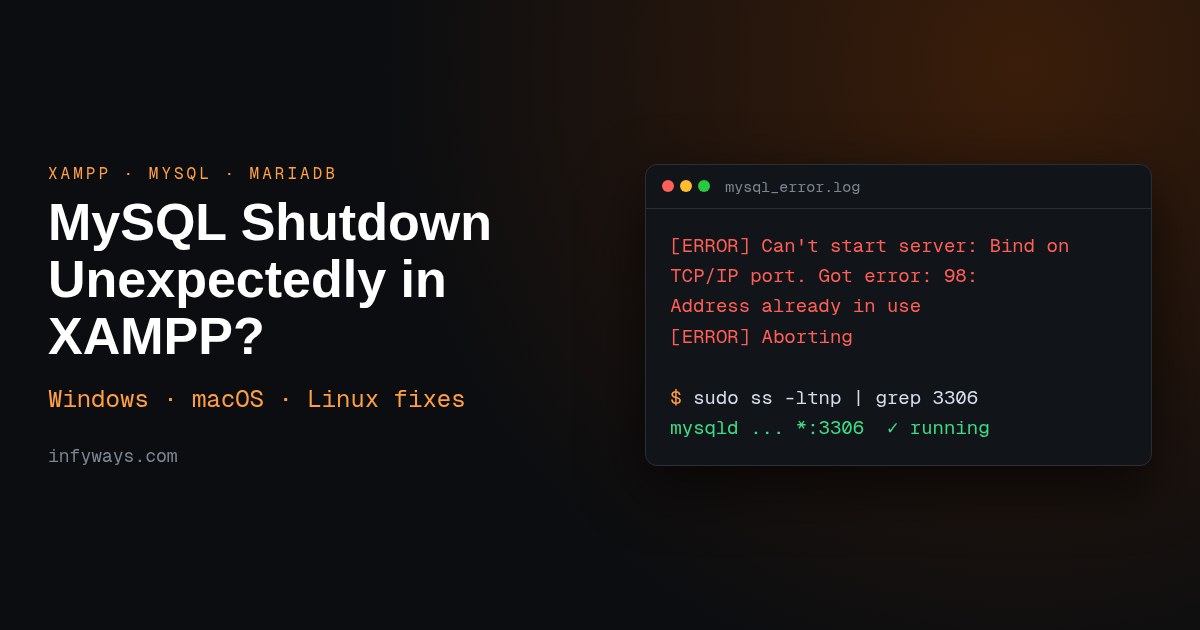
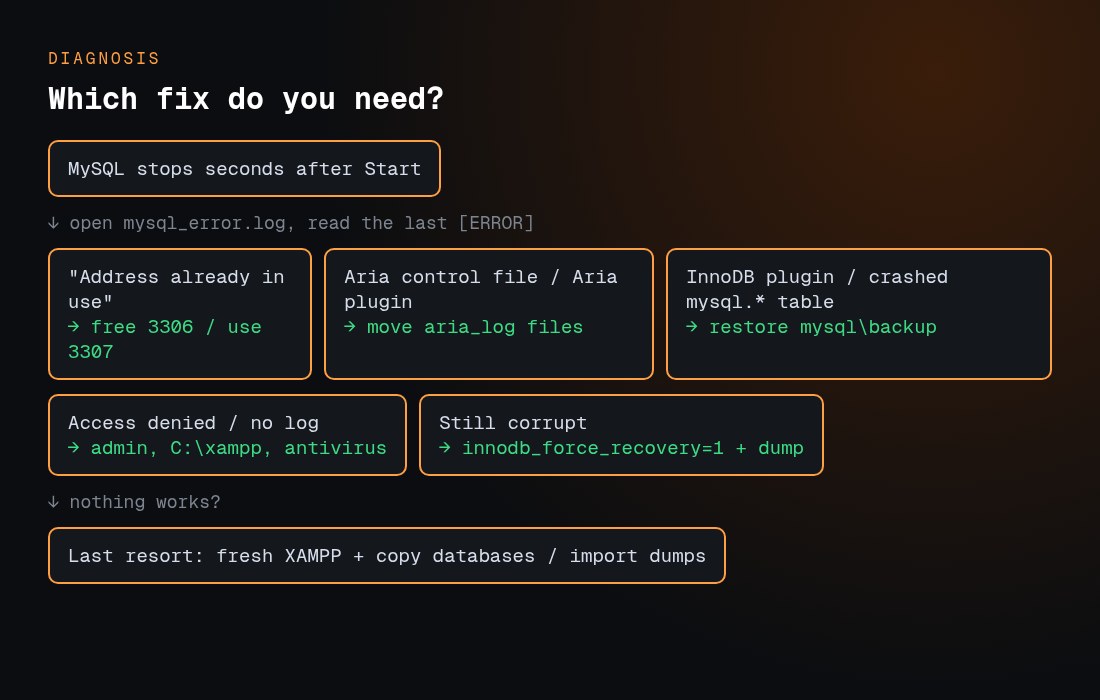
Quick answer: “Error: MySQL shutdown unexpectedly” means XAMPP’s MariaDB server started and then crashed. Open mysql_error.log (Control Panel → MySQL → Logs) and read the last [ERROR] line:
“Address already in use” means another program has port 3306. Stop it, or change XAMPP to port 3307.
“aria control file” errors mean the Aria log is damaged. Back up first, then move aria_log_control and the aria_log.* files out.
InnoDB or “marked as crashed” errors mean data or system tables are damaged. Restore the system files from mysql\backup and keep your own databases and ibdata1.
No log, or permission errors point to Windows permissions. Run XAMPP as administrator, install it in C:\xampp, and exclude the folder from your antivirus.
Always copy the mysql\data folder somewhere safe before you change anything.
I installed XAMPP 8.2.12 for Linux (MariaDB 10.4.32) and reproduced the two most common failures, a port conflict and a damaged Aria control file. The terminal images marked “real output” are what the server actually printed. Every command and path below is checked against the official XAMPP FAQ or the MariaDB documentation.
What does “Error: MySQL shutdown unexpectedly” mean?
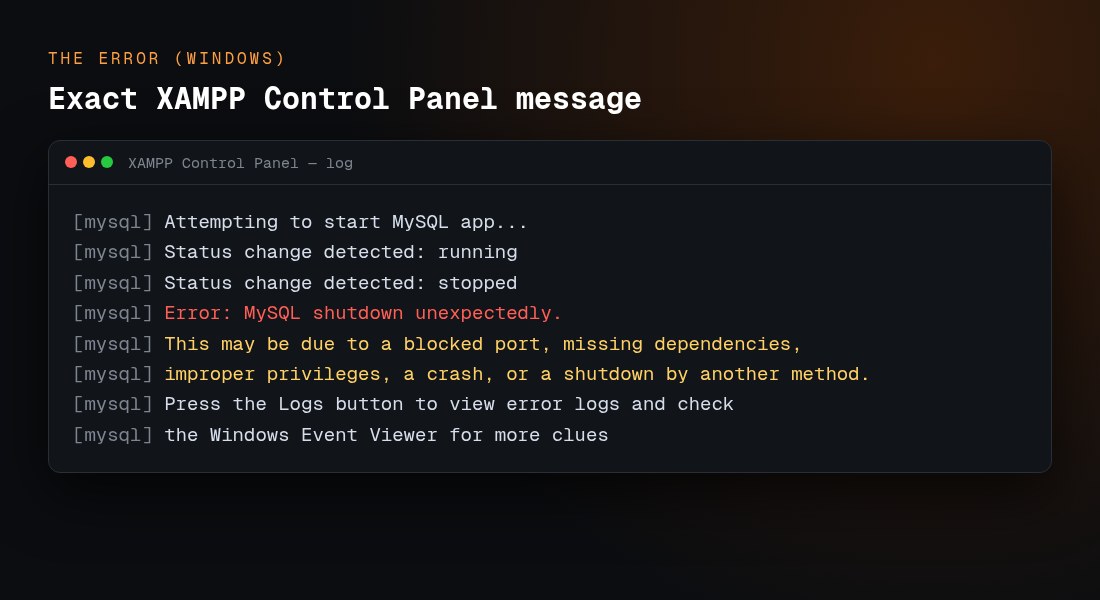
On Windows, the XAMPP Control Panel prints this exact text when MySQL dies seconds after you click Start:
The message lists every possible cause because the Control Panel can’t see the real one. The real reason is in the server’s own error log. XAMPP has shipped MariaDB instead of MySQL since versions 5.5.30 and 5.6.14, according to the XAMPP FAQ, so the MariaDB documentation applies. The panel still calls it “MySQL”.
Read the last 20–30 lines. On Linux and macOS, run sudo tail -30 /opt/lampp/var/mysql/*.err (use the matching path on macOS). Lines tagged [Note] are normal. The line that matters is the [ERROR] just before Aborting.
How do I fix a port 3306 conflict?
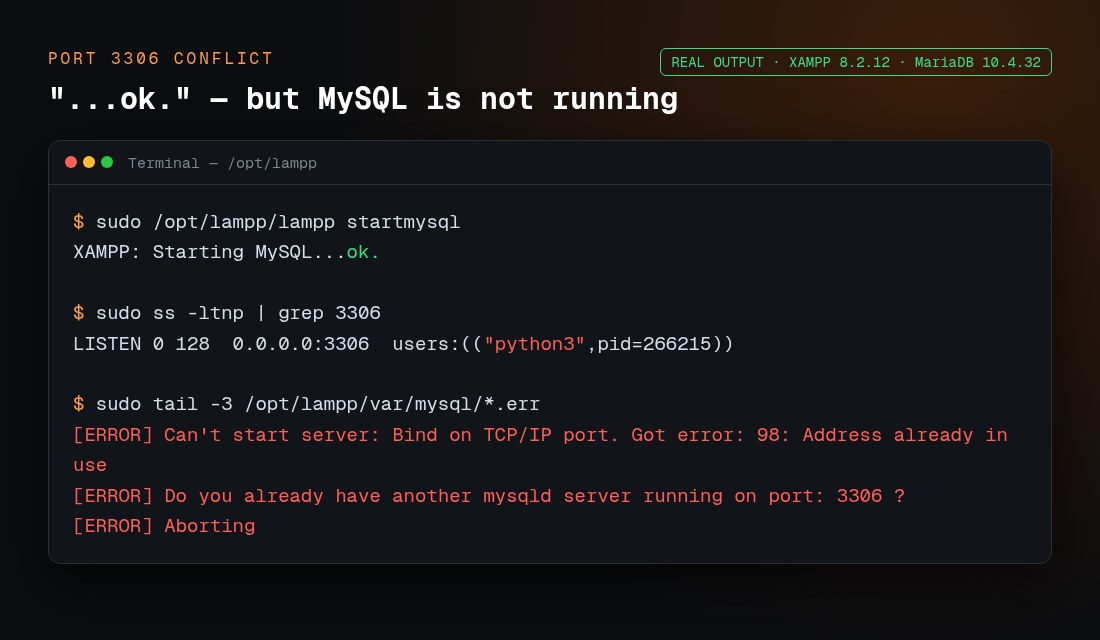
MariaDB listens on TCP port 3306. If anything else already listens there, the log shows this. It’s real output from my test, where another process was holding the port:
Watch for one trap: on Linux and macOS, lampp startmysql still printed “XAMPP: Starting MySQL…ok.” even though the server aborted a second later. Don’t trust “ok”. Check the port and the log.
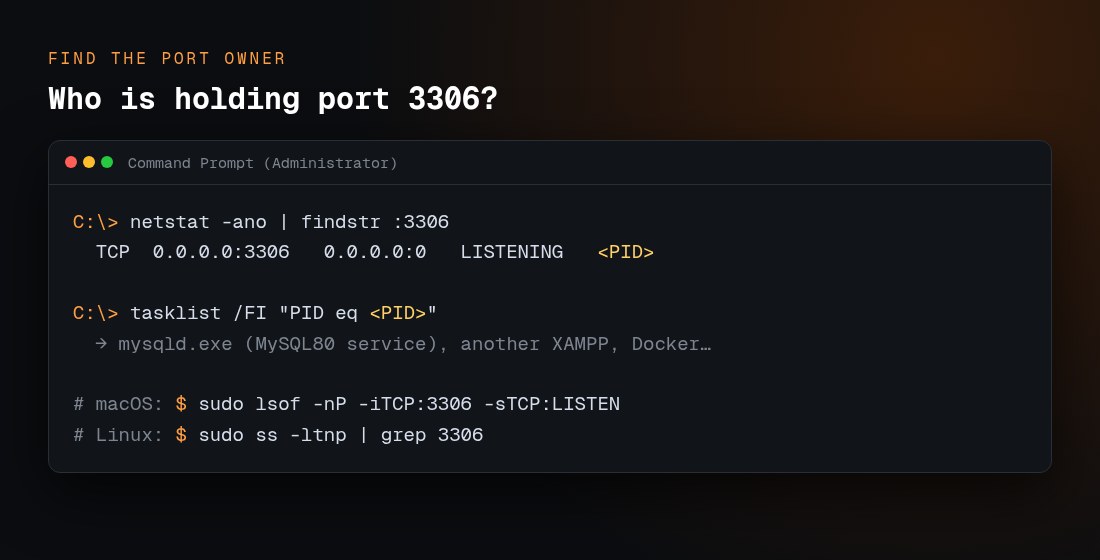
Find out what owns the port:
:: Windows (Command Prompt as administrator)
netstat -ano | findstr :3306
tasklist /FI "PID eq 1234"

# macOS
sudo lsof -nP -iTCP:3306 -sTCP:LISTEN

# Linux
sudo ss -ltnp | grep 3306
Replace 1234 with the PID from netstat. The usual owners are:
A standalone MySQL or MariaDB Windows service (often named MySQL80, MySQL57 or MariaDB), installed with MySQL Installer, Workbench, WampServer or Laragon.
A second XAMPP copy, or an old mysqld.exe left running.
Docker containers that publish port 3306.
On Linux or macOS, a system MySQL. XAMPP’s FAQ documents this message for that case: “LAMPP-MySQL is already running. A MySQL daemon is already running.”
Skype is often blamed in older guides, but it competed with Apache for ports 80 and 443, not MySQL’s 3306.
How do I stop another MySQL service on Windows?
Press Win + R, type services.msc and press Enter.
Find MySQL80, MySQL57, MySQL or MariaDB. Right-click it and choose Stop.
Open Properties and set Startup type to Manual so the service doesn’t take the port again at boot.
Or, from an administrator prompt, run net stop MySQL80 (use the exact service name).
On Linux, stop the system server with sudo systemctl stop mysql or sudo systemctl stop mariadb. On macOS with Homebrew, use brew services stop mysql.
How do I change the MySQL port in XAMPP?
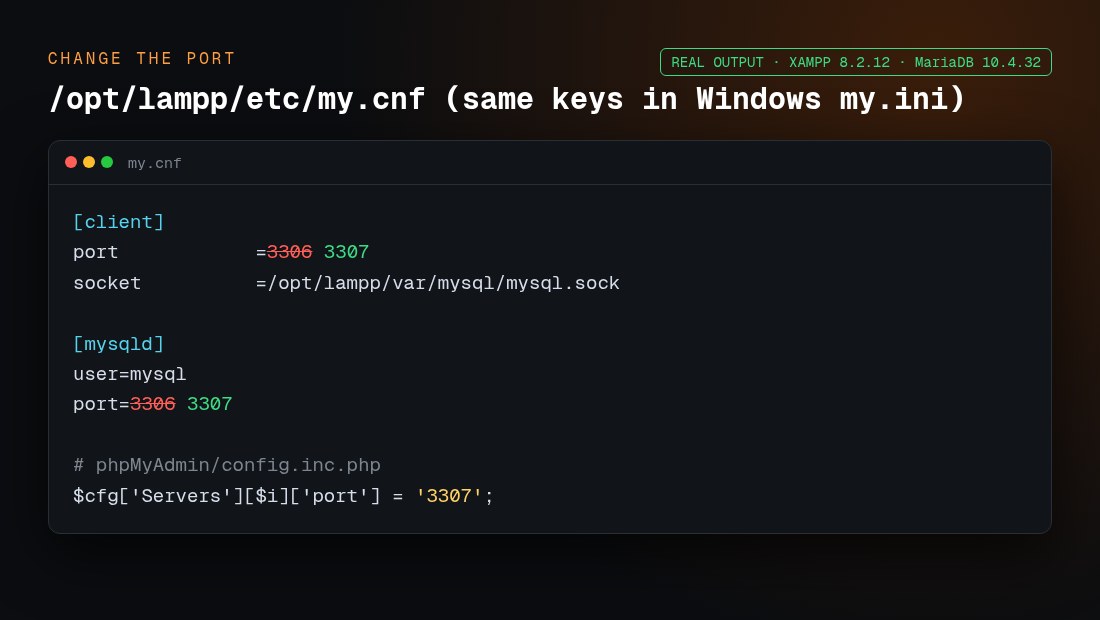
If you need both servers, move XAMPP to 3307. Change port in both the [client] and [mysqld] sections. These are the real lines from XAMPP’s Linux my.cnf, and Windows my.ini uses the same keys:
Then reconnect everything else:
phpMyAdmin: in phpMyAdmin/config.inc.php, add $cfg['Servers'][$i]['port'] = '3307'; next to the existing host line. Without it, phpMyAdmin shows “mysqli::real_connect(): (HY000/2002)” connection errors.
Your apps: use 127.0.0.1:3307 as the database host. That’s DB_HOST in WordPress’s wp-config.php, and $host plus the port in Joomla’s configuration.php.
The command line:mysql -u root -P 3307 -h 127.0.0.1.
How do I fix “aria control file” errors?
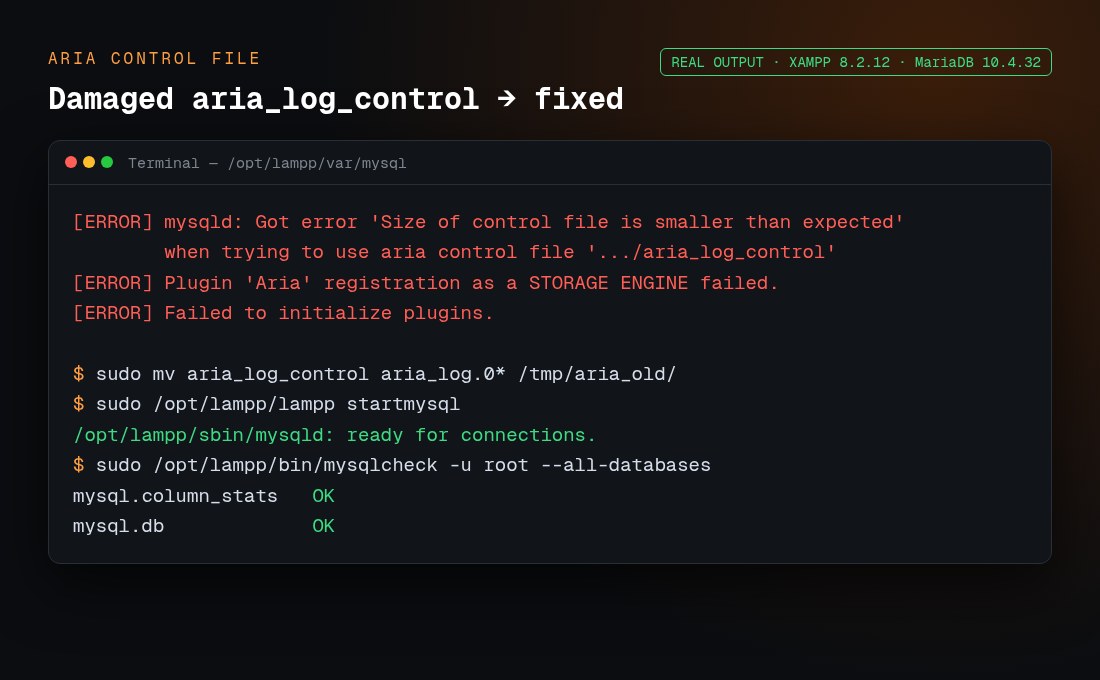
Aria is MariaDB’s crash-safe engine for its system tables. If aria_log_control is damaged, for example after a power cut, the whole server refuses to start. I reproduced this by damaging the file on purpose. The fix took one command:
Stop MySQL and back up the whole data folder.
Move (don’t delete) aria_log_control and the aria_log.0000000N files out of the data folder.
Start MySQL. MariaDB creates new Aria log files.
Check your tables with mysqlcheck -u root --all-databases. On Windows, run C:\xampp\mysql\bin\mysqlcheck.exe.
If individual Aria tables are still damaged, MariaDB’s offline tool aria_chk can repair them. MariaDB’s docs warn that “aria_chk should not be used when MariaDB is running”, so stop the server first. Then, inside the data folder, run aria_chk --check */*.MAI, and aria_chk -r on the tables it flags.
How do I fix corrupted InnoDB or system tables with the backup folder?
On Windows, XAMPP ships a clean copy of the system databases in C:\xampp\mysql\backup. If the log shows “Plugin ‘InnoDB’ registration as a STORAGE ENGINE failed” or “Table ‘.\mysql\user’ is marked as crashed and last (automatic?) repair failed”, rebuild the data folder from it:
Stop MySQL and close the Control Panel.
Rename C:\xampp\mysql\data to data_old. Keep it: it’s your safety net.
Copy C:\xampp\mysql\backup and name the copy data.
From data_old, copy your own database folders into data. Skip mysql, performance_schema, phpmyadmin and test.
Copy data_old\ibdata1 into data and replace the existing file. Your InnoDB tables depend on it.
Start MySQL. Then run mysqlcheck -u root --auto-repair --all-databases.
After this, any MySQL user accounts and passwords you created are reset, because they live in the mysql system database. Recreate them in phpMyAdmin.
Is it safe to delete ibdata1 or ib_logfile0?
Don’t delete them unless you have a backup. ibdata1 is the InnoDB system tablespace, which holds the data dictionary and undo logs. ib_logfile0 and ib_logfile1 are the redo logs. Deleting them can make every InnoDB table unreadable. If you must experiment, do it on a copy of data_old.
When should I use innodb_force_recovery?
Use it only when the backup-folder method doesn’t work and InnoDB still refuses to start. Add one line under [mysqld] in my.ini or my.cnf:
[mysqld]
innodb_force_recovery = 1
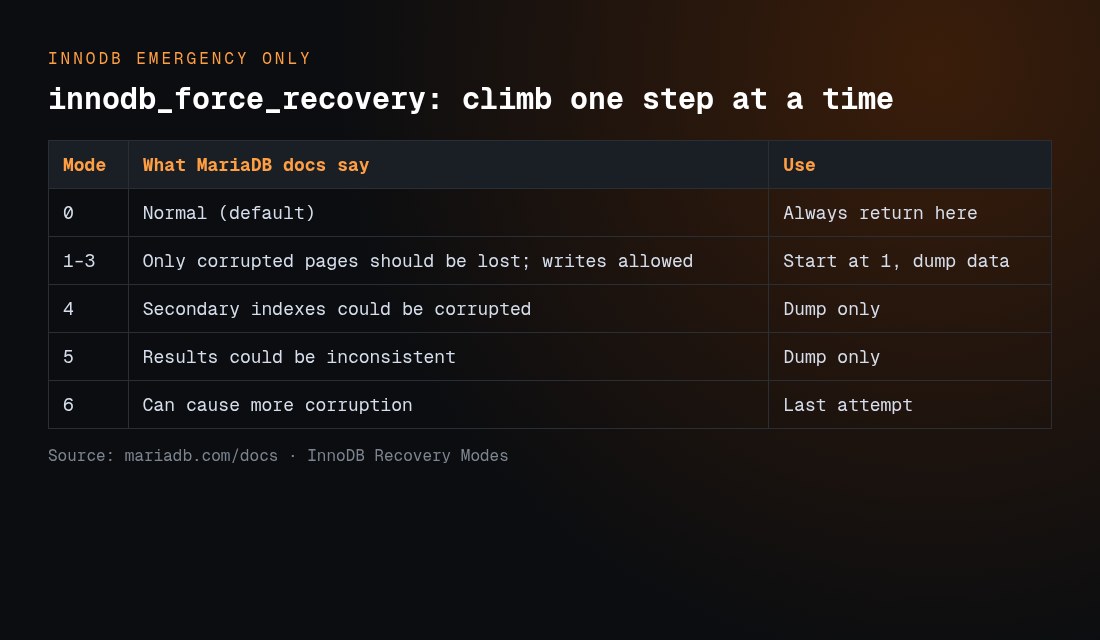
MariaDB’s documentation says to start at 1 and go up one step at a time. In its words: “With a recovery mode < 4, only corrupted pages should be lost”, and “A value of 6 leaves pages in an obsolete state, which might cause more corruption.” Once the server starts, export everything straight away with mysqldump -u root --all-databases > all.sql (or use phpMyAdmin Export). Then set the value back to 0 and rebuild from that dump. Don’t keep working with recovery mode on.
If a crashed mysql.* table blocks startup, you can repair it the same way. Start the server in a console with mysqld --console --skip-grant-tables, then run mysqlcheck -u root --repair --databases mysql in a second window.
Why does MySQL fail with permission or antivirus problems?
Install location: the XAMPP installer warns against C:\Program Files, because User Account Control limits writes there. Use C:\xampp.
Run as administrator: right-click xampp-control.exe and choose Run as administrator. This is also required to tick the Service box and install MySQL as a Windows service.
Windows Defender or other antivirus: real-time scanning can lock or quarantine mysqld.exe and data files. Go to Windows Security → Virus & threat protection → Manage settings → Exclusions, and add C:\xampp\mysql.
Linux: XAMPP’s FAQ notes that SELinux can block startup with “Cannot restore segment prot after reloc: Permission denied”. The data folder must belong to the user set in my.cnf (user=mysql).
Event Viewer: the Control Panel message itself suggests checking the Windows Event Viewer (Windows Logs → Application) when mysql_error.log is empty.
How do I fix XAMPP MySQL on macOS and Linux?
macOS native installer. The control app is manager-osx, in /Applications/XAMPP. A leftover mysqld or a Homebrew MySQL is the usual cause:
You can also change the port in manager-osx under Manage Servers → MySQL Database → Configure.
macOS XAMPP-VM. The XAMPP FAQ describes XAMPP-VM as a Linux virtual machine running on your Mac. So the Linux commands below apply inside the VM, not to /Applications/XAMPP.
Linux (/opt/lampp). These are the official commands from the XAMPP Linux FAQ:
Last resort: move your databases to a fresh XAMPP install
If nothing above works, keep your data and replace the server around it:
Back upC:\xampp\mysql\data (or /opt/lampp/var/mysql) and htdocs to another drive.
Dump if you can. If any recovery mode got the server running, export SQL dumps. A dump is the most portable, version-safe backup.
Uninstall XAMPP, or rename the folder, then install the same XAMPP version fresh. Copying raw data files between different MariaDB versions is risky.
Start the fresh MySQL once and stop it.
Import your SQL dumps through phpMyAdmin or mysql -u root < all.sql. If you have no dumps, copy your database folders plus ibdata1, ib_logfile0 and ib_logfile1 from the backup into the new data folder while MySQL is stopped, then start it.
Recreate MySQL users and copy your htdocs projects back.
On Linux and macOS, sudo /opt/lampp/lampp backup is documented in the FAQ, but XAMPP labels it a beta feature that “may not work correctly”, so don’t rely on it alone. Moving a Joomla site this way? Our Joomla transfer guide and Joomla backup guide cover the site side.
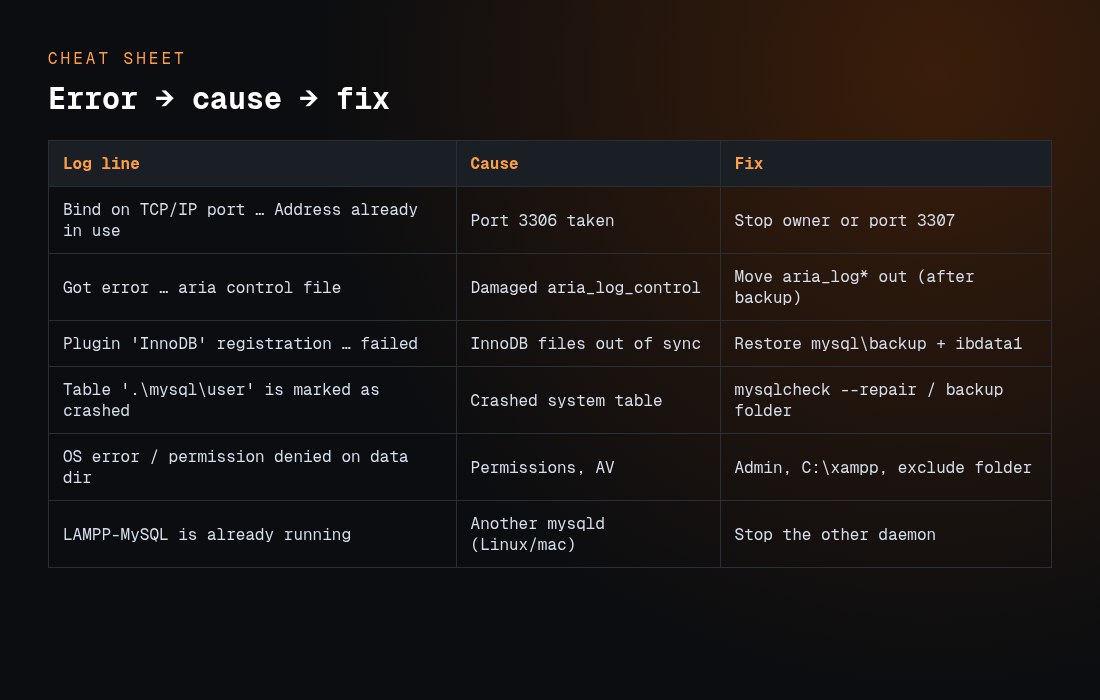
XAMPP MySQL errors, causes and fixes
Log line or symptom
Cause
Fix
Data risk
Can’t start server: Bind on TCP/IP port … Address already in use
Port 3306 already taken
Stop the owner, or use port 3307
None
Do you already have another mysqld server running on port: 3306 ?
Second MySQL or MariaDB running
services.msc → stop and set to Manual
None
Got error … when trying to use aria control file
Damaged Aria log
Move the aria_log files out
Low
Plugin ‘InnoDB’ registration as a STORAGE ENGINE failed
InnoDB files out of sync
Restore from the backup folder and keep ibdata1
Medium
Table ‘.\mysql\user’ is marked as crashed
Crashed system table
mysqlcheck –repair, or the backup folder
Low (users reset)
InnoDB still won’t start
Corrupted pages
innodb_force_recovery=1, then dump and rebuild
High
Empty log, stops instantly
Permissions, antivirus, Program Files
Run as admin, install in C:\xampp, add an exclusion
None
phpMyAdmin HY000/2002 after a port change
phpMyAdmin still uses 3306
Set the port in config.inc.php
None
LAMPP-MySQL is already running
Another mysqld (Linux or macOS)
Stop the other daemon
None
Which fix should I try first?
Fix
Time
Touches data?
Try it when
Free port 3306 or change the port
2 min
No
The log says “Address already in use”
Run as admin, add an antivirus exclusion
2 min
No
The log is empty or shows permission errors
Move the aria_log files
3 min
Logs only
The log shows Aria control file errors
Restore from mysql\backup
10 min
Yes (system DBs)
The log shows InnoDB or crashed-table errors
innodb_force_recovery
15+ min
Read-only rescue
The backup folder method failed
Fresh install and re-import
30+ min
Rebuild
Everything else failed
How do I prevent MySQL from crashing in XAMPP again?
Always click Stop on MySQL before you shut down or restart your computer, or before you close the Control Panel. An unclean shutdown while MariaDB is writing is the classic trigger for Aria and InnoDB damage.
Export your databases regularly. A weekly mysqldump or phpMyAdmin export turns any crash into a five-minute restore.
Keep only one MySQL server per port, and set other database services to Manual.
Install XAMPP in C:\xampp, not Program Files, and exclude it from antivirus scanning.
Never delete the mysql\backup folder. It’s your rescue kit.
Remember that XAMPP is for development. The FAQ says it is “not meant for production use”. New to local development? See our WordPress development for beginners guide.
Frequently asked questions
Why does MySQL start and then stop immediately in XAMPP?
The server starts, hits a fatal error and aborts within seconds. The most common causes are port 3306 already being in use and damaged Aria or InnoDB files after an unclean shutdown. The exact reason is the last [ERROR] line in mysql_error.log.
Where is mysql_error.log in XAMPP?
On Windows, it’s at C:\xampp\mysql\data\mysql_error.log, or open it from the Logs button. On Linux, it’s /opt/lampp/var/mysql/<hostname>.err. On macOS, it’s the same file under /Applications/XAMPP/xamppfiles/var/mysql/.
Will restoring the mysql\backup folder delete my databases?
Not if you rename data to data_old first and copy your database folders and ibdata1 back. Only the system databases are replaced, so MySQL user accounts you created are reset.
Can I run XAMPP MySQL alongside MySQL80 or another XAMPP?
Yes, on different ports. Set XAMPP to 3307 in both [client] and [mysqld], then update phpMyAdmin’s config.inc.php and your apps’ database host.
Is it safe to delete ibdata1, ib_logfile0 or ib_logfile1?
No, not without a full backup. They are InnoDB’s system tablespace and redo logs, and deleting them can make every InnoDB table unreadable.
What is innodb_force_recovery and is it safe?
It’s an emergency MariaDB setting from 0 to 6 that lets a damaged InnoDB start so you can dump your data. Start at 1, export everything, then set it back to 0. MariaDB warns that higher values can cause more corruption.
Does XAMPP use MySQL or MariaDB?
MariaDB, since XAMPP 5.5.30 and 5.6.14. The Control Panel still says MySQL, and the commands and tools are the same.
XAMPP says “Starting MySQL…ok” but MySQL isn’t running. Why?
On Linux and macOS, the lampp script prints “ok” when it launches the server, before the server can fail. Check with sudo ss -ltnp | grep 3306, or lsof on macOS, and read the .err log.
How do I start XAMPP MySQL from the command line?
On Windows, run C:\xampp\mysql_start.bat. On Linux, run sudo /opt/lampp/lampp startmysql. On macOS, run sudo /Applications/XAMPP/xamppfiles/xampp startmysql.
Should I reinstall XAMPP?
Only as the last resort, after you back up mysql\data and htdocs. Install the same version and re-import SQL dumps, or copy your database folders back while MySQL is stopped.
Hi! Are you looking to create an online store of your own? Or are you seeking to establish an online presence for a physical store you’ve already built? In any case, I’ve got you covered. Below you’ll find a list of 10 awesome the Shopify themes with video. Other than being designed specifically for online stores, those templates have another thing in common. And that thing is the usage of the background video.
Background video as a cool design choice
Background video is a really cool design element that can make a website a million times more attractive. Once someone enters your resource, their attention will be instantly drawn to whatever you’ve chosen to show them. That’s just how a motion picture works. Let’s say you own a store that sells snowboarding equipment. A background video with beautiful mountain landscapes, people enjoying themselves, riding snowboards and doing cool tricks will fit your site perfectly. It will both look good and encourage people to purchase your merchandise so they can be just like the people in the video.
Shopify themes as a way to kickstart your store
If you want to build a successful website for your store quickly, a Shopify theme would be a perfect choice. They are easy to install and service, and come with sufficient functionality even for the neediest of shopkeepers. Check out the video below if you want to find out more about those. And when you’re done, feel free to go over the themes I’ve collected for you!
Shoe Store Responsive Shopify Theme
Shoe Store is a clean one-page template design to help create a fully-featured and conversion-optimized website with minimal efforts.
Despite its design looking simple and minimalistic, it offers a wide selection of useful tools like Cloud Zoom, Olark Live Chat, Product Gallery, YouTube video, Ajax cart, and many others.
The special offer top panel with a counter will help improve your conversion rates and draw your customers’ attention.
The theme also utilizes a Sticky menu as well as a Back to top button as a means to make navigation more intuitive and comfortable for your customers.
This beautiful theme provides a visually attractive and functionally powerful design for your online sports store.
A skilful mix of blue and orange elements along with diamond shapes and skew lines in different videos as well as page-wide sliders and background video will add a vibrant touch to your site’s look.
A multi-column menu fixed to the top of the layout allows your visitors to browse your merchandise in an accessible and attractive way.
There is also a built-in color switcher that you can use to quickly swap colors of any element or your page’s background.
Build an engaging and easy-to-navigate interface for your tea store with this template.
Its full-screen header along with background video will present your inventory in a visually appealing manner and definitely catch your visitors’ attention.
The layout features parallax and hover effects as well as a card-based content structure and feels dynamic and engaging.
A burger menu that opens into a sticky sidebar gives access to menu categories, currency switcher, contacts, login, and registration options and makes navigation intuitive and comfortable. It is also fixed to a semi-transparent bar along with Ajax cart and a search field.
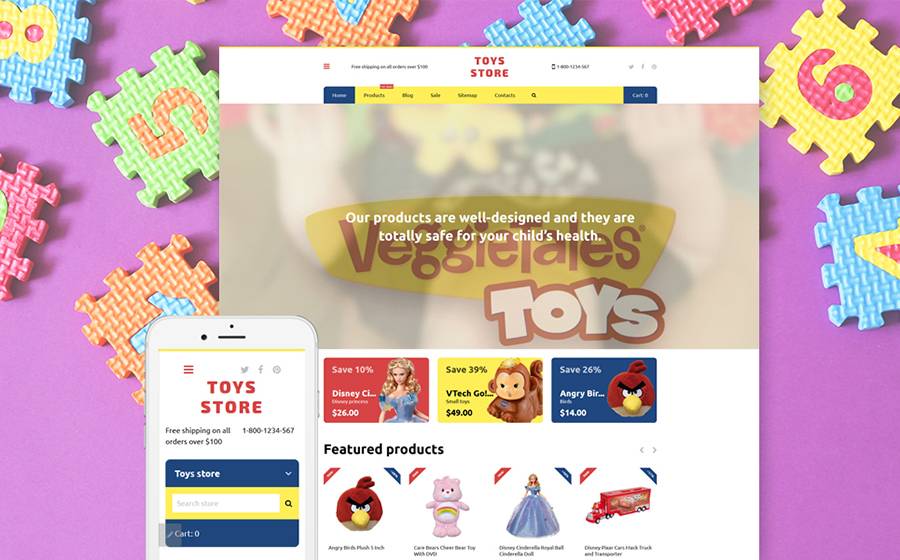
This theme’s bright design with contrasting colors fits the toy store niche perfectly and will welcome all of your potential clients to your store.
All products are wisely arranged into categories and are easy to find with the help of a filtered search.
All of your content will be neatly organized in the layout that is oriented to create effective visuals while remaining extremely user-friendly.
The theme is fully responsive and SEO-optimized, which means your site will look outstanding on all screen resolutions and will not be lost between thousands of search results, regardless of the search engine used.
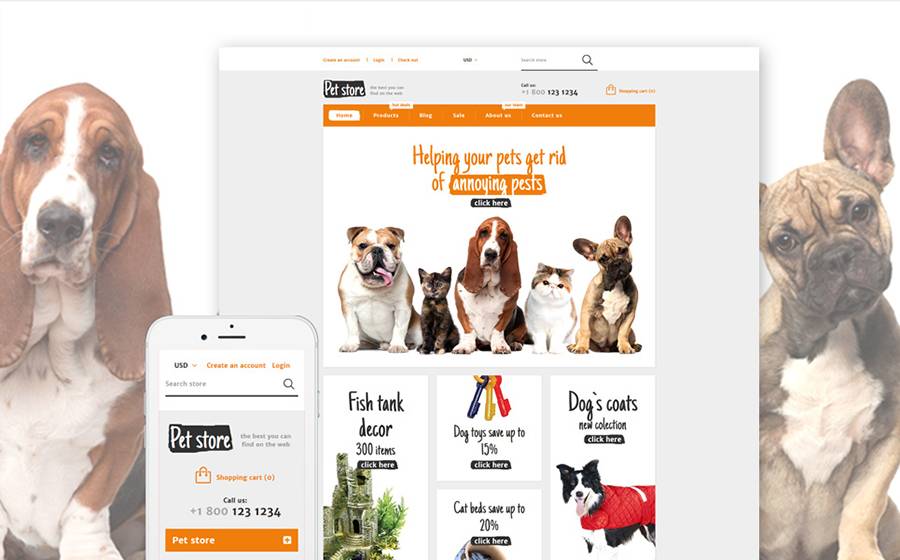
This theme was created for online stores that specialize in pet supplies.
It uses a clean background with bright orange elements which is a trick to guide your visitors’ eyes through your pages and stimulate them for action.
Playful typography fits the template perfectly well.
Banners with images of cute animals help create a positive mood on the page and will surely appeal to the tastes of all animal lovers.
Your featured products will be displayed in four columns and you will also have the ability to utilize Google map and social media blocks to promote your store.
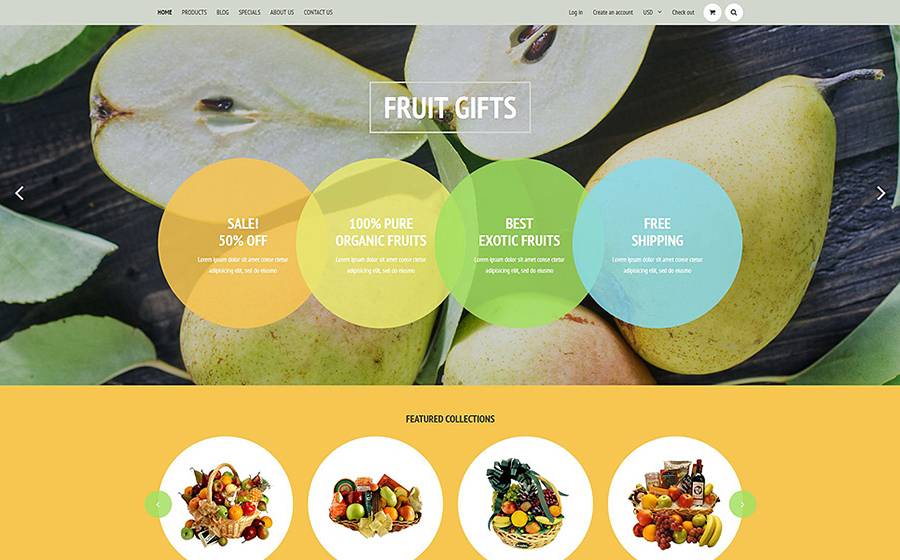
This theme’s design was specifically crafted for an online bouquet boutique.
Its layout is straightforward and user-friendly and is aimed for commercial websites.
It is optimized for search engines and will ensure that your customers will not have any difficulties finding your website.
Its design is fully responsive and will look pixel-perfect on any known device and screen resolution.
The template also uses Parallax animations which help make your website’s user experience much more engaging. Besides, it also makes it much more visually appealing.
A useful admin panel will let you manage your content in a simple yet effective interface.
This template is a perfect solution for any beauty-related business.
Its full-width slider and bold visuals are sure to capture your visitors’ attention.
It is packed with awesome features that are undeniably helpful for creating a successful online store like custom page templates, alternative module layouts, commenting system, online chat, newsletter subscription, live search, social options, and many others.
You don’t need to be a professional coder to install and modify this theme since it has a powerful admin panel that is both helpful and easy to use.
Parallax effects are also present on the background and will add to your websites overall respectability.
If you are looking to create a truly effective web design that will captivate users with its clear structure and visual appeal, you should definitely consider this template.
It uses colors that are pleasant to the eye and careful implementation of white space brings balance to the overall look.
Circular elements and ghost buttons give the theme a modern, refined feel.
A dropdown menu, advanced search bar and a handy back to top arrow will improve your site’s usability.
Social share buttons that are placed at the bottom will encourage your visitors to tell their friends about your services in a convenient manner.
Have you noticed the other thing that all those templates have in common? That’s, right, all of them make use of parallax effects. It’s another cool trick up the designers’ sleeves to make your site even more engaging. I’ll tell you a little more about it.
Parallax effects are created by sets of moving pictures, one on the background and one on the foreground. As you scroll, the foreground moves faster than the background, creating a feeling of depth. While not being true 3-dimensional imagery, it still looks very cool and is an awesome design tactic. It really adds to your site’s user experience.
I sincerely hope I have been helpful in any way to you in this article. If so, feel free to leave a comment! I would love to hear about your business successes!