“Could not resolve host: magento-community; Host not found” error in Magento usually occurs when the Magento installation is unable to connect to the Magento repository to download and install extensions. Here are some steps you can follow to fix this error:
Check your internet connection – Ensure that you have a stable internet connection and that there are no network issues that may be preventing Magento from connecting to the Magento repository.
Verify the Magento repository URL – Verify that the Magento repository URL is correct and properly configured. To do this, navigate to System -> Web Setup Wizard -> System Configuration -> Magento Marketplace and ensure that the Magento repository URL is set correctly.
Check firewall settings – Ensure that your server firewall is not blocking the connection to the Magento repository. You may need to whitelist the Magento repository domain name or IP address in your firewall settings.
Clear Magento cache – Clear the Magento cache by navigating to System -> Cache Management and clicking on the “Flush Magento Cache” button.
Manually install extensions – If the error persists, you can try manually downloading and installing the extension from the Magento marketplace website.
If none of the above steps work, it may be best to seek the assistance of a Magento developer or support team who can help you diagnose and fix the issue.
Joomla is a powerful and flexible content management system that can be used for a variety of websites, including eCommerce sites.
Whether you’re starting a new eCommerce site or looking to improve your existing one, there are many eCommerce extensions available for Joomla.
These extensions can help you enhance your website’s functionality and features. In this blog post, we will explore some of the best eCommerce extensions for Joomla.
VirtueMart
VirtueMart is a popular and powerful eCommerce extension for Joomla. It offers a wide range of features, including multiple languages and currencies, flexible pricing and tax options, and support for various payment and shipping methods. VirtueMart is also highly customizable, with many templates and extensions available to enhance your website’s functionality.
HikaShop
HikaShop is another popular eCommerce extension for Joomla, offering a range of features such as customizable checkout, advanced tax and discount rules, and integration with various payment gateways. HikaShop also offers a drag-and-drop interface for building and managing your product catalog, making it easy to add and update products.
J2Store
J2Store is a lightweight and user-friendly eCommerce extension for Joomla. It offers features such as customizable product options, support for multiple currencies and languages, and integration with various payment gateways. J2Store also offers a range of templates and extensions to enhance your website’s functionality.
DJ-Catalog2
DJ-Catalog2 is a powerful product catalog and eCommerce extension for Joomla. It offers features such as customizable product options, advanced search and filtering options, and support for multiple currencies and languages. DJ-Catalog2 is also highly customizable, with many templates and extensions available to enhance your website’s functionality.
MijoShop
MijoShop is a popular eCommerce extension that integrates OpenCart with Joomla, offering a range of features such as advanced product options, multiple currencies and languages, and integration with various payment gateways. MijoShop also offers a drag-and-drop interface for building and managing your product catalog, making it easy to add and update products.
In conclusion, these are some of the best eCommerce extensions for Joomla, each offering a range of features and functionality to enhance your website’s eCommerce capabilities. Whether you’re looking for a lightweight and user-friendly solution or a powerful and highly customizable eCommerce extension, there is an option available for you in Joomla. Choose the one that best suits your needs and start building your eCommerce website today!
If you’re running a Joomla website, you may come across an error message that reads “Fatal error: Class ‘ContentHelperRoute’ not found.” This error can occur for a variety of reasons, including issues with the Joomla core files, missing or corrupt files, or database problems. In this blog post, we’ll walk you through the steps to troubleshoot this error and get your Joomla website up and running again.
Clear your Joomla website’s cache
The first step to troubleshoot this error is to clear your Joomla website’s cache. To do this, go to the Joomla administrator area and navigate to System -> Clear Cache. Click on all the options to clear the cache.
Check the Joomla version
Next, check that you are running a supported version of Joomla and that the com_content component is installed correctly. ContentHelperRoute is a part of the com_content component, which is a core component of Joomla. Make sure that you are using a version of Joomla that is supported and that the com_content component is installed correctly.
Check for missing or corrupt files
Check that there are no missing or corrupt files in your Joomla installation. You can do this by navigating to Extensions -> Manage -> Discover in the Joomla administrator area and clicking on the “Discover” button. This will help identify any missing or corrupt files that need to be fixed.
Check the database
Ensure that the Joomla database is functioning correctly by navigating to System -> Global Configuration -> Server and checking the database settings. Verify that the database connection is working correctly and that the database server is running.
Reinstall Joomla core files
If none of the above steps work, try reinstalling the Joomla core files. This will help replace any missing or corrupt files that are causing the “Fatal error: Class ‘ContentHelperRoute’ not found” error.
In conclusion, the “Fatal error: Class ‘ContentHelperRoute’ not found” error in Joomla can be frustrating to deal with, but there are several steps you can take to fix the issue. By clearing your Joomla website’s cache, checking the Joomla version and com_content component, checking for missing or corrupt files, and verifying the Joomla database, you can eliminate many of the most common causes of this error. If you are still experiencing issues, consider seeking help from a Joomla developer or support team.
The error message “Fatal error: Maximum execution time of 60 seconds exceeded” in Magento indicates that a PHP script on your website has taken longer than the server’s specified time limit to complete. This can happen when performing resource-intensive tasks such as importing large amounts of data, processing large orders, or running complex queries.
To resolve this issue, you can increase the maximum execution time limit for PHP scripts on your server. Here are the steps to do so:
Locate the php.ini file on your server. You can use the command “php –ini” to find the file path.
Open the php.ini file using a text editor.
Search for the following line: “max_execution_time = 60”
Change the value of 60 to a higher number, such as 120 or 180. This value represents the number of seconds that PHP scripts are allowed to run before timing out.
Save the changes to the php.ini file and close it.
Restart the web server to apply the changes. You can use the command “service apache2 restart” for Apache servers or “service nginx restart” for Nginx servers.
max_execution_time = 180
Once you have completed these steps, the maximum execution time limit for PHP scripts on your server should be increased. This should prevent the “Maximum execution time exceeded” error from occurring again.
WordPress, being a versatile platform, is used by millions worldwide. However, like any other web platform, it can sometimes face compatibility issues with certain browsers, especially older versions of Internet Explorer (IE). This guide will provide advanced solutions to instantly resolve these issues and ensure your WordPress site runs smoothly across all browsers.
Understanding the Issue
Before diving into the solutions, it’s essential to understand the nature of compatibility issues. WordPress themes, plugins, and custom codes might not always align with the way older browsers, like IE, interpret and display web content. This misalignment can lead to distorted layouts, malfunctioning features, or even security vulnerabilities.
Solutions to WordPress and IE Compatibility Issues
Browser Detection Using JavaScript: Implement browser-specific code by detecting the user’s browser through JavaScript. Place this code in the header file of your WordPress page or post. This method can identify common browsers like Opera, Internet Explorer, Safari, Chrome, and Firefox.
Separate Style Sheets for Different Browsers: Create distinct CSS files tailored for specific browsers. For instance, if you notice that a particular CSS attribute doesn’t render well in IE but works perfectly in Firefox, you can create two separate style sheets. Use JavaScript to determine which style sheet to apply based on the user’s browser.
Use the Compatibility View in IE: For users still on Internet Explorer, especially older versions like IE 11, there’s a feature called “Compatibility View.” This feature allows websites to be displayed as if the user was viewing them in an older version of IE. It can be a quick fix for many display issues.
Update WordPress Themes and Plugins: Ensure that your WordPress themes and plugins are updated. Developers often release updates to address compatibility issues.
Use Cross-Browser Testing Tools: Tools like the Microsoft Edge browser can help you run cross-browser compatibility checks on your site. This can be particularly useful to identify and resolve any inconsistencies.
Clear Browser Cache: Sometimes, the issue isn’t with the website but with the stored cache in the browser. Clearing the cache can often resolve display issues.
FAQs
How do I make my WordPress site compatible with all browsers? Regularly update your themes and plugins, use cross-browser testing tools, and consider implementing browser-specific code using JavaScript.
What is the browser compatibility plugin for WordPress? There are several plugins available that can help identify and fix compatibility issues. It’s essential to choose one that’s regularly updated and has good reviews.
Why is my WordPress site not displaying correctly? This could be due to outdated themes/plugins, browser cache, or compatibility issues with certain browsers.
How do I enable IE compatibility mode in Chrome? Chrome doesn’t have a native IE compatibility mode. However, there are third-party extensions available that can emulate this feature.
Conclusion
Ensuring your WordPress site is compatible with all browsers, especially older versions like IE, is crucial for user experience. By following the steps mentioned above, you can ensure a seamless experience for your users across all browsers.
When it comes to choosing a WordPress website builder, there are a lot of options to choose from like Beaver, WP Bakery, Visual Composer and lot more. However, two of the most popular choices are Avada and Elementor. Both have a lot to offer, but which one is the best? In this blog post, we’ll take a look at both software, explore their pros and cons, highlight the similarities and differences between both, and see which one is the best for developing your website.
Choosing Between Avada & Elementor for Your Next WordPress Project – What’s In It For You?
Choosing between these two popular WordPress page builders can be a difficult decision. Avada and Elementor are both powerful page builders that offer drag-and-drop functionality, easy customization, and incredible design options. They both can deliver a high-quality website design and offer many configuration options, an intuitive interface, and plenty of customization choices to choose from. However, each of them has the strengths and weaknesses that set both apart from each other.
When deciding which one to use for your next project, it is important to consider what is important to you as a designer or webmaster. If you are looking for a lot of design options or want to be able to build any type of website with the same tool, then Avada may be the best option for you. If you need more flexibility in terms of design, then Elementor will be a better choice for website building.
Pros & Cons of Using Avada & Elementor
Avada and Elementor are two of the most popular website builder software in the market today. They have a lot of similarities and differences.
The main difference between Avada and Elementor is that Avada has more templates to choose from, but Elementor is easier to use for beginners.
Both have drag-and-drop features, but Elementor is more intuitive for this purpose. Elementor comes with an intuitive interface, which cuts down on the time spent on creating the site.
Avada has a better SEO function than Elementor, but at the same time, it’s less user-friendly than Elementor when it comes to adding content to your website.
Elementor offers better customer support than Avada, but at the same time, it’s less flexible than Avada with some of its features like contact forms or popups.
Avada vs. Elementor Review – Which is Better?
Avada is a premium WordPress theme that offers more than 5000 different features, including an advanced drag-and-drop page builder. It is highly customizable, providing you with all the tools you need to create any type of website in minutes. If you’re looking for powerful website builder software, Avada is a great option. It’s easy to use and offers a wide range of features, making it a great choice for both novice and experienced web developers.
With Elementor, you can create exquisite, responsive websites with ease. Plus, there’s no need to code! Just drag and drop your way to a stunning website. From a wide selection of templates to a wide range of widgets, Elementor has everything you need to create a profitable website. It is an ideal tool for both the beginner and the pros. And, it’s free! If you’re looking for a powerful, yet easy-to-use website builder software, then you must check out Elementor.
There is something about awarding someone a hard-earned accolade that is quite satisfying. Giving people awards for their achievements as an employee, offering them special rewards for completing work or training courses, or just rewarding cherished loved ones for being in your life – can be seen as a way to acknowledge achievement. However, anybody rarely gets a certificate. That would be the one time when you receive something official and important to be framed with pride. So, looking at some amazing certificate design tips would come in very handy for sure.
A handy Guide To Design Your Own Certificate
Designing your certificate can be a fun and rewarding experience. With a little creativity and some basic knowledge of design principles, you can create a professional-looking certificate that will impress anyone who sees it. There are a few things to keep in mind when designing your certificate. First, decide what the certificate will be used for. Will it be a gift certificate, award, or something else? Once you know the purpose of the certificate, you can start to brainstorm design ideas.
Next, consider the layout of the certificate. You’ll want to include all of the necessary information, such as the recipient’s name, the date, and the reason for the award. But you also need to leave enough space for any images or logos you want to include. Finally, think about the overall look of the certificate. What colors do you want to use? What fonts will you use? Remember, your goal is to create a Certificate that looks professional and stylish.
Creative Ideas For Cool Certificate Designs
When it comes to designing a certificate, the sky’s the limit! So let your imagination run wild and see what you can come up with. You can go with a traditional look, or you can get creative and try something different. If you’re looking for some inspiration, check out these cool certificate design ideas that’ll blow your brain!
Use bright colors and patterns.
Get creative with the layout.
Use interesting fonts and text treatments.
Incorporate photos or images.
Think outside the box!
Get Started for New Design
Whether you’re just starting in the world of design or you are a seasoned pro, there is always room to explore new ideas, get inspired by fresh perspectives, and make your brain juices flow. From modern and minimalistic to intricate and ornate, there are a lot of designs that can catch your eye. And the best part is, that these certificates can be easily customized to fit your unique style. So, what are you waiting for? Get started on creating something amazing!
Themes & Font Types
The internet is full of certificate design ideas, but picking the right one for your needs can be tough. From simple and elegant designs to more creative and unique ones, there’s something for everyone on this list. Firstly, make sure that the theme and font you’re using are easy to read. For a more formal look, choose a classic serif font like Times New Roman or Garamond. If you’re going for something more fun and festive, try using an ornamental or script font. And for a modern and sleek look, try using a sans serif font like Arial or Helvetica.
Google rewards faster websites, and every user customers want a quicker site too. As you know, when a site is slow to load, you quickly lose patience and click away, right? With all the hard work that you put into building your website, do you know the one thing that can kill it before it even has a chance? Then the only thing is boosting your WordPress speed to get high rank and more traffic.
Loading speed is essential for your site’s success.
Think about it. How long are you willing to wait for a site to load before you decide to move onto the next one?
Not long, right?
Most visitors of your site are only willing to wait a matter of seconds for your website to load before they decide it isn’t worth the effort and escape out, back to Google, where they will eventually search for other sites.
The WordPress plugins are designed to increase the load speed of your page through a variety of mechanisms. Which one you need depends significantly on the structure, design, and reach of your page.
Why should you increase WordPress Speed?
There are many reasons to speed up WordPress, some of which might even cause significant concerns for you.
Search engines rank websites with fast-loading times higher than the slow-loading ones. So, if you want to improve your position in the SERP, improving speed should be one of your priorities.
Studies have said that site-loading speed of more than 2 seconds usually results in about 47 per cent of visitors bouncing off the website. So, to keep about half of your visitors stick to your site, you should speed up your WordPress.
Online buyers are the most impatient; they expect the page to load within a second. So, if you are running an e-commerce store on WordPress, then you better get ready to make significant improvements so your business can be more profitable.
To help you which WordPress plugin is best for your site, we have discussed some of our favourites, to help you get more traffic.
WP Rocket
WP-Rocket plugin is the best WordPress Speed loading plugin. It is the most accessible and most beginner-friendly caching plugin, which is a big help if you don’t know the technical terms used for different caching options.
Features
It allows users to cache their website with one-click instantly.
WP Rocket crawler automatically fetches your WordPress pages to build up the cache.
This plugin then automatically turns on recommended WordPress caching settings like zip compression, page cache, and cache pre-loading.
WP Rocket also includes optional features as you can turn on to further improve performance. This includes lazy loading images, CDN support, DNS pre-fetching, minification.
Reducing Image Size: WP Smush
Every image on your site can increase page load time. In the past, the only real way around this was by compromising image quality. With WP Smush plugin, every image is compressed so that the overall size is decreased, and the quality of the image remains the same.
Features
It supports all standard image formats, including JPEG, GIF, and PNG, removes unused colours from images.
WP Smush is compatible with other plugins. It compresses any image in your directory.
It removes metadata from JPEG images.
WP Smush handles up to 50 at a time of multiple images to compress.
It is the go-to plugin for image optimization.
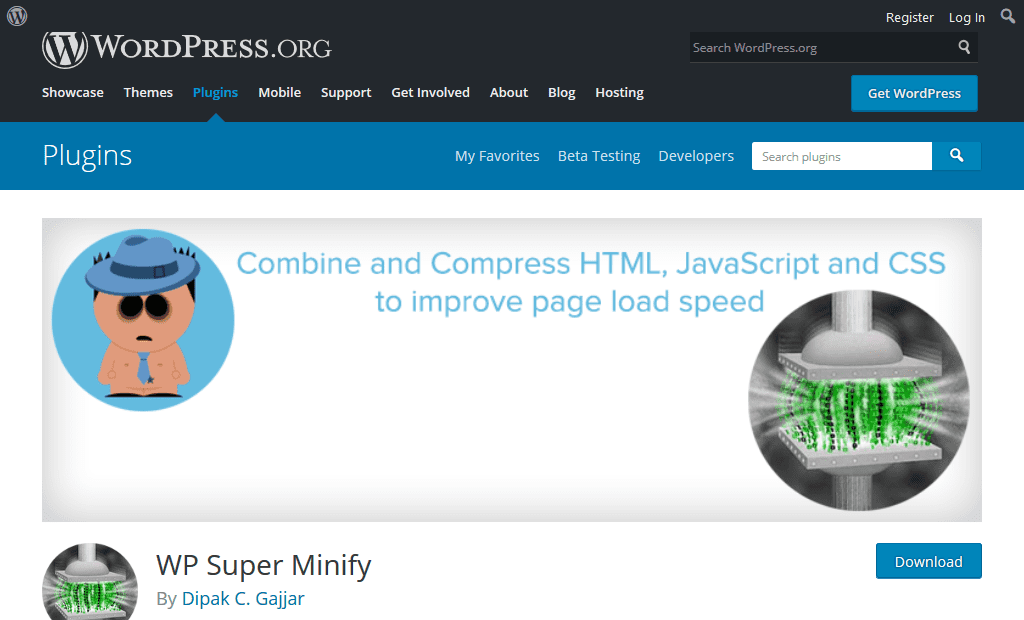
WP Super Minify
WP Super Minify plugin combines, minifies, and caches inline JavaScript and CSS files to speed up page loads, using Minify PHP Framework. By activating this plugin, you will see the source of your HTML, inline JavaScript and CSS are now compressed. The size will be smaller and quite helpful to improve your page load speed as well as google page speed. It combines JS, HTML and CSS files so that they can be compressed and served to visitors in a way that reduces website loading times.
Features
WP Super Minify plugin minifies JavaScript, CSS and HTML.
It gives option to disable compression of CSS/JavaScript.
The plugin is extremely straight forward and easy to use.
W3 Total Cache
WordPress caching is one of the best ways to improve website performance. The primary purpose of caching is storing the website data temporarily in the cache so that it loads faster the next time the user opens the same page. W3 Total Cache WordPress plugin is one of the most popular plugins and the best caching plugin for WordPress.
Features
W3 Total Cache fetch page cache, database caching, object caching, browser caching and a lot more.
It lets you integrate CDN services to reduce page load time.
W3 Total Cache has options to magnify and HTTP compression of the HTML, JS, and CSS files so that you can save bandwidth up to 80%.
You need to install the plugins mentioned above in your site to reach its potential. This can only happen when it is fully optimised for speed and usability. These WordPress plugins help your website to appear professional and user-friendly.
Downloading is easy, and you need at least one of these plugins right now. Don’t wait.
Increase your speed, boost your WordPress and start optimizing traffic today.
However, the core CMS does provide a lot of functional flexibility, the core software still lacks a certain degree of functionality.
The core software of WordPress is a bit like an incomplete puzzle. WordPress plugins are the missing part.
But the biggest advantage is a lot of free and paid plugins are readily available to use and you just have to install and use them.
Plugins are like add-ons or bit of codes which can be installed to a WordPress. Users can install them to improve their WordPress site in various ways, including article enhancement, security, managing comments, and optimizing content to rank higher in search engines.
In short, it can make a website look more professional, run faster, and enhance the features.
The good news is there are more than 55,000 plugins to choose from the WordPress plugin directory and there are at least a thousand on third-party websites.
The bad news is how do you choose the best WordPress plugins to use?
Depending on your business you may require different plugins which different features and functionality.This guide brings you the best seven plugins that we believe every WordPress user should have.
List of Top 7 Best WordPress Plugins
WP Rocket – The Best for Speed Optimization
Rank Math – The Best for Increasing Organic Website Traffic
WP Rocket
Speed Optimization is one of the important factors in SEO from the aspect of Technical SEO. WP Rocket is a plugin, used by millions of websites and helpful for making your WordPress good at speed. Most of the WordPress users are not aware of the coding for making their website optimized. For example, Removal of unnecessary code, etc. This plugin will automatically help you in speeding up your loading speed by making the necessary actions. Here are the features of this plugin:
It removes the cache of the page
It preloads Sitemap
It compresses the GZIP
It optimizes the database for faster fetching
Minify of CSS, JS loading
CDN integration
DNS Prefetching
There are a lot of other features of this plugin that will force you to buy the premium account of this plugin.
Rank Math
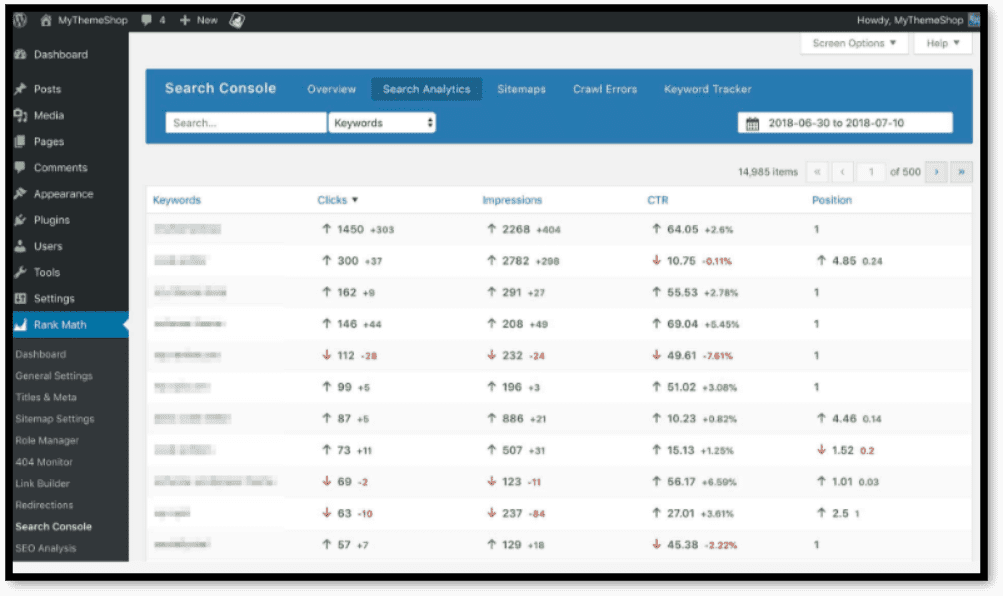
Rank Math is one of the most effective SEO plugins for WordPress users. It allows you to manage the On-Page SEO of your website. The biggest advantage of this plugin is that it gets integrated with Google Search Console and you can get some essential information directly on your dashboard.
It helps to manage the tags like no-index, no-follow, no-archive. The plugin would also help you to focus on the specific keyword. Some of the features of Rank Math includes XML sitemap, Meta Description, Links, 404 errors, Redirects, Local SEO, Image SEO.
Prepostseo
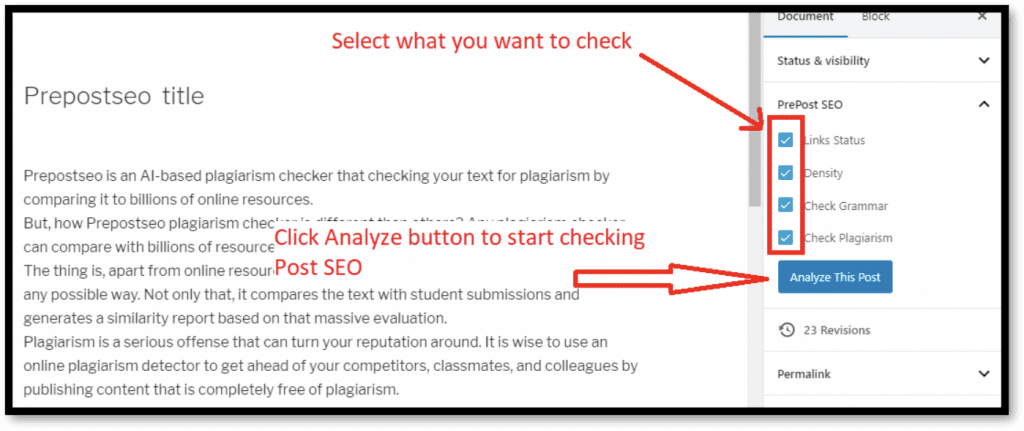
We all know that the SEO factors are usually considered on the content and if your content is not potential then your SEO wouldn’t be so effective. Before applying the SEO implications, you should consider making your content up to the mark and Prepostseo can help you in this regard.
It checks your content in the sense of SEO like readability score and some other optimization score
It checks the plagiarism in your content and checks the ratio of the plagiarism and unique content in your writing
It helps to remove the grammatical errors in your writing through providing the suggestion upon mistakes
It finds the broken links in your web pages which is an important SEO application
Besides these, there are a lot of other features for your website like counting the words and character of your content.
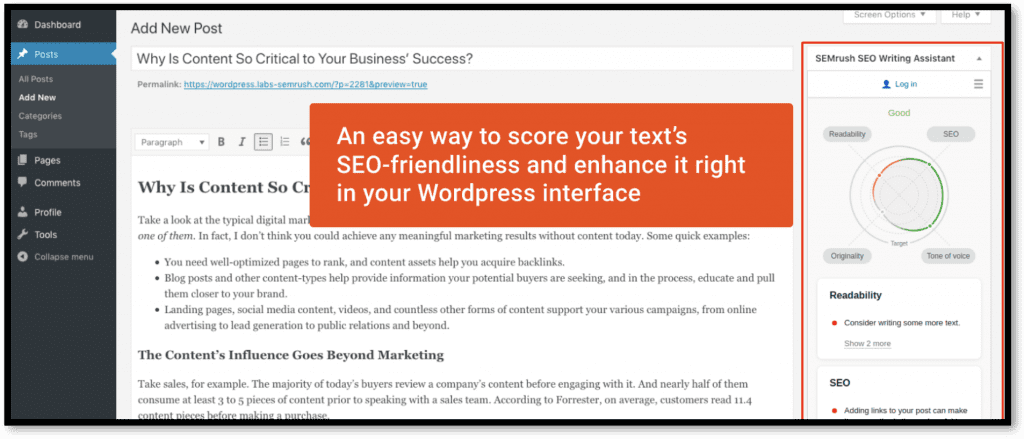
SEMrush SEO Writing Assistant
SEMrush is one of the popular brands for SEO experts and webmasters. They are also offering the WordPress plugin for WordPress users and through this, you can improve your writing skills.
This plugin helps make your content up to the Search engine algorithms. Some of the features of this amazing plugin are discussed below:
Firstly, it will analyze your content and give you a score for that content according to the readability and SEO measurement.
It suggests making your content friendly to read which is helpful for the audience and crawlers to understand.
For better SEO, it will also help you to make some changes in your content for better optimization.
It will allow you to add the keyword and get suggestions for making your content accordingly.
The biggest advantage of this amazing plugin is that it will let you know how much word count for the article you should have for the specific topic. Moreover, it will also let you know the number of keywords you should have in the content.
Broken Link checker
Broken links are one of the bad factors for SEO and users. Broken links are the external links that are placed in your content but the navigated web page though the link is not available. For example, you are placing the link to another site but the other web page or post is removed. These broken links are harmful to the ranking of your website because crawlers are very familiar with the links. This plugin will provide the feature of monitoring the broken links whether it’s pointing to the web page, comment, or any post. In case you are having a broken link, this plugin will stop the crawlers to follow the broken link for affecting your SEO.
Conclusion
As we know that WordPress is famous because of the access to plugins and readymade themes. On other platforms or through the programming language, it is quite tough to have the SEO factors applied to your site. However, the case is completely different on WordPress because the majority of the process is done through the plugins. The above-mentioned plugins can help you to make your website optimize to the search engine for better ranking. Most of the plugins which are discussed in this article are free to use while you can go for the premium if you are loving these plugins.