Updated 15 October 2026 · By Abhilash Sahoo, Founder, Infyways
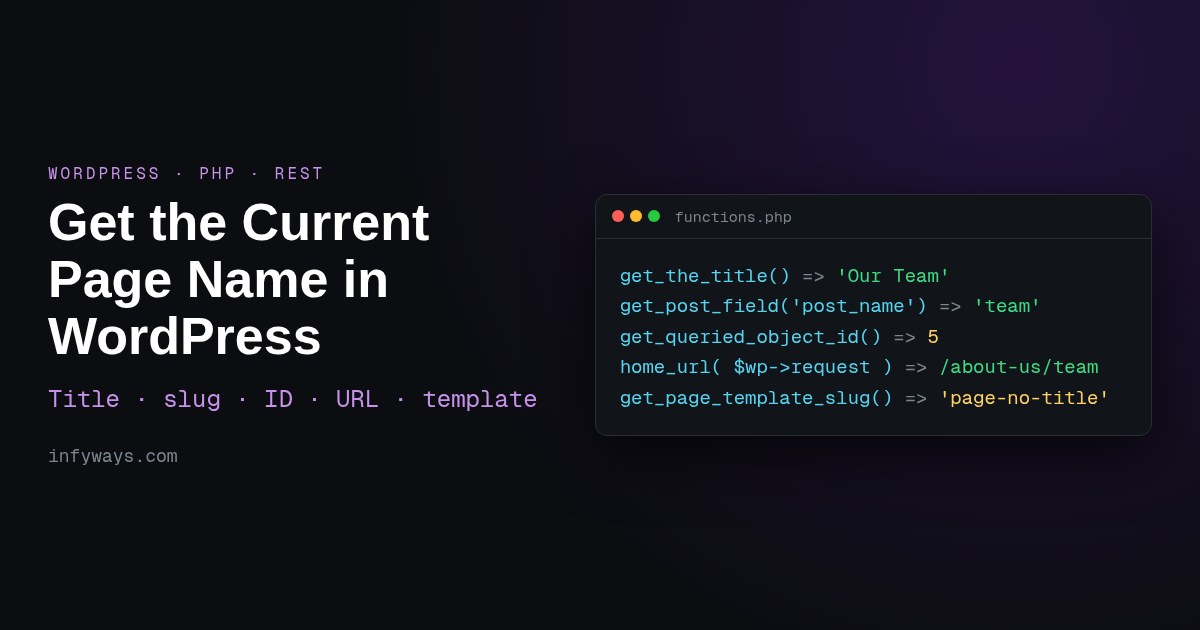
Quick answer: to get the current page name in WordPress, use the function for the thing you need:
- Title:
single_post_title( '', false ), orget_the_title()inside the Loop - Slug:
get_post_field( 'post_name', get_queried_object_id() ) - ID:
get_queried_object_id() - URL:
global $wp; home_url( add_query_arg( $_GET, $wp->request ) ) - Template:
get_page_template_slug()
On category, tag and other term archives, use get_queried_object()->name or ->slug instead.
I tested every snippet below on a fresh WordPress 7.1.3 install (PHP 8.2.12, the Twenty Twenty-Five block theme) with a parent page, a child page, a posts page and a category archive. The images marked “real output” are what WordPress actually returned. The function descriptions are checked against the WordPress Code Reference.
Which function returns the page name, slug, ID or URL?
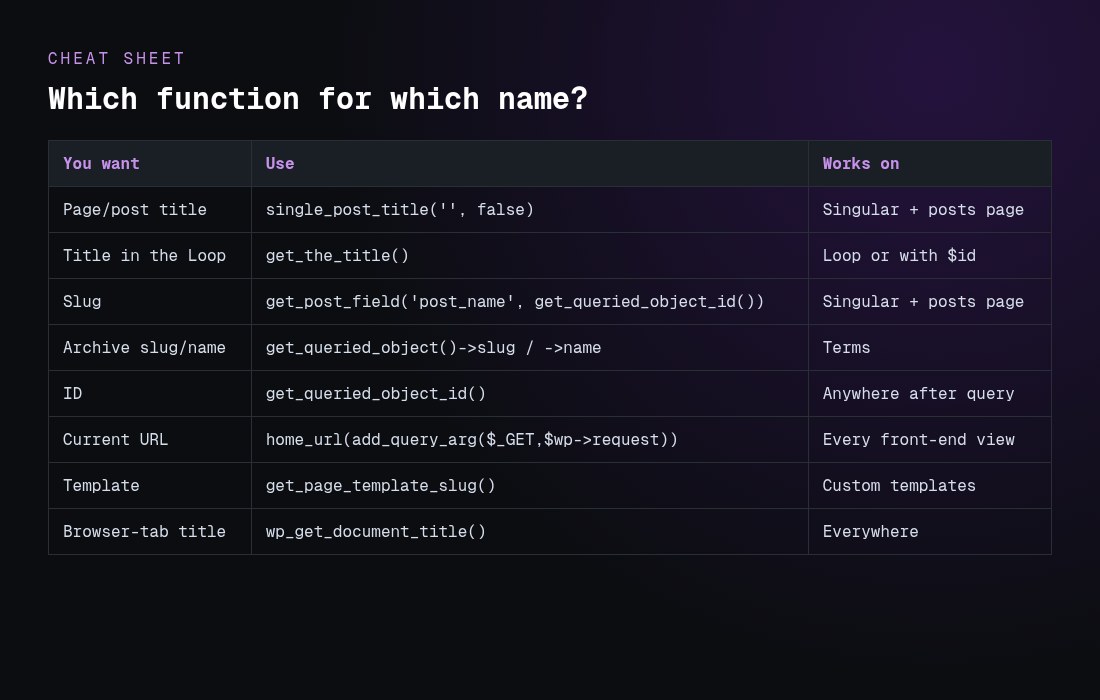
| You want | Function | Returns (tested on /about-us/team/) | Inside the Loop? | Watch out |
|---|---|---|---|---|
| Title | get_the_title() | ‘Our Team’ | Yes, or pass an ID | Returns the first post on the posts page |
| Title outside the Loop | single_post_title( ”, false ) | ‘Our Team’ | Not needed | Returns NULL on term archives |
| Slug | get_post_field( ‘post_name’, get_queried_object_id() ) | ‘team’ | Not needed | Only on singular views and the posts page |
| Slug in the Loop | $post->post_name | ‘team’ | Yes | Follows the Loop, not the page |
| Slug from the query | get_query_var( ‘pagename’ ) | ‘team’ | Not needed | Empty on a static front page and on posts |
| ID | get_queried_object_id() | 5 | Not needed | It’s a term ID on archives |
| Permalink | get_permalink() | …/about-us/team/ | Yes, or pass an ID | Posts only, not archives |
| Current URL | home_url( add_query_arg( $_GET, $wp->request ) ) | …/about-us/team?ref=x | Not needed | No trailing slash |
| Browser-tab title | wp_get_document_title() | ‘Our Team – Demo’ | Not needed | Includes the site name and is HTML-encoded |
| Template | get_page_template_slug() | ‘page-no-title’ | Not needed | Empty for the default template |
| Archive name | get_queried_object()->name, single_cat_title( ”, false ) | ‘Uncategorized’ | Not needed | Only on term archives |
How do I get the current page title in WordPress?
get_the_title() “retrieves the post title”. With no argument, it uses the global $post, so inside the Loop and on a single page or post it returns the right title:
<h1><?php echo esc_html( get_the_title() ); ?></h1>

// Any page by ID
echo esc_html( get_the_title( 42 ) );
Outside the Loop, in header.php, a hook or a shortcode, use single_post_title(). It reads the queried object, not the Loop. Pass false as the second argument to get the value back instead of printing it:
$title = single_post_title( '', false );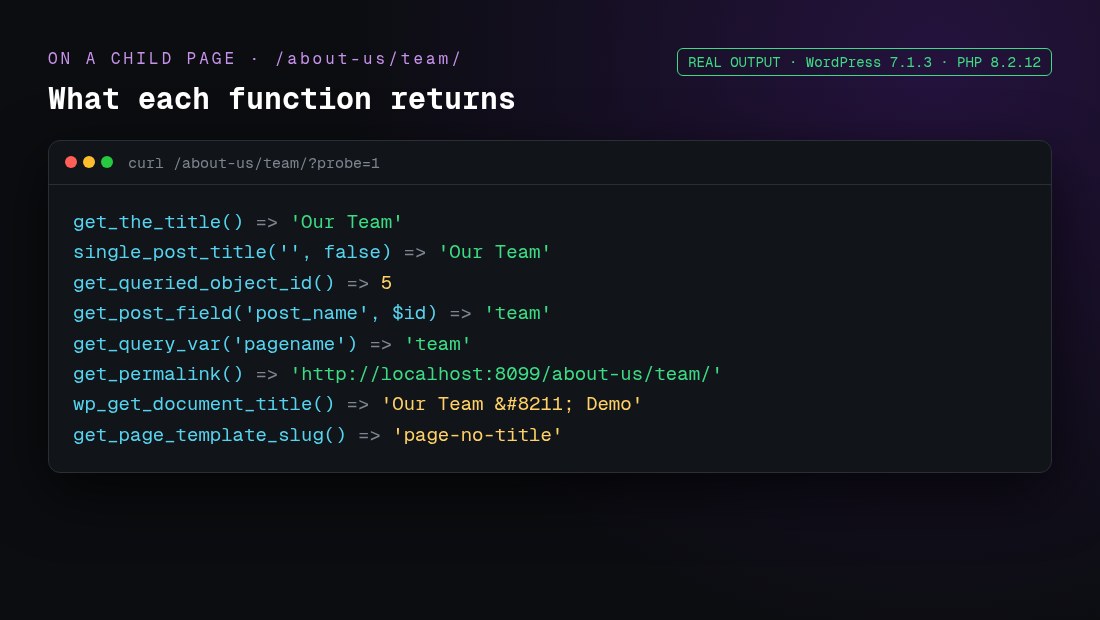
For the browser-tab title (the <title> tag), use wp_get_document_title(). Since WordPress 4.1, themes should declare add_theme_support( 'title-tag' ) and let WordPress build the tag, instead of printing wp_title() manually.
How do I get the current page slug?
WordPress stores the slug in the post_name field. The reliable way to read it is:
$slug = get_post_field( 'post_name', get_queried_object_id() );Other options return the same value in the right context:
global $post; $post->post_nameworks inside the Loop or on a single view.get_queried_object()->post_nameworks on singular views only.get_query_var( 'pagename' )works only for pages reached through pretty permalinks. In my test it was empty on the static front page and on single posts.basename( get_permalink() )returned ‘team’, but it depends on your permalink structure.
For a child page, the slug is only the last part (‘team’). To get ‘about-us/team’, use get_page_uri( get_queried_object_id() ). To get the parent page’s title, use get_the_title( wp_get_post_parent_id( get_queried_object_id() ) ).
How do I get the current page ID?
get_queried_object_id() “retrieves the ID of the currently queried object”. It’s the safest choice in templates and hooks because the Loop can’t change it. Inside the Loop, get_the_ID() gives the ID of the post currently being looped. On a category archive, get_queried_object_id() returns the term ID (see Trap 2 below).
How do I get the current page URL in WordPress?
There are three common methods, and they don’t return the same thing:
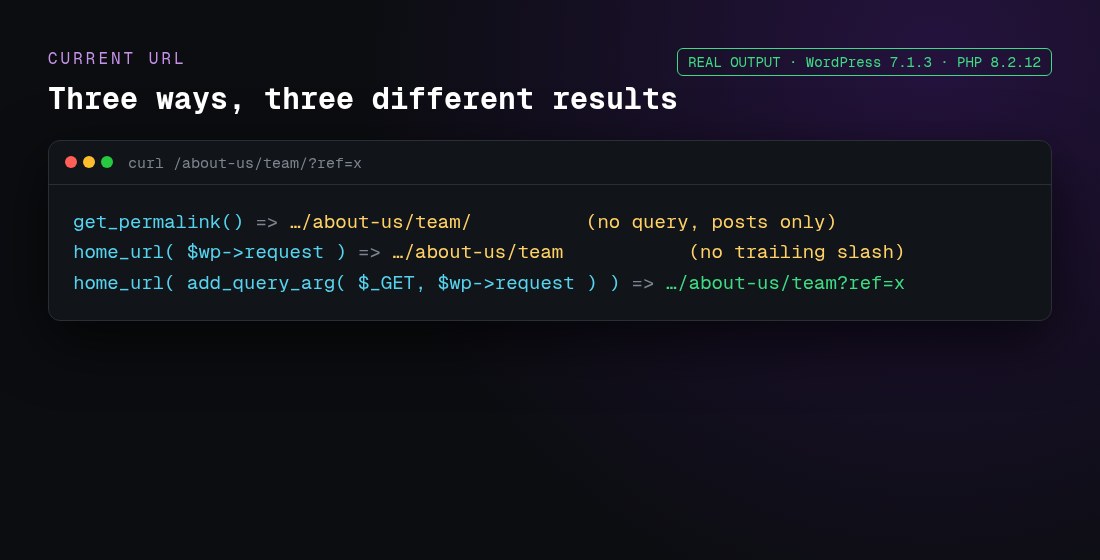
// 1. Permalink of the current post or page (no query string, posts only)
$url = get_permalink();

// 2. Current path on any view, including archives (no trailing slash, no query string)
global $wp;
$url = home_url( $wp->request );

// 3. Current URL with the query string
global $wp;
$url = home_url( add_query_arg( $_GET, $wp->request ) );

echo esc_url( $url );
Method 3 works on archives, search and paginated views too. If you need the trailing slash that your permalinks use, wrap the path in trailingslashit(). The WordPress reference notes that add_query_arg() output is “not escaped by default”, so always pass it through esc_url() before you print it. $wp->request is only filled after WordPress parses the request (the parse_request step), so it’s empty very early, for example in plugins_loaded.
Why does get_the_title() return the wrong name?
Trap 1: the posts page (is_home)
When Settings → Reading uses a page called “Blog” as the posts page, the global $post is the first post in the list. In my test, get_the_title() returned the first post’s title, not “Blog”:
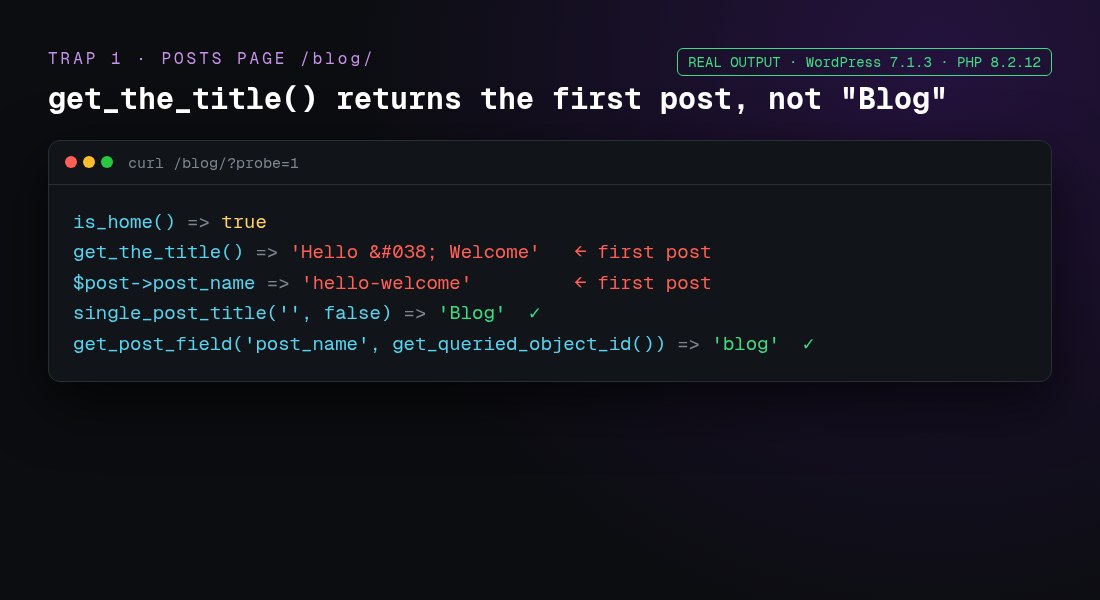
Use single_post_title( '', false ), or get_the_title( get_option( 'page_for_posts' ) ).
Trap 2: archives return a term, not a post
On a category archive, get_queried_object() is a WP_Term, and get_queried_object_id() is a term ID. Passing that ID to get_post_field() silently returned the slug of post ID 1 (‘hello-world’):
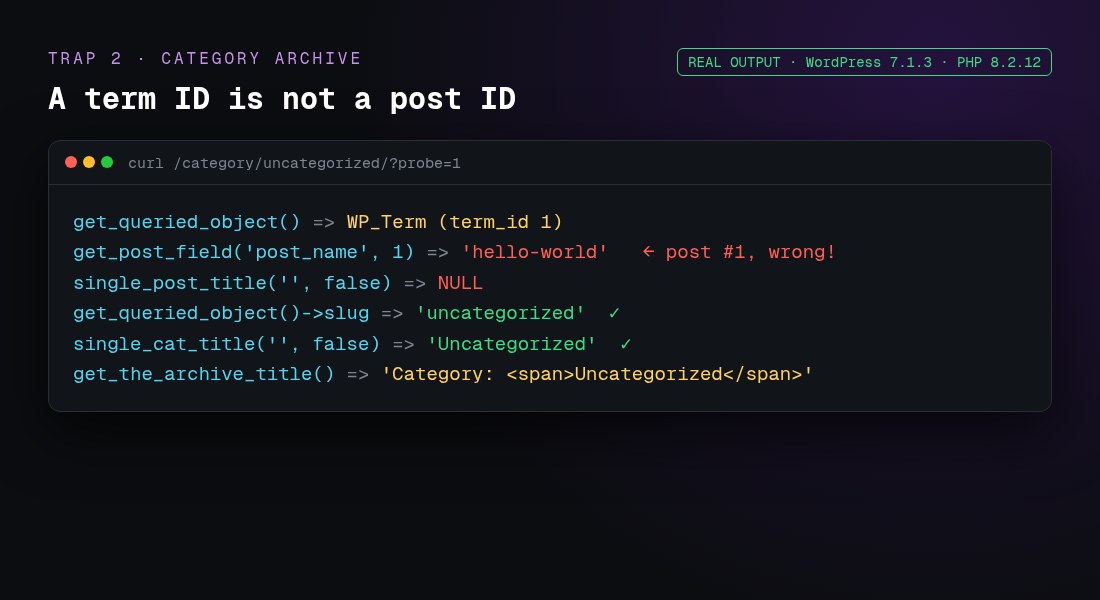
Check what is being viewed first:
function infy_current_name( $field = 'title' ) {
    $obj = get_queried_object();

    if ( $obj instanceof WP_Post ) {          // pages, posts, CPTs, posts page
        return 'slug' === $field ? $obj->post_name : single_post_title( '', false );
    }
    if ( $obj instanceof WP_Term ) {          // category, tag, taxonomy
        return 'slug' === $field ? $obj->slug : $obj->name;
    }
    if ( $obj instanceof WP_Post_Type ) {     // post type archive
        return 'slug' === $field ? $obj->name : $obj->label;
    }
    if ( $obj instanceof WP_User ) {          // author archive
        return 'slug' === $field ? $obj->user_nicename : $obj->display_name;
    }
    return is_front_page() ? get_bloginfo( 'name' ) : '';
}
Trap 3: a static front page has no pagename
With a static front page, get_query_var( 'pagename' ) was an empty string, but get_post_field( 'post_name', get_queried_object_id() ) returned ‘about-us’. Use the queried-object method there too.
Trap 4: HTML entities
get_the_title() returned 'Hello & Welcome', because it applies the the_title filters, which encode characters. For a raw value, for example in JSON or data attributes, use get_post_field( 'post_title', $id ) and escape it for the context. Use the_title_attribute() inside HTML attributes.
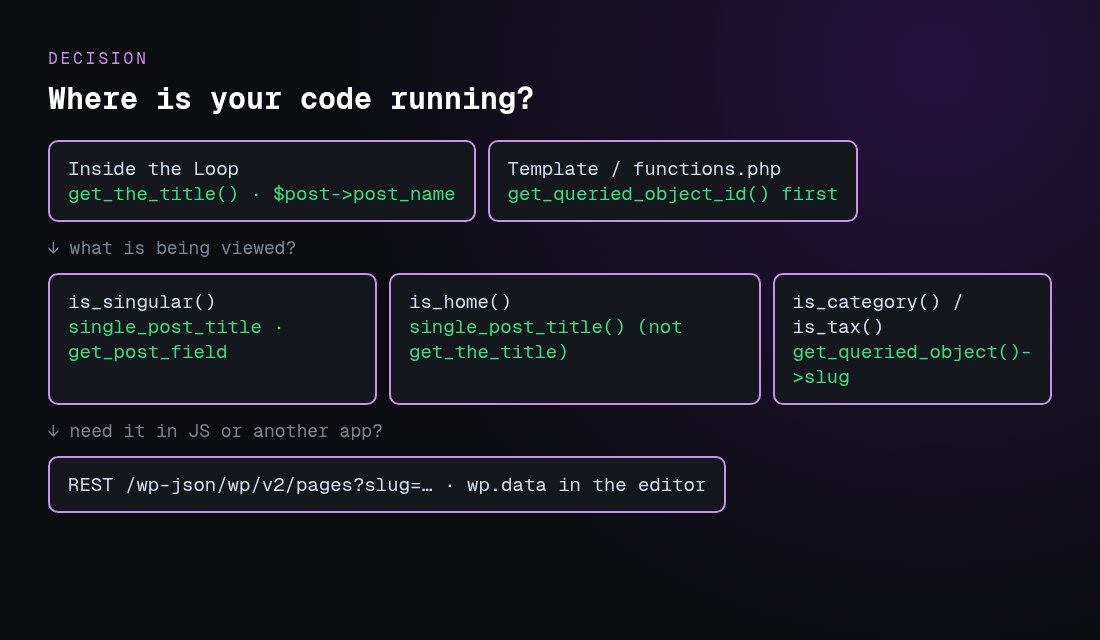
How do I check which page I’m on (is_page, is_home, is_front_page)?
if ( is_page( 'team' ) ) { /* slug, ID or title */ }
if ( is_page( array( 'about-us', 42 ) ) ) { /* any of these */ }
if ( is_front_page() ) { /* the homepage visitors see */ }
if ( is_home() ) { /* the posts page */ }
if ( is_singular( 'product' ) ) { /* a single CPT item */ }
In my test, on the static front page is_front_page() and is_page() were both true. On the “Blog” posts page, is_home() was true and is_page() was false. These conditionals only work after the main query runs, from the wp hook onwards, so don’t call them in functions.php outside a hook.
How do I get the page template name?
get_page_template_slug() “gets the specific template filename for a given post”. In a classic theme, it returns a file such as templates/full-width.php. In a block theme, it returns the template slug. My Twenty Twenty-Five test returned 'page-no-title'. It returns an empty string when the page uses the default template. WordPress also adds the template to the body classes (page-template-page-no-title), which is handy for CSS.
Can I get the page name with the REST API or JavaScript?
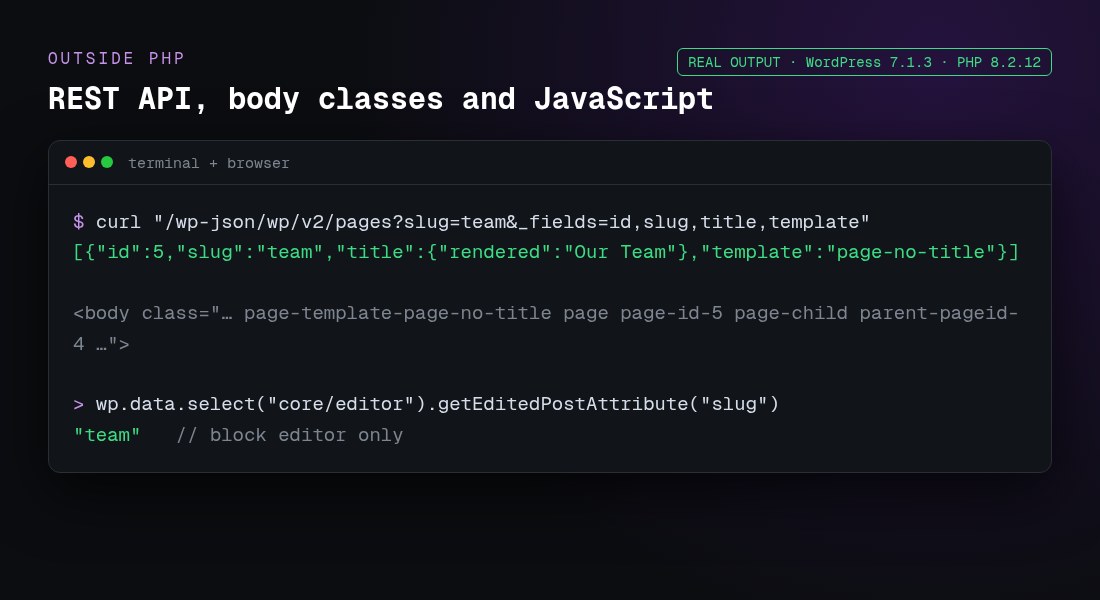
- REST API:
/wp-json/wp/v2/pages?slug=team&_fields=id,slug,title,templatereturned{"id":5,"slug":"team","title":{"rendered":"Our Team"},"template":"page-no-title"}. Use/wp/v2/postsfor posts. - Front-end JavaScript: read
document.titleorwindow.location.href. You can also take the ID from the body class:document.body.className.match(/page-id-(\d+)/). My test page hadpage page-id-5 page-child parent-pageid-4. - Block editor:
wp.data.select( 'core/editor' ).getEditedPostAttribute( 'title' ), or'slug'. This works only in the editor, not on the front end. - Passing PHP values to a script:
wp_add_inline_script( 'my-script', 'const infyPage = ' . wp_json_encode( array( 'slug' => $slug, 'id' => get_queried_object_id() ) ) . ';', 'before' ); - WP-CLI:
wp post get 5 --field=post_namereturnedteam.
Practical examples
Add the slug as a body class
add_filter( 'body_class', function ( $classes ) {
    if ( is_singular() ) {
        $classes[] = 'slug-' . sanitize_html_class( get_post_field( 'post_name', get_queried_object_id() ) );
    }
    return $classes;
} );
A shortcode that prints the current page title
add_shortcode( 'page_title', function () {
    return esc_html( single_post_title( '', false ) );
} );
Load a script only on one page
add_action( 'wp_enqueue_scripts', function () {
    if ( is_page( 'contact' ) ) {
        wp_enqueue_script( 'contact-form', get_stylesheet_directory_uri() . '/js/contact.js', array(), '1.0', true );
    }
} );
Need the page’s image as well? See our guide to getting the featured image URL in WordPress. If you’re building a theme, read custom WordPress theme development and WordPress development for beginners.
Common mistakes checklist
- Using
get_the_title()or$poston the posts page or on archives. Use the queried object instead. - Passing a term ID from
get_queried_object_id()to post functions. - Relying on
get_query_var( 'pagename' ), which is empty on the front page, on posts and with plain permalinks. - Calling conditionals or
$wp->requestbefore the query runs. Hook intowportemplate_redirector later. - Printing values without escaping. Use
esc_html(),esc_attr()oresc_url(). - Using
$_SERVER['REQUEST_URI']alone. It duplicates the folder on subdirectory installs.home_url( $wp->request )handles that. - Hard-coding
wp_title()in new themes instead of usingtitle-tagsupport andwp_get_document_title().
Frequently asked questions
What is the difference between page name and page title in WordPress?
The title (post_title) is the human-readable name, such as “Our Team”. The “name” (post_name) is the URL slug, such as “team”. Use single_post_title( '', false ) for the first and get_post_field( 'post_name', get_queried_object_id() ) for the second.
How do I get the page name outside the Loop?
Use single_post_title( '', false ) for the title and get_post_field( 'post_name', get_queried_object_id() ) for the slug. Both read the queried object, so the Loop can’t change them.
Why does get_the_title() show a post title on my blog page?
On the posts page, the global $post is the first post in the list. Use single_post_title( '', false ) or get_the_title( get_option( 'page_for_posts' ) ).
How do I get the current category name?
Use single_cat_title( '', false ) or get_queried_object()->name. For the slug, use get_queried_object()->slug. get_the_archive_title() adds a “Category:” prefix.
How do I get the full current URL including the query string?
Use global $wp; echo esc_url( home_url( add_query_arg( $_GET, $wp->request ) ) );. Use home_url( $wp->request ) for the path only.
How do I get the parent page’s name?
Use get_the_title( wp_get_post_parent_id( get_queried_object_id() ) ). For the full path, such as about-us/team, use get_page_uri().
Does this work in block themes and full site editing?
Yes. All the PHP functions here worked with Twenty Twenty-Five, a block theme. In block templates you’d usually use the Title block. Use PHP in a plugin, a render_callback or functions.php hooks.
How do I get the page template name?
Use get_page_template_slug( get_queried_object_id() ). It returns the file path in classic themes, the template slug in block themes, and an empty string for the default template.
Can I get the page slug with the REST API?
Yes. /wp-json/wp/v2/pages?slug=team finds a page by slug, and /wp-json/wp/v2/pages/5?_fields=slug,title,link returns the slug of page ID 5.
How do I get the current page name in JavaScript?
On the front end, use document.title, location.pathname or the page-id-N body class, or pass PHP values with wp_add_inline_script(). In the block editor, use wp.data.select( 'core/editor' ).getEditedPostAttribute( 'slug' ).