Let’s be honest. How many times have you opened Finder on your Mac, searched for a file, waited for results, and wondered why something so basic still feels unnecessarily complicated?
Apple’s Finder has been around for decades. It does its job, but if you work with hundreds or thousands of files, manage development projects, handle large media libraries, or regularly move files between folders, you might find yourself wishing it could do a little more.
What if you could have faster search, better file management, detailed disk usage insights, developer-friendly tools and a more powerful browsing experience without paying for another application?
That’s where Strata Files comes in.
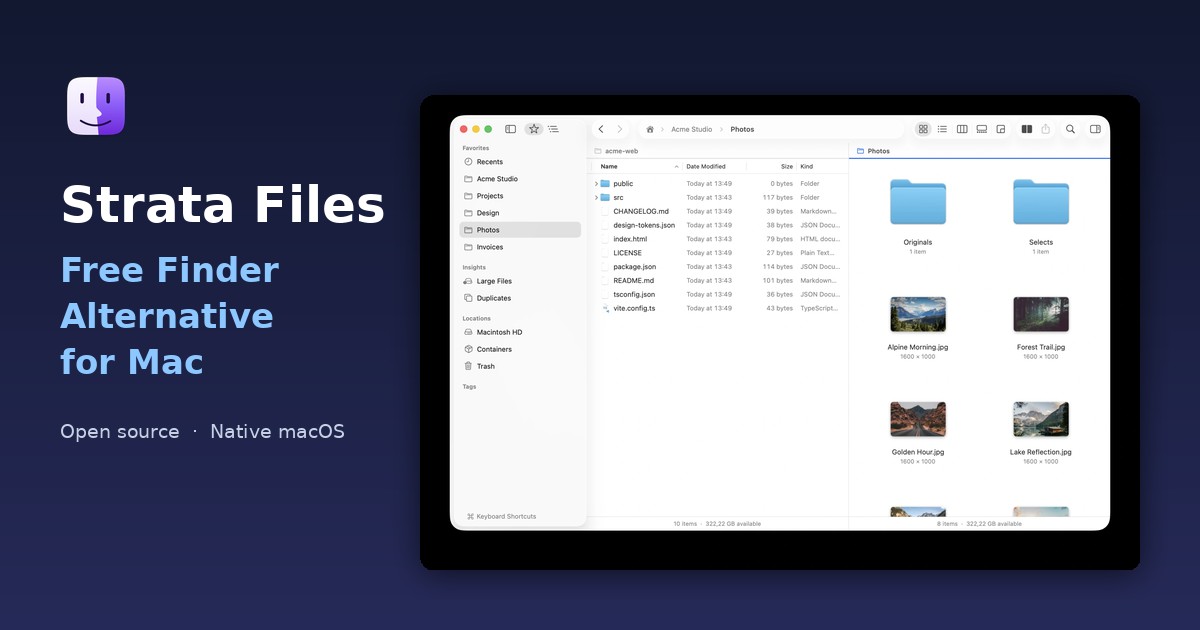
Strata Files is a free, open-source file manager for macOS that aims to make managing files faster, smarter and more enjoyable. It takes the familiar experience of Finder and adds features that many Mac users have been waiting for.
And yes, it is completely free.
What Is Strata Files?
Strata Files is a native macOS file manager designed as an alternative to Apple’s Finder.
It combines familiar file management features with powerful capabilities such as instant file search, real-time folder sizes, disk usage visualization, dual-pane browsing, advanced filtering and developer tools.
But there’s something particularly interesting about Strata Files: it is built entirely using Apple’s native AppKit and Swift technologies.
There is no Electron, no web views and no unnecessary layers running in the background.
It is designed specifically for Mac users who want a fast, lightweight and privacy-focused experience.
Even better, Strata Files is open source under the MIT license. You can download it, use it, inspect its source code and contribute to its development.
Why Look for a Finder Alternative?
Finder is convenient, familiar and deeply integrated into macOS. However, convenience doesn’t always mean efficiency.
Consider a few everyday situations.
- You want to find every PDF modified last month.
- Your Mac is running out of storage, but you have no idea which folders are consuming the most space.
- You need to compare two project folders and move files between them.
- You want to search for files larger than 1 GB.
- You work with multiple repositories and frequently navigate between project directories.
These are relatively simple tasks, but they can become frustrating when your file manager doesn’t provide the right tools.
Several third-party applications attempt to solve these problems, but some come with paid licenses, subscriptions or additional complexity.
Strata Files takes a different approach: deliver a powerful Finder alternative that is free and open source.
7 Reasons to Try Strata Files
1. Lightning-Fast File Search
Searching for files shouldn’t feel like waiting in a queue.
Strata Files indexes files in your home folder and Applications directory, allowing you to search as you type. Once indexing is complete, results can appear in milliseconds, even across millions of files.
You can search using file names, precise filters or natural language.
For example:
- “PDFs from last month”
- “Videos bigger than 500 MB”
ext:swift modified:<7dsize:>1gb kind:movie
You can even save searches and keep them available for later.
If you regularly work with large collections of documents, images, videos or development files, this feature alone is worth exploring.
2. Finally Understand Where Your Disk Space Goes
Running out of storage on your Mac?
Instead of manually opening folders and checking their properties, Strata Files provides a dedicated Disk Usage view.
It visualizes folder sizes using a map, making it easier to identify which directories are consuming the most storage.
You also get dedicated Large Files and Duplicates sections to help identify unnecessary files and reclaim valuable disk space.
This is particularly useful for developers, designers, photographers and video editors who regularly work with large files.
3. A Keyboard-First File Management Experience
If you love keyboard shortcuts, you’ll appreciate this.
Strata Files includes a command palette that lets you jump between folders, search files and execute commands without constantly reaching for your mouse.
Some useful shortcuts include:
| Shortcut | Action |
|---|---|
| Command + K | Open command palette |
| Command + L | Type a path |
| Command + 1–5 | Switch between views |
| Space | Quick Look |
| Shift + Command + F | Open Recents |
You can also filter files within a folder simply by typing.
The goal is simple: spend less time navigating and more time getting things done.
4. Five Views and Dual-Pane Browsing
Different files deserve different ways of viewing them.
Strata Files supports five viewing modes:
- Icons
- List
- Columns
- Gallery
- Disk Usage
It also includes Dual Pane mode, allowing you to work with two folders side by side.
Need to copy files from one project to another? Compare folders? Move documents between locations?
Dual Pane makes these operations much more convenient.
5. Powerful Features for Developers
This is where Strata Files becomes particularly interesting.
Most file managers focus primarily on everyday file operations. Strata Files goes further by offering tools designed for developers.
You can:
- See Git status directly on files.
- View the current Git branch in the path bar.
- Run project scripts for Node.js, Rust, Swift, Python, Go and other technologies.
- Preview Markdown, HTML, JSON, CSV and SQLite files.
- Browse Docker and other container environments.
- Connect to SFTP servers and S3 buckets.
- Manage project files and inspect build artifacts.
For developers who spend most of their working day inside project directories, these features can make file management considerably more efficient.
6. Privacy Without Compromise
Privacy is another area where Strata Files stands out.
Your files are yours. Your file manager shouldn’t need to upload them somewhere else just to help you find them.
Strata Files runs locally on your Mac.
There are no accounts to create, no tracking and no cloud-based file indexing. Its search index and history are encrypted on disk, with the encryption key stored in your macOS Keychain.
Even its document summaries and AI-related features are designed to run locally.
That’s a meaningful advantage for people working with private documents, business files and development projects.
7. Completely Free and Open Source
Here’s perhaps the most interesting part.
Strata Files is free.
Not free for seven days. Not free with limited functionality. Not free until you need an essential feature.
The application is released under the MIT open-source license, and its website lists all its major features as included at no cost.
You can download it, use it, inspect the source code and contribute to its development.
For users looking for a free Finder alternative, that’s a compelling proposition.
Strata Files vs. Apple Finder
How does it compare with the file manager already installed on your Mac?
| Feature | Apple Finder | Strata Files |
|---|---|---|
| Native macOS experience | Yes | Yes |
| Advanced instant search | Standard search | Yes |
| Natural-language search | Limited | Yes |
| Real-time folder sizes | Limited | Yes |
| Disk usage visualization | No built-in equivalent | Yes |
| Large files and duplicates | Limited | Dedicated tools |
| Dual-pane browsing | No | Yes |
| Git integration | No | Yes |
| SFTP and S3 | No built-in support | Yes |
| Container browsing | No built-in support | Yes |
| Free | Yes | Yes |
| Open source | No | Yes |
Strata Files is not necessarily intended to replace every feature of Finder. It is designed to work alongside Finder, giving users another way to manage their files.
You can even configure supported file-reveal workflows to open Strata instead.
Is Strata Files Really Free?
Yes.
Strata Files is released under the MIT license, and its website currently lists its complete feature set at $0.
There are no subscription plans or paid feature tiers advertised.
This includes advanced search, disk usage analysis, dual-pane browsing, developer tools, SFTP, S3, copy history, undo and on-device summaries.
For anyone searching for a free and open-source Finder alternative, this makes Strata Files worth considering.
How to Download and Install Strata Files
Getting started is straightforward.
Step 1: Visit the official website:
Step 2: Select Download for Mac to access the latest release on GitHub.
Step 3: Download and install the application.
Step 4: Follow the initial setup instructions. You can optionally grant Full Disk Access to allow Strata to search and measure files across your Mac.
You can also install it using Homebrew:
brew install --cask cristipufu/tap/strata
Important: Strata Files currently requires a Mac with Apple silicon running macOS 26 Tahoe. It is not currently advertised as compatible with Intel Macs or older macOS versions.
Who Should Use Strata Files?
Strata Files is particularly interesting for:
- Developers: Git integration, project inspection, terminal commands and container browsing.
- Designers: Better file organization, gallery previews and large-file discovery.
- Content creators: Managing large video, audio and photography libraries.
- Power users: Keyboard shortcuts, advanced search and dual-pane browsing.
- Privacy-conscious users: Local processing without accounts or cloud-based file indexing.
- Open-source enthusiasts: A free application with publicly available source code.
If you regularly work with files on your Mac, there is a good chance you’ll find something useful here.
Final Verdict: Is Strata Files Worth Trying?
A good file manager should make your computer easier to use, not introduce another layer of complexity.
Strata Files makes an interesting case for itself by combining the familiarity of Finder with features that go considerably further.
Its fast search, disk usage visualization, dual-pane interface, developer tools and privacy-focused architecture make it more than just another Finder replacement.
But perhaps its biggest advantage is its pricing.
You get a native macOS application, an extensive feature set and an MIT open-source license without paying a subscription.
If you’ve been searching for a Finder alternative that is powerful, private, free and open source, Strata Files deserves a place on your shortlist.
You don’t have to uninstall Finder or commit to anything. Download it, explore its features and see whether it fits your workflow.
Ready to give your Mac a better file manager?
Visit Strata Files and try it for free.
About Strata Files: Strata Files is a free and open-source native file manager for Apple silicon Macs, built with Swift and AppKit. It offers advanced search, disk usage analysis, dual-pane browsing, developer tools and privacy-focused local processing.
Official Website: https://stratafiles.app
Source Code: Available through the official GitHub link on the website.