Short answer: If your Joomla site sells products or services to consumers in the EU, such as an online shop, a booking system or a consumer banking portal, the European Accessibility Act (EAA) has applied to it since 28 June 2025, unless you are a microenterprise providing services (fewer than 10 staff and no more than €2 million in annual turnover or balance sheet total). In practice, you meet the EAA by following the harmonised standard EN 301 549. Its current legal version (V3.2.1) points to WCAG 2.1 Level AA, and the new V4.1.1, published in September 2026, moves to WCAG 2.2 AA. Joomla 5 and 6.2 (the latest version) give you a solid start, with an accessible default template and a built-in content checker. But an independent 2026 audit still found issues in core, and most real-world failures come from templates, extensions and content. So you need to audit, fix at the source and publish an accessibility statement. An overlay widget on its own won’t make you compliant.
In this guide: who the EAA covers, which WCAG version to target, what Joomla core already does (and where it falls short), a practical checklist with native fixes, how to handle the problems core can’t, and an FAQ. This article is general information, not legal advice. Check your own obligations with a qualified adviser.
What Is the European Accessibility Act?
The European Accessibility Act is Directive (EU) 2019/882. It sets common accessibility requirements for certain products and services sold in the EU. Each member state wrote it into national law. Germany did this with the Barrierefreiheitsstärkungsgesetz (BFSG), and Italy, France, the Netherlands and Poland have their own transposing acts. That’s why enforcement and penalties differ from country to country.
For website owners, these are the parts that matter:
- Since 28 June 2025 it applies to services provided to consumers. That includes e-commerce services, consumer banking services, e-books, electronic communications, access to audiovisual media, and websites, apps and e-ticketing for passenger transport (Article 2).
- The directive defines e-commerce services broadly: services provided at a distance, through websites and mobile apps, at a consumer’s request, with a view to concluding a consumer contract. If visitors can buy, book or subscribe on your Joomla site, assume you’re in scope.
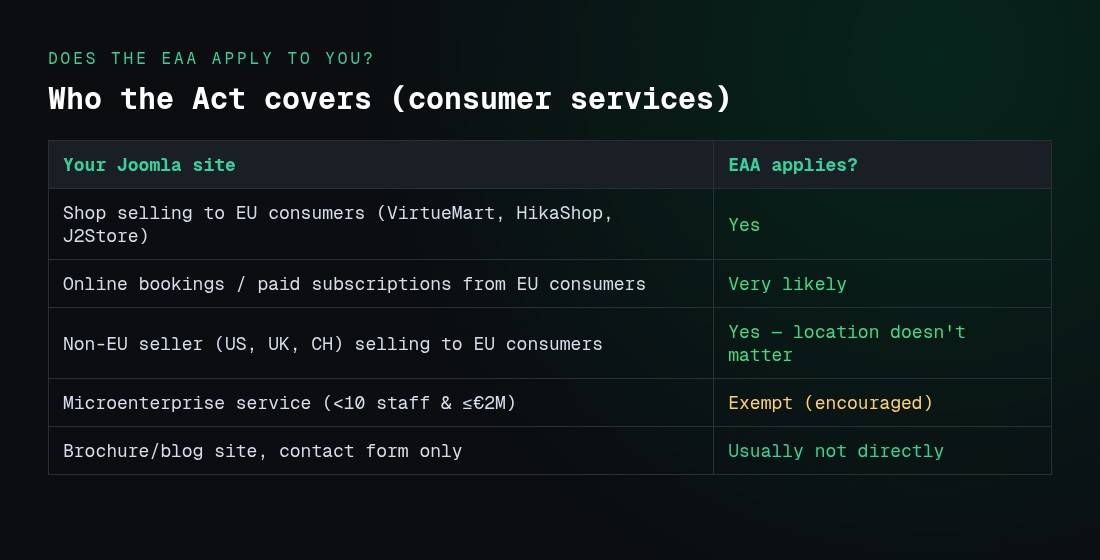
- Microenterprises providing services are exempt. That means fewer than 10 employees and an annual turnover or balance sheet total of no more than €2 million (Article 2(23) and Article 4(5)). Microenterprises dealing in products get lighter rules but aren’t exempt.
- Some content is excluded. That includes pre-recorded audio and video and office files (PDF, DOCX) published before 28 June 2025, archived content that hasn’t been edited since that date, and third-party content you don’t fund or control (Article 2(4)).
- Location doesn’t matter. A US, UK, Swiss, Australian or Canadian company that sells to consumers in the EU must comply for those EU services.
- Service providers must explain how the service meets the requirements and make that information public in an accessible format (Article 13 and Annex V). In practice, that’s an accessibility statement.
Does the EAA apply to my Joomla site? A quick test
| Your Joomla site… | EAA likely applies? |
|---|---|
| Runs a shop (VirtueMart, HikaShop, J2Commerce, etc.) selling to EU consumers | Yes (e-commerce service) |
| Takes bookings or paid subscriptions from EU consumers online | Very likely (contract concluded online) |
| Is a brochure or blog site with a contact form only | Usually not directly, but see the other laws below |
| Is a B2B portal that only sells to businesses | Usually not (the EAA covers consumers) |
| Belongs to a business with fewer than 10 staff and ≤ €2M turnover/balance sheet | Exempt for services, but still encouraged |
| Belongs to an EU public-sector body | Covered by the Web Accessibility Directive, which uses the same EN 301 549 standard |
Even when the EAA doesn’t apply, accessibility rules elsewhere often do. Examples include the UK Equality Act 2010, the US ADA, Australia’s Disability Discrimination Act and Ontario’s AODA. They all point to WCAG in one form or another, so a single WCAG 2.2 AA approach covers every market.
WCAG 2.1 or WCAG 2.2: Which Should Joomla Sites Target?
The EAA states its requirements in functional terms. A service that conforms to a harmonised standard cited in the EU Official Journal is presumed to conform (Article 15). That standard is EN 301 549:
- EN 301 549 V3.2.1 (2021) is still the legal reference today. Its web requirements match WCAG 2.1 Level AA.
- EN 301 549 V4.1.1 was adopted on 24 August 2026 and published in September 2026. It moves the baseline to WCAG 2.2 Level AA, adds an annex mapping the standard to the EAA, and adds requirements about respecting users’ accessibility preferences. It only becomes the legal reference once the Commission cites it in the Official Journal. The expected date varies by source, with late 2026 being the usual estimate.
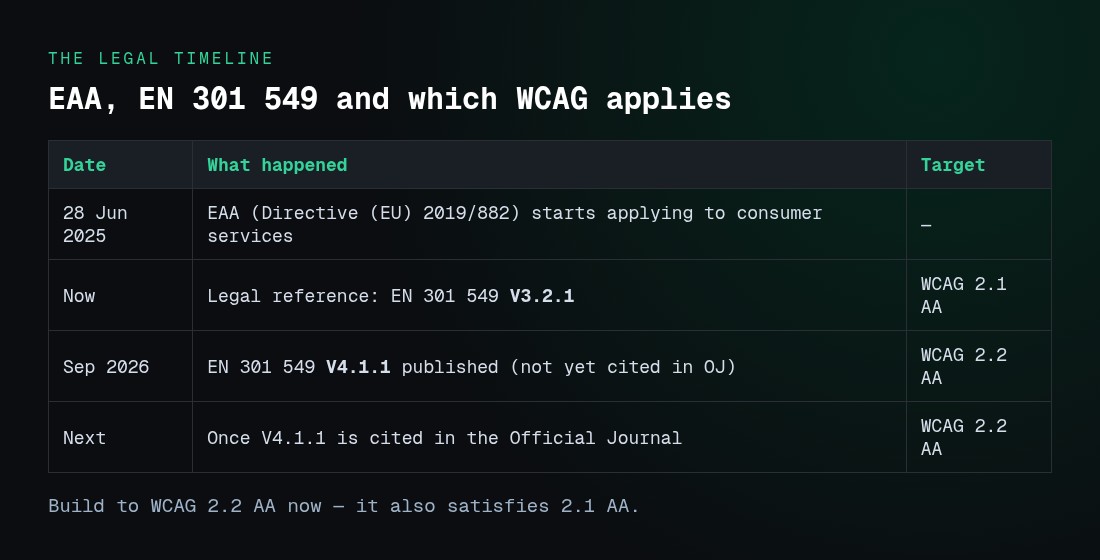
Our recommendation: build and audit against WCAG 2.2 AA now. WCAG 2.2 is backwards compatible with 2.1, so meeting 2.2 AA also meets 2.1 AA. And any redesign you start today will go live after the new standard is cited.
What WCAG 2.2 adds (Level A and AA)
According to W3C’s “What’s New in WCAG 2.2”, these are the six new A/AA success criteria. 4.1.1 Parsing has been removed.
| Criterion | Level | What it means on a Joomla site |
|---|---|---|
| 2.4.11 Focus Not Obscured (Minimum) | AA | Sticky headers, cookie banners and chat widgets mustn’t completely hide the element that has keyboard focus |
| 2.5.7 Dragging Movements | AA | Sliders, carousels, sortable lists and map pins need a non-drag alternative (buttons, arrows) |
| 2.5.8 Target Size (Minimum) | AA | Clickable targets must be at least 24×24 CSS px or well spaced. Watch social icons, pagination and tag links |
| 3.2.6 Consistent Help | A | Help options (contact link, phone, chat) appear in the same place on every page |
| 3.3.7 Redundant Entry | A | Multi-step forms and checkouts shouldn’t ask for the same information twice |
| 3.3.8 Accessible Authentication (Minimum) | AA | Login and registration can’t depend on a cognitive test. Allow paste and password managers, and offer alternatives to puzzle CAPTCHAs |
What Joomla 5 and 6 Already Give You
Joomla has taken accessibility seriously since version 4. Here’s what core gives you:
- Cassiopeia, the default site template. The Joomla documentation describes it as “an excellent general purpose accessible and responsive template”. It uses semantic HTML5 landmarks (header, nav, main, footer). The docs also warn that colours you choose must still have enough contrast.
- Atum, the administrator template. Your editors work in Atum, and it includes accessibility settings. The audit below found issues there too, which matters if staff with disabilities manage content.
- The Joomla Accessibility Checker (jooa11y). This core system plugin has been included since Joomla 4.1. After you save an article, an Accessibility Check button runs more than 50 tests: missing or weak alt text, skipped or empty headings, unclear link text, missing captions, PDF links and more. Optional checks cover contrast, form labels and readability. You’ll find it under System → Plugins → “System – Joomla Accessibility Checker”. As the Joomla manual puts it, it identifies problems but doesn’t fix them.
- Language attributes are set from the content language, and multilingual sites can mark up each language.
- Alt-text fields in core media (intro and full-text images) and a “No description” option for decorative images.
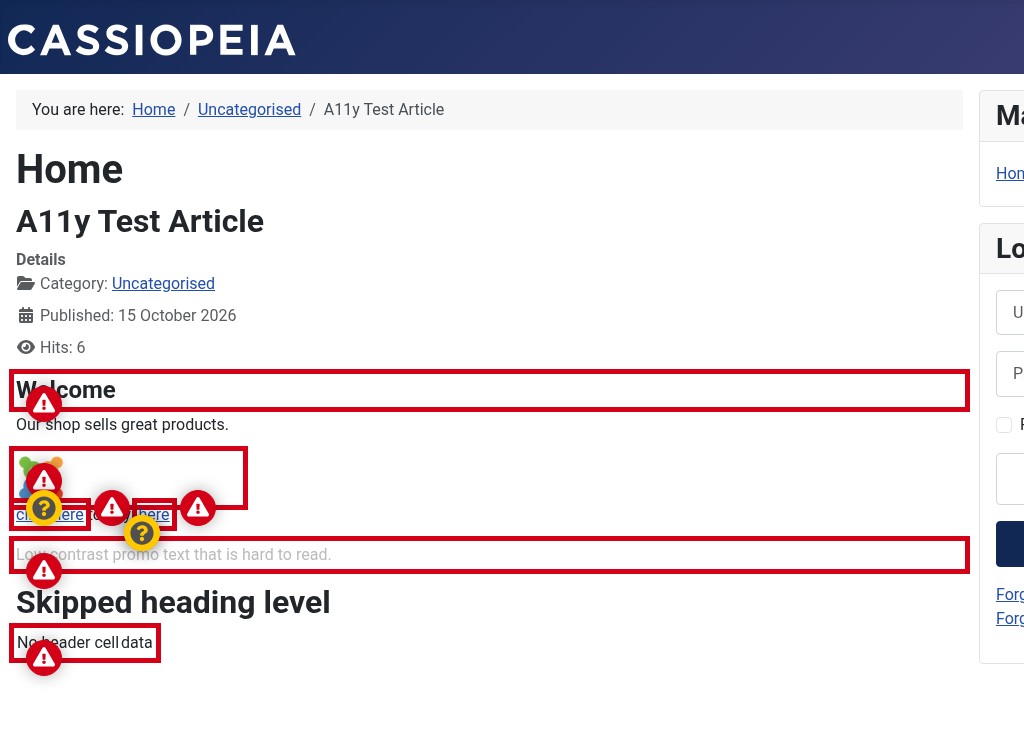
We tested the checker on a real Joomla 5.4 site. We published a deliberately broken article (an image with no alt text, “click here” links, a skipped heading level, low-contrast text and a table with no header cell) and ran the built-in checker. It immediately flagged 6 errors and 3 warnings, pinpointing each one on the page. The same checker ships in Joomla 6.2, the latest version.
We also ran axe-core against a clean default Cassiopeia page and it reported no violations — a useful reminder that an empty default install looks fine, but real sites fail on content, templates and extensions, which is exactly what the audit below and the checklist address.
Where core still falls short: the 2026 audit
In 2026 the Joomla project commissioned an independent WCAG 2.2 AA audit by Axess Lab. It covered Atum, Cassiopeia, login and MFA, the Media Manager, the installer and update process, and forms. According to the Joomla Community Magazine summary and the published report, it found 42 issues. The ones that matter for a typical public website include:
- No skip link in Cassiopeia by default. Keyboard-only users have to tab through the whole menu on every page.
- Low contrast for focus states and the current menu item (below 3:1).
- Tag links without context for screen-reader users.
- Undefined focus styles in Atum’s navigation, plus Media Manager issues with roles, states and keyboard use.
The good news is that the Joomla project is publishing this openly and working through the fixes. Until those fixes ship in a release you’re running, these gaps are yours to close.
Keep in mind that core is rarely the main problem. On most Joomla sites we audit, the failures come from third-party templates, page builders, sliders, popups, cookie banners, forms and years of content.
The Joomla Accessibility Checklist (Native Fixes First)
Work through these in order. Each item says how to fix it with what Joomla already offers.
1. Audit before you change anything
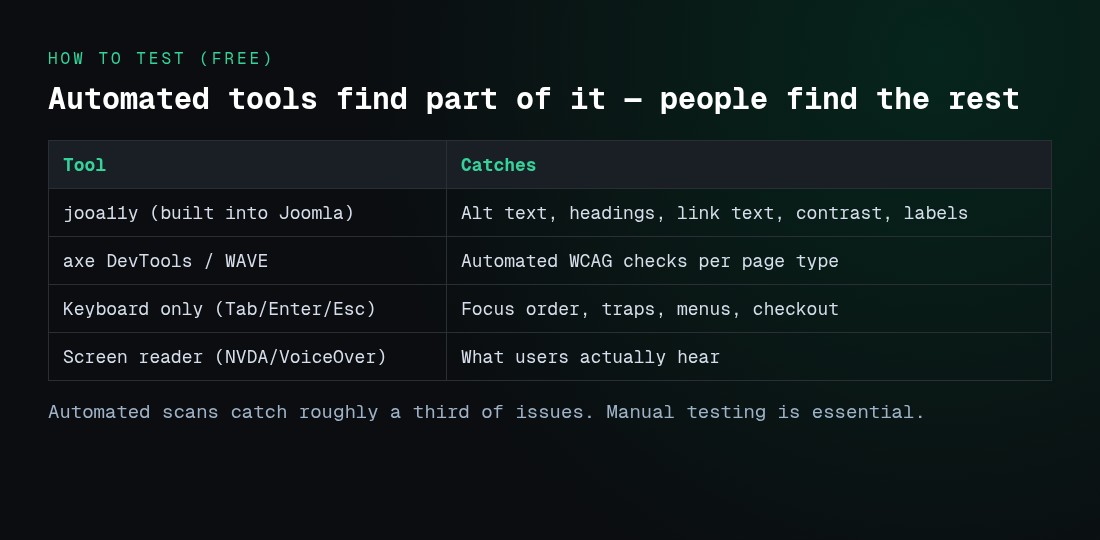
- Turn on the jooa11y plugin and check your most-visited articles.
- Run a free automated scan (for example WAVE or axe DevTools) on your home page, a category page, an article, a form page and your checkout or booking flow.
- Test by keyboard: unplug the mouse and use Tab, Shift+Tab, Enter and Escape through the menu, forms, popups and checkout.
- Do a quick screen-reader check (NVDA on Windows, VoiceOver on Mac or iOS).
- Automated tools only catch part of the issues. W3C’s Evaluating Web Accessibility overview explains why manual checks are essential.
2. Template: skip link, focus and contrast
- Add a “Skip to main content” link in a child template of Cassiopeia (or your own template), as the first focusable element and pointing to
<main id="main">. - Make focus visible. Add a clear
:focus-visibleoutline inuser.csswith at least 3:1 contrast against its background. - Check colour contrast for body text (4.5:1), large text (3:1) and UI parts such as buttons, form borders and the current menu indicator (3:1). Use the WebAIM Contrast Checker.
- Make sure sticky headers don’t cover focused elements (WCAG 2.2 2.4.11). Add
scroll-padding-topequal to the header height.
3. Images and media
- Give every meaningful image real alt text that describes its purpose, not “image of…”. Mark decorative images as decorative.
- Linked images need alt text that describes where the link goes.
- Videos need captions. Audio needs a transcript.
- Add a
titleattribute to every YouTube, Vimeo or map iframe.
4. Headings and content structure
- One H1 per page (usually the article title), then H2 and H3 in order with no skipped levels.
- Use real lists, not lines starting with dashes. Don’t use bold paragraphs as headings.
- Write link text that makes sense out of context. Avoid repeated “Read more” links pointing to different pages. Joomla’s “Read more” layout can include the article title in a template override.
- Warn users when a link opens in a new tab or points to a PDF.
5. Forms, login and checkout
- Every input needs a visible
<label>. A placeholder isn’t a label. - Error messages must say what went wrong and how to fix it, and they must be announced to screen readers.
- Mark required fields in text, not only with colour or an asterisk.
- Allow paste into password fields and don’t block password managers (WCAG 2.2 3.3.8). Offer a CAPTCHA alternative.
- In checkout, don’t ask for the same address twice. Offer “same as billing” (3.3.7).
6. Menus, sliders, popups and cookie banners
- Drop-down menus must open with the keyboard and expose
aria-expanded. - Carousels need pause controls and keyboard and button navigation, not drag-only (2.5.7). Avoid auto-rotating hero sliders.
- Popups and modals must move focus inside, keep focus there, close with Escape and return focus when closed.
- Cookie banners are a common blocker. They must be keyboard-operable, readable by screen readers and must not hide focused content.
7. Documents
- PDFs published or edited since 28 June 2025 should be accessible (tagged, with reading order and alt text), or have an HTML alternative.
8. Publish an accessibility statement
- Create a Joomla article (or menu item) called Accessibility and link it in the footer. Say which standard you target (EN 301 549 / WCAG 2.2 AA), known limitations, the date of your last review, and how users can report problems and get content in another format. The EU’s model accessibility statement for public-sector sites is a useful template, and Annex V of the EAA lists what service providers must explain.
9. Keep it compliant
- Make accessibility part of your publishing workflow. Editors should run jooa11y before they publish.
- Re-test after every template, extension or Joomla update.
- Keep a short log of what you tested, when and what you fixed. If a regulator or customer asks, it’s your evidence.
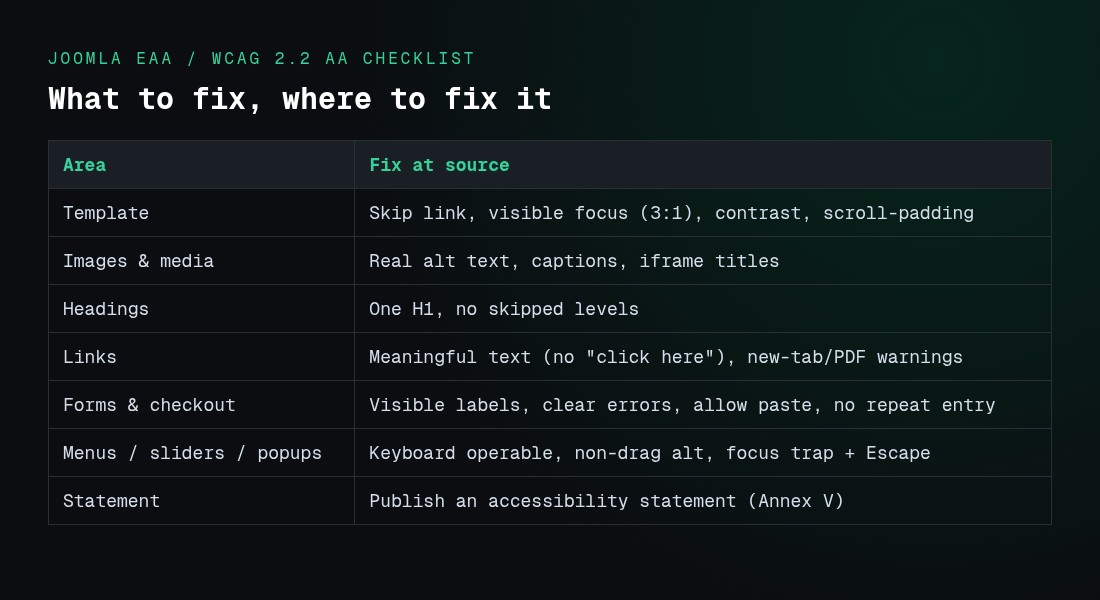
Compliance checklist at a glance
| Area | Fix at the source | WCAG hooks |
|---|---|---|
| Template | Skip link, visible focus (≥3:1), colour contrast, scroll-padding-top | 1.4.3, 2.4.1, 2.4.7, 2.4.11 |
| Images & media | Real alt text, decorative images marked, captions, transcripts, iframe titles | 1.1.1, 1.2.x |
| Headings & structure | One H1, no skipped levels, real lists, meaningful link text | 1.3.1, 2.4.4, 2.4.6 |
| Forms, login & checkout | Visible labels, clear announced errors, allow paste, no redundant entry | 3.3.1, 3.3.2, 3.3.7, 3.3.8 |
| Menus, sliders, popups, cookie banners | Keyboard operable, non-drag alternative, focus trap + Escape, don’t obscure focus | 2.1.1, 2.4.11, 2.5.7 |
| Documents | Tag PDFs or provide an HTML alternative | 1.3.1, 1.1.1 |
| Statement & process | Publish an accessibility statement; re-test after every update | EAA Annex V |
Why an Overlay Widget Alone Won’t Make You Compliant
“One-line” accessibility overlays promise instant compliance. Regulators don’t accept that claim. In January 2025 the US Federal Trade Commission ordered accessiBe to pay $1 million over claims that its AI widget could make any website WCAG-compliant. The final order bars it from making such claims without evidence.
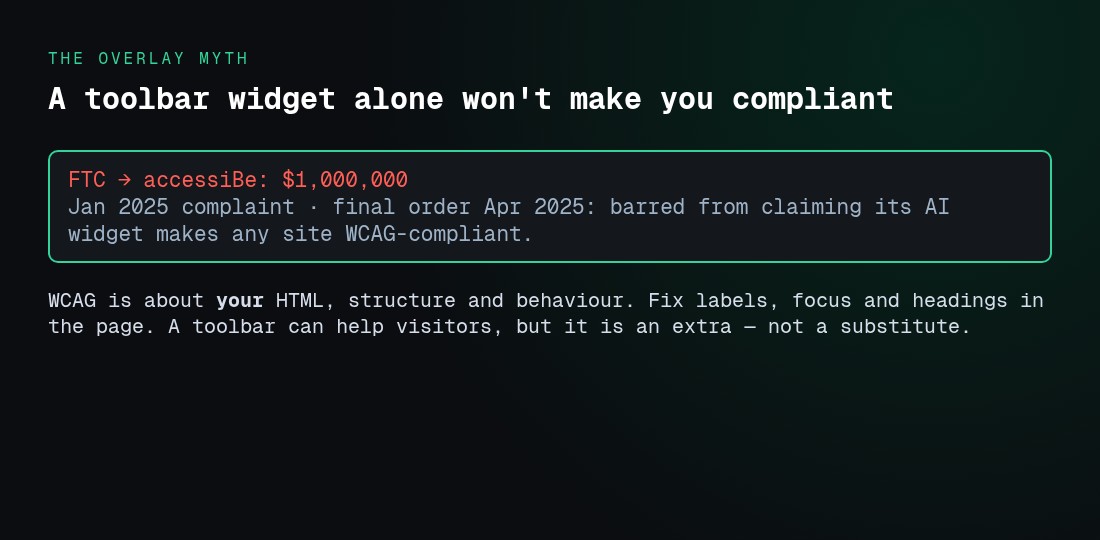
The reason is simple. WCAG is about the HTML, structure and behaviour of your site. If your form has no labels, your slider traps focus or your checkout repeats fields, a floating toolbar doesn’t change that. Fixes have to happen in the page itself.
A visitor toolbar can still help people. Text size, contrast, dyslexia-friendly fonts and read-aloud tools are genuinely useful to some visitors. Just treat it as an extra on top of a site that’s already accessible, not as a replacement for one.
Fixing What Core Can’t: A Practical Path
Template overrides and careful editing will get you a long way. But on a site with hundreds of articles, many extensions and many editors, fixing everything by hand is slow and easy to break on the next update. That’s the gap we built two tools for at JoomlaX:
- Easy WCAG fixes common accessibility gaps in the HTML Joomla sends to the browser. It adds missing
altand iframe titles, names icon-only links and buttons, sets the pagelang, labels unlabelled inputs, adds a skip link and new-window warnings. It then reports what still needs a human. Your articles in the database stay untouched, and it runs on your own server with no overlay script and no third-party CDN. It’s deliberately honest: it doesn’t claim WCAG AA certification, because no plugin can. - Easy Accessibility is a self-hosted visitor toolbar with text size, contrast, Read Mode, a dyslexia-friendly font, on-device read-aloud and more. You can sort or remove any tool. Use it alongside source-level fixes, as described above.
Both run on Joomla 4, 5 and 6.
If you’d rather have it done for you, our Joomla development team runs accessibility audits against WCAG 2.2 AA, fixes templates and overrides, cleans up content and writes your accessibility statement. We often combine this with a Joomla 6 upgrade or performance optimisation, because accessible, well-structured pages also tend to load faster and rank better.
Accessibility Rules Beyond the EU (Quick Reference)
| Market | Main rule | Technical benchmark |
|---|---|---|
| EU (DE, IT, NL, FR, PL…) | EAA (private, consumer services); Web Accessibility Directive (public sector) | EN 301 549 → WCAG 2.1 AA now, 2.2 AA next |
| United States | ADA. For state and local government, the DOJ Title II rule requires WCAG 2.1 AA (compliance dates now April 2027 and April 2028). US site owners: see our Joomla WCAG and ADA compliance guide. | WCAG 2.1 AA (Title II); WCAG is widely used in private-sector cases |
| United Kingdom | Equality Act 2010; public sector accessibility regulations | WCAG 2.2 AA is the UK government benchmark for the public sector |
| Canada | Accessible Canada Act (federal); AODA (Ontario) | WCAG 2.0 AA under AODA; EN 301 549 referenced federally |
| Australia | Disability Discrimination Act 1992 | WCAG is the accepted reference |
| Switzerland | Disability Discrimination Act (BehiG) at home; EAA applies when selling to EU consumers | eCH-0059 / WCAG |
Because nearly all of these point to WCAG, one WCAG 2.2 AA programme covers every market you sell in.
What happens if you don’t comply?
The EAA is enforced by each EU member state, so penalties are set in national law and vary by country rather than by the directive itself. Enforcement typically means a complaint to a national authority, an order to fix the service, and fines or a suspension of the service if you don’t. Germany’s transposing law (the BFSG), for example, provides for fines and, as a last resort, having a non-compliant service taken down. Because the exact amounts and procedures differ per country, treat “it’s only a small fine” as a risky assumption and check the rules in each market where you sell. Beyond regulators, inaccessible checkouts also lose real customers.
Frequently Asked Questions
Is Joomla WCAG compliant out of the box?
Not fully, and no CMS is. Joomla 5 and 6 ship an accessible default template (Cassiopeia) and a built-in checker (jooa11y). But the independent 2026 WCAG 2.2 AA audit found 42 issues across core, including a missing skip link and low-contrast focus states in Cassiopeia. Compliance also depends on your template, extensions and content. For US ADA rules and a step-by-step audit, see our Joomla WCAG and ADA compliance guide.
When did the European Accessibility Act start applying to websites?
On 28 June 2025. It covers e-commerce and other consumer services provided after that date. Some existing content is excluded, such as pre-recorded media and office files published before that date, and archived content that hasn’t changed since.
Does the EAA apply to small businesses?
Microenterprises providing services, meaning fewer than 10 employees and no more than €2 million in annual turnover or balance sheet total, are exempt from the service requirements. Small and medium-sized businesses above that threshold aren’t exempt.
Does the EAA apply to companies outside the EU?
Yes, if they provide covered services, such as online sales, to consumers in the EU. Where your company is based doesn’t matter.
Should I aim for WCAG 2.1 or WCAG 2.2?
Aim for WCAG 2.2 AA. EN 301 549 V3.2.1 (WCAG 2.1 AA) is still the legal reference, but V4.1.1, published in September 2026, moves to WCAG 2.2 AA. And meeting 2.2 AA also meets 2.1 AA.
Will an accessibility plugin or overlay make my Joomla site compliant?
Not on its own. Plugins that fix the HTML at the source and report what’s left can save a lot of time, but a person still has to test keyboard use, forms and content. Toolbar-only overlays don’t fix the underlying code, and the US FTC has fined a vendor for claiming they do.
How do I check my Joomla site’s accessibility for free?
Turn on the core “System – Joomla Accessibility Checker” plugin, run WAVE or axe on key templates, then test every page type by keyboard and with a screen reader. The automated tools find a share of the issues, and manual testing finds the rest.
Do I need an accessibility statement on my Joomla site?
Under the EAA, service providers must publicly explain how their service meets the accessibility requirements, and an accessibility statement is the standard way to do that. Public-sector sites in the EU must publish one under the Web Accessibility Directive.
Disclaimer: This article is general information about accessibility standards as of October 2026. It is not legal advice. National implementations of the EAA differ, so check your obligations with a qualified adviser in each market where you operate.