Joomla Redirect Guide: 301, com_redirect, .htaccess, and nginx
A Joomla redirect sends visitors and crawlers from an old URL to a new one with an HTTP status code (usually 301). Joomla gives you three practical layers: server rules (.htaccess, nginx, or IIS) that run before PHP, the com_redirect component that runs after a 404, and Global Configuration switches that control how Joomla builds links. Pick the layer that matches whether the old URL still returns 200 or already 404s.
Redirects are not a cosmetic tweak. They are how you keep rankings when you rename an article, retire K2, force one hostname, or move HTTP to HTTPS without splitting authority across two URLs. Google treats a proper 301 as a strong signal to consolidate to the destination: Consolidate duplicate URLs.
This guide is the full map for Joomla 4, 5, and 6. For the "I saved a 301 and nothing happened" checklist, see Joomla 301 redirects not working.
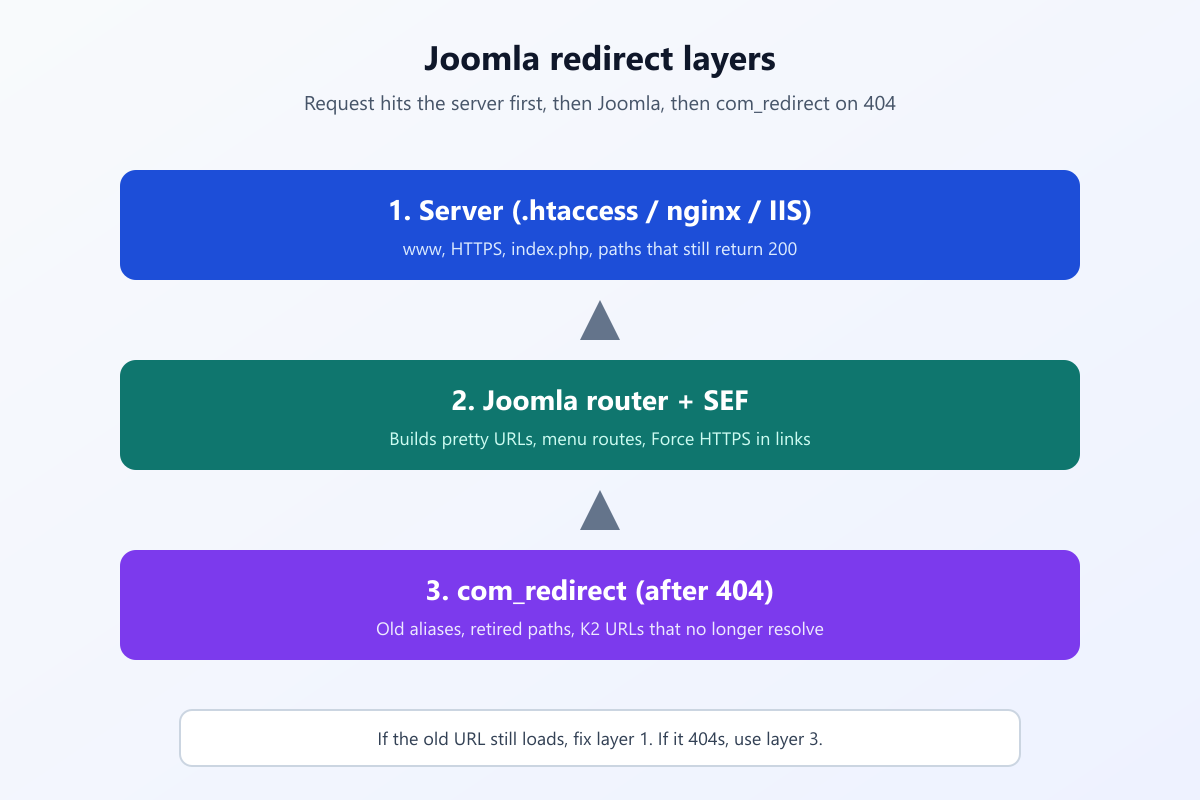
Server rules run first. com_redirect only fires when Joomla has already decided the path is a 404.
What you will learn
- What 301, 302, and 307 mean in Joomla
- When to use
.htaccess, nginx,com_redirect, or neither - How to enable System – Redirect and publish rows in System → Redirects
- Exact
.htaccessrules for www, non-www, and HTTP to HTTPS - nginx and IIS equivalents when there is no
.htaccess - How to test headers, avoid redirect chains, and protect SEO after a migration
301, 302, and what Joomla actually sends
| Code | Name | Use in Joomla |
|---|---|---|
| 301 | Moved permanently | Default for SEO migrations, retired aliases, www/HTTPS canonicalization |
| 302 | Found (temporary) | Short campaigns, A/B tests, maintenance you will reverse |
| 307 | Temporary redirect | Rare in Joomla admin; some server modules use it instead of 302 |
com_redirect defaults to 301 unless your Joomla version exposes per-row status codes under Redirects → Options. Server rules use [R=301] in Apache or return 301 in nginx.
A Menu Item Alias is not a redirect. It shows the same article at a second menu path while both URLs can still 200. Aliases are navigation. Redirects are HTTP responses. If two real menu items point at one article, you have duplicate URLs until you unpublish one or 301 the loser: Joomla duplicate URLs.
Pick the right layer
| Layer | When it runs | Use it for |
|---|---|---|
.htaccess (Apache / LiteSpeed) |
Before PHP boots | www ↔ bare host, HTTP → HTTPS, /index.php/alias → /alias, folder moves, anything that still 200s |
nginx server / location |
Before PHP | Same jobs on nginx hosts (no .htaccess) |
IIS web.config |
Before PHP | Windows hosts |
com_redirect + System – Redirect plugin |
After Joomla returns 404 | Old article aliases, retired menu paths, K2 URLs after uninstall |
| Global Configuration → Server → Force HTTPS | Link generation in Joomla | Makes Joomla emit https:// links. Pair with a server 301 for typed http:// visits |
| System – SEF | Rewrites URLs in HTML | Cleaner paths. Not a substitute for 301 when an old URL still resolves |
Official component help: Redirects: Links (Joomla 5) and Redirects: New or Edit. Stock Apache snippets live in preconfigured htaccess.
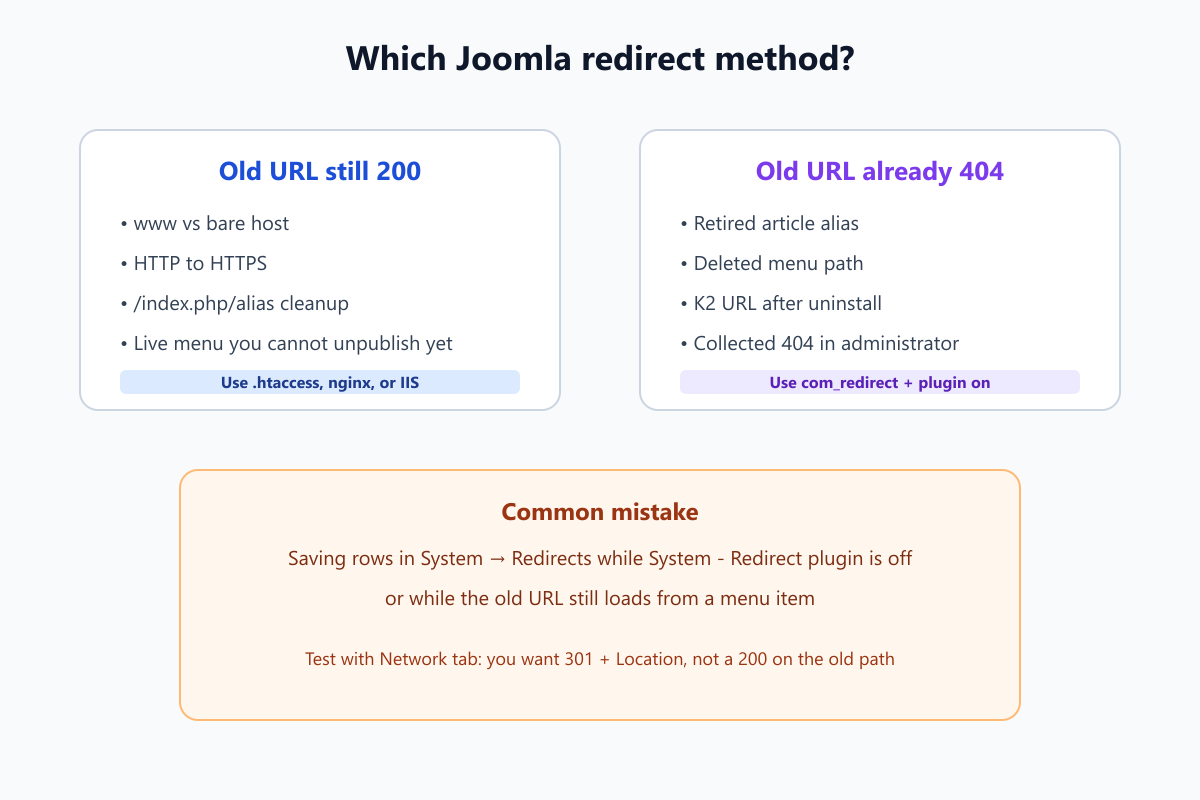
If the old URL still loads a page, com_redirect never runs. Fix that at the server or unpublish the route.
Step 1: Set up com_redirect (Joomla 4, 5, and 6)
Use the component when the expired path is already a 404 and you want to manage dozens of mappings in the administrator.
Enable the plugin (not optional)
- System → Plugins → search System – Redirect → Enable.
- On fresh installs this plugin is often disabled. Rows in System → Redirects do nothing until it is on.
Do not confuse it with System – SEF. SEF builds pretty links. It does not send 301s for dead paths.
Create a redirect row
- System → Redirects → New.
- Expired URL: the full old address as you would type it (
https://www.example.com/old-alias). - New URL: the full destination.
- Status: Enabled (published). Collected 404s stay disabled until you add a New URL and publish.
- Save.
Optional: turn on Collect URLs in the plugin so 404s appear in the list for you to map. Collection is logging, not redirecting.
Regex and bulk work
- Enable Regular expressions on a row when you need a pattern (example: all
/blog/2019/paths). Test one URL before importing hundreds. - After a K2 removal, map
/component/k2/...to newcom_contentURLs as part of Migrate K2 to Joomla articles. Do not leave public 404s while you "collect later." - Joomla expects Use URL Rewriting on and a working rewrite file, or matching is unreliable. See Joomla index.php still in URLs.
If a row is published and the old URL still shows the old page, a menu item or alias is still serving it. com_redirect cannot help until that route 404s or you move the job to .htaccess.
Step 2: Redirect www and non-www in .htaccess
Pick one canonical host (www or bare) and 301 everything else. This belongs in server config, not in com_redirect.
Joomla ships a commented block in .htaccess labeled custom redirects. Place rules after RewriteEngine On and before the Joomla core rules, or inside the documented custom section from preconfigured htaccess.
Bare → www (replace example.com):
RewriteEngine On
RewriteCond %{HTTP_HOST} ^example.com [NC]
RewriteRule ^(.*)$ https://www.example.com/$1 [L,R=301]
www → bare:
RewriteEngine On
RewriteCond %{HTTP_HOST} ^www.example.com [NC]
RewriteRule ^(.*)$ https://example.com/$1 [L,R=301]
Notes:
- Use your real domain. Escape dots in the host (
example.com). - If you also need HTTP → HTTPS, chain both conditions or use one rule that targets the final
https://host. [NC]makes the host match case-insensitive.[L]stops processing.[R=301]sends the permanent redirect.
After editing, purge CDN cache and test in a private window. The address bar should show your chosen host on the first hop.
Step 3: Force HTTPS at the server and in Joomla
Server (Apache / LiteSpeed)
Below RewriteEngine On, when SSL is working:
RewriteCond %{HTTPS} off
RewriteRule ^(.*)$ https://%{HTTP_HOST}/$1 [L,R=301]
Better: combine host canonicalization and HTTPS in one rule set so you do not create a chain (http://example.com → https://example.com → https://www.example.com).
Joomla Global Configuration
System → Global Configuration → Server → Force HTTPS: set to Entire Site once the certificate is valid. That makes Joomla generate https:// links in HTML. It does not always redirect a visitor who manually types http://. Keep the server rule for that.
Step 4: Single-path and migration redirects in .htaccess
When one old path still 200s but must point elsewhere:
Redirect 301 /old-folder/page https://www.example.com/new-alias
Or with mod_rewrite:
RewriteRule ^old-alias/?$ https://www.example.com/new-alias [L,R=301]
Use this for:
- Renamed menu aliases while the old menu item still exists
/index.php/seo-tips→/seo-tipsafter SEF is fixed- Retired microsite folders
For large content moves, pair server rules for structural changes with com_redirect rows for long-tail aliases that already 404.
Step 5: nginx and IIS when Joomla has no .htaccess
nginx (inside the server block for the site):
# bare to www + HTTPS (adjust host names)
if ($host = example.com) {
    return 301 https://www.example.com$request_uri;
}
if ($scheme = http) {
    return 301 https://$host$request_uri;
}
Official Joomla nginx notes: Nginx. You still need try_files so SEF works: details in Joomla index.php URLs.
IIS: rename web.config.txt to web.config, install URL Rewrite, and add equivalent rules. Joomla documents IIS rewriting alongside Apache in Enabling SEF URLs.
Step 6: Test headers, chains, and loops
- Browser Network tab → first document request → Status should be 301 (or 302 if intentional) with a Location header pointing at the final URL.
- Command line:
curl -I https://www.example.com/old-pathand readHTTP/1.1 301plusLocation:. - Avoid chains longer than one hop (
/a→/b→/c). Google will follow them but dilutes signals. Point/astraight to/c. - Loops (
/old→/new→/old) crash the browser. Usually acom_redirectNew URL points back at the expired path. - Clear Joomla cache and any CDN. Cached 404 HTML can hide a redirect you just published.
Canonical tags complement redirects but do not replace them when both URLs still 200: Joomla canonical URL problems.
Redirect mistakes that still waste SEO
| Mistake | Why it hurts | Fix |
|---|---|---|
| 302 instead of 301 for a permanent move | Search engines may not consolidate equity | Use 301 in server rules or Redirect options |
| Old URL still 200 | com_redirect never runs |
Unpublish menu item or use .htaccess |
| Plugin off, rows published | Looks configured | Enable System – Redirect |
| Slash / www / HTTP mismatch | Row does not match request | Add rows for each variant or force one host at server |
| Only fixing canonical, not 301 | Two indexable URLs remain | 301 losers after duplicate audit |
| Leaving K2 404s public | Crawl budget on dead paths | 301 map during K2 migration |
Key takeaways
- 301 is the default for permanent Joomla URL changes that should pass ranking signals.
- Server rules handle www, HTTPS, and paths that still return 200.
com_redirecthandles paths that already 404. - Enable System – Redirect. The component UI alone is not enough.
- Publish redirect rows. Collected 404s are a log until Enabled with a New URL.
- Match the full expired URL (scheme, host, slash) or canonicalize host at the server.
- Test with response headers, not only whether the browser lands on the right page.
- After migrations, map old aliases before you declare SEO done. Broader cleanup: Joomla on-page optimization and Joomla SEO services.
Frequently asked questions
What is a 301 redirect in Joomla?
An HTTP response that tells browsers and crawlers a URL moved permanently. Joomla can send it via com_redirect after a 404, or via .htaccess, nginx, or IIS before PHP runs.
Should I use com_redirect or .htaccess?
Use .htaccess (or nginx/IIS) for www, HTTPS, and any old URL that still loads. Use com_redirect when the old path already 404s, such as retired article aliases.
How do I redirect non-www to www in Joomla?
Add Apache rewrite rules after RewriteEngine On in .htaccess, or the nginx/IIS equivalent. Do not rely on com_redirect for hostname changes while both hosts still 200.
How do I redirect HTTP to HTTPS in Joomla?
Force HTTPS in Global Configuration → Server for link generation, and add a server 301 from http:// to https:// so manual HTTP visits redirect too.
Why is my Joomla 301 redirect not working?
Usually the System – Redirect plugin is off, the row is unpublished, or the old URL still returns 200. Full checklist: Joomla 301 redirects not working.
Does Joomla redirect preserve SEO?
A correct 301 tells search engines to consolidate signals to the new URL. Chains, 302s, and duplicate 200 URLs undermine that.
Can I bulk import redirects in Joomla?
Yes on many Joomla 4/5/6 builds via System → Redirects import (CSV). Test a few rows, then import. Regex rows need extra care.
Is a menu alias the same as a redirect?
No. An alias serves the same content at a second menu path. Both can 200. A redirect returns 301/302 and stops serving the old URL.
What about IIS servers?
Rename web.config.txt, install URL Rewrite, and add host and HTTPS rules there. com_redirect still works for 404 paths on IIS.
Where do I put custom .htaccess redirects?
Use the custom redirects section documented in Joomla's preconfigured htaccess, after RewriteEngine On, without breaking the core Joomla rewrite block.